PHP2Shell hacks servers with no login, is yours affected?
Two PHP flaws (CVSS 9.2) strike before any login check. Timeline, runtime differences, how to check your server, patches, stopgaps, and signs of past attacks.
Suppose that on the afternoon of October 21, the owner of a small online shop finds an email in the inbox from the hosting provider titled “Urgent PHP update and restart notice” (an example made up by the editorial team). The shop plugins were all updated last week, and the admin password was changed not long ago. So why is PHP being upgraded now? The questions pile up at once: is my site affected, and if it has already been hit, how would I know? This article answers them in the order the events unfolded.
The nickname is PHP2Shell, and what it names is two flaws in the PHP engine (CVE-2026-109618, CVE-2026-109619). A web request alone can be enough to run code on the server, regardless of logins or plugins, and after the disclosure there were reports of banks, online shops, and even public portals going into precautionary checks. All times in this article are UTC.
The result of php -v typed in a server terminal and the PHP that actually handles web requests can be different programs. In this article, “PHP version” always means the one used by the web side (Apache, PHP-FPM, and so on). How to check it is in the sixth section.
- Affected
- PHP 8.5.0–8.5.11, 8.4.0–8.4.26, 8.3.0–8.3.35, 8.2.0–8.2.34. Versions 8.1 and earlier are end of life, so they carry the same flaws with no official fix. If PHP handles web requests, Apache
mod_php, PHP-FPM, FrankenPHP, and LiteSpeed are all in scope. The reporting vendor Wiz says that nearly every version from the last ten years, since PHP 5.4, is affected by at least one of the two. - Attack method
- Unauthenticated remote code execution (RCE). Code runs with the privileges of the web server worker account (for example
www-data), so the configuration files and database credentials that account can read define the exposure. - Exploited?
- On October 17, four days before disclosure, Amazon threat intelligence reported attempts. From October 21, security firm watchTowr observed real exploitation of both flaws in its honeypots, and reports of public proof-of-concept code followed. Neither is yet listed in the Known Exploited Vulnerabilities (KEV) catalog run by the government cyber security agency (edition of October 23, 19:30 UTC).
- Patch
- PHP 8.5.12 · 8.4.27 · 8.3.36 · 8.2.35 or later (released October 21, 14:00). For 8.1 and earlier, the PHP project published only minimal source patches for 7.4, 8.0, and 8.1, and distribution or LTS vendors sometimes issue backports. Updating WordPress or plugins does not fix this; the fix applies only after you update PHP and restart PHP-FPM or Apache.
Signs buried in an audit, a fix that took 10 weeks, a disclosure pulled forward a day
This flaw did not appear in a single day. The first sign surfaced once in 2024 and was buried. PHP was going through its first external security audit in years (organized by OSTIF, carried out by Quarkslab), and a core developer fixing issues raised by the audit noticed oddities in out-of-memory (OOM) handling. No concrete attack path was visible at the time, and more urgent issues came first. The fixes proposed afterward came with a price, either breaking compatibility or requiring mass changes to extensions, and they stalled and restarted for months at a time. The PHP Foundation itself calls this a “structural failure.”
This year’s course of events is laid out in the timeline below. The blue dots at the top mark the coordinated disclosure phase, which ran quietly, and the red dots mark the phase where that arrangement began to wobble.
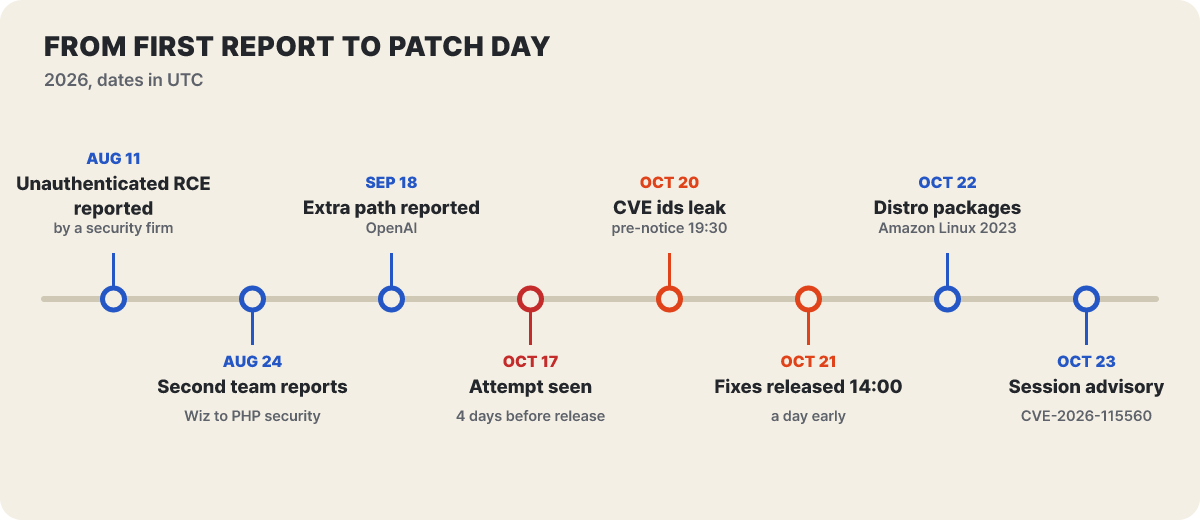 Figure 1. From the first report to the post-disclosure notices (based on public material from the PHP Foundation, Wiz, Sophos, and watchTowr, all UTC).
On July 30, security firm Calif began auditing PHP under its “Patch the Planet” program. On August 11, a Calif researcher reported a path to run code without authentication through a problem with the same root, which made the fix the top priority. Wiz found its first vulnerability on August 19, confirmed unauthenticated RCE in Drupal on the 20th and in WordPress on the 21st, and reported to the PHP security team on the 24th. On September 18, OpenAI independently reported a problem with the same root, followed by additional attack paths.
The most striking thing is the gap: about 10 weeks passed from the first report (August 11) to disclosure. The fix touched memory management and error handling, so fixing one thing broke another. Then the arrangement wobbled in the last two days. According to the Foundation, October 20 went like this. Around 15:00, the two CVE numbers leaked on forums and social media (with a wrong release time and a CVSS of 10.0 attached, and no technical details). At 19:30, PHP issued an advance notice. Around 20:00, Calif accidentally published its proof video. Around 23:00, the Foundation says, mitigation guidance given to major infrastructure operators may have leaked as well. On the 21st at 03:02, Cloudflare turned on a WAF rule, and at 07:41 the container image vendor Chainguard pushed images that already contained the fix, which moved the embargo forward by more than six hours. The fixed versions were released at 14:00 on the 21st, a day earlier than the original plan (14:00 on the 22nd).
Work continued after disclosure. On October 22, Amazon Linux 2023 packages and Elastic Beanstalk platforms appeared, and on the 23rd PHP issued a separate notice about session upload progress (the eighth section). On the 26th, Windows PHP builds were reissued as 8.5.12-1, 8.4.27-1, 8.3.36-1, and 8.2.35-1. These are rebuilds that include a fix for a separate flaw in the bundled Brotli library (CVE-2026-111497); the PHP version itself is unchanged, so if you run PHP on Windows, take these builds.
What happens before the login check: the road a request travels
Why updating the app to the latest version does not help becomes clear when you follow the road a single request takes. In the figure below, compare where the login check sits with where the flaws sit.
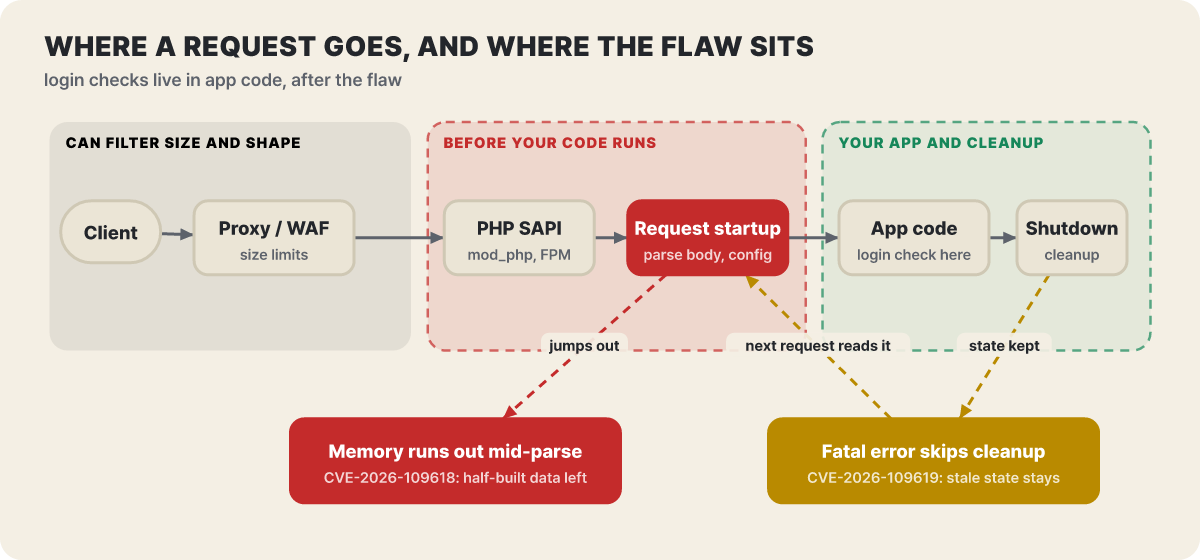 Figure 2. The road a request travels and where the flaws sit (a concept diagram). It shows not an actual attack procedure but only “where and what remains.”
The flaws arise in the red box, near request startup. This is the stage that reads the request body (POST, file uploads) and turns it into variables, applies settings, and prepares session features such as upload progress. Login screens and plugin security belong to the green box on the right, which is the app code’s job. What happens before a request reaches that box cannot be blocked by the app. The results CrowdStrike and Datadog reproduced separately were the same: no login, no session, and no vulnerable app code were needed, and a single PHP file of any kind was enough to expose the path. A static contact form or a health-check page is no exception.
The proxy and WAF in the gray box on the left are the place that can filter requests by size and shape. As we will see later, that is why limits on size and field counts are the core of the stopgap measures. Configuration files are also variables on this road. In mod_php, directives such as php_value in .htaccess or Apache config are applied before the request starts, and if a deprecated setting or a bad value raises a warning, that warning becomes a chance to touch stale state. The PHP advisory stresses that hiding warnings from the screen, changing error_reporting, or suppressing them with @ does not help.
The same failure, a different road for each runtime
Even for the same flaw, the road differs depending on how PHP is connected to the web server. The grid below is the editorial team’s four-level breakdown of how the two PHP advisories describe each case.
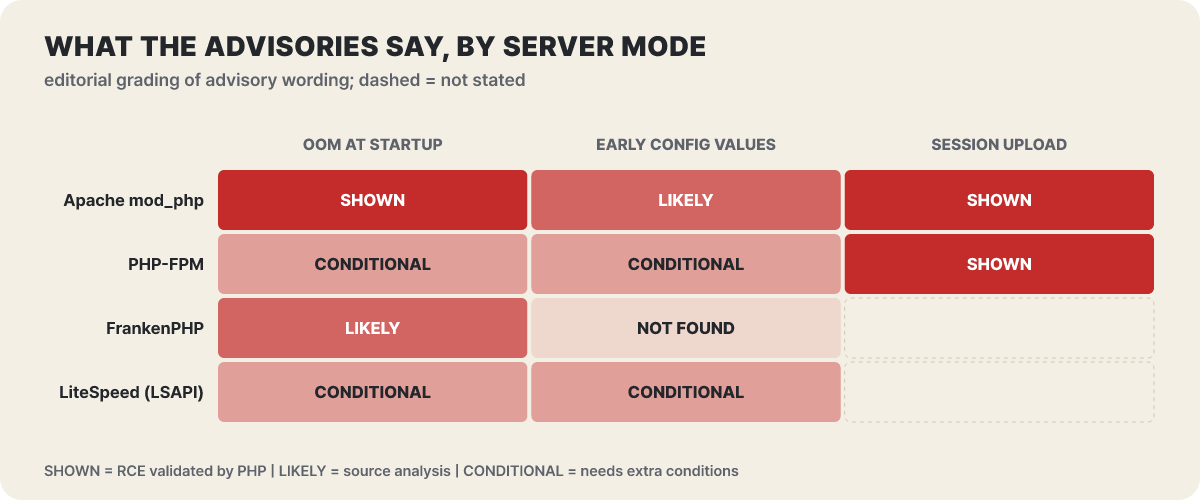 Figure 3. How far each path is reachable by runtime (editorial classification). Dotted cells are ones the advisories do not address.
The reddest cells are in mod_php. The advisory explains that mod_php calls shutdown cleanup unconditionally even when request startup fails, and says full RCE was confirmed at default limits. That is why an attack can begin before any app code runs. PHP-FPM terminates the child process when startup fails, which cuts this path, but paths where the error occurs after startup is passed remain open, and the session upload path was confirmed on FPM as well. FrankenPHP is said, based on source analysis, to call shutdown cleanup much like mod_php, and LiteSpeed has a model similar to FPM, so it is treated as conditional.
Do not read this grid as “FPM is safe.” The “NOT FOUND” in the early configuration values cell means no such path was found in the default configuration, not that the setup is immune. Being less dangerous and not needing to update are different things. Another feature common to every runtime is that workers are reused, so the traces one request leaves carry over into the next.
A structure that trusts half-finished state after an error, and what the patch changed
The two flaws share the same root: PHP treats the state left behind after an error as normal.
In CVE-2026-109618 (OOM corruption), when PHP runs short of memory, it jumps straight out of the current context using something called longjmp(). If an allocation fails while the request startup stage is reading the body, the structure being built is left half-initialized, and request shutdown cleanup reads it or branches on its values. This holds even if the failed allocation had nothing to do with that structure. What made the problem worse is that there are several ways to exhaust memory on the way there. The advisory gives examples such as an upload request that does not declare its length, a multipart part whose headers go on without end, and nested field names that double the array work. Also, a multipart request with no usable length declaration can pass the first post_max_size check and keep receiving data.
CVE-2026-109619 (stale global state) is a problem where error, session, and object state hang off the worker’s global variables, and when a fatal error causes cleanup to be skipped, they keep pointing at request memory that has already been freed. Pre-initialization behavior of the next request received by the same worker (applying settings, handling session upload progress, and so on) reads that stale state. One request leaves state and another uses it, so it works only if the two requests reach the same worker. With many workers the chance of success only drops; the condition does not go away. In 8.5, the feature that stores backtrace information in request-owned memory on fatal errors (fatal_error_backtraces) was confirmed as the most reliable path, and the session upload progress feature is on by default.
Wiz also reported one more path that is not code execution but reading process memory. If the next multipart request reads a leftover session ID pointer after OOM has destroyed the request heap, the contents of memory that has already been returned can come out in the response as the PHPSESSID cookie value. That memory can hold passwords, tokens, API keys, and certificates from other requests, so there is a route for data to leak even without reaching code execution.
Here you can also read why the CVSS score is not a perfect 10. For both flaws the attack path is the network and no privileges or user interaction are needed, but the score vector carries Attack Complexity High and Attack Requirements present, which gives 9.2 (the 10.0 that leaked just before disclosure was a wrong value). The conditions the advisory cites are that two requests must reach the same worker, and that portability varies with the PHP build, extensions, front-end server, and memory layout. Yet “hard” does not mean “impossible.” Once a framework for the hard part exists, it gets automated.
The core of the patch is that it removes the abrupt escape. In 8.5.12 and later, PHP no longer uses longjmp() on OOM. When it hits the soft limit (memory_limit), it handles it as a normal error at the next safe point, and when it hits the higher hard limit, it terminates the worker immediately (_exit()). For the stale state, the fix is a full reset: it re-initializes the request-owned global state before rewriting it and clears error and exception state at shutdown. Because the worker disappears right away when the hard limit is hit, error and worker-termination logs can look different from before right after the update. Datadog, for its part, expects that more problems of the same kind may turn up, since this fix changed how errors are handled rather than structurally eliminating this class of bug.
Reading outage notices and observation reports in four boxes
Headlines right after a disclosure tend to lump different things into one line. Risk escalates in four stages, and they are different things.
- The weakness exists. The fact that PHP versions before the fix contain the vulnerability. In this case it is confirmed, and fixed versions are out.
- Attack attempts have occurred. An observation that traffic aimed at the weakness has arrived. It is only an attempt.
- The breach succeeded. A case where code actually ran on the server.
- Data has leaked. A case where personal data or the like has actually gone out, which can be judged only from each service’s official announcement.
Most service shutdowns are precautionary measures taken at stages 1 to 2. The point is to keep the entrance closed so that fixing and checking can be done safely, so news of a shutdown does not immediately mean stage 3 or 4. If you are a user of a service, the first thing to do is go in through the official app or a bookmark and check the operator’s notice. Text messages or emails saying “this is an emergency response, enter your password now” are the phishing that grows most at times like this, so do not click the links.
An announcement of “no impact” also needs its scope checked. The AWS security bulletin says AWS services themselves are not affected, while telling customers that services where they run their own PHP need action on their side. Elastic Beanstalk needs the platform update applied, Lambda functions running on a self-built PHP runtime or container image need PHP updated and redeployed, and Lightsail cannot fix a running instance in place and requires moving to a new instance. Some EMR clusters with the Ganglia monitoring tool enabled were also affected. Security vendors are no exception: Sophos said its own products are not affected, but a license portal for end-of-life appliances was running an affected PHP version, so it took the portal down on October 21.
Observations from the attacking side measure different things depending on who made them, so they have to be read separately.
| Where observed | What was confirmed | How to read it |
|---|---|---|
| Amazon threat intelligence | Attempts reported on October 17, four days before disclosure (relayed by Sophos and Datadog) | A signal that someone was already going after it; separate from whether any damage occurred |
| watchTowr | From October 21, real exploitation of both flaws observed in its own honeypot network (updated October 22) | Attacks that reached decoy servers; counts not disclosed |
| Cloudflare | Saw attack traffic aimed at its customers and said attackers are changing payloads to evade rules | The company’s own account; counts not disclosed |
| Datadog | Identified indiscriminate scanning and said there are multiple public proof-of-concept codes, some sending more generic attack traffic. It relayed that Patchstack reported multiple exploitation cases | Shows the scale of attempts and scanning, but not the number of successful breaches |
| CrowdStrike | In its own experiments, a single request was enough for a mod_php worker to run commands, reproduced on both x86-64 and ARM and stable across worker restarts | A lab result; it did not say it observed exploitation in the wild |
| Sophos | While noting that public proof-of-concept code exists, it saw only scans and a few failed attempts in its own environment and found no evidence of a successful breach (advisory v4, October 22). It released detection signatures for firewalls and endpoints | An observation from one environment |
| Sansec | Warned that large-scale attacks would begin within 15 minutes of disclosure | A prediction, not an observation |
| Known Exploited Vulnerabilities (KEV) catalog | Neither is in the October 23, 19:30 UTC edition | Being listed is not the same thing as being exploited |
Put together, this table says neither “it blew up everywhere at once” nor “it is exaggerated.” The official advisory’s “Attack Complexity High” and CrowdStrike’s stable reproduction do not contradict each other, and neither do the attacks the honeypots saw and the successful breaches Sophos did not find. Different parties measured different things in different places. And there is something CrowdStrike and Datadog both point out: even a successful attack may leave the worker alive, the HTTP response at 200, and nothing unusual in application logs. You cannot conclude that no attack happened just because there are no traces, and installing the fixed version is a separate check from confirming there was no breach before it.
Which cell is our server: a read-only check
Start by finding out which PHP the web actually uses. Everything below only reads values.
php -v                            # PHP version of the terminal (CLI). It can differ from the PHP the web server uses
php-fpm -v                        # If you use PHP-FPM, check this version too (the name differs by distribution, such as php-fpm8.3)
apachectl -M | grep -i php        # Whether the PHP module (mod_php) is attached to Apache

# The web-side processes that are actually running (to see how it runs)
ps -eo user,pid,ppid,args | grep -E 'php-fpm|apache2|httpd|php-cgi|frankenphp|lsphp' | grep -v grep

# If you run containers, check inside the container, not on the host
docker ps --format '{{.Names}}  {{.Image}}'
docker exec <container name> php -v

# Memory and upload settings (CLI values, which can differ from the web's)
php -i | grep -E '^(memory_limit|post_max_size|upload_max_filesize|session.upload_progress.enabled|Loaded Configuration File)'
For example, on an Ubuntu VPS running PHP-FPM 8.3, the screen looks like the one below (an example output made by the editorial team). If the version on the first line is below 8.3.36, the server is not yet fixed, and if the mod_php line prints nothing, it is the PHP-FPM setup.
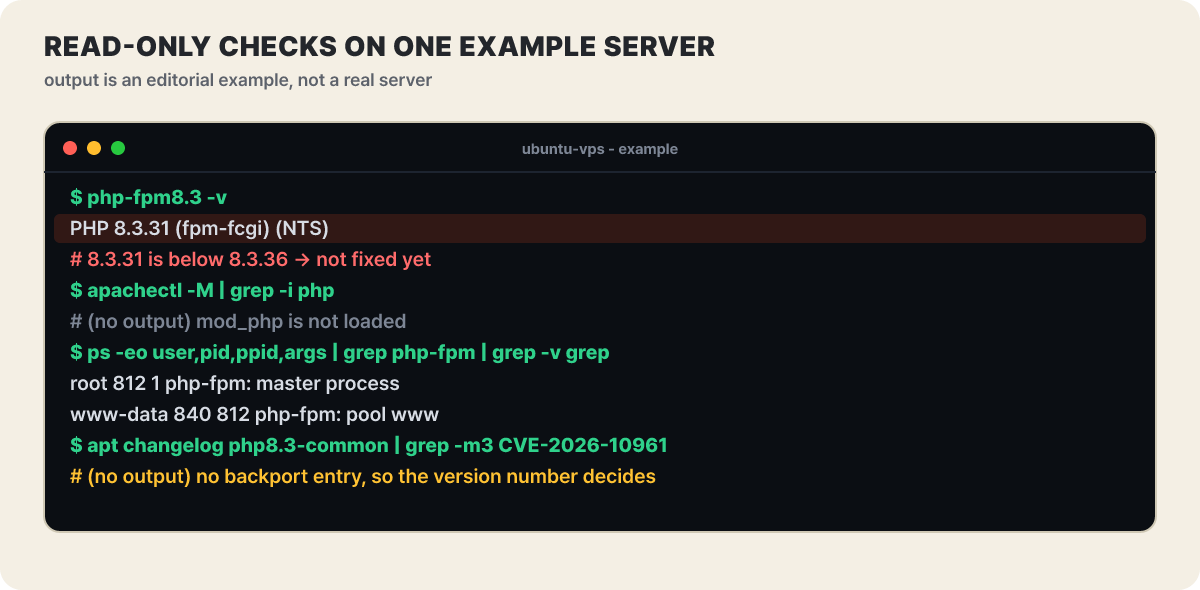 Figure 4. An example of running four commands in a row on one server (the output is an editorial example). The last line is the backport check, explained below.
Sometimes the version number stays the same but the fix is in. When a distribution vendor ports a fix back to an older version, the number does not change, so look in the changelog for these CVE numbers. Change the package name to fit your environment.
apt changelog php8.3-common 2>/dev/null | grep -m3 'CVE-2026-10961'      # Debian and Ubuntu family
rpm -q --changelog php-common | grep -m3 'CVE-2026-10961'                # Red Hat family
On WordPress, the admin screen under Tools → Site Health → Info → Server shows the PHP version and PHP SAPI. If the SAPI is fpm-fcgi, it is PHP-FPM, and if it is apache2handler, it is mod_php. For settings, the reference value is the one seen through the web, not the terminal’s CLI value, which is why Sophos also recommends verifying with an actual web request, not the CLI, after applying settings.
There is something to know when you look at setting values. In the CrowdStrike experiment, the memory exhaustion path opened when memory_limit was smaller than roughly 4 times post_max_size, and the defaults (8M, 128M) did not meet that condition. But the PHP advisory says full RCE was confirmed at the default input and memory limits too, so do not judge a server safe from the limit values alone. Values can differ per directory through .htaccess or virtual host settings, so on shared hosting a single site can be vulnerable on its own.
The view from outside is also a useful reference. In the October 20 Shodan banner count cited by security firm CybelAngel, about 2.24 million hosts identified themselves as PHP, and splitting out the roughly 1.5 million that reveal a version gives this.
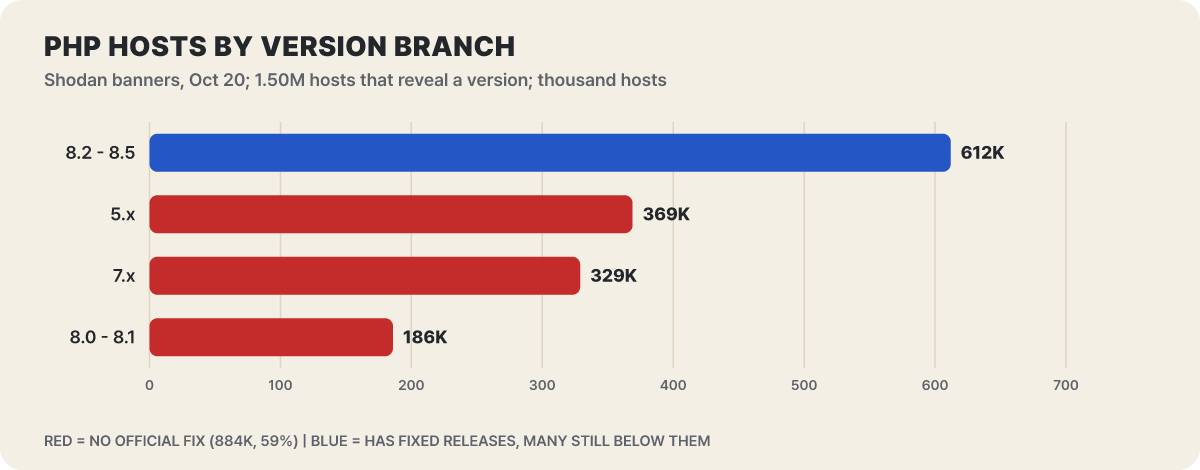 Figure 5. Hosts by version line (in thousands). The three red bars total 883,717, or 59% of the whole.
The three red lines are those for which no official fix will be issued. There are three things to keep in mind when reading this. These are hosts, not sites (shared hosting puts many sites behind one address), the roughly 740 thousand that hide their version are left out, and even within the blue 8.2–8.5 line there are hosts that have not moved to the fixed release. A host with an older number whose distribution ported the fix back may be safe.
Here is how to resolve the three situations where a verdict most often gets stuck.
- A WordPress site on rental (shared) hosting. Updating PHP is the provider’s job. Check the version in Site Health and confirm the response date and target versions in the provider’s notice. If you are unsure, just ask: “Has this been updated to a fixed version for PHP2Shell (CVE-2026-109618/109619)? Is the PHP version on my account affected?” If you pick the PHP version yourself in a control panel, check that your selection is in a fixed line.
- A VPS you run alone (Ubuntu, nginx, PHP-FPM 8.1). 8.1 is a line with no official fix. Use the changelog commands above to see whether the distribution vendor has a backport, and if not, moving to a supported version (8.3 or 8.4) is the fundamental solution. While you migrate, narrow the admin path with a VPN or an IP allowlist, and block uploads if you do not need them. Do the migration in this order: snapshot, check plugin and extension compatibility on staging, then switch over.
- A Docker service (a base image such as
php:8.x-apache). The host’sphp -vmeans nothing; the PHP inside the container is what counts. Rebuild the image on a fixed version and replace the running container. Images with-apachein the name are usually the mod_php type, which is the higher-risk side.
If you run PHP only as CLI scripts and take no web requests, or you only use a service and have no bundled PHP product, you are not directly affected (checking the operator’s notice is a separate matter).
Updating and restarting, a different touch for each environment
The order is simple, but accidents happen at step three. If you update and skip the restart, running processes keep using the old code.
- Snapshot — Take a backup or server snapshot first.
- Update — Install the fixed version or the distribution's fixed package.
- Restart — Restart PHP-FPM and Apache. If you skip this step, the old code keeps running.
- Verify on the web — Check the version and settings through the web, not the terminal.
- Functional check — See that pages, login, and the contact form behave as before.
The party responsible for updating and the road differ by environment. The AWS items were confirmed from the official security bulletin (2026-143-AWS) and the advisory numbers in the Amazon Linux Security Center.
- Rental (shared) hosting: The provider updates. Check the target version and completion time in the provider’s notice.
- Amazon Linux 2023: Fixed packages for php8.2 to 8.5 were released on October 22. The advisory numbers are ALAS2023-2026-3301 (8.2), 3302 (8.3), 3303 (8.4), and 3304 (8.5), and because repository versions are pinned, it is safest to use the command in each advisory.
- Elastic Beanstalk: New platform versions for PHP 8.2 to 8.5 are out (8.5 and 8.4 on October 21, 8.3 and 8.2 on the 22nd). If managed platform updates are turned on, they are applied automatically in the next maintenance window; otherwise raise the environment’s platform version yourself.
- Lambda · Lightsail: Lambda has no managed PHP runtime, so update PHP in your self-built runtime or container image and redeploy (if you use Bref, follow the Bref security release). On Lightsail, create a new instance from a new blueprint and move over.
- Containers and 8.1 and earlier: Rebuild the base image on a fixed version and replace it. For 8.1 and earlier, look for a backport or source patch from the distribution or LTS vendor, and fundamentally move to a supported version.
# Amazon Linux 2023 example (8.3). For 8.2 use the command from advisory 3301, for 8.4 use 3303, for 8.5 use 3304
sudo dnf update php8.3 --releasever 2023.12.20261021
sudo systemctl restart php-fpm
If you use 8.2, keep the schedule in mind too. php.net announced that PHP 8.2 reaches end of support on December 31, 2026, with no security fixes after that. This fixed release lands in the last stretch of 8.2, so while you update, it is worth making a plan to move to the next line as well. Having a list that can immediately answer which server runs which OS and PHP under whose management makes the response fastest, and it helps to put servers a provider manages for you on the same list.
Stopgaps while you cannot update, and their limits
If circumstances keep you from updating right now, you can use the temporary mitigations in the official PHP guidance. First, one thing must be made clear: the official guidance says plainly that these measures only reduce specific attack paths and do not make an installation safe.
| Target flaw | Setting | What it blocks | Limits |
|---|---|---|---|
| 109618 | memory_limit = -1 |
Removes the memory limit failure point | Set it in a way the app cannot override, such as php_admin_value, and check that no pool or directory setting brings a finite value back. A single request can use up the server’s memory, and if allocation itself fails, the path remains |
| 109618 | Lower post_max_size |
Cuts off large requests early | Use 8M if you need no uploads and 32M if you do, and keep upload_max_filesize smaller. The web server and proxy should also limit post-decoding size, the number of fields, parts, and headers, and nesting depth, including requests with no length declaration |
| 109619 | session.upload_progress.enabled = 0 |
The confirmed session upload path | Put it where it applies before request parsing, such as php.ini, an FPM pool, or server config, and restart all workers. ini_set() and .user.ini do not help, and other variants are not blocked |
| 109619 (PHP 8.5) | fatal_error_backtraces = 0 |
One confirmed fatal-error backtrace path in 8.5 | It likewise takes effect only after restarting all workers, and the other state the request holds is untouched |
The official guidance also lists methods you should not use. Blocking memory with process-level RLIMIT_AS or RLIMIT_DATA actually triggers the allocation failures the flaw relies on, so it says not to use them. Container and cgroup memory limits can be used as an availability boundary, but if the whole container dies, the master and all workers can die together, so they are safe only when each worker has its own group. If performance allows, reducing worker reuse with pm.max_requests=1 is another option.
A WAF is a supporting defense on the same layer as the configuration mitigations in this table. Cloudflare turned on the related rules from 03:02 UTC on October 21 and enabled them by default on every plan that has a WAF (including free), and paying customers need to check that the ruleset is in block mode. It says it introduced detection for the first time that looks at responses as well, since requests alone make it hard to tell attacks from normal traffic. The AWS WAF managed rule group for PHP is also being updated to block both CVEs, and the default version is protected automatically. But both companies say updating PHP is the fundamental fix, and Cloudflare says attackers are changing payloads. If the origin server can be reached directly, bypassing the WAF, the rules do nothing, so close that road as well.
If you cannot update now, narrowing access is the surest stopgap. Move the admin screen and upload paths behind a VPN or an IP allowlist, and block upload and multipart requests at the web server for services that do not need them. Cutting down the road by which requests reach PHP shrinks more paths at once than changing one or two settings.
The separate notice PHP issued on October 23 belongs in this context. It asks you to keep session.upload_progress.enabled=0 until the next regular bug-fix release, to block another RCE path (CVE-2026-115560) that holds only under an unusual combination of settings. The condition is that the app sets session.serialize_handler to php_binary or php_serialize in configuration, switches it to php at runtime with ini_set(), and calls session_start() while upload progress is on. If you do not use the upload progress display, leaving it off causes almost no inconvenience.
Checking traces to see whether it already happened before the update
An update only blocks what comes next; it does not undo what has already happened. Attempts began on October 17, before disclosure, and PHP received the first report on August 11, so Sophos recommends looking at activity since August 1. Traces are not collected in one place, so you have to overlay several.
| Where to look | Signs to suspect | Notes |
|---|---|---|
| PHP and web server error logs | Lines with the message “Allowed memory size of … exhausted” followed by “in Unknown on line 0” | A sign that it failed at the startup stage before any PHP file ran. 2 to 4 entries can cluster briefly from one worker |
| Web server error log | “exit signal Segmentation fault (11)” | A trace of an attempt whose guess failed. Things may go quiet after this |
| WAF and proxy logs | Multipart POSTs containing PHPSESSID or PHP_SESSION_UPLOAD_PROGRESS fields, hundreds of parts, deeply nested field names | Ordinary access logs do not contain the request body, so this usually shows up only in WAF or proxy logs |
| Response headers | A PHPSESSID cookie whose value is unusually long or mixed with encoded or binary data | A sign of a memory exposure attempt (Wiz, Datadog) |
| Processes | A web worker (apache2 or php-fpm account) starting sh or bash and connecting outward | The most direct evidence. Do not trust command names alone |
| Files and accounts | New PHP files or modified PHP in the web root, a new admin account, unexpected cron jobs, external connections you have not seen before | Check against the work you did (watchTowr names the same items) |
A single memory exhaustion message cannot establish that an attack happened. Normal work also sometimes uses up memory, so read it together with abnormally large POSTs, worker terminations, and upstream connection drops. You can start with read-only commands, and change the paths and account names to fit your environment.
# Traces of startup-stage memory exhaustion (log paths depend on your environment)
sudo grep -rh "Allowed memory size" /var/log/apache2 /var/log/nginx /var/log/php* 2>/dev/null | grep "Unknown on line 0" | tail -20

# Whether the web server account has started a shell right now (change the account name to fit; only what is running now shows)
ps -eo user,pid,ppid,args | awk '$1=="www-data" && $4 ~ /(^|\/)(sh|bash|dash)$/'

# PHP files changed since August 1, and PHP inside the WordPress uploads folder (normally there should be none)
find /var/www -type f -name '*.php' -newermt 2026-08-01 -ls
find /var/www/html/wp-content/uploads -type f -name '*.php' -ls
A result does not immediately mean a breach. Some files change because of updates or deployments, so look for entries that do not match the work you did. Conversely, finding nothing is no proof of safety. The official PHP advisory also warns that clean logs do not mean safe. Past logs may not have recorded the needed level of detail, PHP can fail before it writes a message, and the check sees only the paths that were actually taken. If something looks suspicious, the order is this.
- Isolate — Separate the server from the outside and take a snapshot. Do not wipe or roll back the server right away; preserve the evidence (logs, files).
- Rotate credentials — Change every database password, API key, and secret in configuration files that the web server account could read. Execution privilege is that account's read privilege, so secrets in configuration files are exposed first.
- Consult — Talk to the hosting provider's security contact or a specialist firm, and if there is user data, check your reporting and notification obligations.
One more thing. Do not download and run files circulating as a “PoC (proof of concept).” No PoC is needed for this response. Planting malware with a hot vulnerability as bait is a common trick, and running code of unverifiable origin on your server or PC makes it a path for a breach instead.
10 weeks to disclosure, hours to exploit code
This incident’s timeline holds three different clocks. The code is old. According to CrowdStrike’s analysis, the hash table ordering change related to CVE-2026-109618 came from an October 2017 optimization and has been in since PHP 7.3.0 (December 2018), while the serialization path for CVE-2026-109619 has existed since PHP 7.1 and the session path since PHP 5.4. That means the exposure window exceeds seven years. It went unexploited all that time because shaping the memory layout into the desired form meant chaining several flaws together and testing against each target, which was considered impractical.
Wiz explains that frontier AI models have greatly lowered this barrier. It used Gemini 4 Argon and GPT-5.6 Sol together with its own tool, Wiz Atlas, for discovery, exploit development, per-environment tuning, and patch verification, and says it produced exploit code that works across several applications within hours. The wording has to be read carefully. It is more accurate to say researchers used AI as a tool than that AI found the flaws on its own, and this time Calif, Wiz, and OpenAI reached the same root at different times.
The second clock is the speed of people. By the Foundation’s numbers, since July 1 this year the PHP security team has issued 15 CVEs, while more than 100 reports were filtered out as invalid, duplicate, or not reproducible. Earlier this year Alpha-Omega swept PHP with Anthropic’s Claude Mythos, but the Foundation says people make all the judgments and patches. AI has made reports surge, but people still judge and fix each one, so the bottleneck in this incident was not discovery but judging, fixing, and shipping. The Foundation created an Ecosystem Security Team in May and said it will change the security team’s decision method from consensus to majority vote.
The third is the server operator’s clock. Because comparing patches to build attacks speeds up the moment a fixed version is released, Sansec warned that large-scale attacks would begin within 15 minutes. The secret kept through 10 weeks from first report to disclosure leaked in the last two days, and attacks began four days before disclosure. In the end, the defending side can shorten only one stretch: the interval from the time the fix came out to the time my server is updated and restarted, and whether that interval is hours or weeks depends on how fast I can answer where my server runs, in what way, and who is in charge of it.