GitLab's perfect-score bug returned in 9 days, patch again
A perfect-score flaw lets anyone run code on self-managed GitLab without a login, 9 days after the last. Servers patched on Oct 12 must upgrade again.
When a vulnerability notice arrives, the usual routine is to upgrade to the fixed version and close out that CVE number. With GitLab this time, that routine broke down after nine days. On Oct 12, a perfect-score flaw that lets anyone run code on the server without logging in (CVE-2026-97229) was fixed. Then on Oct 21, just as servers upgraded to 19.4.2, 19.3.5 and 19.2.8 were settling into a sense of safety, another perfect-score flaw in the same regex engine (CVE-2026-110264, CVSS 10.0) was fixed. The Oct 12 release does not block this new flaw, so if you run your own GitLab CE or EE, the target is a version from Oct 21 or later, whether or not you upgraded on the 12th. The scope is also far wider than the Oct 12 flaw (19.2 and later): every version since 7.0 is affected, and there is no official workaround. GitLab.com and GitLab Dedicated have already been fixed by GitLab, so there is nothing for you to do there. All dates and times in this article are in UTC, and the content reflects what was confirmed as of Oct 27.
Sep 23 to Oct 23: four releases
Four notices came out within a single month. In the figure below, look at the gaps between the dots (19 days, 9 days, 2 days) and the two red dots. The red dots are the perfect-score flaws that work without logging in.
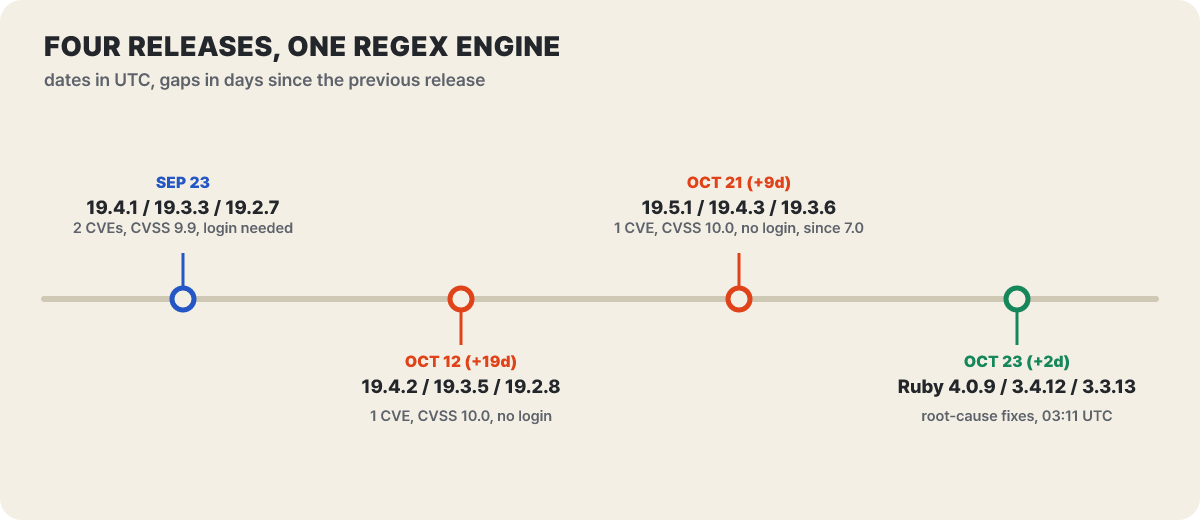 Figure 1. Four releases that dealt with the same regex engine (dates in UTC). Each gap is the number of days since the previous release
Two flaws came out together on Sep 23, one each followed on the 12th and the 21st, and on the 23rd it was Ruby, not GitLab, that fixed the underlying bugs. All four were reported by the researcher joaxcar through the HackerOne bug bounty, and The Hacker News described the Oct 21 flaw as the fourth code execution flaw the same researcher had reported within a month. Matching them up line by line also shows why the scores differ.
| Notice date | CVE | Flaw type | CVSS | Login | First Ruby release with the fix (4.0 / 3.4 / 3.3) |
|---|---|---|---|---|---|
| Sep 23 | CVE-2026-89078 | Double free in the parser | 9.9 | Required | 4.0.0 / 3.4.12 / 3.3.13 |
| Sep 23 | CVE-2026-93577 | Size-calculation overflow in the compiler | 9.9 | Required | 4.0.8 / 3.4.12 / 3.3.13 |
| Oct 12 | CVE-2026-97229 | Size-calculation overflow in the CI/CD compiler (same cause as 93577) | 10.0 | Not required | 4.0.8 / 3.4.12 / 3.3.13 |
| Oct 21 | CVE-2026-110264 | Internal ID overflow on patterns with many repetitions | 10.0 | Not required | 4.0.9 / 3.4.12 / 3.3.13 |
The two Sep 23 flaws score 9.9 because an attack needs a low-privilege account; the Oct 12 and Oct 21 flaws need no account, so they score 10.0. The most striking change in this table is that, after the two September flaws, the barrier dropped to the point where no account is needed.
Three different holes in the same engine
GitLab compiles the regular expressions found in places such as CI/CD configuration files with Onigmo, the regex engine bundled with Ruby. A regular expression is a short pattern describing what shape a string should have, and compiling means expanding that pattern into a list of instructions the engine can run. A pattern with large repetition counts grows multiplicatively when expanded, and if that size is calculated with a signed 32-bit integer (maximum about 2.1 billion), exceeding the limit makes the value wrap around into a small number or a negative one. The size check passes it as “small”, but the actually expanded program is far larger, so memory gets written past the expected boundary. This is an integer overflow (CWE-190), and code execution becomes possible on top of the resulting memory corruption.
Ruby’s Oct 23 notice splits the four flaws into three distinct fixes.
- Ruby fix #13332: memory being freed twice when parsing fails. CVE-2026-89078 falls here.
- Ruby fix #19020: an overflow in the calculation that estimates the size of a compiled pattern by multiplication. CVE-2026-93577 and CVE-2026-97229, two numbers, share this cause.
- Ruby fix #16801: a separate bug in which the engine’s internal identifiers overflow on patterns with many repetitions. This is CVE-2026-110264.
So this is not a case of “the same flaw went unfixed and came back.” Different calculations overflowed independently in the same area. The Oct 12 fix replaced the multiplication in the size calculation with a division-based check so that it cannot overflow, and capped the compiled program at about 512 MiB (per Rapid7’s analysis); the repetition ID calculation behind the Oct 21 flaw lay outside that fix. There were two doors, and only one had been shut.
How a request gets past the checks and reaches the compiler
Why, then, did GitLab’s defenses fail to filter out this input? The figure below lays out the layers of checks an input passes through inside GitLab next to the Ruby engine beneath them, and marks in green where the fixes go in.
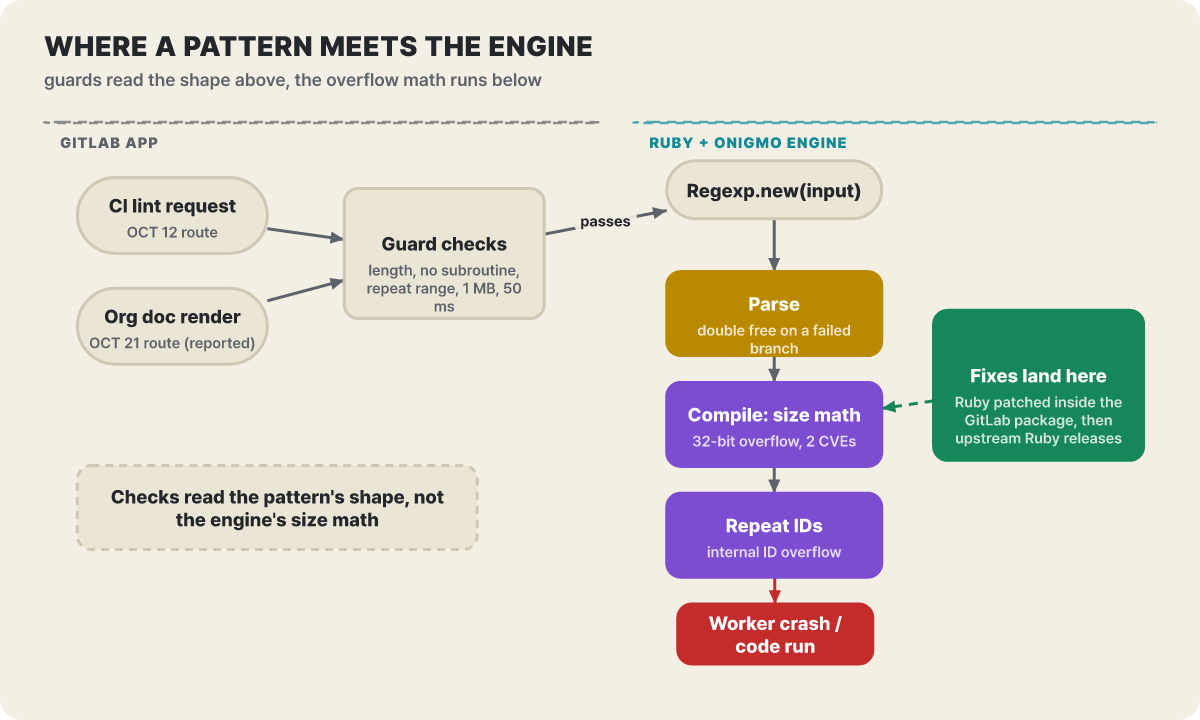 Figure 2. The check layers are on top and the overflowing calculations are below. The fixes go into the engine (conceptual diagram)
Based on the Oct 12 flaw as Rapid7 analyzed it, GitLab places several layers of checks before handing a regex to the engine: a source length limit, a ban on subroutine calls, a range limit on repetition counts, a compiled-size limit of about 1 MB, and a 50 ms timeout on match checks. These checks read the shape of the pattern. Ruby, on the other hand, recompiles the pattern when the path string is multibyte (UTF-8), and that recompilation happens in a stretch that gets neither the size check nor the 50 ms timeout. When the engine’s calculation overflows beneath checks that only read the shape, the layers above see nothing.
The fix reaches the engine in two layers as well. GitLab released with its own patches applied directly to the Ruby bundled in its packages (Omnibus) and container images (CNG): the Oct 12 release added the patches for the size calculation and the double free in the repetition range, and the Oct 21 release added the patch for the repetition ID overflow. Two days later, Ruby itself shipped the same fixes in official releases. Upgrading a Ruby installed separately on the system has no bearing on the defense of a GitLab server; you need to upgrade GitLab itself to a fixed version.
How far each server is covered across the four flaws
Now it is time to see which cell your server sits in. The figure below shows, cell by cell and in color, which of the four CVEs each of four installed versions in the 19.4 series blocks. Green is closed and red is open.
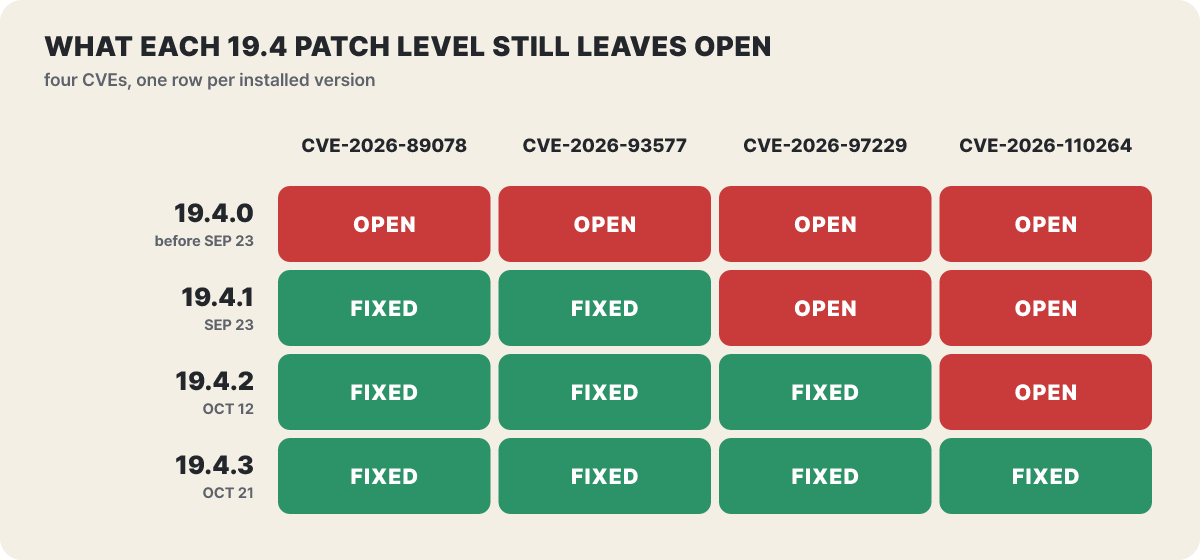 Figure 3. Status by version in the 19.4 series. The 19.3 series (19.3.3 → 19.3.5 → 19.3.6) and the 19.2 series (19.2.7 → 19.2.8 → 19.2.9) fill in one cell at a time in the same pattern
Only the bottom row is green through the fourth column. 19.4.2, the Oct 12 fix, has three green cells and looks “almost fully covered,” but the one remaining cell is the flaw with the widest scope (7.0 and later). The first three flaws affected only 19.2 and later, so servers on 19.1 or below came within range for the first time with the Oct 21 flaw. For them, the phrase “but I already upgraded once” does not apply; they can simply upgrade straight to the Oct 21 release.
The Oct 12 door and the Oct 21 door: what stayed the same and what changed
Putting the second and third perfect-score flaws side by side, item by item, separates what changed from what stayed the same.
| Item | Oct 12 flaw (CVE-2026-97229) | Oct 21 flaw (CVE-2026-110264) |
|---|---|---|
| Affected versions | 19.2 and later (before 19.4.2, 19.3.5 and 19.2.8) | All versions since 7.0, including the Oct 12 fixed releases |
| Cause | Overflow in the compiled-pattern size calculation | Overflow of the internal ID on patterns with many repetitions |
| Entry point | A regex planted in a repository’s CI/CD configuration (as demonstrated by Rapid7) | GitLab’s notice says only “a crafted regex, under specific conditions.” One of the detection rule names refers to an Org document rendering error |
| Login | Not required | Not required |
| Workaround | None. Access restrictions only block the demonstrated path | No official workaround |
| Detection rules | 6 | 2 |
| CVSS | 10.0 | 10.0 |
What changed is the cause (a different calculation), the affected versions (from 19.2 and later to everything since 7.0) and the entry point. What stayed the same is that no login is needed and that the score is 10.0. The preconditions for the Oct 12 flaw were write access to plant a malicious CI configuration and a public project, and Rapid7 pointed out that on a server where sign-up and project creation are open, those preconditions disappear.
- Affected
- Self-managed GitLab CE/EE, all versions since 7.0 (below the fixed versions). GitLab.com and Dedicated are already patched
- Attack method
- Network access without authentication; a crafted regex is compiled, giving arbitrary code execution on the server (web worker, git account privileges)
- Score breakdown
- Network access · low complexity · no privileges required · no user interaction · scope changed, high confidentiality, integrity and availability impact
- Workaround
- No official workaround. Upgrading to a fixed version is the only fix
- Upgrade to the Oct 21 releases (19.5.1, 19.4.3, 19.3.6, 19.2.9, 19.1.9, 19.0.10, 18.11.13)
- Narrow the visibility of public projects until patched
- Apply the 2 detection rules published by GitLab
For the Oct 12 flaw, Rapid7 directly confirmed that the same input works on 19.4.1 and fails on 19.4.2, and even built a demonstration in which commands run with git account privileges in the official GitLab CE image. That means the Oct 12 patch really did close the door it was responsible for. It was not ineffective; a side door had been left open.
The situation outside, three days after disclosure
Several things changed after the 21st. The CVE record was published on the 22nd (CVSS 10.0, CWE-190), and from the same day, demonstration repositories targeting this flaw began to appear on GitHub. One of them states in its README that it only showed a crash from memory corruption and did not get as far as code execution; even with RCE in a repository’s title, some contents stop at the crash level, so it is best not to judge by the title alone. Konfirmity’s Oct 25 update summarizes that there are no reports of attacks and that the flaw is not on the Known Exploited Vulnerabilities (KEV) list.
On the entry point, GitLab’s notice said only “specific conditions,” and what the detection rule name “Org mode render error burst” and outside write-ups point to is the stage that renders Org documents (.org). According to those write-ups, a Ruby gem that builds regular expressions from strings in the document is called during rendering, which makes the documents of public projects, viewable without logging in, a reachable input. This article is not a guide to reproducing the attack, so it goes no further than this. GitLab plans to disclose the issue details around Jan 19, 2027, 90 days after the patch. Once the details are out, building exploit code gets easier, so it is right to upgrade before then.
With demonstration code circulating, the priorities change. Upgrade the servers that are open to the internet and can host public projects first; internal-network-only servers can wait for the next maintenance window.
Six steps for upgrade day
Condensed for this case, the flow that the official upgrade documentation recommends looks like this. Checking the version is read-only; only the install commands change the server.
- Make a full backup including configuration and secrets files, or take a server snapshot. Even if a package install automatically backs up the database, do not treat that as a full backup.
- Confirm that background migrations have finished. Do not upgrade to the next version while they are still running.
- The official documentation recommends turning on maintenance mode and pausing CI/CD pipelines and jobs for a while.
- Install by specifying a fixed version from the same series (commands below).
- Bring GitLab Runner to the same version as the GitLab you upgraded to.
- Turn maintenance mode off, reopen pipelines, and verify with the health check command.
# Check the current version (read-only)
sudo gitlab-rake gitlab:env:info | grep -i "GitLab information" -A3

# Ubuntu/Debian example: for the 19.4 series, specify 19.4.3 (for EE: gitlab-ee=19.4.3-ee.0)
sudo apt update && sudo apt install gitlab-ce=19.4.3-ce.0

# RHEL-family example (9; for EE: gitlab-ee-19.4.3-ee.0.el9)
sudo dnf install gitlab-ce-19.4.3-ce.0.el9

# Health check after upgrading
sudo gitlab-rake gitlab:check
If you have an admin token, you can also read the version through the API. The version in the response comes out in a form like 19.4.2-ee (example).
curl --header "PRIVATE-TOKEN: <token>" "https://gitlab.example.com/api/v4/version"19.4.3 and 19.3.6 contain DB migrations, and 19.4.3 also has post-deployment migrations. A server with only one node stops serving until the migrations finish, so announce the maintenance first and do it at a time when few users are around. If you run multiple nodes, you can use the zero-downtime upgrade procedure, but only for Linux package multi-node setups, in the order Consul, PostgreSQL, PgBouncer, Redis, Gitaly, Praefect, and then Rails and Sidekiq, working from the back. Upgrade one minor release at a time, and run the post-deployment migrations on the designated node. Components not set up for high availability must be upgraded within a maintenance window, and the official documentation’s test results say a database under 10 GB takes about an hour. That time varies with the environment, so treat it as a rough estimate only.
Reducing exposure until you have the fixed version
If the upgrade will take a few days, narrowing the paths an attack can come in through comes first. These are not official workarounds; they are measures to buy time. Layer four of them, from the outside in.
- Restrict access addresses: if the server is directly exposed to the internet, narrow it to the internal network or a VPN. Unfamiliar connections simply decrease.
- Restrict sign-ups: in the admin area’s General settings, open New user account restrictions and turn off new account sign-ups or require admin approval.
- Narrow visibility: under Visibility and access controls, restrict Public in Restricted visibility levels. Projects that are already public must each be changed to private or internal.
- Detection: add the rules GitLab published, “Onigmo native worker crash” and “Org mode render error burst”, to your log monitoring.
The visibility restriction needs some care. Restricting Public means that only admins can create public groups, projects and snippets, but the restriction does not apply to projects under personal namespaces and does not retroactively apply to projects that are already public. The level set as the default project visibility cannot be put on the restricted list. For untrusted users, narrow the permission to create projects under Default minimum role required to create projects to No one or Administrators. Rapid7 noted for the Oct 12 flaw that such restrictions only block the demonstrated path and do not fix the compiler itself, so use temporary measures only until upgrade day.
Traces of attempts to look for in logs
Before patching, you can gauge from logs whether an attempt took place. Rapid7 listed four signs for the Oct 12 flaw: a long-running CI lint request ending in a 502 with a backend connection EOF in the Workhorse log; the web server (Puma) worker dying or restarting at the same time (more suspicious if a regex matcher shows up in the stack trace); worker memory growing by about 2 GiB; and unexpected shell child processes. All of the following are read-only searches.
# Lines where Workhorse logged a backend connection drop (EOF)
sudo grep -i "eof" /var/log/gitlab/gitlab-workhorse/current | tail -n 20

# Lines where Puma left a regex-related stack
sudo grep -i "regexp" /var/log/gitlab/puma/puma_stderr.log | tail -n 20

# Number of requests that ended in 502 in the Rails request log
sudo grep -c '"status":502' /var/log/gitlab/gitlab-rails/production_json.log
GitLab has also published detection rules for self-managed installations. There are 6 for the Oct 12 flaw (Onigmo native worker crash, Graphql cilint hostile regexp, ci regexp oversized non ascii path, ci regexp guard rejection, ci lint workhorse worker crash, ci lint scripted client error burst) and 2 for the Oct 21 flaw (Onigmo native worker crash, Org mode render error burst), and the notice gives no description of their logic. Because the rules are based on the demonstrated paths, the absence of traces does not mean you are safe. It is closed only once the patch is applied.
If you suspect the server was breached before patching, the post-compromise signs compiled by SOC Prime are also worth checking: shell or script processes running under the GitLab service account, new SSH keys or admin accounts, changes to scheduled jobs, changes to runner, deploy and access tokens, unexpected modifications to repositories or pipelines, and unfamiliar outbound connections from the server. If even one matches, isolate the server, preserve evidence, and then rotate tokens and credentials.
The other 11 fixes in the same release
The Oct 21 release fixes 12 flaws in all. Besides the 1 critical, there are 2 High, 5 Medium and 4 Low. The figure below lines up the CVSS of the 12, and at a glance you can see how far the single 10.0 stands from the rest.
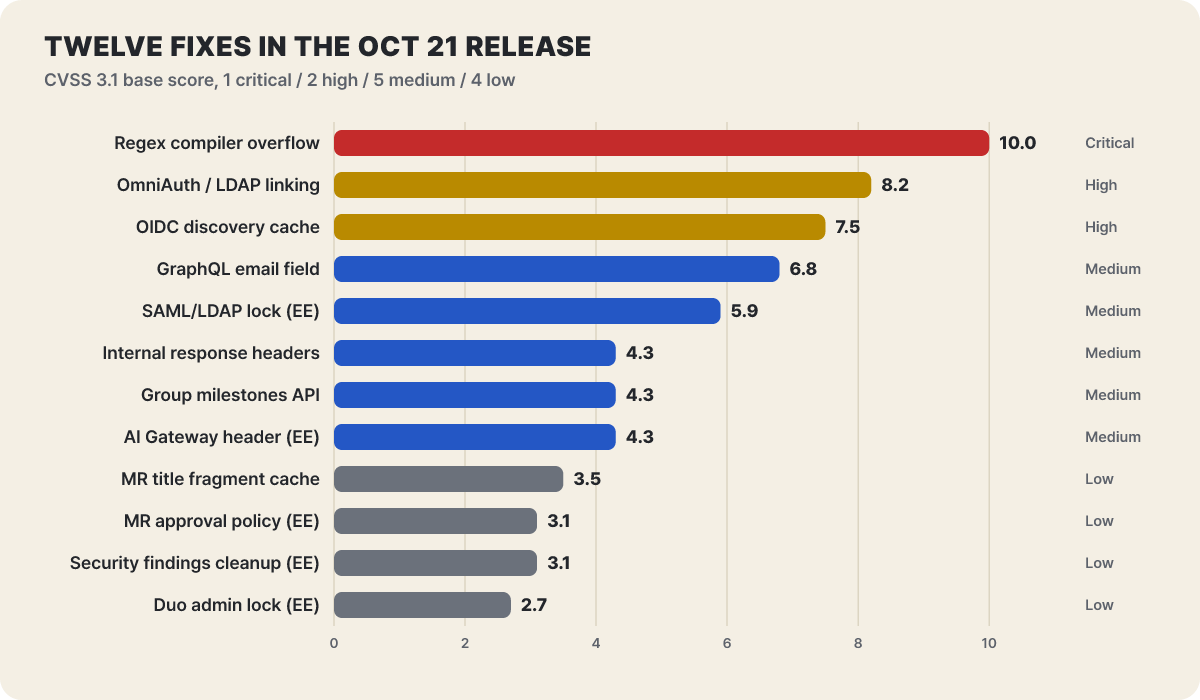 Figure 4. CVSS 3.1 base scores in the Oct 21 release. The severity is at the right end of each bar
| CVE | Severity | Description | Affected since |
|---|---|---|---|
| CVE-2026-110264 | Critical | Regex compiler integer overflow (the subject of this article) | 7.0 |
| CVE-2026-15723 | High | Authentication flaw in email lookup for OmniAuth and LDAP auto-linking | 10.1 |
| CVE-2026-112212 | High | Cache poisoning of OAuth/OIDC discovery endpoints | 18.3 |
| CVE-2026-12664 | Medium | Access control on the GraphQL work item email field (read_api scope bypass) | 18.2 |
| CVE-2026-16255 | Medium | Incomplete instance-wide SAML/LDAP membership lock (EE) | 12.0 |
| CVE-2026-105777 | Medium | Internal credentials exposed through internal response headers | 17.6.5 |
| CVE-2026-13319 | Medium | Permission bypass in the group milestone API | 15.10 |
| CVE-2026-112378 | Medium | Trust level of the AI Gateway feature-enablement header (EE) | 17.8 |
| CVE-2026-105711 | Low | Sensitive information in the MR title rendering fragment cache | 15.0 |
| CVE-2026-14288 | Low | Access control in MR approval policy enforcement (EE) | 17.4 |
| CVE-2026-112326 | Low | Missing cleanup on exceptions in security results (EE) | 17.8 |
| CVE-2026-103515 | Low | Access control in the group Duo administrator lock setting (EE) | 19.2 |
The two High items deserve attention. CVE-2026-15723 (CVSS 8.2) was a flaw that let a logged-in user take over an LDAP-based account on servers with both SAML and LDAP auto-linking turned on, and CVE-2026-112212 (CVSS 7.5) was a flaw in which cache poisoning of the OAuth/OIDC discovery document could send the login flow to an external server. These 11 are included only in 19.5.1, 19.4.3 and 19.3.6; the backports for 19.2 and below (19.2.9, 19.1.9, 19.0.10, 18.11.13) contain only the 1 critical flaw. If your server uses login integrations, it is better to move to 19.3 or later where possible. It also means that blocking only the critical flaw on 19.2 and below leaves the other 11 in place.
Four entry points to look for in Ruby-built apps
The root of this flaw lies not in GitLab’s code but in Ruby’s regex engine, so Ruby itself was fixed on the 23rd as well. Ruby 4.0.9, 3.4.12 and 3.3.13 contain the fixes for all four underlying bugs, and 3.3, which normally receives only security fixes, was included as an exception because GitLab attached CVEs to them. The Ruby side did not apply for CVEs of its own, and advises tracking them in scanners for now by the numbers GitLab assigned. GitLab applied its own patches to Ruby only in its package and container image builds, so if you install from source without packages and manage Ruby yourself, you must upgrade to the Ruby versions above on your own.
The scope is set by a single condition. Only apps that build regular expressions from attacker-written strings are affected; apps that use only regexes written by developers are not. The entry points are four calls: Regexp.new(input), which turns user input directly into a pattern, and Regexp.compile(input), another name for the same behavior; Regexp.union(inputs), which combines several inputs into one; and /#{input}/, which interpolates input as a string inside a regex literal.
Timeouts and length limits are not a shield. Ruby stated that Regexp.timeout is only a mechanism against denial of service and is of no use against this bug, and that length limits cannot be trusted either because there is a bug that triggers even with short patterns. If upgrading is hard, the only alternative is not to build regular expressions from untrusted input. You can check whether your app’s code has such calls with a read-only search. No results means none of the entry points above exist; if there are results, start by working out whether that input comes from outside.
grep -rnE "Regexp\.(new|compile|union)\(" app libFixed versions by series
Here are the four releases laid out by series. Follow the row for the series you use to the far right and you reach your target version. A “—” in the middle columns means no fixed release for these flaws came out that day for that series.
| Series you run now | Sep 23 | Oct 12 | Oct 21 (target) | What the Oct 21 release contains |
|---|---|---|---|---|
| 19.5 | — | — | 19.5.1 | All 12 |
| 19.4 | 19.4.1 | 19.4.2 | 19.4.3 (DB migration + post-deployment migration) | All 12 |
| 19.3 | 19.3.3 | 19.3.5 | 19.3.6 (DB migration) | All 12 |
| 19.2 | 19.2.7 | 19.2.8 | 19.2.9 | The critical flaw only |
| 19.1 | — | — | 19.1.9 | The critical flaw only |
| 19.0 | — | — | 19.0.10 | The critical flaw only |
| 18.11 | — | — | 18.11.13 | The critical flaw only |
| 18.10 and below | — | — | No fixed version | Move to a supported series first |
If you manage Ruby yourself, the target is the fixed release that came out on Oct 23.
| Ruby series | First release containing fixes for all four underlying bugs | Published |
|---|---|---|
| 4.0 | 4.0.9 | Oct 23, 03:11 UTC |
| 3.4 | 3.4.12 | Oct 23, 03:11 UTC |
| 3.3 | 3.3.13 (a security-only series, but included this time as an exception) | Oct 23, 03:11 UTC |