1.4% of OpenCode users had AI keys stolen, how to rotate
Affects the 1.4% of OpenCode console users who stored Anthropic, OpenAI or Google keys. Three questions to find your keys, six rotation steps, vendor limits.
1.4% is the share of users OpenCode said were affected in this incident, and the first thing to point out is that the denominator is not all users. Only people who use the hosted console and have connected an outside AI vendor account are included. For anyone who meets that condition, this is not a 1.4% matter but a 100% matter, and if you do not meet it you will not have received the notice email. This article is a checklist that works out which side you are on and, if you are affected, spells out in an order you can follow exactly which keys to replace and where to verify. All times are UTC.
If I had to put the conclusion in one line, it is this: the keys stop working only when you revoke them in each AI vendor’s console, not in OpenCode. A copied key stays alive even if you delete it from the OpenCode screen.
Three places a key could be
OpenCode has two parts. One is the open-source command-line tool and desktop app that run on your own computer, and the other is the optional hosted console. In the console you can create a workspace and invite team members, and according to the official docs, owners and admins pick the models, set monthly budgets per workspace and per member, and connect their own AI vendor accounts. As Infosecurity Magazine describes it, the console stores the keys registered that way and uses them on your behalf at request time, so team members never see the original keys.
This incident happened at that storage point. OpenCode’s notice email said there had been unauthorized access to an older system that was going through a shutdown process, and that the keys stored in workspaces there may have been exposed. Co-founder Dax Raad explained that keys you set up in the app on your own computer never reach the company’s servers, and TechCrunch relayed this. The agent itself kept being updated after the incident: its GitHub stars were about 222,000 as of Oct 26, and v1.19.4 came out on Oct 22.
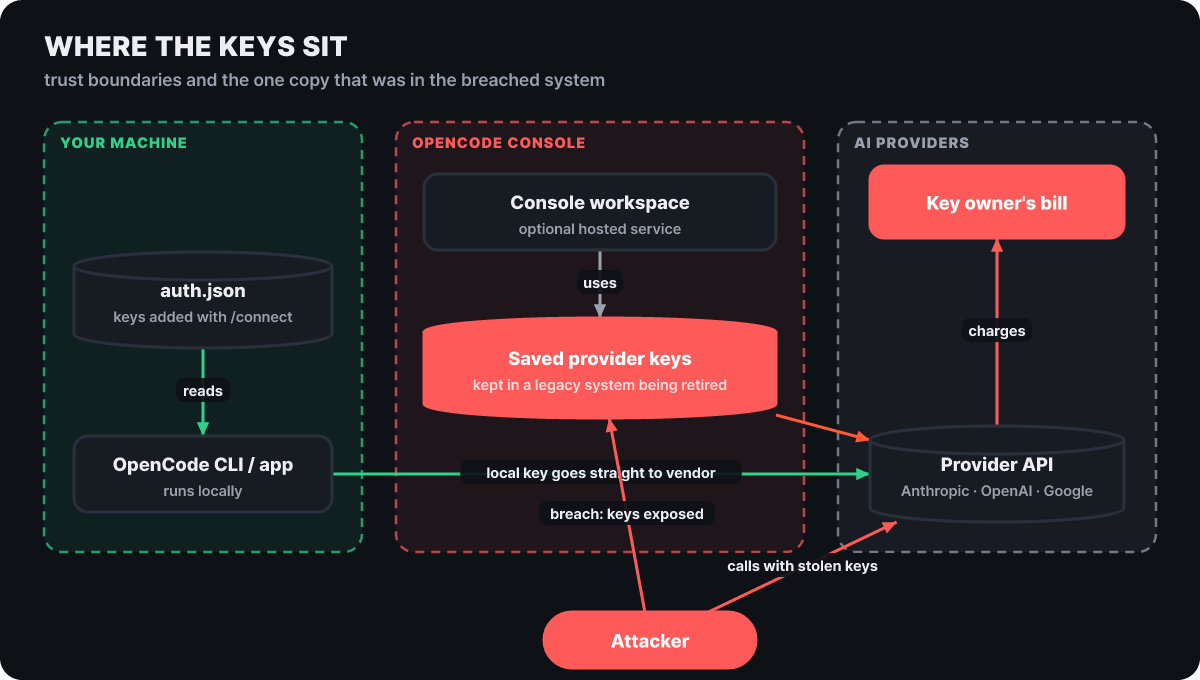 Figure 1. The boundaries between your computer, the console and the vendors, and the spot that was breached this time
What to look at in the figure is where the green and red arrows start. A key kept only on your own computer goes straight to the vendor without passing through the console. The red side is the path where a key the console was storing is exposed and the attacker calls the vendor API directly, and the bill goes to the key’s owner. The attacker’s calls never pass through the console, so a budget set in the console cannot stop them, and the last line of defense is the limit on the vendor’s side.
The earliest exposure time is Oct 17, 00:30 UTC
The notice email gave the earliest possible exposure time as 00:30 UTC on Oct 17, and BleepingComputer reported on a screenshot of that email. Laying out the main scenes after that time on one axis gives the picture below. Every time except 00:30 is the local time written in each statement or post, converted to UTC by our editors.
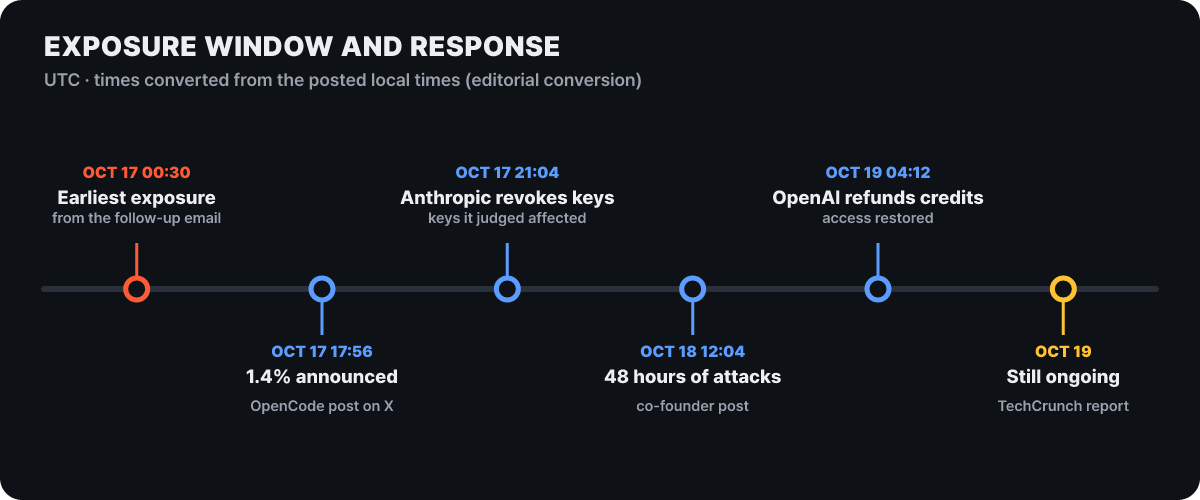 Figure 2. The sequence of responses on Oct 17-19 (UTC, converted by our editors)
The notice went out at 17:56, roughly 17 and a half hours after the earliest exposure time (our calculation). According to a site that compiled the incident timeline, users were already posting unexpected usage on Reddit and X from early on Oct 17, before the notice, so you need to check from the earliest exposure time, not from the time of the notice. Anthropic revoked the keys it judged to be affected, Google also blocked the exposed Gemini keys, and on the 19th OpenAI said it would work with OpenCode to restore access and refund the credits used in the attack. Even as of the 19th, when TechCrunch reported, OpenCode said the incident was ongoing.
Many security vendor posts, such as Safeguard’s, advise reviewing usage starting from Oct 16, a day before the earliest exposure time, and this article follows that standard. Starting generously means you will not miss anything because of time zone conversion or the date breaks on a screen.
The email lists the last 4 characters of each key
The first thing to do is search your inbox. According to Infosecurity Magazine, which cited the Safeguard report, the subject is “Action Required: Potential provider key breach”. Check your spam folder too. The email states that there was unauthorized access to an older system, that the vendor keys stored in your workspace may have been exposed, and recommends revoking and replacing those keys, updating the apps that use them and reviewing recent usage. eSecurityPlanet reported that the email lists the stored keys by workspace, vendor and last four characters. That list is your replacement roster. In each vendor console’s key list, find the keys with the same vendor and ending and match them against it.
Do not click the links in the email. Right after an incident, phishing that imitates the notice email tends to be mixed in. Type the vendor console address yourself or use a bookmark to reach the key list.
If you have no email, by the company’s account you are not affected. Still, if you were using the console, it is safer to go through the three questions in the next section. There may be keys you did not enter yourself, for example when a team admin registered your vendor key in the workspace.
Deciding the scope of rotation with three questions
The figure below asks about your setup three times from the front and decides what to change on each branch. Follow the top row sideways and go down where you see YES.
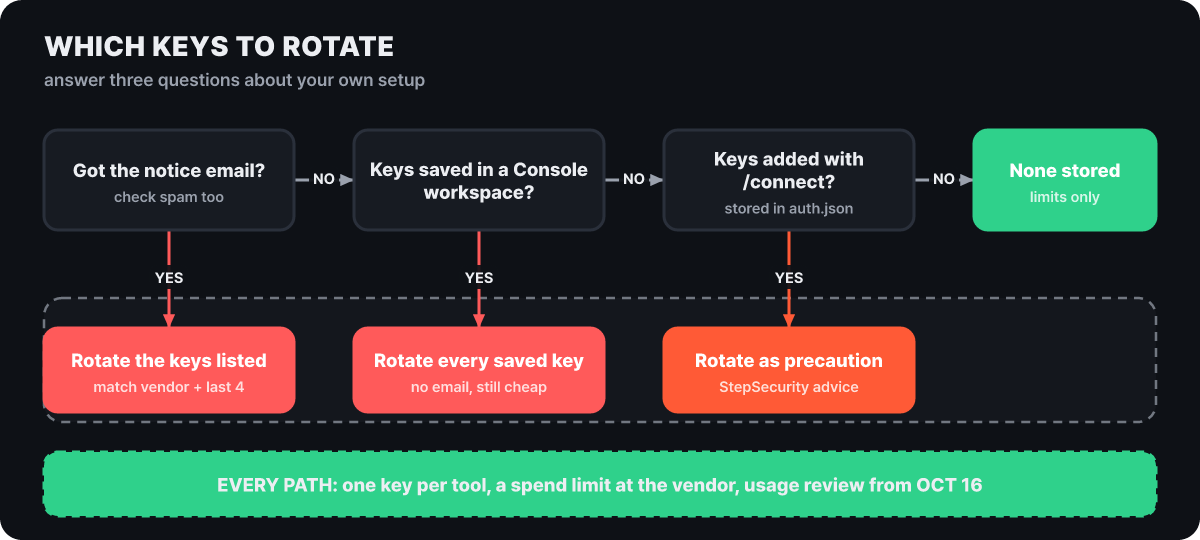 Figure 3. Three questions that decide the rotation scope
The middle and right branches need some interpretation. The case where you have no email but have keys in the console is outside the impact by the company’s account, but the replacement takes only a few minutes, and as long as you leave keys in the console, the same structural risk remains. The right branch comes from the OpenCode official docs, which say that keys entered with /connect are stored in ~/.local/share/opencode/auth.json on your computer. The security firm StepSecurity advised suspecting possible impact if this file lists a vendor, but that is a precautionary recommendation, not a company notice. What the company pointed to is the keys stored in console workspaces.
Finding keys left on your computer and in project folders
There are two things to check locally. One is the list of vendors OpenCode is holding, and the other is keys you copied into project environment files. The OpenCode official docs tell you to run opencode auth list to see which vendors have credentials added. Do not paste the file’s contents into chat or an issue; only check which vendors are there. On Windows the same file is at %USERPROFILE%\.local\share\opencode\auth.json.
For the environment file search, use the -l option, which prints only file names, not key values. The screen below is the result of actually running the two commands in an example folder containing fake keys.
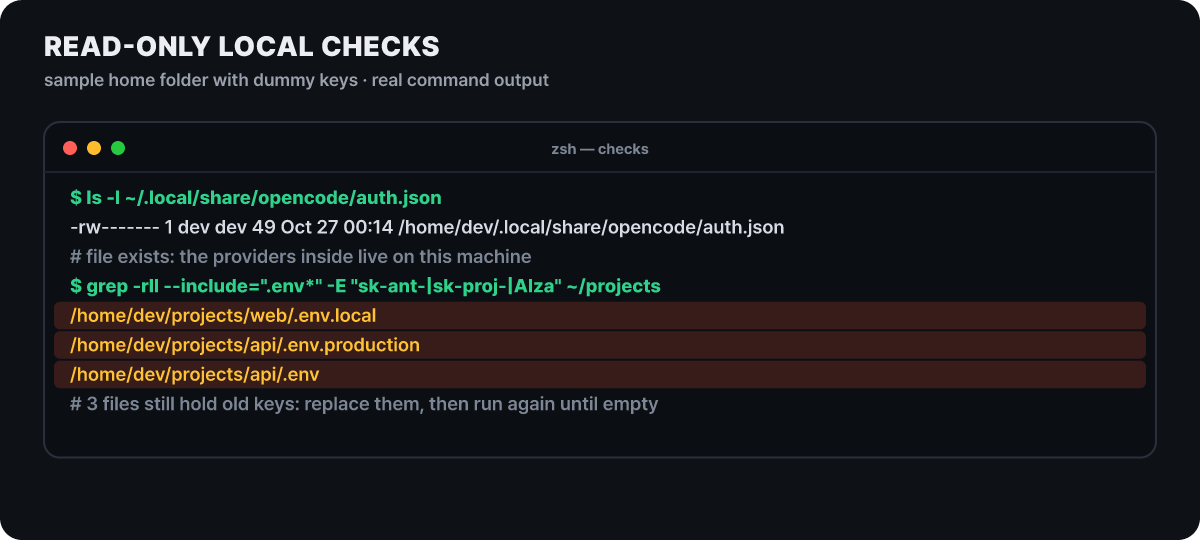 Figure 4. Read-only check commands (an example folder made by our editors, with fake keys)
sk-ant- is a common starting string for Anthropic, sk-proj- for OpenAI project keys, and AIza for Google keys. If a file name comes up, it means an old key is left there. After replacing it with a new key, run the same command again and repeat until nothing comes up. Note that this search shows only file names, so you must open the files that come up and check yourself which vendor’s key each one holds.
Six steps to rotate
The order matters because you need to shorten both the time the service is down and the time the old key stays alive.
- List the targets. Gather into one list the keys named in the email (workspace, vendor, last 4 characters), every key registered on the console Providers screen (including ones another admin added), and the vendors in auth.json.
- Create the new keys. In each vendor console, issue a new tool-specific key, narrowing its scope and setting an expiry date or a limit.
- Update where they are used. Swap in the new keys in local settings, CI jobs, server environment variables, team members' computers and, if you keep using the console, the keys registered there too.
- Confirm the new key works. Check that one call with the new key succeeds.
- Revoke the old key. Revoke the old key in the vendor console. Deleting it in the OpenCode console is not the end of it.
- Confirm the old key is rejected. Check that a call with the old key returns an authentication error, but inject the key value through an environment variable rather than typing it into the shell or leaving it in chat.
Both the OpenAI docs and the Safeguard report recommend creating a new key, updating the apps, and revoking the old key once you have confirmed everything works. Now, when the key is quite likely to be in actual use, the point is to shorten the gap between step 3 and step 5 to a few minutes. Conversely, if no service uses that key at all, you can revoke first and create the new key later. A key the vendor has already blocked ends in an error on every call, so in that case you have to create the new key first for the tool to run again.
Revocation and limits differ on each vendor’s screen
These are menus that do the same job, but the names and locations differ by vendor. The table below is what we confirmed in the three vendors’ official docs.
| Vendor | Key rotation | What stops the calls | How to narrow the scope |
|---|---|---|---|
| Anthropic | Issue a new key, then revoke the old one | Monthly spend limit on the Billing page. The organization tier caps are $500 for Start, $1,000 for Build and $200,000 for Scale, and you can only set limits below them | Split into workspaces and set a limit per workspace |
| OpenAI | Set an expiry date when you create a project key, and set a key lifetime cap at the organization or project level | Hard spend limit (traffic stops when reached). The alert threshold only sends email | Separate development and production into projects and set a limit per project |
| Rotate key in the key details, then after switching the app to the new key, delete the old key under Previous key | Watch usage with Cloud Monitoring and Cloud Logging | Combine an API restriction with an application restriction (one of web address, IP, Android or iOS) |
There is one trap with Anthropic. According to the docs, you cannot set a spend limit on the default workspace, so you have to create a separate workspace and issue the tool’s keys inside it for the workspace limit to apply.
Set the limit when you create the new key. If you put it off until after the rotation, you will usually forget. How much damage was done varied with the limit on the stolen key and with when the user turned the key off.
With Google, there are two more things worth knowing. According to the official docs, a deleted key can be restored within 30 days, so do not touch the “Restore deleted credentials” menu, which would accidentally revive a key you revoked. And you can find keys with no restrictions using the command below. It only reads, and you replace PROJECT_ID with your own project.
gcloud asset list --project=PROJECT_ID \
  --asset-types=apikeys.googleapis.com/Key \
  --content-type=resource \
  --filter="-resource.data.restrictions:*"
Google, which blocked the exposed Gemini keys, told users to create new keys in AI Studio (eSecurityPlanet).
How to spot unfamiliar calls
Once the keys are replaced, look for traces of past use. The screens differ by vendor, but the criteria are the same.
- Period. Set it from Oct 16 (UTC) to now.
- Screen. Look by key or project in Anthropic's Console Usage page, in OpenAI's Billing and usage screens, and in Google's Cloud Monitoring and Cloud Logging.
- What to look for. Models you did not use, calls at hours you do not normally work, a sudden jump in cost, and unfamiliar auto-recharge payments.
- What to keep. If you find something, save a screen that shows the last 4 characters of the key, the call time and the amount. You will use it for the refund request.
If you use the OpenCode console, check the console side too. According to the docs, the console has an auto-recharge that buys credits when the balance runs low, so if you had it on, check the payment history and the per-member budgets together. The charges do not come only to the vendor account.
BleepingComputer also carried a user report that a Google project was suspended because of this incident. The reason given was abuse activity consistent with the stolen resources. Even if the usage screen looks normal, check whether there is a project status alert.
If the bill has already arrived
Refunds are moving along three tracks. Raad said around 00:01 UTC on Oct 18 that he had contacted all affected users and that refunds were in progress (per the site compiling the incident timeline, converted by our editors). OpenAI said on the 19th it would refund the credits used in the attack to its API customers, and the notice email said the company was also discussing compensation for fraudulent charges with Google. The application method differs by vendor, so proceed through each vendor’s support channel.
The amounts users posted are below. This figure is for comparing sizes, not for adding up the scale of the damage.
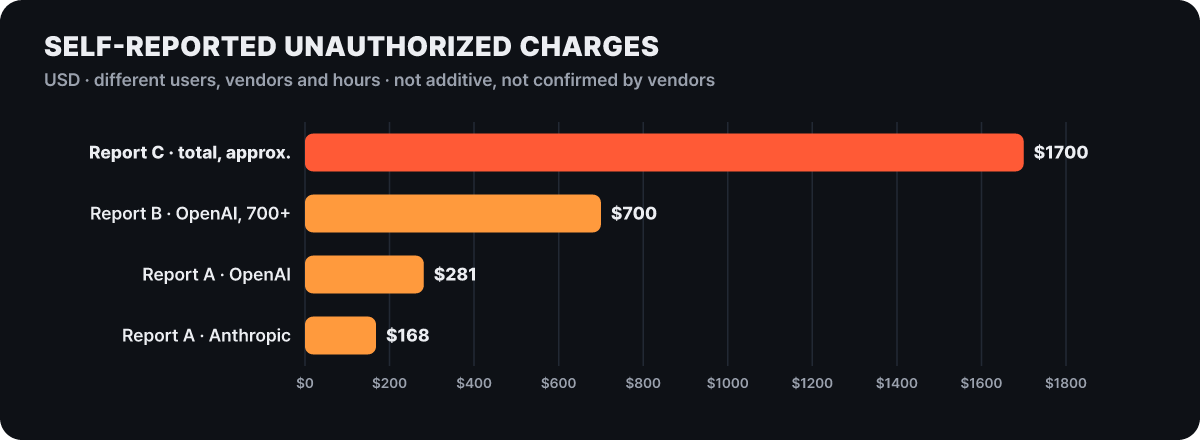 Figure 5. Self-reported unauthorized charges (dollars, different users, vendors and times)
A is the charges one user received from OpenAI and Anthropic respectively; B is OpenAI usage that another user racked up before turning the key off, which exceeded $700; and C is a case that reported about $1,700 charged in a single night (compiled by Dealroom). The bar lengths differ because of differences in the limit on the stolen key, how long the attacker kept calling and when the user turned the key off. These are not amounts confirmed by OpenCode or the vendors, so do not add them up or average them.
In this setup, it is the limit that determines the maximum loss. If you have not set a limit yourself, Anthropic’s organization tier cap is the theoretical maximum spend, so if you have auto-recharge on or use a team account, it is safer to set your own, lower limit.
The distillation label and the blocked investigation
OpenCode called this incident a “large-scale distillation attack.” Distillation is a technique that collects a strong model’s answers in bulk to teach a smaller model, and when it becomes a means of cloning someone else’s model it is classed as an attack. In a February 2026 post, Anthropic disclosed a case that collected more than 16 million conversations through about 24,000 fake accounts, and explained that when one account was blocked, another took its place immediately. One article offered, as inference, the analysis that new accounts get caught in verification, but the key of a customer who has been paying normally is already a trusted channel, so stealing keys is the better option. Still, calling it distillation is the company’s wording, and TechCrunch reported that some see it as a plain breach. The cost to users is the same either way.
Something else happened during the investigation. According to BleepingComputer, the AI models OpenCode was using refused even defensive requests because of their safeguards, which blocked the investigation, and things improved after it gained access to OpenAI’s defender program Daybreak. According to TechCrunch, what it accessed was Daybreak Blue, which gives verified users models that are unlikely to refuse defensive work. TechCrunch noted that in the July Hugging Face incident too, safeguards failed to tell responders from attackers. The attacker hammered away with AI agents for at least 48 hours without a break, while the defenders were turned down by the same AI.
The response you get when you hit a limit
If you set a limit on the new key, you need to know what comes back when you hit it. It is common for a CI job to keep failing because someone tried to solve a limit error with retries. Anthropic’s docs distinguish two cases.
- When you hit the organization tier cap: it is HTTP 429, and the
error_codeisenforced_spend_limit_reached. There is noretry-afterheader, and calls stop until 00:00 UTC on the 1st of next month. The SDK’s automatic retries do not clear it either. - When you hit a limit you set yourself: it is HTTP 400, and the error type is
invalid_request_error. The message starts with “You have reached your specified API usage limits”, or “specified workspace API usage limits” for a workspace limit, and says from when you can use it again. Raising or removing the limit clears it right away.
OpenAI’s hard limit stops the relevant traffic when reached, while the alert threshold only sends email and blocks nothing. Seeing this error suddenly may be both an outage and a signal that there are unfamiliar calls, so check the cause on the usage screen first.
About a week after you finish the rotation, there are four things to check.
- Does a call with the revoked old key still return an authentication error (inject the key value through an environment variable).
- Has usage at all three vendors returned to normal, and does the alert email for the new limit arrive.
- If you applied for a refund, the progress status at OpenCode, OpenAI and Google each.
- If you keep using the console, is the key you registered a dedicated key made only for this purpose (not a production key).