Node.js fixed 10 flaws, 4 are High, so upgrade now
Node.js 22.23.4, 24.22.1 and 26.12.1 fix 10 vulnerabilities (4 High). How each line is hit, what behaves differently now, and the copies a server update misses.
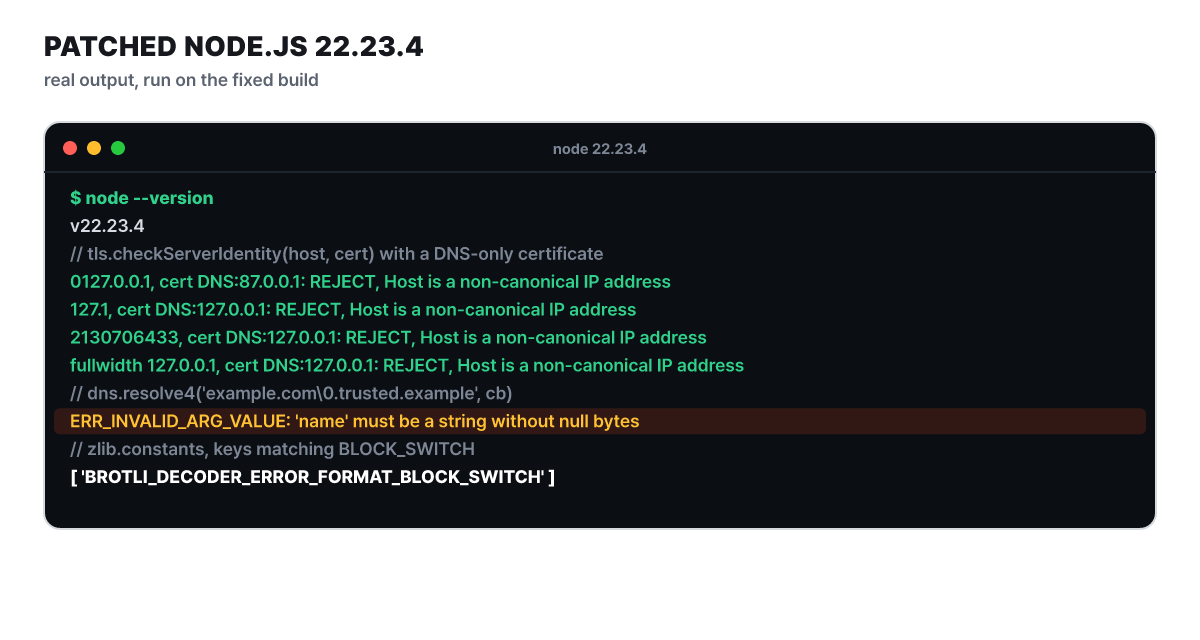 Figure 1. Output from the editorial team’s own run on the patched 22.23.4 (four TLS name checks, dns.resolve4, the zlib constant)
The output above is one slice of what changed in this Node.js security release. On Oct 21 (dates in this article are in UTC) the project fixed 10 vulnerabilities at once, and the fixed versions are 22.23.4, 24.22.1 and 26.12.1. Before the fix, the TLS checks above passed (the full-width form only on 24.x and 26.x), and a DNS name containing \0 was looked up only up to that point. As of Oct 27, there is no release newer than these three versions, and the advisory has no updates added since it was published. This article splits the changes by area and sets before against after, follows how the 10 flaws divide across the lines, and then covers how to find the copies that remain even after you update the server.
Three fixed versions and where each line stands
The three versions shipped together in the same advisory, but they sit at different stages. The stages in the table below are read from the dates in the Node.js release schedule as of Oct 27.
| Line | Fixed version | Stage | Flaws that hit it |
|---|---|---|---|
| 22.x | 22.23.4 | Maintenance LTS (since 2025-10-21) | 7, High 3 |
| 24.x | 24.22.1 | Maintenance LTS (since 2026-10-20) | 8, High 4 |
| 26.x | 26.12.1 | Current, LTS transition planned for Oct 28 | 10, High 4 |
| 20 and earlier, 21, 23, 25 | None | End of life | Always in scope, per the advisory |
24.x moved from the active phase of LTS into maintenance a few days ago. 26.x is still Current, but its LTS transition is set for the next day, so it is about to become an option for teams choosing a new long-term-support line. The advisory states that end-of-life versions are always affected whenever a security release ships, and tells you to use a supported line.
Putting each line’s security-support period on a calendar makes it clear at a glance. In the figure below, the red vertical line is the day of the security release and the dotted line is today.
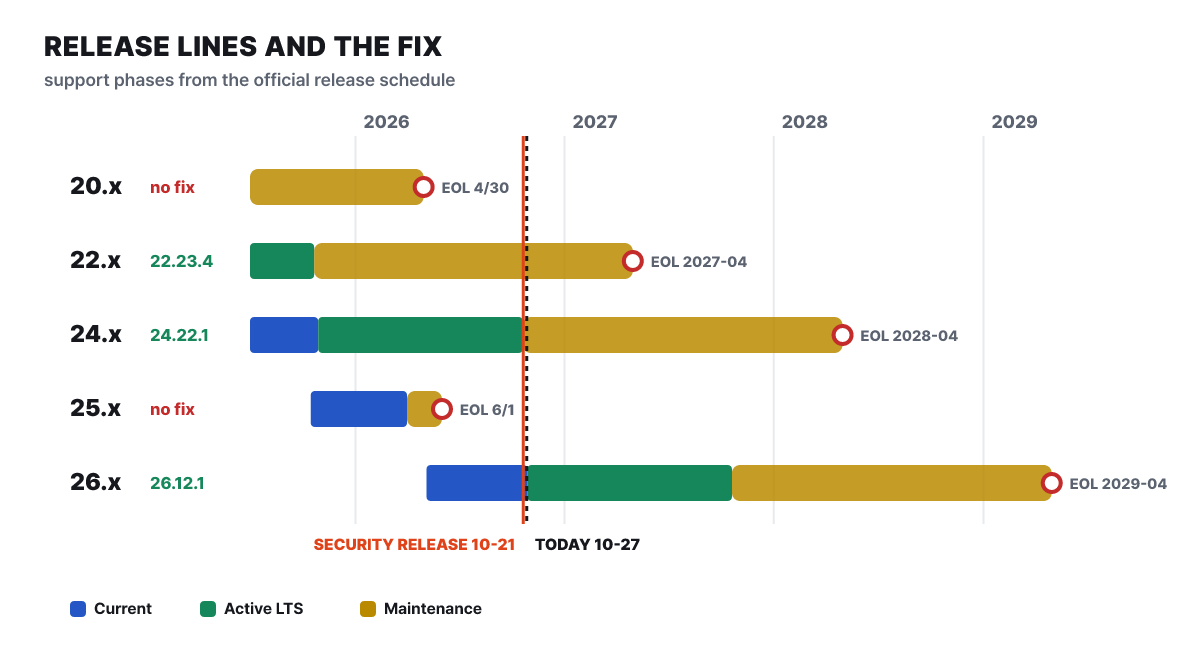 Figure 2. Stage periods from the release schedule. 20.x and 25.x have already ended, and 22.x is next to end (April 2027)
The bars for 20.x and 25.x end to the left of today’s line, so there is no way for them to receive this fix. Among the lines that do receive this patch, the first to end is 22.x, with about six months left. Teams on 22.x are better off scheduling a move to the next line while they do this update. The schedule carries a caveat that dates may change.
Which of the ten hit which line
The 10 do not hit every line with equal weight. Counting the affected-lines column of the advisory and laying it into a grid shows where the gaps are.
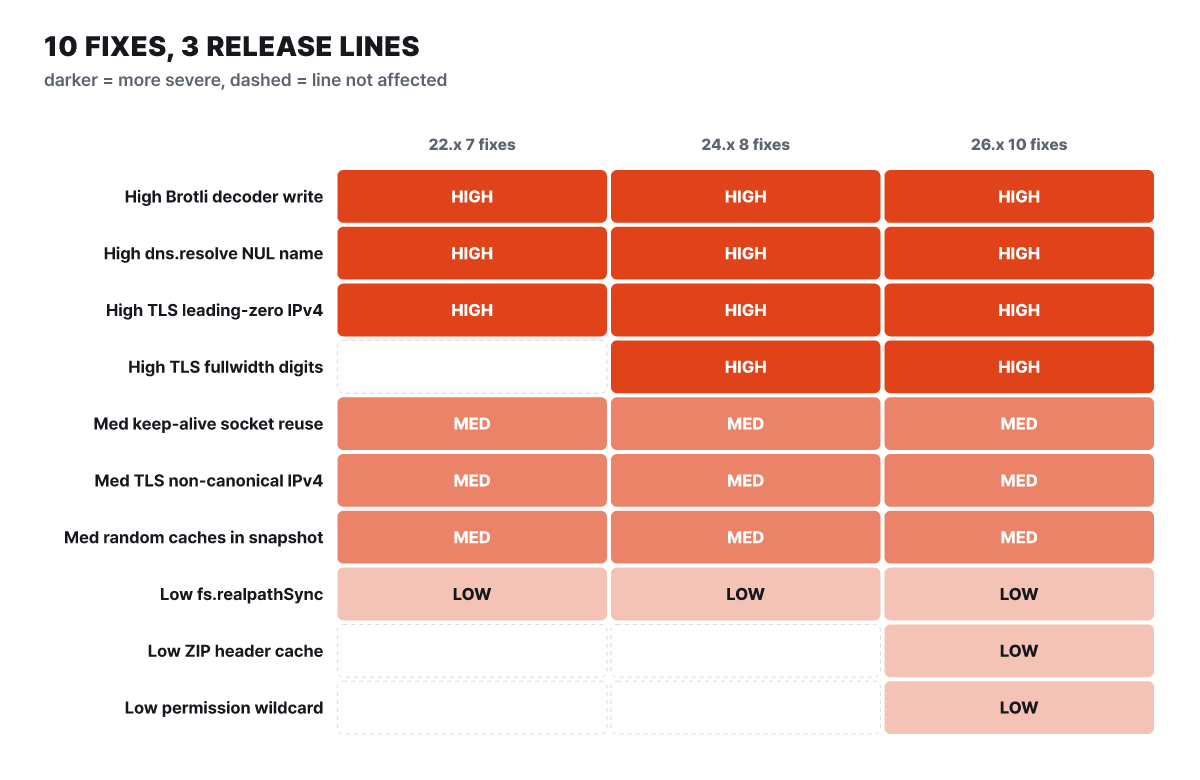 Figure 3. The darker the cell, the higher the severity. Dotted cells are flaws that do not apply to that line
26.x is hit by all 10, 24.x by 8, and 22.x by 7. There are three empty cells. The full-width-digit TLS flaw is absent from 22.x, and the ZIP header cache flaw and the Permission Model wildcard flaw exist only in 26.x. Counting only High, 22.x has 3, and 24.x and 26.x have 4. The smaller count on 22.x does not mean it is safe. The Brotli, DNS name and leading-zero TLS flaws all hit 22.x as well, and all three are High.
The grid shows one more thing: 4 of the 10 are follow-ups to earlier fixes. The DNS name flaw (CVE-2026-105482) remains because CVE-2026-48930 blocked only dns.lookup() and the host options of net and tls and missed dns.resolve*(), and the full-width-digit flaw (CVE-2026-105483) is a recurrence that appeared after CVE-2026-48618 was fixed. The keep-alive socket flaw (CVE-2026-105481) and the fs.realpathSync() flaw (CVE-2026-106073) are likewise places that CVE-2026-48931 and CVE-2026-21715 each blocked only in part.
TLS now sorts out number-like hosts first
Two of the three High flaws and one Medium flaw came from TLS hostname verification. The part of tls.checkServerIdentity() that decides “is this string an IP?” went wrong in three ways, and the fix points in one direction: a non-standard notation is not accepted as an IP and is rejected.
- Leading zeros (CVE-2026-106069). The web standard (WHATWG URL) rules read
0127.0.0.1as octal and turn it into87.0.0.1. The actual connection goes through the operating system resolver, and on environments such as macOS the same string is read as decimal127.0.0.1. The address that was checked and the address that was connected to differed, so the server connected to could be authenticated with a certificate issued for a different IP. - Full-width digits (CVE-2026-105483). A host such as
127.0.0.1was not recognized as an IP and was compared against the certificate’s DNS names and Common Name. It appears only on 24.x and 26.x. - Other notations of the same number (CVE-2026-106072).
0177.0.0.1,0x7f.0.0.1,2130706433and127.1were not classified as IPs, so a certificate with a numeric-only DNS entry (DNS:127.0.0.1) let them through. The conditions are that a certificate authority the client trusts issues such a certificate, and that the resolver, like glibc, accepts that notation.
Matching before and after by input gives the table below. The “Before the fix” column follows the advisory, and the “After the fix” column is the 22.23.4 run result from Figure 1.
| String used as host | Certificate | Before the fix | After the fix |
|---|---|---|---|
0127.0.0.1 |
DNS:87.0.0.1 |
Read as octal and treated as a match | Rejected (Host is a non-canonical IP address) |
127.1, 0x7f.0.0.1, 2130706433 |
DNS:127.0.0.1 |
Passed against the numeric DNS entry | Rejected (same message) |
127.0.0.1 (full-width) |
DNS:127.0.0.1 |
Compared like a DNS name and passed | Rejected (same message) |
127.0.0.1 (standard notation) |
Only DNS:127.0.0.1 |
Rejected | Still rejected (an IP connection needs an IP entry) |
The last row is the baseline that did not change. The standard notation never passed on a DNS entry alone, and only the non-standard notations slipped through that gap. So the effect of the fix is closer to “the route that bypassed the check by changing notation now merges into the same result as the standard notation” than to “it got stricter.” The 22.23.4 release notes also list the commit tls: match IPv6 hosts against IP-Address SANs. If you hit certificate verification errors on IPv6 connections in 22.x, it is worth reading alongside this.
dns.resolve no longer accepts names containing NUL
The DNS flaw (CVE-2026-105482) is a case where the code that checks and the code that looks up read the same string at different lengths. dns.resolve*() and dns.reverse() hand the name to the C library c-ares as a C string, and if the name has a NUL character in the middle, the string is read as ending there.
// The allowlist check uses the whole string, but the actual lookup stops before NUL
if (!name.endsWith('.trusted.example')) throw new Error('blocked');
dns.resolve4(name, cb);
// If name = 'attacker.example\0.trusted.example'
// the check passes, and the lookup fetches the records of attacker.example
After the fix it is blocked at the input stage. As Figure 1 showed, on 22.23.4 dns.resolve4('example.com\0.trusted.example', cb) ends with ERR_INVALID_ARG_VALUE and the name never reaches c-ares. The earlier fix (48930) added NUL validation only to dns.lookup() and the host options of net and tls and missed the resolve* family, so only now has the whole DNS module been brought under the same rule.
There is one thing to do on the code side. Make the value you check and the value you look up the same variable. If you normalize the name the user gave, check that result and pass that same result along, this kind of gap does not open even before the library is fixed.
Brotli now reports a wrong block switch as an error
The heaviest flaw is in the Brotli decoder bundled with the zlib module (CVE-2026-111497). The advisory says that decompressing malformed data with node:zlib can corrupt process memory and lead to a crash, disclosure of memory contents and even remote code execution. It was reported by OpenAI’s security review tool team (Codex Security), and the Node.js fix is a port of the fix in the upstream Brotli project (commit 0ed4268a).
Here is how it played out. A decompressor is streaming: it receives input in pieces and carries state across them, so each time the decoder has to tell apart a permanent error (“this input is malformed”) from a temporary signal (“not all of it has arrived, give me more”). An invalid block switch was reported as the latter, and the decoder kept appending the next piece to an 8-byte internal buffer. After the fix this case ends early as a format error, and a new error constant, BROTLI_DECODER_ERROR_FORMAT_BLOCK_SWITCH, is exposed in zlib.constants. The last line of Figure 1 shows that constant visible on 22.23.4.
The scope of impact is decided by where the input comes from. The advisory’s condition is an application that decompresses attacker-supplied Brotli data with node:zlib. The Node.js documentation covers three paths, zlib.brotliDecompress(), zlib.brotliDecompressSync() and zlib.createBrotliDecompress(), and its HTTP client example also decompresses a Content-Encoding: br response with createBrotliDecompress(). Upload handling, proxies and jobs that decompress external responses, that is, any structure that directly decompresses compressed data from outside, are the first things to look at. A deployment that decompresses only data it produced internally is less urgent, but since a version you can upgrade to exists, upgrade.
This flaw belongs not to Node.js’s own code but to the bundled Brotli library. One vulnerability database (PatchStack) explains that if you built Node.js yourself linked against a system-installed Brotli library, you are affected when that library predates the upstream fix. If you use a distribution package or a self-built Node.js, check whether the Brotli package also needs updating.
Five conditional flaws: keep-alive, random cache, ZIP, two in the Permission Model
The remaining five are two Medium and three Low, and the conditions under which each applies are narrow.
Keep-alive socket (CVE-2026-105481, Medium). An HTTP client holds idle sockets to reuse connections, and there is a safeguard that destroys a socket if unexpected data arrives on it. That safeguard ran only when the event loop polled for I/O. If, while the loop was busy with synchronous work, a response that arrived before the request sat unread and the socket was then assigned to a new request, the safeguard was skipped and that data was interpreted as the response to the new request. The title of the fix commit is “make agent data protection work without I/O.”
Random cache (CVE-2026-106074, Medium). crypto.randomUUID(), randomUUIDv7() and randomInt() pre-generate and cache random numbers for speed. If you call these functions (or URL.createObjectURL(), which uses them) while building a startup snapshot (--build-snapshot) or a single executable with useSnapshot enabled, the leftover cache is saved into the snapshot, and every process started from that output returns the same values until the cache is drained. The sizes given in the advisory are up to 127 UUIDs and about 1,000 randomInt() values. That means values collide, and that observing one process lets you guess the values of another. This does not apply to servers that start normally without a snapshot.
ZIP reading (CVE-2026-106070, Low, 26.x). For a ZIP file whose local header does not match the central directory at the end of the file, reading zipEntry.modified catches the validation error but the parsed header stays in the cache. A later content read is not refused and returns bytes from the front of the file, and the CRC-32 passes because the attacker set the CRC in the central directory. The advisory gives as an example a checker built on Node.js approving some content while another ZIP implementation extracts it differently. The 26.12.1 release notes list it as zlib: avoid caching invalid ZIP local headers.
Two in the Permission Model (Low). The Permission Model is the feature that passes allowed paths to node --permission through --allow-fs-read and --allow-fs-write. The wildcard flaw (CVE-2026-106071, 26.x) treated a request path as a match when it was shorter than the prefix of a wildcard allow. In the advisory’s example, --allow-fs-read=/etc/passwd.* also allowed reading /etc/passwd, and it holds only when the wildcard allow sits at the very top of the permission tree. In the fs.realpathSync() flaw (CVE-2026-106073), the earlier fix had covered only fs.realpathSync.native(), so even with reads restricted by --permission, you could check whether paths outside the allowed set exist, check symlink targets and list paths.
Even if you were relying on the Permission Model, these two Low flaws did not bring down your line of defense. The Node.js documentation describes the feature as a “seat belt” that keeps trusted code from accidentally touching resources it was not granted, and says it offers no security guarantee against malicious code. The documentation also lists its limits: it follows symbolic links and it bypasses already-open file descriptors. To confine code from outside, separate users, containers and OS-level isolation are the right tools.
What did not change this time either
In a change log, what stays the same matters as much as what changes.
- Workarounds. The advisory lists no workaround for any flaw, and its guidance is only to update to a fixed version. Narrowing input formats or pinning connection targets in code are just the generic ways to reduce exposure and buy time until you update.
- End-of-life lines. As the schedule above shows, there are no fixed versions for 20 and earlier or for 25. The plan to move to a supported line comes before working out whether these flaws apply.
- Rejection of standard notation. As in the last row of the table, a certificate with only a DNS entry for
127.0.0.1is rejected both before and after the fix. - The nature of the Permission Model. It is as described in the seat belt explanation above. Two gaps were closed this time, but it did not become a sandbox.
- Versions of copies. The Node.js inside container images, single executables and startup snapshots does not change when you update the server. They are covered separately below.
- undici installed from npm. An
undiciyou put inpackage.jsonyourself is a separate package from the one Node.js bundles, so it stays as is when you update Node.js. If you use only the built-infetch, updating Node.js is enough.
Services that receive outside input first
The 10 flaws do not all weigh the same. In the editorial team’s view, what decides the order of checks is whether the service accepts input whose value an attacker can choose and how large the damage is if it is hit. The three situations below are examples the editorial team built from configuration and structure alone, and they do not cover attack procedures.
Services that decompress uploaded files or external API responses on the server. If you decompress Content-Encoding: br bodies or Brotli-compressed attachments with node:zlib, this is the first service to upgrade this time. It is more urgent if it is open to the internet and the input arrives without authentication. An internal batch job that decompresses only files it made itself can be upgraded on the regular update cycle.
Webhooks and link previews that keep a domain allowlist and connect to user-supplied addresses. The allow decision is made on a string, and the actual connection is made by fetch, https, tls or a DNS lookup. The TLS and DNS flaws above share the same root: the string that was checked and the target that is used differ. If you can pin the connection target in code, pin it, and if you accept user input, normalize it, decide first whether it is an IP or a name, and only then decide whether to allow it. Code that was already connecting with a non-standard notation may throw errors after the upgrade.
Command-line tools shipped as single executables. If a tool that sped up its startup with useSnapshot called randomUUID() during the build, every process started from that output produces the same first few values. Used for session identifiers or request numbers, they can collide or be predicted across users. Rebuilding with the new Node.js comes first, and if values made by the existing output were used as tokens or temporary keys, consider replacing them too. The recommendation to replace is the editorial team’s judgment, not guidance from the Node.js project.
The order for upgrading the copies too
Updating Node.js is a hassle because an organization has more than one copy of Node.js. The figure below starts at the point where you check your line and draws how far you have to rebuild before you are done.
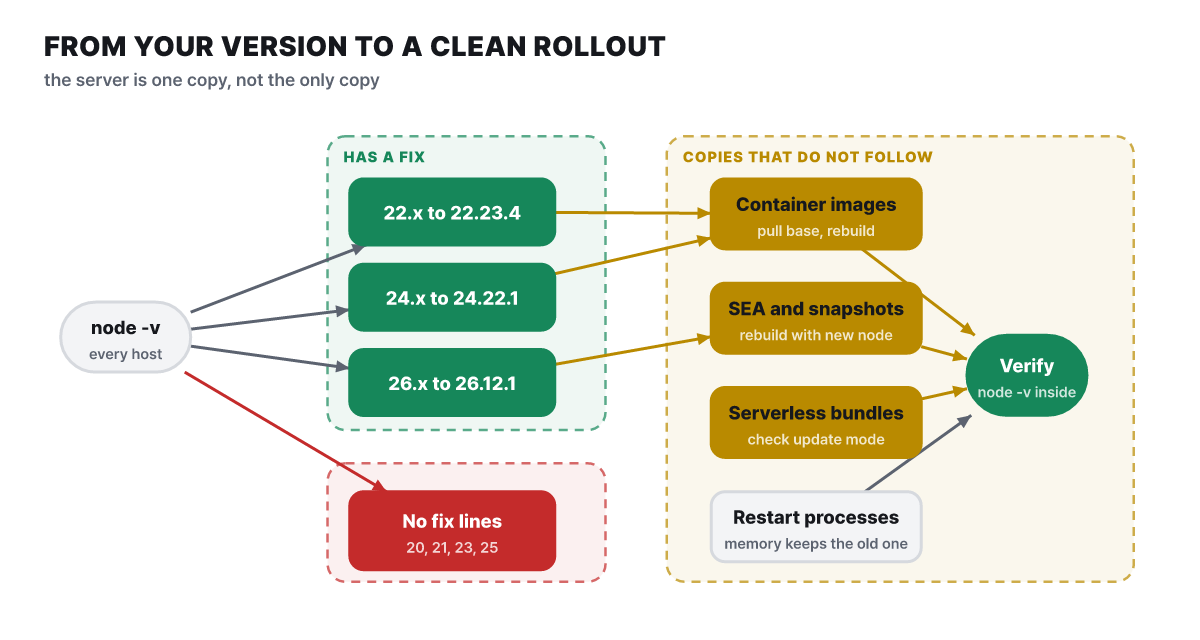 Figure 4. Lines with and without a fixed version, the copies that do not follow a server upgrade, and the final check
A line with no fixed version cannot take the upper route, and moving comes first. The yellow boxes on the right are the things a server update does not reach. A container image has Node.js inside it, so upgrading the host leaves it unchanged, and you pull a new base image, then rebuild and deploy. According to the Node.js documentation, a single executable is made by injecting application data into a copy of the node binary, so the Node.js from the moment it was built stays embedded. Even if you upgraded the server, if you do not restart the process, the old version is still running in memory.
For serverless, the AWS Lambda official documentation draws the clearest distinctions. Lambda lets you choose a runtime update mode for each function version, and the default, Auto, updates automatically to the latest security runtime in two phases. Function update moves to the latest only when you create or update the function, so a function whose development has stopped has to be updated by hand. Manual pins the runtime version you specify and keeps using it; it is a temporary measure for rollback, and the documentation advises against making it the default. Functions built from a container image are not subject to updates, so you must rebuild the image from a new base image and redeploy. The same runtime version may reach each region at a different time, so for another vendor’s serverless, check that vendor’s announcements.
First look at the version you are running now. All of these are read-only commands.
# Node.js version on this PC/server, plus versions of bundled components
node -p "[process.version, 'openssl ' + process.versions.openssl, 'c-ares ' + process.versions.ares, 'undici ' + process.versions.undici].join('\n')"

# Containers: an old image may be left locally, so pull first and then check (change the image name)
docker pull node:22
docker run --rm node:22 node --version
The reason to run docker pull first is that if the same tag already exists locally, docker run does not download a new one and uses the old image. Whether your code touches these flaws can be roughly sorted out by scanning the repository. Change the source location (src) to fit your project.
# Places that use Brotli decompression directly
grep -rnE "brotliDecompress|createBrotliDecompress" --include=*.js --include=*.mjs --include=*.ts src

# Places that look up DNS names or check TLS hostnames directly
grep -rnE "dns\.(promises\.)?(resolve|reverse)|checkServerIdentity" --include=*.js --include=*.mjs --include=*.ts src

# Places that use snapshots, single executables or the Permission Model
grep -rnE "build-snapshot|useSnapshot|--permission|allow-fs" . --exclude-dir=node_modules --exclude-dir=.git
Finding nothing only means there is no direct path. If an npm package you depend on uses node:zlib or dns internally, this search will not catch it, so update Node.js regardless.
- Confirm that
node -vis 22.23.4 · 24.22.1 · 26.12.1 or later on every server, CI and development PC - Rebuild containers from the latest base image, then check the version inside the running container
- Rebuild single executables and startup snapshots with the new Node.js, and consider replacing any tokens made from random values the old output produced
- Check each serverless function's runtime update mode (Auto, Function update, Manual)
- Deploy first the services that handle external Brotli input and user-supplied names and addresses
- Restart processes, and update separately any
undiciyou put inpackage.jsonyourself - Fix the migration schedule for end-of-life lines such as 20 and earlier
Components updated together and what differs by line
A Node.js release raises bundled components along with its own code. Matching the advisory’s dependency list against each line’s release notes shows the component versions differ by line. A - in the table is an item that is not in that line’s release-note update list.
| Component | 22.23.4 | 24.22.1 | 26.12.1 |
|---|---|---|---|
| c-ares (DNS lookup) | 1.34.9 | 1.34.9 | 1.34.9 |
| OpenSSL | 3.5.9 | 3.5.9 | - |
Undici (basis of built-in fetch) |
6.29.1 | 7.30.1 | 8.12.2 |
| SQLite | 3.53.4 | - | - |
| Certificate list (NSS) | 3.131.1 | 3.131.1 | 3.131.1 |
| Time zone data | 2026e | 2026e | - |
The certificate list update includes the blocking of eMudhra intermediate certificate authorities, and all three releases carry the commit tls: reject chains containing blocked public keys. It is a change that rejects certificate chains holding a public key on the block list, so services that use certificates from the affected authorities may see different connection results after the update. The 26.12.1 commit list also has an unrelated-to-security Revert "module: synchronously load most ES modules". If your project touches module loading, read that item in the 26.x release notes.
Two events that overlapped in the same week are covered separately. PHP also shipped a security release on the same day, Oct 21, and it is covered in PHP2Shell explained. The eMudhra incident behind the certificate list update above is explained in The certificate signing key was effectively zero.
If connection errors appear after upgrading
The most common aftermath comes from code that connected to IP addresses written in a non-standard way. Addresses with a leading 0 or shortened such as 127.1, and hosts written in full-width digits, are rejected after the update with Host is a non-canonical IP address together with ERR_TLS_CERT_ALTNAME_INVALID. If the error message is this sentence, the cause is the address notation, not the certificate.
When you see a connection error, do not turn verification off with rejectUnauthorized: false or NODE_TLS_REJECT_UNAUTHORIZED=0. That reopens by hand the route this fix closed. Correct the address to standard notation (127.0.0.1) or connect by name, and check that the certificate has an entry that matches that address or name.
On the DNS side, what to check after the upgrade is whether input with a NUL character in the name fails with ERR_INVALID_ARG_VALUE, and, for tools that use snapshots, whether randomUUID() now differs per process in the newly built output.
What the 10 flaws boil down to in one line is “the side that checks the same string and the side that uses it read it differently.” The TLS notations, the DNS NUL, the Brotli error signal and the arrival order on keep-alive sockets are all that, and the fact that 4 follow-ups to earlier fixes appeared is also because the same reading paths are scattered across many places. Even if the library corrects how it reads, the same gap opens again if your own allowlist and your connection code produce values separately. The homework left after this update is not a version but building into your code a structure that uses the value it checked.