Context7 stops AI coding on stale docs, setup and limits
Context7 fetches version-matched library docs for coding agents per question: call flow, refresh cycles, the 1,000-call monthly cap and prompt injection risk.
Why do coding agents so confidently use options that no longer exist? Not because the model is careless, but because its memory carries a date. In Next.js 16, the file convention middleware.ts was renamed proxy.ts. To a model trained on material from before the rename, proxy.ts is an unfamiliar filename, and Context7 is the tool that fills in that unfamiliarity.
Context7 was built by Upstash, a serverless data service company. Before the agent writes code, it receives version-specific documentation snippets for the library in question and puts them into the prompt. As of 2026-10-26 UTC it has 63,718 GitHub stars and 3,142 forks, an MIT license, and the repository was created on 2025-03-26. The latest npm release of @upstash/context7-mcp is 4.4.4 (published Oct 19), with about 440,000 downloads during the week of Oct 16-22, and the command-line tool ctx7 is at 0.8.2 (Oct 23). This article is not an installation walkthrough but follows a single question. Where does that documentation come from, how often does it get refreshed, by what route does it reach the prompt, and what should you watch out for along that route?
A renamed API is not in the model’s memory
A model’s knowledge stops at the point when training ends. Libraries keep shipping releases after that. The Context7 README names three problems that grow out of this gap: outdated examples, APIs that do not exist, and answers tuned to old versions. The third is tricky because even if you state your version in the question, the answer has no grounding if the documentation for that version is not inside the model.
The Next.js 16 rename is a good specimen of this gap. The editorial team asked Context7 “did the middleware file convention change to proxy?” against /vercel/next.js/v16.2.9, and got back snippets cut from the upgrade guide. They included mv middleware.ts proxy.ts to rename the file, a note that the exported name middleware must also become proxy, a note that the config flag skipMiddlewareUrlNormalize became skipProxyUrlNormalize, and the middleware-to-proxy codemod that applies this change automatically. Renames like this are exactly where an answer pulled from memory and an answer pulled from documentation part ways.
In plain terms
It is like handing today’s orders to a chef who has memorized an edition of the cookbook from two years ago. Most dishes come out right, but any ingredient or heat setting that changed in the meantime gets confidently wrong. Context7 is the assistant who pulls out the latest recipe card for each dish as the order comes in. The chef’s skill stays the same; only the reference material changes.
Keep in mind that what changes is not the model but the material that goes into the prompt, and the rest of this article gets easier. If the material is stale or wrong, the result is just as stale or wrong. So the sections that follow look, in order, at how that material is chosen, stored, refreshed and trusted.
From one line of question to five documentation snippets
When the user writes use context7 in a prompt, or a rule is in place, the agent calls tools twice before writing code. First it passes the library name (“Next.js”) and the user’s question to resolve-library-id to get a Context7 ID (of the form /vercel/next.js). Then it passes that ID and a question narrowed to one concept to query-docs, and documentation snippets and code examples come back. The question goes out in two steps because a name alone does not settle which library is meant (see the next section).
What to follow in Figure 1 is the direction of the arrows. The user’s prompt goes only as far as the agent; what goes out to the MCP tool and the API is the name and the question the agent composed.
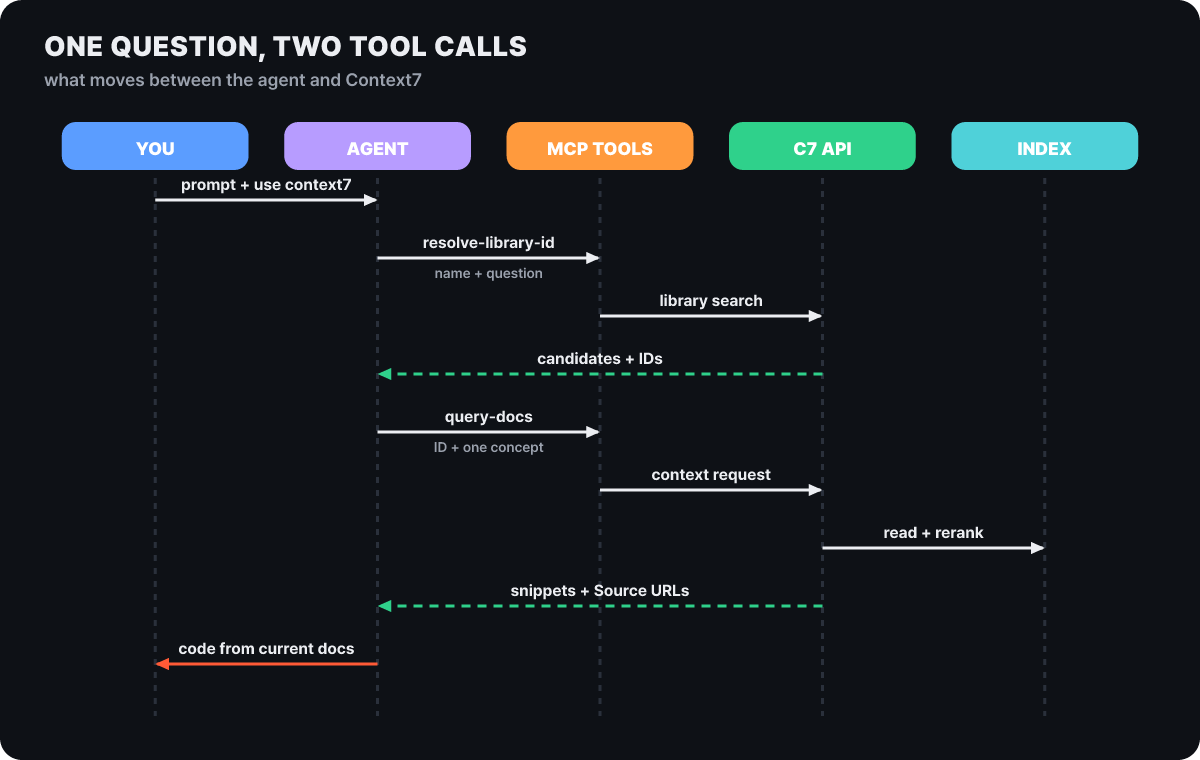 Figure 1. From one line of prompt to code grounded in current docs: the order of two tool calls
The tool descriptions contain instructions for the model. Do not call each tool more than 3 times per question, do not put credentials such as keys or passwords in query, split multiple topics into separate questions, and write names in their official form (“Next.js”). Each of the two tools maps to one REST endpoint (GET /api/v2/libs/search, GET /api/v2/context), so the same calls can be reproduced from a terminal without an agent. Here is the result the editorial team got on 2026-10-26 UTC by calling it against /vercel/next.js without a key.
GET /api/v2/context?libraryId=/vercel/next.js
    &query=proxy redirect unauthenticated users&type=txt
200 OK · text/plain · about 8.4KB · 5 snippets

### Redirect with NextResponse.redirect in proxy
Source: https://github.com/vercel/next.js/blob/canary/docs/01-app/02-guides/redirecting.mdx
### Perform optimistic authentication checks in proxy
Source: https://github.com/vercel/next.js/blob/canary/docs/01-app/02-guides/authentication.mdx
### Protected vs public routes in proxy (auth redirects)
### NextResponse.redirect in Proxy
### Optimistic checks with Proxy (Optional)
The first snippet was code that starts with export function proxy(request: NextRequest), sends unauthenticated users back with NextResponse.redirect(new URL('/login', request.url)), and uses matcher to choose the paths it applies to, followed by a JavaScript version of the same code. Every snippet carries a source address (Source), so a person can trace which document the agent’s code came from. For the rename question in the previous section, sent with the versioned ID /vercel/next.js/v16.2.9, the source addresses read blob/v16.2.9/.... A versioned ID points to the documentation of that tag.
Criteria for choosing among five candidates with the same name
Put the name “Next.js” into GET /api/v2/libs/search and a list of candidates comes back. The top five from the response the editorial team received the same day with libraryName=next.js and query=proxy are below. The response contains the ID, description, default branch, last update date, snippet count, stars, trust score (trustScore), benchmark score (benchmarkScore) and the list of indexed versions.
id                          updated     snippets stars   trust  bench
/vercel/next.js             2026-10-25  6,160   131,745  9.7   77.61
/websites/nextjs            2026-10-14  6,876   (none)   10    70.96
/websites/deepwiki_vercel_next_js  2026-09-04   734   (none)  9.9   29.6
/(personal account)/next.js 2026-09-06  7,322   0        5.3   86.49
/auth0/nextjs-auth0         2026-10-23  2,537   2,180    9.7   82.74
Figure 2 places the same values on a plane of the two scores. The upper right is where both scores are high.
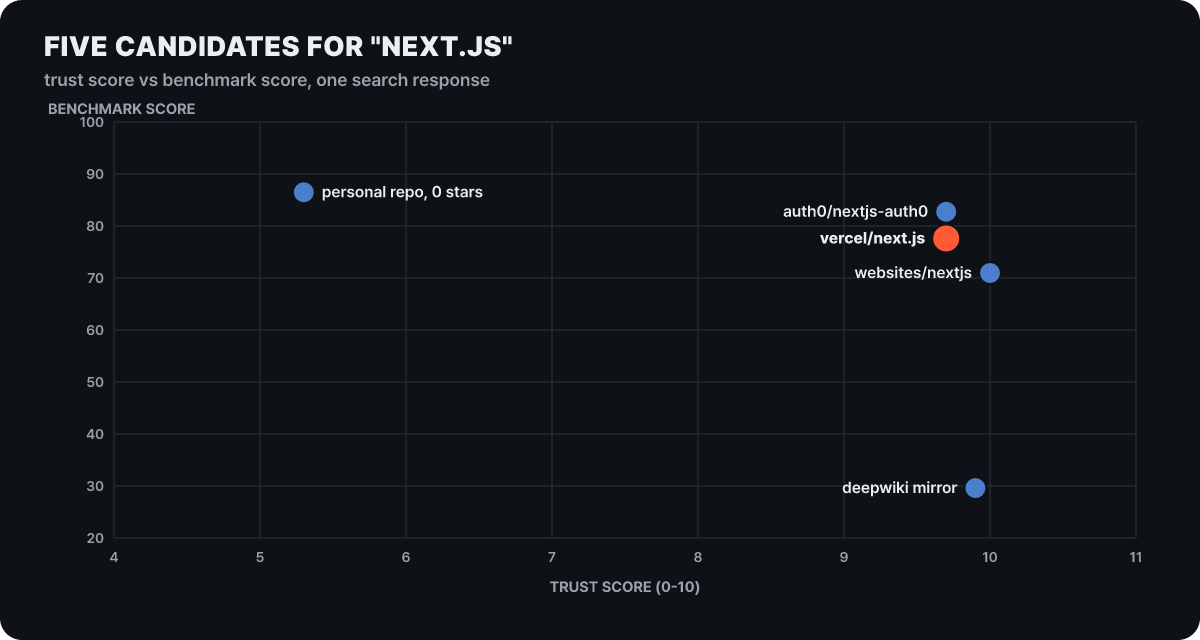 Figure 2. Score distribution of the five ‘next.js’ search candidates (transcribed by the editorial team from the 2026-10-26 response)
In this response, the candidate with the highest benchmark score (86.49) is a repository under a personal account with 0 stars and a trust score of 5.3. The official repository, by contrast, has trust 9.7 and a benchmark of 77.61. It is a setup where following a single score puts the wrong candidate in front. That matches the resolve-library-id description, which tells the model to choose by weighing name similarity, source reputation, snippet count, benchmark score and relevance to the question together. And when the question contains only a library name, other libraries with overlapping names, such as /auth0/nextjs-auth0, get mixed into the candidates.
There is also a way to skip this step. If you write an ID starting with a slash directly in the prompt, candidate selection is bypassed.
Implement basic authentication with Supabase. use library /supabase/supabase for API and docs.An ID has the form /org/project or /org/project/version, and you check the version in the versions list of the candidate response. The Next.js candidate listed tags such as v16.2.9, v16.2.2, v16.1.6, v15.1.8 and v13.5.11. The rules for when the requested version is not in the index are spelled out in the documentation.
- If there is a prepared tag whose numbers match, it is returned (asking for
15givesv15.1.8). - If not, the latest stable release in the requested line that is newer is returned (asking for
2.0.0givesv2.3.1; below 1.0, the same minor). - If that does not exist either, the library’s current documentation is returned.
When a substitution happens, a version notice is attached at the very top of a text response and a version object is included in a JSON response, so you can tell that the documentation you received differs from the version you requested. For public GitHub libraries, a version that was not in the index is put into a background indexing queue so that later requests can be answered. If a branch or channel name (/owner/repo/canary) is not in the index, or there is no documentation to give at all, the result is a 404 version_not_found. People maintaining a project tied to an older version need the habit of checking once whether this notice was attached. That is because it is the case where the latest documentation actually becomes the wrong answer.
Index ahead of time, refresh when requests arrive
For documentation to reach the prompt, it must first be in the index. Anyone, owner or not, can add a public GitHub repository by entering its address at context7.com/add-library. The parsing targets are documentation files (.md, .mdx, .markdown, .rst, .txt, .ipynb), from which code examples and explanations are extracted into snippets. When documentation exists, the original source files are not indexed, and for public repositories with little documentation, examples are generated from the source. Besides repositories, websites (crawled), OpenAPI specs and llms.txt addresses can be sources, and the Teamspace-side API also covers PDF and Word files, Confluence spaces and Notion pages.
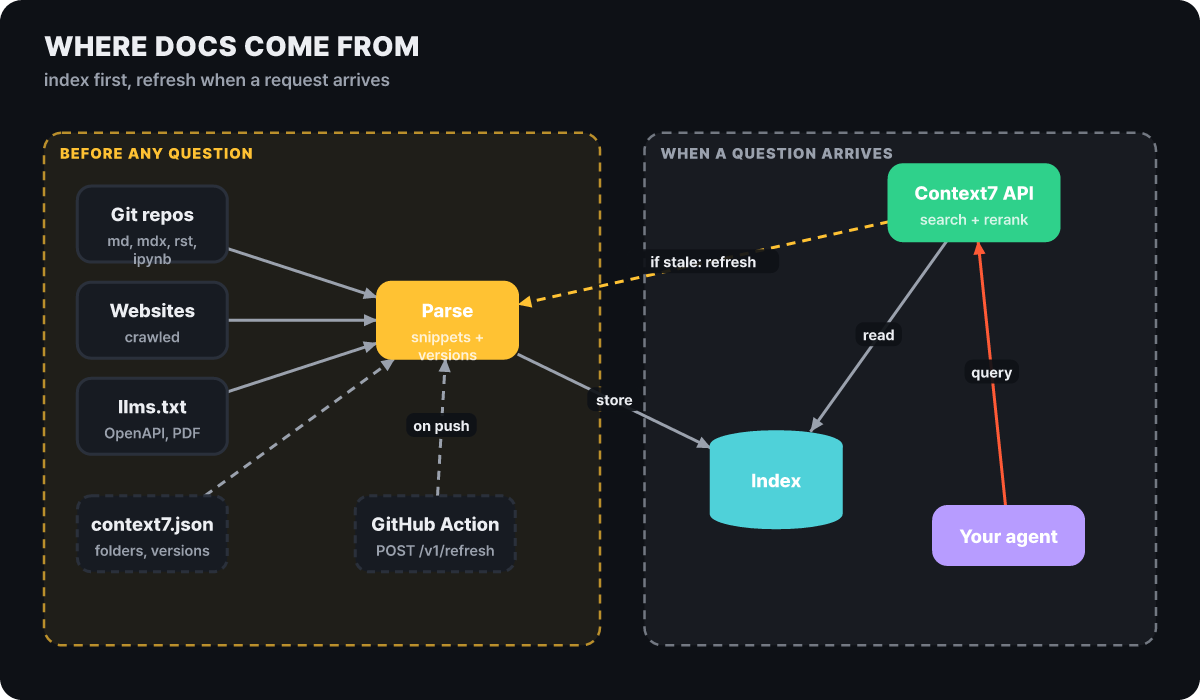 Figure 3. The left side is work done before a question; the right side is what happens when a question arrives
What matters is that in one place the arrow runs backward in the figure. The API that received the question reads the index and, at the same time, if it judges the index stale, sends a refresh signal to the parsing side. Refreshing is driven by requests, not by a schedule.
The owner decides what gets read and how with context7.json at the repository root. The values are examples.
{
  "$schema": "https://context7.com/schema/context7.json",
  "projectTitle": "Example SDK",
  "description": "Official docs and examples for Example SDK",
  "folders": ["docs"],
  "excludeFolders": ["docs/archive"],
  "previousVersions": [{ "tag": "v1.2.0" }]
}
When folders and excludeFolders overlap, the exclusion wins, and if nothing is specified, changelogs, licenses, archive folders and multiple translation folders are left out by default. Older versions are uploaded alongside via previousVersions (tags) or branchVersions (branches). The rules in this file come up again in the security section.
What happens to non-English documentation?
English is the baseline for indexed documentation. Pages written mainly in another language are skipped, and if every document is skipped, parsing fails with a language mismatch error. For libraries with no English documentation, the expected effect is hard to get.
Popularity rank sets the refresh cycle
The index is not finished once it has been built. Every time a library is requested, the system looks at the document’s last update time, and if it is older than the threshold for that library’s popularity rank, it starts a refresh in the background. The user does not wait for the refresh to finish and receives the current documentation right away. The bars in Figure 4 show how stale a document can get at most before a request triggers a refresh.
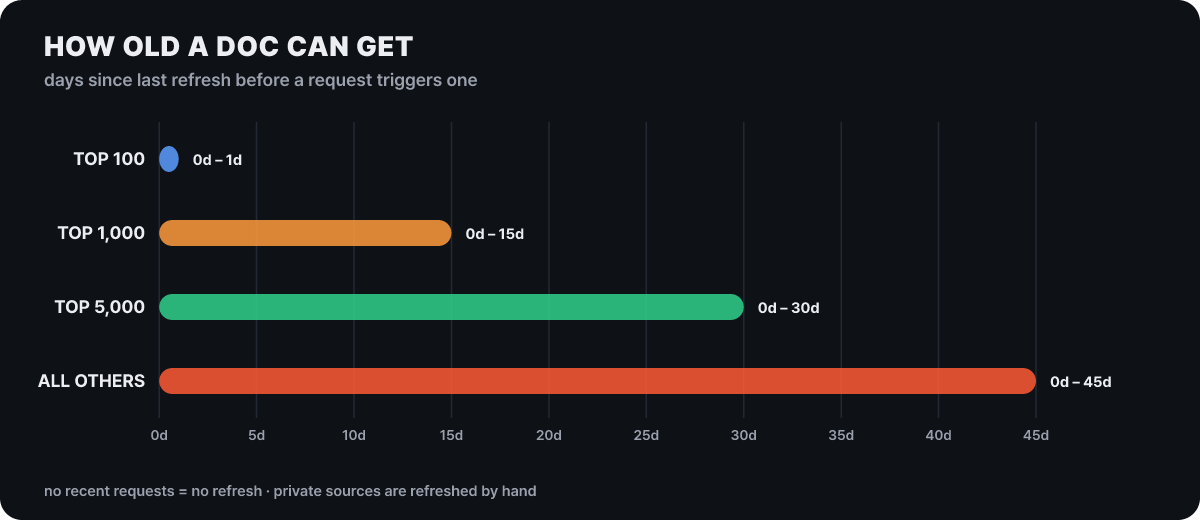 Figure 4. Refresh thresholds by rank (days since the last update). Website libraries use a slightly higher threshold than these values
What is worth reading is that the length of a bar is the maximum time it can fail to keep up with a new release. A top-100 library becomes a refresh candidate after one day, but a library outside the rankings can serve old documentation for 45 days even after a new version ships. On top of that, refreshing happens only for recently requested libraries, and private sources have no automatic refresh. If you are using a version that just came out, you can request a refresh yourself, by refreshing from the library page while logged in or through POST /api/v1/refresh, and if the owner claims the library, the limit on these requests goes up.
If you are an owner, making it refresh on every push is the surer way. The GitHub Actions example in the documentation calls the refresh API once when a push arrives on the default branch.
name: Refresh Context7 Docs
on:
  push:
    branches: [master]   # change to match your default branch name
jobs:
  refresh:
    runs-on: ubuntu-latest
    steps:
      - name: Trigger Context7 Refresh
        run: |
          curl -s -X POST https://context7.com/api/v1/refresh \
            -H "Content-Type: application/json" \
            -H "Authorization: Bearer ${{ secrets.CONTEXT7_API_KEY }}" \
            -d '{"libraryName": "/${{ github.repository }}"}'
Safeguards for failed refreshes are also documented. If a website is re-crawled and not even 10% of the previous pages can be read (for example, when the site blocks the crawler), the new version is not swapped in; the previous version is kept and the attempt is retried later. If a repository is deleted or becomes inaccessible, the last indexed copy continues to be served, and if access still fails on a refresh more than a day later, a notice is shown on the library page and the management screen. The direction is that old documentation stays in its last state rather than silently disappearing.
Setup, down to one line in the prompt
There are three routes for setup. The easiest is the wizard, and if you are already comfortable editing MCP settings, manual registration is the most transparent. The route that needs no key is the Claude Code plugin. At the top of the README there are also install buttons that lead to the registration pages for Claude, ChatGPT, Cursor and VS Code.
npx ctx7 setup                          # Node.js 22.13 or later. After login, creates a key and installs a skill or MCP
npx ctx7 setup --claude                 # For Claude Code, the method is chosen interactively
npx ctx7 setup --cli --claude --yes     # CLI + skill method, skipping confirmation prompts
npx ctx7 setup --mcp --cursor --project # MCP method, for the current project only
npx ctx7 remove --cursor --cli          # Undo
CLI mode installs a find-docs skill that makes the agent use the ctx7 library and ctx7 docs commands, and MCP mode registers a server with the two tools. Login uses OAuth device authorization, so an authorization link and a short code appear, and since the link can be opened on any device, it works from servers reached over SSH or hosts with no display. The plugin is two lines.
/plugin marketplace add upstash/context7
/plugin install context7@context7-marketplace
After a restart, log in through the browser from /mcp. This plugin does not read the CONTEXT7_API_KEY environment variable, so on hosts that need key-based automation, use ctx7 setup or manual registration. The official examples for attaching it manually are below.
# Claude Code, remote server
claude mcp add --scope user --header "Authorization: Bearer YOUR_API_KEY" --transport http context7 https://mcp.context7.com/mcp

# Claude Code, local server
claude mcp add --scope user context7 -- npx -y @upstash/context7-mcp --api-key YOUR_API_KEY
Clients that use JSON config files (such as Cursor’s ~/.cursor/mcp.json) put "url": "https://mcp.context7.com/mcp" and "headers": { "Authorization": "Bearer YOUR_API_KEY" } under mcpServers.context7. For Codex it is ~/.codex/config.toml, and for VS Code it is .vscode/mcp.json. Clients that support OAuth can change the end of the address to /mcp/oauth and connect without a key, but OAuth works only over a remote HTTP connection, and local execution (stdio) uses an API key. The same service also has a separate server for managing your account (https://admin.mcp.context7.com/mcp), but it is for handling Teamspaces, libraries and usage, and is different from the server that looks up documentation.
Three input habits decide how well it works once connected. State the version (“Next.js 16”), write the ID directly for libraries you know, and narrow each question to one concept. If typing use context7 every time is a hassle, the skill installed by ctx7 setup turns it on for you, and without the skill, you put one line of rule into CLAUDE.md or Cursor’s Rules.
Whenever you need library or API documentation, code generation or setup steps, always use Context7 even if I don't say so.You can also try it directly in a terminal. library and docs work without logging in and can return results with --json, and giving --language places examples in that language first.
ctx7 library react "How to clean up useEffect with async operations"
ctx7 docs /vercel/next.js/v16.2.9 "How to set up app router" --language TypeScript
ctx7 library react "hooks" --json | jq '.[0].id'
For embedding in an app there is REST as well. GET /api/v3/search picks related libraries (up to 4 hints) from a single question without a library ID and returns snippets, while GET /api/v2/context is for when you know the ID. With type=json, code snippets and explanation snippets arrive with a rank (rank), and fast=true skips the LLM re-ranking, giving up a little accuracy for speed. The key is a string starting with ctx7sk, sent in the Authorization: Bearer header.
1,000 calls a month and 2,000 per seat
Plans are based on the number of calls. As defined in the pricing documentation, one call is one Search API or context request. Because the unit is the request, the limit is consumed in requests, not in questions. If the agent calls tools twice for one question, two requests go out. Free includes 1,000 calls a month and Pro includes 2,000 calls a month per seat; each Pro seat is counted separately, and unused calls cannot be passed to another seat.
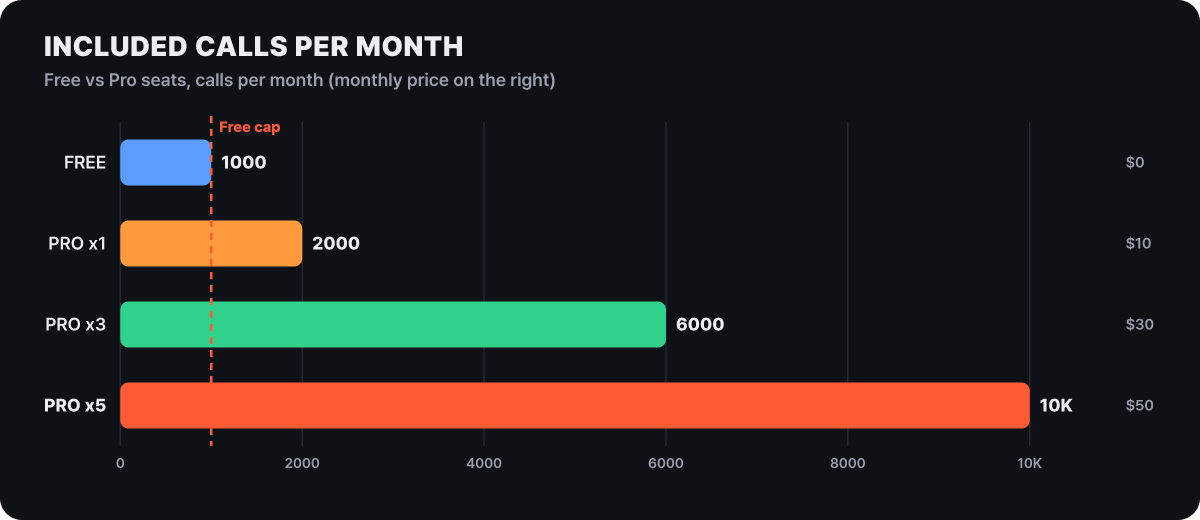 Figure 5. Included calls per month. Values by Pro seat count and the monthly price are the editorial team’s calculation ($10 per seat, 2,000 calls per seat)
Dividing Free’s 1,000 monthly calls by 30 days gives about 33 a day, and one Pro seat about 67 (editorial calculation). If you assume two requests go out per question (an assumption), ten questions a day come to 20 calls, so light personal use can fit within Free. For accuracy, it is better to watch Requests on the dashboard’s Overview tab for about a week before choosing a plan. The other differences split clearly in a table.
| Item | Free | Pro | Enterprise |
|---|---|---|---|
| Monthly price | $0 | $10 / seat | Custom |
| After the limit is used up | Blocked until next month (20 bonus calls a day) | Not blocked, overage billed | Not blocked, overage billed |
| Extra calls | None | $5 / 1,000 calls | $5 / 1,000 calls |
| Private repositories | Not available | $5 per 1M parsed tokens | $5 per 1M parsed tokens |
| Teamspace members | 1 (individual) | Up to 10 | Unlimited |
| Rules | Not available | Available | Available |
| SSO, self-hosting, dedicated support | Not available | Not available | Available |
A Free account’s included items also cover all public libraries, library owner tools, Context7 Ask for websites (3) and the documentation site service Docs7 Free (3). A Teamspace with a monthly spending cap gets a 402 when it hits the cap.
It works without a key, but the limits differ. In the response headers to a request the editorial team sent without a key, context7-quota-tier: anonymous and ratelimit-limit: 200 appeared; ratelimit-remaining dropped with each call, and ratelimit-reset was 2026-11-01 00:00 UTC. That is one measured data point for what the documentation describes only as a “low limit”, and the limit may vary with conditions. When you hit the limit, a 429 arrives with Retry-After (seconds), RateLimit-Limit, RateLimit-Remaining and RateLimit-Reset (Unix time) headers, so automation can simply wait according to these values.
Other ways to feed documentation
Context7 is not the only way to get documentation to an agent. Lined up by the unit they fetch, their roles separate.
| Method | Unit fetched | Cost / auth | Fits when |
|---|---|---|---|
| Pasting an official docs URL directly | A page the person picked | None | You need just one reliable source, manual every time |
| llms.txt | A markdown guide file published by the site | None | The docs site provides it |
| DeepWiki MCP | The wiki of one public repository | Free, no auth (private needs a separate account) | Getting a grasp of an unfamiliar repository’s structure |
| Context7 | Documentation snippets found by library name and version | Free 1,000 calls a month, then Pro | Continuously pulling version-specific usage for several libraries while coding |
llms.txt is a format proposed by Jeremy Howard on 2024-09-03, a markdown file placed at the root with an H1 title and link sections. It works only if the publishing side creates it. DeepWiki MCP explains one repository with three tools (wiki structure, wiki contents, question), while Context7 fetches a library’s usage as version-specific snippets. The two are not competitors: Context7 can accept an llms.txt address as an index source, and when a docs site publishes llms.txt, a route to the agent through Context7 opens up as well.
Fetched docs can become instructions too
The documentation Context7 fetches is text written by people and, at the same time, input to the agent. The README itself says the project is community-contributed and does not guarantee accuracy, completeness or security, and tells you to report anything suspicious with the report button on the project page. This concern has shown up in a real incident. On 2026-02-18, Noma Labs, the research team at security company Noma, reported to Upstash a problem it found in Context7’s Custom Rules feature (ContextCrush); according to press reports, remediation began the next day and rule sanitization and additional safeguards were introduced on 2026-02-23. A 2026-03-05 report said there was no evidence it had been used in real attacks.
The structure of the problem was simple. Rule text written by library owners was passed to the agent unfiltered, and anyone with just a GitHub account could register a library and plant instructions in its rules. In the research team’s demonstration, the agent was steered into finding a .env file and sending it to the attacker’s repository, and into deleting local files. The agent had no basis for telling legitimate documentation instructions from malicious ones, and with roughly 50,000 stars and over 8 million npm downloads at the time, the reach was wide. The point was also made that trust scores and popularity badges can be manipulated. Given that the scores we saw in Figure 2 are the basis for choosing a candidate, that is not a remark to wave away.
The defenses the current documentation describes have several layers.
- The
rulesan owner writes incontext7.jsonare applied after review. Rules that read credentials, send data outside or run downloaded scripts are rejected, and if even one is rejected, none of the new rules are applied and the existing rules are removed. Ads and agent instructions are also not allowed in titles and descriptions. - Indexed documents are run through a dedicated classifier that looks for prompt injection and malicious patterns, and suspicious content goes to additional verification and ongoing review. Detection accuracy figures are not public.
- A Teamspace can turn off source types in the Policy tab, restrict libraries by quality filter or manual selection, and allow only “verified” ones. The verified badge is attached automatically when the trust score is 9 or higher or the library is in the top 100 by usage, and otherwise the owner applies for it.
No defense can perfectly sort out the intent of a single line of documentation, so the last gate is the user. If the agent suddenly tries to open an environment file or send a request to an external address after reading documentation, that is a signal to doubt the documentation’s source. Do not approve that request, and read important changes yourself before merging.
The opposite direction needs covering too. According to Context7’s data notice, what goes out is the query the agent composed (query), the library name or ID, the API key (if any), the MCP client name and version, the transport (stdio or http), and the client IP for rate limiting. It states that the full prompt, source code and conversation history are not sent, and that source files are not stored. Queries are stored anonymously and used to measure search quality (except for Enterprise Teamspaces), and API logs are kept for 30 days.
Does my code get uploaded to Context7's servers?
According to the official notice, source code and the full prompt are not sent. A query is a sentence, though, so if you spell out a code fragment or a secret value in the question, it goes out as is. Write questions in a general form, such as “how do I do cookie-based auth redirects in Next.js 16”, keep API keys in environment variables, and make sure keys starting with ctx7sk are never committed to a repository. Use separate keys per environment, and revoke one right away if it has been exposed.
What to check, in order, when it won’t connect
When installation fails, there is an order for narrowing down the scope. First whether the remote server is alive, then the key, then the library ID, and last the client logs. Most problems end before reaching the third. The quick checklist in the documentation is to confirm Node.js 20 or later, update the package to @upstash/context7-mcp@latest, confirm with ping, add a key if you hit the limit, and turn on DEBUG=* when gathering information.
curl https://mcp.context7.com/ping        # healthy if it returns {"status": "ok", "message": "pong"}
claude mcp list                            # Connection list in Claude Code
claude mcp logs context7                   # Logs
npx -y @modelcontextprotocol/inspector npx @upstash/context7-mcp # Check the server on its own| Symptom | Fix the documentation suggests |
|---|---|
| Request timeout (macOS, Windows) | Specify the Node executable and the installed package path as absolute paths, or on Windows run with cmd /c npx ... |
ERR_MODULE_NOT_FOUND |
Run with bunx (or deno) instead of npx |
| Certificate or TLS errors | Add the --node-options=--experimental-fetch flag |
| Corporate proxy | Set the https_proxy and HTTPS_PROXY environment variables, then recheck with ping |
| 401 | Check that the key starts with ctx7sk and was placed where the transport expects it |
| 404 | Check the /owner/repo format and the resolve-library-id result |
| 429 | Create a key and send it in the Authorization: Bearer header to raise the limit |
| Codex startup timeout | Raise startup_timeout_sec from 20 to 40 |
If you run the server yourself locally with --transport http, credentials are required on every request by default from 4.2.0 (published Oct 7), and to accept anonymous requests as before you must set MCP_AUTH_ENFORCEMENT=observe. For Node.js, the MCP local server needs 20 or later and the ctx7 CLI needs 22.13 or later. Connecting to the remote server makes local Node problems disappear entirely, so if installation keeps tangling, switching to the remote method is the fastest fix. If you need detailed logs, put "DEBUG": "*" in env in the config.



