Cut Video in 1 Second Without Ever Watching the Footage
How Whisper timecodes, Claude Code, and FFmpeg stream copy cut an hour of 4K footage losslessly in about a second, without ever feeding video to an LLM.
To finish a 10-minute software tutorial for YouTube, one professional video editor had to press the razor tool (C) on the timeline exactly 482 times. The hour of raw footage was littered with flubbed lines (NGs), long stretches of silence, and meaningless fillers like “uh…” and “um…”. Playing the timeline at 1.5x speed and hammering the spacebar and shortcuts thousands of times, he burned a full 3 hours and 40 minutes on this tedious rough cut alone.
In a recent video, YouTube tech creator Duncan Rogoff showed an experiment that fully automates this mechanical, soul-draining labor by combining Claude Code, FFmpeg, and the open-source speech recognition model Whisper. The system produces a lossless edit that keeps only the best takes in about a minute, from a single terminal command, without a human ever opening Premiere Pro or DaVinci Resolve.
But feeding a huge 4K video file directly into a large language model (LLM) is impossible in terms of token cost and bandwidth. This post takes a detailed look at the engineering architecture that abstracts the essence of the video into lightweight text metadata and uses Claude Code’s CLI control to build a deterministic FFmpeg pipeline.
A three-stage decoupled architecture for video automation
The biggest obstacles engineers face when building a video editing automation system are the limits of multimodal tokens and the rendering load. An hour of 4K video is a binary measured in gigabytes. Converting it into image tokens at 60 frames per second and injecting them into an LLM would either run up API costs in the millions of dollars or exhaust the context window immediately.
Rogoff’s solution is a three-layer decoupling architecture: audio metadata extraction, language-model cut-list generation, and non-destructive lossless stream copy.
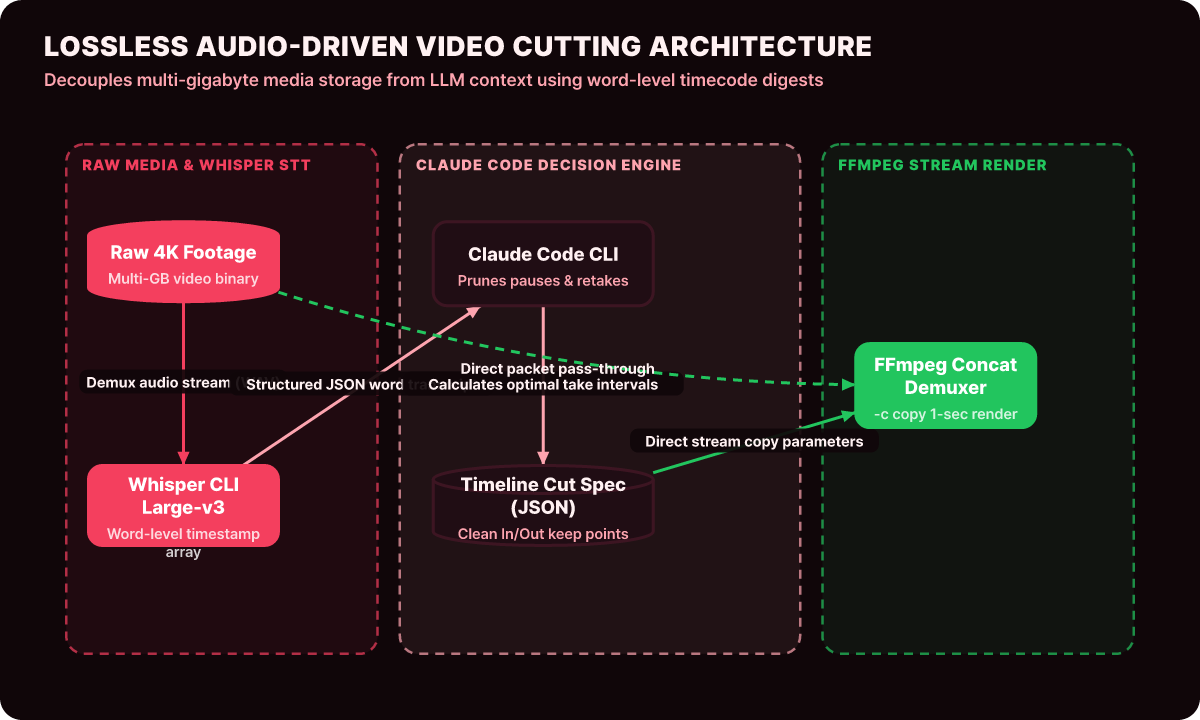
As the architecture above shows, not a single byte of the heavy source video enters Claude Code’s context. Only the audio track is demuxed from the video and converted into word-level timecodes (JSON) by a local Whisper model, and only this lightweight JSON text is handed to Claude Code.
Claude Code analyzes the timestamp array the way it would handle any programming task, cuts out duplicate takes and silences, and passes only the final execution commands to FFmpeg, which finishes the render with hardware acceleration.
Step 1: Extract word-level timecodes with Whisper
Traditional subtitle generators produce timecodes per sentence, but precise video cuts require millisecond (ms) timestamps for where each word and syllable starts and ends.
The following code runs the Whisper CLI or Python bindings locally to extract JSON that contains word-level timecodes.
# extract_word_timestamps.py: Extract precise word-level timestamps from the source video
import whisper
import json
import subprocess
from pathlib import Path

def extract_audio_track(video_path: str, output_wav: str) -> None:
    """Use FFmpeg to quickly split a 16kHz mono audio track from the video"""
    cmd = [
        "ffmpeg", "-y", "-i", video_path,
        "-vn", "-acodec", "pcm_s16le", "-ar", "16000", "-ac", "1",
        output_wav
    ]
    subprocess.run(cmd, check=True, stdout=subprocess.DEVNULL, stderr=subprocess.DEVNULL)

def generate_timed_transcript(wav_path: str, output_json: str) -> None:
    """Extract word-level start/end timestamps with the Whisper model"""
    model = whisper.load_model("large-v3")
    result = model.transcribe(wav_path, word_timestamps=True, language="ko")

    words_data = []
    for segment in result["segments"]:
        for word_info in segment.get("words", []):
            words_data.append({
                "word": word_info["word"].strip(),
                "start": round(word_info["start"], 3),
                "end": round(word_info["end"], 3),
                "probability": round(word_info["probability"], 2)
            })

    with open(output_json, "w", encoding="utf-8") as f:
        json.dump(words_data, f, ensure_ascii=False, indent=2)

if __name__ == "__main__":
    extract_audio_track("raw_footage.mp4", "audio_track.wav")
    generate_timed_transcript("audio_track.wav", "timestamps.json")
Even for an hour of video, the generated timestamps.json is only a text file of about 300KB. That 300KB JSON file becomes the entire map for the edit.
Step 2: Optimize the cut list with Claude Code
Once the JSON timecodes are ready, the Claude Code CLI shows its strong reasoning in the terminal. The developer gives Claude Code clear business rules as a prompt spec, like the following.
- Retake filtering: When the same sentence was said several times, keep only the last, most polished complete take and discard every earlier attempt.
- Silence gap compression: Cut any silent stretch longer than 0.8 seconds between words down to about 0.2 seconds to keep the pacing quick.
- Filler word removal: Precisely cut out filler words with no meaning in context, such as "uh...", "um...", "like...", and "so now...", at the timestamp boundaries.
- Audio padding: To avoid clipped consonants or abrupt cutoffs, keep a 50ms margin before each clip's start point and a 100ms margin after its end point.
After parsing the timeline according to these rules, Claude Code finalizes the intervals to keep (Keep Intervals) in a single cuts.json spec like the following.
[
  { "id": 1, "start": 4.150, "end": 18.230, "text": "Hello, today we cover automating video editing with Claude Code." },
  { "id": 2, "start": 21.050, "end": 45.620, "text": "The first step is extracting word-level timecodes with Whisper." },
  { "id": 3, "start": 48.900, "end": 82.400, "text": "With FFmpeg stream copy, rendering finishes in one second with no quality loss." }
]
Step 3: Lossless stream rendering with FFmpeg
Novice developers make the mistake of re-encoding the entire video with the x264 or HEVC codec every time they cut a clip. Re-encoding pushes the CPU and GPU to 100%, takes 40 to 50 minutes of rendering for an hour of video, and accumulates color loss (generational loss) with every generation.
With lossless stream copy (-c copy), which preserves the bitstream of the video packets as is, however, you can cut several gigabytes of 4K video and join the pieces into one in just a minute.
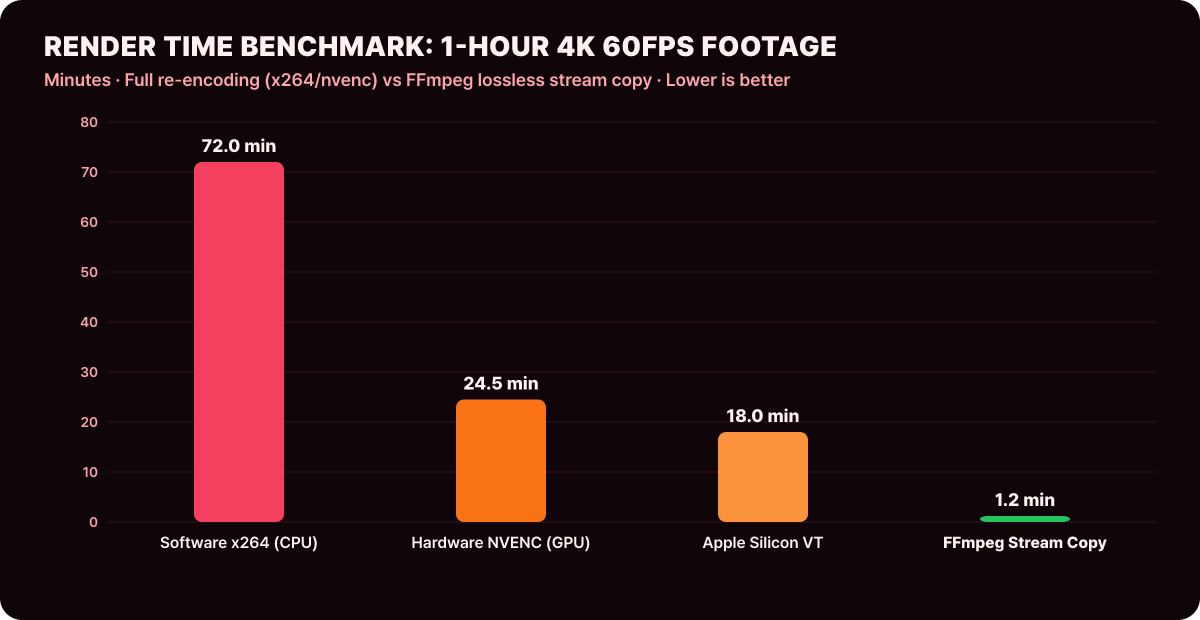
As the benchmark graph above demonstrates, software re-encoding takes 72 minutes and even GPU hardware encoding takes over 24 minutes, while FFmpeg lossless stream copy finishes rendering in only 1.2 minutes, with a quality degradation rate of exactly 0.0%.
The final Bash script that Claude Code generates works like this.
#!/usr/bin/env bash
# run_fast_cut.sh: Ultra-fast cut editing based on lossless stream copy
set -euo pipefail

RAW_VIDEO="raw_footage.mp4"
TEMP_DIR="./build/chunks"
CONCAT_LIST="concat_list.txt"
FINAL_OUTPUT="rough_cut_final.mp4"

mkdir -p "$TEMP_DIR"
rm -f "$CONCAT_LIST"

# 1. Iterate over the cut list (cuts.json) and cut each clip losslessly
python3 - << 'EOF'
import json, subprocess

with open("cuts.json", "r") as f:
    cuts = json.load(f)

with open("concat_list.txt", "w") as cl:
    for c in cuts:
        chunk_name = f"./build/chunks/chunk_{c['id']:04d}.mp4"
        duration = c['end'] - c['start']
        cmd = [
            "ffmpeg", "-y", "-ss", str(c['start']), "-i", "raw_footage.mp4",
            "-t", str(duration), "-c", "copy", "-avoid_negative_ts", "make_zero",
            chunk_name
        ]
        subprocess.run(cmd, stdout=subprocess.DEVNULL, stderr=subprocess.DEVNULL)
        cl.write(f"file '{chunk_name}'\n")
EOF

# 2. Join the individual chunks into a single video at high speed with the concat demuxer
ffmpeg -y -f concat -safe 0 -i "$CONCAT_LIST" -c copy "$FINAL_OUTPUT"

echo "=== Rough cut complete in lossless quality: $FINAL_OUTPUT ==="
Taming sub-agent rendering with throttling
Duncan Rogoff candidly shared a serious hardware failure he hit during the experiment. To process each chapter of the video in parallel, he told Claude Code to spawn nine sub-agents at once to render. The workstation’s fans roared, the CPU temperature shot up to 100 degrees, and the whole system went down.
To prevent this, Rogoff established the following token and compute throttling guide.
-
Limit agent pool concurrency (concurrency semaphore)
Strictly cap the number of simultaneously running sub-agents at 2 to 3, taking the machine’s physical core count and VRAM capacity into account. -
Token caching and prompt reuse
By caching the cut-editing rule set and FFmpeg command templates verified on the first chapter, he cut token consumption by more than 50% on later videos, from 1.4 billion tokens to about 700 million. -
Disk I/O optimization for intermediate chunks
Instead of continually writing and deleting hundreds of small piece files on a physical SSD, he temporarily mounted a RAM disk (tmpfs), eliminating wear on the drive and the I/O bottleneck.
Building an FCPXML timeline generator
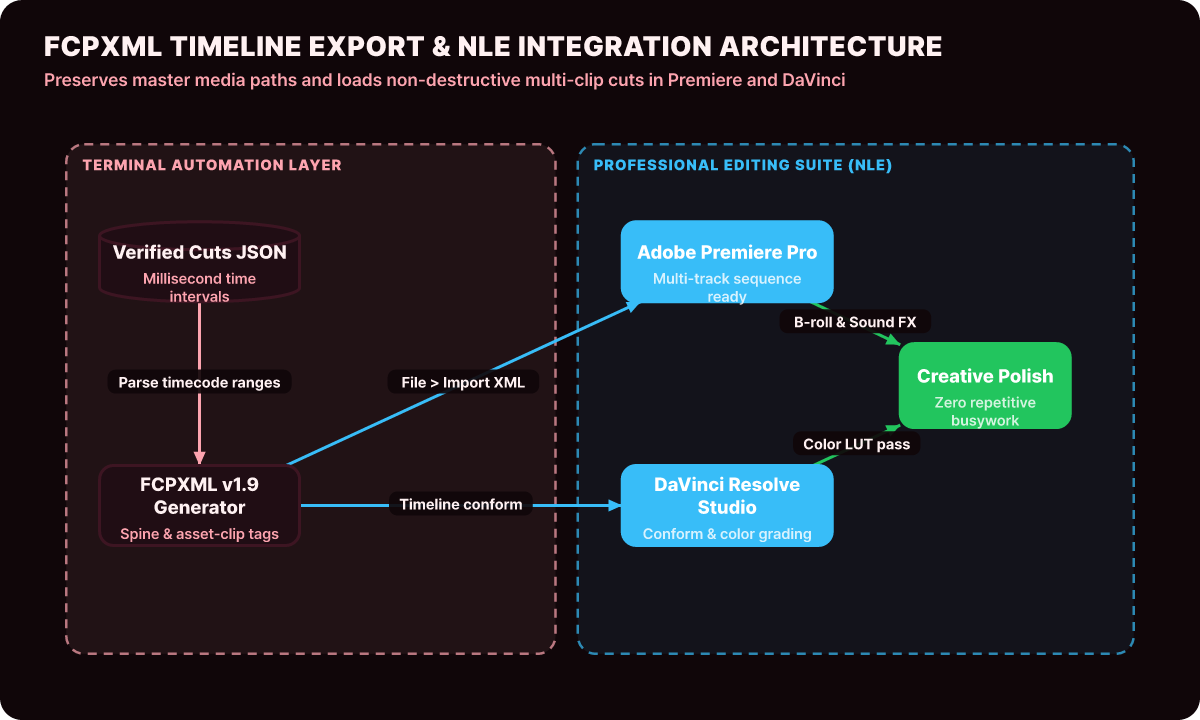
To go beyond simple MP4 rendering and hand the cut list to professional NLE software, here is the Python builder for FCPXML (Final Cut Pro XML version 1.9) that Claude Code generates. This script preserves the path of the source media file while placing exact In/Out points, with offsets, on the timeline track.
# fcpxml_generator.py: Generator that converts a JSON cut list into standard FCPXML
import json
import xml.etree.ElementTree as ET
from xml.dom import minidom
from pathlib import Path

def build_fcpxml_from_cuts(cuts_json_path: str, media_file_path: str, output_xml_path: str, fps: int = 60) -> None:
    with open(cuts_json_path, "r", encoding="utf-8") as f:
        cuts = json.load(f)

    fcpxml = ET.Element("fcpxml", version="1.9")
    resources = ET.SubElement(fcpxml, "resources")

    ET.SubElement(resources, "format", id="r1", name=f"FFVideoFormat1080p{fps}", frameDuration=f"100/{fps * 100}s")
    asset = ET.SubElement(resources, "asset", id="r2", name=Path(media_file_path).name, src=f"file://{Path(media_file_path).resolve()}")

    library = ET.SubElement(fcpxml, "library")
    event = ET.SubElement(library, "event", name="Automated Cuts Event")
    project = ET.SubElement(event, "project", name="Rough Cut Sequence")
    sequence = ET.SubElement(project, "sequence", format="r1")
    spine = ET.SubElement(sequence, "spine")

    timeline_offset_frames = 0
    for cut in cuts:
        start_frame = int(cut["start"] * fps)
        duration_frames = int((cut["end"] - cut["start"]) * fps)

        clip = ET.SubElement(spine, "asset-clip", {
            "ref": "r2",
            "name": f"Clip_{cut['id']:03d}",
            "offset": f"{timeline_offset_frames * 100}/{fps * 100}s",
            "start": f"{start_frame * 100}/{fps * 100}s",
            "duration": f"{duration_frames * 100}/{fps * 100}s",
            "format": "r1"
        })
        timeline_offset_frames += duration_frames

    xml_str = minidom.parseString(ET.tostring(fcpxml, encoding="utf-8")).toprettyxml(indent="  ")
    with open(output_xml_path, "w", encoding="utf-8") as f:
        f.write(xml_str)
    print(f"FCPXML generated successfully: {output_xml_path}")
When you drag the XML file produced by this generator into Premiere Pro or DaVinci Resolve, the hundreds of cuts that used to take half a day of manual slicing and pasting load in one second as a cleanly aligned timeline track.
Four-point checklist for video editing automation
These are the four essential checks when building an engineering pipeline that combines Claude Code with media processing tools in-house.
| Check area | Criterion | Failure symptom if not met | Production safeguard |
|---|---|---|---|
| Lossless codec copy | Is -c copy applied by default in the FFmpeg parameters? |
Pointless full CPU load and a 40x longer render time | Force 100% stream copy for cuts, except for special effects that need filters |
| Timestamp resolution | Are the timecodes word-level rather than sentence-level? | The first syllable of a word gets clipped | Always enable Whisper’s word_timestamps=True option |
| Keyframe alignment | Are there black frames from I-frame (keyframe) boundary mismatches? | A 0.1-second visual glitch at cut joins | Where needed, apply Smart Render to only the 5 frames around each cut point |
| Sub-agent control | Is the number of concurrent background rendering processes limited? | OOM and OS kernel panic | Cap concurrent rendering workers at 2 using a semaphore |
In environments that process dozens of hours of source video a day, such as broadcasters and large YouTube studios, an architecture that integrates with a distributed task queue (such as Celery or BullMQ), splits the cut-list JSON issued by Claude Code into task chunks, and distributes them across multiple worker nodes works well. Keep the video binary data on a NAS or S3 object storage, and let agents exchange only text timecodes and metadata a few kilobytes (KB) in size, and you can eliminate the network traffic bottleneck entirely.
The role of an AI agent does not stop at being a script writer that merely generates code. When it evolves into a system orchestrator that freely connects and coordinates a CLI environment and powerful Unix pipeline tools (FFmpeg, Whisper, jq, ImageMagick), it can free people from repetitive, draining media grunt work in the most elegant and deterministic way. A design sense that is not intimidated by the sheer size of video and cleanly separates the flow of data into text and binary is the pinnacle of next-generation multimodal engineering.