How Orkas unsticks work, with Claude Code as a worker
From a source comment about 21 straight empty review cycles, we follow five Orkas scenarios using constants in the official source and our own experiments.
Twenty-one. That is the number in a comment in Orkas’s review scheduler source. In the old design, even an agent that had been idle for a long time was forced onto the review list once a week, and the result, according to the author’s diagnosis on their own machine, was that the cycle ran 21 times in a row without a single review taking place. All five review slots were occupied by the same agents, which had nothing to do. The comment is not a bug report; it stays in the code as the reason the code looks the way it does now.
Orkas is an MIT-licensed desktop app in which one Commander directs several agents. It mixes 16 built-in specialist agents with Claude Code, Codex, OpenCode, OpenClaw, and Hermes-Agent, which are already installed on your computer, in a single chat window. The README lays out the feature list well, so this article does not repeat it. Instead we set up five scenes in which, after you hand the app some work, something gets stuck, overflows, shuts off, or changes, and follow which mechanism in the source kicks in at each moment.
The requests, file names, and times in the scenes are all examples made up by the editorial team. The facts the scenes rely on come from the repository README, the constants and comments in the source code, and the release notes, as of the main branch on 2026-11-02. Things we ran ourselves are marked separately as Editorial experiment. The experiments did not install the app or call a model. One source file (context-budget.ts) was run exactly as it is; for the rest, we copied short calculation functions from the source and ran those. Interpretations drawn from reading the source are marked as Editorial note.
The three paths a refactoring request splits into first
Friday, 4 p.m. A developer who has found that the date handling in the billing module is outdated types this into the Orkas chat: “Switch the payment module’s date handling to the new library, and review the changed parts separately and report back.” It is one sentence, but from the Commander’s point of view it mixes different kinds of work: editing code, visually verifying the result, and the odd jobs in between (finding where the old functions are called).
The README describes how the Commander hands off work with three tools. The tool names are the distinction.
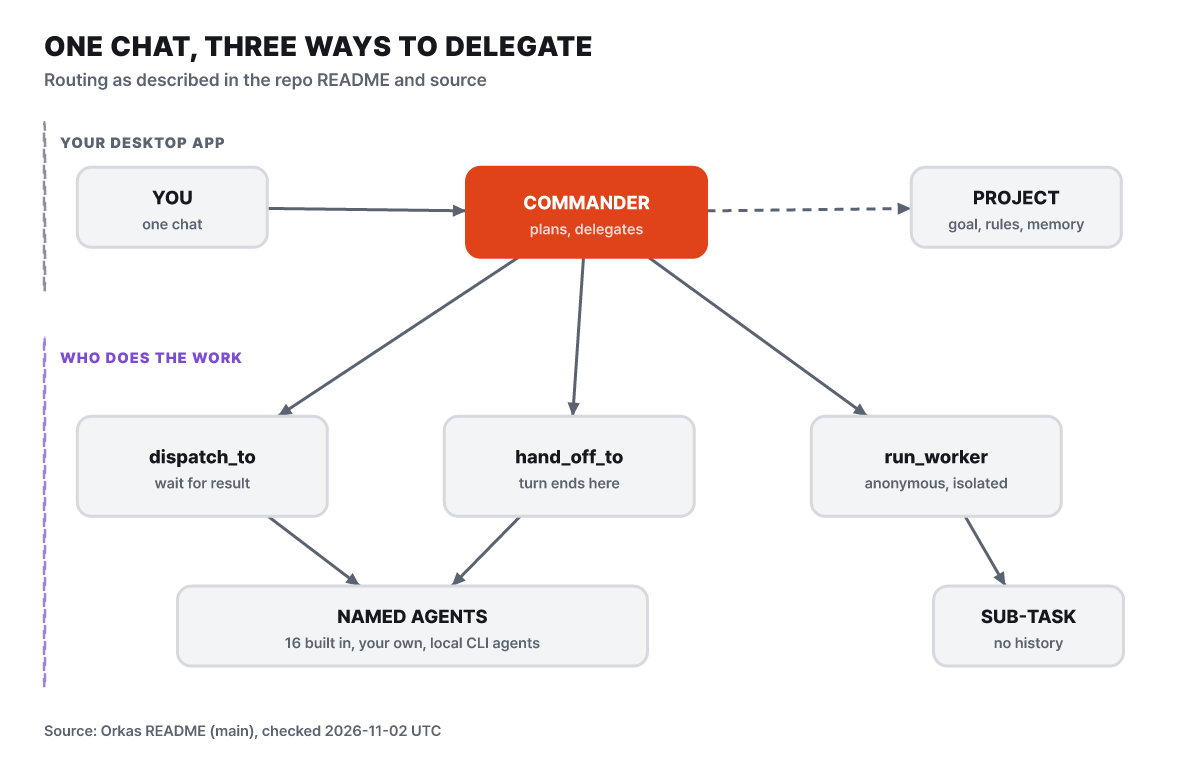
Figure 1. The delegation structure (an editorial diagram based on the README). Two paths go to named agents; one goes to anonymous workers.
What to look at first in the figure is the difference between the middle path and the left path. The left one, dispatch_to, runs a named agent and the Commander gets the result back. The Commander can wait for the result and keep working, or throw the job out asynchronously and get a notification when it finishes. The middle one, hand_off_to, passes off all the remaining work and ends the Commander’s turn. The agent that receives it answers the user directly, and if you optionally set up a takeover, the Commander comes back later for a larger task. The right one, run_worker, spins up an anonymous subtask with no name, no chat history, and no skills, and receives only the result, privately.
So the request above splits like this. Changing the date handling goes to a coding agent through dispatch_to, because the Commander needs to hold the result to chain the next step. Checking twelve folders for places that call the old functions is a chore that needs no conversation context, so it is scattered with run_worker. For the final review, hand_off_to goes to a different agent such as Codex. If the reviewer speaks to the user directly, the Commander never blurs the review by summarizing it again. Which agent gets which job is the Commander’s judgment, and if the split comes out differently from what you intended, you correct it with another instruction in the chat.
When to use dispatch_to
- You need the result for the next step
- The Commander coordinates to the end
- You run it asynchronously and carry on with other work
When to use hand_off_to
- The receiving side takes responsibility for the remaining work
- The answer comes in the receiving agent’s own voice
- If needed, a takeover brings the Commander back
Here is where Claude Code sits. The README explains that Orkas runs already-installed CLI agents as local sessions. The Commander and the built-in agents share a single model setting in the app, but external CLI agents keep their own model settings. That means a single conversation can have more than one model passing through it. The release notes show traces of this thread being polished. v2026.8.29 says it made Codex and local CLI execution more resilient to broken streams, differences in how they start, and parallel tool results, and v2026.9.11 stopped surrounding work from vanishing when you answer a local coding agent’s question or cancel a pending input. v2026.10.17 records the log and elapsed time of a dropped CLI process while no longer replaying work that has already finished. The shape of the release notes suggests that using external CLIs as teammates was not smooth from the start but something whose corners have been sanded down release by release.
Four of ten slots, and one line per file
Now let’s see what happens when those twelve folder checks go out at the same time. The README only says that session locks and concurrency limits bind parallel work; the values are in the source. Opening src/main/util/locks.ts, the relevant comment in group_chat/bus.ts, and actor-budgets.ts, there are five mechanisms involved in this scene.
| Mechanism | Value | Role in this scene |
|---|---|---|
| Per-conversation lock | 1 per conversation | A new turn cannot start in the same conversation before the previous turn finishes |
| Global slots | 10 | App-wide cap on simultaneous model calls |
| Anonymous worker slots | 4 | Cap on simultaneous nested run_worker calls |
| Named-agent runs per conversation | 4 | Cap on agent tasks running at once in one conversation |
| File edit lock | 1 per path | Prevents two tasks from editing the same file at once and losing one side’s change |
If twelve run_worker requests arrive at once, the 4 anonymous worker slots fill first and the other 8 wait in line. If each takes the time of one model call, they finish in three waves of four (editorial calculation: 12 ÷ 4 = 3). The design below shows an intent to keep queued work from blocking anything else. The slot count of 4 is changed with the environment variable ORKAS_MAX_DISPATCH_CONCURRENCY, and the cap of 4 on named-agent tasks per conversation with ORKAS_MAX_CONVERSATION_TASKS. These are knobs for people who launch from source.
# Example of lowering the anonymous worker concurrency cap to 2 when running from source (an example written by the editorial team)
ORKAS_MAX_DISPATCH_CONCURRENCY=2 ./run.sh
The reason anonymous worker slots are separate from the 10 global slots is written plainly in a source comment. Nested runs under the Commander deliberately skip the global slots. If the parent turn already holds a slot and the child waits for the same slot, both wait forever in a deadlock. Nested runs therefore need their own cap, and because each one uses an entire model call, it was set to 4, lower than the global value. The comment adds that only the Commander takes this slot, so there is no re-entry and no deadlock. Workers and agents do not receive the delegation tools. That means it is one step down from the Commander, not a chain of delegation. Named-agent runs tell the same story. According to the comment in bus.ts, the per-conversation cap of 4 does not count the Commander’s turn (the Commander is serialized per actor, so only one runs at a time), a crowded conversation does not eat into another conversation’s slots, and whether to start a run from the queue is decided by fixed rules, with no model in the judgment.
The editorial team reads one thing from these numbers. The number 10 does not mean ten agents work at the same time. The global slots count model calls that the app itself makes, while anonymous workers and named-agent runs each have their own doors. The README’s structural description suggests that model calls an external CLI agent makes in its own process run regardless of these slots. So scattering twelve jobs never puts twelve lines running at once, and the speedup is at most 4x.
The problem of two places editing the same file belongs to the file edit lock. Unpacking the source comment: parallel workers are separate runs, but they share one process and one file system. The edit_file tool goes through three steps, checking the file’s state, reading, and writing, and if two runs interleave those three steps on the same file, one side’s edit disappears. So there is one lock keyed by the absolute path, and the freshness check and the write are made into a single unit. Different files do not wait on each other. This lock ledger has a backstory too. According to the comment, locks created for every session number and every path where a write occurred used to stay in the map forever and keep growing. Now it counts the holders and waiters, and removes an entry from the ledger only when the count is 0 and it is released. Deleting an entry while someone is waiting would hand the next caller a fresh lock and break exclusivity, which is why it counts. The release notes also list fixes in v2026.8.25 that keep changed file contents alive across model rounds and align the edit-freshness recovery guidance.
Editorial note. The scope the comment describes is Orkas’s own edit_file tool. The natural reading of the source wording is that files Claude Code edits with its own tools fall outside this lock. So it is safer to avoid, from the start, an instruction that hands the same file to two external CLI agents at once. For a Friday-afternoon refactor, splitting the work by folder is enough.
The Monday 9 a.m. research and the closed laptop
The second scene is recurring work. Suppose the same developer wants a report every Monday morning on changes in the release notes of four competing products. Because this request is not a conversation that ends after one question, Orkas uses the concepts of projects and automations. As the README explains, a project is a unit that holds goals, rules, memory, and files, so a new conversation always starts from that content. Each project has a to-do list that people and agents share, and when autopilot is on, the team picks up the next to-do on its own and brings the finished result back for review. Automations repeat work hourly, daily, weekly, or monthly.
The agent that produces the report is the built-in DeepResearcher. The README’s table introduces it as the one that delivers verified sources, flagged contradictions, and auditable reports. If you write “price table changes as a table, a source link on every sentence” into the project’s rules, every Monday starts from that rule. When you want it to refer to earlier reports, it helps that memory is split into three places. User preferences and project facts live in persistent notes, documents the user added live in the library, and past conversations live in chat_history tool search. The library splits documents into pieces and stores them in a local SQLite vector index, the embedding model also runs on the device (about 95MB is downloaded on the first run of the source build), and the library tool lists files, searches relevant pieces, and reads the original text. The FAQ explains that answers drawn from this library carry citations that link back to the source pieces. When a report relies on last week’s file, you can click the citation to check the original.
Connectors are how results get sent out. They attach to services like Gmail, Google Calendar, Sheets and Drive, Notion, Slack, Shopify, and Stripe, and according to the README the default is to ask the user before sending, posting, or deleting. The v2026.9.11 release notes say guided setup and task-scoped permissions were added to these connections. The step of posting the Monday report to Slack remains a step that waits for approval. Because a human eye passes over it once, no message goes out at 9 a.m. Monday with nobody there. That fact leads to the next question. If nobody is there at nine, is the computer on?
The README’s FAQ is blunt about this. Orkas is an app that runs on the user’s computer, so the computer must be awake and the app running for autopilot and automations to run. Starting with v1.9, the most recent one of the missed automations is caught up and run if the computer wakes or the app starts within 12 hours.
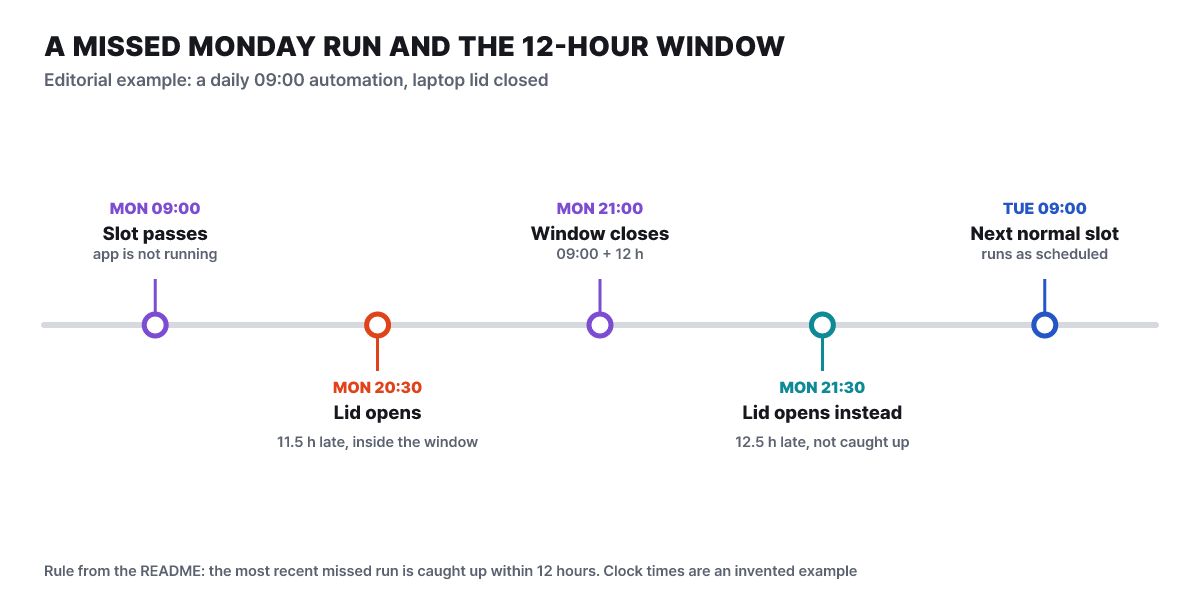
Figure 2. The 12-hour window drawn with example times made up by the editorial team. We assumed a daily 09:00 automation and a laptop lid that had been closed.
What to look at in this timeline is the difference between the red dot and the teal dot. If you open the lid at 20:30 on Monday, only 11 hours 30 minutes have passed since the missed slot, so the catch-up happens; if you open it at 21:30, it has been 12 hours 30 minutes, so this run is skipped and waits for the regular slot at nine on Tuesday. Editorial note: this reads the README sentence as “within 12 hours of the missed slot,” and the documentation says nothing more about which clock the app uses to measure the missed time. If this reading is right, there are two practical conclusions. A daily job loses little if it skips a day, but a report that runs only once every Monday is skipped for the entire week if the app is not turned on within 12 hours on Monday. Also, the catch-up covers only the most recent one. If you left it off for a three-day weekend, three days’ worth does not pour out at once; only the last slot runs, when the conditions are met.
The release notes also show what you see when you open the app. The headline change in v2026.10.17 is a Commander home that gathers unfinished to-dos and unread work results, and v2026.10.27 added an improvement that opens saved automations and linked to-dos directly from a card. If you opened the laptop at the office on Monday morning, the first screen is the doorway to the results that piled up over the weekend. If keeping the computer on is hard, setting the automation time just before you leave work or just after you arrive, so it falls in the 12-hour window more often, is one option within this structure. That is the extent of what the app promises in its documentation.
The context at the 500th round of tool calls
The third scene is when the work gets long. Suppose you hand the built-in ProductDeveloper (in the README’s table, the agent that reads a repository and does implementation, bug fixes, refactoring, and review) a configuration format migration spanning two hundred files. The agent repeats a few hundred tool calls: reading files, editing them, running test commands. Each call’s result piles up in the conversation history, so at some point it hits the model’s input limit. Because this agent is run by Orkas’s own runner, not an external CLI, the code that handles this limit is in the source.
First, there is a cap on the number of rounds itself. According to actor-budgets.ts, the Commander and named agents can run up to 500 rounds of tool calls per turn (anonymous workers follow the schema default). The comment at the top of the file says periodic checkpoints, a hard cap, repeated-call protection, and an idle watchdog bind long work. Within that cap of 500, runner.ts issues nudges, signals that tell the model to check the situation, under three conditions. When the editorial team copied and ran the short functions from the code, this is what came out. Editorial experiment.
- At rounds 100, 200, 300, and 400, a signal to check the wrap-up appears. 100 is
TOOL_LOOP_CHECKPOINT_INTERVAL, and when it reaches 500 the cap takes over instead of a signal. - If a single run goes past 8 minutes and has made 8 or more tool calls, a time-based signal appears.
- If context compaction has happened 2 or more times and the calls reach 375, which is 75% of the cap, or if compaction has taken 2 minutes or more and calls exceed 8, a “circling after compaction” signal appears. It is not at 374 but from 375. With only one compaction, even at 450 this signal does not appear.
A source comment makes clear that the third signal is not an interruption. In a legitimately long run it is just a word telling the agent to check what is done and what remains and to converge, and it does not stop the agent. It is a device for catching the symptom of forgetting earlier work through compaction and repeating the same task, that is, circling after compaction.
How does that compaction happen? The README explains it in two words: completed conversations use a bounded recent-history window, and long active work uses checkpoints. Going down into the code, there are several layers.
- Past conversationsOnly up to the last 5 turns are loaded verbatim, sized at the smaller of 30K tokens and 20% of the spare input space at the start of the turn
- Work in progressA checkpoint that summarizes and folds the earlier steps. The input handed to the summarizer at one time is at most 150K tokens
- A single tool resultUp to 10K tokens can enter the context as is; skill documents are read whole, up to 25K tokens
- Growth roomOne sixth of the window headroom is left empty for what grows before the next check
Among these layers, the one that matters in this scene is the structured work record. The README says that file reads, file changes, and command runs have separate structured records that survive context compaction. The constants in workspace-state.ts show the size. It keeps up to 256 observation records, up to 512,000 characters per file snapshot (8 million characters in total), and even after compaction it preserves up to 2,048 paths, changes from 16 turns, and 256 read records. The summary raised as model input includes at most 20 files and 6 commands. In a job that changes two hundred files, this means “which files have been changed and how far” is not left to the memory of a summary sentence alone. Facts the summary missed can be checked again against the records.
The source comments also go on at length about what happens when compaction itself fails. After 3 consecutive failures, it stops trying LLM-based compaction (MAX_CONSECUTIVE_COMPACTION_FAILURES). There is no cap on the number of successful compactions. The explanation in the comment is interesting. There had already been a cap on compactions per run twice, and both failed the same way. From the moment the cap is hit, the context only grows, the inline space for results shrinks to 0, and the agent keeps calling tools whose results it cannot see until an error arrives at the moment the request overflows. Raising the first cap from 3 to a value proportional to the tool budget only moved the wall. So the code now has devices that directly prevent waste: a fingerprint check that never compacts the same state twice, and a condition that the summary must actually free the context. A single compaction call also has a time budget. If the first response does not arrive within 60 seconds it switches to another candidate model, once the response has started it must not go silent for more than 60 seconds, and the wall-clock time one compaction step may use is 10 minutes.
The README’s one line, “named-agent tasks are tracked individually and can be cancelled, and being queued is not treated as a completed result,” is the last mechanism in this scene. Even if a two-hundred-file job stops halfway, no false “done” mark is left, and you only need to cancel the individual task.
Calculating the fold point on a 200K window
The numbers in these layers change with the window size. context-budget.ts is a pure arithmetic file with no side effects, so the editorial team took this file as it is and ran it. Editorial experiment. The input was 200,000 tokens of usable model input, and the fixed overhead of 12,000 tokens taken by the prompt and tool definitions and the 3,000 tokens of resident state are assumptions (the app measures the real values while running).
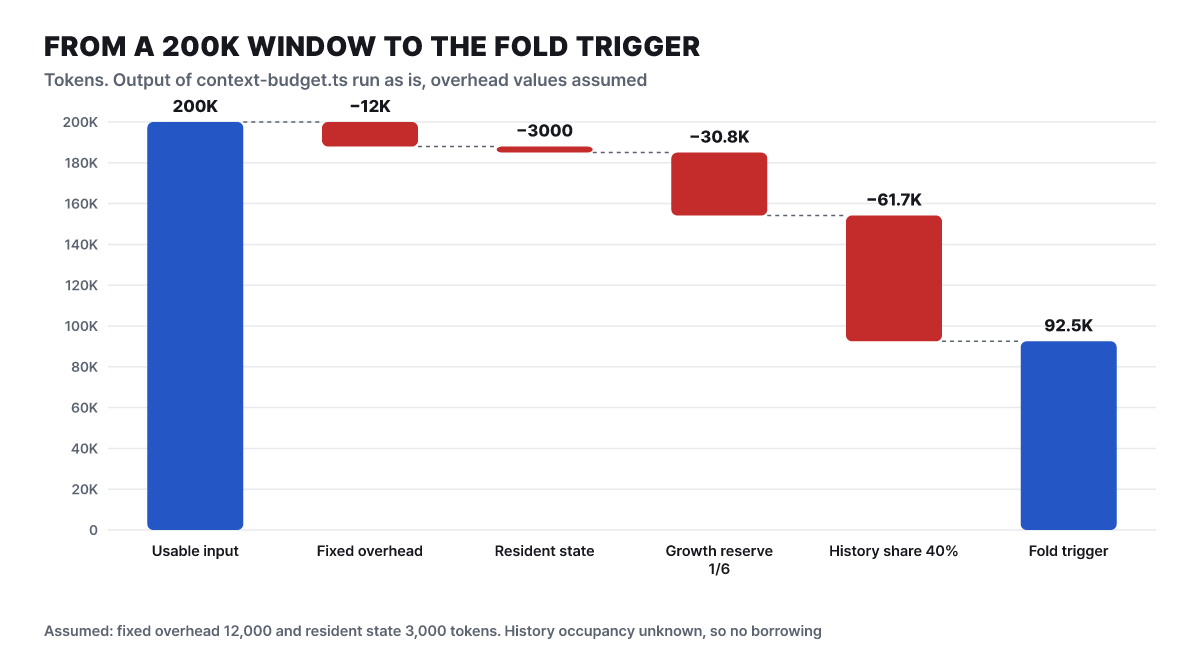
Figure 3. The calculation up to the fold start point on a 200K window (editorial experiment, including assumed inputs).
What to look at in the waterfall is the blue bar on the right. Subtracting the overhead and resident state from 200,000 tokens leaves 185,000 tokens as the room available for planning. One sixth of that, 30,833 tokens, is set aside as growth room, and the remaining 154,167 tokens are split 60% to active work and 40% to past conversations. The past-conversation share is 61,667 tokens, and the point at which folding starts once active work fills its share is 92,500 tokens. Since a single tool result is at most 10K tokens, that point is reached after receiving roughly nine large results (editorial calculation).
The size of each fold also comes from these values. In the same run, the recent tail kept when folding is 45% of the active share, or 41,625 tokens, the maximum unit folded at once is half of that, 20,812 tokens, and the target length of one summary is 2% of the active share clamped between 1,200 and 6,000, giving 1,850 tokens (storage cap 3,083). A source comment gives the reason for this proportionality. If a fixed 1,200-token summary stands in for 270K tokens of process, on a 60K window the space per fact shrinks far below the space the summary holds, and lost facts come back as the cost of reading again. So the larger the window, the larger the summary.
Active work borrows whatever the past conversation did not actually occupy. This file takes the past-conversation occupancy as historyOccupancyTokens and adds the unused part of the 40% share to the active-work share. These are the values from running the same 200K window with different inputs. With 0 tokens of past conversation the fold point is 154,167 tokens, with 20,000 tokens it is 134,167, with 40,000 it is 114,167, and when the full 61,667 is used it returns to 92,500. This means a long task in a project with a long-running prior conversation has less to borrow and folds early, while a long task started in a fresh conversation holds onto the verbatim text longer. The input a single checkpoint passes to the summarizer is capped at 150K tokens, so in a window with a large active-work share, a bundle that does not fit is deferred to the next batch. In the wording of the code comment, “a complete bundle that does not fit stays as raw text.”
The review that runs on a night when nobody is using it
There is no user in the fourth scene. Suppose that after a week of use, you left the app on over the weekend and walked away. The README explains that in this time slot, when the app is idle, a background job looks back over recent activity, and each agent can update its own self-assessment file COMPETENCE.md, LEARNING_STRATEGIES.md for writing down reusable methods, and learned skills. The file that conducts this job is reflection-orchestrator.ts. Its header comment lays out the design at length, so the order of the scene can be taken from there.
After the app starts and a startup window passes, the first cycle runs, and after that it runs once every 14 hours (CYCLE_INTERVAL_MS). Even when a cycle runs, not every agent is reviewed. Each agent must first pass a cooldown (a minimum of 4 hours between reviews of the same agent), and then pass the “dirty gate.” It is a review candidate only if new signals for that agent have accumulated in signals.jsonl since the last review, or the session record file has changed more recently. Conversations the Commander handled directly are collected under a virtual agent ID called _default. An agent being reviewed for the first time looks back over the last 48 hours of records. If there are more than 5 candidates, only 5 are picked in order of longest untouched and the rest move to the next cycle; no agent disappears. If the app is in use, it retries once after 10 minutes, and when the user returns, a review in progress also yields.
One agent’s review must finish within 120 seconds. According to the comment, an actual review was measured at about 25 seconds to read the two meta files and write the update, and even the worst case is capped at five model calls. This deadline has a design backstory too. It used to be that the whole cycle was bound by a single 30-second time slice, and a slow agent that reads files and writes updates ended not just itself but the whole cycle. Meanwhile, the answer “nothing to save” finishes in 5 seconds, which created a selection pressure in which only fast agents survive. Now each agent has its own deadline, and the safety net for the whole cycle is 5 × 120 seconds + 60 seconds, that is, 11 minutes.
A review also has four possible outcomes. It writes an update and keeps it (reflected), reads the records and decides there is nothing to save (nothing_to_save), there was no activity at all in that window, or the write is deferred. Because the review prompt tells the agent not to review for the sake of reviewing and to answer “nothing to save,” nothing to save counts as a normal exit, not a failure. The comment says that in the days before this distinction, the feature ran silently broken for weeks without anyone noticing. Receiving a response and leaving something behind were counted as the same thing. The writes a review now leaves are fixed as write in the metacognition tool and create, patch, and delete in skill_manage; reads and lists are for gathering context and are not counted as writes.
It is worth knowing that review results change an agent’s behavior. The updated assessment and method files become input to the next run, so even the same agent can behave differently over time. For work where the same result must repeat, the editorial team suggests opening these files from time to time.
The code also reflects that a review spends model-call cost. If every configured model candidate is in cooldown, the whole cycle is skipped, because each agent would consume only a failed attempt anyway.
Why a failing review never reaches 64 hours
Let’s look separately at the failure handling. According to the comments, a transient failure (a provider error, an unreadable source) does not advance the reference timestamp, so it is retried in the next cycle, but the attempt itself is recorded, so the cooldown and the order are determined from the last attempt. The cooldown doubles with each consecutive failure. It multiplies the base 4 hours by a power of 2, and the exponent stops at 4.
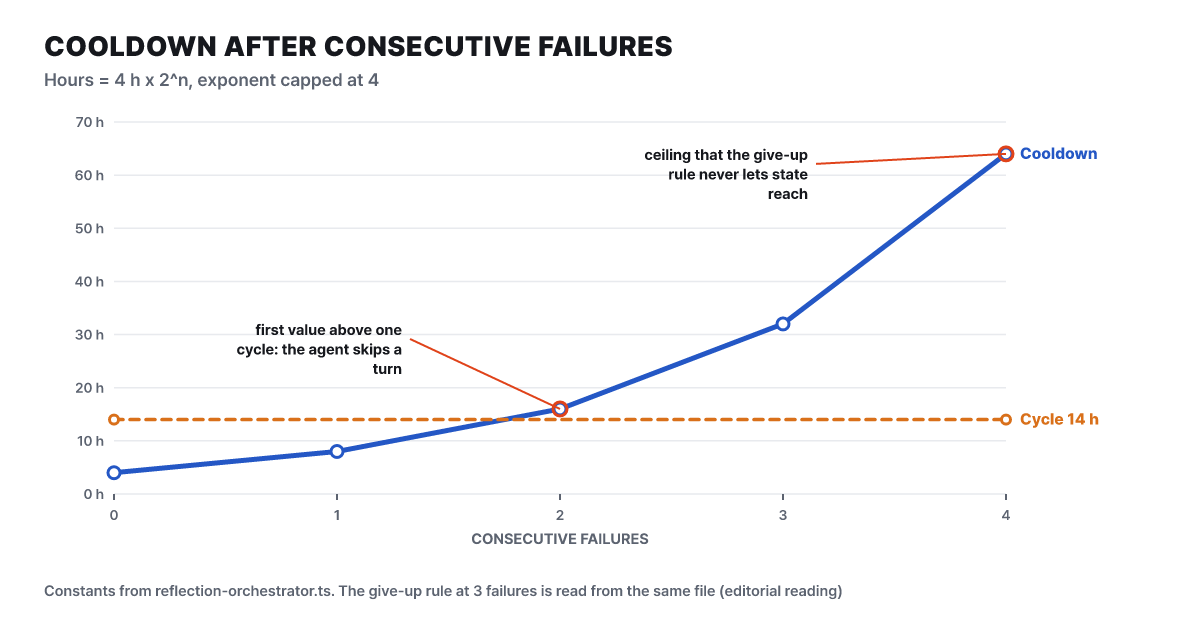
Figure 4. Cooldown by number of consecutive failures (editorial calculation from the source constants).
What to look at on the line is where it first meets the 14-hour dotted line. At 2 failures the cooldown is 16 hours, which exceeds the cycle (14 hours) for the first time, and that agent skips one cycle. But the same file also has a rule that after 3 consecutive failures it gives up on that window, advances the reference timestamp, and clears the consecutive-failure record. Reading the two rules together, the consecutive-failure count that enters the cooldown calculation is at most 2.
The editorial experiment below ran this directly. We copied the source’s cooldown function and selection rules and simulated the case where every agent keeps having new activity. First, these are the agents picked each cycle when eight agents are always review candidates.
| Cycle | Time | Agents picked (cap 5) |
|---|---|---|
| 1 | +0 hours | A1 A2 A3 A4 A5 |
| 2 | +14 hours | A6 A7 A8 A1 A2 |
| 3 | +28 hours | A3 A4 A5 A1 A2 |
| 4 | +42 hours | A6 A7 A8 A1 A2 |
The rule of longest untouched first rotates and gives everyone a turn. It matches the comment’s explanation that the cap of 5 does not make agents get lost. Next is the simulation for one agent that keeps failing (cycle of 14 hours).
| Cycle | Time | What happens |
|---|---|---|
| 1 | +0 hours | Attempt fails, consecutive 1 |
| 2 | +14 hours | The 8-hour cooldown has passed, so it tries, fails, consecutive 2 |
| 3 | +28 hours | The 16-hour cooldown has not yet passed, so it is skipped |
| 4 | +42 hours | Attempt fails, consecutive 3, window abandoned and records reset |
| 5 | +56 hours | First attempt of a new window |
In this table the same pattern repeats from +56 hours. The cooldowns of 32 and 64 hours for 3, 4, and 5 consecutive failures are never calculated in this flow. Editorial note: the 64-hour cap is in the code, but because the window-abandonment rule clears the consecutive record first, it reads as a value not reached under the default settings. This judgment rests on the comments and the result of running a few copied functions; we did not run the whole orchestrator to confirm it. Taken together with the 21 consecutive empty cycles from the opening, the intent of this design comes into view. A failing agent must not take the front of the line, the same failure must not repeat on the same input, and an agent with no activity must not eat a review slot.
The moment you switch to a 32K local model
The last scene is about switching models. Suppose the team that was producing reports now handles sensitive material and decides to run on a local model that never goes out to the cloud. The route the FAQ gives is to add a chat model under Models in account settings, choose “Custom,” pick OpenAI-compatible or Anthropic-compatible, and enter the base URL, the exact model ID, and the API key. The FAQ gives Ollama and LM Studio as examples. The v2026.10.27 release notes say custom models can be connected using OpenAI’s Responses and Chat Completions styles and the Anthropic style, with clearer capacity validation and credential recovery. The FAQ says a source build can run fully offline if you attach only a local model endpoint.
What to understand before switching is the scope of the model setting. The Commander and built-in agents share a single model setting in the app, so they change together. But external CLI agents such as Claude Code and Codex keep their own model settings. A situation where you switch to a local model and Claude Code still sends calls to the cloud is not a misconfiguration but a result of this structure. Where the data goes differs by setup.
Your own key or a local endpoint
- Model calls go from your device straight to the provider (or the local server)
- Keys are encrypted on the device and excluded from cloud sync
- A source build makes a fully offline setup possible
The built-in Orkas model and voice input
- The built-in model goes through a service operated by Orkas
- Voice input requires an Orkas API key, and the audio is sent to Orkas for recognition
- Optional sync and shared projects store the data you choose on Orkas servers
If the goal is to process sensitive material with a local model only, the condition is not to turn on the right-hand side of this table. Once the one-line local model connection is done it looks like the job is finished, but one thing is recalculated inside the app: the context budget. The numbers we saw in the third scene come from the model’s usable input, so when the window gets smaller, every layer shrinks together. The editorial team ran the same file changing only the window size. Editorial experiment. The inputs assume 12,000 tokens of overhead and 3,000 tokens of resident state.
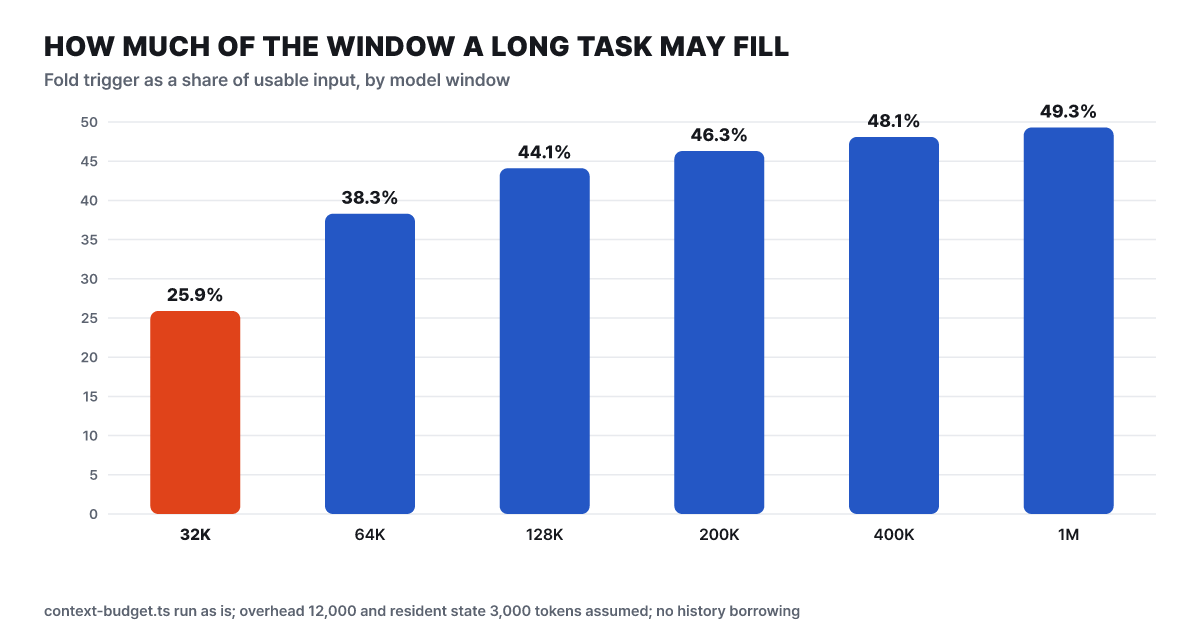
Figure 5. The fold start point as a share of the window, by window size (editorial experiment, including assumed inputs).
The bars show the ratio rising gently toward 50% as the window gets larger, and falling to 25.9% on a 32K window. In numbers, a 32K window has 17,000 tokens of room and a fold start point of 8,280 tokens. Doing the same job on a 200K window gives 92,500 tokens, and on a 1M window 492,500 tokens. An earlier fold point means folding happens more often. Each fold uses a model call for summarizing, and when the window is small the summary length stays at the floor of 1,200 tokens. The target summary length is 1,200 tokens for 32K, 64K, and 128K windows, then rises to 1,850 at 200K, 3,850 at 400K, and 6,000 at 1M, reaching the cap. Under the same assumptions, the calculation is that folding starts at the 25.9% point on a 32K window and at the 49.3% point on a 1M window. Because early folding can increase the number of passes through summarizing and re-reading, the editorial note is that splitting work into small units for a small-window local model fits this design.
One more thing: what happens if the app does not know the window size of a custom model? The source is written to fall back to the default budget when the window is unknown or an unusable value. This default is based on 36,000 tokens of room, with a fold start of 18,000 tokens and a planning room of 16,000 tokens, and a source comment explains that it is a compatibility value and not a second capacity limit. The fact that release v2026.10.27 says it separately polished “capacity validation” reads as a move toward making the app not trust a wrong window. Also, v2026.5.8 includes a fix that splits an external provider’s maximum output tokens by model ID tier instead of capping everything at 8192.
The end of the small window is made by yet another rule. If the room is smaller than 9,600 tokens, which is 8 times the 1,200-token summary target, layered folding is judged unable to do anything meaningful, so it falls back to a single emergency layer and does not spin summary calls for nothing. Running the same file with different inputs (assuming 8,000 tokens of overhead and 1,000 tokens of resident state), a window of 18,000 tokens has 9,000 tokens of room and hits this rule, while with 20,000 tokens the room is 11,000 and the layered structure holds with a fold start of 5,400 tokens. If the window your local model approaches is near this size, the folding method itself changes.
Sources
- Orkas GitHub repository README github.com
- GitHub release list github.com
- Orkas source locks.ts github.com
- Orkas source actor-budgets.ts github.com
- Orkas source context-budget.ts github.com
- Orkas source runner.ts github.com
- Orkas source reflection-orchestrator.ts github.com
- Orkas official site orkas.ai