Herdr runs many agents in one terminal, even once closed
Herdr gives each agent a real terminal pane, lists states in a sidebar and keeps running on a server. Five scenes: stuck panes, delegation, remote, restore.
With six agents running, which one is waiting for a person right now? If the only way to answer is to flip through windows one by one, that is exactly the pain Herdr (repository herdrdev/herdr) targets. It is an open-source project written in Rust under Apache-2.0, and its official documentation calls it a runtime (the base environment where agents live) rather than a multiplexer. It gives every agent a real terminal pane, gathers in a sidebar whether each pane is “working or waiting for a person”, and because a background server holds the terminals, the work continues even after you close the screen. As of 2026-10-27 it has roughly 46,000 GitHub stars and more than 3,700 forks. The latest stable release is v0.9.5 from Oct 14, and there has been no newer official release since.
The session persistence that tmux provides is already good enough. But all tmux sees is a pane where characters scroll by; it does not know whether the program inside is an agent or whether it is stuck on an approval question. Herdr adds an “agent-aware layer” on top, so instead of listing features, it is easier to follow five scenes you would run into during a day. The scenes are examples the editors composed from the behavior described in the official docs; the commands, error codes and figures are exactly as written there.
Monday morning: finding the one pane out of six that is waiting for a person
It starts with running a single herdr command in the project folder in the morning. You can install it with the homepage script, Homebrew, mise, Nix or a downloaded binary, and Windows uses a PowerShell installer. Supported platforms are Linux (x86_64, aarch64), macOS (Intel, Apple silicon) and Windows (x86_64).
brew install herdr
herdr- Run
herdrin the project folder. If there is no workspace yet, one opens automatically. - Split to the right with
prefix+vand downward withprefix+-. The prefix key defaults toCtrl+B. - Run
claudein one pane andcodexin another. Herdr recognizes them automatically, with no registration step. - Check both agents’ states in the sidebar. The official recommendation is one workspace per project.
- Close the window. Run
herdragain and you attach to the same session.
From top to bottom, the structure is workspace (one project), tab (one layout), pane (a real terminal) and agent (a process Herdr recognized inside a pane). Panes get IDs such as w1:p3; once an ID is closed it is never reused, and IDs only mean something within a single server. The workspace row shows the combined state of the agents inside it, so even with six projects open, a glance at the sidebar tells you which one needs a hand.
Figure 1 shows one moment of such a day. Look only at the left sidebar and the pane with the glowing yellow border among the three panes on the right.
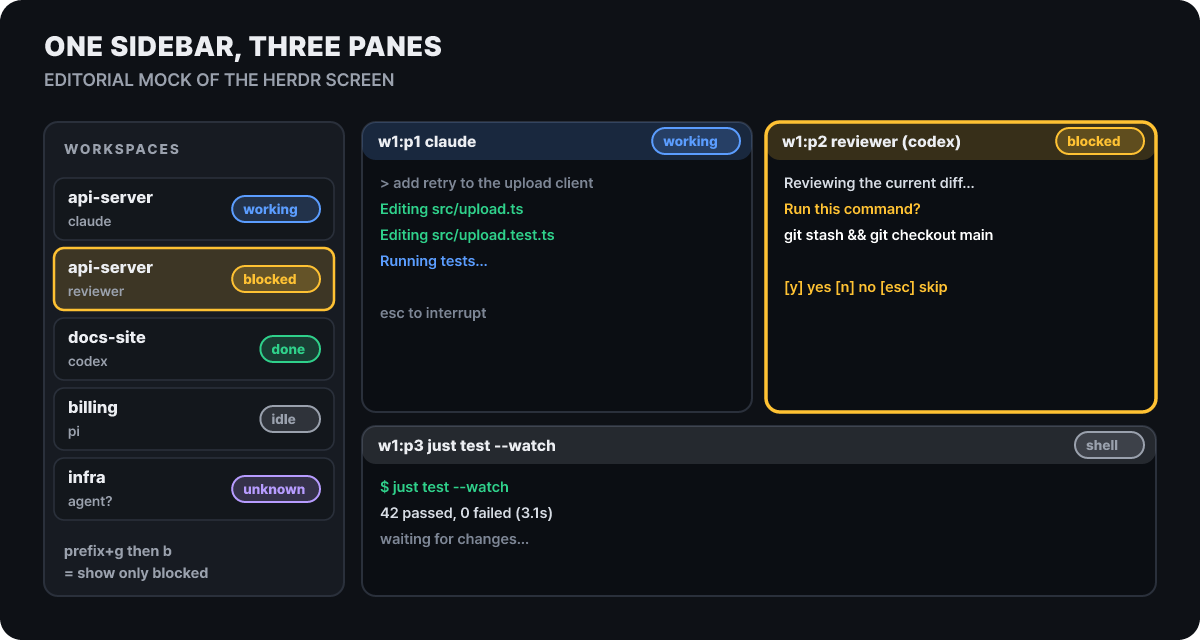 Figure 1. A screen example the editors drew from the documented behavior. The reviewer pane has stopped at an approval question, and the sidebar shows the same state
An approval question you might have missed on your own now shows up in the sidebar first. After opening the jump selector (prefix+g), press b to show only blocked panes, w for working only, i for idle only and d for done only; a returns to all. For notifications, [ui.toast] delivery lets you choose between Herdr’s internal toast, the terminal and system notifications, or turn them off, and the done and request sounds can be swapped for mp3 files. The config file is ~/.config/herdr/config.toml; herdr --default-config prints the defaults and herdr server reload-config applies changes while it is running. If you set [ui] mouse_capture = false to pass mouse input through to the terminal, all of Herdr’s own mouse actions, such as clicking tabs or dragging borders, stop working.
How far to trust the sidebar’s indicators
The sidebar’s state is not a guess; it comes from one of three paths. For most agents, such as Claude Code and Codex, Herdr finds the pane’s foreground process and reads the bottom of the screen against a rules file. OpenCode, Pi, Kimi, Kilo and others report directly once you install an integration, and in that case the report takes priority over the screen. Some agents, such as Command Code and Crush, know about Herdr and send their own state.
Figure 2 shows how the five states move from one to another. The yellow sentence at the bottom is the single most important line when using this tool.
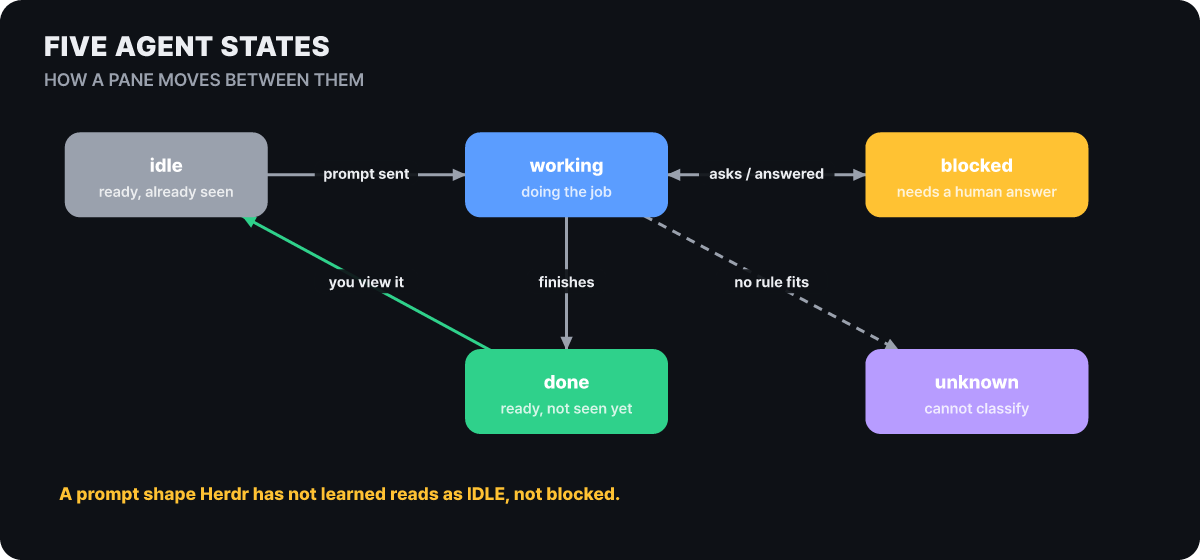 Figure 2. State transitions. After completion, done turns into idle once the user has looked at it
For agents it reads from the screen, Herdr marks a pane as blocked only when it matches a known approval, question or permission screen, and the documentation itself says that a dialog with a new look may show up as idle instead of blocked. So you must not read “quiet” as “free”, and idle is not permission to approve anything. If an unfamiliar question has appeared, look at the screen before sending any input. done means finished but not yet viewed; because each client counts completions it has seen on its own screen separately, confirming in one client can leave another client’s done badge unchanged. unknown only means it could not classify the pane and is no evidence of success. Antigravity and Grok are counted as idle once they return to the prompt, even if their own background tasks are still running.
Four calls for an implementation pane to hand work to a review pane
What sets this tool apart is that agents can operate Herdr directly through the CLI and a socket API. Suppose the Claude Code in the left pane, which handles the implementation, has finished, and the person said beforehand, “When you’re done, start a Codex reviewer in the next pane and have it check the diff.”
When the implementation is done, start a Codex reviewer in the next pane and have it review the diff.
I'll create a new pane to the right of this one, start Codex there under the name reviewer, and ask it to review. I'll wait up to 120 seconds for it to finish.
Sidebar: the reviewer pane turns to working, then to done a little later
The reviewer has finished. Two of the things it found need fixing, so I'll start applying the first one.
Internally, the calls go back and forth in the order shown in Figure 3. The three vertical dotted lines are the three parties, and the horizontal arrows are calls. Solid lines are commands the caller issues, and dotted lines show the direction in which state comes back.
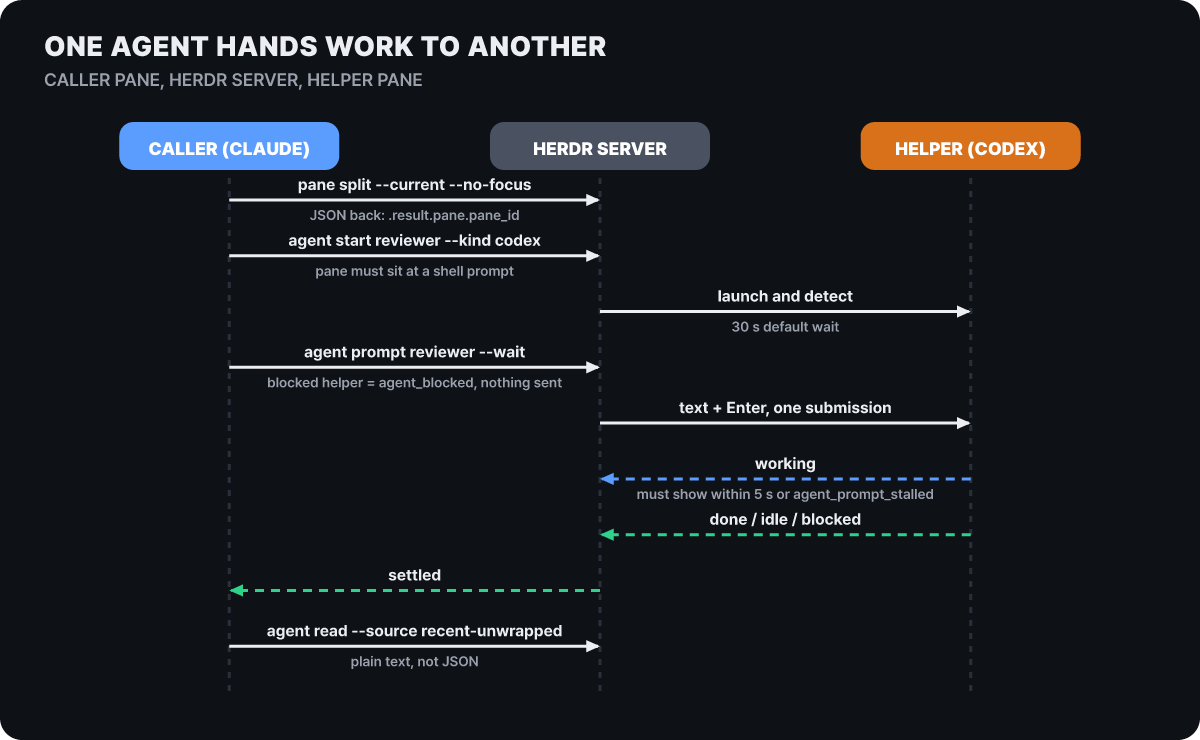 Figure 3. The calls exchanged in a single delegation. Notes mark where rejections and wait times come into play
Creation commands return their result as JSON, so you take the pane ID from the response instead of guessing it (.result.pane.pane_id). agent start works only on an existing pane that is sitting at a shell prompt; the default wait is 30 seconds, and --timeout must be more than 3 and at most 300 seconds. agent read has four screen-reading modes, recent, recent-unwrapped, visible and detection, and for logs or long answers recent-unwrapped, which joins wrapped lines, reads best. The past history of a full-screen agent (Claude Code, OpenCode) is fetched by scrolling only while it is idle. Names follow the format [a-z][a-z0-9_-]{0,31} and only need to be unique among living agents; when an agent ends, its name is released.
Failures come out as JSON on standard error with exit code 1 (2 for syntax errors). The errors the documentation names are the six below.
| Code | When it appears |
|---|---|
agent_not_ready |
blocked was detected during startup |
agent_blocked |
A prompt was sent while the target was already blocked. The input is not delivered |
agent_prompt_stalled |
It did not become working or blocked within 5 seconds after the prompt |
agent_not_running |
The agent moved to another pane while waiting |
agent_not_idle |
Past history had to be read but the agent is not idle |
timeout |
The time limit given by the caller passed |
The most practical caution is that a timeout or agent_prompt_stalled is not proof that the input did not go through. Both the documentation and the skill say not to resend the same prompt immediately but to check with agent read first. The rule exists to prevent the accident where the same instruction goes in twice and the work runs twice. Conversely, using agent wait separately without --wait has no default time limit and can wait forever, so it is safer to pass --timeout.
When the reviewer stops partway at an approval question, handle it like this. Reading the question and showing it to the person is as far as the agent’s job goes.
herdr agent wait reviewer --until blocked --timeout 120000
herdr agent read reviewer --source recent-unwrapped --lines 80
herdr agent send-keys reviewer esc       # only after the person has checked
Processes that are not agents, such as tests or a dev server, run through pane commands, and you wait until the line you want appears in the output. This wait does not interpret agent state; it only looks for a regular expression on the terminal screen.
herdr pane run w1:p3 "just test --watch"
herdr pane wait-output w1:p3 --regex "passed|failed" --timeout 120000
What teaches an agent this set of commands is skills/herdr/SKILL.md. Install it with npx skills add herdrdev/herdr --skill herdr -g (without -g it applies only to the current project), and if Herdr is installed, herdr --skill prints the copy bundled in the binary. The skill’s safety rules come in three layers. Without HERDR_ENV=1 it says it is not inside Herdr and stops; it is used only when the user mentions Herdr directly; and unless asked, it does not create new workspaces, tabs or other folders, and instead opens a pane next to the current one in the current folder. Unlike subagents that run hidden in the background, the conversation between the two agents stays visible in their own panes, so a person can tell right away which side is spinning its wheels.
The evening you close the laptop and leave: the server’s agents keep running
This is a day when you need to run an agent on an in-house server for several hours. First check that ssh workbox connects, then run the following directly in a terminal.
herdr machine add workbox
herdr machine add workbox --remote-session agents --label "Build machine"
If Herdr is missing on the remote machine, it asks whether it may install it, and the default answer to the question about replacing the server is No. If several sessions are running on one machine it lets you choose, and as in the second line you can also specify one directly with --remote-session. After that, the sidebar shows the default session as workbox and a named session as workbox/agents (or under the label if you gave one), and that server’s agents are mixed into the local agent list. The machine you select receives input and terminal size and sends back pane screens, while machines you have not selected send only state and notifications.
Even if you close the laptop and go home, the server’s agents keep running on the server. The same holds when you close the local terminal window or SSH drops: the background server holds the terminals and agent processes, and the screen is just a client attached to it, so if you detach with prefix+q and reattach with herdr, the agents have never stopped. This got sturdier in v0.9.4 (Oct 13). On Linux and macOS, closing the shell that launched Herdr no longer stops the server, and the server ends only with herdr server stop (herdr session stop <name> for a named session). That command also ends the processes inside the panes, so be careful not to type it by mistake before leaving for the day.
The documentation spells out what happens when the connection drops.
- The last known workspace and agent states stay on screen, dimmed. They are only a cache, not live.
- Input and navigation to a dimmed pane are blocked until a new connection is made.
- An authentication failure shows as a
! authbadge and any other connection problem as! error;! authclears only after you finish SSH authentication in the terminal withherdr machine reconnect <label>. - Reconnection is attempted automatically, open clients recheck failed connections about every 30 seconds, and after repeated failures the retry interval grows to at most 2 minutes. Background reconnection does not answer prompts or install or restart the server.
When you call a remote agent the next morning, attach the same prefix to every command, as in herdr --machine workbox agent list. This is because local IDs and --current do not point to remote panes, and since IDs are separate per server, two machines can both have w1:p1. Herdr does not take over authentication. A stored profile holds only an ID, a name, the SSH target, the remote session name and an enabled flag; it contains no passwords or private keys, and OpenSSH handles that as before. Host key checking is also unchanged, agent forwarding is off by default, and local plugins, settings and secrets are not copied to the remote.
The homepage carries a notice that “Herdr Cloud” is coming soon. It is a service for connecting your machines without SSH setup, and it is taking a waitlist. The connection method in the current documentation is the SSH one above, and every command in this article is based on that.
The morning after a power outage: what came back and what disappeared
Suppose the power went out in the room where the server sits. Detaching and reattaching differs completely from restarting the server. The differences by case, as laid out in the official session-state document, are below.
| Situation | Processes | Layout | Screen history | Agent conversation |
|---|---|---|---|---|
| Detach and reattach | Keep running | Kept | The live terminal, unchanged | Unchanged |
| Server restart (including a power outage) | Gone | Restored | Only if pane history is on | Only if the agent has session restore |
Update (without --handoff) |
A compatible server stays up; one that needs a restart must be stopped and started | Restored after the restart | Only if pane history is on | Only if session restore exists |
Update with --handoff succeeding |
Kept | Kept | Kept | Kept |
After an outage, the layout comes back first. Workspaces, tabs, panes and working folders are restored as saved, and each pane starts a new shell in its saved folder. The shells, dev servers and test processes that were running are gone, so intermediate results need to be in files to be safe. The final step, reconnecting conversations, has conditions. If the agent had reported a session ID, the conversation is reattached ([session] resume_agents_on_restore, on by default); otherwise, or if the ID has expired, you get an empty shell. Reporting requires the integration, the minimum integration versions are Claude Code 6, Codex 5, OpenCode 5, Pi 2, Copilot 2, Hermes 2 and Kimi 3, and you can check with herdr integration status.
The saving mechanism has several safeguards. Figure 4 shows the files that sit in the session folder (find its location with herdr session list --json). Yellow marks files that are off by default.
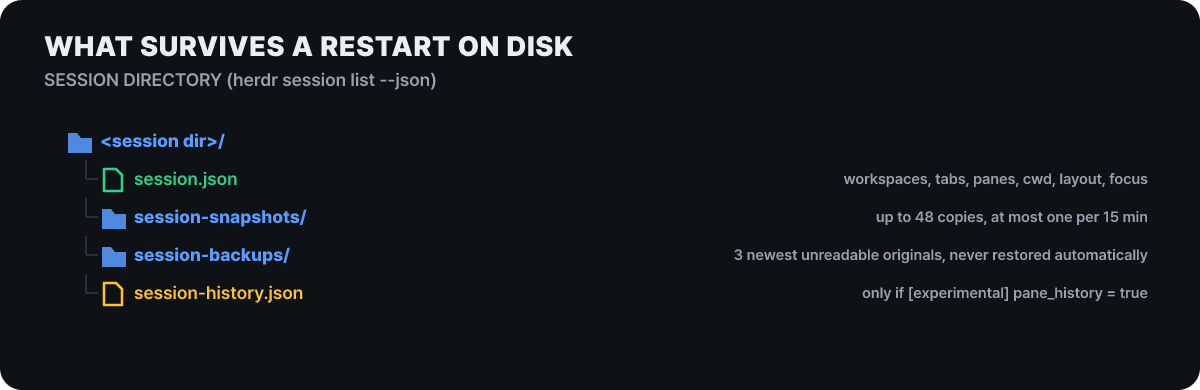 Figure 4. The files used for restoring. Screen history is saved only when
pane_history = true
The documentation says screen history is off because secret values may have been printed on screen. When it is on, it is brought back only when it exactly matches the saved layout. Snapshots copy the previous layout once right after the first save and then at most once every 15 minutes, piling up to 48, and no duplicate is made if the layout has not changed. If session.json is corrupted and unreadable, the original bytes are kept in session-backups/ up to three copies, but it is not restored automatically, so if the layout looks wrong after a restore, you can roll it back by hand.
- Find the session folder with
herdr session list --json. - Stop the server with
herdr server stop(herdr session stop <name>for a named session). - Back up the current
session.jsonsomewhere else. - Copy the file you picked from
session-snapshots/into the place ofsession.json. - Run
herdragain to bring the server up.
Recent releases have refined this area too. v0.9.4 saves before the system closes apps on a Mac restart or Windows shutdown so agent sessions survive, and it replaces the save file only after it has been fully written to disk so a crash never leaves an unreadable save. On Linux’s systemd-logind it asks for time to save before shutdown, but it cannot prevent a forced shutdown or a power outage itself. herdr update applies only when installed with Herdr’s own installer, and Homebrew, mise and Nix installs are upgraded through each package manager. --handoff, which moves the server to the new version as well, is experimental and cannot be used with those three methods or on Windows.
What the conversation-restore integration leaves in your settings files
To use conversation restore, install the per-agent integration.
herdr integration install claude     # install
herdr integration status             # check installed versions
herdr integration uninstall claude   # remove
According to the official integration documentation, installing writes a small hook script or plugin file into the agent’s settings folder and adds a Herdr entry to that agent’s settings file. For Claude Code that is a hook script and a settings.json entry; for Codex a hook script, hooks.json, and [features] hooks = true in config.toml; for OpenCode server and TUI plugin files; and Grok creates just one file of its own. Removal deletes only the entries Herdr added and leaves the rest of the settings alone. The hooks run with the same user permissions as the agent and only report state over a local socket. v0.9.5 on Oct 14 stopped installing Codex’s turn hook so that Codex state is read from the screen again, and the release notes advise that if you installed the Codex integration earlier, you should refresh it with herdr integration install codex.
The permissions to settle in front of 1,789 plugins in the marketplace
The homepage shows 1,789 community plugins and says it automatically detects 22 agent CLIs. The cumulative install count of 1,644,092 is also a figure displayed on the same page, so how it is counted depends on the official explanation. A plugin consists of a herdr-plugin.toml manifest and arbitrary commands (in any language), and the Herdr CLI itself serves as the API. The problem is that there is no sandbox. A plugin inherits the user’s permissions and environment as they are and can call the entire Herdr CLI, and Herdr only validates the format of the manifest and does not vet the code. The marketplace is a list indexed every 30 minutes from public GitHub repositories tagged with the herdr-plugin topic, so being numerous and being safe are separate matters.
herdr plugin install owner/repo --ref <revision>   # confirm after reading the preview, pin the revision
herdr plugin update                                # bulk update, since v0.9.4
The order is to read the preview shown at install time, open the manifest and scripts yourself, and then pin the revision with --ref. There is also guidance to keep credentials not inside the plugin folder but in a dedicated config folder (HERDR_PLUGIN_CONFIG_DIR). Development moves fast enough that compatibility has broken at times. On Sep 29, v0.9.2 removed the Herdr-specific pane graphics API, the same day v0.9.3 fixed a shortcut problem, and v0.9.4 on Oct 13 and v0.9.5 on Oct 14 followed. That the version is still 0.9.x and the release intervals are short are signs that things change quickly, and what can be read as evidence of stability is not the number of stars but the contents of the release notes.
A bigger problem is the path that calls between agents create. The fact that one agent can write into another agent’s input box also means a path opens for a malicious instruction hidden in a web document or file to spread through one agent to another. Herdr does not filter input, so this defense depends on the agents’ approval settings and on the user’s habits. Fortunately, agent prompt blocks input when the target is blocked, and the skill says not to answer a blocked dialog without the user’s confirmation. The setup to be most careful about is an agent with approval prompts turned off sending input to another agent, and the first step is to limit where an agent may write in other panes to the current folder and the space next to the current pane. On remotes, do not connect with agent forwarding on to a host you do not trust, and in panes where screen history (pane_history) is on, do not print secret values.
The official comparison document defines Herdr as a runtime, not an app or a multiplexer, and the same document sorts tmux and Zellij as session persistence for people, Warp as an app that replaces the terminal itself, and Conductor, Emdash and Superset as management apps centered on worktrees and diff review. This comparison was written by the Herdr side, and the document itself explains that these columns are categories, not competitors. Development is listed on the YC company page with a Fall 2026 batch and a team of one, and the Windows install is directed to a separate “endpoint-protected” beta page. On Windows, herdr terminal attach and live handoff are not supported.
When you run several agents, the bottleneck is often a person’s attention rather than the model’s speed, and what Herdr does is make visible which pane to spend that attention on and run errands between panes for you. It does not make the judgment for you. A blocked pane in the sidebar is a question a person has to read, an idle pane is not a guarantee that it is resting, and plugins and integrations are code running with your permissions. So it is worth adopting in small steps. Start with two panes in one project, using the state display and detach and reattach, and you can turn on agent-to-agent calls and integrations later, once the need arises and after you have settled the approval settings.



