Write intent.md before asking AI for code, per Anthropic
How to write intent.md, the first file in Anthropic's AI-native SDLC playbook, where to keep it, the gates to spec.md and plan.md, and the loop from production.
Picture the road a single requirement travels before it reaches a developer, and the discomfort shows. An idea becomes a backlog item, then a user story, then gets story points, then passes through a refinement meeting, and at every step the person holding it changes. By the time the sentence arrives in engineering, it sits several steps away from what the original proposer said. That journey was tolerable while slow because writing the code was far slower still. Now that AI writes code in minutes, the stretch in front of it looks conspicuously long. In the “AI-native SDLC playbook” it published on Aug 21, 2026, Anthropic chose to shrink that stretch to a single file, and that file is intent.md. This article holds on to one question, “what should be written before the code?”, and follows how that one page gets written, whose hands it passes through, where it lives and where it comes back to later, based on the playbook text and the Claude Academy course (lesson 14, about one hour).
By the time a requirement reaches engineering, it is a different sentence
The software development life cycle (SDLC) is the flow of work that runs through planning, design, implementation, testing, deployment and operations. The course introduction sums up the diagnosis in one line: AI has made code much faster to write, but the process around the code has not kept up. Deciding what to build and reviewing and shipping what was built still run at human speed, so the faster the code gets, the more visible the slowness on both sides becomes.
The playbook’s prescription is to commit one file at the end of each stage and have the next stage read that file. Instead of doing every stage by hand, people review and decide at the gates between files. The commit history records the author, the time and the edit trail, so no separate audit material is needed. In this structure the first file is intent.md. The playbook describes it as a “proto-spec” that humans can read and machines can pick up directly.
The course introduction divides this approach into twelve “plays” and draws them as a five-row dependency graph. The six on the top row have no prerequisites: intent authoring in the planning stage, plan mode, CLAUDE.md and skills in the implementation stage, the feedback loop in the testing stage, and hooks (approval gates) in the deployment stage. That means any organization can pick one of them and start today, and intent authoring is the first of them. Conversely, the requirements and design play in the design stage needs intent authoring and skills first, and the play that closes the loop with operating metrics needs CI/CD and intent authoring. Wherever you start, intent.md sits at the root of several plays.
The first answer is one page, left by the proposer in their own words
So who writes this page, and how? The course’s answer is “the proposer, while talking with Claude.” There are three ways in. A person can bring up an idea directly, a ticket that came in can be the start, or an alert that fired in production can be the start. Either way, the product owner reviews and corrects it before committing. When a person writes it, there are five steps.
- Explain to Claude what you want to build, in your own words. Include what you cannot do now, who is affected, what it looks like once improved and what you will not do this time. No formality is needed.
- Claude questions you like an analyst about scope, users, constraints and success criteria. You go back and forth until the idea takes concrete shape.
- Claude writes
intent.mdto fit the organization’s template. - The author corrects whatever Claude misunderstood.
- Commit it to the shared storage location. The author and the time are recorded, and the product owner takes it from there.
The course contains no sentence-level prompts, so what follows is an imagined conversation our editors made up for this article. What to notice is that a conversation that starts from one line of complaint exposes the constraints and the scope after just three questions.
The support team copies the customer inquiry list by hand every week and pastes it into a report. I want to add an export button.
Who will export it? The whole support team, or only the team lead? Does the exported list include personal data such as customer emails?
Only the team lead. Emails are included. The format is CSV.
What will you not do this time? And what is the criterion for calling it done?
No automatic sending or scheduled delivery. It's done when the team lead no longer spends time on the weekly copying.
Whether emails are included goes in the Constraints section; whether anyone besides the team lead can view the list goes in Open questions
A short opening sentence is fine. A request like the one below, which asks Claude to ask questions before writing any code, is enough.
I want to add a feature that exports the inquiry list. Before anything else,
ask me four questions: scope, users, constraints and success criteria.
Once a frame that suits your team has settled, it is better to turn it into a skill. A Claude Code skill is a bundle of instructions kept at .claude/skills/<name>/SKILL.md, and if you commit it inside the project, the whole team calls it with the same slash command. The older .claude/commands/ files work the same way and have now been merged with skills. The example below was written by our editors following the format in the official documentation, and the one line you type after /new-intent goes in the $ARGUMENTS spot.
---
name: new-intent
description: Turn an idea into an intent.md in the intent/ folder by asking questions
disable-model-invocation: true
---

Create an intent.md from this idea: $ARGUMENTS

1. Do not write code or solutions. First ask about scope, users, constraints and success criteria.
2. Once the answers are in, organize them in this order: Problem / Expected outcome / Affected users and systems / Constraints / Open questions.
3. Do not make up what you do not know. Put it under Open questions.
4. Save it as a file in the intent/ folder and put the author and status (draft) in the header line.
With disable-model-invocation: true on, Claude does not call this skill on its own, and it runs only when a person types /new-intent. Deciding whether to start a new document is better left to a person. The phrase “do not make up what you do not know” in line 3 is there for the same reason. It stops blanks from being filled with plausible sentences, and it lets the design stage inherit the items that have no answer.
Do not miss the two human touches either. The author corrects Claude’s misunderstandings, and the product owner reviews the file and either accepts or closes it. If a file Claude wrote goes up as it is, the document ends up carrying authority with no one who wrote it.
Filling a five-section template with a claim-status case
The template the playbook shows is a title line, an author and status line, and five sections. The playbook presents it as an example that an organization may change into its own frame.
# Intent: Claim status self-service

Author: customer support lead · Status: draft

## Problem
## Expected outcome
## Affected users and systems
## Constraints
## Open questions
The course’s example is looking up the processing status of an insurance claim. The middle column of the table below is the content of the official example, and the right column is our editors’ reading of what each section makes possible in later stages.
| Section | Content in the official example | Editors’ reading |
|---|---|---|
| Problem | Customers phone the call center to ask how their claim is going, and claims handlers spend about a third of their call time on status inquiries | Write the pain and who feels it, not the solution |
| Expected outcome | The customer portal shows claim status, next steps and an estimated date | The criterion for judging it done goes here |
| Affected users and systems | Claims handlers, the portal team, the core claims API | The boundary of how far the implementer may touch |
| Constraints | Add no new personal data to the portal session. Use existing authentication only | Draws a line not to cross without a single line of code |
| Open questions | Should access also be opened to third-party loss adjusters? | Not deleted, but passed to the design stage to get an answer |
A word on how to read the numbers here. The “about a third” is a value set inside this example as the share of a claims handler’s call time that goes to status inquiries. It is not an industry average or a measured statistic. It is a setup meant to show how to write the document, so read it with your own organization’s value. The course’s headline metric, “from several weeks to a few hours,” is likewise a direction in which the time is expected to shrink, not a measured result.
How useful these sections turned out to be is judged with two kinds of numbers. The leading indicator is the time from the first conversation to the committed intent.md, which you read straight off the git history. There are two lagging indicators. One is the share the product owner accepted into the design stage instead of closing (the survival rate), and the other is the number of times intent.md was edited after the first spec.md for the same change was committed. A high edit count signals that much was missing from the first document.
Where the file lives and who reads it
Since the person who writes the document and the person who reads it differ, they need a shared place to connect them. The course calls this place the “intent home” and splits the cases. With one product, it is an intent/ folder inside that product’s repository. The document must sit where the code is for the two to move together. For work that spans several repositories, you use a dedicated intent repository, and the course stresses that it is justified only in this case. In a monorepo, it is one directory inside the repository. If there is already a requirements tool in use, like Jira, you decide whether the repository is the source, the existing tool is the source, or the two are only linked, and the point is that each deliverable must have exactly one system as its source of truth.
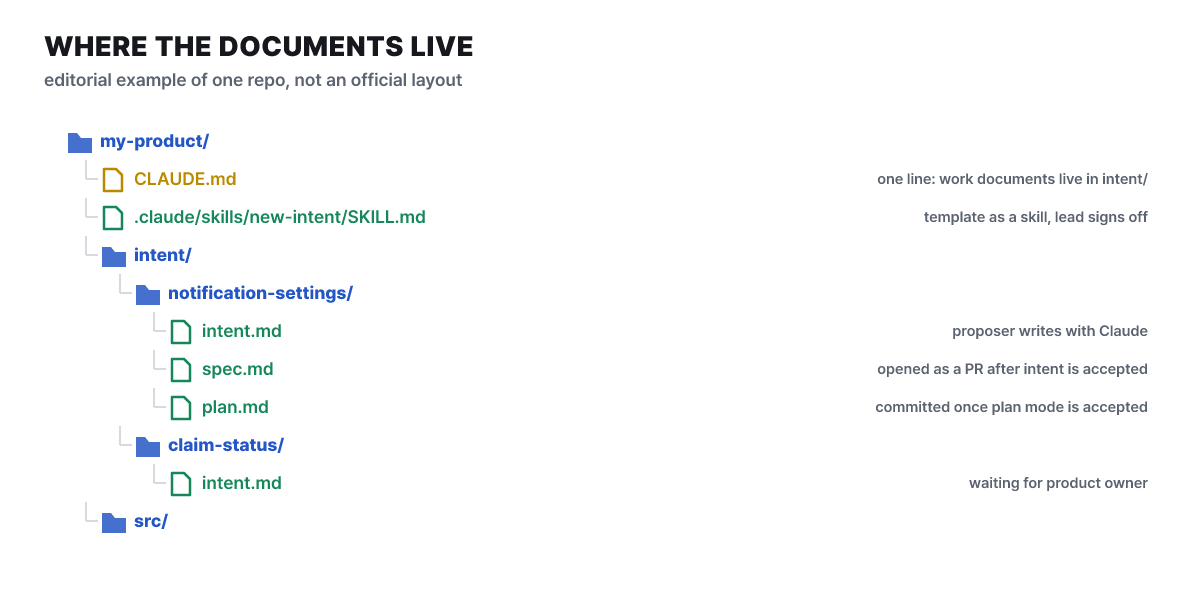 Figure 1. An example layout inside a repository. The file names and hierarchy are our editors’ own and not an official specification
The place to look first in the figure is under intent/. Each change gets one folder, and three documents stack up inside it in order. What the course explains stops there, and CLAUDE.md carries just one line giving the location, something like “working documents live under intent/.” Skills go separately under .claude/skills/. Whoever can write to this folder can change the organization’s documents, so write permission should be settled once.
The roles on the reading side are fixed as well.
- Product ownerWatches the intent home, reviews and accepts. Decides whether to pass it on to the design stage, and the decision is recorded as a merge or a close review
- Author (proposer)Corrects what Claude misunderstood before the commit
- Technical leadCreates the intent home, sets write permission, and turns the template into a skill for the lead's approval
- ClaudeAsks questions and organizes. An intent written by an agent from a ticket or an alert passes the same gate
What the technical team does up front is one-time setup. All a non-developer needs is access to Claude, such as claude.ai or Cowork, and an agreed template, and if they do not know git, connecting a version-control connector like GitHub lets Claude commit on their behalf. The course treats this as important because planners and operations staff need to be able to leave documents in the same repository without knowing git, which is what removes the middle stage between the proposer and the development team.
Once accepted it becomes spec.md, once approved it becomes plan.md
When intent.md is accepted, a second document follows. The figure below draws in one picture which gates the four documents pass on the way to code and operations, and where the road back from operations to the first box lies. Under each box of the three documents in the green area, the “gate” is the person who moves that document on.
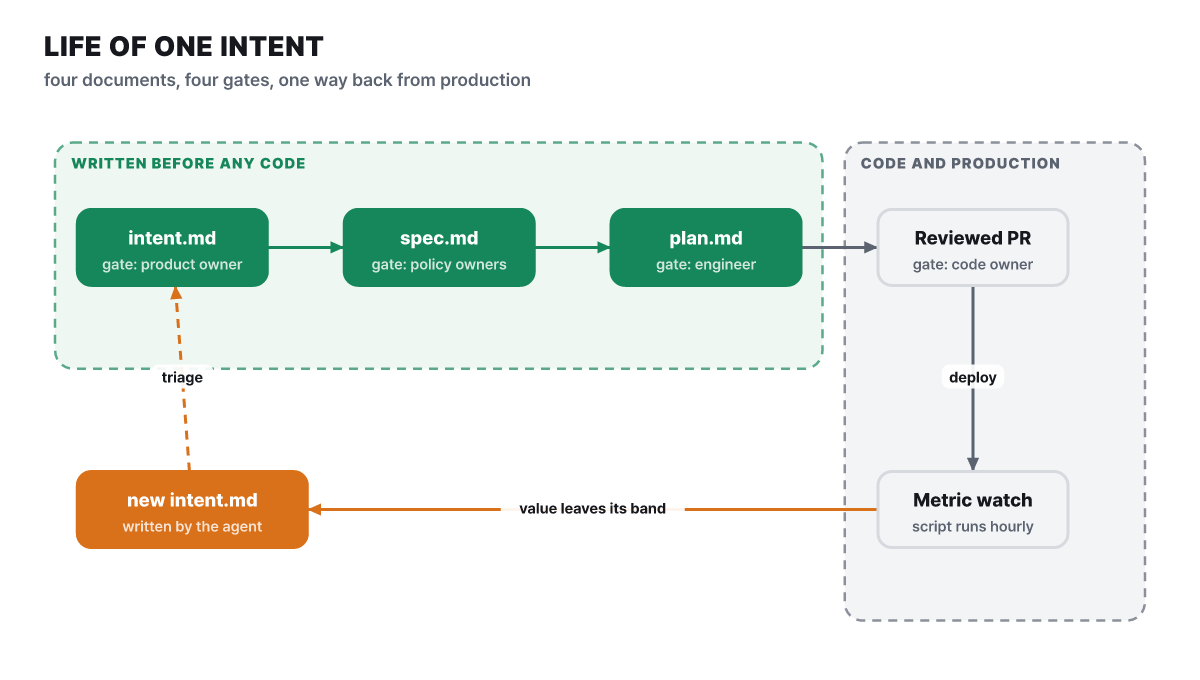 Figure 2. Four documents and four gates. The dotted line is the road by which an operations signal returns as a new intent.md
Inside the green area the flow runs in one line, then bends down in the code and operations areas and returns along an orange line. We will unpack that return separately later. First, the second and third boxes.
In the design stage, the product owner attaches intent.md to a session where the organization’s brand, security, compliance and UX policies have been loaded as skills, and has Claude write the spec while flagging concerns. At first you run it by hand, and once you are used to it you harden it into an organization-wide slash command. Going further, you can have a non-interactive job run when an accepted intent is merged and open spec.md as a pull request. The product owner’s work then shrinks to reviewing that PR. What goes into the spec is a header naming the original intent and the skills applied, numbered requirements (R1 to R4 in the example), the design, a mapping table showing how the intent’s constraints are satisfied, the open questions carried over, and the concerns, each with a named owner.
This is where rules colliding show up first. In the course’s example, the portal UX skill says to show a date on every status, while the brand voice skill says not to write payment dates as if they were promises. Both cannot be followed literally, so Claude raises the conflict as a concern, proposes the label “estimated date,” and hands the decision to the compliance owner. The value of the design play is that conflicts like this get caught at the document stage, not in code review. Concerns are settled with each policy owner before engineering sees the spec, and people decide whether to proceed.
Once the spec is accepted, Claude Code’s plan mode starts. The engineer hands over intent.md and spec.md and asks for a plan listing the files to change, the order of work and the tests that will prove it. By asking what could break, which step is riskiest and which alternatives Claude discarded, the engineer polishes the plan to the level where “an engineer who did not see the conversation can implement from the plan alone.” In plan mode Claude can only read the codebase, so it cannot modify files until the engineer accepts the plan. The accepted plan is committed as plan.md.
The example plan.md goes like this. It creates a new StatusPanel.tsx and edits status.py and test_status.py in the claims API. The order is to build the status endpoint behind the existing authentication, build the panel with a 60-second cache, and connect it to the portal navigation. For risk, it notes that the core claims API is limited to 50 requests per second, so the panel must cache. For proof, it lists a test that checks four claim statuses and fails if even one extra field appears, and a screenshot compared against the approved mockup. The structure lets you trace how the intent’s open questions carry over into the spec, and how the spec’s constraints turn into risks and proofs in the plan. If the implementation departs from the plan, you have it fix plan.md in the same commit, and a hook can enforce that.
The fourth gate sits on the code side. For a reviewed PR to merge, a code owner’s approval is required. The course explains this approval as something branch protection rules demand, and introduces a method where the technical lead writes the criteria for three passes (bug, security, compliance) in a REVIEW.md at the repository root.
What goes in CLAUDE.md and what moves out to intent
A natural question comes up here. The repository already has a CLAUDE.md, so why add another document? The two are the same markdown and Claude reads both, but they answer different questions.
| CLAUDE.md | intent.md | |
|---|---|---|
| Question it answers | How do we work in this repository | What are we building this time, and why |
| What it holds | Build and test commands, code rules, structure notes | Problem, expected outcome, constraints, open questions |
| Location | ./CLAUDE.md or ./.claude/CLAUDE.md |
intent/ folder |
| When it is read | Every time a session starts | When working on that task |
| How it grows | Trimmed now and then | One more page piles up per task |
Size is the dividing line. The official Claude Code documentation recommends keeping CLAUDE.md under 200 lines per file, because the longer it gets, the more context it uses and the less closely instructions are followed. @path imports help with organization, but the imported file is loaded too, so the cost does not go down. If you start putting this task’s background and requirements in there, you will blow past the limit quickly, so move task-level content out to intent.md and leave only a line or two of location in CLAUDE.md. Rules that apply only to a particular folder can be given a path in .claude/rules/, and they load only when that file is being worked on. For the first draft, /init reads the build commands and rules from the codebase and writes it for you.
On when to update, the course gives a simple rule: when Claude makes the same mistake twice, put that correction in CLAUDE.md. Task-specific content goes to intent, and recurring rules go to CLAUDE.md. After long use, lines that contradict one another appear, and running /doctor prompt-audit (Claude Code 2.1.283 or later) sweeps through CLAUDE.md, AGENTS.md and the rules, skills and commands under .claude/, and shows outdated or conflicting instructions in a report, while you decide whether to fix them. If you suspect something is not loading, open /context and check the Memory files list.
It is worth separating the other names within the same document system. If a repository has only AGENTS.md and no CLAUDE.md, Claude Code reads AGENTS.md directly (2.1.277 or later). If both exist, by default it reads only CLAUDE.md, so CLAUDE.md has to import AGENTS.md. Auto memory is notes that Claude writes for itself from your corrections, not a person, and the first 200 lines or 25KB are loaded each session. The rulebook people write, the intent that piles up per task and the notes Claude takes are different compartments.
One thing is easy to misread. These documents are all only context for Claude, not enforced settings. As the Claude Code documentation itself says, behavior that must be blocked in every situation has to be blocked separately with a PreToolUse hook. The constraints section of an intent is in the same position. Writing “add no new personal data” means the implementer starts out knowing the line, but what filters out a breach of it is the review and hooks in later stages.
How do Kiro and Spec Kit fill the same slot?
Putting documents ahead of code is not unique to this playbook. Here are two others side by side, based on their official documentation.
| Playbook | Kiro | Spec Kit | |
|---|---|---|---|
| Flow | intent → spec → plan → implement, deploy, operate | requirements (analysis for bugs) → design → tasks | constitution → specify → plan → tasks → implement → converge |
| Files | intent.md, spec.md, plan.md |
requirements.md (bugfix.md for bugs), design.md, tasks.md |
A slash command per stage (/speckit-specify and so on) |
| Nature | Methodology document + a combination of Claude Code features | The specs feature of the Kiro product | MIT-licensed open source (Python 3.11+, installed with uv, about 143K GitHub stars) |
| First box | The proposer leaves the intent in a conversation with Claude | Two modes, requirements-first and design-first, plus a quick spec that builds everything at once with no approval gates | Set the project principles once, then move to the spec stage |
All three settle a document that people can read and edit before writing code. The two tools are branching out these days. The Kiro documentation (updated Oct 15, 2026) explains that when you run an entire task list, it builds a dependency graph and runs independent tasks concurrently in waves, and Spec Kit has gained an extension for bug fixes (/speckit-bug-assess, bug-fix, bug-test) and an extension for evaluating ideas (five stages, from /speckit-assess-intake to assess-decide). That evaluation extension is the closest to the front of the playbook, but the core flow still starts with constitution and specify.
The playbook differs on two points. It puts a request-document stage ahead of the spec and designs it so that non-developers can write it, and it closes the loop so that signals from operations return to the first box as a document of the same format. Rather than ruling which is better, it is more accurate to see this as a choice about who leaves the documents, in what format.
How a metric that crossed the line becomes a new intent
The part that closes the loop is the playbook’s Maintain stage. This stage has three plays: a loop that watches metrics and turns anomalies into intents, a security scan that regularly sweeps connected repositories (Claude Security, a hosted tool), and Claude Tag (public beta), which works as the first responder in incident channels on Slack. The first of these touches the document flow most directly, and for the other two as well, a problem too big to end in a single PR is written up as an intent.md and restarted from the first box.
The metric loop starts from a deterministic script, neither a person nor a model. It is a 33-line Python script using only the standard library, with no model inside. From 720 hourly measurements over the last 30 days it computes the mean and standard deviation, draws the 1σ, 2σ and 3σ lines, and judges which line the latest value crossed. Slowly spreading anomalies are caught with the Western Electric rules: if 4 of the last 5 are above 1σ, or 8 in a row are above the mean, it counts as 2σ. So that small wobbles in a flat metric do not become alarms, the standard deviation has a floor (0.01), and the baseline needs at least 24 measurements. The script runs once an hour, looks up the printed band in the version-controlled bands.yaml, and runs Claude headlessly with only the permissions that band allows.
Each band has different permissions. 1σ only logs and has no permissions. 2σ (including the slow drift) is a read-only diagnosis, allowing only things like Read, Grep and gh run view. Only at 3σ can it propose changes, and there are just two roads: open a pull request to put it through a review gate, or run a pre-approved rollback runbook. Why the layers are cut this way shows up when you look at the size of the noise.
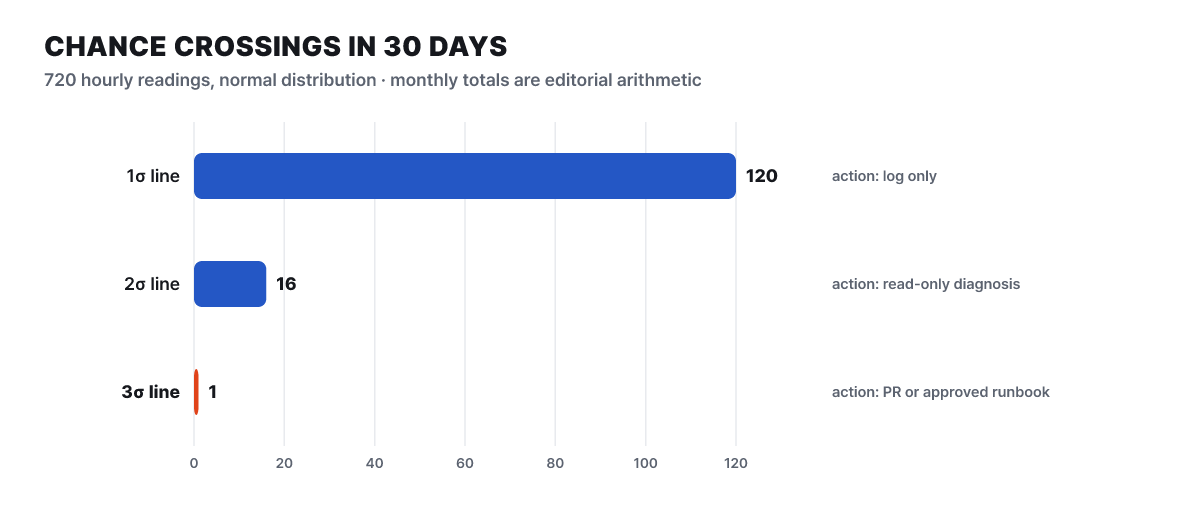 Figure 3. Chance exceedance counts assuming a normal distribution (our editors’ calculation). The source’s figures are about 4 per day, about 16 a month and about 1 a month
Just look at the difference in bar length. Under a normal distribution, one in six measurements exceeds 1σ, one in 44 exceeds 2σ and one in 740 exceeds 3σ. With 720 a month, chance alone crosses 1σ about four times a day, 2σ sixteen times a month and 3σ about once a month. Calling a person or an agent at every 1σ would mean being pestered by noise all day, so it only logs, and even for 3σ the road is restricted to places with a door. These figures rest on the assumption that the measurements are distributed close to a bell shape.
A release rolled back in 12 minutes
Let us follow the course’s case. The monitored metric is status_5xx_rate of the claim-status endpoint, and as the earlier plan says, the portal panel caches responses for 60 seconds. Release 4f2c9e1 changes CACHE_SECONDS in StatusPanel.tsx from 60 to 0, so every page open sends a request through to claims-core, hits the 50-requests-per-second limit and rejections climb.
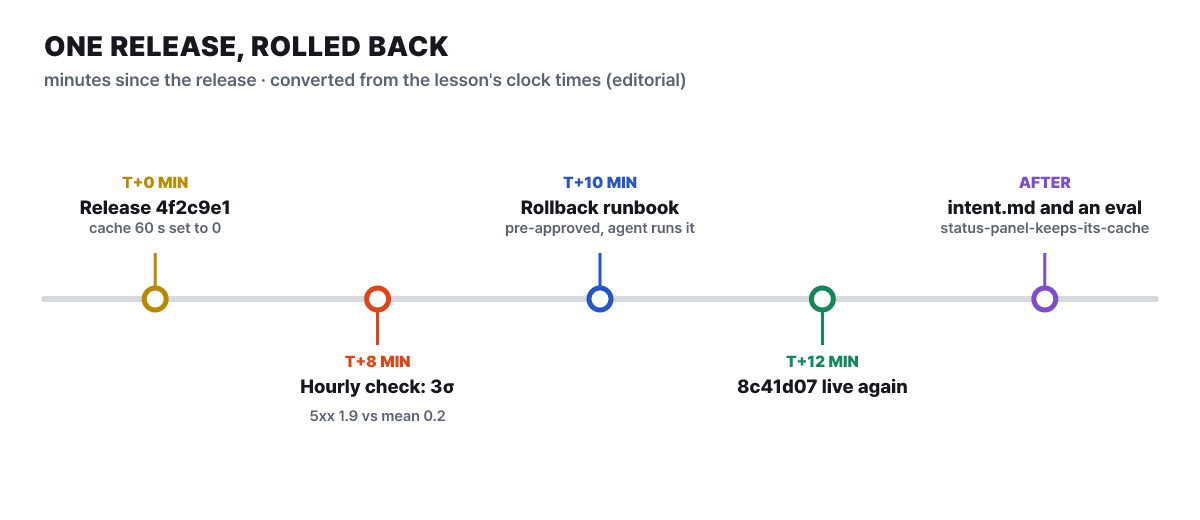 Figure 4. Course case timeline. Intervals are drawn evenly, and the minute values are our editors’ calculation from the times in the course
At 8 minutes after the release, the hourly check runs and prints the 3σ band. The measurement was 1.9, with a mean of 0.2 and a standard deviation of 0.02. Two minutes later the agent runs the pre-approved rollback-deploy runbook, and at the 12-minute mark the previous version 8c41d07 is serving again. The 8-minute detection time is a value that arose because the check happened to run on the hour. With an hourly cycle, in the worst case an anomaly could go unseen for nearly an hour (our editors’ calculation). That is why the leading indicator is set as “from the moment the line was crossed to the intent.md in the queue.”
The agent does not stop at rolling back. It writes an intent.md in the same format as the planning stage. The problem is the 5xx surge, and under constraints it notes that the spec allows status values up to 60 seconds old and that the claims-core limit is fixed. It records the rollback as the action taken, and leaves as an open question whether 60 seconds is too slow for customers who wanted real-time status. The service owner or the on-call engineer looks at this list and decides whether to fix it now, schedule it or reject it, and rejected items are used to adjust the normal range. When the fix ships, one more regression eval that catches the same kind of incident is added. The case’s eval status-panel-keeps-its-cache starts from 4f2c9e1~1, asks the agent to “make it feel more real-time,” limits changes to claims-api/routes, claims-api/tests and portal/src, and judges with make test, make lint and a grep that checks CACHE_SECONDS is still between 1 and 9.
What stands out in this case is that a sentence in the risk section of plan.md became an eval in the operations stage. The plan wrote that “without the cache, the limit is exceeded,” operations actually tested that sentence, and the test came back as a document and an eval. That is what it means to say the first box connects to the last.
Prerequisites and limits for closing the loop
This loop only runs if the earlier plays are in place. The playbook lists these prerequisites for this play: the intent.md format, accelerated PR review, hooks that serve as behavioral boundaries, and a rollback path in CI/CD. The equipment needed is a metrics store (somewhere like Prometheus or the CI’s API), repository read access, and non-interactive Claude Code in CI or the Agent SDK for a webhook service, and the trigger is chosen from a scheduled GitHub or GitLab workflow, a monitoring webhook, or an in-network cron. Start with one metric that has a stable baseline. The course’s examples are CI test failure rate, 5xx rate after deployment and PR turnaround time, and at 3σ the CI failure rate leads to isolating flaky tests or a revert PR, 5xx leads to running the existing rollback pipeline, and a slow drift in PR turnaround time leads to a report for executives.
The playbook states its own limits too. The thresholds in bands.yaml and the 30-day baseline are examples, the Maintain stage has no numeric targets, and each play offers only leading and lagging indicators as a direction. The plays are modular, so an organization can adopt them at different times for each stage. The auto mode that raises autonomy is described as a feature suited to routine work with a tight spec and enough tests, Claude Security does not replace existing static analysis and dependency checks but supplements them and is billed by usage, so it advises setting the spending cap to match repository size and scan frequency. Claude Tag is in public beta and currently available only on Slack. Having documents does not make the risk go away; they have to travel together with verification mechanisms.
To start small, take one feature you are about to build and let Claude ask you the questions first. One or two constraints you had not thought of at the start usually surface, and the questions with no answer are left in Open questions and committed. Once a page has piled up, when another person or another agent takes over the same feature, they read that file instead of the conversation history. Then, if you write down the time from the first conversation to the commit and the share accepted into the design stage, you can see the course’s leading and lagging indicators as your own team’s values.



