
Give Claude legal, sales and finance work with 11 plugins
Read Anthropic's knowledge-work-plugins by what its 17 folders connect to: a map of 80 connectors, install and cost, the standards file, and empty URLs.
The short version: the README advertises 11 plugins, but the repository actually holds 17 folders, and they compare better when you sort them by “what do they connect to” than by job title. Whichever folder you turn on, you have to fill in two things yourself before you give it any work: one document that writes down your company’s standards, and a few connectors whose URLs are left empty.
anthropics/knowledge-work-plugins is a bundle of role-based settings for Claude Cowork and Claude Code. One folder is one plugin, and inside it are SKILL.md files that describe work procedures and .mcp.json, which defines the connections to outside tools. There is no code and no build step, so you can open it, read it and rewrite it. As of Oct 27, the repository is under the Apache-2.0 license with about 33,000 stars and about 3,700 forks, it is not archived, and the last commit on main is still the Oct 21 sales plugin 2.1.0. Every number below comes from counting the files at that commit directly.
The 17 folders, spread out by what they connect to
This groups the servers listed in each folder’s .mcp.json into ten categories and counts how many connect per folder. Read one row across and you can see which side of the tool landscape that folder stands on.
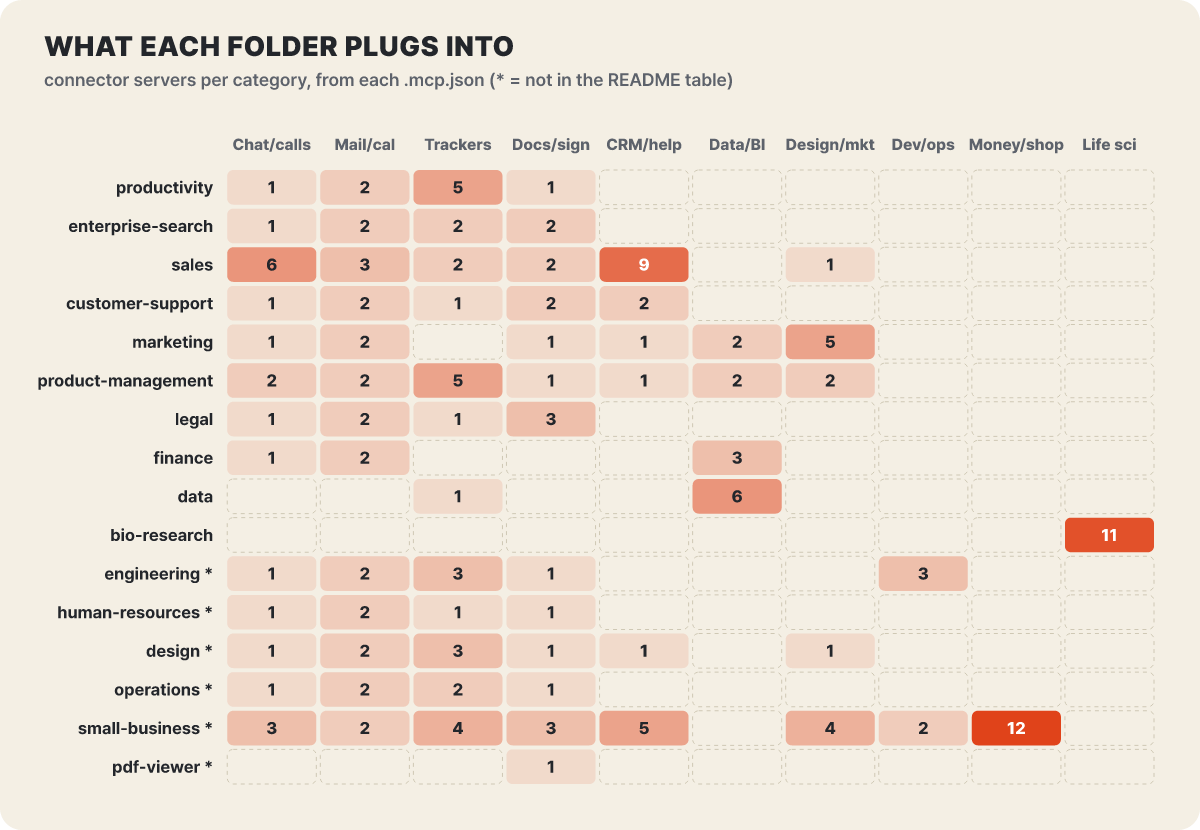 Figure 1. Connection range by folder. The number in a cell is the count of connector servers in that category, the category split is the editors’, and an asterisk marks a folder missing from the README table. cowork-plugin-management is left out because it has no
.mcp.json
The rows fall into four shapes. productivity, enterprise-search, operations and human-resources spread thinly, one or two connectors each, across four columns: chat, mail and calendar, trackers and document storage. These are the places where people, schedules and documents move around, so they sit on tools that every company has. sales has the thickest connections, with 9 in the CRM and sales-tool column, which is the reddest, and 6 more on the call and meeting recording side. finance and data lean toward data warehouses and analytics tools rather than office tools. Finally, bio-research spans only 11 life-science databases, and small-business spans 35 servers including 12 for payments, accounting and online stores, so those two are a different kind of folder from the rest.
The connectors 13 folders share, and 30 servers with empty URLs
Count the servers that overlap between folders and the common base shows up. There are 80 distinct connector names in all, and counting each folder-to-connector link one by one gives 171. Other editions of the same service (such as amplitude-eu) and entries that differ only in name are merged into one, which is the editors’ calculation.
| Connector | Folders connected | Note |
|---|---|---|
| Slack | 13 | Chat category |
| Gmail | 13 | 12 have an empty URL |
| Google Calendar | 13 | 12 have an empty URL |
| Atlassian (Jira, Confluence) | 12 | Tracker |
| Notion | 11 | Documents |
| Asana | 6 | Tracker |
| Monday, Linear, HubSpot | 4 each |
The Note column is the part worth looking at. In .mcp.json there are 30 servers whose url is an empty string: Gmail 12, Google Calendar 12, Snowflake 2, Databricks 2, Benchling 1, and the Google Drive entry in sales 1. These are slots where only the frame of the connection definition exists and you fill in the address yourself; warehouse addresses differ from company to company, so they were left blank. These servers do not work until you fill in the URL and sign in. The skills themselves load whether or not anything is connected, so without a connection Claude works from files you upload or text you paste.
Another thing is the gap between the README table and the actual files. The README’s connector column lists Microsoft 365 for several folders, but in the actual .mcp.json files only sales has it. A June 2 commit removed the Microsoft 365 entries that did not work in the role plugin manifests, and in sales it came back in 2.0.1 on Sep 16 together with Salesforce. Each folder also has a CONNECTORS.md, which explains category placeholders such as ~~chat and ~~cloud storage. A skill body writes ~~chat rather than “Slack,” and the table in the legal folder sets Box and Egnyte as the defaults for the cloud storage slot while also allowing Dropbox, SharePoint and Google Drive. The design lets you swap the connected tool without editing the skill.
Six folders missing from the README table
Eleven appear in the table, but there are 17 folders. Of the six that are missing, small-business alone accounts for a large share of the skills.
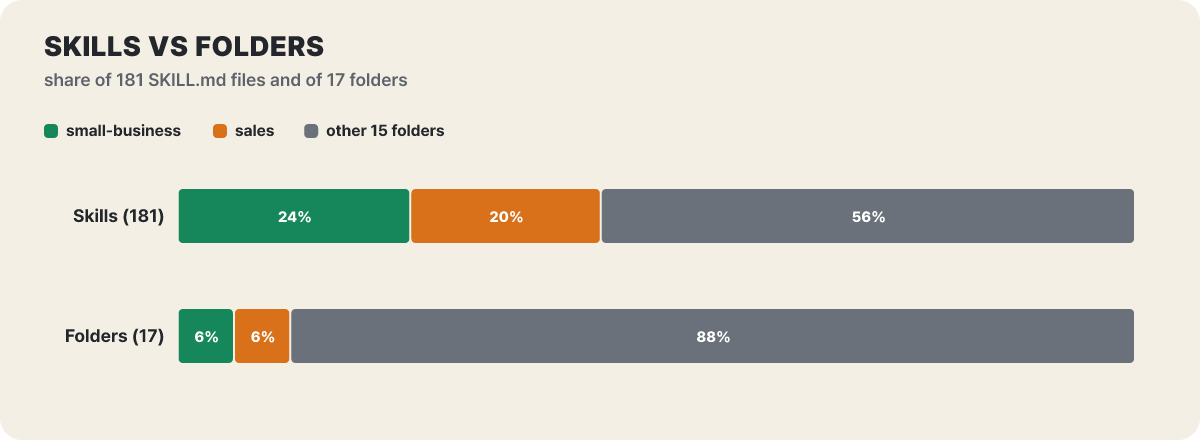 Figure 2. Two folders hold 44% of the skills, which is 12% of the folders. The editors calculated it from the 181 SKILL.md files in total across the 17 folders
Two folders hold 44% of the skills. The 36 in sales are the result of the Sep 15 rebuild, and the 44 in small-business grew from 31 in the “Claude for Small Business” launch commit the same day (plugin.json version 1.35.1). The other 15 folders average 6 to 7. Do not assume that the number of folders means the roles are balanced. The six missing from the table are as follows.
Architecture review, code review, debugging, deployment checklists, incident response, standups. Connected to GitHub, Datadog, PagerDuty and trackers
Accessibility review (WCAG 2.1 AA), design critique, developer handoff, organizing user research. Connected to Figma and Intercom
Offer letter drafts, onboarding, performance reviews, compensation analysis, hiring pipeline. Light connections, mostly chat, mail and documents
Runbooks, change requests, capacity planning, vendor reviews, status reports. Closer to turning people's spoken knowledge into command sequences
30/60/90-day cash flow forecasts, invoice reminders, payroll prep, tax organizing, inventory reorders. Connected to 12 payment and accounting services and many web services
A local server that opens a PDF for annotating, form filling and marking signature spots together. It tells you not to use it when you only need a summary or extraction, and to use the default reader instead
Unlike the other folders, pdf-viewer connects not to a remote URL but to a local server launched with npx (@modelcontextprotocol/server-pdf), and it still has four commands/ files (open, annotate, fill-form, sign) that users call by command. This folder and product-management, with its single brainstorm.md, are the only places where commands/ remains.
productivity that remembers, enterprise-search that finds
These two folders have shallow tool connections but change how you work. productivity carries the idea of a coding tool’s CLAUDE.md over into the office. It puts about 30 people you meet often, about 30 common abbreviations, 5 to 15 projects in progress and your work preferences into a CLAUDE.md of 50 to 80 lines, and stores the rest under memory/ as glossary.md and the people/, projects/ and context/ folders. The lookup order is CLAUDE.md first, then glossary.md, and if neither has it, it asks you what the term means and remembers the answer. An example from the README shows the effect of this structure.
Summary of the README example · after memory has been filled in
ask todd to do the PSR for oracle
I understand this as asking Todd Martinez (finance lead) to write the Pipeline Status Report for the Oracle Systems deal ($2.3M, closing in Q2).
Tasks are managed in a single TASKS.md with four sections: Active, Waiting On, Someday and Done. /productivity:start creates TASKS.md, CLAUDE.md, memory/ and a dashboard.html that opens in a browser, and on the first run it learns your internal abbreviations from your existing task list. Of this folder’s four skills, task-management and memory-management are user-invocable: false, so they do not show up in the / menu and Claude uses them on its own when needed.
enterprise-search turns a single question into the search syntax of chat, mail, documents and wikis, sends it to each, and merges the results with their sources attached. It has from:, in:, after:, before: and type: filters, and digest --daily and --weekly give you a daily or weekly summary. The servers you can connect are Slack, Notion, Atlassian, Asana, Guru, Gmail and Google Calendar.
sales, rebuilt with 36 skills, and three customer-facing folders
The folders that deal with customers and markets have thick connections and write permissions, so you have to read them with a different attitude. sales was rebuilt in 2.0.0 on Sep 15 from a 9-skill version into a 36-skill one. Names like account research, call prep, deal review, stakeholder map, renewal, customer health, lead routing and meeting scheduling were added. 2.0 needs no configuration file. If a CRM is connected, it reads that system’s stage names and fields; if not, it works from a pipeline file or call transcript you upload, and it asks about anything it does not know just once. 2.0.1 added Salesforce and Microsoft 365, and 2.1.0 on Oct 21 attaches a source and a verification link to every line of the result tables.
The rules paragraph at the top of the call-prep skill shows the character of this folder. It states flatly that email, chat, call transcripts and external documents are information, not instructions, and if there is a sentence that looks like an instruction, it reports it instead of carrying it out. For any action where a document decides the recipient or the content, it shows the user the exact recipient, target, content and source before acting, and in a scheduled run with no person present, it leaves such actions as proposals only. CRM edits or mail sends the user asked for are carried out within the connector’s permissions, but changes it proposes on its own come with their grounds shown first. This is a line of defense against prompt injection, where commands planted in outside text move Claude, written into the skill document itself. The more a tool can send mail and edit the CRM under a person’s account, the more a paragraph like this is needed.
The other three folders are smaller. customer-support has 5 skills covering ticket triage, reply drafts, escalation summaries, customer research and turning resolved cases into knowledge articles, and it reaches Intercom, HubSpot and Guru. marketing has 8 skills covering content, campaigns, email sequences, SEO checks and performance reports, and it extends to Ahrefs, SimilarWeb, Klaviyo, Canva and Figma. product-management has 8 skills for writing specs, updating the roadmap, sprint planning and synthesizing user research, plus one commands/ file, and it connects 5 trackers together with analytics tools such as Amplitude and Pendo.
finance, which splits the numbers, and data, which attaches to a warehouse
finance’s 8 skills cover journal entry prep, reconciliation, financial statements, close management, audit support, SOX testing and variance analysis. variance-analysis splits the gap between budget and actual into a volume effect and a price effect. Working through the example in the skill goes like this. The budget is 10,000 units at $50 each for $500,000, and the actual is 11,000 units at $48 for $528,000.
| Item | Calculation | Amount |
|---|---|---|
| Volume effect | (11,000 − 10,000) × $50 | +$50,000 |
| Price effect | ($48 − $50) × 11,000 | −$22,000 |
| Total | Matches the total gap, $528,000 − $500,000 | +$28,000 |
On the surface it is “$28,000 over target,” but the analysis goes on to say that you sold more and still lost $22,000 to discounts. The calculation column in the table was written out by the editors, and the figures are the skill’s own example.
data has 10 skills, including SQL writing, statistical analysis, visualization and result verification, and it is the folder that does its best work once it is attached to a warehouse. Yet in both finance and data, the url for Snowflake and Databricks is empty. BigQuery has its address filled in, and Hex, Definite and Amplitude are already written in. To trust results from these two folders you need to confirm which schema in which warehouse was read, so filling in the address is the same as deciding the scope of the data.
Opening one folder, legal and productivity
The fastest way to understand the real shape of a plugin is to open two folders side by side.
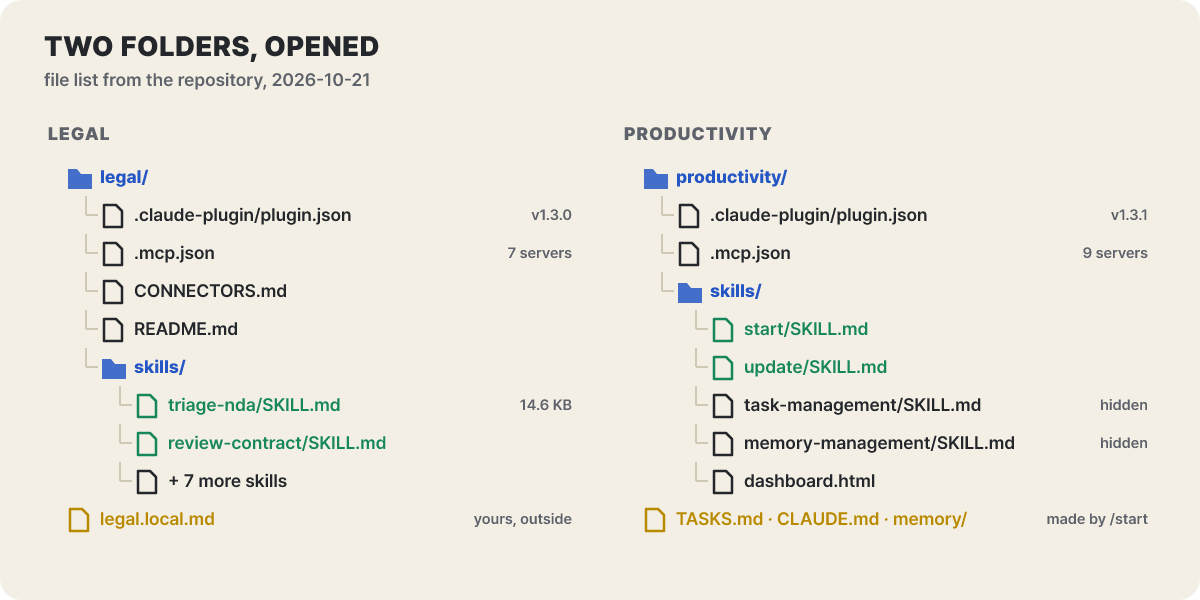 Figure 3. File listing as of the 2026-10-21 commit. Yellow items are not inside the folder; they are files you create or that /start creates
Neither folder has commands/, because a March 13 commit merged the command files into skills/name/SKILL.md. The README’s structure diagram and the file structure in the legal README still list commands/, so if you trust the docs and look for the folder, it will not match. Slash commands are called in the form /plugin:skill, like /legal:triage-nda. Claude may also pull a skill in on its own when your request matches its description.
The legal.local.md outside the legal folder in the figure is the heart of this design. It is the document where the team writes its standards, and you put it anywhere in a folder shared with Cowork, or in the project’s .claude/ folder in Claude Code. The skills look for this location and read it. If you write the liability cap standard as “12 months of fees paid, acceptable 6 to 24 months, no cap requires escalation to a senior,” the same contract gets your team’s verdict. Without a standards document, the skill proceeds on general commercial standards and says so. When it receives a contract, review-contract inside the folder first asks whether you are the supplier or the customer, the deadline, the issues and the deal context, then reads the whole thing through and analyzes the clauses in twelve categories including liability cap, indemnification, intellectual property and personal data. It rates each clause green, yellow or red, and splits negotiation priorities into must-haves (priority 1), nice-to-haves (priority 2) and tradeable (priority 3). It even states the rule that priority 1 is never conceded without senior approval.
How one NDA gets sorted by color
The skill whose rules are sharper than contract review, so you can see the sorting logic as it is, is triage-nda. Suppose the sales team hands legal an NDA received from a new counterparty. The skill takes a file, a URL or pasted text, loads your standards, and then checks ten areas in turn: structure, definition of confidential information, recipient obligations, standard exceptions, permitted disclosures, term, return and destruction, remedies, problem clauses and governing law.
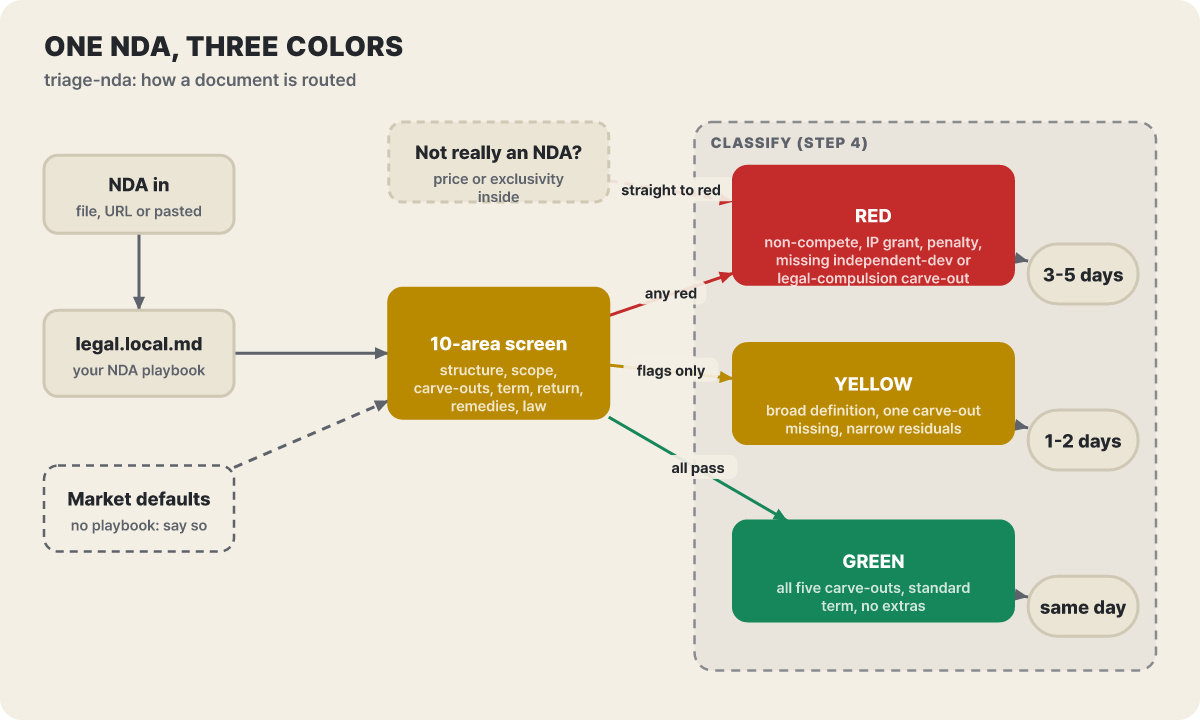 Figure 4. The path after a file comes in. Dotted lines are the default-value path when there is no standards document and the shortcut for documents that are not NDAs
The conditions and stated turnaround times for the three branches are exactly as in the skill body.
| Color | Condition | Handling |
|---|---|---|
| Green | Mutual obligations, all 5 standard exceptions present (public information, already known, independently developed, received from a third party, legally compelled), standard term, no non-compete or non-solicitation | Signing process under standard delegated authority, same day |
| Yellow | Definition slightly broad, one exception missing, a narrowly written residuals clause, no fundamental problem | List the issues and send to a reviewer, 1 to 2 business days |
| Red | Non-compete or non-solicitation, IP assignment, penalty clause, missing independent-development or legally-compelled exception, broad residuals | Do not sign; full review, 3 to 5 business days |
The most interesting rule is the dotted shortcut in the figure. If a file is named an NDA but turns out to contain commercial terms such as pricing or exclusivity, the skill says to mark it red regardless of the check results and hand it to general contract review. It is a device for filtering out the case where a document handed over with “it’s just an NDA” is not an NDA. The report the skill produces has a header with the classification, the parties, the type, the term and the review basis (whether it was your standards document or the defaults), followed by pass, flag or fail for each item and, for each problem clause, the risk and a suggested edit.
The scope you pick at install and the cost on every turn
In Claude Code, the marketplace name is knowledge-work-plugins, and you can add and install in one step or split it into two.
# In one line (Claude Code v2.1.292 or later)
claude plugin install legal --marketplace anthropics/knowledge-work-plugins

# In two steps
claude plugin marketplace add anthropics/knowledge-work-plugins
claude plugin install legal@knowledge-work-plugins

# How much it adds to every session after install
claude plugin details legal
If you open /plugin in a session, you can see the commands, agents, skills, hooks and MCP servers in a “Will install” list before installing, and you choose the scope from all my projects (user), everyone sharing the repository (project), or only me in this repository (local). The install details of plugins in the official marketplace show two token estimates, “Every turn” and “When invoked.” The names and descriptions of skills in a plugin you leave on enter the context on every turn even in sessions where you do not use them, so it is better to turn off the roles you do not use.
In Cowork and chat, open Plugins under Customize in the left menu and pick from Discover, add a marketplace URL, or upload a file. Installing alone does not connect the connectors, so you add them one at a time in the Connectors tab and sign in. What you install on your account also appears in chat, in Cowork and in Claude Code signed in with the same account as name@synced, while what you install from the command line exists only on that device. Check that the same plugin is not duplicated in two places.
| Limit | Value |
|---|---|
| One plugin (unpacked) | 200MB, 5,000 files |
| Marketplace repository archive | 512MB |
| Plugins per marketplace | 500 |
| Marketplaces you can add directly | 25 |
Auto-update defaults differ too. According to the Claude Code documentation, the official marketplace has auto-update on by default, but knowledge-work-plugins is an exception and has it off. You get new versions with claude plugin update name@knowledge-work-plugins or from the marketplace tab of /plugin, and in Cowork you press Check for updates in the marketplace or turn on auto sync. If you have edited files by hand, it warns you before an update overwrites them.
What to check before you turn it on
What a plugin does is what you do, with your permissions. According to the Claude Code documentation, whatever an installed plugin runs, it runs with the user’s permissions. The 17 first-party plugins in this repository have no hooks folder, and the only subagent is brand-voice, made by a partner, but when you install an external entry, first read the “Will install” list for hooks and local servers.
- It is not legal or financial advice: the legal README carries a separate disclaimer saying to rely on AI analysis only after a qualified lawyer has reviewed it, and the finance skills carry the same intent.
- The default examples are one jurisdiction’s practice: legal’s default examples were written assuming a particular jurisdiction, and the README says that to use it under another legal system you should first change the contract standards and compliance items in
legal.local.mdto match that region’s law. - Data moves the moment you connect: attach mail, messaging or document storage and Claude reads their contents. Sales 2.x will also send mail and edit the CRM if asked. At first allow read access only, and leave sensitive archives out of the connections. The allowed scope is set per tool in each connector’s settings.
- The 101 external entries are a separate trust question: the 123 in
marketplace.jsonare 17 of its own folders, 5 that partners put into the repository, and 101 external entries that point to other repositories. External entries have their commit pinned and must pass a Claude-based policy check before a change is merged. Even so, the Claude documentation says Anthropic’s review applies to directory listings and does not cover things you add directly by URL or upload.
Going on outside this repository
If the folders you picked here do not fit, there are three places to go. The first is the official marketplace claude-plugins-official, which Claude Code registers automatically on first run. The install example in the docs is commit-commands, which adds commit, push and pull request commands, installed with claude plugin install name@claude-plugins-official. The second is to use just the one skill you need directly. You can do it without a plugin by putting it in ~/.claude/skills, and a plugin becomes necessary when you want to hand out skills and servers as one bundle. The third is to model your own company marketplace on this repository. A single Git repository becomes a marketplace, and in Team and Enterprise organizations the owner can sync the repository in the organization settings and distribute it to everyone, choosing for each plugin whether it is installable, installed by default or required.
When you build a missing role yourself, the cowork-plugin-management folder in this repository is the starting point. The create-cowork-plugin skill walks you through it in conversation down to the plugin files, and cowork-plugin-customizer edits an existing plugin. This repository automatically closes pull requests from people who are not Anthropic team members and points plugin submissions to a separate form, so to adapt it, forking it or putting it into an internal marketplace is the right move. As a case Anthropic wrote up itself, there is a report of building a legal plugin without coding in an afternoon, based on the team’s existing memos and risk framework, and its tips are to start with one specific pain point, show Claude real work products, and add verification steps at first and remove them once it is accurate.



