ECC, 280K stars, makes agents search first with 311 skills
ECC (MIT, about 289K stars) installs 2 to 311 skills plus hooks, depending on the path. How search-first and codebase-onboarding set the install route.
Open the README of the ECC (Everything Claude Code) repository and the install commands fork six ways: the guided setup, install --guided, which asks about several tools at once, the two plugin lines you type inside Claude Code, --profile minimal without hooks, a folder copy, and --skills, where you name the skills yourself. From the names alone, you would expect any of them to bring in all 311 skills. In reality, one path installs just two skills, and another installs all 311 plus auto-running hooks, and both sit side by side in the same document. If you copy the top command without choosing, you can end up with the descriptions of hundreds of skills you never use taking up context in every session.
This article uses the two ECC skills most worth trying first as reference points. One is search-first, which makes the agent look for existing packages, MCP servers, and repository functions before writing code. The other is codebase-onboarding, which skims an unfamiliar repository and produces a guide. We first look at what the two skills do, then at which install paths bring them in and what comes along with each path. On October 27, we re-checked the repository (main, commit of October 26, 04:03 UTC) and the npm package ecc-universal 2.2.3 (published October 2, currently latest). The repository has about 289K stars and about 43K forks.
If you split 311 skills by area, where do the two sit
ECC divides what you install into “modules” and records them in manifests/install-modules.json. 26 modules contain skills, and all 311 skills belong to exactly one module. Counting skills per module gives the following picture.
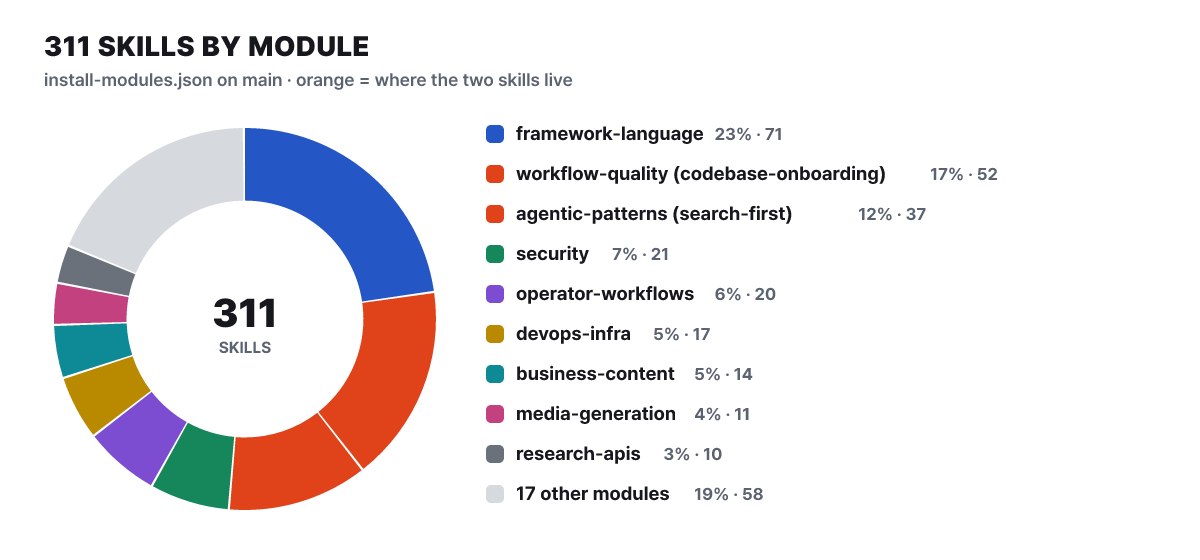 Figure 1. Skill distribution by install module (main, tallied by the editors). The two orange slices hold the two skills in this article
The largest block is language and framework patterns (71). Next come workflow-quality (52) and agentic-patterns (37), where the two skills live: codebase-onboarding is in workflow-quality, and search-first is in agentic-patterns. This placement becomes the criterion for splitting the install paths later, because the assumption that skills from the same area come together does not hold.
The numbers differ depending on where you read them. The skills/ folder on main has 311 skills, and the README states the same number, but unpacking the npm 2.2.3 package gives 68 agents, 293 skills, and 94 command files. That means 18 skills were added to main after the release. The SKILL.md of the two skills is identical in both places. This article uses the main numbers for the plugin, which points at the GitHub repository, and the package numbers for the version-pinned npx ecc-universal@2.2.3 commands.
Where search-first looks and what it decides
For a model, writing something new is the easiest path. Finding a package means searching the repository, searching the registry, and even judging the candidate’s maintenance status, while code you write yourself comes straight out of the context in front of you. The result looks fine and runs, and the trouble shows up weeks later. It disagrees with a utility function that already existed in the repository, or it goes through again the retry, timeout, and encoding exceptions that a library solved long ago. You can add a line such as “look for an existing implementation first” to CLAUDE.md, but as the Claude Code documentation makes clear, CLAUDE.md is only context given to the model, not an enforced setting. search-first spells that one line out as a concrete procedure.
The order set by SKILL.md (183 lines) has six steps. Step 0 checks which search channels are available. Then it analyzes the need, searches package registries, MCP and skills, and GitHub and the web in parallel, evaluates candidates on function, maintenance, community, documentation, license, and dependencies, decides, and only then implements. Step 0 deserves attention. It checks repository search with rg --files, packages with npm --version, GitHub with gh auth status, and the skills folders with ls ~/.claude/skills ~/.codex/skills. If a channel is unavailable, the skill says to report “that channel was skipped,” not “I looked and found nothing.” It is a safeguard against the mistake of failing to search and then concluding “none exists.”
The decision has four branches. If a candidate matches exactly, is maintained, and has a license such as MIT or Apache, adopt it (install it and use it as is). If it matches only partly but has a good base, extend it (install it and write a thin wrapper). If there are several weak candidates, compose them (combine two or three small packages). If nothing usable exists, build it yourself. There are also two modes by task size. For small changes, there is a fast mode that does not spawn a separate agent and only skims five questions: inside the repository (rg), npm and PyPI, MCP servers (~/.claude/settings.json), skills (~/.claude/skills/), and maintained implementations on GitHub. For long-running features, the full mode has a dedicated research agent return a structured comparison table and a recommendation. Shortcuts by domain are attached as well, so the agent looks first at candidates such as eslint and ruff for lint, prettier and black for formatting, zod and pydantic for validation, and sharp for image optimization. The listed anti-patterns are jumping straight into code, ignoring MCP, and installing a large package for a small feature.
The ECC repository’s effectiveness evaluation document lists, as a scenario, a trap this skill is meant to prevent. The agent is asked for a new URL slug helper, but the repository already has a slugify that strips accents, turns & into a word, and limits length. If the new function disagrees with it, the same article ends up with two addresses.
The two outputs codebase-onboarding leaves behind
This is the skill you use when you say “onboard me to this project” in a repository you are opening for the first time, and its SKILL.md is 234 lines. The core principle is not to read every file. It checks the package manifest, framework config, entry points, folders two levels deep (excluding places such as node_modules and dist), linter and CI config, and test structure in parallel to infer the structure, and when the inference disagrees with the code, it says to trust the code. Next it organizes the tech stack and the role of each folder, and traces the path of one request from arrival to the DB. It also reads file naming rules, error handling, and the collaboration habits visible in recent commits and branch names. If the repository has no commit history or was cloned shallow, it skips this part and records that it did.
There are two outputs, and they are stored in different places. The onboarding guide is only printed in the conversation and not left as a file, so you have to ask for it to be saved if you want to share it with your team. At the end of the guide goes a table pairing “what you want to do → where to look” (for example, adding an API endpoint points to src/app/api/). The starter CLAUDE.md is written at the project root. It has five sections: tech stack, code style, testing and build, project structure, and conventions. The skill’s own criteria say to keep it under 100 lines, not list every dependency, not explain obvious folders such as src/, not copy the README, and not guess at conventions it is unsure about but state that it could not determine them. That is shorter than the Claude Code documentation’s recommendation of under 200 lines for CLAUDE.md.
In a repository that already has a CLAUDE.md, it does not overwrite it. It reads the file first, adds only what it newly found, and says what changed. If you say “just make CLAUDE.md,” it runs only steps 1 to 3 and produces CLAUDE.md without a guide. This is where it overlaps with Claude Code’s built-in /init command: /init also analyzes the codebase to create a starter CLAUDE.md and, if the file exists, suggests improvements instead of overwriting. The difference is that this skill gives you more when you want the guide, the “where to look” table, and the request path trace.
The install path splits on four questions
A Claude Code user who wants the two skills needs few questions. How many do I need, do I need hooks, do I need the whole thing, and if not the whole thing, which area. All commands are pinned to the 2.2.3 release.
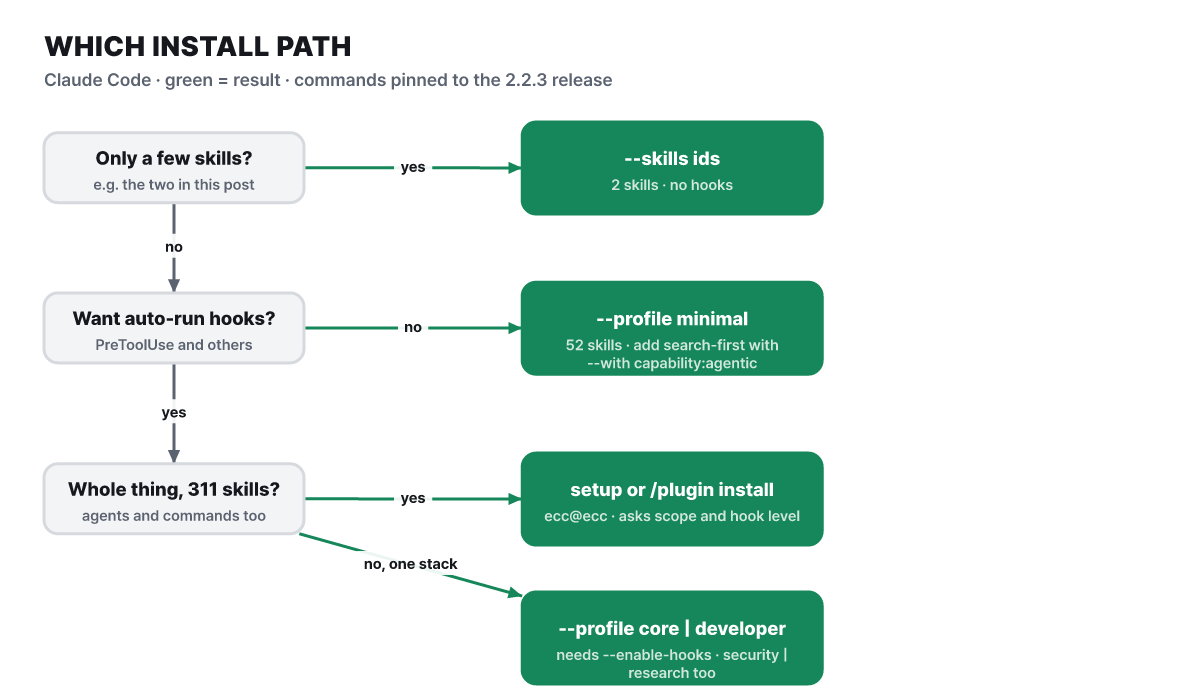 Figure 2. Ask from top to bottom and stop at the first “yes.” The green boxes are commands
Follow the left column from top to bottom and stop at the first “yes.” If the two skills are your goal, it ends at the first question.
# Just the two skills (no hooks). No need to download the ECC repository
npx ecc-universal@2.2.3 install --target claude --skills search-first,codebase-onboarding
The help text says --skills installs “one or more skill directories by ID,” and we confirmed in the 2.2.3 package code that each skill folder is composed as a skill:<name> component. No hook module is involved, so there is no hook consent question either. If you only want to see the install plan, add --dry-run to the end of the same command. When you do not know which components fit your work, an advice command such as npx ecc-universal@2.2.3 consult "security reviews" --target claude returns the matching components, the profile, and a preview command.
If you dislike hooks but want the base setup, that is minimal. This profile contains rules, agents, commands, platform settings, and the workflow-quality module, and deliberately leaves out the hook runtime. However, minimal does not have search-first. Adding --with capability:agentic, which brings in the agentic-patterns module, pulls it in.
npx ecc-universal@2.2.3 install --profile minimal --target claude --with capability:agenticSkills each profile brings, on one grid
Profile names make it hard to guess what comes in, so we unpacked the module composition into skill counts. The area columns group the modules in the donut above.
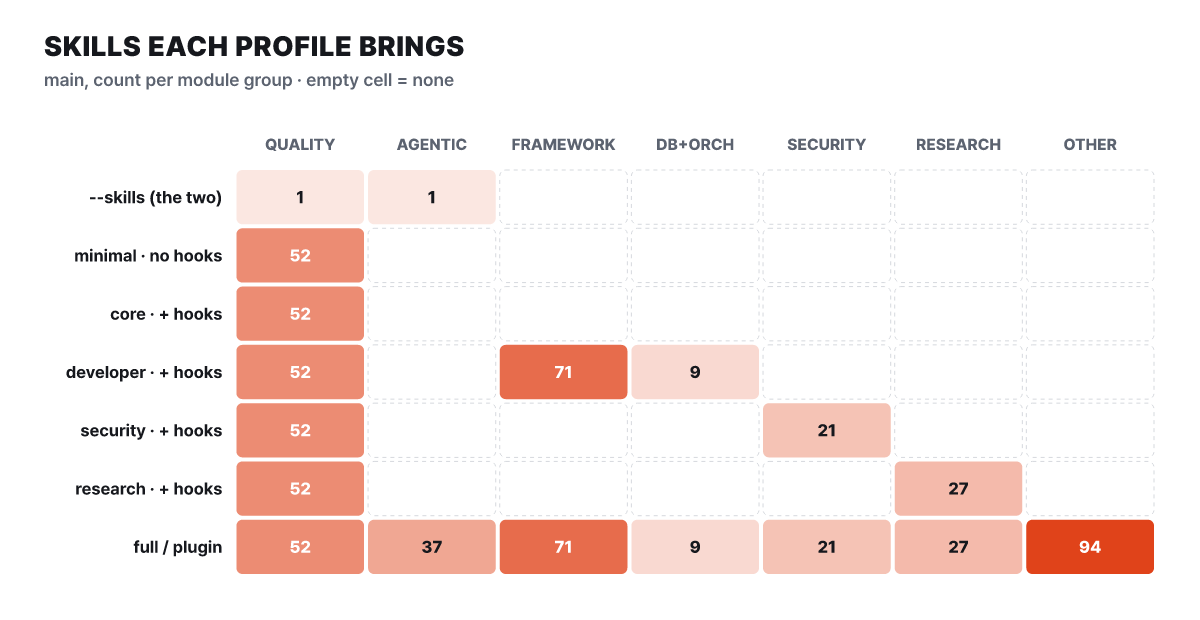 Figure 3. Skill counts per profile (main 25278e7, calculated by the editors). Blank cells are 0
What stands out first in the grid is that the first column (QUALITY) has 52 in every profile. codebase-onboarding comes along whichever profile you pick. The second column (AGENTIC) is filled only in the bottom row, full, so search-first arrives only through full or the plugin. Also, minimal and core have the same skills (52), and the only difference is that core includes the hook runtime. From the names, you would expect core to hold more, but what grows is not skills but auto-running scripts.
If you pin a version, the numbers drop a little.
| Profile | Skills (main) | Skills (npm 2.2.3) | Hook runtime |
|---|---|---|---|
| minimal | 52 | 47 | No |
| core | 52 | 47 | Yes |
| developer | 132 | 125 | Yes |
| security | 73 | 66 | Yes |
| research | 79 | 73 | Yes |
| full | 311 | 293 | Yes |
Profiles that include hooks demand a decision at install time. If you run without --enable-hooks or --no-hooks, the installer prints what the hooks can do and stops before writing any files. So if you want core without hooks, it becomes --profile core --no-hooks, and the result is the same skill set as minimal. Meanwhile, the README’s manual copy section tells you to copy the skills in .agents/skills/ (46 on main) together with search-first into ~/.claude/skills/, and this bundle does not include codebase-onboarding. When copying, put the skill folders directly under ~/.claude/skills, and do not nest them in a subfolder such as ecc/.
The guided install does not ask for a profile
The default path the README recommends is npx ecc-universal@2.2.3 setup. It requires Node.js 18 or later, Git, and Claude Code 2.1 or later. We read what this wizard actually asks from scripts/setup.js and reproduced it on screen.
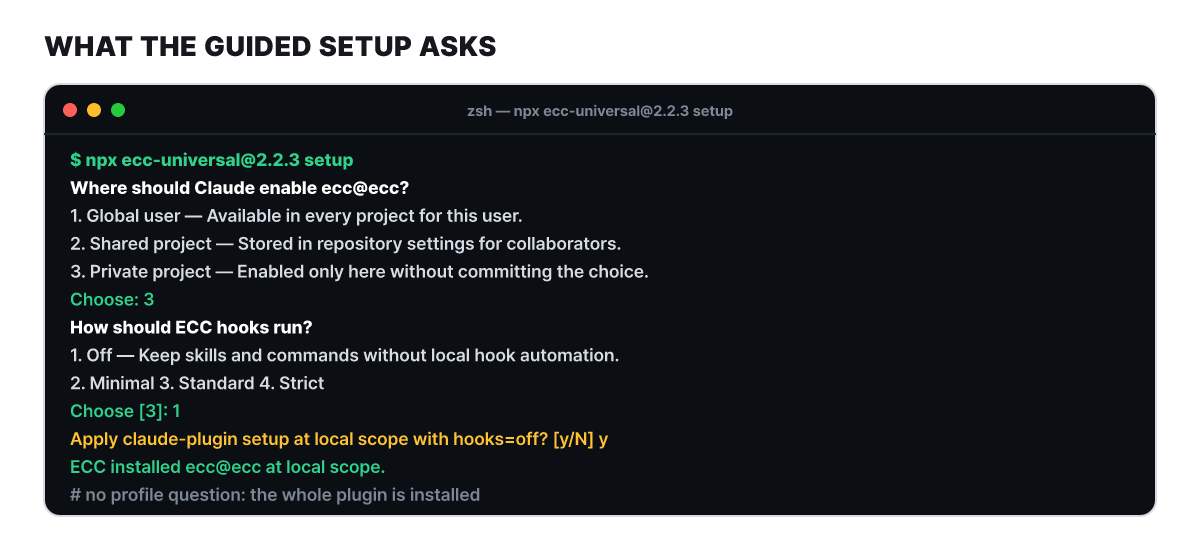 Figure 4. There are only two questions. The wording is taken from the source (hook choices shortened), and the input is an example
The questions are only the scope (global, shared project, private project) and the hook level (off, minimal, standard, strict), and there is no step for choosing a profile. This path installs the whole ecc@ecc plugin, with the same result as typing /plugin marketplace add https://github.com/affaan-m/ECC and /plugin install ecc@ecc inside Claude Code. The plugin declaration points at the entire skills folder, and when you invoke a skill, the plugin name goes in front, as in /ecc:configure-ecc.
Here we correct an error in the previous version of this article. The previous version said you could choose a profile in the guided install with install --guided --harness claude --profile core --yes. But the --profile of the guided install is the content profile that Kimi Code accepts, and if you pick only Claude and pass --profile, it is blocked with an error saying the profile option can be used only when Kimi is selected (the 2.2.3 package and the main source are the same). To narrow the skill scope by profile in Claude Code, you need the install --profile ... --target claude form from the previous section. Whether you used the guided install or the plugin, check with /plugin list that ecc@ecc is enabled, and choose one method only. As the README warns repeatedly, if they overlap, skills, commands, and hooks come in twice.
The price you pay for turning hooks on
The hooks that the plugin and the core and higher profiles bring are auto-running scripts that step in before and after the agent uses a tool. The events are before tool execution (PreToolUse, which can block with exit code 2), after execution, prompt submission, end of a response, session start and end, and just before context compaction, and the levels are minimal, standard (the default), and strict. Examples include a type check that runs tsc --noEmit when you edit a .ts file, a hook that blocks starting a dev server outside tmux, and a hook that loads the previous context at session start (8,000-character cap by default). Session summaries, the state just before compaction, and the exit log stay on disk and are kept for 30 days by default.
Of these, GateGuard is worth weighing the cost of. It is a hook that first rejects the first Edit, Write, or Bash, and allows it once you present facts such as the places that import this file or the affected public functions. The skill description states an A/B score of 9.0 versus 6.75, averaged over two tasks. The same repository’s effectiveness evaluation document reaches a different conclusion. It ran 72 sessions with six scenarios, four configurations, and three repetitions, and all four configurations passed all 18 attempts, so the effect could not be separated, and what was measured was only the cost. The side with the gate on used about 45% more turns and 28% more tokens (median turns from 4.5 to 6). The document itself states the limits: the person who wrote the questions built the traps and the grader, and the scenarios were small enough to detect only large effects. The 9.0 versus 6.75 is a score from the side that made the tasks and grading, and the same repository’s pilot concludes that “the effect could not be separated, but the cost was measured.”
main has accumulated unreleased GateGuard changes (Unreleased in the CHANGELOG). If a search in the same turn names the target file, the first contact passes; the question is changed to fit the target type (instructions, tests, config, code); read-only shell commands no longer use up the one-time shell gate; and installs now go to the folder given by CLAUDE_CONFIG_DIR when it is set. These changes are not in the npx command pinned to 2.2.3. There are also knobs for when you dislike the hooks. For everything, use --no-hooks at install time; for a specific hook, ECC_DISABLED_HOOKS; for GateGuard alone, ECC_GATEGUARD=off; for the session-start context, ECC_SESSION_START_CONTEXT=off; and for the retention days, ECC_SESSION_RETENTION_DAYS.
96,000 characters of descriptions go into every session’s context
Having many skills does not put all 311 into every conversation. According to the Claude Code documentation, an ordinary session carries only each skill’s description, and the body is read when the user or Claude invokes that skill. Descriptions are truncated at 1,536 characters, and a SKILL.md body is recommended to stay at 500 lines or fewer. Downloading the repository and counting, the descriptions of the 311 skills total about 96,000 characters (calculated by the editors), with a median of 288 characters per skill. The median body length is 188 lines; 36 skills exceed the recommended 500 lines, 94 exceed 300 lines, and the longest is 950 lines. The two skills in this article, at 183 and 234 lines, are near the average.
So the cost of installing the whole plugin comes not from the bodies read at invocation but from the descriptions of unused skills filling the context every time. The two skills’ descriptions together come to around 600 characters. That is where the difference in standing cost between the full install and the two-skill install comes from, and it is why the --skills path is the lightest if the two skills are your goal.
Getting the same effect without installing
What the two skills do can be imitated to a degree without installing anything. The difference is only how much setup you put in and how concrete a procedure you get, so comparing against the three below before installing makes the decision easier.
Write "find the existing implementation before new code." It applies right away, but it is context, not enforcement, and the model decides where to look and in what order
Analyzes the codebase and creates a starter CLAUDE.md, and only suggests changes to an existing file instead of overwriting it. The guide, the "where to look" table, and the request path trace have to be done separately
Bring in just two with --skills. No hooks, and fewer description characters. You have to keep up with updates yourself
CLAUDE.md has the large advantage that most people already use it and it costs nothing. However, the sentence “look for it” alone does not make the model report an unusable search channel as “skipped,” and this reporting rule is the most concrete contribution of search-first.
Read before installing, and how to undo it afterward
A skill body is an instruction the agent follows, so read the SKILL.md you plan to use before installing and check that it does not conflict with your project’s rules (for example, an approval procedure for adding dependencies). The two skills are 183 and 234 lines, so reading takes five minutes. Installing is free. The license is MIT, and installing the repository and the npm package (ecc-universal) costs nothing. A separate commercial service exists, the GitHub app ECC Tools. According to its pricing page, the free tier is 10 analyses per month for public repositories, and Pro is $19 per seat per month ($190 per year) and supports private repositories. The app analyzes commit history and some files in memory and submits a SKILL.md as a PR, so read the terms yourself before connecting it to a private repository.
- Use only the official paths. The README names only the GitHub repository affaan-m/ECC, the npm packages ecc-universal and ecc-agentshield, the GitHub app ecc-tools, the plugin ecc@ecc, and the site ecc.tools as official, and it warns that third-party redistributions may contain malware. There are many posts and copies under old names, so do not install packages that only have a similar name
- Attach a version to the command. The README's npx examples are pinned like @2.2.3. However, the README itself says version pinning is not a security audit or an integrity check, so run it after reading the release source
- Look at the install plan first. Adding --dry-run prints only the plan without writing files. A profile that includes hooks proceeds only once you set --enable-hooks or --no-hooks yourself
- Choose one method only. If you overlap the plugin, the guided install, and the manual install, skills, commands, and hooks come in twice. If you have overlapped them, undo first
- Check the install state. Use list-installed to see the installed list and doctor to run a check, and use repair if something looks wrong
- To undo, look at the list of what will be removed with uninstall --dry-run, then run uninstall. If you copied folders by hand, delete those skill folders
- On a shared PC or a sensitive repository, keep in mind that session summaries stay on disk, and shorten the retention days or turn the hooks off
If you boil the criterion down to one sentence, it is not the number of skills but the kind of standing cost. The side that adds skills pays the price of description characters sitting in context, and the side that adds hooks pays the price of automatic scripts running every time a tool is used. If you start with just the two skills, this cost is nearly zero, and if it becomes insufficient, you can raise it one layer at a time with --with capability:... or a profile. Since increasing is one command, you lose nothing by starting small.



