Run local models behind Claude Code with Unsloth Desktop
From installing Unsloth Desktop to the first unsloth start claude run: fixes for edits that don't land and for slowdowns, sandbox levels, and open-port risks.
Until now, attaching a local model to Claude Code took a lot of hand work. You had to start a model server separately, line up the address, key and model-name environment variables in every shell, open a settings file to add one more variable when things got slow, and dig through server options when files still would not change. Almost nothing told you where you were stuck, so most people spent half a day and ended up in a state where the model answers but nothing changes on disk. Unsloth Desktop is an app that shrinks this process to a single line, unsloth start claude, and this post walks the road to that line in the order you actually type the commands, starting from installation. It also covers the causes and fixes for the two places where people get stuck (files that do not change, and slowdowns), the levels of permission you can hand to the tools, and the risks of opening a port. It is based on the official docs and GitHub releases as of 2026-10-27 UTC (latest v0.1.911-beta, Oct 26).
Three things to check before installing: the app type, your device memory, the license
Three similarly named things exist, so let’s separate them first. Desktop is an installed app built on Tauri and marked as beta in the docs. Studio is the web UI that offers the same features in a browser, launched with unsloth studio, and it is meant for servers and remote access. Core is the Python fine-tuning library you use from code. The star of this post is Desktop, and the agent-connecting command unsloth start and the server command unsloth run are CLIs that use the same engine. GGUF models run on llama.cpp-family code, and MLX models on the Mac run on MLX.
Devices include NVIDIA, AMD and Intel graphics as well as Macs, and since v0.1.909 non-NVIDIA PCs also run GGUF on the graphics device through Vulkan. Even with no graphics device at all, Studio supports GGUF chat and dataset creation on the CPU alone. Training needs a graphics device (or MLX on a Mac), and the docs say older hardware may not be well supported. Supported operating systems are Windows 10 and 11 (64-bit), macOS 12 or later, and Linux and WSL.
The repository has about 78 thousand stars and more than 7 thousand forks, and the license splits in two. The core package is Apache-2.0, while the Studio UI and some optional components are AGPL-3.0. For use on your own computer this is not a problem, but if you modify the UI part and offer it as a network service, check AGPL’s source-disclosure obligations first. The docs state that there is no telemetry (the app detects the GPU and device type to decide what it can run), and once a model has been downloaded it runs offline.
From installing the app to the first conversation
This section assumes Claude Code is already installed. The official install script the docs point to is curl -fsSL https://claude.ai/install.sh | bash (on Windows, irm https://claude.ai/install.ps1 | iex in PowerShell), and if you already use Claude Code there is nothing to touch. On macOS, installing Desktop goes in this order.
- Download the Mac
.dmgfrom the download page on unsloth.ai (or from the GitHub releases), open it, and drag Unsloth into Applications. On Windows it is an.exe; on Linux there are a.deb, an ARM64.deband an AppImage in the same place. - Launch the app and wait for setup to finish. From v0.1.910 there is a separate small install build for people who only chat; you can add the training tools later in settings.
- From the "Select model" list or the Model hub tab, pick a model from Hugging Face and download the quantized variant that fits your memory.
- When the download finishes, type a message and check that the conversation works first. If it does not work here, it will not work with an agent attached either.
The Mac install doc makes a distinction: the Homebrew command brew install --cask unsloth installs Studio, not Desktop. The same doc says that to remove the app, you move Unsloth to the Trash from Applications in Finder.
There is one more point about the installer. The v0.1.910 release notes include an item saying the installer now rejects a problematic certificate issued by eMudhra. The safe approach is to download the app only from the official download page or the GitHub releases, and to stop the installation if a signature warning appears.
October’s models, tried against your device memory
The first thing you run into in the model picker is the tag after the name. In UD-Q4_K_XL, Q4 means 4-bit quantization: it saves memory by storing the model’s numbers in fewer bits, which makes the model lighter at the cost of some quality. The UD in front stands for Unsloth Dynamic, a GGUF that does not use the same number of bits for every layer but allocates them layer by layer, as the Unsloth docs explain. Adding it after the repository name with a colon (unsloth/Qwen3.8-27B-GGUF:UD-Q4_K_XL) selects that variant. Gated models such as Llama and Gemma can only be downloaded with a Hugging Face token, which is verified as soon as you enter it.
So how far up in size can your device go? If you collect only the models whose memory is stated in the release notes and docs, you can see where the line falls. The bit counts differ from row to row, so this is not a like-for-like comparison; the values are exactly as the docs state them.
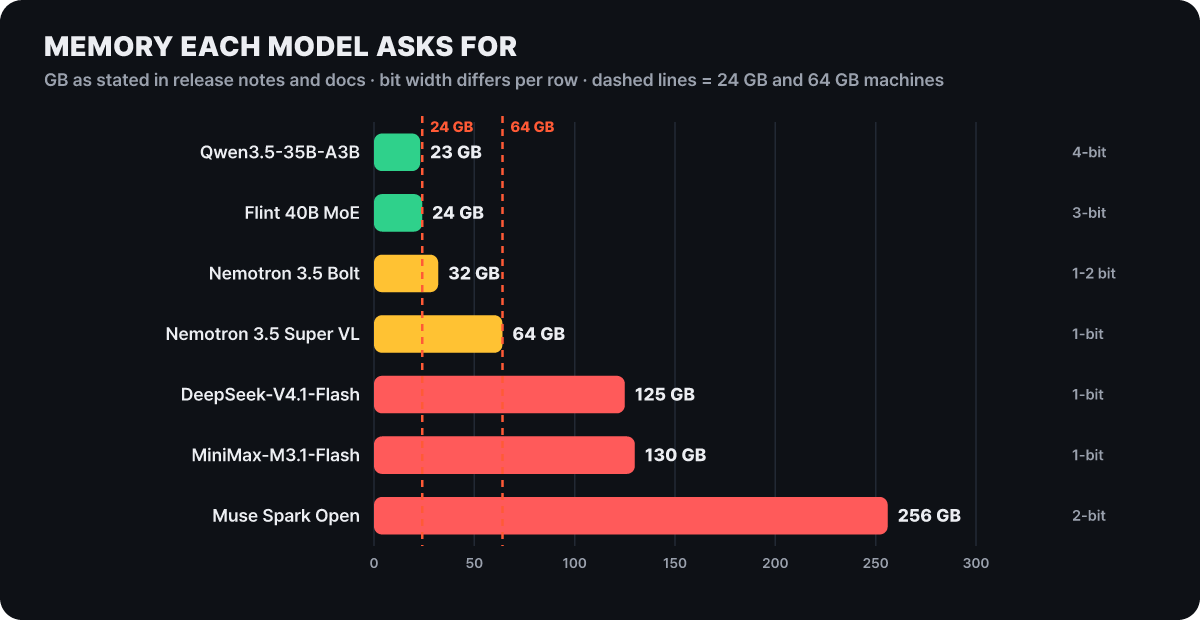 Figure 1. Only the 4-bit Qwen3.5-35B-A3B (about 23GB, in the 24GB graphics device example) and the 3-bit Flint (at a short context) fit inside the 24GB line
Once you cross the 24GB line, it becomes a different kind of story. Nemotron 3.5 Bolt (74B, 9B active) needs about 32GB at 1 to 2 bits, and Nemotron 3.5 Super VL (120B, 12B active) needs about 64GB at 1 bit. DeepSeek-V4.1-Flash-1017 needs about 125GB at 1 bit, with the condition that the Engram table sits on an SSD. MiniMax-M3.1-Flash needs 130GB or more of RAM and graphics memory combined at 1 bit, and Muse Spark Open needs about 256GB at 2 bits. There is also a way to put a bigger model on the same machine. v0.1.910 added a method on Mac that keeps the experts of a MoE model larger than memory on the SSD, and the release notes include an example of running Qwen3.8-Flash-Next on a 32GB Mac.
For reference, if you plan to train as well, the requirements are larger. In the docs’ minimum VRAM table (the absolute floor), QLoRA needs 6GB for 8B, 22GB for 27B and 41GB for 70B, and the same 70B with 16-bit LoRA jumps to 164GB. If memory runs short, the docs advise lowering the batch size to between 1 and 3. This post centers on connecting agents, so training stops here.
What happens the first time you run unsloth start claude
With the app open and a model loaded, move to your project folder and type unsloth start claude. What this command does is create temporary settings used only for this run and hand them to Claude Code; the endpoint, API key, model and context length go into them. The docs explain that Unsloth is not added to the Claude Code settings files you normally use. If the app is off, specifying a model with --model starts a temporary server, and it shuts down together with the agent when the agent ends. If the app is already running, it connects as is and leaves the server on.
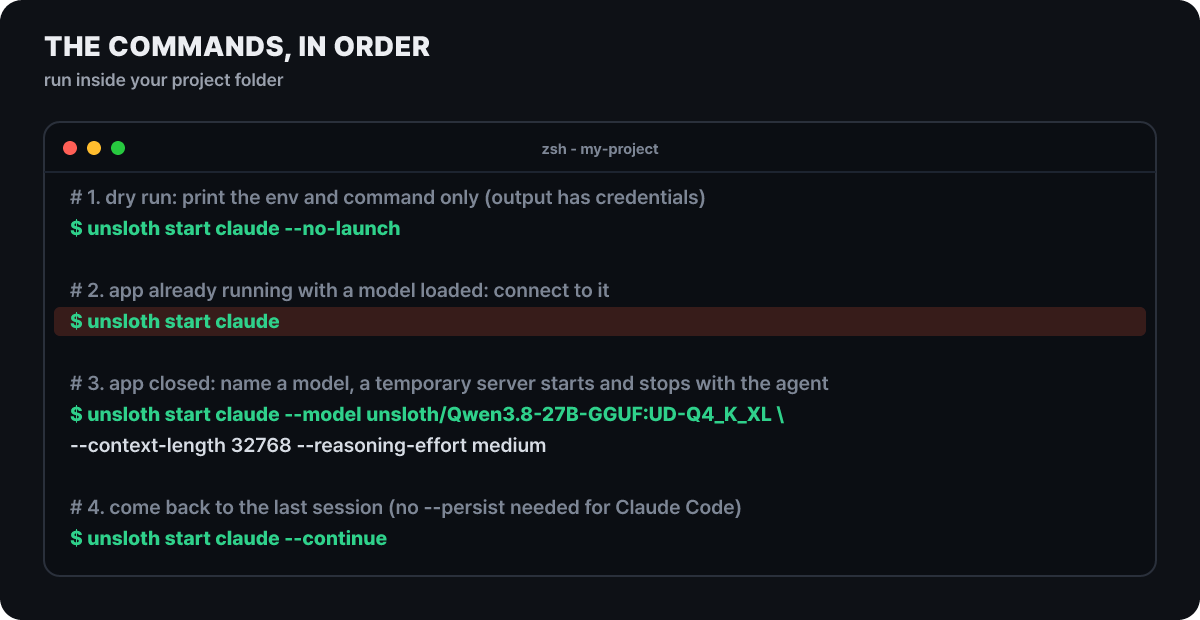 Figure 2. Four lines are a day’s worth of usage. The docs do not show real output, so only the commands and comments are included
For a first time, it is better to press the first of the four lines, --no-launch, first. It does not run anything; it only prints the environment variables and the command that would be created, so you can see what gets set. The docs do warn, though, that the output can contain connection credentials, so do not put it in logs or screenshots. If you give no options at all, Unsloth picks a context length and sampling values that suit the model. To choose them yourself, use the options below.
| Option | What it does |
|---|---|
--model, -m |
Specify the model. If omitted, the first model Unsloth reports |
--gguf-variant |
Choose the GGUF quantization variant |
--context-length |
The context length requested when loading the model |
--reasoning, --reasoning-effort |
Thinking mode on, off or auto, and a level (levels differ by model) |
--serve / --no-serve |
Whether to start a temporary server automatically |
--persist |
Keep the agent home that Unsloth created (not needed for Claude Code) |
--yolo |
The agent’s no-confirmation mode. It runs commands without asking, so use it only in a folder you can afford to lose |
Arguments that are not Unsloth options are passed to the agent as they are, so you can resume the last session with --continue. Choose a read-only first question. Something like “Summarize the structure of this repository” checks both the connection and the speed in one go, and requests that edit files come after that.
When it answers but the file stays the same
If read questions work well but a request like “fix the typo in the README” only produces an explanation of how to fix it while the file stays unchanged, the problem is not the model but the path the tool call takes. The Unsloth server has its own tools (code execution, web search, a terminal), and they are on by default on the local address (127.0.0.1). The doc on manually connecting a model to Claude Code states flatly that starting the server with --disable-tools is essential for coding agents, and explains why: the server tools intercept the tool calls the model emits first, so Claude Code receives the answer but the request to edit the file never reaches it.
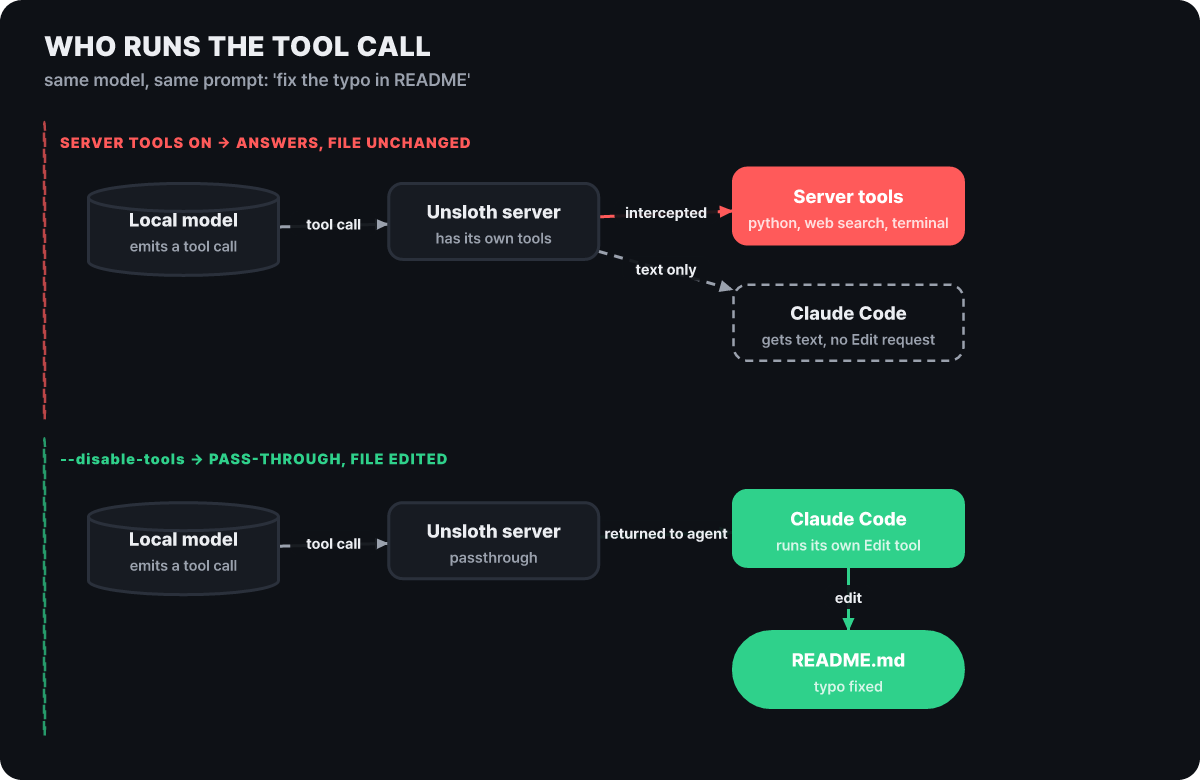 Figure 3. When the server runs the same tool call, the file stays as it was; when it is sent back to the agent, the file gets fixed
The fix is a server-side option, not an agent setting. The command to start the server yourself is this.
unsloth run \
  --model unsloth/gemma-4-26B-A4B-it-GGUF:UD-Q4_K_XL \
  --disable-tools \
  --reasoning off \
  -p 8888
unsloth run starts the server, loads the UI, and prints the endpoint address and the API key. --disable-tools and --enable-tools are server-wide settings, and a request cannot override them by sending enable_tools=true. If you changed this option, restart the server and try the same request again. If you also want to use the server tools (web search and code execution), keep this server for agents only and start a separate server with the tools on at a different port, which keeps the two uses from mixing.
When every turn of the conversation drags
The second trap is speed. A local model gets faster when the start of a request matches the previous one, because it can reuse values it has already computed (the KV cache). But recent Claude Code versions put an attribution line at the very start of the system prompt whose value changes with every request, and when the first line changes, the cache is invalidated every time. The Unsloth docs explain that this can slow inference by about 90%. Setting the environment variable CLAUDE_CODE_ATTRIBUTION_HEADER to 0 fixes it, and LM Studio’s Claude Code guide lists the same variable. There are three ways to apply it.
# A. Only for this run (does not touch settings files, the most reliable)
claude --settings '{"env":{"CLAUDE_CODE_ATTRIBUTION_HEADER":"0","CLAUDE_CODE_ENABLE_TELEMETRY":"0"}}' \
  --model unsloth/gemma-4-26B-A4B-it-GGUF

# B. Shell variable (recent Claude Code recognizes it, older versions ignore it)
export CLAUDE_CODE_ATTRIBUTION_HEADER=0
The third is to put the same value in env in ~/.claude/settings.json. The docs say older versions ignore the shell variable, so they recommend A or this method. If the file already has content, do not overwrite it wholesale; add just one entry inside env.
If you want more speed, the docs recommend a launch option. Adding --bare --exclude-dynamic-system-prompt-sections skips automatically discovered hooks, skills, plugins, MCP servers and CLAUDE.md, and the parts that differ from machine to machine drop out of the front of the prompt, so the cache gets reused more. Bash and file reading and editing remain usable. In exchange, the rules in CLAUDE.md are not read either, so leave these options out for work that depends on those rules.
The release notes seen earlier show that speed is something Unsloth keeps working on too. v0.1.907 says inference gets up to 5 times faster and cache hits reach 95%, and v0.1.908 says it improved prompt caching for local GGUF models so less is re-read from the second turn on.
Attaching other agents with the same one line
Put another name in place of claude and a different agent attaches to the same model. The docs’ support list has eight, and the README adds Mistral Vibe (vibe). The conditions and the session-resume rules differ by agent.
| Agent | Command | Condition | Resuming a session |
|---|---|---|---|
| Claude Code | unsloth start claude |
None | --continue, --persist not needed |
| OpenAI Codex | unsloth start codex |
Only GGUF models served by llama-server | --persist needed, resume --last |
| VS Code | unsloth start vscode |
Copilot Chat extension (no paid plan needed); Agent mode needs tool calling and a context of 32K or more | Rerun the command when you change the model |
| OpenCode | unsloth start opencode |
None | --persist not needed |
| Hermes | unsloth start hermes |
None | --persist from the first run |
| OpenClaw | unsloth start openclaw |
None | --persist and the same session ID |
| Pi | unsloth start pi |
None | --persist from the first run |
| DeepSeek Harness | unsloth start dsh |
None | No separate rule in the docs |
Codex, OpenClaw, Hermes and Pi use a temporary home, so you add --persist from the first run, add it again when you return, and then pass the agent’s own resume option. --persist only keeps the storage space; it does not continue the conversation by itself. A connection in the opposite direction has appeared too. unsloth mcp add in v0.1.909 connects Claude Code, Codex and Cursor so they can use Unsloth as an MCP server, and since v0.1.907 MCP is accessed with an account API key. To use a remote server, give UNSLOTH_STUDIO_URL and UNSLOTH_API_KEY as environment variables and run the same command.
Connecting directly with environment variables, and the messages that block you
The usual reason to connect without unsloth start is that the server is on another computer or you want to pin the settings. On one port, both the Anthropic style (/v1/messages) and the OpenAI style (/v1/chat/completions, /v1/responses) are open. For the key, go to the API tab in the app’s Settings and create one by choosing a name and an expiry date. It starts with sk-unsloth-, and because Unsloth stores only a hash, you must copy it the moment you create it. A revoked key and a wrong key both get a 401.
export ANTHROPIC_BASE_URL="http://localhost:8888"
export ANTHROPIC_AUTH_TOKEN="sk-unsloth-여기에-키"
export ANTHROPIC_API_KEY=""
claude --model unsloth/gemma-4-26B-A4B-it-GGUF
The model name must not differ by a single character from the ID the server reports. Put the id returned by GET http://localhost:8888/v1/models into --model exactly as it is. When you are stuck, look it up by symptom.
| Symptom | Cause and fix |
|---|---|
Unable to connect to API (ConnectionRefused) |
An address variable from an earlier session may be left over, so run unset ANTHROPIC_BASE_URL and connect again |
| No Unsloth server was found | Open the app and load a model, or specify --model to start a temporary server |
| It answers but the file does not change | Restart the server with --disable-tools (Figure 3 above) |
| Slow on every turn | Apply CLAUDE_CODE_ATTRIBUTION_HEADER=0 |
| Model not found | Use the ID from /v1/models as is |
| Codex does not connect | Check that it is a GGUF model running on llama-server |
| The session is not restored | For Codex, OpenClaw, Hermes and Pi, use --persist from the first run |
Where models and settings end up on disk
This is the map you need when you try it and quit, or when you run short of space. Models pile up in the Hugging Face cache (~/.cache/huggingface/hub/, or wherever HF_HUB_CACHE or HF_HOME points), and ones downloaded directly in the app also show up in ~/.unsloth/studio/models. The app finds models you have already downloaded automatically, and you can add your own folders too.
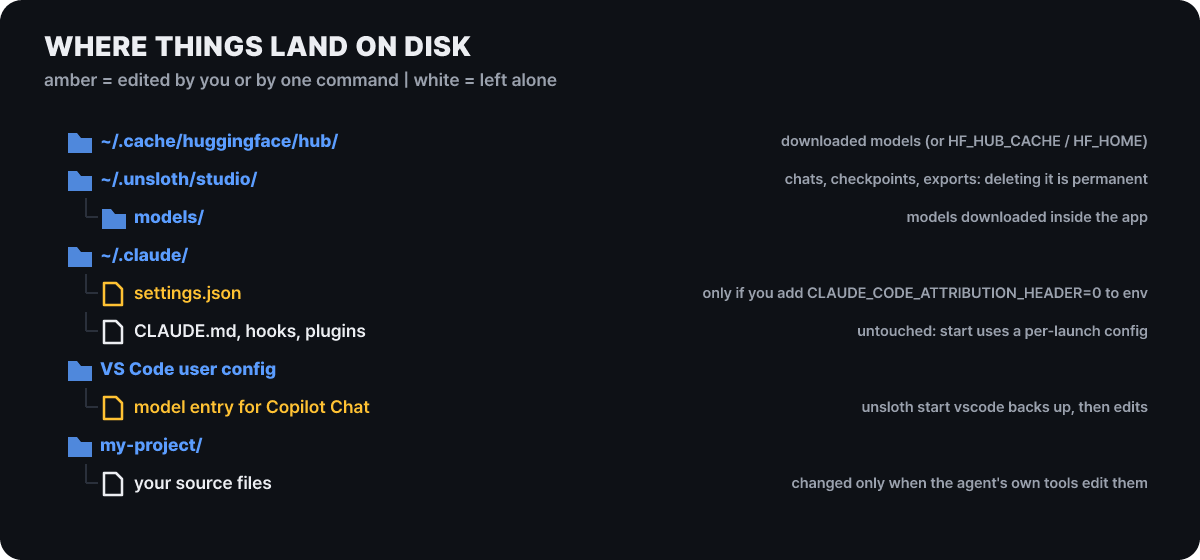 Figure 4. The model cache and the Studio folder grow, while the Claude-side settings files stay as they are unless you edit them yourself
That ~/.claude stays untouched is the benefit of the temporary-settings approach. VS Code is the exception. In that case it backs up your user settings and inserts a model entry, and when you change the model you have to run unsloth start vscode again to refresh the entry. In environments without a VS Code user folder, such as over SSH or inside a container, it only prints the settings to place locally and the port-forwarding instructions, and the docs say that if the model does not appear in the remote workspace’s model list, you should use the local window.
You delete a downloaded model with the trash icon in the model search window or by deleting the cache folder. The docs state that deleting the Studio folder (~/.unsloth/studio) removes chat history, checkpoints and export results together and cannot be undone, so export whatever you need before you delete.
How far to allow tool calls: the sandbox levels
Once you let a model read files and run commands, how far you allow it is the security. Unsloth splits the execution of server tools into three levels. Low is a software check that filters dangerous calls by string, syntax and regex patterns. It blocks commands such as rm, dd, sudo, chmod, curl, wget, ssh, kill, eval and source, Python’s os.system, subprocess, requests and raw sockets, and sensitive reads such as /etc/passwd. High is real operating-system isolation, using bubblewrap on Linux, Seatbelt on macOS and MXC on Windows (installed by default on Windows 11 24H2 and later). Full Access turns all of this off. In both Low and High, secret environment variables are stripped, Studio’s credential files are denied, and limits are applied to files at 100MB, memory at 8GB, CPU time at 600 seconds, process count and call time.
The per-call delay shows that High is not free.
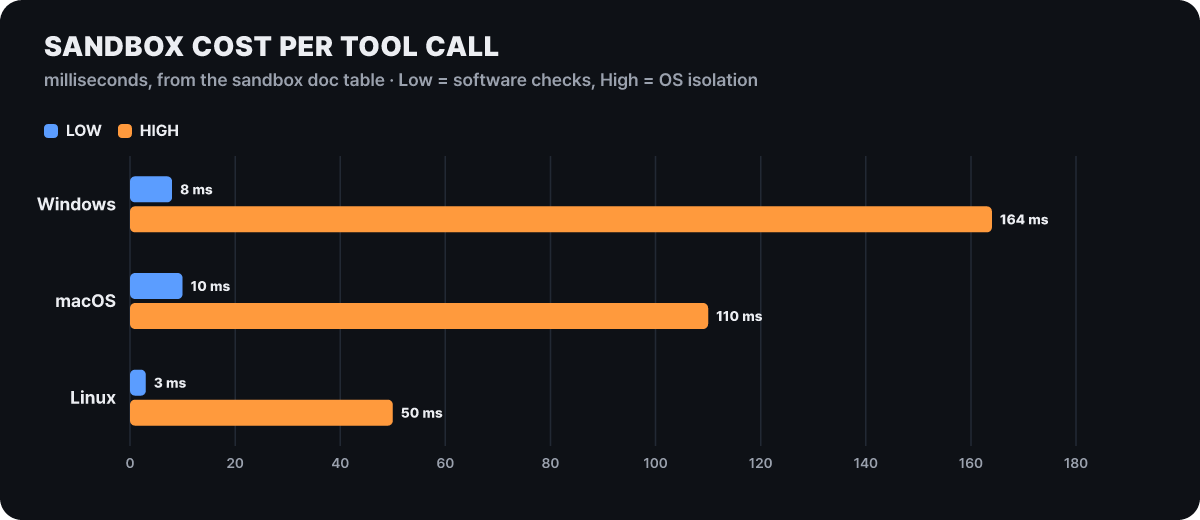 Figure 5. The High level costs 50ms per call on Linux, 110ms on macOS and 164ms on Windows
Low is a single-digit number of milliseconds on all three operating systems, while High is shortest on Linux at 50ms and longest on Windows at 164ms. If an agent calls tools dozens of times in one task, the difference adds up, but the heavier fact is that the check is string matching, which makes it a weaker backstop than operating-system isolation. Low is a defense that can be bypassed, and High is the actual wall.
v0.1.911 (Oct 26) includes a change that hardens this structure further. An app connected with an API key can no longer approve, on its own, Python and terminal calls that run outside the sandbox, and the client IP forwarded by a proxy is no longer trusted by default. The idea is that even if a key leaks, the key alone cannot lift the sandbox. But with Full Access this protection means nothing either, so if you will not use server tools on a server that has an agent attached, the --disable-tools seen earlier is the surest choice.
When you open a port to use your home computer from outside
To use the graphics-device computer at home from a laptop, you have to open the server to other devices. The reach depends on how you start it.
| Run | Who can reach it |
|---|---|
unsloth studio |
This computer only |
unsloth studio -H 0.0.0.0 -p 8888 |
The same network |
unsloth studio -H 0.0.0.0 --cloudflare |
The same network plus a public Cloudflare address |
unsloth studio --secure |
Only the public Cloudflare address (LAN is closed) |
In a running app there is also a way: in the Remote & LAN card on the Settings API tab, Start LAN access and wait until the status becomes Online, and if you turn on the Start automatically toggle, LAN opens every time you launch the app. The address to connect to appears on the first line of the CLI output (for example http://192.168.1.42:8888). That is the convenient side, and there are three risks.
First, LAN traffic is unencrypted HTTP, so anyone on the same network segment can read it. If it is a network you do not control, the docs recommend using the HTTPS Cloudflare address. Second, server tools run with your user permissions, so whoever holds the key can run code on your computer. When you expose the server, writing --disable-tools explicitly gives the same result whichever way the default goes, and the key should be handled like a password. Third, using --cloudflare together with -H 0.0.0.0 opens the internal port and the public address at the same time, which the docs call the least private mode. --secure asks for a new admin password in the terminal when it opens, and if you cancel, it stops running instead of opening with an auto-generated password.
When you open with a wide address (0.0.0.0), Unsloth connects to the external check sites ifconfig.me and check-host.net to test whether the port is reachable from the internet. If you do not want even this connection, you can turn it off with the environment variable UNSLOTH_STUDIO_DISABLE_PUBLIC_CHECK=1. Only when you need the real client IP behind a reverse proxy you configured yourself, set UNSLOTH_STUDIO_TRUST_FORWARDED=1 so that it trusts X-Forwarded-For.
The order of checks when you cannot connect is this. See whether the two devices are on the same network, suspect guest Wi-Fi, AP isolation and VPNs, which commonly block the connection, and check whether the computer’s firewall allows incoming connections on that port. The LAN address a router hands out can change, so setting a static IP or a DHCP reservation keeps the address from drifting. If the Start button in the app is gray, the message below the card tells you why it is blocked. If you see the message Unsloth Studio is already running on port 8888, stop it with unsloth studio stop or change --port. When you are done, press Stop in the LAN access card or stop it with unsloth studio stop. Note that Stop does not change the auto-start setting, so to keep it from opening again on the next launch, turn off the Start automatically toggle separately. The four HTTP endpoints that change LAN settings (status, start, stop, auto-start) accept only UI sessions and reject API keys, so someone holding only a key cannot open the port.



