13 free Rust apps that rebuild Photoshop and Premiere
The 13 Crafting Apps mapped by the work they replace, self-measured readiness (40-62%) and stars, plus what to try on a copy and which folder to give an agent.
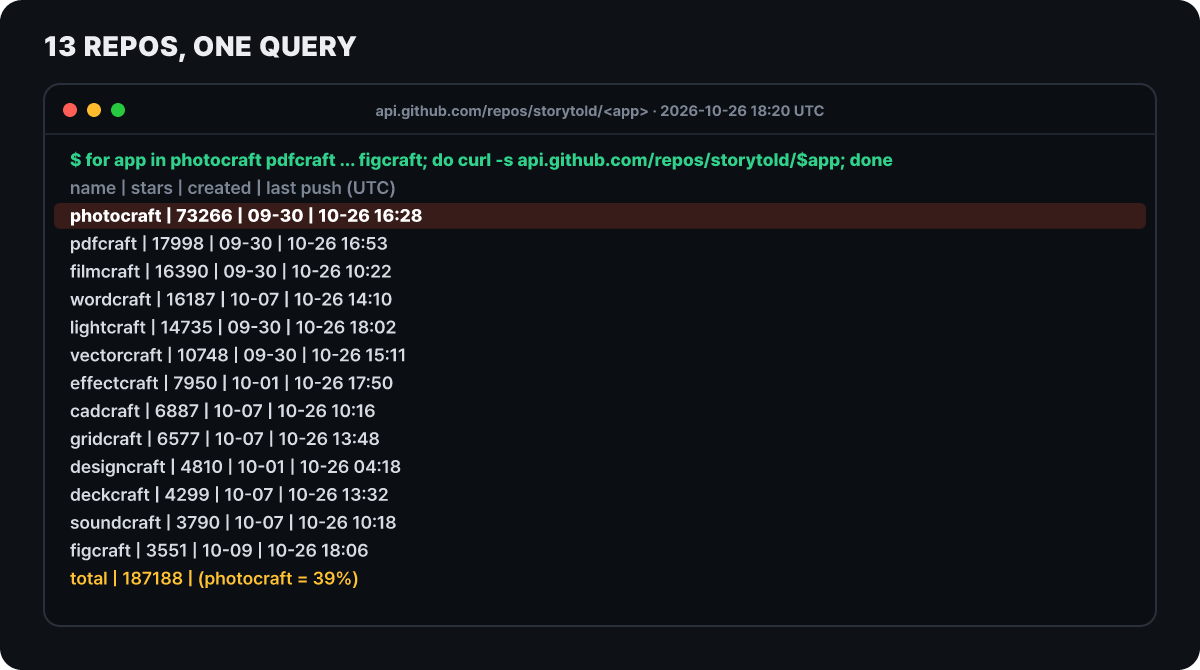 Figure 1. Stars, creation date and last push for the 13 app repositories. GitHub records turned into a table, queried 2026-10-26 18:20 UTC
The 13 repositories above belong to the ArtCraft team, which builds image and video generation AI services. The team began uploading them to the GitHub organization storytold on Sept 30 (UTC). They are desktop apps that rewrite, from scratch in Rust, the work done by commercial apps such as Photoshop, Illustrator, Premiere Pro and Lightroom, and all of them are free. At the time of the query, all 13 had received new code within the same day, and their stars add up to about 187,000. Of those, 39% sit in a single image editor, PhotoCraft.
Most coverage ends at “a Photoshop alternative has arrived,” but the 13 are very different in character. So instead of praising the apps one by one, this article draws a map. It lays out, in turn, what kind of work each neighborhood used to do, how the repositories measure “it exists” differently from “it is usable,” and how far star counts drift from readiness, and then ends by picking the apps worth trying on a copy.
Four terms first. Rust is a systems programming language that catches many memory errors at compile time. These apps draw even the screen in Rust, without Electron (a framework for building desktop apps with web technology) or a webview. MCP (Model Context Protocol) is a common standard that lets an AI agent call external programs as tools. A clean-room implementation means the app was rebuilt without looking at the original app’s code, using only public specifications and externally visible behavior.
The criteria for splitting 13 apps into four neighborhoods
The official site getartcraft.com/apps groups the 13 as “Crafting Apps” but lists only the field, not the names of the commercial apps. Drawing a map needs criteria. The first is “the kind of work they used to do.” The second is the development stage each repository writes about itself. The third is two kinds of percentages that separate “the feature exists” from “it is usable for real work.” The fourth is the size of attention, in stars.
Pixel editing, RAW development, vector illustration, screen design, page layout
Video editing, motion graphics and VFX, audio workstation
PDF, word processor, spreadsheet, presentations
Technical drawing and drafting. Handles DXF and DWG
The site and the repositories label the stages differently. The site calls only PhotoCraft, PdfCraft and FigCraft “early alpha” and the other 10 “in development.” Most repositories open with “alpha,” while SoundCraft and DesignCraft say “pre-alpha” and CADCraft says “early development.” Two labels for the same app show the pace of this project well: the wording trails behind the code.
There is one more besides the 13 apps. ArtCraft Launcher (latest v0.8.1, Oct 25) is a small native app that lists the apps, picks the build that matches your operating system and processor, installs it, verifies the file against the release’s SHA-256 checksum and even tells you about updates. The organization also has a repository that is not among the 13 on the official apps page (AniCraft, created Oct 14) and a shared AI connection repository, but this article covers only the 13.
One command ledger, three doors
The 13 fit on one map because they share a body. Every action of PhotoCraft’s menus, tools and dialogs is registered in one ledger as a named command, and there are more than 500 of them. The action that creates a curves adjustment layer is layer.newAdjustmentLayer.curves, and whether you click it in a menu, call it from a terminal or have an agent call it, it passes through the same name. The screen is a thin shell and the engine does the work. The other apps follow the same rule: DesignCraft says every menu and tool action can be driven through a JSON control channel and an MCP server, and CADCraft and FilmCraft have the same structure.
The code is split into 24 crates (Rust’s package unit), and an inspection tool (cargo xtask layers) stops lower layers from referencing upper ones. That is why the engine can be detached from the window and used by the CLI and MCP. For compositing, the CPU compositor produces the reference result and the GPU (wgpu) compositor is cross-checked against it to confirm it gives the same result. The development guide (AGENTS.md) forbids abnormal-exit paths such as unwrap and panic! in runtime code, and makes an exception for unsafe only in one isolated crate that reads pen tablet input. The principle is that a broken file is returned as an error message and never kills the app, and every time a crash is fixed, a regression test that reproduces it has to go in with the fix.
This structure matters when an agent attaches. There are three entrances, and each one limits the range of files it can touch differently, so the last section covers them separately.
The image and drawing neighborhood: RAW development, vector files, page layout, screen design
PhotoCraft’s numbers get a section of their own later, so start with the four other apps in this neighborhood. Each app wins or loses in a different place.
LightCraft is decided by camera color. It handles the photo library and RAW development. The repository says about 82% of the features by count exist (98% of the core features), and it lists the overall product readiness as 61%, readiness for working photographers as 51% and for light use as 65%. It handles JPEG and DNG, plus RAW from Sony, Panasonic, Fujifilm, Nikon and older Canon cameras, but its camera color correction is an estimate extracted from camera JPEGs, with no measured calibration. Olympus compressed RAW and some CR3 files are replaced by the embedded JPEG preview, and AI features such as subject selection run only after you install a separate model (SAM 3). The README also gives a test result for RAW files on a network drive: reading only the headers and previews cuts 56.5 MB to 5.9 MB and 10 seconds to 1 second.
VectorCraft is decided by the range of file formats. It handles SVG, PDF, PDF-compatible .ai (including PDF/X) and older .ai, EPS, DXF and EMF/WMF, and for PSD it supports export and opening as a flattened image. It also opens and places Affinity documents (.af, .afdesign, .afpub) with layers and curves intact. About 88% of the core menus, tools, effects and formats exist and feature depth is about 75%, while readiness is 65% for general illustrators and 62% across all tracked features. That is the highest self-estimate of the 11 apps.
FigCraft is decided by how much you can trust a file. It is an interface design app and has prototype links, variables, and even code export to CSS, HTML, React, Vue, SwiftUI and Compose from the developer handoff screen (Dev Mode). But the repository says it opens .fig files only on a “best effort” basis and has never checked them against real design documents. Simultaneous editing is at a first-preview stage, run on a host in the app or on a server you set up yourself, and there are no accounts, teams or cloud. Its self-estimated readiness is 49%.
DesignCraft speaks through a single sample magazine. The repository shows the result of laying out a whole magazine in code and exporting it with its own renderer. Paragraph typesetting uses the Knuth-Plass method, and it supports IDML import and export, INDD import (through a separate repository, indd-utils), editable .pptx export, PDF/X-4 and PDF/A-2b, and EPUB export. Some characters, such as Han characters and kana, require you to bring in fonts from a separate repository, craft-fonts, at build time. Its stage is pre-alpha and it gives no readiness number.
The video and sound neighborhood: an app with hand-written codecs and an app that cannot pick a device
FilmCraft claims to be rewritten from the bitstream up. Its README explains that the H.264, HEVC, ProRes and AAC codecs were implemented directly in Rust from public specifications alone, that GPU compositing happens in linear light space, and that frame math uses integer time so that edits do not drift no matter how often they repeat. It also records a measurement of a 6-second 960×540 H.264 render taking 1.3 seconds, with ffmpeg decoding it without warnings, but the hardware specs are not listed with it, so read it as evidence that the design runs, not as the time on your computer. Feature breadth is about 86% and readiness about 56%, and FilmCraft is the only app on the official site without a browser version.
EffectCraft is decided by the project file. The project is readable JSON (.ecproj), so changes diff cleanly in version control tools; it has 306 effects and imports and exports Lottie. The same render queue runs from the command line, so you can produce video with something like effectcraft-cli render --comp Main --out main.mp4. But although its presence rate is a high 91%, readiness is 45%, and the repository itself says it does not yet recommend it for commissioned production work. It also says it was tested most on macOS, and that basic-operation bugs show up on Linux and Windows. The rotoscoping brush works only after you download the MobileSAM model (about 40 MB) in settings.
SoundCraft publishes what is missing as a list. It is an audio workstation with 94% of its menu items present, about 70% of features present and about 40% readiness, the lowest of the 11. Recording, editing, mixing and bouncing work from start to finish, but choosing the audio interface and buffer size, recording MIDI from a controller and a session exchange format (AAF/OMF) are not there yet, and neither are translations. The repository writes that these three are the checklist for moving up to alpha.
The documents, office and drafting neighborhood: the contest is decided by opening and saving
For office apps, the decisive question is less the feature list than whether a file made by someone else looks the same after you open and save it. The repositories write about this weakness with relative honesty.
WordCraft reads and writes .docx, and it covers importing the old .doc (97-2003), reading and writing .odt, .rtf, .html, .md and .tex, and PDF export. 97% of the ribbon and menu features have commands, and readiness is 60% overall, 55% for everyday work and 63% for essential features only. For the road to beta, it names bringing page breaks closer to the original app, stability checks and native printing.
GridCraft uses .xlsx as its default format and says it has 513 standard functions, but the README itself stresses that this number is the size of the mapping list, not the count of finished implementations. Ribbon commands are at 89% and readiness at 50%. The work ahead is fidelity on real XLSX files, very large workbooks and multi-threaded recalculation, chart depth, and importing old .xls. ODS is imported by stored values only, without formulas.
DeckCraft opens and saves .pptx and exports slides, speaker notes and handouts to PDF. 84% of the tracked features exist (92% of the core ones) and readiness is about 55%.
PdfCraft gives the most concrete test figures in this neighborhood. It reports that 963 of the 983 pdf.js test files open and render without trouble, with 0 crashes, and when saving an existing document it preserves the original through incremental saving, which leaves the original bytes untouched and appends only the changes. The repository states that there are no accounts, telemetry or cloud processing. The weaknesses are just as clear: there is no conversion from office documents to PDF, .docx export breaks the layout, and page drawing still borrows another crate (hayro). Readiness splits three ways, 49% for full professional work, 55% for everyday work and 66% for essentials only.
CADCraft is a drafting app centered on command-line input. It reads DXF from R12 through the 2018 version and writes R2000, and it reads DWG and writes R2000 too. It has dimension styles, hatches, blocks, constraints, paper space layouts and PDF plotting, and it offers 15 interface languages. But the README warns that entities it cannot model are not preserved when you save. Its stage is early development and it gives no readiness number.
The gap between existing and usable
The repositories use two kinds of percentages. One is a presence rate that counts “the feature exists” (by menu items or a feature list), and the other is the team’s subjective estimate of “ready for real work.” The figure below fills one cell per measure with the values the 13 READMEs published; a dotted cell means the repository did not write that value.
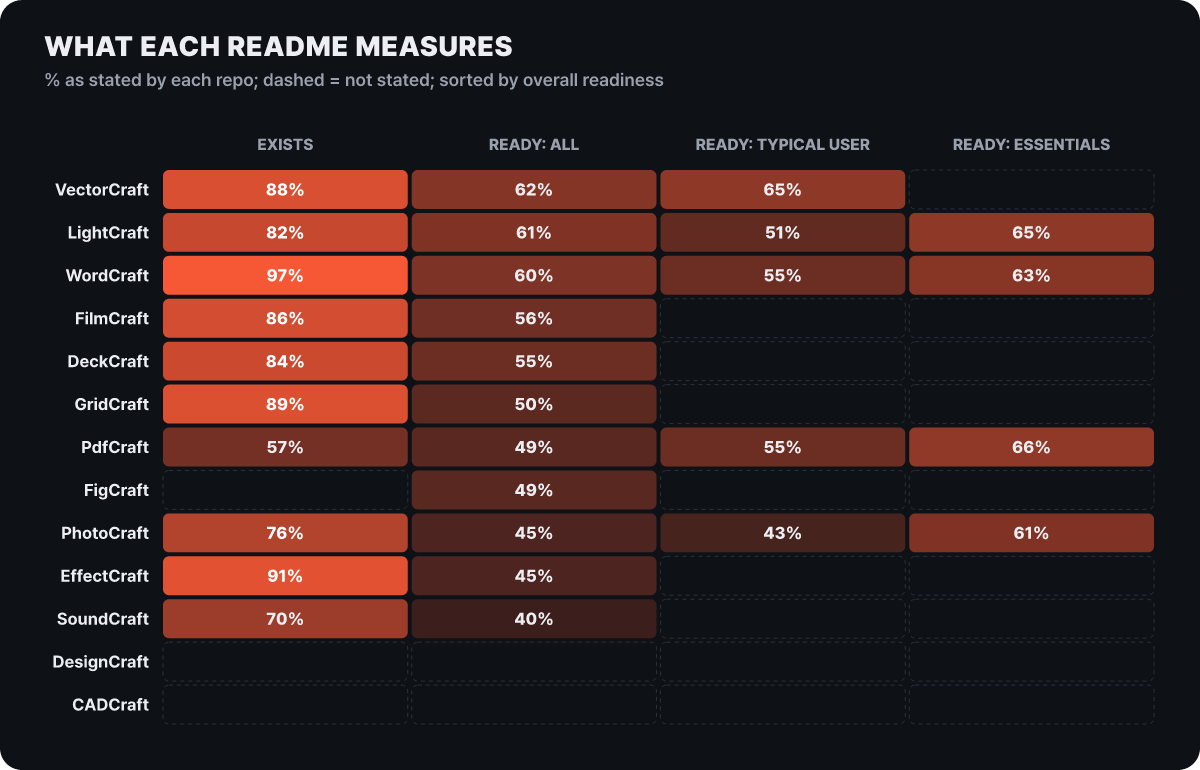 Figure 2. Each repository publishes different measures. Presence rate counts different things in each app (menu items, feature lists, ribbon commands), so comparisons between apps are rough
In all 10 apps that give a presence rate, the first column is larger than the second (overall readiness). Presence rates run 57-97% while overall readiness is 40-62%, and the app with the biggest gap is EffectCraft (91% and 45%, 46 percentage points, calculated by this site’s editors). Even WordCraft (97%), which has the highest presence rate, has 60% readiness. Filling in the boxes of a feature list went fast; whether those boxes hold up against real files has to be measured separately.
The two right-hand columns read differently. The four apps that give a value for people who use only the essential features (PhotoCraft 61%, PdfCraft 66%, WordCraft 63%, LightCraft 65%) are all higher than their overall value. The general-work value, on the other hand, is lower than the overall value for PhotoCraft, WordCraft and LightCraft and higher for PdfCraft and VectorCraft. The same app can be usable or not depending on who uses it, so when a review says “usable,” the first question is which kind of user it means. And all of these values are estimates assigned by the repository teams, not outside tests.
70,000 stars and 45% readiness
Attention shows up in stars. The figure below puts the number of stars on the horizontal axis (log scale) and the overall readiness of the same app on the vertical axis.
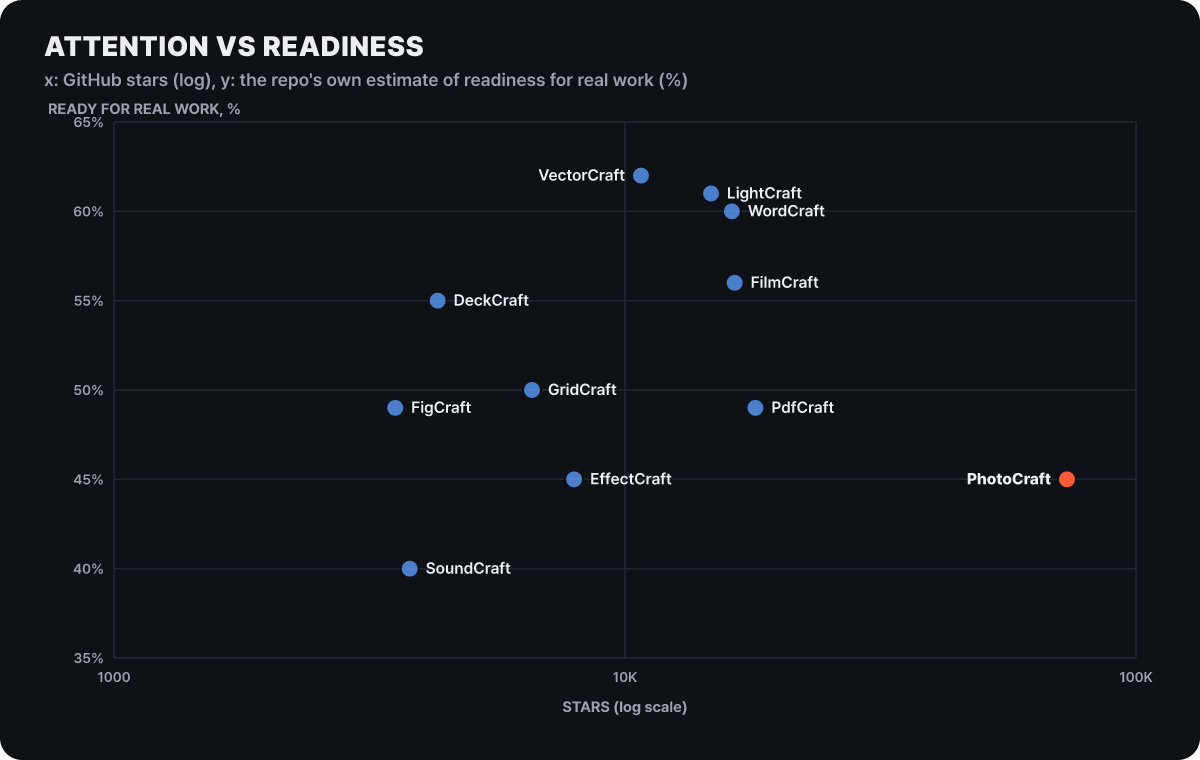 Figure 3. The app with the most stars is tied for 9th of 11 in readiness. Readiness is each repository’s own estimate
PhotoCraft has a bit more than 4 times the stars of the second app, yet its readiness is 45%, the same as EffectCraft, and the two share the second-lowest value among the 11. Conversely, VectorCraft and LightCraft, which have the highest readiness, are in the 10,000-15,000 star range. Stars are heavily concentrated in one app, and among these 11 no relationship with readiness shows up.
The flip side of the speed also remains in numbers. From Oct 2 to Oct 25, PhotoCraft shipped 18 releases, counting test builds, with 3,234 merged pull requests (proposed changes) and 411 accounts counted as contributors. Open issues grew from 953 on Oct 13, when the roadmap was written, to 2,129 in the GitHub search on Oct 26 at 18:20 UTC, and 1,109 open pull requests are piled up as well. The trace of code moving faster than documents also shows between documents. The PhotoCraft README says 15 tools are still missing, but the gaps document in the same repository (updated Oct 25) counts no missing tools. So the numbers in this article are not copied from a single document but chosen from the most recently updated documents and the GitHub records.
Reading PhotoCraft’s numbers: 307, 249 and 190 are different tests
The same thing happens within one app. The number most often cited for PhotoCraft’s PSD reliability is “307 of 309,” but the same repository has more numbers that look similar, and each one measures something different.
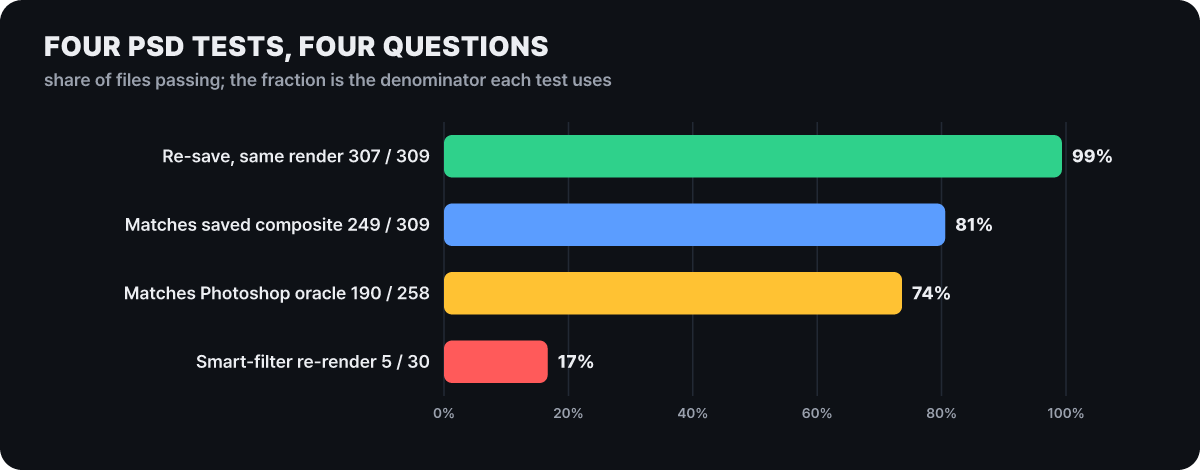 Figure 4. PSD tests of the same app range from 99% to 17% depending on the question asked. The denominator differs by test suite
The first row is the number of files from a public test suite (psd-tools) whose screen stays the same after opening and re-saving. The second is the number out of the same 309 whose PhotoCraft rendering matches the composite image stored in the file (a lower bound written in the gaps document). The third is the match against the composite images of 258 test files made in Photoshop, and the fourth is the match when smart filters are re-rendered. The first is the promise that “no content is lost between opening and saving,” and the others are the promise that “it looks the same as in Photoshop.” The last row tests a partial feature, so the sample is only 30. All the numbers here are also for PhotoCraft reading Photoshop files.
There are no tests for the opposite direction. The gaps document states that there is no test that opens exported files in a third-party editor, and it lists user-reported issues such as “Photoshop 26.6 can no longer reopen our file” (#1281) and “PSD does not open in Photoshop” (#2469). A re-saved file is not byte-identical to the original either, because it rewrites the image resources, layer records and composite. The team’s top roadmap item is “a PSD Photoshop trusts,” estimated at 150-250 hours. Until then it is safer not to use a PSD saved in PhotoCraft as your working file.
The gaps between areas inside the app are public in the roadmap too. By area, readiness is high at 70% for adjustments, filters and color management and 65% for layers, masks and smart objects, and low at 40% for text input (Type) and workspace and panels, 30% for video and timeline and 10% for generative AI. By dimension, performance is 25% (only 3 of 25 performance budgets met, as of Oct 17) and the plugin and action ecosystem is 15%. The overall figure is 45% (range 40-50%), and the team calculates 1,100-1,800 hours of agent work remain until beta.
Speed figures get the same treatment. The README says a Gaussian blur with radius 180 on a 3.6-megapixel image finishes within 1 second, but there are no hardware specs for the measurement, so the right reading is evidence that the design works to keep even large radii from being slow by using every core. The roadmap’s “3 of 25” is the pass rate of the whole performance test list, so the two do not contradict: one is a single case that went well and the other is the pass ratio across the whole list. PhotoCraft’s Korean UI string translation rate is counted as 100%, but some messages the engine produces are still in English, so the roadmap classifies every language as “partial support.”
Clean-room claims, AI-written code and licenses
Each repository calls itself a clean-room reimplementation. It is a declaration that the code, shaders, icons and profiles of commercial apps were not used and that everything was implemented from public specifications (the PSD specification, ICC, ISO 32000) and observed behavior, and the non-code assets it includes are gathered in ATTRIBUTION.md, which lists author, source and license. The PhotoCraft roadmap also says it measured against Photoshop 2026 27.11.0, installed as the comparison target. This declaration is a statement the team wrote, not something a third party has verified.
The team does not hide that the development process is AI-centered. The roadmap converts the remaining work into agent hours calibrated against 1,004 merged pull requests, and Phoronix, a software news outlet, reported on Oct 8 (UTC) that Claude Code and AI agents built these apps. One IT outlet judged PhotoCraft hard to regard as a full Photoshop replacement and pointed to limits in text layout, brushes and plugins. Neither report carried a response from Adobe or a specific legal analysis. How patents and trademarks of commercial apps meet apps that imitate their features is an area where legal interpretations differ, so if you plan to put one into a company product or use it in a deliverable, you need a legal review. For personal use in study or as a hobby this burden is small.
The license is simple. The apps are dual-licensed under your choice of MIT or Apache-2.0. Permissive licenses like these allow you to modify the code, put it in a commercial product and distribute it without publishing the source, whereas GPL-family licenses such as GIMP’s (GPL-3.0 or later) or Krita’s (GPL-3.0) bring a source disclosure obligation to builds made that way. If you only use the app yourself there is no difference; it matters when you embed the engine in your own product. Note that the ArtCraft name and logo are trademarks outside the license and may be used only unmodified, and forks must remove the logo.
What to check before downloading
For work that needs stability, it is safer to keep it in the tools you use now. GIMP or Krita (which can save PSD) for image editing, Inkscape for vector and Kdenlive or Shotcut for video have been refined over a long time, and the realistic place for Crafting Apps is trying them out on copies. If you decide to try, check the items below before and after installing. As of v0.16.0, PhotoCraft’s installers are about 99 MB for the macOS universal DMG, about 75 MB for the Windows x64 MSI, about 72 MB for the macOS CLI archive and about 12 MB for the browser version zip.
- Download only from the official site getartcraft.com, the releases of the storytold organization repositories, or ArtCraft Launcher. A search turns up several unofficial intro and download sites with similar names
- Compare the SHA-256 of the downloaded file with the line for the same file in the release's
SHA256SUMS.txt(shasum -a 256 file, orGet-FileHashon Windows) - Read the signer of a Windows installer yourself with
Get-AuthenticodeSignature. The README says it is signed, but the distribution item in the gaps document still has a line saying a code signing certificate has not been obtained yet, so the documents disagree - On macOS the CLI is a separate archive and the app contains only the desktop app. Extract it and check notarization with
spctl --assess --type install -vv - Open test PSDs and photos only as copies, save under a different name, and open the result in the app you normally use to compare
- The browser version has no autosave or crash recovery, so save (download) before closing or refreshing. In a Wayland session on Linux, dragging a file onto the window does not open it, so use File > Open
- In an offline environment, first note that the optional AI features (some selection features in LightCraft, the rotoscoping brush in EffectCraft) need a separately downloaded model. PdfCraft states that it has no accounts, telemetry or cloud processing
If you find a bug or vulnerability, PhotoCraft’s SECURITY.md lists file format parsers, the control server, the MCP server and release signing as in scope for reports. It says there is currently no dedicated private reporting channel in the documentation, and advises not to attach malicious test files to a public issue but to write only the format, size, hash, observed behavior and reproduction command.
Opening only one folder to an agent
Because the apps put agent connection up front, this is where the access scope is set. PhotoCraft’s automation documents guard the three entrances differently. The higher the row, the wider it is, and the lower the row, the narrower the access.
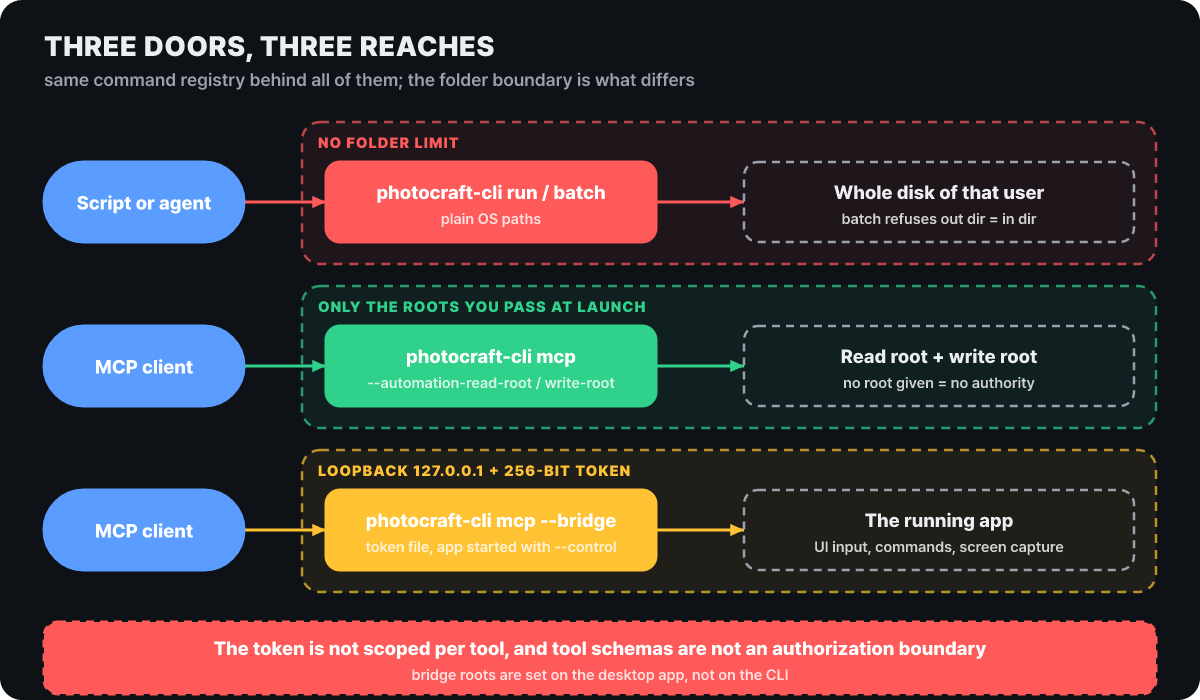 Figure 5. Even with the same command ledger, each entrance limits the range of files it can touch differently
The CLI (photocraft-cli) offers convert, info, run, batch, commands, mcp, serve and more, and takes paths as operating system paths as they are. It has no working-folder limit, and its only safeguard is that batch refuses when the output folder is the same as the input folder (lifted with --in-place). The documentation says to run action files of unknown origin only in an isolated account or environment. Headless MCP takes a read root and a write root separately at launch, and a side you do not specify is treated as having no permission at all. Absolute paths outside the roots, parent-folder traversal and escapes through links are rejected before they reach any file, and no network port is opened. Bridge mode attaches to a running app started with photocraft --control <port> and lets the agent see and operate the screen. It requires a 256-bit token and accepts connections only on loopback (127.0.0.1), and the allowed folders follow the values set when the app was started, not the CLI. The documentation also lists limits such as 256 steps per MCP batch, 8 MiB per response and 16 concurrent connections.
The token’s authority is broader than you might expect. The security model document says the token is only proof of holding the secret and does not separate general method permissions, and it says per-tool permission scopes and audit logging are still at the proposal stage. It also states plainly that a tool’s input schema is not a permission boundary. So the documentation’s practical guidance is to keep the token file in a location only you can read, not to leave it in shared folders or logs, and not to expose it externally through a proxy or tunnel. When you hand work to an agent, the narrowest setup is headless MCP with specified roots rather than the CLI, connected to a single folder that holds only copies, not originals. Roots must be written as absolute paths. A relative path is resolved against where the agent program was started and can open a different folder than you intended. Registering with Claude Code, carried over as the documentation presents it, looks like this.
# 1) Make a working folder that holds only copies, and copy files in so the originals stay untouched
mkdir -p "$HOME/photocraft-work"
cp ~/Pictures/poster.psd "$HOME/photocraft-work/poster-copy.psd"

# 2) Register with the read root and write root set to the same single folder, as an absolute path
claude mcp add photocraft -- photocraft-cli mcp \
  --automation-read-root "$HOME/photocraft-work" \
  --automation-write-root "$HOME/photocraft-work"

# 3) A first request to confirm: ask it to open poster-copy.psd, describe the layer structure,
#    and export the result as poster-v2.png.
#    If you make the same request with a path outside the root, like ../originals/poster.psd,
#    the tool should refuse with an error before touching the file

# Other apps can be registered the same way (EffectCraft example; check the app README for the root options)
claude mcp add effectcraft -- effectcraft-cli mcp


