Fence in your AI agent first with NVIDIA OpenShell
OpenShell turns a sandboxed agent's blocked connections into policy: denial log, draft rule, risk check, human approval. Covers defaults and auto-approve gaps.
You ask an agent, “Clone the repo, install the dependencies and run the tests.” The agent starts working inside an OpenShell sandbox, and a few seconds later pip install stalls and a single line comes back: 403 from proxy after CONNECT. The agent is not broken. A sandbox with no rules written denies every outbound connection, and that denial is the designed first reaction. Everything up to here is a scene the editors staged from the behavior described in the official docs.
This article starts from that one line and follows what happens next: how the blocked connection is logged, turned into a draft proposal, run through a risk check and, with a human’s approval, written into the policy. Along the way it covers what the sandbox leaves open and what it locks, where the keys live, and where the approval process can loosen.
OpenShell, released by NVIDIA under the Apache-2.0 license, is a runtime that puts an AI agent in an isolated sandbox and restricts files, system calls and network access through policy. As of Oct 27, 2026 (UTC), it has about 20,000 GitHub stars (20,052) and 1,981 forks, and the repository was created on Feb 24. The latest stable release is v0.1.5, published on Oct 20, and no newer stable release has followed.
Where the agent’s hands can and cannot reach
What makes an agent useful and what makes it risky are the same thing: it reads files, installs packages, calls APIs and uses credentials. The docs name four risks. Data exfiltration sends source code to unauthorized places. Credential theft reads local secrets such as SSH keys. Unauthorized API use sends prompts and data to unapproved model providers. Privilege escalation tries sudo or dangerous system calls. OpenShell counters each one: only approved destinations are allowed, only declared paths are accessible, provider profiles and network policy confine model traffic, and an unprivileged user plus system-call limits block escalation.
The core of the design is that these controls are split across different trust zones. In the figure below, the left side is where the agent lives, the middle is the part that makes decisions, and the right side is the outside world. Pay attention to which zones the requests and keys cross.
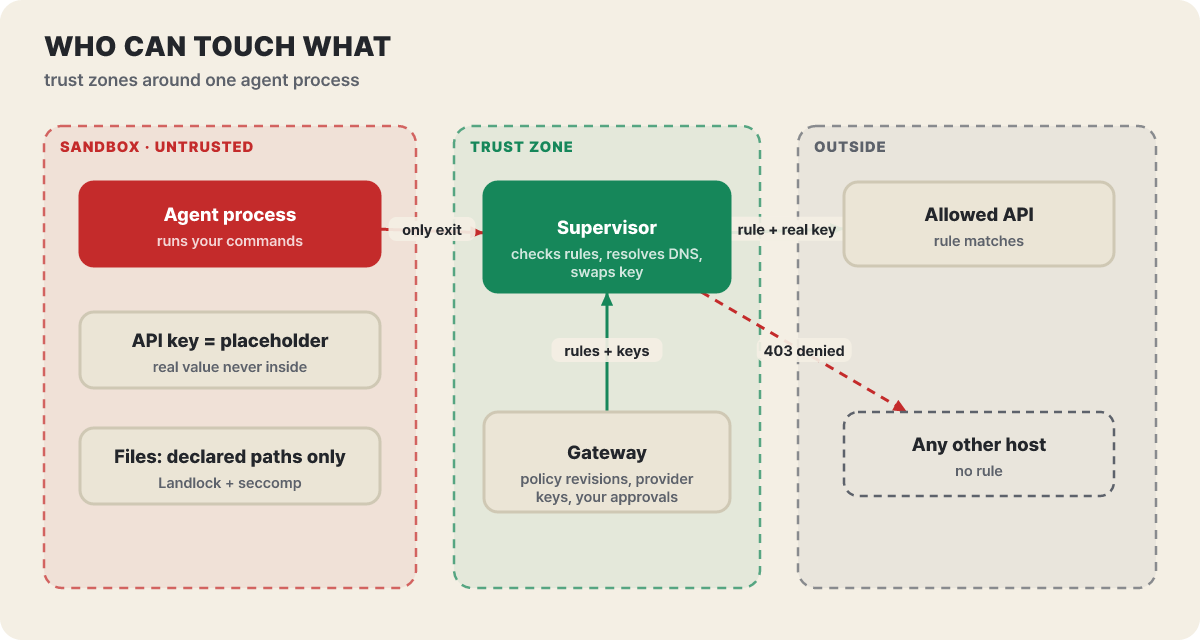 Figure 1. The agent’s only exit is the supervisor. The real keys exist only in the trusted zone, and the sandbox holds placeholders
There are four components. The gateway handles user authentication, the sandbox lifecycle, and the policy and provider connections, and it hands policy and credentials down to the supervisor. The compute driver starts the sandbox and the supervisor and builds the outer fence. The supervisor checks requests against policy, resolves DNS on the sandbox’s behalf, opens only the allowed connections and attaches credentials. The sandbox confines the agent process, identifies the program making each call and forwards TCP and DNS to the supervisor. The important point is that the sandbox and the driver do not decide “allow or not.” Only one place decides: the supervisor in the trusted zone.
Each runtime builds the outer fence with a different tool. Docker and Podman switch off networking for the workload container, Kubernetes uses a NetworkPolicy that permits only the supervisor service, and a VM gets no network device at all in the guest. Either way, the agent’s only route outward is one protected connection to the supervisor. DNS lookups travel the same route and the supervisor resolves them for the agent. If the protected connection drops, the sandbox halts the agent, and only the same supervisor process can reattach. A token is bound to one sandbox and one execution generation, so after a restart the old token is useless.
What the default policy leaves empty
When you specify no policy, a fallback default policy applies. Collecting what is open, what is closed and when each value can change into one table makes it faster to answer “why isn’t this working?”
| Item | Default | When it can change |
|---|---|---|
| Read-only paths | /bin, /usr, /lib, /proc, /etc, /var/log, /dev/urandom |
Fixed when the sandbox is created |
| Read-write paths | Working directory, /tmp, /dev/null |
Fixed when the sandbox is created |
| Network | No rules, all outbound connections denied (a connected provider can add rules and widen this) | Changeable while running |
| Run-as user | Non-root. Docker and Podman use the image’s USER, or UID and GID 1000 if none |
Fixed when the sandbox is created |
| Protected path | The private /.openshell directory cannot be opened by any policy |
Cannot be changed |
| File enforcement | Landlock. Requires ABI 3 or later (Linux 6.2+), and the sandbox will not start if the baseline cannot be applied | Fixed when the sandbox is created |
The column to look at in this table is the last one. File and process settings are fixed at creation, so changing them takes a new sandbox, and only the network rules change while the sandbox runs. That is also why the approval loop this article is about is limited to editing network rules.
Some of the floor cannot be changed at all. Seccomp unconditionally blocks calls such as ptrace, io_uring_setup, process_vm_readv, memfd_create and the mount family, and a sandbox can create only Unix sockets, netlink (for querying network interfaces) and internet sockets relayed by the supervisor. Connections to private IPs are blocked by default (an endpoint with an exact hostname is the exception), and loopback, link-local and unspecified addresses cannot be opened even by policy. The cloud metadata address 169.254.169.254 falls under link-local. Users cannot change this list, and the approval process described later cannot cross this line either.
The default for the Landlock compatibility setting (compatibility) in a user policy is best_effort. It skips paths that the kernel or image lacks and records only a High-severity detection event. If every restriction must be applied, switch to hard_requirement so that the sandbox refuses to start.
Same denial, but which of two gates stopped it
A network rule pairs “which executable can reach which destination.” Rendering the rule built in the official first tutorial according to the docs’ schema gives this shape.
network_policies:
  github_api:
    endpoints:
      - host: api.github.com
        port: 443
        protocol: rest
        enforcement: enforce
        access: read-only
    binaries:
      - path: /usr/bin/curl
The check has two gates. The first gate is the connection check, which looks at whether the executable, host and port appear in a rule. If no rule matches, it ends here. The second gate is the request check, which opens only when protocol is set on the endpoint and looks at the HTTP method and path. Put four requests against that single rule and where each one ends depends on the gate.
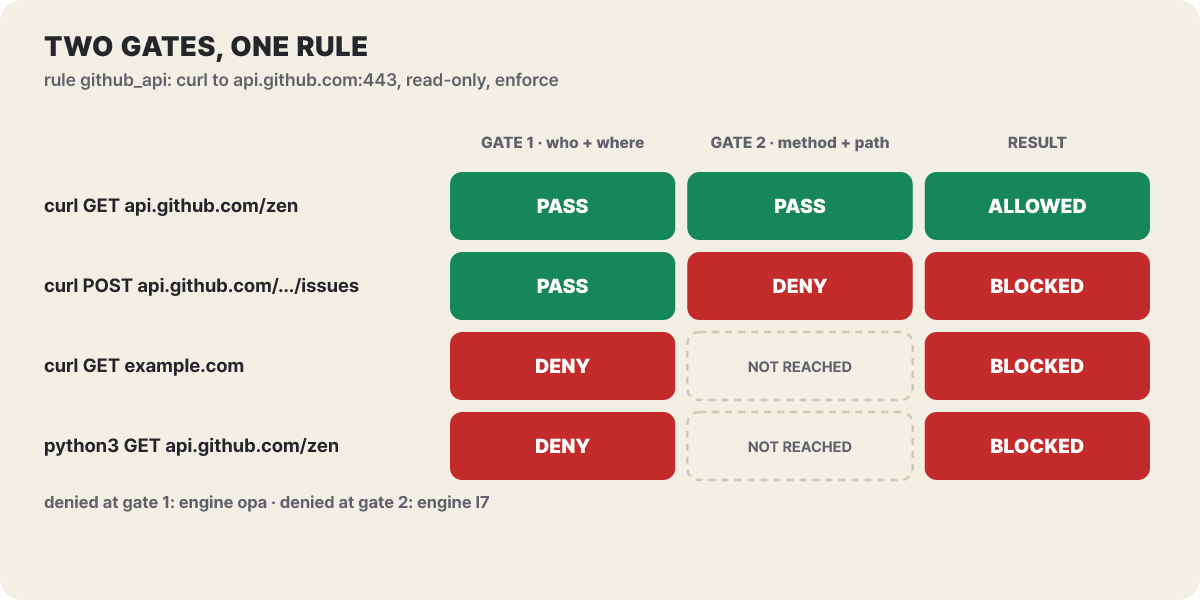 Figure 2. Even for the same host, a different program is stopped at the first gate and a different method at the second
The second and fourth rows are the interesting ones. A POST to the same api.github.com passes the connection check and is stopped at the method, but when Python sends a GET to that address, the program is not listed in the rule, so it is stopped at the connection. The calling program is identified not by the path the agent presents but by the executable the sandbox confirms itself from /proc. That is why a rule must name the real path rather than a symlink (check with readlink -f inside the sandbox), and why allowing pip install means naming the Python interpreter that connects to PyPI, not pip. There is also a safeguard that records the SHA-256 hash of the executable that first took part in a connection and rejects connections if the file at the same path changes. If you replaced a binary on purpose, restart the sandbox runtime so that it records the new hash.
A few points about what the rules mean deserve care. Every listed executable can reach every listed endpoint, so to allow a program to reach only some destinations, split the rules. An empty binaries list allows nothing, and child processes launched by a listed program use the same rule. access: read-only is shorthand that allows only GET, HEAD and OPTIONS. For finer control, write methods and paths in rules and paths to block in deny_rules, and where an allow rule and a deny rule overlap, the deny wins. You cannot use access and rules together on one endpoint.
The request check has a default-value trap. The default for enforcement is audit, which only logs a request that breaks the rule and lets it through. To block it you must write enforce, and a blocked request gets a 403 and a JSON response describing the violation. More fundamentally, an endpoint without protocol is judged only by host, port and executable and ignores method and path, so for API endpoints it is safer to pair it with protocol: rest. The docs recommend this order: set a new rule to audit, run the workload and check the log, then raise it to enforce.
Reading the two lines of a denial log
The first tutorial shows the screen before and after adding the rule above. Inside the sandbox curl is blocked, and when you open the log on the host, a single line says which program tried to go where. After the rule is added, GET works and only POST is blocked, and that second denial is the bottom line of the screen below.
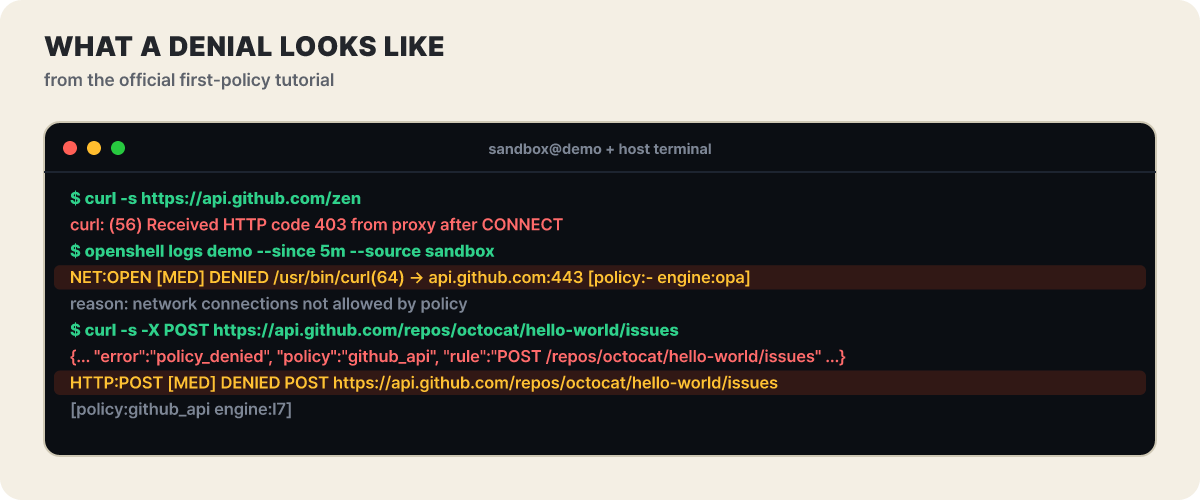 Figure 3. Output from the official tutorial (timestamps omitted). The
engine value of the two denial logs tells you which gate made the decision
NET:OPEN is a denial at the stage of opening a connection, /usr/bin/curl(64) is the executable that tried, and engine:opa means the first gate decided. An empty policy:- is the signal that no rule matched. The second denial starts with HTTP:POST and carries policy:github_api engine:l7, so even the rule name is visible. Knowing this difference lets you tell from one log line whether the request needs a brand-new rule or an existing rule needs narrowing or widening. Policy events are logged at INFO level, so filtering with --level warn hides these lines.
How a denial becomes a draft proposal
Having a person read the log and edit YAML repeats every time the agent gets blocked. To cut that repetition, OpenShell generates a draft rule on its own from a blocked connection. The draft is produced even in sandboxes where the policy advisor feature is off, and it takes a narrow form: let one binary reach one port on one host. Connections to hosts that no rule names are covered too. The important point is that a draft does not unblock the request. The request stays denied until the draft is approved and the rule is loaded, so the agent has to try again.
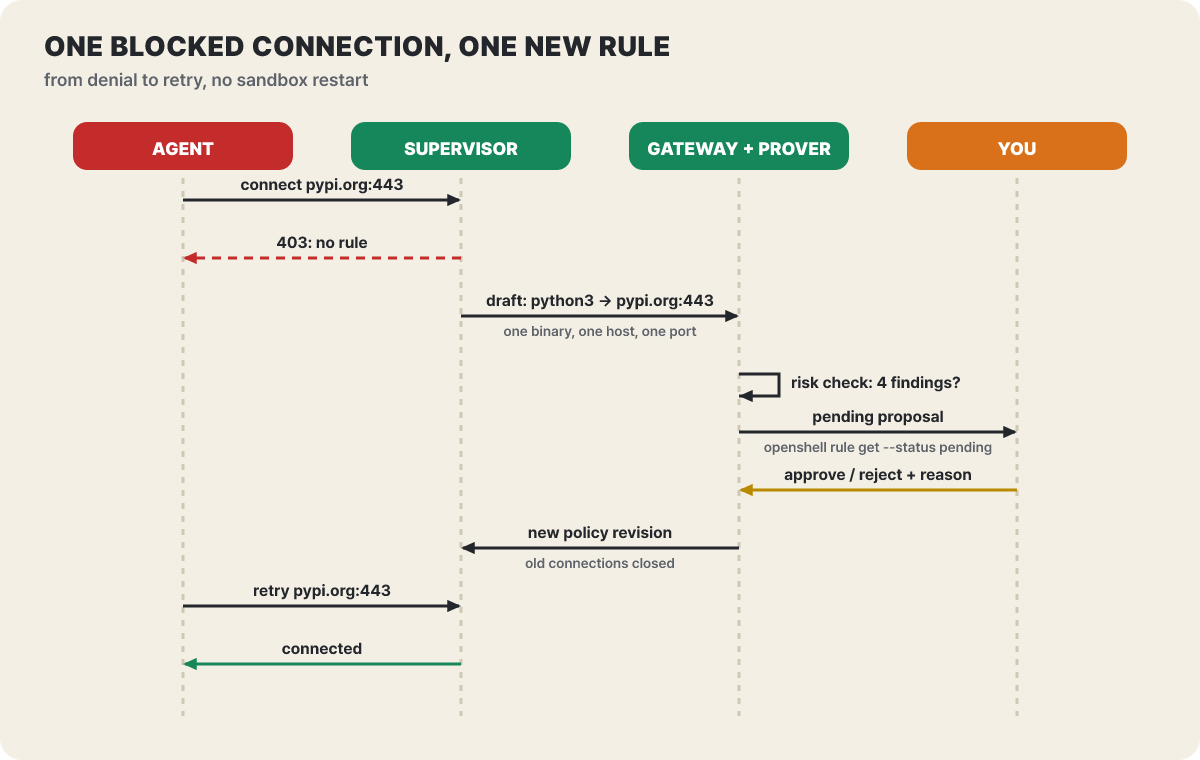 Figure 4. An approved rule takes effect without restarting the sandbox, and connections opened under the old rule are closed when it is applied
Before a draft enters the pending list, it goes through the risk check of the policy prover. Using an SMT solver, it compares “where the sandbox can reach before and after this rule is added,” and it counts the connected providers’ credentials and programs that cannot be inspected. The docs list four findings.
| Finding | What the proposed rule would allow |
|---|---|
link_local_reach |
A binary reaches a link-local address or a cloud metadata host |
l7_bypass_credentialed |
Traffic that cannot be inspected, such as git, ssh or nc, reaches a host that gets credentials attached |
credential_reach_expansion |
The hosts and ports where a credential can be used grow |
capability_expansion |
A new HTTP method is allowed on a host that already uses a credential |
If either of the two policies cannot be analyzed, the proposal is marked validation unavailable and cannot be approved until validation succeeds. The prover’s guarantees are also limited to the capabilities in its model (files, process user, Landlock, L4 connections, REST rules), so GraphQL, MCP and WebSocket rules come back as unsupported, and passing does not mean “least privilege.”
What the human does is read the pending list on the host terminal and rule on it.
- View the pending list.
openshell rule get my-agent --status pending. It shows the proposed rule, the reason and the risk-check result, and theChunkline carries the proposal ID - Read the rule yourself. Look at the host, port, binary, method and path of the rule shown in the list, not at the agent's explanation. Take a second look at any proposal flagged on the
Securityline - Approve or reject.
openshell rule approve my-agent --chunk-id <ID>, oropenshell rule reject my-agent --chunk-id <ID> --reason "Please narrow it to the docs/ path only". The reason goes back to the agent as written - Confirm the retry. On approval the rule is loaded into the running sandbox and the agent can try again. Other pending proposals are re-checked against the updated policy, up to the latest 32 at a time
There is also a bulk approval command, openshell rule approve-all my-agent, but it skips proposals with a security flag (add --include-security-flagged to include them) and tells you how many it skipped. Some proposals cannot be approved at all. A proposal aimed at loopback, link-local or a metadata address is never approved, and a host whose name resolves to a private address stays blocked even after approval until you add an allowed_ips entry or declare the endpoint yourself. While a global policy is on, no approval can be made, including automatic approval.
Letting the agent propose rules itself
If OpenShell is the one producing drafts, you can go one step further and let the agent understand the reason and propose a rule itself. This feature is off by default and is turned on for the whole gateway with openshell settings set --global --key agent_policy_proposals_enabled --value true --yes. Once on, the sandbox gets a guide file (/etc/openshell/skills/policy_advisor.md) and an http://policy.local API, and the denial response from an inspected HTTP endpoint says how to make a request. The agent reads recent denials with GET /v1/denials, proposes with POST /v1/proposals, and waits for the result with /wait. It is better to turn this on before creating the sandbox, because many agents read files such as /AGENTS.md only at startup, and an agent may already have been denied and given up.
A proposal can only add a network rule. It cannot delete anything or change file or process settings, it cannot propose protocol: tcp or tls: skip, and the API has no fields at all for credential settings or for GraphQL and MCP rules. Below is a scene the editors staged following the docs. The agent first proposes something too broad, a human rejects it with a reason, and the agent narrows it and submits again.
pip is blocked with a 403 at pypi.org:443. Following the guidance in the denial response, the agent opens policy.local and reads the policy and recent denials
I propose a rule that lets python3 reach port 443 on pypi.org and files.pythonhosted.org. I did not restrict the methods
openshell rule reject --reason "Open it as read-only (GET) only"
I will submit again with access narrowed to read-only on the same two hosts
openshell rule approve --chunk-id <ID>
The proposal status changes to approved and policy_reloaded becomes true. The agent's pip install is retried and goes through
The strength of this loop is that the rejection reason and the risk-check result both go back to the agent. Still, what a human should look at is not the agent’s explanation but the actual rule that rule get shows. The docs advise reviewing the displayed rule instead of the explanation for the same reason.
What auto-approve lets through
The setting that decides the approval mode is proposal_approval_mode, and its values are manual (default) and auto. A value set for the whole gateway overrides the per-sandbox value, so an administrator can pin every sandbox to manual. Even in auto, not every proposal passes automatically. A proposal is approved without a human only when there are no risk findings and OpenShell has not flagged the destination.
| Nature of the proposal | Result in auto mode |
|---|---|
| A new public host with no credential attached | Auto-approved |
| A private-IP host, a wildcard host, a port above 49152, a database or cache port such as 5432 or 6379 | Human review |
| A new port or new method on a host that gets credentials, or traffic that cannot be inspected | A risk finding is attached, so human review |
| Loopback, link-local or metadata address | Cannot be approved |
The first row is the part to be most careful about. The check does not treat a new public host that provider credentials cannot reach as a risk, so in auto mode the routes by which programs in the sandbox reach public hosts can widen without human review, OpenShell’s own drafts included. Data exfiltration is a risk that occurs even without credentials, so it is safer to start with manual, watch what proposals come up, and only then decide how much to auto-approve. Automatic approvals are also recorded. The CONFIG:APPROVED entry carries auto:true, the proposal’s origin (agent_authored, or mechanistic for a draft OpenShell made) and where the approval mode came from.
Even after approval, the keys stay outside the sandbox
As rules grow, the keys the agent holds do not. The agent never sees the real credentials; when the sandbox starts, only opaque placeholders go into the environment variables. As a request passes through the proxy, the placeholder is replaced with the real value only if both conditions hold. First, the network policy allows that binary and destination. Second, the credential’s binding includes that host, port and path. Even if the agent falls for a prompt injection and tries to send a key somewhere else, there is no real key in the sandbox to send, and sending the placeholder to another host returns a 403 for the mismatch (credential_endpoint_mismatch). An unknown or expired placeholder is not passed through as it is.
This structure is why three of the four risk-check findings ask “does the reach of credentials widen?” The moment an approval adds a rule, the destinations where a key can be used may grow with it. Using a key takes three steps. The gateway has no built-in profiles, so first import a profile from the repository’s providers/ folder (claude-code.yaml, github.yaml, openrouter.yaml and others) and check that the binary paths in the profile match your image. Then create a provider and attach it to the sandbox.
openshell profile import --url https://raw.githubusercontent.com/NVIDIA/OpenShell/main/providers/claude-code.yaml --global
ANTHROPIC_API_KEY=<key> openshell provider create --name my-claude --type claude-code --from-existing
openshell sandbox create --name agent --from <image with the agent> --provider my-claude -- claude
--from-existing reads the key from the environment variable and stores it in the gateway without exposing it on the sandbox side. To change a key, replace it with openshell provider update my-claude --from-existing, but processes that are already running hold the old reference, so start new ones. Detaching a provider from a running sandbox (sandbox provider detach) revokes access immediately, and deleting the sandbox discards the injected credentials with it. The default image is a minimal Ubuntu (nvcr.io/nvidia/base/ubuntu:24.04) with no agent installed, so you must specify an OCI image containing your agent with --from, and the docs list Claude Code, OpenCode, Codex and GitHub Copilot CLI as agents that can run on this runtime.
One official tutorial shows how the two relate. Tell Claude Code in a sandbox to create a file, commit it and push to a repository, and only the push step fails. The GitHub profile allows only clone and fetch and rejects the git-receive-pack request used for push. Swapping the token does not help. What is missing is not a key but network permission, and the fix is to add a rule narrowed to the one repository you will push to.
After the approval becomes a revision
An approved rule becomes a new policy revision. openshell policy list my-sandbox shows the list of revisions and whether the sandbox has loaded them, and a successful change should read Loaded. The current base policy is shown by openshell policy get my-sandbox --base, and the effective policy including provider rules by --full. To remove a rule, use openshell policy update my-sandbox --remove-rule <name> --wait, and to roll back, fetch the earlier revision with --rev N --base and upload it again with policy set. This rollback does not restore provider profiles and connections, credentials or global policy.
A network change closes connections opened under the old rule as it is applied to the running sandbox. If applying fails, fail_closed (default) blocks traffic and retain_last_valid keeps the last policy that was valid. How fast it applies changed in v0.1.5. If you switch the settings delivery mode to push, policy and settings changes reach the supervisor within about 100 milliseconds, while the default polling mode takes up to 10 seconds. That is the difference you feel when the agent retries right after an approval.
It is worth separately noting that approvals pile up unnoticed. An endpoint approved in the TUI (openshell term) survives a restart of the same sandbox, and you have to delete and recreate the sandbox to reset it. Rather than leaving frequently used destinations to approvals, it is better to move them into YAML with the binary and path narrowed and keep it in the repository. Because policy is YAML, changes can be reviewed as code, and openshell-prover checks whether a candidate policy exceeds a boundary policy even without a gateway and reports the result by exit code in CI.
openshell-prover check candidate.yaml --boundary boundary.yaml
# exit code 0 = within_boundary, 1 = exceeds_boundary, 2 = error, 3 = unsupported or inconclusive
Every opening is also a way out
The smoother the approval loop, the more quietly the open paths grow. The remaining risks that the docs warn about directly or that show up in the defaults are these.
- An allowed destination is a path data can leave through. The docs also state that every allowed endpoint can become an exfiltration path. The basic stance is to start with a minimal policy and open one thing at a time while watching the denial log
- Wildcard hosts (
*.example) allow DNS lookups for every matching name, so they can become an exfiltration path through names. Where possible, write exact hostnames tls: skipturns inspection off. Use it only for mTLS, which needs a certificate, and for protocols where the server speaks first (such as SMTP); on an endpoint that gets credentials it can be used only with a separate permission setting- The Landlock compatibility default
best_effortskips file restrictions it could not apply and only records that. If they must be applied, specifyhard_requirement - Docker’s supervisor networking defaults to host mode. Bridge networking can be chosen from v0.1.5, so check the setting if your isolation requirements are high
- Telemetry is on. It says it collects only anonymous task categories and counts, and does not collect sandbox names, file paths, prompts or credentials. To turn it off, set
OPENSHELL_TELEMETRY_ENABLED=falseon the gateway
The pace of change is also a risk factor. The stable release dates are Sep 25 for v0.1.0, Sep 26 for v0.1.1, Sep 28 for v0.1.2, Oct 9 for v0.1.3, Oct 13 for v0.1.4 and Oct 20 for v0.1.5 (all UTC). Security and critical stability fixes are provided only for the latest minor and the one before it, and the docs are split by version, so read the docs for the version you use. When upgrading to v0.1.5, the supervisor’s OCSF log file extension changed from .log to .jsonl (old logs are not migrated), so you need to check your collector patterns and the old records, and labels and annotations in Kubernetes sandbox templates are rejected without an allow list. On Oct 22, a change that puts Kubernetes sandboxes on a shared supervisor landed on main, but it is not included in v0.1.5. Open issues and pull requests together number 581, so it is worth searching for known problems with a feature before you use it.
A policy skeleton for the first time
Back to the pip install scene at the start: what you need first is not a broad allowance but one rule for installing, and approvals that a human reads in person. Below is that starting point. File, Landlock and process settings cannot be changed in a running sandbox, so take the file you get from openshell policy get work --base and edit only network_policies like this.
version: 1
# leave filesystem_policy, landlock and process as in the policy get --base output
network_policies:
  python_install:
    endpoints:
      - host: pypi.org
        port: 443
        protocol: rest
        enforcement: enforce      # you can run with audit first, then raise it
        access: read-only
      - host: files.pythonhosted.org
        port: 443
        protocol: rest
        enforcement: enforce
        access: read-only
    binaries:
      - path: /usr/bin/python3.12   # the real path, checked in the sandbox with readlink -f $(which python3)
# Turn the advisor on, and let a human approve (the global value overrides the per-sandbox value)
openshell settings set --global --key agent_policy_proposals_enabled --value true --yes
openshell settings set --global --key proposal_approval_mode --value manual --yes
# Create the sandbox, apply the rule, then confirm it has loaded
openshell sandbox create --name work --from <image with the agent> --provider <provider>
openshell policy set work --policy starter.yaml --wait
openshell policy list work
# Each time the agent is blocked: log, then pending list, then read the rule and approve, or reject with a reason
openshell logs work --since 5m --source sandbox
openshell rule get work --status pending
openshell rule approve work --chunk-id <proposal ID>


