Read-only Fabric IQ MCP lets AI agents query Power BI
Fabric IQ MCP queries Power BI models read-only with the signed-in user's permissions. See where Power BI security applies and where results go next.
The short version: Fabric IQ MCP does not widen what an AI agent can see in Power BI. It lengthens the distance the data travels. Up to the server, the signed-in user’s permissions and row-level security (RLS) follow every call. Once the results leave the server and reach the MCP client and the LLM provider, it is no longer Power BI that protects them but your organization’s AI data policy. Microsoft’s documentation lists this server as generally available (GA). It is a remote MCP server, and all six of its tools are read-only. This article walks through where the boundary is drawn, what filters data inside it, and what you have to decide yourself outside it. The reference date is 2026-10-27 (UTC), and the official getting-started document’s Oct 21 edition is the latest.
Where permissions stop and where the data keeps going
First, here is the path one piece of data takes. The green zone is where Power BI’s permissions and security rules work. The yellow zone is where they do not.
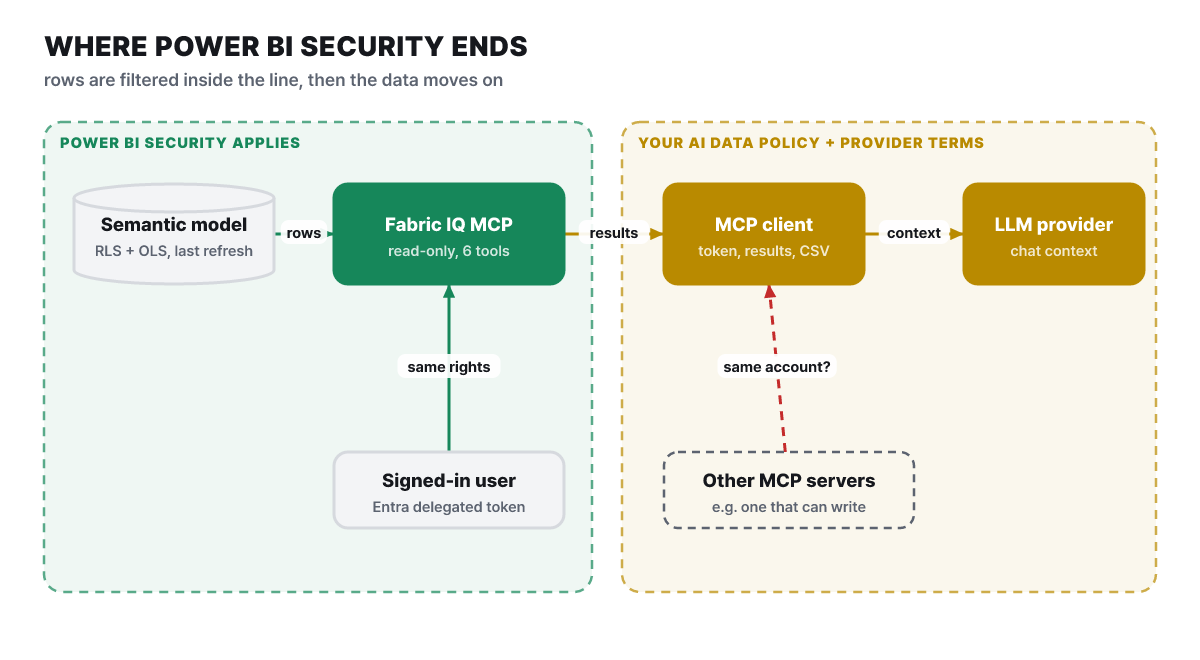 Figure 1. Results leaving the server continue on to the client and the LLM provider. The other server on the dotted line is the path that exists when it is registered with the same client
Inside the green zone, the signed-in user’s permissions are attached to every call, and RLS and OLS (object-level security) filter the returned values. The line where the two zones meet in the diagram is the center of this article. Microsoft states plainly that the MCP server does not widen access but does move data. Metadata, schemas and query results go to the MCP client, and the client may pass them to the configured LLM provider as conversation context. The documentation asks that this movement be governed not by Power BI’s security controls but by your organization’s AI data-handling policy and the provider’s terms.
It is easy to miss that query results are not the only thing that crosses. Table and column names, measure definitions and the instructions the model author wrote reach the client during a schema lookup, and a value search brings values stored in the model, such as customer or product names. Set your policy on the assumption that the model’s structure and vocabulary enter the conversation context, not just a line of numbers.
The client is also not a single kind of thing. Microsoft’s overview document presents Fabric IQ as a supported path for Microsoft 365 Copilot, Copilot Studio, Microsoft Foundry and custom agents to get answers from Power BI data. What the yellow zone looks like differs by the client you connect, and no server decides that policy for you.
What one token opens: five layers
Here is how the permissions the server runs under break down into layers. The lower you go, the closer you get to the data.
- Delegated token (Microsoft Entra)Two delegated permissions of the Power BI Service API,
Item.Read.AllandItem.Execute.All, are required for every client. Service principals and app-only authentication are not supported - Consent policyBy default these two permissions need no admin consent, and users consent themselves if the tenant setting allows it. Admins can block user consent or require an approval process, and the permissions apply to the whole endpoint
- Power BI access rightsOnly the reports and models the user could already open are visible. There is no admin-on-behalf path, and neither workspace roles nor Build permission are required separately
- RLS and OLSThe same query returns different rows and columns for different people. These rules still apply when connecting over MCP
- Semantic model dataValues as of the last successful refresh. A question that needs a field or measure the model does not expose fails or gets an incomplete answer
The top layer matters because service principals are blocked. If an unattended pipeline queried a model as a service principal, it would read with the principal’s own permissions rather than a person’s RLS. The documentation for the earlier Consumption endpoint warns outright that RLS is not applied under service principal authentication. Fabric IQ allows only delegated authentication from the start, so that hole is structurally not open. The trade-off is that you cannot use this server for jobs such as “run it every night with a service account”.
The third layer’s point that “no workspace role is needed” cuts both ways. If you can access a report or model, you can query it, and you do not need to be granted the model’s Build permission separately. The lower the access bar, the more everyone who can open that report becomes someone who can ask this server questions. That is why cleaning up who reports are shared with becomes homework before adopting AI.
Also, the Power BI tenant setting Users can use the Power BI Model Context Protocol server endpoints (preview) does not turn Fabric IQ on or off. As the documentation says, this setting controls the model authoring experience. So do not assume the read-only server is blocked just because this setting is off. The admin-side control the documentation describes is the second layer above: blocking user consent or requiring an approval process.
Two people get different answers to the same question
With RLS, a test is quicker than an explanation. What follows is a hypothetical scenario made up by the editors. A sales model has regional RLS. Regional sales rep A sees only the rows for their own region, and headquarters analyst B sees everything. The two ask the same report the same question.
- A’s agent gets back a single line for A’s region for “total sales by region, latest quarter”
- B’s agent gets the totals for every region
- The DAX from the two agents can be identical, because what gets filtered is the user, not the query
The agent is not wrong. Security is working as intended. Conversely, if A’s answer shows numbers from another region, suspect the model’s RLS settings. It is worth running this test once, on the day you first attach the MCP server. It checks whether the model’s rules were built as intended, not whether the server passes RLS along correctly. If the rules themselves are empty, the server simply follows that state.
Object-level security (OLS) works in the same place. The documentation says both RLS and OLS continue to restrict the data returned, so when a column is missing from an agent’s answer, check the scope open to that user before suspecting a server defect.
Eight steps one question takes
Next, at which points in a call this security attaches. The path of the documentation’s test example (“Using the Sales Analytics report, show total sales by region for the latest quarter”) is drawn in order.
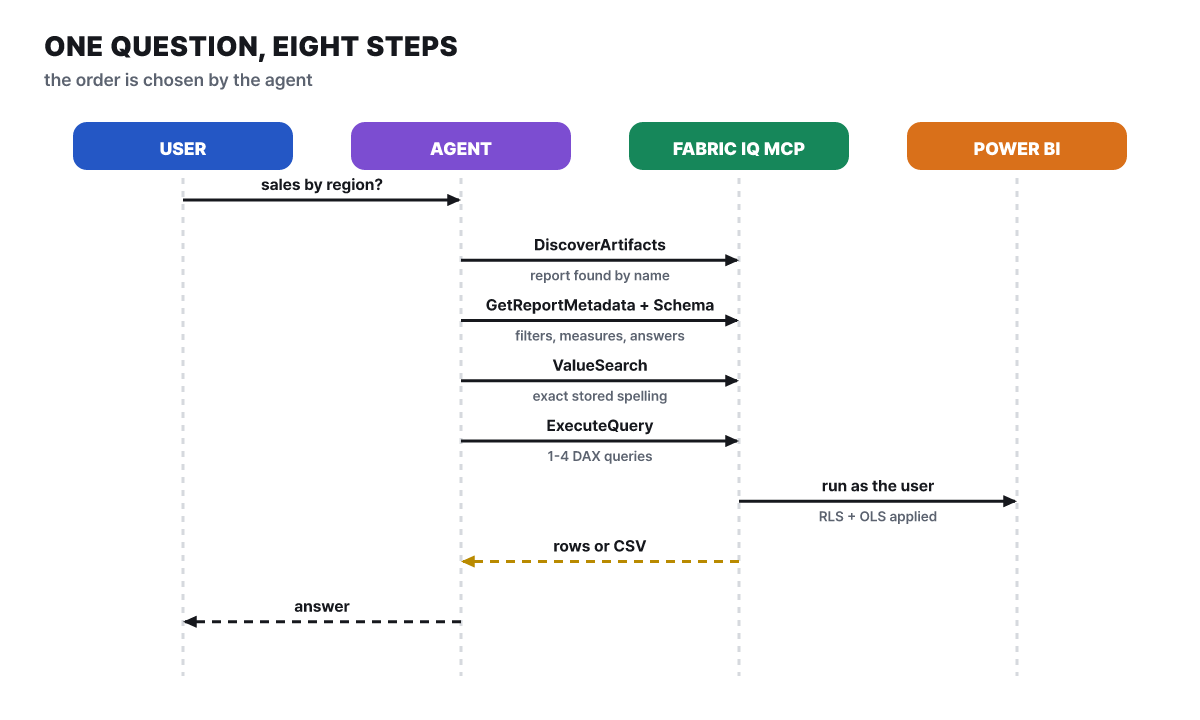 Figure 2. The agent decides the order. This is the flow in the documentation’s example, and steps shrink or grow depending on the question
Of the four tool calls, the first points where data values leave the server are value search and query execution. The first two (finding and reading the structure) fetch names and structure. As “run as the user” in the diagram shows, the server does the executing on the agent’s behalf, but the identity is the user’s. In none of these eight steps does the server read with its own authority. The table below sums up what each tool passes to the client.
| Tool | What it does | What goes to the client |
|---|---|---|
DiscoverArtifacts |
Searches reports and semantic models by name (up to 50, reports first) | The list of items found |
ResolveFabricItem |
Converts a browser address or GUID into a canonical identifier, item type and workspace ID | Identifier and type |
GetReportMetadata |
Reads a report’s pages, visuals, filters and the semantic model it uses | Report structure and filters |
GetSemanticModelSchema |
Reads tables, columns, measures and relationships, plus the author’s instructions and verified answers | Model structure and the author’s text |
ValueSearch |
Finds the exact spelling of stored values | Values stored in the model |
ExecuteQuery |
Runs 1 to 4 DAX queries against one semantic model | Query result rows |
No tool produces an answer in natural language. Choosing tools, writing DAX and explaining results are all the calling agent’s job. You can paste a browser address when looking for a report, but Power BI sharing links cannot be used, and an address for a report inside a workspace app requires ResolveFabricItem. The per-tool specifications (1 to 4 queries, up to 1,000 rows, up to 50 results) are values written in the Fabric IQ skill document Microsoft published, and the official getting-started document says to treat the runtime tools/list response as the reference for input specifications.
Rules that read-only DAX follows
A query the agent builds looks like this. The table names are examples, and in practice the agent uses names it reads from the schema. It is a lookup that leaves no trace in the model.
EVALUATE
SUMMARIZECOLUMNS(
    'Region'[Region Name],
    "Total Sales", [Total Sales]
)
ORDER BY [Total Sales] DESC
The rules set by the Fabric IQ skill document are these. Each query has exactly one EVALUATE, and a query that returns multiple rows gets an ORDER BY. Rankings are cut down with TOPN, to 50 rows or fewer unless the request says otherwise. A measure defined inside a report lives only in the report layer, so calling it by name fails. The agent has to read the expression from the report metadata and redefine it inside the query. Like this.
DEFINE
    MEASURE 'Sales'[Sales YoY] =
        DIVIDE([Total Sales] - [Total Sales LY], [Total Sales LY])
EVALUATE
TOPN(
    10,
    SUMMARIZECOLUMNS('Product'[Category], "YoY", 'Sales'[Sales YoY]),
    [YoY], DESC
)
ORDER BY [YoY] DESC
All names are examples. The thing to notice is DEFINE MEASURE. It is a temporary definition that lives only inside this query and does not change the model. This is a way for an agent to attempt a new calculation even on a read-only server, and the result is never saved to the model.
Some syntax is blocked in the other direction. The skill document says INFO functions, DMV queries and MDX are not supported. The route of sweeping a model’s meta information with arbitrary queries is closed, and the structure is visible only as far as the schema tool provides. There are rules for errors as well. Invalid DAX is fixed and rerun once. When a result is empty, the agent checks the schema, measures and filters and retries at most once. A permission error is reported as possibly either a lack of access or a tool limitation. When throttled, the agent tells the user to try again shortly, and on a timeout it retries once and then says to wait a few minutes.
How many rows can leave in one call
Read-only does not mean the amount going out is no concern. So the limits are placed on the same axis.
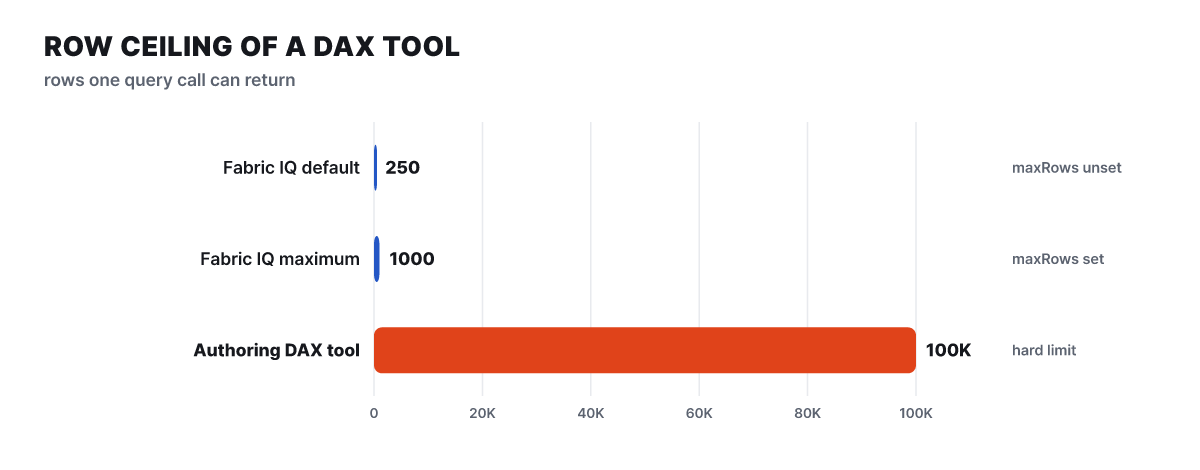 Figure 3. Upper limits on the rows a single call can return. The 100,000 rows on the Authoring side is the limit of the DAX execution tool as written in Microsoft’s Authoring documentation
Fabric IQ returns 250 rows if maxRows is not set, and up to 1,000 if it is. The Authoring MCP’s DAX execution tool, which builds and edits models, has a limit of 100,000 rows. By our calculation, the maximums differ by a factor of 100. The consumption server has a ceiling by design on how much can flow out in one go, and that ceiling also acts as an upper bound on one-time outflow. The bars diverge so sharply because the two servers are designed for different purposes. One answers a single question from a person, and the other lets a model developer verify bulk results.
Large results come back from the server as embedded CSV resources. Clients usually show only a small preview on screen and let the full data arrive as a CSV resource, but embedded resource support varies by client, and Power BI’s query limits can truncate results. The documentation’s recommendation is to reduce results with aggregation, filters and narrowly focused queries. That is advice for performance, and it is also a way to reduce the data going out. It queries only one model at a time, so to combine results from several models the agent has to run them separately per model and stitch them together, and the server does not join across models.
When four servers gather under one account
Register several MCP servers with one client and the dotted line in Figure 1 becomes real. There are two servers on the Power BI side, and the earlier Consumption endpoint remains for existing integrations, so in practice you have to tell four apart. If they connect with the same user account, the permissions of each server simply add up.
| Server | Status | Can it change a model? | What it needs |
|---|---|---|---|
| Fabric IQ MCP | GA | No (read-only) | Entra sign-in, 2 delegated permissions |
| Authoring MCP, hosted | Preview | Yes | Write permission on the model (DAX execution only with Build), a tenant setting an admin turns on |
| Authoring MCP, local | GA | Yes, plus Desktop, PBIP and TMDL files | XMLA read/write, service principals possible, not supported on macOS |
| Consumption MCP (earlier) | Preview | No (query execution) | Build permission, a tenant setting, a model ID supplied directly, a Copilot license for the query-generation tool |
Microsoft’s overview document divides the uses clearly. Creating and editing model objects is for Authoring, and answering users’ questions is for Fabric IQ. Even though the Authoring server can run DAX, it is not designed to answer end users’ questions, and the documentation is firm that you should use Fabric IQ for consumption. The recommended combination is “build and document the model with Authoring, then let everyone ask through Fabric IQ”.
There are two risks. First, registering the Authoring server with a read-only client as well makes Fabric IQ’s read-only property meaningless. If the user has Write permission on the model, the agent can change model objects, and Microsoft also warns that an autonomously acting agent or a misconfigured client can take unintended actions. Second, registering both the local and hosted Authoring servers at once is not recommended either. The agent sees two copies of overlapping tools, routing becomes ambiguous, and each request costs more tokens.
The guidance a model author sets in advance
The direction of an answer is decided by the model, not the server. The Fabric IQ skill document sets a nine-step work order. Confirm the item, apply the filters on the report, read the schema through to the end, check whether the question matches a verified answer, confirm values, write the DAX, run it, check the result, and answer with the conclusion first. Among these, verified answers are the strongest guidance. When a question matches a verified answer, the skill has the agent follow its bindings, filters and aggregation grain as they are, forbids adding things like date filters on its own, and rules that even the model’s instructions cannot override it.
Verified answers and the model’s “AI instructions” and “AI data schema” are created with Power BI’s Prep data for AI feature and are stored in the semantic model, not the report. They can be authored in both Desktop and the service, and the Q&A setting must be turned on. The documentation is firm that results are not guaranteed to be identical every time, so this is a non-deterministic feature, and the recommended procedure is to test it in the Copilot pane after creating it. That these settings reach the agent through the MCP schema tool is behavior described in the skill document. If this guidance is empty, the agent has to guess intent from column and measure names, and the answers wobble accordingly.
A skill is a markdown instruction that teaches the agent “how to do it”, while the server handles actual access and execution. A skill is static knowledge and does not run code on its own. Without a skill the connection still works, but the client has to work out Fabric’s specific order and safety rules by itself. The install commands are the same for Copilot CLI and Claude Code.
/plugin marketplace add microsoft/skills-for-fabric
/plugin install fabric-skills@fabric-collection
/quit
/skills
Skills for Fabric is split into two plugins. The fabric-skills above does not include the Power BI plugin, and powerbi-authoring@fabric-collection, which builds models, is installed separately. The point to note is that the Authoring documentation says this plugin bundles the local Authoring MCP server, so one install gives you both the tools and the guidance. For a read-only client, it is better not to install this plugin. The documentation lists Node.js, PowerShell 7, Git and Azure CLI (az login) as prerequisites, and after installing you restart the tool with /quit and check that it appears in the /skills list.
Connect, then check that permissions carry through
The client the official documentation walks through is GitHub Copilot CLI. The configuration is in the last section, and the sequence below checks the connection and the carry-through of permissions together.
- Add the server to
.copilot/mcp-config.jsonin your home folder (on Windows,%USERPROFILE%\.copilot\mcp-config.json) and start Copilot CLI. - Run
/mcp show FabricIQand a browser opens. Sign in with a Microsoft Entra work or school account and accept the permission request. Copilot CLI uses a pre-registered Entra app, so no app registration is needed. - If the connection status and the list of 6 tools appear, the endpoint, authentication and MCP handshake are confirmed.
- Have it find a report you can access, such as "Find the Sales Analytics report in Microsoft Fabric". If
DiscoverArtifactsis called and returns results, authentication, Fabric permissions, tool execution and access to the target are all confirmed. - Ask a question that needs data ("Using the Sales Analytics report, show total sales by region for the latest quarter") to verify end to end.
- If the model has RLS, ask the same question from the accounts of two people with different permissions and compare whether the results differ.
Do not add an Authorization header here yourself, because it overrides interactive OAuth and automatic token management. If the token is invalid or has expired, removing the header returns you to interactive sign-in. If your organization uses Private Link, change the endpoint to https://api.fabric.microsoft.com/v1/mcp/fabriciq.
With other MCP clients, check two conditions. They must support Streamable HTTP and the required OAuth 2.0 flow, and some clients require a single-tenant Entra app registration. In that case, create an app in the Entra admin center with “Accounts in this organizational directory only”, add the redirect URI the client requires under authentication, add the two delegated permissions of the Power BI Service, and give the application (client) ID and tenant ID to the client. The documentation recommends not hard-coding the tool list but reading it at runtime with tools/list, and building so you survive new tools or fields being added. To pin the tool specification version, attach the X-Variants: Fabric.Routing.FabricIQ.V1 header to every initialize, tools/list and tools/call request. The v1 in the endpoint is just part of the address, not a tool specification version.
Symptoms that block you, and what is not supported
Here are the official troubleshooting table’s symptoms, condensed.
| Symptom | Cause given | What to check |
|---|---|---|
| The sign-in window does not appear | The client does not support OAuth auto-discovery, or an app registration is needed | The client’s OAuth settings, a single-tenant app registration |
| Authentication fails | Expired token, wrong audience, missing delegated permission, consent policy | Reauthenticate, the Power BI Service delegated permissions, the tenant consent policy |
| Tools differ from the documentation | The X-Variants header is missing or has a wrong value |
Set the header to Fabric.Routing.FabricIQ.V1 and reconnect |
| A report you know does not show up | No permission, unsupported format, ambiguous name | A more specific name, or paste the browser address |
| Throttling error | Requests too fast, or throttled on the Power BI side | Retry shortly, reduce request batches, narrow results |
| Numbers are stale | The semantic model has not been refreshed recently | Check the model’s refresh history |
If the tool list looks empty, the connection may be stale, so restart the connection and check the runtime tool list. A permission error means the identity cannot access what was requested, so check report and model access rights and RLS and OLS restrictions.
Some things are not supported.
- The only supported items are Power BI reports and semantic models. Dashboards, paginated (RDL) reports and Power BI apps are not supported, and the documentation says Fabric ontologies and data agents are not supported for now either
- The tenant’s home region must support all Fabric workloads, and it cannot be used in Power BI-only regions or sovereign clouds. Conversely, the report and model do not need to be on Fabric or Premium capacity
- Workspace management, development and item creation are not this server’s job. The documentation directs you to Skills for Fabric and the broader Fabric MCP server for that
- There is rate limiting. Power BI’s service-side limits apply to metadata and DAX operations, and throttling errors can be retried, but the client has to back off for a moment and then try again
The setting to register on a read-only client
Compressing the risk map so far into one setting looks like this. Register only Fabric IQ on a read-only client, and use tool names in place of the documentation example’s “*” as an allow list. Since the documentation recommends surviving growth in the tool list, the point is that even if a new tool appears on the server, anything not written in the list does not open automatically. Keep the Authoring server and the powerbi-authoring plugin off this client and set up a separate client for model authoring. If the client supports header settings, you can also put the X-Variants header, which pins the tool specification, here too.
{
  "mcpServers": {
    "FabricIQ": {
      "type": "http",
      "url": "https://fabriciq.svc.cloud.microsoft/v1/mcp/fabriciq",
      "tools": [
        "DiscoverArtifacts",
        "ResolveFabricItem",
        "GetReportMetadata",
        "GetSemanticModelSchema",
        "ValueSearch",
        "ExecuteQuery"
      ]
    }
  }
}


