Microsoft Learn MCP lets AI read Azure docs, no key or fee
We checked six claims about the Microsoft Learn MCP server on its public endpoint: Q&A posts mixed in, a repeated page, budget steps, old class samples.
$ microsoft_docs_search  query="azure functions timeout consumption plan"
 1  doc  azure-functions/functions-scale#function-app-timeout-duration        1,658 chars
 2  doc  azure-functions/functions-scale#function-app-timeout-duration        2,822 chars
 3  doc  durable-task/common/durable-task-timers#use-durable-timers-...       2,055 chars
 4  Q&A  answers/a/1907003  "Best approach to run Azure function for 24h"    2,818 chars
 5  doc  azure-functions/flex-consumption-plan#considerations                 2,474 chars
 ... slots 6-10: 2 docs, 3 Q&A
Those are the first five of the ten slots returned when asked about the Consumption plan timeout. Slots 1 and 2 are the same section of the same document, and slot 4 is not official documentation but a question posted by a user. Across all ten slots, four were Q&A posts. The pitch that it “finds official documentation” and the description of “ten results per search” already look slightly off on this one screen.
The Microsoft Learn MCP server is a remote MCP server that lets AI agents search and read documents and code samples from Microsoft Learn (the official technical documentation site). There is a single address, https://learn.microsoft.com/api/mcp, and three tools: doc search, doc fetch and code sample search. The official docs state that it needs no authentication and has no fee. The GitHub repository MicrosoftDocs/mcp, which holds the server configuration and skills, has about 2,000 stars and 275 forks. Articles introducing this server and the official docs say largely the same thing: it grounds answers in official documentation, it is free, and its data is refreshed daily.
Instead of repeating those claims, this article calls the same server directly and checks them one by one. On the evening of 2026-10-26 UTC, we sent 54 tool calls to the public endpoint with no authentication header, all of them read-only: 14 searches (8 queries and 6 budget steps), 13 code sample searches and 27 page fetches. Rankings and counts are values from that moment.
Six claims and the verdicts
The claims come from the official overview, FAQ, README and tool descriptions, and the sections below lay out the evidence for each verdict.
| # | Claim | Experiment | Verdict |
|---|---|---|---|
| 1 | It finds official documentation | 8 queries, 80 result slots | 74 slots were docs, 6 were Microsoft Q&A. Mixed in only for the 2 symptom-style queries |
| 2 | One search returns ten results | Distinct pages the slots point to | Ten results means ten slots, not ten documents. 1 to 8 pages per query, 37 across the 8 queries |
| 3 | A token budget shrinks the response | Same query repeated at 6 budget steps | True. But it works in steps of slots, does nothing at 8000, and does not apply to fetch |
| 4 | It finds official code samples | Classes used inside 10 C# samples | 6 use the current approach, 4 use previous-generation classes. Some description-field labels disagree with the code |
| 5 | It fetches doc pages as markdown | About 10 kinds of address | True. The scope is HTML pages on microsoft.com properties, wider than the docs site |
| 6 | Data is refreshed daily | Question dates, doc version paths | It means the latest version is included, not that old posts and old versions are gone |
Opening the ten slots 80 times
We sent each of the eight queries once and laid out the ten slots we got back in rank order. Blue is the first appearance of a doc page for that query, dotted is another part of a page that already appeared, and orange is a Microsoft Q&A post.
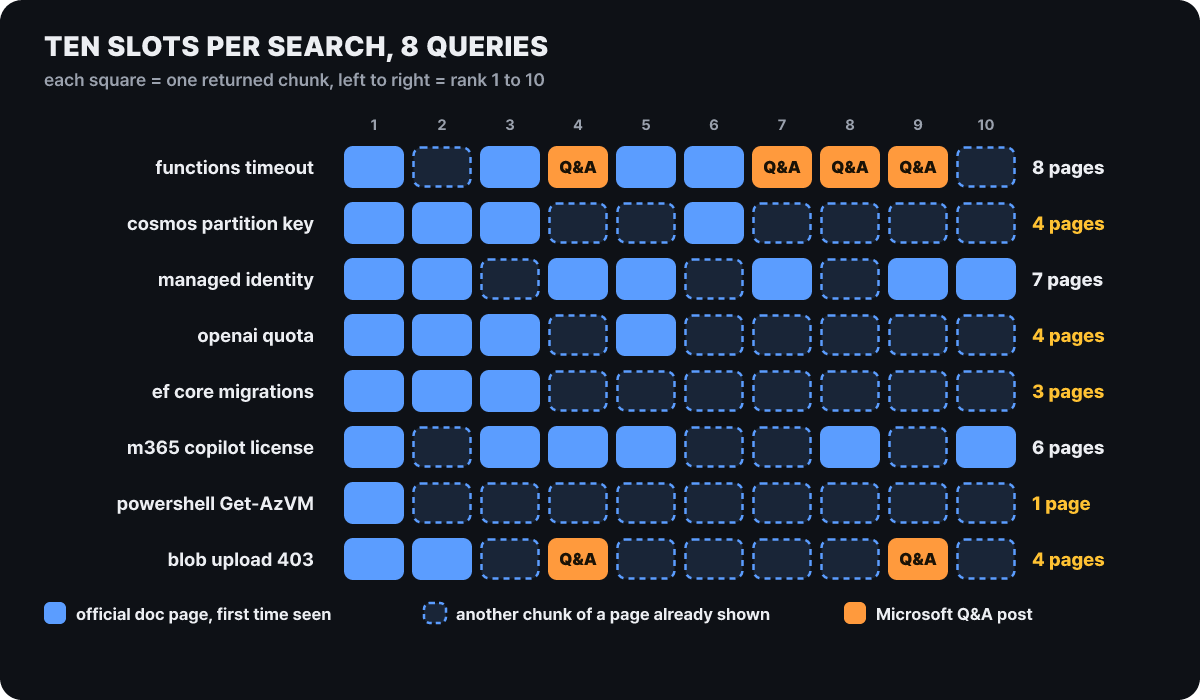 Figure 1. Blue is a first-appearance doc, dotted is a repeat, orange is Q&A. The right side shows the number of distinct pages (Q&A included)
Orange appears in only two rows: four slots for “functions timeout” (a query asking why the timeout won’t extend) and two for “blob upload 403” (a query trying to fix an error). The other six queries (partition key design, managed identity setup, quota, migration, licensing and a PowerShell command) had all 60 slots as official docs, which brings the total to 74 of 80 slots being docs. Both queries that surfaced Q&A were sentences asking about a symptom or an error. This is a trend from only 8 queries, so for queries about a problem situation it pays to build the habit of checking the address the agent cites as its source.
The second thing that stands out is the dotted cells. The figure shows at a glance that ten slots are not ten documents. The distinct page counts for the 8 queries were 8, 4, 7, 4, 3, 6, 1 and 4, totaling 37, an average of 4.6 per query. The PowerShell query filled all ten slots from a single page, the Get-AzVM command doc (its address carries the doc version azps-16.4.0), and the EF Core migration query filled its ten slots with three pages. Because the search unit is a section-sized chunk rather than a document (the #anchor at the end of the address points to that section), a page that matches the query well has several of its parts rise one after another. A single chunk ranged from 739 to 3,302 characters, 1,905 on average. If you need broad evidence, you have to rephrase the query and send it several times; one search does not give ten independent lines of evidence.
The orange slots can be told apart by these two sets of traits.
Official doc chunk
- The address starts with a product path like
learn.microsoft.com/azure/...and has no/answers/ - The title is the document title, and the part the trailing
#section-namepoints to is the body - The body contains no asker’s post, just that section of the document as it is
Q&A chunk
- The address is
learn.microsoft.com/answers/a/numberwith no anchor - The title ends with
- Microsoft Q&A - The body has the asker’s post along with a
##Accepted Answers:or##Moderator Recommended Answers:marker. All 6 found this time had one of the two
How stale answers sit in the search ranking
If you open a Q&A chunk with fetch, the time the question was posted is stamped at the very top of the body. We read those dates from the four Q&A posts in the timeout query and set them beside the server’s history.
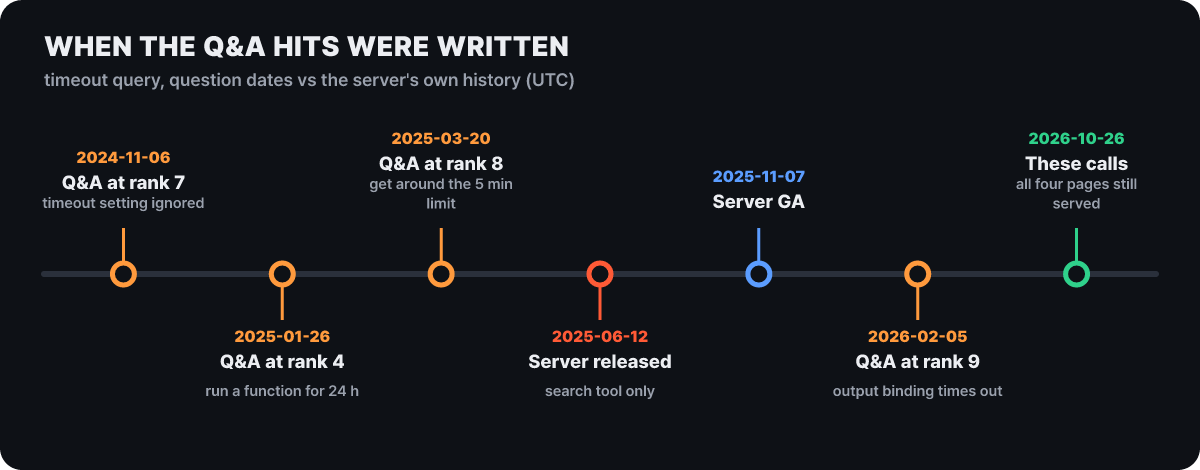 Figure 2. Question dates (UTC). Three of the four were written before the server was first made public
Three of the four are questions that predate the server’s launch on 2025-06-12, and the oldest is 2024-11-06. That does not mean the posts are wrong. The 2025-03-20 question says “the limit is 5 minutes on the dynamic (Consumption) plan” and the 2024-11-06 question says “the docs have a 230-second limit”, and both values match the tables in the current docs we fetched this time (Consumption default 5 minutes, HTTP trigger response 230 seconds). The verdict is something else. Official docs are refreshed on a schedule, but a Q&A post stays frozen at its question date, so in an area where plan names or limits have changed, an old post can sit at the same rank. If an agent’s answer cites an /answers/ address as its source, opening that post once to look at its date is the cheapest check.
Budget numbers and response length do not scale together
The README says that appending maxTokenBudget to the server address trims the search tool’s responses to fit that budget. It is marked as an experimental feature. We sent the same timeout query with the address changed to https://learn.microsoft.com/api/mcp?maxTokenBudget=N and measured the characters in the chunk bodies that came back.
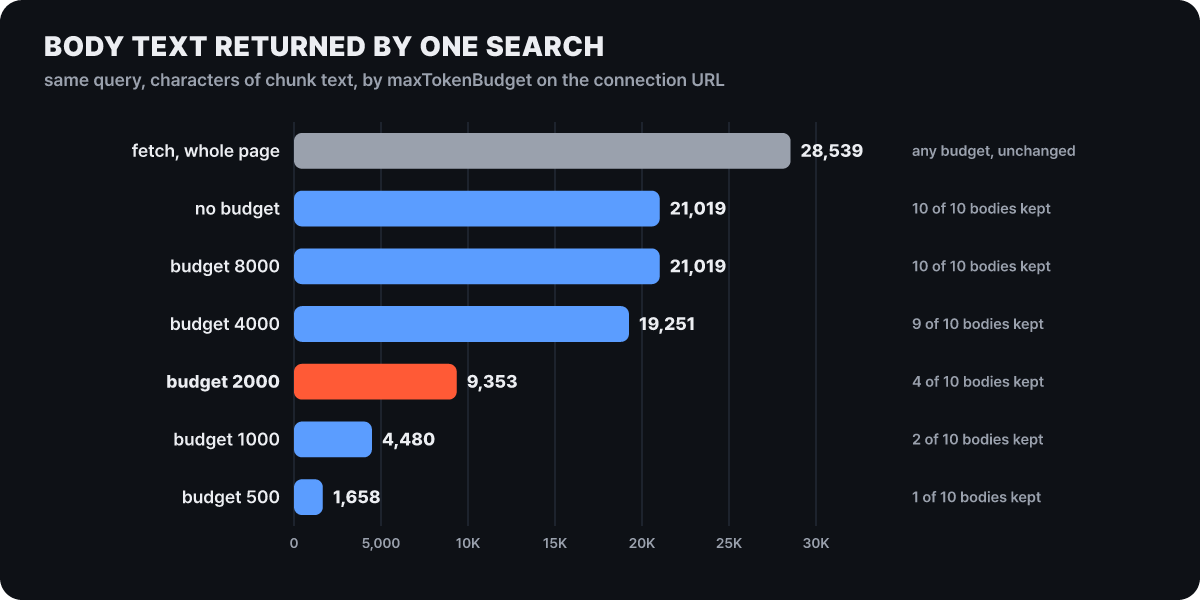 Figure 3. Response body characters for the same query. Gray is a single page fetch from the same server
Three things show up. First, the budget does not trim characters at sentence level. It keeps bodies in chunk units from the top of the ranking and leaves only the title and address for the rest (the response carries content_omitted: true). A budget of 500 kept only the first-ranked chunk, 1000 kept two, 2000 kept four, and at 4000 only the last 1,768-character chunk was dropped. Second, 8000 has no effect, because this query’s total body of 21,019 characters already fits within the budget. Third, the budget keeps bodies by rank alone. At a budget of 2000, the four slots that kept their bodies were three documents (slots 1, 2 and 3) and one Q&A (slot 4), while slot 5 (the Flex Consumption doc) and slot 6 (the Consumption plan doc) kept only titles. It preserves breadth and lowers depth, so if an official doc chunk sits lower in the ranking, the agent has to open it directly with fetch.
The README says this value applies to “search tool responses”, and there are two search tools. We checked code sample search too: at a budget of 500, the code bodies of the upload blob (csharp) results dropped from 8,386 to 1,638 characters, and six of the ten results changed to content_omitted. Page fetch on the same connection, however, still returned all 28,539 characters at a budget of 500. That is 17 times the search response (1,658 characters) that a budget of 500 allowed (our calculation). If an agent set to a low budget calls fetch two or three times in one turn, the context is decided not by the budget but by the number of pages fetched.
Ten samples with four old classes mixed in under one query
We sent code sample search the query upload blob with the language csharp and sorted the ten results by the class names used inside the code. BlobServiceClient, BlobContainerClient and BlobClient belong to the current Azure.Storage.Blobs family, while CloudBlockBlob and CloudStorageAccount are classes from the earlier-generation library.
| Rank | Classes in the code | Package label in the description field | Generation | Source document |
|---|---|---|---|---|
| 1 | blob.UploadAsync (description says BlobClient) |
None | Current | Key Vault encrypted upload |
| 2 | CloudBlockBlob |
Microsoft.WindowsAzure.Storage.Blob | Previous | UWP app submission API |
| 3 | BlobServiceClient, BlobContainerClient |
Azure.Storage.Blobs, Azure.Identity | Current | Synchronous I/O antipattern |
| 4 | CloudBlockBlob |
Microsoft.WindowsAzure.Storage.Blob | Previous | UWP add-on submission |
| 5 | CloudBlockBlob |
Azure.Storage.Common | Previous | Cloud Services (extended support) deployment |
| 6 | BlobServiceClient |
Azure.Storage.Blobs | Current | Data Explorer Event Grid connection |
| 7 | CloudStorageAccount, CreateCloudBlobClient |
Azure.Storage.Blobs | Previous | Data Explorer Event Grid (SDK) |
| 8 | BlobContainerClient |
Azure.Storage.Blobs, Azure.Identity | Current | Web app Storage access (Entra) |
| 9 | BlobClient, BlobContainerClient |
Azure.Storage.Blobs, Azure.Identity | Current | Customer-provided keys |
| 10 | BlobContainerClient |
None | Current | App Service app Storage access |
“Official sample” is true, but “current approach” is not. Four of the ten are the previous generation, and numbers 2 and 4 are old samples whose SAS addresses in the code expire in 2016. Numbers 5 and 7 are riskier. The description field lists new package names such as Azure.Storage.Common and Azure.Storage.Blobs, yet the code uses the old classes. That means even when the document page covers a current product (Cloud Services extended support, Data Explorer), the sample inside can use an old library. Do not copy based on the description field alone; look at the class names in the code.
We also checked whether changing the query changes the result. Sending BlobClient UploadAsync Azure.Storage.Blobs instead gave ten current-approach samples and not a single old class. Sending just upload blob with no language returned 4 azurecli, 3 javascript, and 1 each of bash, java and typescript, with no C# or Python at all. Setting the language to python or javascript gave ten samples of current libraries such as azure-storage-blob and @azure/storage-blob (confirmed from the imports and class names in the code). One more thing: the server’s guidance says code sample search returns “up to 20”, but all 13 calls this time returned 10.
For this reason the repository’s microsoft-code-reference skill lists mixed-version cases, such as CloudBlobClient from version 11 and BlobServiceClient from version 12, as things to verify, and recommends three steps.
- Confirm by search that the method or package actually exists. Example:
BlobClient UploadAsync Azure.Storage.Blobs - If there are several definitions of the same name or the arguments are complex, open the document with fetch and read the full signature
- Find samples by giving a query that describes the task plus the language, then compare the fetched code with your own
Search is not verification. The server only brings back docs and code snippets; it does not verify the code the agent writes. Even when a fetched sample is official, compile it and test it.
Addresses fetch accepts and addresses it refuses
The tool description says fetch accepts only HTML doc pages on microsoft.com domains and cannot take PDF, DOCX or images. We put in addresses one at a time and checked the first line that came back.
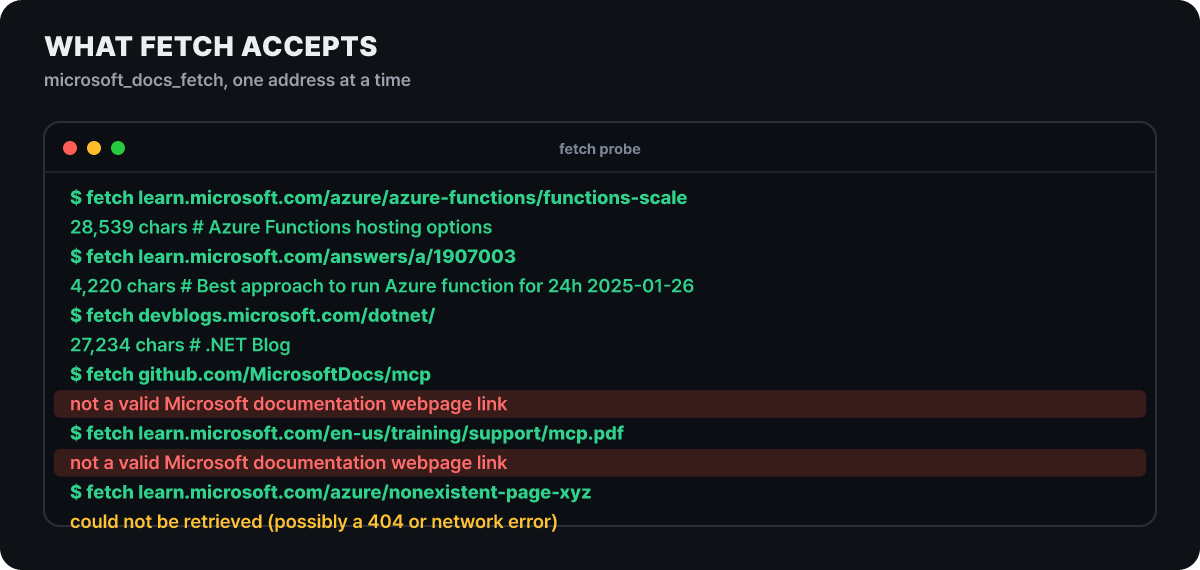 Figure 4. Addresses put into fetch and the responses. Red is a domain or format refusal, yellow is a missing page
It is as described, but the scope is wider than “the docs site”. Not only docs and Q&A posts on learn.microsoft.com but also devblogs.microsoft.com (27,234 characters) and the pricing page on azure.microsoft.com (35,871 characters) came back as markdown. In contrast, github.com and a .pdf address got the same refusal sentence, and a missing page got a different sentence (it may be a 404 or a network error). An http:// address and an address with a query such as ?view=azure returned the same 28,539 characters as the https original. It is accurate to see it not as a way to make an agent read arbitrary web addresses but as a fetch dedicated to Microsoft-family pages.
One point to flag here is that what you fetch goes straight into the agent’s context. Official docs are written by Microsoft, but Q&A posts can be written by anyone, so make sure the agent does not follow sentences inside a post that look like commands. As we saw earlier, Q&A really does get mixed into search results.
What “latest” covers
The official overview explains that the knowledge service reflects content changes incrementally and does a full refresh once a day, and the FAQ says the data generally changes daily. What we confirmed with our own eyes in these calls is that “the latest version exists” and “old versions exist too” are both true at once.
The Azure OpenAI quota query is an example. Of the ten result slots, slots 1, 4 and 10 were /azure/ai-foundry/openai/how-to/quota and slots 5 and 6 were /azure/foundry/openai/how-to/quota. When we fetched both, the first was the old portal version (34,824 characters), with a “(classic)” label on its first line and a notice to “switch to the new Foundry portal version”, and the second was the new portal version (34,449 characters). Two versions of the same topic sit in one index, and both can be fetched. Which version the agent based its answer on can be told only from the address.
A case of a fact the model had no memory of arriving through documents came from the same fetch. When we fetched documents 1 and 2 of the timeout query (Azure Functions hosting options) in full, they contained the per-plan table (Flex Consumption, Premium, Dedicated and Container Apps default to 30 minutes with no upper limit, while Consumption defaults to 5 minutes with a 10-minute maximum), the footnote on the 230-second HTTP trigger limit, and a notice that the option to host on the Consumption plan on Linux ends on 2028-09-30. Asking only about the “time limit” and receiving a migration warning along with it is the scene where this server turns memory into lookup.
“Free and no key” is true, but “unlimited” is not. All of these 50-odd calls went through without authentication, and none hit a limit. The official FAQ says that because it is a public, free endpoint, there are request limits for fair use, and tells you to report it to the repository if you hit one. Design automation with many repeated calls to reduce call volume with the budget value and the CLI’s --max-chars.
Turning the results into configuration
Every MCP client uses the same address. This is the standard configuration with the budget appended.
{
  "servers": {
    "microsoft-learn": {
      "type": "http",
      "url": "https://learn.microsoft.com/api/mcp?maxTokenBudget=2000"
    }
  }
}
To use it without a budget, just remove ?maxTokenBudget=2000. As we saw, a budget of 2000 keeps bodies only for the top four slots, so choose it knowing that a query whose official doc chunk is ranked fifth or lower needs one more fetch. The README lists installation for 15 clients, and the three most common are one line each.
# Claude Code (installs the server and skills together, restart after installing)
/plugin install microsoft-docs@claude-plugins-official

# Codex
codex mcp add "microsoft-learn" --url "https://learn.microsoft.com/api/mcp"

# GitHub Copilot CLI
/plugin install microsoftdocs/mcp
VS Code uses @mcp learn in the extensions search box, Cursor uses the one-click install button in the repository, and Visual Studio (2022 17.13 or later, and 2026) has “Microsoft Learn” built in. Gemini CLI takes it as httpUrl in .gemini/settings.json, and for ChatGPT you create a connector in developer mode, leave authentication as “No authentication” and enter the address. The method of registering the marketplace first in Claude Code (/plugin marketplace add microsoftdocs/mcp followed by /plugin install microsoft-docs@microsoft-docs-marketplace) is also in the official getting-started doc and installs the same plugin. Opening this address in a browser gives 405 Method Not Allowed, which is not an error: it is an endpoint for MCP clients only.
If you manually add a server with the same name (microsoft-learn) in Visual Studio, the built-in server is hidden and shown as “Eclipsed”. The match is by name, not by address, so whether it is microsoft-learn or Microsoft Learn, deleting the manual entry with the same name from .mcp.json brings the built-in server back. This was added to the README’s troubleshooting table on 2026-09-02 (issue #100 remains open because it also contains a different report that the server is not visible in VS 2026).
Turning the verdicts above into one paragraph of guidance, you can write this in the agent’s rules file. The README’s troubleshooting section admits that models sometimes don’t call the tools by default, which is why such guidance is needed.
For Microsoft technologies such as C#, ASP.NET Core and Azure, check with microsoft_docs_search before answering.
For code, specify the language in microsoft_code_sample_search and confirm in the code that the class names belong to the current SDK.
If a cited address contains /answers/, state that it is a user post and not official documentation, and give its date.
If the body is not enough, open that page with microsoft_docs_fetch.
Check by eye in the first few runs whether the tools were actually called. The same goes when attaching it to an agent you built in-house. The Copilot Studio exercise (Agent Academy’s “Operation Open Book”, about 15 minutes) explains that on the MCP tab you can turn each of the three tools on and off, and tells you to cut off the other knowledge sources and ask an out-of-scope question such as a “chocolate cake recipe” to check that it answers that it could not find grounds. In Foundry, you choose Custom and MCP under add tool, then set the address and the authentication “Unauthenticated”.
Three skills and a terminal CLI
The same repository has three Agent Skills that teach agents when and how to use the tools. microsoft-docs covers concepts, tutorials, limits and best practices, microsoft-code-reference covers API lookup, sample search, error resolution and verification, and microsoft-skill-creator is a meta skill that builds a skill tailored to a specific Microsoft technology. The README says to install all three in every case, or just microsoft-code-reference for coding or just microsoft-docs for fact checking. The sample problem in the previous section is the area microsoft-code-reference handles.
For environments where MCP can’t be attached, npm’s @microsoft/learn-cli gives the same three functions in the terminal. The latest version is 1.0.0 (published to npm on 2026-09-10, MIT) and it requires Node.js 22 or later. On September 4, the repository got the CLI 1.0.0 release commit and a change adding agent discovery settings.
# Run right away without installing
npx @microsoft/learn-cli search "azure functions timeout"

# After a global install, use the mslearn command
npm install -g @microsoft/learn-cli
mslearn fetch "https://learn.microsoft.com/azure/azure-functions/functions-versions" --section "Function app timeout duration"
mslearn code-search "cosmos db change feed processor" --language csharp
mslearn doctorfetch’s --section <title> returns just one section and --max-chars <number> truncates the length, so you can directly reduce the problem we saw earlier of a single fetch using a lot of context. search and code-search emit the raw JSON with --json, which is easy to pipe into tools like jq. mslearn setup --cli installs a skill that says “look it up with the CLI when MCP is absent” into the detected Copilot, Claude Code and Codex. It installs to the user folder, and with --project it installs to the current repository. This command does not configure MCP, and if you install both, the agent uses MCP first and the CLI skill as a fallback. To remove it, use mslearn remove --cli.
Sending the same question down a different path
The verdicts above also show what this server does not cover. If you need documentation for open-source frameworks outside Microsoft, Context7 is one route. It has a two-step structure: resolve-library-id gets the library identifier and query-docs fetches the documentation, and the README says that getting a free API key gives higher limits than using it without one (Claude Code setup is npx ctx7 setup --claude, Node.js 22.13 or later). The README states that library docs are contributed and maintained by the community, so Context7 does not guarantee their accuracy or completeness, and the fact that Microsoft docs are written by Microsoft is what separates the character of the two routes. For a project that uses Microsoft technologies and open source together, you can register both and split use by what the question is about.
If the target is Microsoft docs and you can’t attach MCP, the mslearn CLI calls the same knowledge service, and if you want it to read exactly one page, passing the address directly or giving that address to fetch is the simplest way. To look more widely, including user posts such as Q&A, a general web search tool is the right fit. When you do end up receiving Q&A posts through this server, it is better to have the agent attach the source address and tell you which are official docs and which are not.



