Extend Claude Code with mods, from building to vetting
Whether a mod hook calls next at one of eight gates changes what it does. Call chain, guard, samples, building a mod, and vetting before install.
A settings hook runs one shell command in front of a tool call and reads what comes back. A mod stands in the same spot but calls a function inside Claude Code, and that function can pass the call along unchanged, edit it, or answer in its place, and it can draw on screen too. The difference arrived with mods in version 2.1.287, released on Oct 1 (UTC). The changelog line said only that plugins can now change deeper behavior, and over the next three weeks mod entries showed up in almost every release, with events and screen elements still being added through 2.1.310 on Oct 23 (UTC).
This post holds on to a single moment, Claude attempting a tool call such as git push --force, and takes apart the gates that call passes through, from the outside in. It goes through the outer gates where the organization stands, the body of your own hook, what happens when you do not call next, the clock while waiting for a person, and the permission locks layered on top. After that it covers where Anthropic’s samples and user mods sit on the same structure, how to build and test one, and what to read before installing.
Counting the gates one call passes, from the outside in
A mod is a kind of plugin. When a JavaScript or TypeScript file inside the plugin (the docs call it a hook module) exports a register function, Claude Code calls it once while loading the mod, and the functions you register inside register with on('event name', fn) are the hooks. The shell commands you put in a settings file are also called hooks, but the docs call those “settings hooks” separately, and so does this post. The event that fires just before a tool is used is tool.call, and tools called by subagents and MCP tools pass through the same event.
The figure below traces the path of this one event, joining the “order mods run in” section of the docs with the organization management docs. Read it top to bottom; the right-hand column is what Claude gets back at each exit.
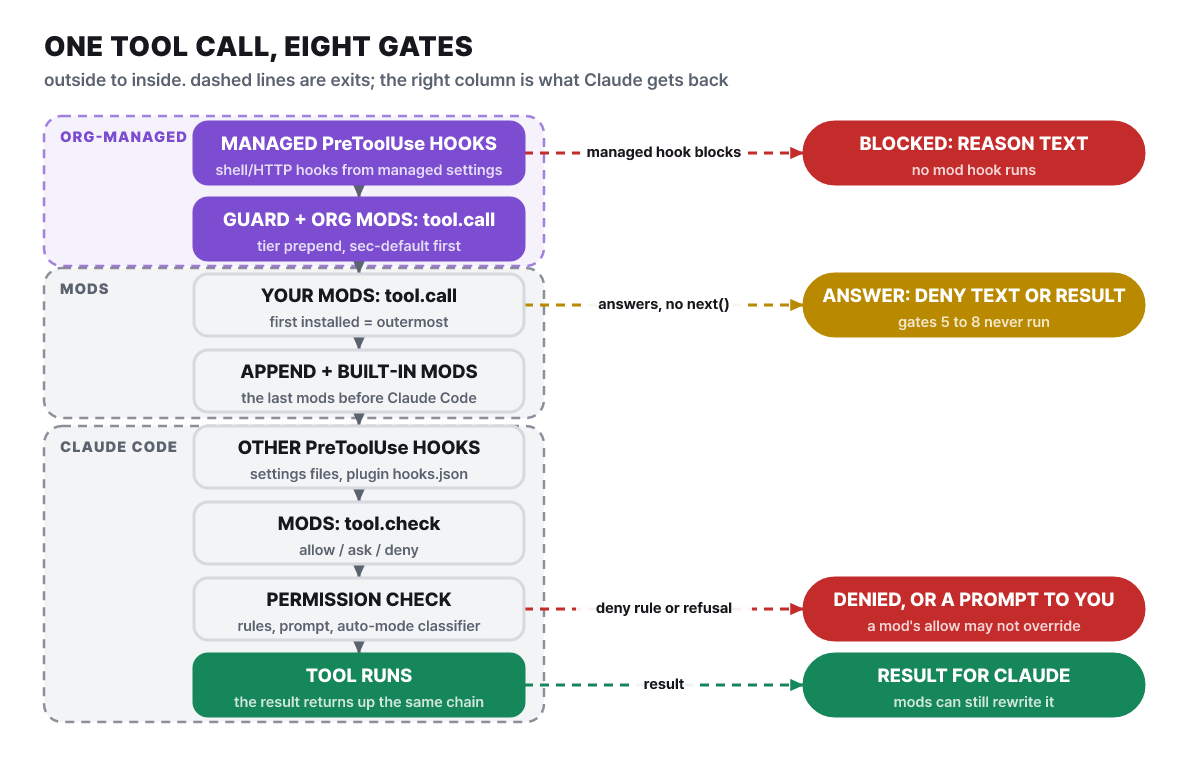 Figure 1. The eight gates and exits for one tool call (based on the docs’ execution order)
The first two gates are on the side you cannot touch. The PreToolUse hooks an organization puts in managed settings run before every mod, and if one blocks there, the mod’s tool.call hook does not run at all. Next come the built-in guard and any mods the organization put in front, and when a call passes both and then gets modified by some mod, the managed hook sees the modified call and runs once more, so it can still block.
The third is your mod. When several mods handle the same event, the one installed first stands outermost, seeing the event first and the result last. A mod comes before the mods listed in its manifest’s dependencies, and inside one file hooks run in the order register called on. The fourth is the mods an organization put in appendPlugins plus other built-in mods, which see only the form the user mods passed along. Claude Code’s own behavior starts only after the mod chain ends. PreToolUse hooks in settings files (other than managed settings) and in a plugin’s hooks/hooks.json run here, then mods handling tool.check see the permission decision, and last the permission rules, dialog, and auto mode classifier run before the tool executes. The result climbs back along the way it came and arrives after await next(e) in your hook.
What stands out in the figure is that there are three exits. When a managed hook blocks, the mod never sees the call; when your mod answers without next, every later PreToolUse hook, permission check, and tool execution is skipped; and when the permission decision denies, the tool does not run. Where a hook stands in the chain decides what it can skip and what it cannot.
The two outer gates belong to the organization
On a device with managed settings, or when the session runs on a Team or Enterprise plan /login, Claude Code loads a built-in mod called sec-default@builtin ahead of any mod the user installed. /plugin and the debug log show it as cc-plugin-sec-default, and users cannot turn it off. A user signed in with an API key or a cloud provider gets this guard only on a device that has managed settings, and a session running on a long-lived CLAUDE_CODE_OAUTH_TOKEN does not count as that login even if a Team or Enterprise login is stored on the device.
What the guard protects is whatever the organization manages. A user’s mods cannot change the input and verdicts of managed hooks, the system prompt, the managed CLAUDE.md, settings values that any mod reads, or the tools and descriptions of managed MCP servers. Everywhere else, a mod holds the user’s own permissions: it reads and writes files, runs programs, reaches the network, edits and denies tool calls and prompts, and draws on screen. With the guard in place, a user mod by default cannot approve a call that a deny rule blocks, a call that an ask rule makes the user confirm, or a call that a PreToolUse hook blocked.
Administrators can also fix the order themselves. A mod listed in the managed settings’ prependPlugins sees events before every user mod and sees results after them, and it can change or block a call or make it skip user mods entirely. appendPlugins attaches after the user mods. Setting either list replaces the default list, so to keep the guard you have to write sec-default@builtin in it yourself. The bar for being accepted as an organization mod is also high. The managed enabledPlugins must turn that plugin on, the managed settings must point the marketplace at a directory by an absolute path on the device, and the marketplace must list the plugin by a relative path so it is loaded in place. A plugin copied from GitHub, git, a URL, or npm counts as a user mod even if managed settings turn it on.
Blocking user mods altogether takes one line. In the managed settings’ pluginConfigs, turn on the guard’s allowManagedModsOnly option.
{
  "pluginConfigs": {
    "cc-plugin-sec-default@builtin": { "options": { "allowManagedModsOnly": true } }
  }
}
With that, no hook runs for mods from installed plugins, mods loaded with --plugin-dir, or mods Claude wrote during a session. Writing the same entry in user settings or project settings has no effect, and the user’s settings hooks and status line keep working. Conversely, turning on allowModsToOverrideDenyRules lets a user’s mod approve calls that a deny rule blocks.
On a device with the guard, some hooks of user mods do not run at all. These are the settings hook events (classic.<Event>, such as classic.Stop), the composition and sections of the system prompt (prompt.compose, prompt.section), the context that goes with the first message (prompt.context), notices appended for Claude (prompt.attachment), skill bodies (skill.prompt), commit and PR signatures (attribution.text), compaction (session.compact), and reading settings (settings.read). tool.call is not on this list, so mods that handle tool calls run as usual. Since 2.1.299 the details and errors tabs in /plugin tell you which hooks are skipped, and since 2.1.304 a line also appears in the conversation when a plugin that runs earlier skips your mod’s hook. To handle these events, you either install the mod as an organization mod or set prependPlugins to an empty list to remove the guard altogether, and the latter also gives up the guard’s protection.
Some of Claude Code’s own features are already mods, and they show as Built-in in the Installed tab of /plugin. They cannot be updated or deleted, only turned off, each in its own way.
Name in /plugin |
What it does | How to turn it off |
|---|---|---|
cc-plugin-agents-md |
Reads AGENTS.md as project instructions |
Turn it off in /plugin, or choose which instruction file to read |
cc-plugin-diff |
Draws the /diff window |
Turn it off in /plugin and the built-in /diff answers instead |
cc-plugin-plugin-authoring |
The plugin-authoring skill for writing mods (a skill only, no code) |
Turn it off in /plugin |
cc-plugin-sec-default |
A guard that protects what the organization manages from user mods | Users cannot turn it off |
cc-plugin-telemetry |
Sends the analytics records that Claude Code and built-in mods produce | Turn it off in /plugin, or disable analytics with DISABLE_TELEMETRY and the like |
cc-plugin-you-should-know |
A helper agent re-reads the conversation and surfaces one thing you may have missed | Off by default. Turn it on with /plugin enable cc-plugin-you-should-know@builtin |
The helper agent in “You should know” is a separate request to the same model, so it uses more of your quota. The sources of diff, agents-md, sec-default, and telemetry are public in the mods folder of the Claude Code repository, and each is a complete plugin with a hook module and tests, which makes them good reading.
The body of one hook: three arguments, three ways to handle
Once you get past the outer gates and it is your turn, the hook receives three arguments: $, which collects the ways a mod reaches the outside world; e, the read-only data holding the event; and next, which hands off to the next step. e is deeply frozen, so trying to change a value directly throws an error; to change something, pass a modified copy such as next({ ...e, text: 'new value' }). The mods after yours and Claude Code never see the original. next(e) calls the next mod’s hook, and at the end of the chain it runs Claude Code’s original behavior and returns the result.
The handling styles split on how you treat next. To only watch an event, do your work and return next(e). To do work after the event, take the result with await next(e), do the work, and return that result. To change an event, pass a modified copy, and to handle an event yourself, do not call next and return a result. A single example in the docs holds the first two. A variable calls sits at the top of the file; the tool-call hook adds 1, asks for a redraw, and lets the call through with next(e), while the hook that draws the spinner passes along a copy with · tool calls: 3… added after the text.
let calls = 0
export function register(on) {
  on('tool.call', async ($, e, next) => {
    calls += 1
    $.ui.invalidate('ui.render')   // ask for a redraw
    return next(e)                 // only watch; the tool runs as usual
  })
  on('ui.render', { component: 'Spinner' }, async ($, e, next) => {
    return next({ ...e, props: { ...e.props, suffix: ' · tool calls: ' + calls + '…' } })  // rewrite
  })
}
Hooks within one mod share the file’s variables, so a value one hook counts can be shown by another. That, plus drawing on screen, is what only mods have and settings hooks, skills, and MCP servers do not. A settings hook fits when you block or log calls with a script you already use, a skill fits when you keep pasting the same instruction, and an MCP server fits when you reach an outside service; one plugin can hold all four. You need a mod for work that can only happen on the inside: drawing a panel or a band above the prompt, changing a tool-call line, the spinner, or a question dialog, adding a slash command that runs instantly without a Claude turn, or routing one request to a different model.
Reacting to every event would be noisy, so the second argument of on takes a filter condition (matcher). It can be a single value ({ tool: 'Bash' }), an array of values ({ tool: ['Edit', 'Write'] }), or a regular expression ({ tool: /^mcp__github__/ }), and event names accept wildcards such as 'classic.*'. '*' matches every event except analytics events. Registering the same event twice without a matcher stops the module from loading with the error on("session.start") is registered twice without a matcher, so gather one event’s work in one hook.
$ holds every method by which a mod reaches files, processes, the network, models, and the screen, and those method calls are events too, so hooking a name like fs.read lets you intercept calls made by other mods that run later. Hook functions also carry next.signal (an abort signal if the event is discarded), next.origin (the plugin and priority of the party that raised the event: prepend, user, append, builtin), and next.budget (the time left). Skipping user mods with next.to(e, 'append') is something only mods in prependPlugins or appendPlugins can do.
How far does not calling next skip
Handling the event yourself is the strongest style. If a hook does not call next and returns { deny: 'reason' }, the tool does not run and Claude reads the reason text as the tool’s result. So write the reason as an instruction Claude can follow. The permission check is skipped too, so no dialog appears, and as with the middle exit in Figure 1, every later PreToolUse hook, tool.check, and tool execution is wiped out.
async function guard($, e, next) {
  if (/git push .*--force/.test(e.command)) {
    return { deny: 'Force push is not allowed in this repository. Push to a new branch instead.' }
  }
  return next(e)   // other commands go through the permission check and run
}

export function register(on) {
  on('tool.call', { tool: 'Bash' }, guard).catch(async ($, e, next) => {
    if (next.called) return next(e)   // if guard failed after calling next, keep that result as is
    return { deny: 'The checker failed, so this command was not run: ' + next.error.kind }
  })
}
The answering style has several variants. To change a call, pass the changed arguments to next; to try again, look at isError in the first result and call next(e) once more. You can also answer in place of the tool with { result } without running it, and then no permission dialog appears either and Claude knows only the result you returned. If you return { deny: reason } after await next(e) has run the tool, the result is hidden from Claude. Claude reads the reason after a notice that “Bash ran and a plugin hid the result” (2.1.295 changed it to report this way). Hiding does not undo what already happened, so blocking has to be done before you call next.
Make a blocking hook fail closed. If a hook throws or runs out of time, Claude Code skips that hook and lets the call proceed as is. If it failed before calling next, a later hook runs in its place and the command goes out; if it failed after next, that result stays. The reason for the failure is left as a single line such as my-mod: tool.call hook skipped: threw Error: boom. For a safety device, attach a .catch handler to the registration that on(...) returns, as in the code above, so that failure means deny. Since 2.1.301 the handler runs only when the hook throws or runs out of time, its time limit is 1 second, and if the handler fails too, the hook is skipped as if it had no handler.
In the handler, next.error.kind is throw or timeout, and re-entry when the hook was skipped because of its own $ call or an event raised by mod code (since 2.1.292). The shape of the rejection in a handler differs by event: prompt.submit takes { drop: 'reason' }, config.set takes { deny: 'reason' }, and tool.check takes { decision: 'deny', reason }. In tool.check and in plugin.register, which watches mod loading, a rejection issued after next still takes effect, so you do not need to check next.called. In tool.call, by contrast, a deny after next only hides the result, as seen above.
While waiting on a person, the 10-second clock stops
A tool-call hook can await in front of next, and the call waits in the meantime. To ask a person, $.ui.ask is the right tool. It puts your question and numbered choices into the dialog Claude uses to question the user, and it resolves with the name of the choice the user picked. After your choices, a line for typing a different answer and a “Chat about this” line are added automatically.
The docs’ example sets up a regular expression that matches rm -rf, git reset --hard, and git push with --force, and for a matching Bash command it asks “Run it” or “Refuse”. The docs themselves note that the expression misses other spellings such as git push -f. The key is to make Refuse the default answer. If the user closes the question, picks “Chat about this”, or nobody is there to ask, as in claude -p, $.ui.ask is rejected, and the catch leaves the answer as Refuse, so the command is denied.
Figure 2 shows who waits and which time is counted in this flow. While the hook is away with the user in $.ui.ask, the clock is stopped, and when the user’s answer arrives the hook either replies to Claude straight away with deny or passes on to the permission check and execution with next(e).
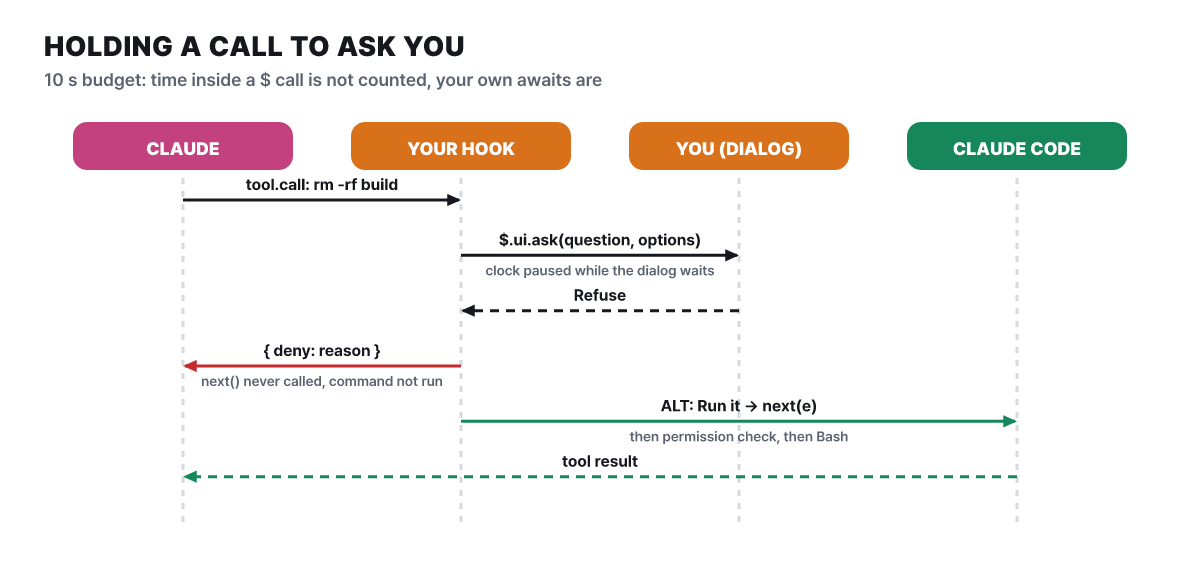 Figure 2. The order of holding a call and asking (based on the docs’
$.ui.ask example), and the 10-second clock
A hook has 10 seconds for its own code on one event (50 milliseconds for a prompt.edit hook), and the time spent waiting for next or for a $ method is not counted in it. $.clock.sleep is the exception and is counted, and so is time spent waiting on a promise you made yourself. If time runs out, Claude Code skips the hook, so the command you meant to hold goes out as is. That is why a hook that waits on a person needs a .catch rejection handler.
The Blast Radius sample took another road because of this limit. It holds the call with a loop that checks the button press every 0.25 seconds through $.process.run, and time spent in $ calls does not count toward the limit, so it can wait a long time for a person’s answer. The simpler road the docs recommend is $.ui.ask. There are other limits on time and size as well.
| Limit | Value |
|---|---|
| Own run time of one hook | 10 seconds (50 ms for prompt.edit) |
.catch handler |
1 second |
$.process.run |
30 seconds by default, 10 minutes at most |
One $.http.fetch call |
30 seconds, 4 MiB body, 5 redirects |
One file for $.fs.read / $.fs.write, total of $.store |
4 MiB |
Characters in a drop / deny reason |
4,096 (longer text is cut at the end, with the same effect) |
Redraws via $.ui.invalidate |
10 per second (30 for some terminal regions) |
| A panel a mod opened that the user did not open | Placed from 144 terminal columns, and from 110 columns once the user has opened it |
One test in claude plugin test |
5 seconds |
tool.check handles only the permission
If you do not need to touch every call and only want to handle the decision “may this call run?”, there is the tool.check event. It fires after the tool.call hooks and PreToolUse hooks finish, and before the permission dialog, the auto mode classifier, and PermissionRequest hooks. await next(e) returns the decision Claude Code reached from rules, permission mode, and hooks, and the permission dialog does not appear in the meantime. The decision is an object whose decision is one of allow, ask, or deny, and it comes with a reason saying who decided so, plus rule (the rule as written, like Bash(git push:*)), hook, and setting. ask means hand it to the decider of that mode, such as the dialog, the auto mode classifier, or a headless host. The hook returns that decision as is or swaps in its own.
on('tool.check', { tool: 'Bash' }, async ($, e, next) => {
  const decided = await next(e)                    // Claude Code's decision
  if (!e.input.command.includes('git push')) return decided
  const branch = await $.process.run(['git', 'branch', '--show-current'])
  if (branch.stdout.trim() !== 'main') return decided
  return { decision: 'deny', reason: 'Push from a branch other than main' }
})
A rule that denies only when the current branch is main cannot be written in a rules file, so you need code. For a fixed command or path, on the other hand, a permission rule such as Bash(npm test) is simpler and needs no code. This hook only reads the command text, so the docs tell you to treat it as a notice to Claude, and to block pushes to main for everyone they recommend protecting the branch on your Git host. If the hook fails, the call gets the decision it would have had without the mod, and to block you return deny from .catch.
The event carries more material for judging. Since 2.1.304, e.isReadOnly is true when the tool reports the call as read-only, and when it is not, the field is absent rather than false. Read, Grep, Glob, and WebSearch are always read-only; Bash is when it passes the built-in read-only command check; an MCP tool is when the server sets readOnlyHint to true. Because it is the tool’s own report, you should not approve on this field alone. WebFetch and Agent calls are also reported as read-only, yet they request URLs and launch subagents that use tools. A matcher that accepts only read-only calls is { tool: 'Bash', isReadOnly: true }, and putting isReadOnly: false in a matcher means the hook never runs, so tell non-read-only calls apart in the hook body by checking whether e.isReadOnly is absent. Since 2.1.290 you can also read e.agentId (when the call comes from a subagent or teammate) and e.ceiling (ask when the organization pinned a connector tool to ask).
If your mod issues allow, are all the locks released? No, and which locks remain depends on whether the session has the guard. The two columns of Figure 3 show how the same allow lands with the guard and without it.
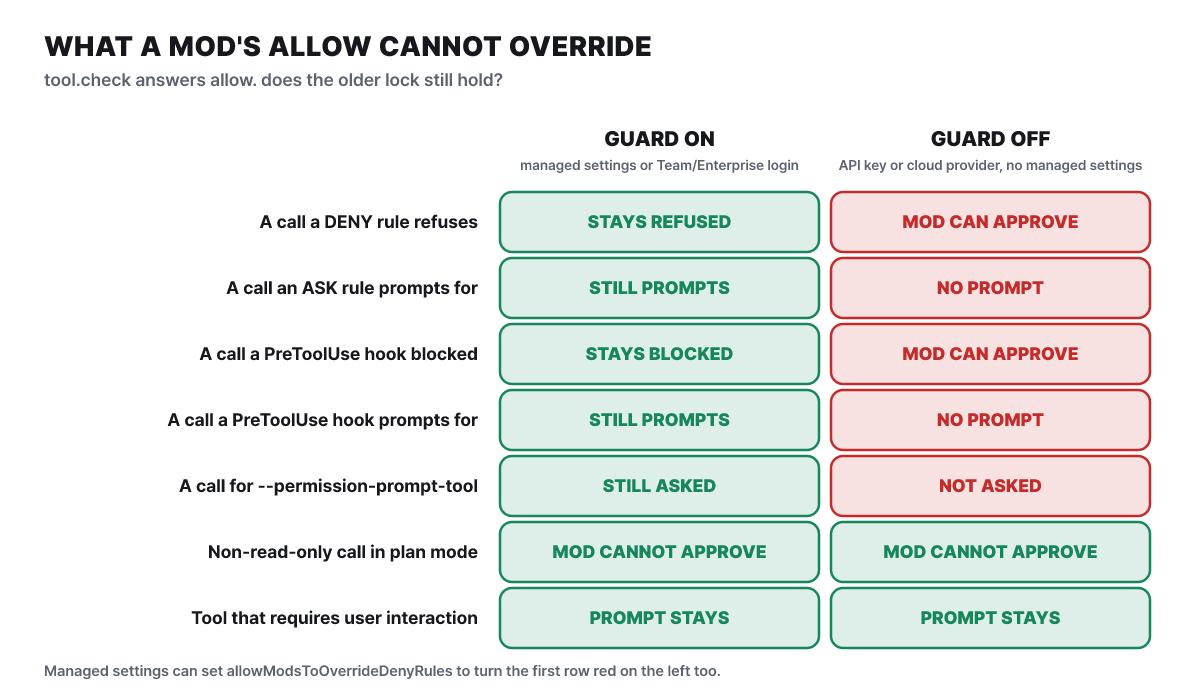 Figure 3. The locks a mod’s allow cannot pass (based on the permissions docs and the mod administration docs)
The upper five rows are overturned wholesale by the presence of the guard, and the lower two hold regardless of environment. A session without the guard is typically a personal device signed in with an API key or a cloud provider and with no managed settings, so personal users in particular should use mods knowing that a mod’s approval goes over rules and PreToolUse hooks. The rows that hold in both environments are decided by the nature of the call rather than the kind of mod. In plan mode, a mod’s tool.check can only tighten the decision for non-read-only calls such as file edits and cannot loosen it, and AskUserQuestion or an MCP tool marked requiresUserInteraction still asks the user even when a mod issues allow (since 2.1.292). In auto mode, calls a mod approved run without the classifier check, but in a session that has the guard and has --permission-prompt-tool or the Agent SDK’s canUseTool attached, that classifier looks first. In dontAsk mode, a mod can approve a call that had no reason to be blocked other than that mode.
Where the three samples stand: watch only, hold, record only
Anthropic keeps sample mods in claude-code/mods of the anthropics/claude-code-playground repository. The repository is Apache-2.0 and had 300 stars on 2026-10-27; it says the samples are shared as is without support and that outside contributions are not accepted. Each sample is a complete plugin, and its README records how it was built from _template/README.md and its limits. Laid over the chain in the previous section, the three samples stand in different places.
| Mod | Where it stands | What it does |
|---|---|---|
token-weather |
Screen only | Draws how full the context window is as weather in the band above the prompt. Does not call a model |
blast-radius |
Holds at tool.call |
Holds a risky shell command, shows its blast radius, then decides with Proceed or Cancel |
replay-theater |
Records at tool.call |
Pages through the files Claude changed in the previous turn, one diff at a time |
token-weather shows under 25% as clear, 25 to 49% as cloudy, 50 to 74% as showers, 75 to 89% as storm, and 90% or more as “compaction soon”. The numbers are the real values returned by $.session.usage(), the same as the status line. The README’s test is a record from a repository with five 42 KB source files, a model with a 200K window, and more files read each turn: 18% after the first turn (clear), 67% after four files (showers), and 81% after one more (storm). One thing to watch when reading it is that this percentage is against the whole window. Claude Code’s own “context usage” notice is based on the lower point at which auto-compaction happens, so in the test the notice read 90% when the band said 81%. The band updates once when a turn ends, and on a 1M-token window a task stays on clear for a long time.
blast-radius holds rm -r, git reset --hard, git push --force, git clean, and migration commands. The blast radius shows differently per command. For rm, it is the list of files to be deleted with count and size; for git reset --hard, the changed files that are not committed; for a force push, the commits that exist only on the remote and not in your HEAD, which would disappear. When the panel opens, focus is on Cancel, so even pressing Enter alone denies. The limits are written by the README itself. It reads the command text without fully interpreting the shell, so it cannot catch $(...), aliases, eval, bash -c "...", xargs rm, find -delete, scripts that call rm, or wrapped forms like timeout 5 rm. It watches only the Bash tool and does not hold file edits, the command is denied if there is no response for 10 minutes or if Esc cuts the turn, and it holds only one command at a time. After you press the button, the command runs exactly as written, and the authors also write that it is “a safety net, not a permission system”. For paths that must be blocked for certain, block them with permission rules.
There are limits on the screen side too. A panel the user did not open is placed beside the conversation when the terminal is 144 columns or wider, and narrower than that it is replaced by the band above the prompt. Since 2.1.305, a panel attached beside the conversation does not exceed 45% of the terminal width. The band is a single line shared by all mods, so if another mod using the same spot takes it first, the button may not be visible. A mod author can put the result of await next(e) into their own tree as a child, which lets it show alongside other mods’ drawings without erasing them.
replay-theater records Edit, Write, and MultiEdit calls at call time, so edits the user rejected or that failed also appear in the replay. One step keeps only a line of context around the changed part and shows up to 12 lines, and the record lives only in memory, so it disappears on restart or when the mod is reloaded. To open it, type /replay, or press ctrl+x then Tab to move focus to the band and press r; inside the window, n is next, p is previous, and c or Esc closes.
The order for trying one is to read, load it for one session, and install it if you like it.
- Clone. Run
git clone https://github.com/anthropics/claude-code-playground.git, thencd claude-code-playground/claude-code/mods. - See what it does. Run
claude plugin validate ./blast-radiusand read thehooks:andcalls:lines. - Load it for one session. Start with
claude --plugin-dir ./blast-radius, ask forrm -rf buildin a working folder, press Cancel, and check that the files are still there. A1 mod activeline appears under the/plugintabs. - Install only what you keep using. Register that folder as a local marketplace with
claude plugin marketplace add ./and install withclaude plugin install blast-radius@claude-code-playground-mods --scope user. The marketplace points at the cloned folder, so if you move or delete the folder the mod will not load either.
Four user mods and the versions they require
Several public repositories appeared within a month of release. All are MIT licensed, the star counts are as of 2026-10-27, and none of them is endorsed by Anthropic. Since the mod feature is growing fast, check the required version first. The desktop app’s Code tab loads mods from 2.1.286, the terminal from 2.1.287, and claude-code-filetree requires 2.1.306 or later.
| Mod | Stars | Required version | What it does |
|---|---|---|---|
| claude-skins | 214 | 2.1.287+ | Draws tool-call lines with an icon and elapsed time, tables, code, and Mermaid charts as cards, and edits as diff cards. Switch with /skin, go back with /skin off |
| claude-code-filetree | 298 | 2.1.306+ | An IDE-style file tree that marks the files Claude reads and edits. Git status, diff, treemap, split preview |
| savvy-progress in claude-kit | 274 | The claude-kit repository | A progress bar above the prompt and a subagent panel (/agents-info) |
| cache-tax | 277 | 2.1.287+, verified on 2.1.304 | Warns before you send, once the prompt cache has gone cold, about the cost of rewriting the whole conversation on the first message |
The first two change the screen. The claude-skins README says agents, plan mode, to-dos, and permission prompts stay as Claude Code’s original screens, which matches the rule that mods cannot change the permission prompt. It states that its only network call is a once-a-day version check, and you install it with /plugin marketplace add hellosverre/claude-skins then /plugin install skins@hellosverre-mods. claude-code-filetree needs the full-screen layout in the terminal (/tui fullscreen) and 110 columns or more, requires git, needs inotifywait on Linux for live updates, and the desktop app has no split preview or treemap. You install it with claude plugin marketplace add data-goblin/claude-code-filetree then claude plugin install filetree@claude-code-filetree, and the command that turns it on and off is /filetree.
The savvy-progress panel shows model, effort level, progress, context, estimated cost, and time. The README says the cost is a rough figure computed from a built-in price table (list prices as of 2026-10-10) and is not what you are billed. This mod also registers tools that the model calls (mcp__savvy-progress__progress, step), which agents that split up work use as a way to report progress. It is an example of one mod holding both commands and tools. In the same repository, session-band gathers turn count, speed, cost, a prompt cache countdown, and context into one band, and warns you before the cache expires.
cache-tax is the mod that shows its reasoning in numbers. When the context is 50,000 tokens or more and the cache has gone cold, it blocks the first message you send once, shows the expected write cost, and lets the same message through when you send it again. In the README’s example, a 330,000-token session was estimated at $6.61 and the actual cache write was $6.28. These are values converted at API prices, not extra money charged on a subscription. When you step away, /keepwarm (6 hours by default; give a duration like /keepwarm 90m, and always and off exist too) sends the conversation history once more without tools after 50 idle minutes to warm the cache. One example ping read 75,000 tokens for $0.02. It stops warming when the read value drops to 0 or the write reaches 10% of the read, and when it detects a cold write it warms for at least 3 hours (6 hours for always). Server-busy responses (429, 529, 5xx) are retried after 1, 2, and 4 minutes.
On a subscription account the main conversation’s cache lasts 1 hour by default, but when you sign in with an API key or a cloud provider the default is 5 minutes, so the README and the Claude Code docs say to change promptCacheTtl to 1h. Claude Code has a feature that fires at a similar point. Idle compaction, which arrived in 2.1.299, compacts a conversation of 200,000 tokens or more that has been left for about 54 minutes before the 1-hour cache ends, so the next message does not reprocess the whole thing. The minimum tokens can be changed with CLAUDE_CODE_IDLE_COMPACT_MIN_TOKENS, it is turned off with "idleCompaction": false, and since 2.1.302 /config has an Idle compaction row too. The 50-minute ping and the 54-minute compaction are close together, so if you turn both on, think about whether they overlap. The warming request spends tokens, and the author advises using only one: if you turn on both a settings hook that does the same job and this mod, there are two guards before every send.
How long a mod made by describing it lasts
You do not have to write the code yourself. The docs tell you to describe the mod you want in everyday language in an interactive session, and the example sentence they give is “make a mod that shows the current git branch above the prompt”. The plugin-authoring skill built into Claude Code gives Claude the list of events and methods and how mods are loaded, so Claude writes the code. Since 2.1.300 this skill first scans the keys in the mod’s files at the sharing step, and in 2.1.304 the question about turning on the mod became plain text and a problem where sharing stalled at the secret scan was fixed.
- Describe. To call it yourself, type
/plugin-authoring. The mod is created under~/.claude/dev-mods/<session ID>/, and in default and acceptEdits permission modes that folder is a protected path, so an approval request appears for every file. - Approve. When the first file is saved, it asks whether to turn on hot reload in this session, and if you choose "Turn on in this session", the answer persists even when you reopen the session. If you choose "Not now", only the files remain, and they load the next time that session starts.
- Check. The mod shows up in the Installed tab of
/plugin. - Revise. Ask again in words for anything you do not like. If loading fails, a line starting with the mod name is printed in the conversation; Claude cannot see that line, so you have to paste it into your next message for Claude to know the cause.
A mod made this way is temporary. It loads only in that session, and the folder is deleted once cleanupPeriodDays has passed. To keep using it, copy the folder somewhere else (for example ~/mods/git-branch) and load it with claude --plugin-dir ~/mods/git-branch, or put it in a marketplace and install it. For a few people use the plugin folder or a .zip, for a team a team marketplace and repository settings, for a whole organization the administrator’s organization mod in managed settings, and for everyone a public marketplace repository or a submission to the Anthropic directory.
For a mod Claude wrote to load, the session must be interactive with someone there to approve, the working folder must be one whose trust dialog you agreed to, and the settings must allow mods. It does not load with a claude -p run, dontAsk permission mode, an untrusted working folder, --safe-mode, --bare, disableAllHooks, or a block in managed settings. There are rules that apply when sharing, too. claude plugin validate fails names that look like Anthropic made them, such as ones starting with claude-. Installed plugins are cached per version, so during development you have to point at the folder directly with --plugin-dir rather than the installed copy for your edits to take effect, and to get them into the installed copy you bump the version and reinstall.
A first-mod set: files, reload, tests
If you want to learn the principle by hand, the docs’ tutorial mod first-mod is the model. You need neither Node.js nor a bundler, because Claude Code reads .js and .ts files directly. The left side of Figure 4 is that folder, and the right side is where Claude Code keeps things related to mods.
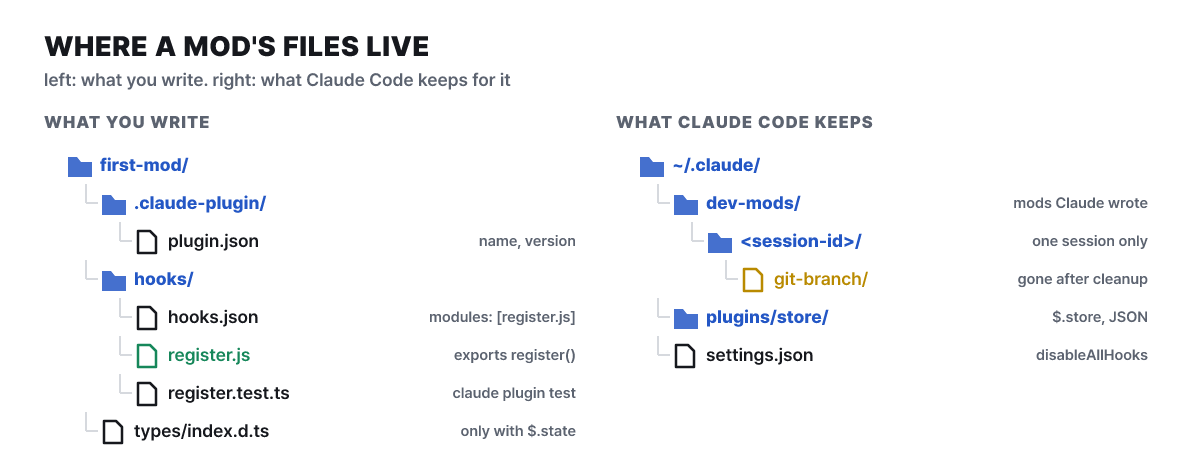 Figure 4. The files you write and the locations Claude Code keeps
The modules key in hooks.json ({"modules": ["./register.js"]}) is what makes the plugin a mod. register.js adds two hooks to the calls example from the earlier section. One is session.start, which registers the /tally command when a session starts, and the other is command.run (matcher { command: 'tally' }), which returns the call count as text only when you type /tally. This hook answers directly without calling next. The session.start event fires once per loaded mod and once more after a mod is reloaded, and does not fire after /clear or /resume.
claude --plugin-dir ./first-mod
# Send a request like "list the files in this folder and read the README"
# and  Thinking · tool calls: 2…  shows up next to the spinner
# After it finishes, type /tally
#   first-mod: Claude has made 2 tool calls since this mod loaded
claude -p "/tally" --plugin-dir ./first-mod    # check only the command, without a session
Claude Code watches a folder opened with --plugin-dir and reloads the hook module when a file changes. If you change the spinner text from tool calls to tools used and save, it takes effect right away without ending the session. On reload register runs again and module variables return to their initial values, so calls goes to 0, and a single line with the mod name and hook list is printed in the conversation. If a save is broken, the previous version keeps running and a reload failed, the previous version stays loaded line appears (since 2.1.304 a failed reload does not erase the remaining version’s tools and commands). To keep a value, choose a place to store it.
| Where to store | Until when | Used for |
|---|---|---|
| Module variable | Until the module reloads (on every save during development) | Values you can afford to lose |
$.state |
Until the session ends or you type /clear, /resume, or /branch |
Drawing state that has to survive a reload |
$.store |
Until the mod deletes it, or until no session has used it for cleanupPeriodDays |
Values to find again later, like settings and records. JSON files in ~/.claude/plugins/store/ |
There are tools for checking as you write. In an interactive session, when you load a mod with --plugin-dir, Claude Code writes type declarations of the current version’s events and methods into .claude-plugin/types/, so your editor gets autocomplete and type checking. A mod that uses $.state or adds a namespace to $ also needs types/index.d.ts. Four rules must hold for static analysis (claude plugin validate) to find every hook and call: write event names as string literals such as 'tool.call' (variables or loops fail), do not put $ in a variable or destructure it (const ui = $.ui fails), do not register the same event twice without a matcher, and write the file as an ES module that uses import.
claude plugin test runs .test.ts and .test.tsx files without a session, login, or network. A test fires a tool-call event and checks the reply to /tally, each test has a 5-second limit, and failure returns exit code 1. When it does not work, leave a log with claude --debug-file ./mod-debug.log --plugin-dir ./first-mod and filter it by the mod name. A loaded mod shows up as a hooks module first-mod@inline loaded …; events: … line. In an app where you cannot pass a flag, the environment variable CLAUDE_CODE_PLUGIN_DIRS (absolute paths separated by :) does the same job as --plugin-dir, and to make a long-running non-interactive session reload in response to saves, set CLAUDE_CODE_PLUGIN_DIR_WATCH=1.
Two validate lines before installing, and the steps to turn it off
The docs call a mod “code that runs with your permissions”. A loaded mod can read and write files anywhere your account reaches, run programs, connect to the network, and read API keys in environment variables and settings files. It sees every prompt you send and every tool call Claude makes, can rewrite prompts and tool calls or approve a tool call before you are asked, and can call a model on your plan or API key. Even with sandboxing on, what is isolated is only the Bash commands Claude runs, and processes a mod launches run outside it.
Permission rules cannot stop calls made inside a mod. Permission rules and PreToolUse hooks apply only to Claude’s tool calls, not to what a mod does directly through $.fs or $.process. Even if you deny Read(.env), a mod can read that file with $.fs.read or launch a program that reads it. To limit even those calls, you have to prevent user mods from loading or filter with a policy mod directly. A policy mod can read other mods’ e.uses.calls with the plugin.register event to refuse loading, or hook call names such as fs.write to log and block.
So before installing, download the mod folder and run claude plugin validate ./some-mod in the shell. It analyzes statically without running the code, and the hooks: and calls: lines in the output show the events the mod handles and the things it asks of Claude Code. Claude Code refuses to load a mod that uses $ in a way the analysis cannot read. The figure below shows the shape of the output for the tutorial mod, and an example of the calls: line that the docs say to weigh.
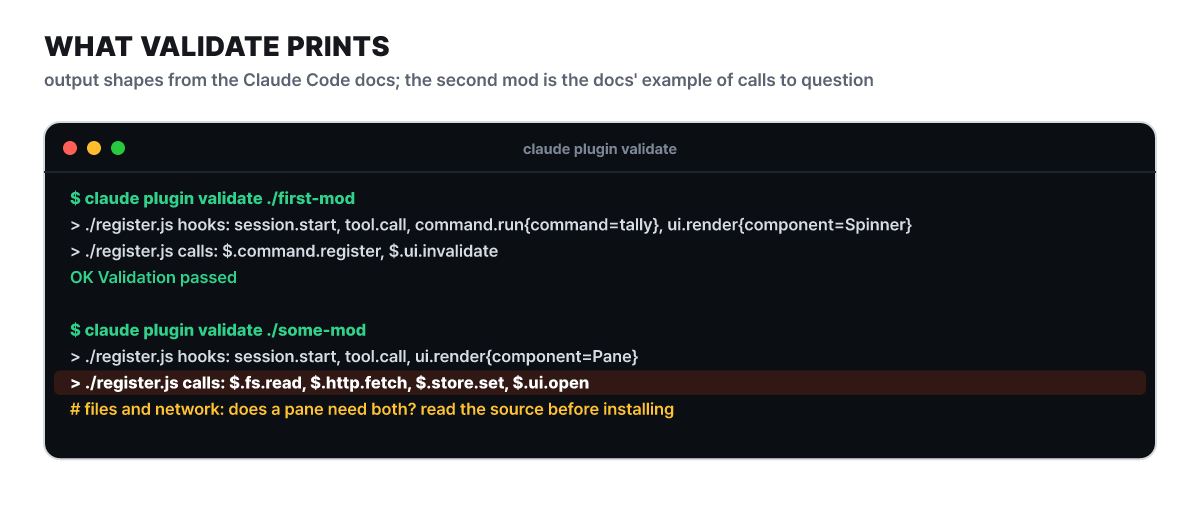 Figure 5. The
hooks: and calls: lines of validate (the docs’ example output)
On the hooks: line, seeing tool.call and prompt.submit means the mod can see and edit every tool call and prompt. session.append means it can edit each line of the conversation before it is saved, ui.render{component=AskUserQuestion} means it can draw the dialog where Claude asks questions, and tool.check means it can approve or deny a call before the permission prompt appears. What to look at on the calls: line is as follows.
| Call | Meaning |
|---|---|
$.fs.read, $.fs.write |
Reads and writes files anywhere the user can reach |
$.process.run, $.process.spawn |
Runs programs with the user’s permissions |
$.http.fetch |
Network requests |
$.env.get, $.settings.read |
Reads environment variables and settings (keys may be in them). The env reads: line gives the variable names |
$.env.set |
Changes the environment of Claude Code and of every command and MCP server run afterward. The env writes: line gives the names |
$.mcp.call |
Calls a tool of a connected MCP server |
$.model.complete |
Calls a model on your plan or API key |
$.prompt.submit |
Submits a prompt, and may send it as if you had written it |
$.session.send |
Sends a message read by Claude in another session, subagent, or teammate |
If it has calls that read files or use the network and they do not fit the mod’s description, skip that mod. Then load it for one session with --plugin-dir and check that the faint line under the /plugin tabs reads 1 mod active · name. validate tells you the range of what the code does, but not what it does with those calls (which address it sends to, which file it reads), so if a call looks suspicious you have to read the source. In 2.1.304, the guidance line that predicted where hooks would run was dropped from the validate output.
There are ways to turn mods off for each scope. For one mod, disable or delete it in the Installed tab of /plugin; for a whole session, start with claude --safe-mode to turn off every installed mod. To turn them off in every session, put "disableAllHooks": true in ~/.claude/settings.json, which also turns off settings hooks and the custom status line, while what the organization manages keeps running. For a whole organization it is allowManagedModsOnly in managed settings. These methods do not turn off the built-in mods from the earlier table, which are turned off one by one by the methods in that table.
It also helps to know where things are drawn. Hooks run almost everywhere, but the screen differs. In the claude terminal and the desktop app’s Code tab (except WSL sessions), the screen is drawn too. In WSL sessions there are no plugins, so hooks do not run either. The VS Code extension chat panel draws only on extension 2.1.299 or later (2.1.304 or later for sessions that do not receive feature flags, such as Bedrock), claude -p and the Agent SDK run hooks but draw no screen, and cloud sessions have no screen even when hooks run. A session used through remote control runs hooks on your device and the screen appears in the terminal on your device. The elements drawn also differ by app: in VS Code, properties such as Button’s hotkey and Text’s size and mono are ignored, and the terminal has only one font size, so it ignores size, which means a mod you used in the terminal may show only some of its elements in another app.



