Give Claude Code a way to verify its work, in four levels
Four questions decide how firmly to check delegated work: one prompt, /goal, a Stop hook capped at 8 blocks, or a verifier subagent. Plus effort and CLAUDE.md.
On a Friday evening you hand Claude Code the job of moving forty call sites in a payment module to a new API, then go home. Monday morning you open the session and the last message says “I migrated all call sites.” But when you run npm test, three tests fail and one file even has a type error (this is a scene the editorial team made up as an example). What was missing in that scene was not Claude’s skill but a standard for judging “done.” When that standard is written nowhere, Claude stops at the moment the work looks finished, and from then on a person is the verifier.
The first item in the Claude Code docs’ best-practices page is not a prompting tip either. It is this: let Claude run a check that comes out as pass or fail. How firmly to attach that check, though, differs from task to task. A one-line typo fix does not justify writing a hook script, and a migration that runs all night cannot be handed over with a one-line request. This article rereads the docs as of 2026-10-27 (Claude Code 2.1.310) and lays out, in order of questions, how to pick a level by the nature of the task. The side topics, effort level, CLAUDE.md and skills, come later as items to tidy up together once the level is chosen.
Four questions to pick the level
The docs split the strength of a check into four levels: a single prompt, /goal, which binds the whole session, a Stop hook where a script makes the call, and a review in which a fresh model tries to refute the result. The figure below redraws these four levels as a sequence of questions. Start from the question at the top left and follow only the boxes your task reaches.
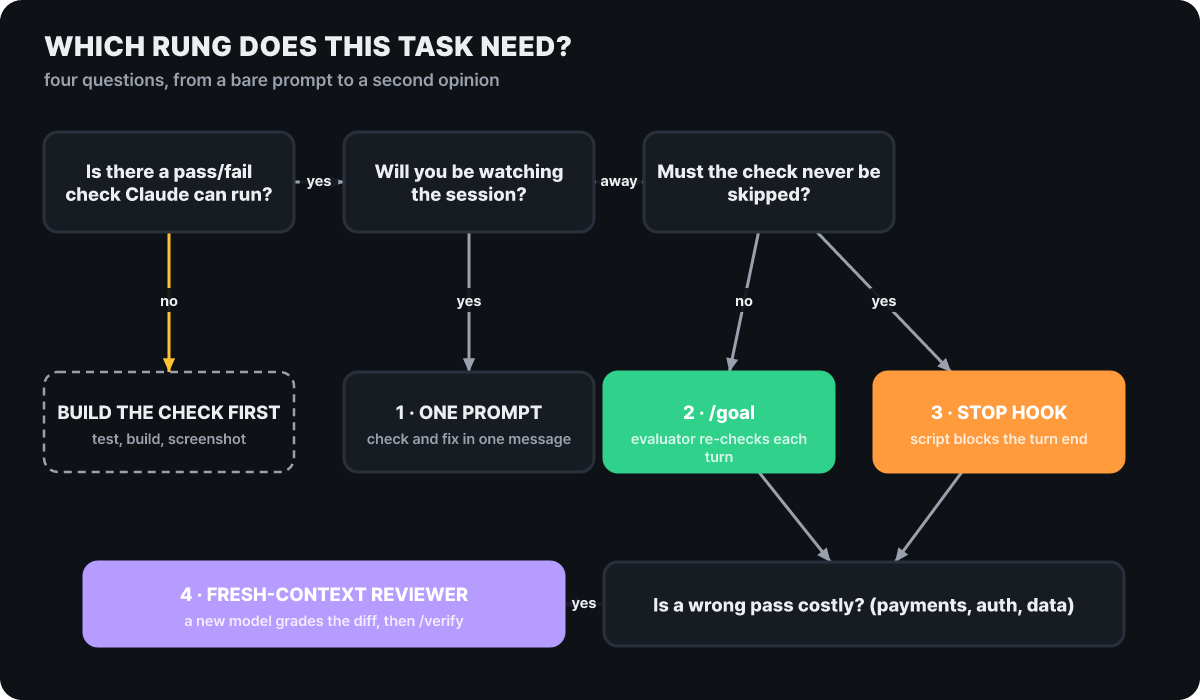 Figure 1. With no way to check, building one comes first. After that, the forks are whether someone is watching, whether the check can be skipped, and whether a wrong pass is costly
What stands out in the figure is that level 4 is not an option alongside the others but a layer added on top. Even a task that went through level 2 or 3 gets graded once more by a fresh context that did not do the work, if a wrong result would be costly. Level 1, on the other hand, looks the weakest but works today on any task with no setup. The docs summarize it this way: the prompt approach works for any task, while the /goal and Stop-hook approaches let the work run to the end precisely without a person.
The three mechanisms are easy to tell apart by asking what starts the next turn.
| Mechanism | When the next turn starts | When it stops |
|---|---|---|
/goal |
When the previous turn ends (in interactive sessions, also when a waiting check-in or an automatic retry arrives) | The evaluator rules it met or impossible, an error you must fix, /goal clear |
/loop |
When the set time interval has passed | The user stops it or Claude judges it finished |
| Stop hook | When the previous turn ends | A script or a prompt makes the ruling |
For work with no check, write the standard first
If the answer to the first question in Figure 1 is “no,” you have to build a check before choosing a level. In the docs, a check is anything Claude can read as a signal inside the conversation. That includes a test suite, a build exit code, a linter, a script that compares output to a reference file, and even a comparison of a browser screenshot against a mockup. Three rewrites the docs give show the feel of it.
| Situation | Asked like this | Rewritten like this |
|---|---|---|
| New function | Write an email validation function | Write the function, then run tests listing the expected value for each input (true for valid addresses, false for invalid ones) |
| Screen | Make the dashboard prettier | Implement the mockup, take a screenshot of the result, compare it to the mockup, list the differences and fix them |
| Build error | The build is broken | Paste the output showing this error, fix it, and confirm the build succeeds. Fix the root cause instead of hiding the error |
The same frame works outside development. Say you hand off a weekly report built from exported CRM data. You need three boxes. The job (write this week’s report), what must not be touched (the set template, sending anything externally), and the finish line (every figure in the report matches the exported data). When the finish-line box is empty, an unjudgeable sentence such as “complete the report” fills its place.
- Pick a single end state. It should boil down to a number or a list, such as a test result, an exit code, a file count or an empty queue.
- Write how to prove it. Pair a command with its expected result, for example
npm testexits with 0, orgit statusis clean. - Write what must not change along the way. Config files, other test files and external actions such as sending messages all count.
- See the standard actually fail once. If it is an assertion that is always true or a lint rule that catches nothing, a pass means nothing.
- Ask for evidence. Instead of a statement that it succeeded, ask to be shown the test output, the command that ran and its result, or a screenshot of the screen.
The effect of the last step shows most when you are away. The docs also say that reading evidence is faster than rerunning everything from scratch, and that even in a session you did not watch, it leaves something to read when you come back. If the job needs a visual comparison, the browser extension (Claude in Chrome) can take screenshots itself and set them against the mockup.
The reason to be this careful is the context window. The conversation, files read and command output all pile up in one window, and as it fills, performance drops and earlier instructions are easier to miss. When the check standard is one clear line, Claude does not have to reread the same results over and over, so less of the window is wasted. Later in this article, trimming CLAUDE.md, effort levels and verifier subagents are all ways around the same constraint.
For work you watch, one line in the prompt is enough
The path that exits at “watching” in Figure 1 is level 1. All you do is write the check into the same message. Something like “write the function, run the tests, and fix any failures” is enough, with no setup and no cost. For work whose change fits in one sentence, such as a README typo, adding one log line or renaming something, the docs advise skipping even plan mode. The docs themselves note that plan mode has overhead.
Plan mode suits the opposite cases: when the approach is uncertain, when several files are touched, or when you are changing unfamiliar code. Press Shift+Tab to cycle modes, start with claude --permission-mode plan, or, for a single use, put /plan in front of the prompt. Claude reads and investigates without editing source, then writes a plan, and when you approve the plan you choose among “proceed in auto mode,” “approve edits one by one” and “keep planning.” You can also edit the plan directly in your editor with Ctrl+G. The flow the docs describe has four stages, explore, plan, implement and commit, and the implementation-stage prompt carries the check: run the tests and fix the failures.
The permission modes you cycle with Shift+Tab are tied to this choice. Manual mode asks for every file edit and shell command. It is the safest, but from the tenth question on you press the key without reading. Accept edits mode does not ask about file edits or common file commands such as mkdir and mv, and asks only about other commands. Plan mode blocks source edits until you approve, and auto mode lets a separate classifier model block only risky actions. Auto mode can be chosen as a starting mode in the terminal and VS Code on v2.1.283 or later. Watched work naturally goes with manual or accept edits, and unattended work with auto mode, and that difference connects to /goal in the next section.
For unattended work, set a /goal
The default for work that forks to “stepping away” in Figure 1 is /goal. The docs give these as fitting jobs: migrating a module to a new API until every call site compiles and the tests pass, implementing until all acceptance criteria in a design doc are met, splitting a large file into modules under a size budget, and working through a labeled issue backlog until the queue is empty. What they share is that the end state boils down to a number or a list, and the Friday evening scene in the opening is exactly the first case.
Usage is one line. Write the condition after /goal, and the condition itself becomes the instruction and a turn starts right away. If a goal already exists, it is replaced by the new condition. Only one goal is active per session, and the condition can be up to 4,000 characters. Typing /goal alone with no argument shows the condition, elapsed time, number of turns evaluated, token usage and the evaluator’s latest reason, and that reason can also be opened with Ctrl+O. To remove it, use /goal clear (aliases stop, off, reset, none, cancel); starting a new conversation with /clear also removes it. When you reopen a session, a goal that is still active is restored, and since v2.1.239 that holds whichever way you open it: --continue, --resume or the session picker. Only the condition is restored. The turn count, timer and token baseline start over from 0.
The evaluator sees only the conversation
/goal is, in fact, a session-scoped prompt-type Stop hook. At the end of every turn it sends the condition and the conversation so far to a small, fast model set for this purpose, and that model returns one of three rulings with a short reason. If it is unmet, Claude continues to the next turn using the reason as guidance. If it is met, the condition is cleared and an achievement record is left. If it is impossible, the condition is cleared and a failure record is left with the cause. The difference from auto mode is that the model doing the work and the model doing the judging are different. Auto mode only removes tool-call approvals inside a turn, cannot start a new turn, and stops when Claude judges it is done. Auto mode removes the asking on each tool call and /goal removes the nudging to continue on each turn, so the two are a pair to use together. Conversely, /goal does not change the permission mode, so in manual mode it keeps asking on every tool call that is not on the allow list, such as a test command, and an unattended run stalls.
The key point of this structure is that the evaluator has no tools. It cannot read files or run commands, and sees only what has surfaced in the conversation. The fact that “the tests passed” has to be printed in Claude’s output for a ruling to stand, and anything not printed did not happen as far as the evaluator is concerned. That is why the yardstick for writing a condition is “a sentence that Claude can prove with its own output.”
Conditions that cannot be ruled on
- Finish the report
- Clean up the code
- The tests more or less run
Conditions that can be ruled on from the conversation alone
- All tests under test/auth pass and lint is clean. Do not change other test files. Stop if not done within 20 turns
- Every call site compiles against the new API and
npm testexits with 0 git statusis clean and CHANGELOG has an entry for each PR merged this week
The first line on the right also contains a tip for capping run time. When you put a clause about turns or time in the condition, such as “stop after 20 turns,” Claude reports progress against it each turn, and the evaluator reads that from the conversation to make its ruling. The same clause also handles a cost cap. The docs note that one evaluation’s tokens are billed at the small fast model’s rate and are usually negligible next to the main work. The cost that actually grows comes from Claude running more turns to satisfy the goal, so a turn limit is the most direct cap. To change the evaluator model, set ANTHROPIC_DEFAULT_HAIKU_MODEL, with a warning attached: this variable applies equally everywhere the small fast model is used, including background features such as conversation summaries and the haiku alias.
Three ways it stops
If you left it running overnight, you need to be able to read what state the goal is in by morning. When a turn fails, the docs sort it like this.
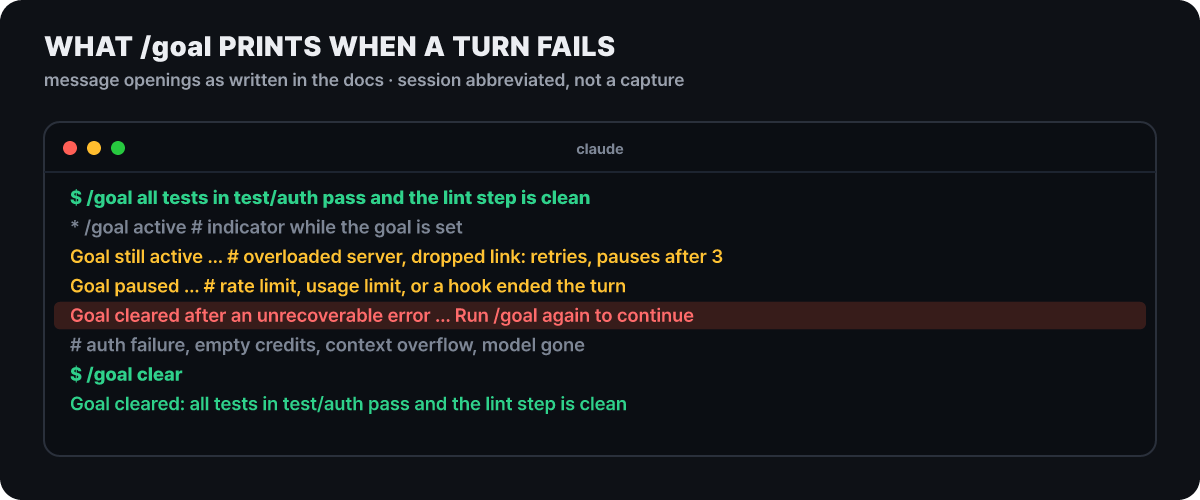 Figure 2. The start of each message follows the docs and the session is shortened in the drawing. Only in the cleared case must you enter the goal again
Only the red lines in the figure are cases where the user has to step in. The causes are an authentication failure (when Claude Code manages the credentials itself), exhausted credits, a context overflow that automatic compaction cannot fix, and an unusable model; after fixing the cause, you enter the condition again with /goal. Errors that clear up with time, such as server overload or a dropped connection, keep the goal, and after three automatic retries it is paused. Errors where a retry would give the same result, such as a billing limit, a usage limit, or a hook that ended the turn, are paused from the start, and when the pause is a wait for a usage limit to lift, the work resumes automatically at that moment. The notice lines that report these states appear in interactive sessions on v2.1.269 or later. Finally, if Claude repeats only its evaluation answer without using any tool and makes no progress for several turns, Claude Code stops the loop, prints a warning, hands control back with the goal left in place, and evaluation resumes from the next prompt.
When background work runs long
If a turn ends while a subagent or a background shell command is still running, that turn’s evaluation is skipped. Evaluation happens at the end of the turn once all background work is done, and when results arrive Claude Code delivers them as a new turn, so you do not need to wake it. If the wait passes 30 minutes, a check-in starts, shows Claude the list of running tasks, and asks it to wait on what is progressing and to fix or finish what has stalled. The interval stretches from 30 minutes to 1 hour and then 2 hours, and stops at four times the first interval. The waiting check-ins that Claude Code starts by itself in an interactive session are limited to three between user prompts. That cap arrived in v2.1.246 and there was no limit on the count before it; waiting check-ins work on v2.1.236 or later, and the check-in itself on v2.1.234 or later. Change the first interval with CLAUDE_CODE_GOAL_CHECKIN_MINUTES, and 0 turns off both check-ins and automatic retries.
In scripts, claude -p "/goal ..." runs until it finishes, and because the default text output gives the final answer only at the end, it can look stalled. Adding --output-format stream-json --verbose makes progress messages stream out. In settings that turn off hooks (disableAllHooks, or allowManagedHooksOnly in managed settings), /goal tells you why and does nothing, so remember that the evaluator is part of the hook system.
Checks that must not be skipped go in a Stop hook
The /goal ruling is made by a model, so it is sometimes off. When the thing to check is real state that never shows up in the conversation, or an inspection that must never be skipped even once, leaving the ruling to a script is level 3. A Stop hook is a user-defined command that runs every time Claude finishes a response, and if it ends with exit code 2, Claude cannot stop and receives the sentence written to stderr as its next instruction. Here is an example that keeps a turn from ending while tests are broken (an example to adapt to your project’s test command).
#!/bin/bash
# .claude/hooks/tests-before-stop.sh  (chmod +x required)
INPUT=$(cat)                       # The hook input (JSON) arrives on standard input
if ! OUT=$(npm test 2>&1); then
  echo "The tests failed. Read the output below, fix the problem and check again." >&2
  echo "$OUT" | tail -n 30 >&2      # Send back only the last 30 lines
  exit 2                            # 2 = do not stop, keep going
fi
exit 0                              # Pass = the turn may end
{
"hooks": {
"Stop": [
{ "hooks": [ { "type": "command", "command": "\"$CLAUDE_PROJECT_DIR\"/.claude/hooks/tests-before-stop.sh" } ] }
]
}
}Put the JSON settings in the project’s .claude/settings.json, and you can see registered hooks with /hooks. You can also answer in JSON instead of an exit code. {"decision": "block", "reason": "..."} keeps Claude from stopping and passes the reason on to it, while hookSpecificOutput.additionalContext shows guidance such as “run the tests before stopping” as feedback rather than an error. Pick only one of exit code or JSON per hook. If you write hooks as PowerShell scripts on Windows, before 2.1.309 a script ending with exit code 2 failed to block, and that was fixed in 2.1.309, so check your version.
It does not block forever
The worry “won’t the hook hold Claude forever if the tests never get fixed?” is already built into the design. If Claude has used no tool and the Stop hook blocks 8 times in a row, Claude Code ignores the next block and ends the turn. As soon as a tool is used even once, the counter goes back to 0.
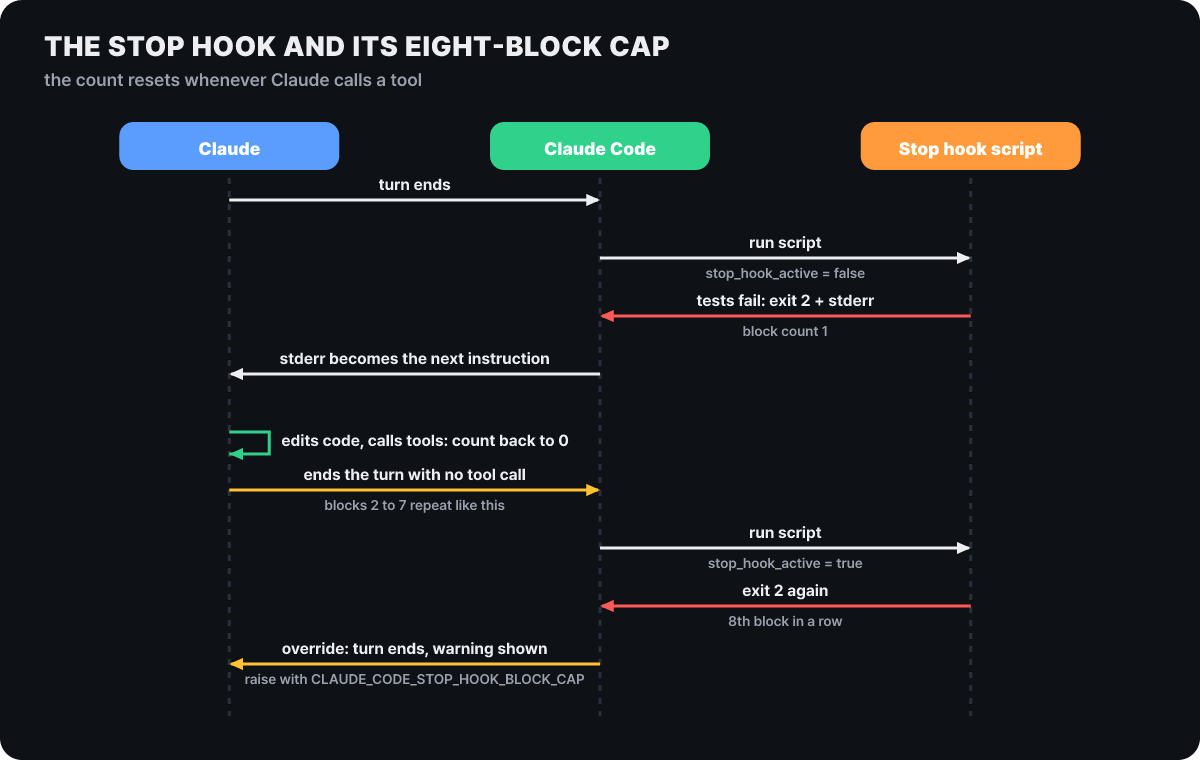 Figure 3. The counter tracks consecutive blocks, so it returns to 0 while Claude is fixing things and reaches 8 only when Claude stops working and repeats itself
What to read from the figure is that the cap targets “repetition without progress,” not “slow fixing.” If the incoming stop_hook_active is true, the turn is already continuing because of a hook, and to avoid blocking on a condition that has no chance of clearing, the docs show a script that reads this value and exits early with exit 0. If a check really needs many rounds of fixing to pass, raise the cap with the environment variable CLAUDE_CODE_STOP_HOOK_BLOCK_CAP.
Hooks come in three kinds, by how they are built.
| Kind | Who rules | Fits |
|---|---|---|
command |
A shell command. Input on standard input, result as exit code and output | A deterministic check that always rules the same way for the same input. The example above is this kind |
prompt |
One model call. It sees only the hook input and answers in JSON whether it is ok | On Stop, if ok is false the reason goes to Claude, and marking it impossible allows the stop. /goal is this kind |
agent |
A subagent that uses tools. It reads files and runs commands to check real state | Default timeout of 60 seconds, up to 50 tool-use turns. It is experimental and its behavior may change, so command is recommended for production |
Prompt-type and agent-type hooks were limited in 2.1.302 to at most 12 running at once per event, so if you stack several hooks that call a model, keep that limit in mind. To sum up: use /goal when a condition written in words is enough and you would rather not touch config files, a command hook for checks where the same input must give the same answer, and an agent-type hook for rulings that need to open the codebase’s real state directly.
Don’t let the one who did the work grade it
Even when a script rules, “what to check” was chosen by the side that did the work, so blind spots remain, and when the agent that did the work grades its own result, bias remains too. For work that is costly if wrong (payments, permissions, data migration), the docs recommend a fresh-context reviewer. A subagent sees only the diff and the standard the user gives it, not the reasoning that produced the change, so it evaluates the result from scratch against its own standard. The built-in /code-review skill reviews the current diff with a new subagent and returns bugs to the session, and if you want to check against a plan document, you write the prompt yourself. The format the docs give states what to review, what plan to compare against, and what counts as a finding.
Use a subagent to review the rate limiter diff against PLAN.md.
Check that every requirement is implemented, that the edge cases
we wrote down have tests, and that nothing outside the task's scope changed.
Report only what is missing, not matters of taste.
The last line is the heart of this prompt. A reviewer told to find gaps will report something even when the work is fine, and chasing every finding leads to over-engineering: abstraction layers, defensive code and tests for cases that cannot happen. The docs advise flagging only gaps that affect correctness or stated requirements and treating the rest as optional. Splitting the session in two works on the same principle: one side implements, the other reviews with a fresh context, and the findings are passed back to the implementing side. A setup in which a dynamic workflow has a new model try to refute its own findings also belongs to level 4.
At the far end of the check levels is /verify, which you invoke yourself. It actually builds and launches the app and checks that the change behaves as intended, and it does not stand in tests or type checks for that. Even with no setup it guesses how to run the app from the README, package.json and Makefile, but the docs note that the guess is unreliable for projects that need a database, environment files, a graphical session or a multi-step build. A method that succeeds once is recorded in .claude/skills/verify/SKILL.md and becomes the baseline for later runs. 2.1.309 also fixed a problem where, when a changed file sat inside a nested package, /verify and /code-review could not find that package’s own skill.
With a check in place, start effort low
Whichever of the four levels you pick, you also have to settle effort level. The habit of enlarging the thinking budget with phrases such as “think harder” has been cleaned up in the docs. The only keyword Claude Code recognizes is ultrathink, and this word merely adds an instruction to reason more deeply for that turn only into the context; it does not change the effort level sent to the API. “Think,” “think hard” and “think more” are passed through as ordinary prompt text. Reasoning depth is controlled by /effort.
| Level | Use the docs give |
|---|---|
low |
Short conversations where you check every result as you go, and small changes such as renaming |
medium |
Default for Opus 5.5, Sonnet 5.5 and Haiku 5.5. Everyday development with a clear scope |
high |
Work where verification matters or with many edge cases. The default for most other models |
xhigh |
Deeper reasoning and more tokens. The default for Opus 4.7 |
max |
Hard problems to hand off while you are away (for example, hunting for vulnerabilities). Gains shrink and it can overthink, so test before using it widely |
The level is set by precedence. A value you pick directly with the environment variable CLAUDE_CODE_EFFORT_LEVEL, --effort or /effort wins, next is the value saved in settings (the per-model modelSettings or the effortLevel key), and last is the model default. If you pick an unsupported level, it runs at the highest supported level below it (xhigh becomes high on Opus 4.6), and max applies only to the current session unless you set it by environment variable. Opus 5.5 starts at medium, and the top-level effortLevel key in the user settings file does not apply to Opus 5.5, so you have to set it directly with /effort or the /model selection. The same key in a project, local or managed settings file applies to all models. To change it for one session only, press s in the slider (v2.1.257 or later), and a skill or subagent overrides the level only while it runs, through effort in its frontmatter.
In the docs’ tests, higher levels tried more edge cases and verified more but made more choices on their own, while lower levels turned out a starting point quickly and suited work where you steer by looking at results. In Anthropic’s tests, Opus 5.5 at medium is said to match or beat Opus 5 at high on coding and knowledge-work evaluations, so the advice is that if you are moving over from Opus 5, you should start at medium instead of carrying over the old level. Tying this to the article’s theme gives a direction. When a check that comes out as pass or fail is in place, it is more efficient to run at a low level, fast, and have it fix what failed, and it is the work that must be right in one shot with no check that needs a high level. When you want just one turn to think deeply, use ultrathink. /effort also has an Ultracode toggle that is separate from the level. When on, it keeps the level where it is and builds and runs a dynamic workflow for each meaningful task; turning it off with /effort ultracode off, and leaving it on at a level other than xhigh, work only on v2.1.284 or later. Two things cannot be changed. On Opus 5.5, Sonnet 5.5 and Haiku 5.5, thinking cannot be turned off, and saving alwaysThinkingEnabled: false or MAX_THINKING_TOKENS=0 has no effect.
Keep CLAUDE.md short, and put rules that can’t be broken in hooks
The instruction file pairs with the check levels. If you write a rule that must not be broken, such as “never send email,” into CLAUDE.md as a sentence, you are only hoping Claude will follow it. The docs explain that CLAUDE.md is read at the start of every session but is treated as context, not as enforced configuration, and they advise using a PreToolUse hook to block an action. A hook is a shell command that always runs at a set point, deterministic control that makes a specific action happen without depending on the LLM choosing to do it. The hooks guide has an example in which a hook script blocks edits to .env, package-lock.json and files under .git/ with exit code 2 and returns the reason to Claude, and when the condition needs judgment, you can use a prompt-type hook that a model evaluates.
What stays in CLAUDE.md has to be chosen with care, since the docs aim for under 200 lines per file. For each line, ask “if I removed this line, would Claude make a mistake?” and delete it if not. If Claude repeats the same mistake, the file is too long and the rule is buried, and if Claude asks about something already in CLAUDE.md, the wording is ambiguous.
| Put in | Leave out |
|---|---|
| Commands Claude can’t guess | What it can learn by reading the code |
| Code style that differs from the default | Standard conventions of the language |
| How to test and the preferred runner | Detailed API docs (link instead) |
| Branch names, PR rules | Information that changes often |
| Design decisions specific to the project | Long explanations, tutorials, file-by-file descriptions |
| Quirks of the dev environment, such as environment variables | Truisms like “write clean code” |
Splitting files with @path imports tidies things up but does not shrink the context. Imported files load together with that CLAUDE.md (chaining up to four levels deep), and an @path inside a code snippet is not treated as an import. Instructions that apply to only some folders move into path-scoped rules. Create a rule file under .claude/rules/ and put paths at the top, and it loads only when you work on those files.
---
paths:
  - "src/api/**/*.ts"
---
# API rules
- Every endpoint goes through input validation
- Error responses use the standard format
A rule file without paths always loads, and one with it loads when Claude reads or edits a matching file. Collecting the files covered so far, where they sit and when they are read, on one sheet gives this.
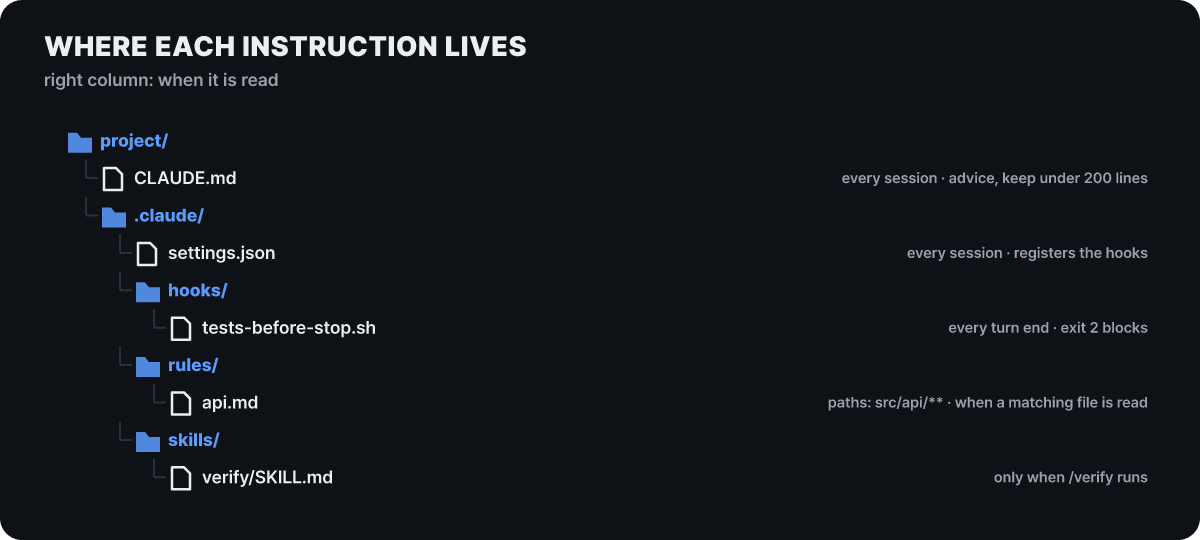 Figure 4. CLAUDE.md and the settings file are read every session, the hook script when a turn ends, and the rule file and skill only when they apply
In the figure, only CLAUDE.md enters the context every session (the settings file registers hooks and is not loaded into the context). Rule files and skills enter only when they apply, so most lines of a grown CLAUDE.md can move to these two. Put emphasis only on the line that gets broken. The docs say that using “important” or “must” on many lines makes nothing stand out. There are tools for cleanup as well. For a checked-in CLAUDE.md, /doctor proposes deleting what can be learned from the code, and on v2.1.283 or later /doctor prompt-audit sweeps through CLAUDE.md and the rules, skills and subagents under .claude/, and reports instructions written for older models, lines that point to files that do not exist, and lines that contradict each other. It only produces the report, and applying changes happens after you ask. Since 2.1.309, to stop sessions from compacting repeatedly while reading an oversized nested CLAUDE.md, a file over the limit loads only its beginning.
If a repository uses AGENTS.md instead of CLAUDE.md, Claude Code reads AGENTS.md as the project instructions when there is no CLAUDE.md in the working directory or above it (v2.1.277 or later). If both exist, only CLAUDE.md is read, so the moment you add a personal CLAUDE.local.md, AGENTS.md stops being read. To have both files read, import it from CLAUDE.md with @AGENTS.md, or change the project instructions setting to claude-md-and-agents-md.
Keep a skill only if it beats having it switched off
Skills are another home for instructions, but the order you go through before creating one is different. To know whether a skill really works, the docs advise running a few realistic prompts in a new session, once with the skill and once with it switched off, and comparing results. It has to be a new session so that context left over from using the skill does not hide gaps in the instructions. Seeing a skill trigger does not mean the result is right. Personal and project skills are switched off with "off" in skillOverrides, and for skills a plugin provides this setting does not apply, so you compare with claude plugin eval, which repeats the same run without the plugin. If the results are the same, that skill is only spending tokens.
The cost of the skill list is also worth working out. Each skill’s description goes into the context every turn (description and when_to_use together are cut at 1,536 characters, so put the core use first), while the body is read only when the skill is invoked and then stays in the conversation. The advice is to keep SKILL.md under 500 lines. A skill used only when you call it directly can use disable-model-invocation: true to take its description out of the context, and /skill-doctor (v2.1.252 or later) shows each skill’s cost and usage frequency, giving you grounds to switch off skills that have never been invoked.
The more checks you attach, the more the risk grows if the check itself is sloppy. If the pass condition is a weak test, or the evidence the evaluator would read is not in the conversation, /goal will wrongly rule “passed” or will stay unmet forever. Before moving up a level, seeing once whether the standard can actually fail is the cheapest insurance.
Where to look a week after trying it
- Count how many of the tasks you handed off in the past week had a one-line "finish standard" written down. For tasks without one, check whether you were watching them.
- If you set a
/goalon any task, type/goalwith no argument to open the evaluation count and token usage, and see whether the turn limit really served as a cap. - Count the lines in CLAUDE.md, pick one rule that has been broken before, and see whether it can move into a hook.
- Find skills that have never been invoked with
/skill-doctor, switch them off and compare whether the results are the same.



