Check gws scopes and limits before agents use Gmail, Drive
The --readonly flag on gws login makes Google block writes and deletes. We printed each option's requested scopes and covered the risks that remain.
The first thing to decide when you attach gws to an agent is not how to install it but one option on the login command. If you sign in with gws auth login --readonly -s gmail,drive, the token receives only the gmail.readonly and drive.readonly scopes, so whatever gws command the agent runs, Google rejects any request to send mail or delete files. If you use -s gmail,drive without --readonly, the same login receives gmail.modify and the full drive scope. One word widens what the agent can touch from reading to reading, sending and deleting.
gws is a Rust tool that the googleworkspace/cli repository describes as a command line for all of Google Workspace, built for people and AI agents. It calls APIs such as Gmail, Drive, Calendar and Sheets with a single command and returns the response as JSON. The README states that it is not a Google-supported product and warns that breaking changes may occur until 1.0. As of Oct 27 it has 31,900 stars, 2,000 forks and 134 open issues, under the Apache-2.0 license. The last release is v0.22.5 on Mar 31 (the latest npm package version is also 0.22.5), and the last commit on the main branch is from the same day, so the version you download now has stood still for seven months. Every command result in this article comes from the editors installing 0.22.5 in Docker and running it themselves. Credentials were dummy values, and we read only the scope= part of the authorization URL printed just before login, so we never signed in to any account.
Where one command travels, and four places a gap opens
gws does not ship a built-in command list. At run time it downloads the document for the relevant service from Google’s Discovery service and builds the command structure from it. There are five steps: read the service name, fetch the Discovery document and cache it for 24 hours, build the command tree, re-parse the remaining arguments, then attach authentication and call the API. So when Workspace gains a new API method, gws follows without any change to the tool. The repository’s development guidelines (AGENTS.md) assume that the tool is called often by agents, treat every input as potentially hostile, and require filtering of path tampering and control characters.
The figure below marks the points a person should check, A through D, on the path one command takes from the agent to Google. Read it in this order: the route by which text enters the agent from the red area on the left (A), the command the agent runs (B), the place where the token sits (C), and the range in which Google responds (D).
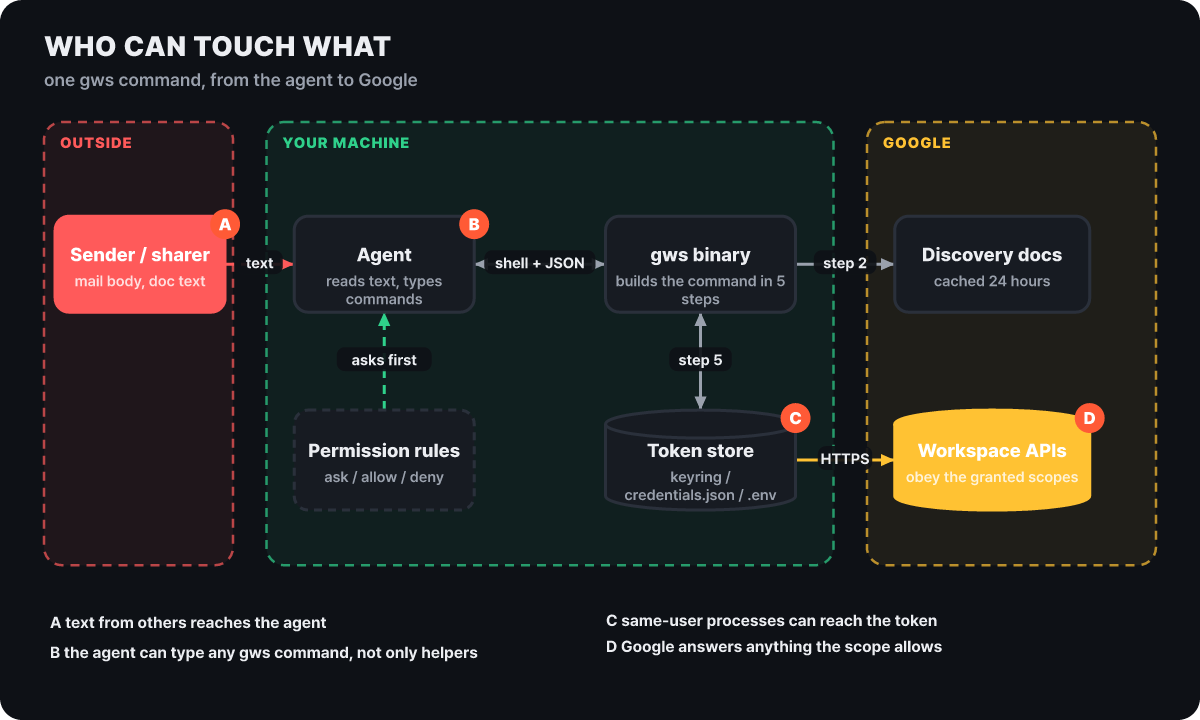 Figure 1. Three zones and four gaps that one call passes through (A external text, B agent command, C token storage, D Google’s scope check)
Different parties close each of the four gaps. A and B belong to the agent and its permission rules, C is shared between the operating system user account and the way gws stores credentials, and only D is a boundary that Google enforces directly. If you arrange things so that whatever command the agent runs is rejected at D, the damage has an upper limit no matter what happens at A and B. The rest of this article covers how to narrow D and how to fill the gaps that remain even after you narrow it.
It is also worth pointing out that helper commands (the ones with a +, such as +triage and +send) are not all there is. The commands generated from Discovery cover every API method. If you inspect a method with gws schema, you can see at once which scopes a delete call accepts.
$ gws schema drive.files.delete | jq -r '.httpMethod, .scopes[]'
DELETE
https://www.googleapis.com/auth/drive
https://www.googleapis.com/auth/drive.appdata
https://www.googleapis.com/auth/drive.file
The method description says it deletes permanently without moving the file to the trash, and drive.readonly is not in the list of accepted scopes. In the same way, sending mail (gmail.users.messages.send) accepts mail.google.com, gmail.compose, gmail.modify and gmail.send; permanent deletion (gmail.users.messages.delete) accepts mail.google.com alone; and adding a sharing permission in Drive (drive.permissions.create) accepts only drive and drive.file. Of the write methods we examined, none accepted a read scope.
The scopes each login option requests, printed directly
The only login option the README mentions is -s (--services), which picks services. gws auth login --help lists two more. --readonly requests read scopes only, and --full adds pubsub and cloud-platform on top of the defaults. Extracting the scopes carried in the authorization URL for each option gives this.
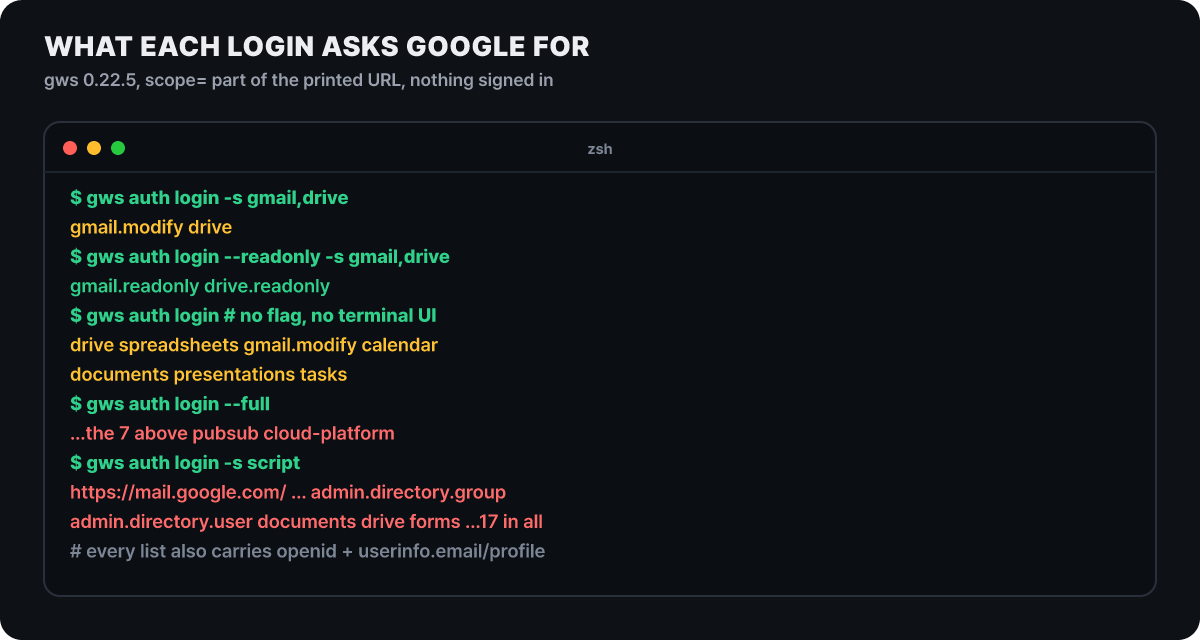 Figure 2. Scopes requested by login option. Result of running gws 0.22.5 without a terminal screen and reading the scope= part of the authorization URL
Even when you pick the same services, the yellow lines (writes possible) and the green lines (read only) split apart. Three things stand out. First, the default for -s gmail is gmail.modify, so the agent can read mail, create drafts and send. Google’s documentation describes it as allowing reading, composing and sending mail, and excludes only permanent deletion that bypasses the trash. Second, the default for -s drive is drive, a scope that views and manages all Drive files. Third, -s script requests 17 scopes at once, including mail.google.com, which can even permanently delete from the whole mailbox. That is probably because Apps Script can run code that calls other services, but it is a combination with no reason to be chosen for an agent.
When you type gws auth login with no option, the result depended on whether the terminal could display a screen. With a screen, a full-screen selector for choosing scopes opens (the README warns that this selector’s recommended preset has more than 85 scopes), and in an environment without a screen the seven defaults were requested: Drive, Sheets, Gmail (modify), Calendar, Docs, Slides and Tasks. If you let an agent attempt login without a terminal, those seven write scopes attach as they are.
You can read what the scope names mean from the table below, taken from Google’s documentation.
| Scope | Google’s description | Classification |
|---|---|---|
gmail.readonly |
View email messages and settings | Restricted |
gmail.modify |
Read, compose and send email. Permanent deletion that bypasses the trash is excluded | Restricted |
gmail.compose |
Manage drafts and send email | Restricted |
gmail.send |
Send email on the user’s behalf | Sensitive |
mail.google.com |
Read, compose, send and permanently delete | Restricted |
drive.readonly |
View and download all Drive files | Restricted |
drive |
View and manage all Drive files | Restricted |
drive.file |
Create and edit only files opened with the app or shared with it | Non-sensitive |
Two more things can be read from the table. Even gmail.readonly is classified as restricted, so releasing an app with this scope to the public requires Google’s verification process. Also, if you sign in with gmail.modify, the call that creates a mail filter (needs gmail.settings.basic) and the call that adds a forwarding address (needs gmail.settings.sharing) are outside the scope and get rejected. The classic trick of quietly setting up automatic forwarding through a filter is blocked by this login.
Scope counts by service: Chat, Classroom and Script are wide
The number of scopes also varies a lot by service. For Gmail or Drive, one service maps to one scope, but Chat and Classroom are split finely by feature, so they come to dozens at once. The bars below compare the count when you log in with a single service, by default and with --readonly (excluding the identity scopes openid, email and profile). The dotted line is the limit of about 25 for an unverified app that the README mentions.
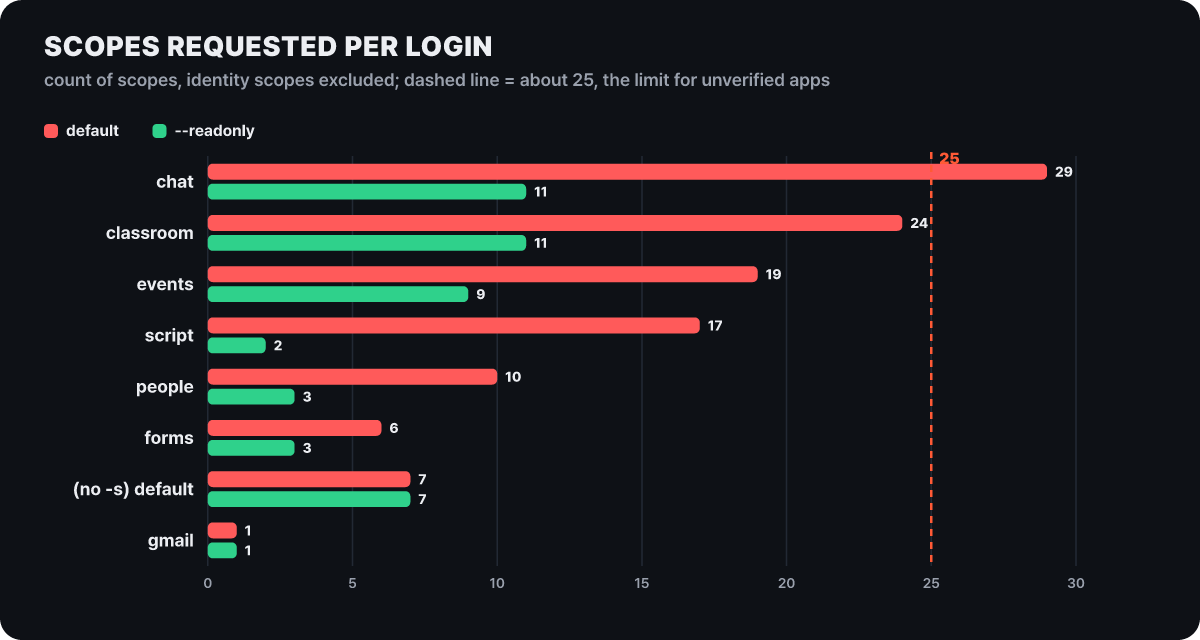 Figure 3. Number of scopes requested in one login (default vs –readonly). Values counted by the editors with gws 0.22.5
Chat requests 29 by default, which crosses the dotted line, and --readonly cuts it to 11. Script falls from 17 to 2 (script.projects.readonly and script.deployments.readonly), and the full-mailbox scope disappears. In contrast, Gmail, Drive, Calendar and Sheets have one scope each, so adding the option leaves the count unchanged and only changes the kind of scope. That means these are services where you have to look at the name, not the count.
There are exceptions. -s workflow and -s keep request nothing besides the identity scopes. The workflow helpers (such as +standup-report) use Calendar, Tasks or Gmail as their material, so they work only if you also obtain the scopes for those services separately. Also, the help text of the --sanitize option, which turns on Model Armor, says it needs the cloud-platform scope, but -s modelarmor requests that scope only by default and requests no scope at all under --readonly. In other words, there is no way to turn on the screening feature with a read-only preset alone, and cloud-platform is a wide scope that reaches across Google Cloud.
Ways a read-only token still leaks
--readonly blocks writes and deletes, but gmail.readonly can read the whole mailbox and drive.readonly can read every file. Even though the token cannot send anything by itself, it means the whole mailbox and Drive can come into the agent’s context. The risk left with an agent holding a read token follows two lines.
The first is gap A. Mail bodies, documents shared with you and the descriptions of calendar invitations are all text you did not write, and +triage or +read hands that text to the agent. Even if it contains a sentence telling the agent to send the file list of this folder to an address below, instead of a sentence asking it to summarize the mail, the tool cannot tell the difference. An agent being pulled along by such instructions is prompt injection, and a read token only cuts the write side of that instruction’s effect at Google.
The second is the path by which what was read goes outside. With a read token gws cannot send mail itself, so for data to leave, another tool in the same session is needed. Web requests, curl, connectors to other services, and commands that write and upload files are the candidates. This point is the editors’ judgment, but structurally, whether a read token is safe is decided not by gws settings but by which outbound communication tools are attached to the same agent. For an agent that reads personal mail, running it in a session with no outbound communication tool matters as much as the read-only option.
The screening mechanism the tool provides is Model Armor. If you pass a template path after --sanitize, or set the environment variable GOOGLE_WORKSPACE_CLI_SANITIZE_TEMPLATE, API responses go through filters such as prompt injection and sensitive information before they reach the agent. You choose the mode between warn (the default, warning only) and block. You must first create the template in Google Cloud, the cloud-platform scope comes along as we saw, and the cost is charged by the number of tokens in the prompts and responses inspected. It is not included in the read-only login, so turning it on means giving up the simple shape of read-only.
Finally, do not leave the consent screen to the agent during login. The README describes, alongside the flow a person does by hand, a way for an agent to open the URL, choose the account and handle the consent screen, and when scope checkboxes appear it tells you to choose the scopes you need or select all. That screen is the only place where scopes are decided. It is safer for a person to read it and click.
Twelve helpers that write, and three that lack a confirmation line
The repository’s skill index (docs/skills.md) lists 95 SKILL.md files, divided into 19 services, 25 helpers, 10 personas and 41 recipes. The README says more than 100, but the index and the editors’ count are 95. What matters for the risk map is the 25 helpers among them, the one-line commands an agent will type most often. Opening all 25 and sorting them by what they do, the editors found 7 read, 12 send or write, 4 subscribe or create resources, and 2 check.
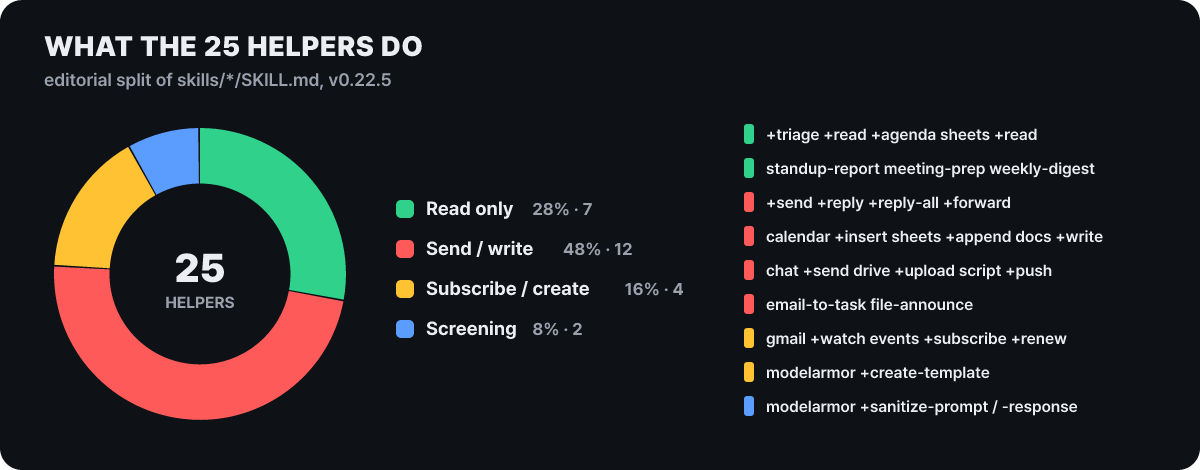 Figure 4. The nature of the 25 helpers. The editors classified the 25 SKILL.md files in the repository’s skills folder
Almost half, 12, are on the writing side, so the range blocked by a single --readonly login is that wide. The 4 that subscribe or create resources carry a cost that is less visible. gmail +watch and events +subscribe create Pub/Sub resources in a Google Cloud project, those resources stay unless you pass --cleanup, and a Gmail watch expires after 7 days and has to be run again.
The “confirm before writing” line in the skill files appears in only 11 of the 25. Among the 12 write helpers, 9 have it: +send, calendar +insert, sheets +append, docs +write, chat +send, drive +upload, +email-to-task, +file-announce and script +push. The 3 that send mail out, +reply, +reply-all and +forward, do not. Their tips entries only describe how to save just a draft with --draft. All 25 skills have a line at the top telling you to read the shared rules skill gws-shared, and those rules include an item saying to confirm with the user before running write or delete commands, so it is not completely empty. Even so, +forward has sent the original attachments by default since 0.20.0, so the spot lacking the line is the most sensitive one.
The preview option --dry-run also has limits you should know before using it. Running a few commands directly shows what becomes visible and what does not.
| Command | What --dry-run shows |
|---|---|
drive files delete |
The method DELETE and the target path |
drive permissions create (type: anyone) |
Even the role and type in the body |
calendar +insert |
Title, start and end time |
gmail +send |
Body null, the address is the send endpoint |
gmail +send --draft |
Body {"message": {}} |
gmail +triage |
Authentication error (environment without credentials) |
For delete and for anyone-with-the-link sharing, you can see exactly what will go out, but for mail the recipient and body do not show. Below is the actual output of +send.
$ gws gmail +send --to a@example.com --subject hi --body hello --dry-run
{
  "body": null,
  "dry_run": true,
  "is_multipart_upload": true,
  "method": "POST",
  "query_params": [],
  "url": "https://gmail.googleapis.com/upload/gmail/v1/users/me/messages/send"
}
It tells you only that the call is a mail send, so saving mail to the drafts folder with --draft and having a person open it is the better means of confirmation.
Instructions are a threshold and permission rules are a wall, but that wall is not complete either
The confirmation line in SKILL.md is text given to the model, not a block that the tool enforces. If the model follows it, it works as a threshold, and it can waver when text that came in through gap A slips in a different instruction. Beneath it are the agent program’s permission rules. Taking Claude Code as an example, the rules are evaluated in the order deny, ask, allow, and whichever matches first wins. If you set a broad ask rule Bash(gws *), the agent asks every time even when a narrower allow rule exists, so to auto-allow read commands you should not keep the ask rule broad and should instead make only the allow list narrow. Commands not on the list are asked about on their own in the default mode.
For Discovery commands, where the prefix is cut matters. gws drive files list and gws drive files delete are identical up to gws drive files. As the Claude Code documentation advises, the * should go after the subcommand, and allowing Bash(gws drive files *) opens up even deletion. Allow read commands one by one, written out to the end like Bash(gws drive files list *).
The documentation itself states that these rules are not a security boundary. The rules only catch commands in the shape an agent usually uses, so calling the same program by an absolute path or inside sh -c '…' can slip past deny and ask rules, and patterns that restrict arguments are also fragile. So the order is this. The scope Google enforces (--readonly) is the last wall, the agent’s permission rules are a front fence that filters mistakes and crude requests, and SKILL.md is guidance in front of that.
There is one deny target you must put in the rules. gws auth export --unmasked prints decrypted credentials to standard output. If an agent running under the same user account can use a shell, this one line can put the refresh token and the client secret into the conversation. It is simpler to deny all of gws auth and leave login and logout to a person.
The README also lists two ways to connect to an agent: the Gemini CLI extension (gemini extensions install https://github.com/googleworkspace/cli) and a link to the skills folder for OpenClaw. Since Jun 18, Gemini CLI no longer processes requests from personal free accounts and AI Pro and Ultra subscription accounts, so this route remains only for use with a paid API key or a company license.
Where credentials sit, and the one-week expiry
Now gap C, that is, where the token is. gws looks for a token in four places, with a fixed priority.
| Priority | Source | Setting |
|---|---|---|
| 1 | Access token | GOOGLE_WORKSPACE_CLI_TOKEN |
| 2 | Credentials file (including a service account key) | GOOGLE_WORKSPACE_CLI_CREDENTIALS_FILE |
| 3 | Encrypted login credentials | gws auth login |
| 4 | Plaintext credentials | ~/.config/gws/credentials.json |
The upper rows override the lower ones. So even if you log in again as read-only, an old access token left in the shell environment is used first. Environment variables can also sit in a .env file, so you should check that no token is in the working folder the agent reads. If login credentials obtained with write scopes are already stored, delete them with gws auth logout and log in again with --readonly.
The credentials created by login are encrypted with AES-256-GCM and stored in ~/.config/gws/credentials.enc, and the key is kept in the operating system keyring. From 0.22.3, macOS and Windows use only the keychain and create no fallback file, while Linux can fall back to the file method (GOOGLE_WORKSPACE_CLI_KEYRING_BACKEND=file, key file ~/.config/gws/.encryption_key). But encryption is for the file lying on disk. gws takes out the key and decrypts it with the same user privileges, so a process running under the same account can also get the same values with gws auth export. The OAuth client information (client_secret.json) sits in the same folder as a plaintext file. For servers without a browser, the README tells you to log in on another computer and move the credentials with gws auth export --unmasked > credentials.json, and this file holds the secrets unencrypted. If a service account key also has domain-wide delegation, it can act on behalf of the whole organization, not one user, so it is better not to use it in a personal trial connection.
How long a token lives also sets the size of the risk. gws logs in with an OAuth client in the user’s own Cloud project, so the app’s publishing status is the token’s lifetime. According to Google’s documentation, a refresh token for an external app whose publishing status is Testing expires after 7 days (apps that use only the name, email and profile scopes are an exception), and there can be at most 100 test users. A token holding Gmail scopes becomes invalid when you change your Google password, and only up to 100 refresh tokens are kept per client per account. Publishing the app to production lifts the 7-day limit, but the Gmail and Drive scopes are classified as restricted and need verification. For one person’s own use, logging in again once a week is simpler, and in the editors’ reading it has the advantage that even a leaked token dies within a week. To use Testing mode you must add your account as a test user in the Cloud console, and if you forget, login ends with an Access blocked error.
How the Google MCP server and gog handle these gaps
There are two other routes that do the same job: Google’s remote MCP server for Workspace and the third-party command line gog. gws also once had an MCP server mode (gws mcp), but it came in with 0.3.0 and was removed in 0.8.0, so the command line and skills are now the only way to connect.
gws
- The login option sets the scope (-s, –readonly)
- The tool has no command allowlist; the agent’s permission rules handle it
- Reads skills and runs from the shell with no server
- Unofficial, pre-1.0, last release on Mar 31
Google Workspace MCP server
- The tools the server exposes are fixed (for Gmail: profile, search, drafts, read, write)
- Requested scopes are split into read and write per server
- Assumes the developer preview program, and each server has its own endpoint and OAuth setup
- Inherits the user’s permissions and data governance as they are
Google’s MCP servers opened as a public developer preview on May 1 (announced at Cloud Next ’26) and are still in preview. Nine servers (Gmail, Drive, Docs, Sheets, Slides, Calendar, Chat, People and Classroom) each have an /mcp/v1 endpoint, and the write scopes are gmail.compose for Gmail and drive.file for Drive. As we saw in the earlier table, gmail.compose covers draft management and sending mail, so it is not a drafts-only scope. The OAuth client must have the setting for use with AI agents turned on, and administrators can see OAuth log events in the security investigation tool. Putting the three methods side by side with the same yardstick gives this.
| gws | Google MCP server | gog | |
|---|---|---|---|
| Read-only login | --readonly |
Per-server read scope (gmail.readonly, drive.readonly) | --readonly |
| Block only sending | No option. You must drop to gmail.readonly to block it |
The write scope gmail.compose includes sending | --gmail-no-send |
| Command allowlist | None | The tools a server exposes are the scope | --enable-commands-exact |
| Status | Unofficial, pre-1.0 | Developer preview | Third-party (MIT), repository moved to openclaw, about 8,500 stars |
gog is a command line written in Go that handles Gmail, Calendar, Drive, Docs and more, and gog mcp is an MCP mode that is read-only by default. gog is the one that puts more safeguards inside the tool, while gws leaves the tool responsible only for choosing scopes per service and the read-only preset. Either way, the same holds: the last boundary is the scope you received at login.
List of gaps to close before you hand it over
Below are the items to check once for each of the gaps A through D before connecting.
- Check that the token has read scopes. If you have credentials with write scopes from before, run
gws auth logoutand log in again with--readonly - A person, not the agent, reads and clicks through the consent screen
- Check that
GOOGLE_WORKSPACE_CLI_TOKENorGOOGLE_WORKSPACE_CLI_CREDENTIALS_FILEis not left in the shell environment or.env - Test one service first on a separate account, not a company account or an admin-privileged account
- Put
gws authin the deny rules, and allow only the read helpers one by one - Check that no web request or other connector that could send what was read outside is attached to the same session
- When writing becomes necessary, have it create only a draft with
--draft, and let a person do the sending - Pin 0.22.5, and before upgrading, skim the changelog for items where behavior changed
A setup that combines a read token with permission rules
Start with a read-only login that blocks all write scopes. Pick only the services you will use, and have a person check that the scope list on the consent screen matches the result of the two lines below.
gws auth logout
gws auth login --readonly -s gmail,calendar,drive
Next is an example of the Claude Code project settings (.claude/settings.json). For allow, only read commands are written out to the end; for deny, we put gws auth, which pulls out credentials, Discovery commands such as delete and share, and reading the files where the token sits. As we saw earlier, these rules are a fence, and the last wall that blocks writes is the --readonly login above. When you need to open a write helper, do not add it to allow; leave it as is and it asks before running.
{
  "permissions": {
    "allow": [
      "Bash(gws gmail +triage *)",
      "Bash(gws gmail +read *)",
      "Bash(gws calendar +agenda *)",
      "Bash(gws sheets +read *)",
      "Bash(gws workflow +standup-report *)",
      "Bash(gws drive files list *)",
      "Bash(gws schema *)"
    ],
    "deny": [
      "Bash(gws auth *)",
      "Bash(gws drive files delete *)",
      "Bash(gws drive permissions *)",
      "Read(./.env)",
      "Read(~/.config/gws/**)"
    ]
  }
}


