88K-star Impeccable catches AI-looking UI with 62 rules
What Impeccable adds to your project, where its 62 rules run (source, browser, design review), when hooks speak to the agent, and what data leaves your machine.
The frontend-design skill is a guidance document that tells the model “don’t drift toward generic design.” Impeccable adds 62 rules on top that count, directly in the code, whether that advice was followed. Guidance gets read according to the model’s mood, while rules run the same way on every edit. Hand a landing page to an AI and, in nearly any project, every letter is Inter, the background is a purple-to-blue gradient, there are cards inside cards, and each heading carries a rounded-square icon. This project’s job is to define those traces as “the mark of AI” and catch them.
As of Oct 27, 2026 (UTC), GitHub’s pbakaus/impeccable has 88,889 stars, 5.3k forks and 2,574 commits, and it is an Apache-2.0 open-source project that is not archived. The repository was created on Nov 16, 2025, and the README credits Paul Bakaus as its author. Instead of an introduction, this article takes the parts apart. It peels back, layer by layer, what the install puts in a project, then checks the three ways the rules run, when hooks speak to the agent, and which requests leave your machine, so you can decide for yourself whether to install it and whether to turn hooks on.
Four layers one install line puts in your project
It starts when you call the installer from the project root. The installer looks for agent folders such as ~/.claude, ~/.codex, ~/.grok and the project’s .cursor, then asks which tools to install into and whether to install for this project only or globally. In scripts, --providers=claude,cursor and --scope=project|global skip the questions.
npx impeccable install    # pick tools and scope, answer whether to install hooks
npx impeccable update     # update
There are several ways to install. In Claude Code, you can run /plugin marketplace add pbakaus/impeccable and then pick it in /plugin. A team that wants to pin a version can add it as a git submodule at .impeccable and link it into the tool folders with npx impeccable link --source=.impeccable --providers=claude,cursor. Grok Build has its own grok plugin install pbakaus/impeccable#plugin --trust. GitHub Copilot in VS Code has the renaissance-geek.impeccable extension, which installs only the skill and no automatic hooks. Whichever route you take, you have to reload the agent after installing before the new skill shows up. For tools that support hooks (Claude Code, Cursor, Codex, GitHub Copilot, Grok Build), the installer explains what the hooks do and asks whether to install them. The default is yes, and your answer is remembered in .impeccable/config.local.json, which is not committed, so it won’t ask again.
Once installation finishes, the first run is /impeccable init. It reads the project first, asks only about the facts that are missing, and writes PRODUCT.md. Because people may edit this file, correct it by hand if a guess was wrong. If the setup feels outdated, /impeccable doctor checks the hook paths, config keys and old file formats.
What gets placed this way falls into four layers. They run from the outside in, and this article’s sections follow the same order.
- Command layerOne
/impeccablewith 24 subcommands. Append a target to narrow the scope, and turn frequently used commands into shortcuts withpin - Context record layer
PRODUCT.md(who the product is for),DESIGN.md(the visual system),.impeccable/surfaces/*.md(per-screen briefs) - Detection engine layerA self-contained binary placed next to the skill or downloaded to
~/.impeccable/bin/on first run. The skill and hooks don't need Node; only thenpxinstaller uses Node 18.19 or later - Connection layerPer-tool hook config files, the
detectCLI in the terminal, and a browser extension that inspects the rendered page
Outer layer: grouping the 24 commands by purpose
Grouped by purpose, the README’s table fits all 24 on one sheet. Most of them pick, by name, “which direction to push a screen that already exists,” so you can also just say “rebuild this hero section” without knowing the names.
| What you want to do | Commands |
|---|---|
| Design before building | shape (design brief only, no implementation), craft (from design to implementation, including visual iteration) |
| Record context | init (PRODUCT.md), document (DESIGN.md), extract (pull repeated UI into shared components and tokens) |
| Review | critique (review of hierarchy, clarity and mood), audit (accessibility, performance, responsiveness), harden (error handling, i18n, text overflow) |
| Adjust direction | bolder, quieter, distill (keep only the essence), overdrive (technically ambitious effects), delight |
| Targeted touch-ups | typeset, layout, colorize, animate, clarify (copy), adapt (per device), optimize, onboard (first run and empty states) |
| Finish | polish (align with the design system and get release-ready) |
| Iterate in the browser | live (pick an element and compare variants), generate (create variants of a named element) |
Appending a target narrows the scope. /impeccable audit blog covers the blog list and post pages, and /impeccable polish settings handles the settings screen. If you run /impeccable pin audit once, you can call it afterward as /audit.
Even the same command takes a different approach depending on what the screen does. The command reads the target screen’s purpose, settles on one of four characters, and writes the result into that screen’s brief. A landing or pricing page that pushes visitors to decide is Persuade. A dashboard, settings page or editor where people finish tasks is Operate. Documentation and guides are Read. A place where people browse works, such as a portfolio or gallery, is Experience. A developer tool’s landing page is Persuade while the same product’s docs are Read, so the character splits even within one product, and if the purpose is ambiguous you can simply tell it what visitors should do there.
When you build a new screen from scratch, the path forks once. In tools that can generate images, the default is comp, which makes a mockup first and builds to match it, and there is also code, which builds straight in code. comp can aim for bolder compositions beyond what coding models usually produce, but details drift when moving from image to code, so it needs a few rounds of review and takes more time. code produces a tidy first implementation, but it stays within the model’s natural range and so tends to end up less ambitious. App screens and docs are built code-first on both paths. The choice is saved as "comp" or "code" in buildPath in .impeccable/config.json, and to override the team setting only on your own machine in a tool without image generation, write it in the uncommitted config.local.json.
Middle layer: context that stays in files, and what to put in git
No matter how many commands you add, repeating the same questions every time defeats the purpose, so this tool keeps context in files. PRODUCT.md records only lasting facts, such as who uses the product and what it does, and what its tone and constraints are, and leaves out visual direction. DESIGN.md is where the document command reads the fonts, colors and corner radii of already-settled screens from existing code and records them. The per-screen briefs in .impeccable/surfaces/*.md hold that screen’s character (the four modes above) and direction. These three files fill the spot where guidance documents only said “decide on a mood,” and when DESIGN.md exists, the rule checker also uses its fonts, colors, radii and font sizes as the baseline to find “values not in the document.”
The catch is that these files pile up in the .impeccable/ folder mixed with other byproducts. Running the tool produces critique and finishing screenshots, live-mode sessions and previews, caches, and per-person settings, and the README advises putting temporary files in .gitignore while keeping the deliverables you share.
# impeccable-ignore-start
**/.impeccable/config.local.json
**/.impeccable/hook.cache.json
**/.impeccable/hook.pending.json
**/.impeccable/*.png
**/.impeccable/review/
**/.impeccable/live/server.json
**/.impeccable/live/sessions/
# ...the README continues with more live subitems
# impeccable-ignore-end
What to leave in commits is config.json, live/config.json, design.json, surfaces/*.md and critique/*.md. If you have already committed temporary files, adding them to .gitignore does not stop tracking them, so run git rm --cached <path> separately. The questions/ and mocks/worlds/ folders that the decision rounds create carry their own .gitignore, so new files don’t end up in commits even in projects without the block above.
One engine, three entrances, three kinds of eyes
The innermost layer is a single self-contained binary, and the hooks, the CLI and the browser extension all run the same rules through this engine. The site’s rule catalog marks each rule as “AI slop” (a tell that AI makes by habit) or “quality” (a problem that makes things hard to use), and also which kind of eye sees it. There are three kinds of eyes. One reads the CSS and markup in source code, one measures the layout of the page as actually rendered, and one is a design review where the model reads the purpose and judges.
The figure below shows which eye each entrance leads to and which ones run without an LLM. The two eyes in the green area at the top use no model and no API key.
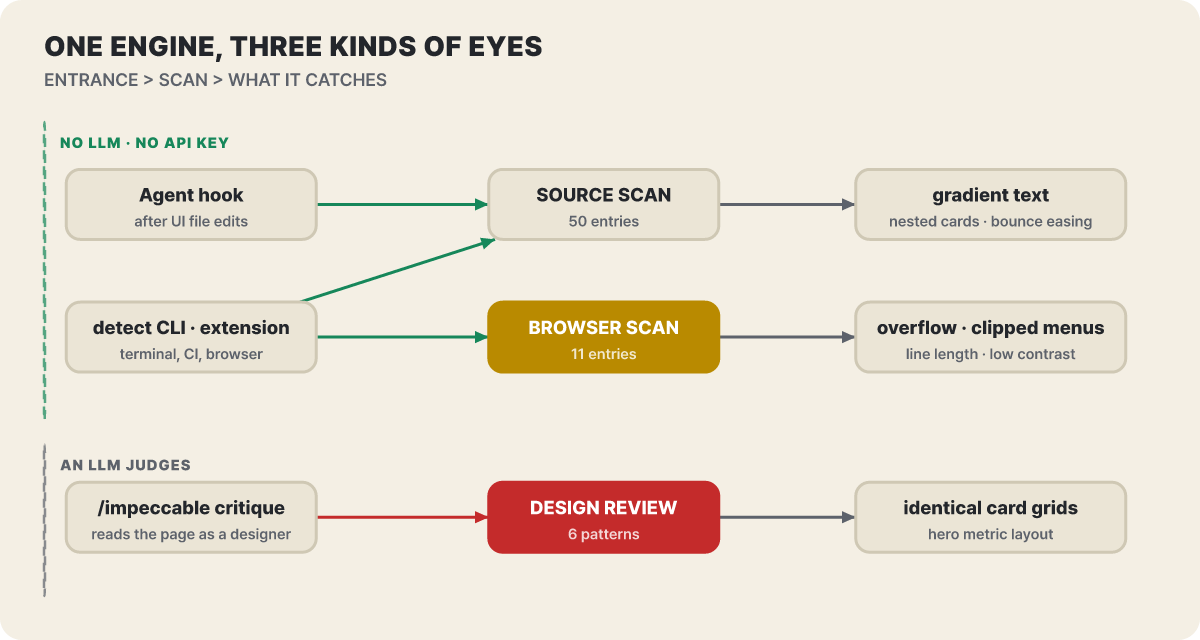 Figure 1. Three entrances split into three kinds of eyes. The eye assignment of catalog entries is the editors’ count of the 67 listed on the site’s catalog page
The eyes are split because the same problem shows up in different places. A font name and gradient text can be seen from CSS alone, but text overflowing its box, a clipped menu or a line that is too long can only be found by actually rendering, and the impression that “the same card repeats down the page” needs an eye that knows the screen’s purpose. So of the 67 listed in the catalog, 50 are source, 11 are browser and 6 are design review. The catalog’s total on the site is 68, which is 62 detectors plus 6 design reviews.
How the 67 catalog slots are distributed
The catalog is organized into nine groups. The thickest slots are typography (13) and layout (12), and the named design-system checks, at 4, are among the thinnest.
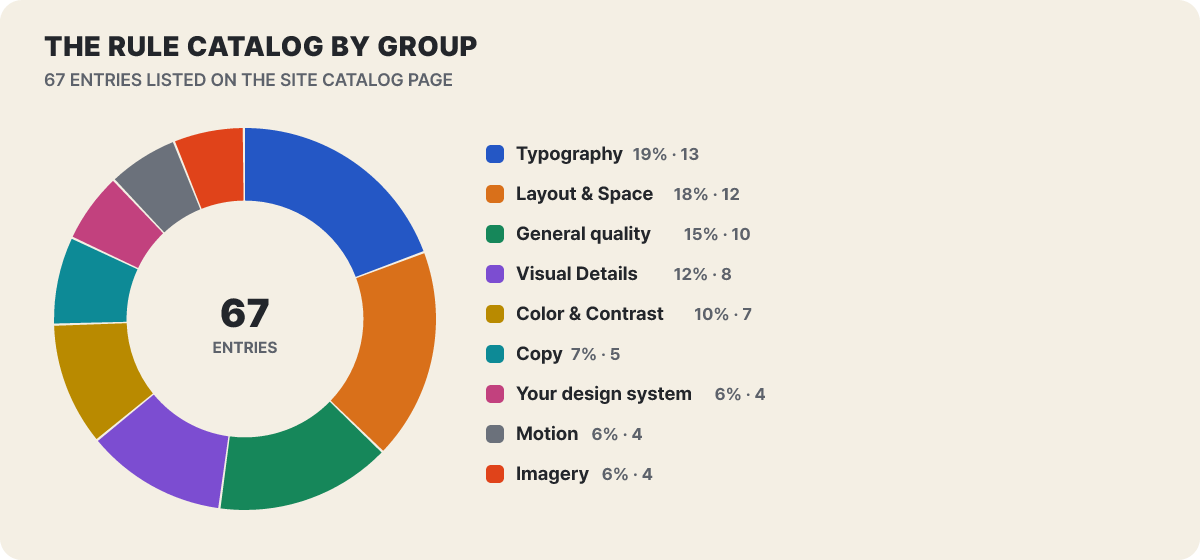 Figure 2. Number of entries per group (based on the site’s catalog page, counted by the editors)
Representative rules give a feel for what each group looks at. The names are the catalog’s wording spelled out.
| Group | Notable rules |
|---|---|
| Typography | Common fonts (Inter and the like), small label above a heading, badge above a heading, a last line left with a single word, headings with a short trailing line, crushed letter spacing, body text set entirely in capitals |
| Layout and spacing | Card inside a card, monotonous spacing, content overflowing its box, clipped menus and popovers, lines that are too long, text hidden behind other elements |
| Color and contrast | Purple gradients and AI palettes, gradient text, glowing accent colors on dark backgrounds, reflexively chosen cream and beige, gray text on colored backgrounds |
| Visual details | Thick side border on one side only, decorative grids, cards stacking a 1px border with a wide shadow |
| Motion | Bounce and elastic easing, pulsing status dots, auto-scrolling logo rows, decorative blinking cursors |
| Copy | An em dash in every sentence, generic promo phrases like “supercharge,” forced contrasts repeated like slogans |
| Images | Placeholder-like shape illustrations, images hidden under a nearly opaque overlay, broken src |
| General quality | JS errors on load, contrast below WCAG AA, skipped heading levels, body text that is too small |
| Design system | Fonts, colors, radii and font sizes not in DESIGN.md |
The six design-review items are patterns that code can’t catch, so critique handles them. They are glass effects everywhere, overly rounded card corners, crude SVG illustrations, solving everything with a single font, big-number placement in the hero, and identical card grids. The last two are closer to a “feel” that a few lines of source can’t decide, so leaving them to the model’s eye is how this tool divides the work. One more thing: v4.7.0 added the straggler and unbalanced-heading checks to typography, which also flag paragraphs whose last line is left with one word and headings with a short tail.
What comes out of one detect run
detect is the way to run only the rules without an installed agent. All of it is read-only checking, so it doesn’t modify your source.
npx impeccable detect src/                               # code and styles in a folder
npx impeccable detect http://localhost:3000              # rendered page (needs Chrome, Chromium or Edge)
npx impeccable detect --viewport 390x844 http://localhost:3000   # at mobile width
npx impeccable detect --scope type,layout src/           # typography and layout rules only
npx impeccable detect --json src/ > findings.json        # for scripts and CI
npx impeccable detect --list-rules                       # list rules only (no scan)
Given a folder, it finds the supported UI and style files (.tsx, .jsx, .html, .vue, .svelte, .astro, .css, .scss and so on), and server templates (Blade, ERB and the like) are included if you list their extensions in detector.extensions. Given a URL, it looks at the rendered DOM, the computed layout and the accessible stylesheets, but it cannot read CSS from another origin without CORS permission because of browser security, and it writes nothing to your source. Human-readable results go to standard error, and JSON goes to standard output.
The terminal below strings together the shape of one result taken from a real scan in the official docs, the exit code, and one exception line. One result consists of a rule name, a line number and the problem condition on that line, and the card in the docs adds guidance on how to reconsider it.
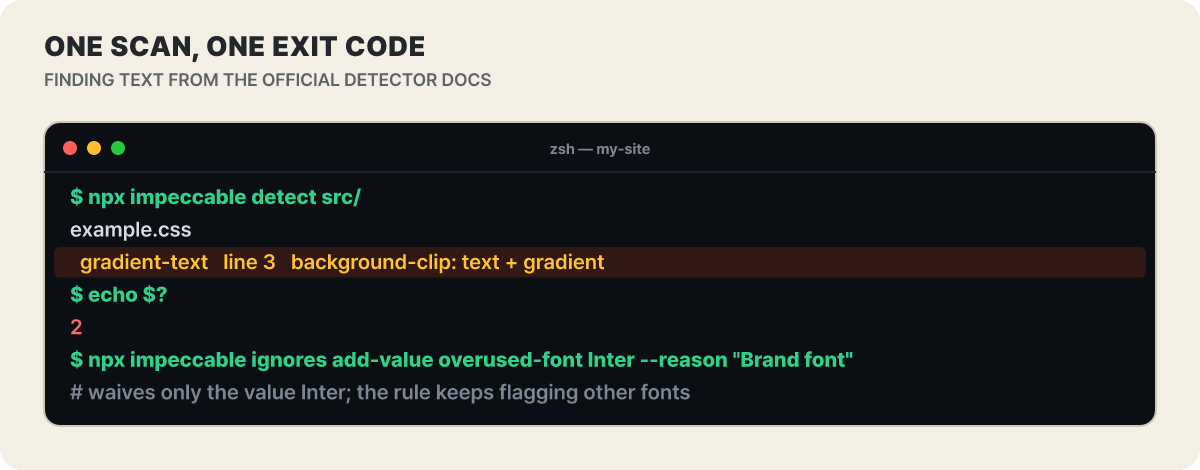 Figure 3. One result and the exit code. The output format follows the example in the official detector docs
You connect it to automation through the exit code.
| Exit code | Meaning |
|---|---|
| 0 | Scan finished with no main issues (advisories may exist) |
| 2 | Scan finished with main issues |
| 1 | At least one target could not be scanned. Treated as a failure even if other targets produced issues |
Advisories are separately counted notes and don’t make a scan fail. A sharp shadow offset by 4px or more may be intentional neo-brutalism, so since v4.7.1 it comes out as an advisory rather than a failure, and adding data-impeccable-ignore="hard-offset-shadow" to that element silences it. As the docs themselves stress, a clean scan is evidence and not proof of visual or accessibility quality, so opening the real screen at several widths remains your job.
In a team repository, running npx impeccable detect --github src/ in GitHub Actions on every pull request attaches problems as comments on the lines that caused them. However, GitHub shows only 10 annotations per type per step and 50 per job, with the rest left in the log, and results from the HTML engine may lack line numbers, in which case the annotation attaches to the file. If your brand font is Inter and keeps getting flagged, don’t turn off the whole rule; record just that value as an exception (the last command in Figure 3). The exception goes by default into the committed .impeccable/config.json and applies to the whole team, and adding --local puts it only in the uncommitted config.local.json. To apply it to a single file, narrow it with --file or leave an impeccable-disable comment in the file; the reason in that comment is written for people to read, and the scanner discards it. The rule-ignore settings are read by both manual scans and hooks, and turning off hooks does not affect manual scans.
Desktop apps have a route too. Since v4.7.0, Electron, NW.js, CEF and WebView2 apps with a debugging port open can be inspected with npx impeccable detect --cdp 9222; it reads the windows currently open without touching them, and if there are several windows you pick one with --target. For a live website, the options are to give its URL or to use the browser extension, and injecting live mode into a production site is not supported.
What falls outside the rules is for audit and critique
The detector only says “this line trips a rule.” Everything beyond that is split between two commands. audit scores five areas, accessibility, performance, theming, responsiveness and implementation consistency, from 0 to 4 each, writes a report out of 20 points, and doesn’t fix code. One line from the official docs looks like this.
/impeccable audit the checkout flow
P1 · The pay button has no visible keyboard focus indicator. Tab reaches it, but nothing shows it is selected.
The second line above is an example sentence the editors translated from the docs’ report format. Read the report’s grades this way.
| Grade | Meaning | When to fix |
|---|---|---|
| P0 · Blocking | Someone cannot finish the task | Right away |
| P1 · Major | Large inconvenience or accessibility failure | Before release |
| P2 · Minor | A problem with a workaround | At the next improvement |
| P3 · Polish | A small point with almost no effect on use | After the above are done |
A high score can still hide one blocker, so the docs advise reading the individual items over the total. critique does the opposite: it judges whether the screen fits the brief’s purpose, whether the hierarchy is weak, and what mood it gives off, and saves the report in .impeccable/critique/. The polish that follows picks up the priorities written there.
So if you’re handling the checkout screen the day before launch, the order goes like this. If the screen feels flat and you don’t know why, critique; for blockers and accessibility, audit; for missing states and exceptions, harden; for slowness, optimize; for the final cleanup, polish; and after the fixes, run audit again to confirm. The order is an example the editors built by stringing together the command descriptions in the official docs, and the 62 rules keep helping from behind on every edit anywhere in this flow.
Hooks: right after an edit and at the end of a turn, when do they speak?
Hooks are the connection layer that runs the detector when an agent edits a UI file and sends the result back into the agent’s workflow. The point is to report a problem while the agent still remembers the code it just wrote, and each tool speaks at a different moment. Suppose three edits happen within one turn, and they split like this.
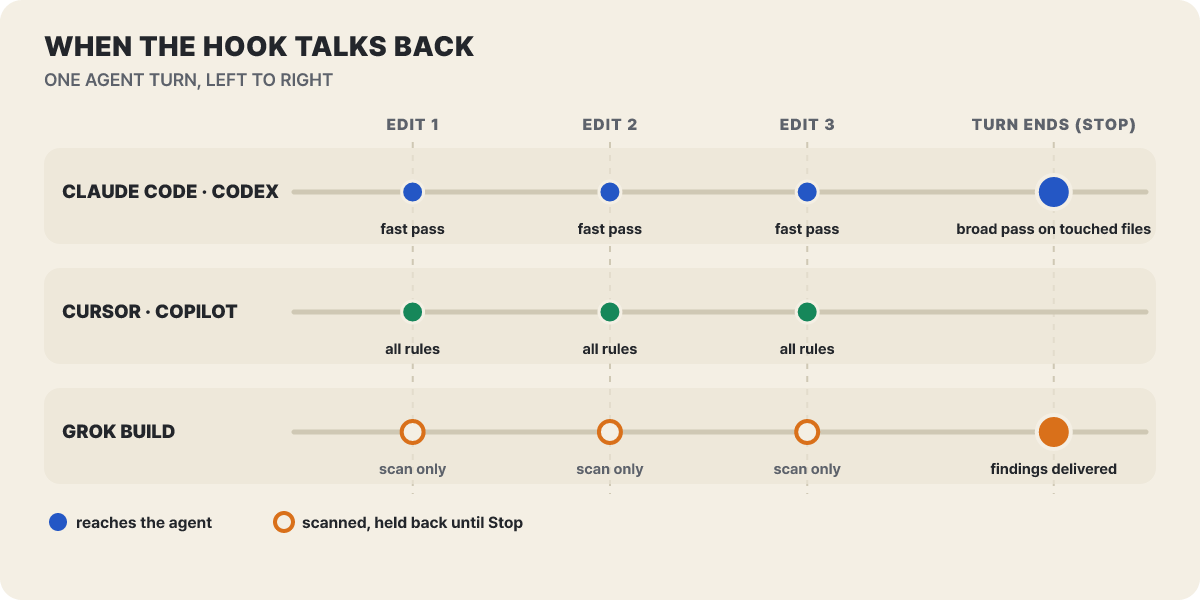 Figure 4. Blue and green dots are moments that reach the agent; hollow dots are moments that only scan and hold the result until the turn ends
Claude Code and Codex report only quickly the problems that stand out immediately after an edit (broken images, overflow, readability, gradient text, glow, design-system deviations), and at the moment the agent finishes its response they look at all the files touched in that session with a wider set of rules. The design avoids nagging on every edit while the agent is in the middle of building, and if you need the full rules on each edit, change hook.perEditRules to "all". Cursor and Copilot run the full rules after an edit. Grok Build only scans during edits and delivers the results all at once when the turn ends. Cursor reviewed proposed writes before they were applied as of v3.6.0, but the README and the v4.7.1 changelog say it moved to checking right after the write, and npx impeccable update migrates old settings to the new method.
The wide check at the end of a turn filters out what has already been reported so it doesn’t repeat itself. There is one more thing. When the baseline before the edit can be confirmed (currently the text scan that uses Claude’s Edit and Write results), problems that already existed are hidden, and other results are marked as either a new problem or a problem of unknown origin. The README explains that an “unknown origin” mark does not mean this session created the problem.
Where hooks live and how trust works differ by tool.
| Tool | Config location | What to do before turning it on |
|---|---|---|
| Claude Code | .claude/settings.local.json (local settings, not committed) |
Accept workspace trust, then check the PostToolUse and Stop hooks in /hooks |
| GitHub Copilot | .github/hooks/impeccable.json (committed, shared with the team) |
Must be on the default branch before Copilot CLI and the cloud agent use it |
| Cursor | .cursor/hooks.json |
Re-reads the file when it changes |
| Codex | .codex/hooks.json |
Approve once in /hooks after install, and approve again after an update that changes the definition |
| Grok Build | .grok/hooks/impeccable.json |
Does not run without /hooks-trust or --trust |
Check the status with /impeccable hooks status, and turn them on and off with /impeccable hooks on and /impeccable hooks off. Silence doesn’t mean there are no problems. It may be a clean edit, quiet mode, or hooks being off, and /impeccable doctor finds mismatches in the hook script path and between installed state and enabled state. Hooks check only web code and skip projects where PRODUCT.md declares ios, android or adaptive. If you need to debug, you can write a path in hook.auditLog in .impeccable/config.json to leave one log line per call.
Read this before turning hooks on. In Claude Code, installed hook commands run separately from the model’s tool approvals. So on the first edit or at exit, they may download the engine binary and place it in ~/.impeccable/bin/, and the README states this holds even if you denied the model’s command in the session. Read the hook contents before running unattended, and to turn them off use /impeccable hooks off, the environment variable IMPECCABLE_HOOK_DISABLED, or --no-hooks at install. Claude Code can also disable all hooks for a single run with --settings '{"disableAllHooks": true}'.
Four requests that leave your machine, and what builds up locally
The privacy policy states that project files and scan results are not uploaded to Impeccable’s servers. The detector and hooks run locally and return results only to the agent, and the prompts and files a coding tool sends to an AI provider follow that tool’s settings and terms. Four things go out.
- A new-version check about once a day. Turn it off with
IMPECCABLE_NO_UPDATE_CHECK=1. - When you start a new design, a request to impeccable.style’s roll API for “visual world” candidates. This is the feature itself, so it can’t be turned off.
- An anonymous record of which candidates were shown and what was selected. It can be turned off.
- Installation and the engine download. These come from npm or GitHub.
The selection record consists of values such as a random roll key, the kind and position of the candidates, the version, and whether the selection came from the decision screen or from the agent, and it reportedly does not send the project name, files, code, PRODUCT.md, or the direction names the agent made up. The committed screen brief keeps not the roll key itself but only a hash mixed with a random value from ~/.impeccable/seed-salt. The server says it does not record IP addresses or device identifiers, but this record has no fixed deletion deadline, and the privacy policy says that because it doesn’t identify individuals, one person’s records can’t be found and deleted. To turn it off, use one of npx impeccable telemetry off, DO_NOT_TRACK=1 or IMPECCABLE_NO_TELEMETRY=1; for the whole team, write "telemetry": false in .impeccable/config.json, and check the current state with npx impeccable telemetry status. Since v4.6.0, when it is off, the roll request also tells the server not to record. The candidate request and the preview images are needed for the feature, so they still go out even when it’s off.
Live mode and image generation carry their own costs and permissions. Live mode is in beta and edits a local dev server or static HTML, so it can’t be used on a deployed production site. When applying a copy edit it runs the optional impeccable:manual-edit-validate script in package.json with your permissions, so in an unfamiliar repository you should read that script first. For image generation on the mockup path, it uses the built-in generator if the tool has one, as Codex and Cursor do. If not, a fallback path using OPENAI_API_KEY opens up, and charges accrue separately to your OpenAI API project. Keep the key in the agent’s environment, not in chat or config files. The tool itself is free. Costs arise only from the coding tool and model usage fees and from this image generation.
From frontend-design to v4.7.1, and the check-only route
This layered structure was not built in one go. The README names Anthropic’s frontend-design skill as the starting point. Its SKILL.md lays out a flow: write a design plan covering color, fonts and layout first, review whether that plan is just a default that would appear for any topic, then write the code, and critique your own work as you build. It also lists the shapes AI design tends to converge on these days: a cream background with a serif heading and a terracotta accent, a black background with one fluorescent accent, newspaper-style rules and columns, a SaaS card bundle with the same rounded cards and the same shadows, and uppercase labels attached to any topic. Impeccable stacked context files and a checker on top of this, and by the changelog’s dates (skill versions) it grew like this.
| Date | Version | What changed |
|---|---|---|
| Apr 8 | v2.0 | Skill renamed from frontend-design to impeccable and rewritten against evaluations |
| Apr 9 | v2.1 | Commands consolidated from 21 to 18 (later grown again, now 24) |
| Jun 14 | v3.6.0 | Project hooks that help while the agent is editing (Claude, Codex, Cursor) |
| Jul 21 | v4.0.0 | Roll method that draws the design direction from an outside seed instead of the model’s first idea, 58 detector rules at that time |
| Sep 4 | v4.2.0 | Unified on one self-contained engine instead of a Node runtime |
| Oct 15 | v4.6.0 | When telemetry is off, roll records are also asked not to be kept; Oh My Pi support |
| Oct 20 | v4.7.0 | Inspection of running desktop apps (--cdp), straggler and unbalanced-heading added |
| Oct 23 | v4.7.1 | detect --github annotation output and --list-rules, engine 0.1.17 included |
The reason the roll method came in lies in a measurement in the v4.0.0 changelog. The project’s own measurement was that when it asked for something creative in sixteen different phrasings, 30 of 35 answers came back as the same concept. It concluded that what is missing is not creativity but variation, so it made directions come from an outside random seed rather than the model’s own ranking. Of the 360 it reviewed by hand, 188 are in the catalog as approved visual worlds, and six challengers sit next to the direction the model derived from the project, with the build going to a challenger only when it wins.
By burden, there are three entrances. The lightest is to skip installing and just run npx impeccable detect src/ to see how many findings your project has now. It gives up the guidance, but there is no agent, no hook and no network traffic, and results come out the same way every time. Above that is the route of adding only a guidance document, like Anthropic’s frontend-design, and at the top is the full Impeccable install, which stacks context files, 24 commands, rules that run on every edit, and hooks. Because this tool’s rules and commands grow often, it’s worth skimming the changelog once before you update.



