Agent Skills moved to AAIF, what changes in SKILL.md?
Anthropic donated Agent Skills to AAIF on Oct 22, but SKILL.md is unchanged. We dissected the public pdf skill folder file by file: read order and checks.
$ wc -c pdf/SKILL.md pdf/forms.md pdf/reference.md
    8072 pdf/SKILL.md
   11854 pdf/forms.md
   16692 pdf/reference.md
   36618 total
That is the file size of the pdf skill that Anthropic keeps in its public repository, measured after downloading it. When you ask an agent to do PDF work, it does not read all 36 thousand bytes. A request to merge two PDFs reads only 8 thousand bytes, and a request to fill in a form reads 20 thousand. This structure, where the amount read varies by request, is Agent Skills. Anthropic, which created the format, donated its name, logo, GitHub organization and domain to the Agentic AI Foundation (AAIF) on Oct 22 (UTC), and the fields and limits in the specification are unchanged. This article takes that folder apart from the outside in to check what a skill is, what the move to a foundation actually touched, and how to read a folder someone else made.
Only the name and the domain moved
An agent is an AI that picks its own tools and keeps working toward a goal. A skill is a format for handing such an agent a procedure, “here is how we do this job, in this order,” as a single folder, and the folder always contains a SKILL.md. Anthropic says the format came out of building its coding agent Claude Code, and that it published it as an open standard in December 2025. AAIF is a foundation under the Linux Foundation that looks after agent-related standards. It launched on Dec 9, 2025 with three projects: Anthropic’s MCP, Block’s goose and OpenAI’s AGENTS.md.
Laid out by date, the year looks like this. Of the five dots, the red one is this donation, and the right end shows how the repository looks today.
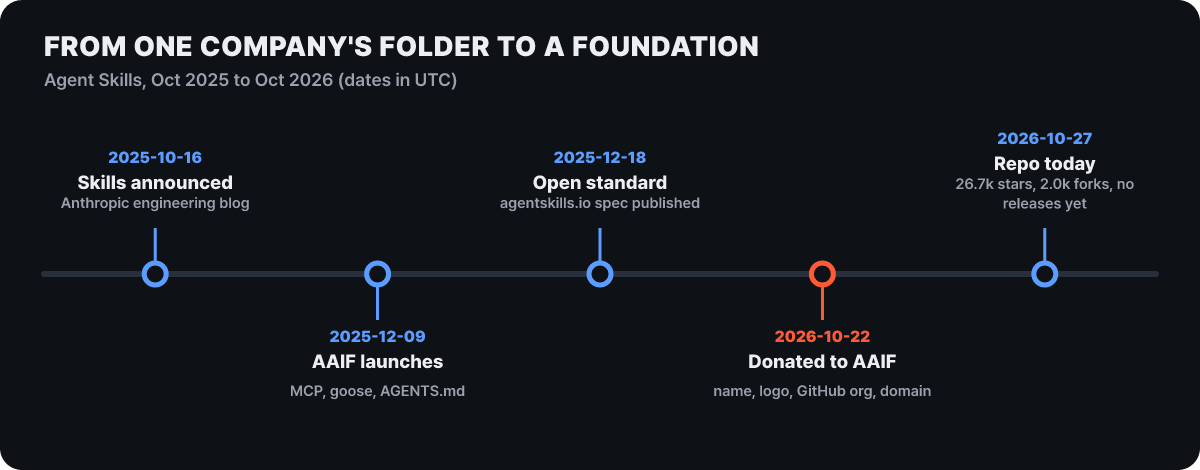 Figure 1. Five dates for Agent Skills. Repository numbers checked on 2026-10-27
What moved with the donation is the Agent Skills name and logo, the GitHub organization and the agentskills.io domain. From now on the specification is maintained by engineers from Anthropic, Google, OpenAI and others in a personal capacity rather than for their companies, led by David Soria Parra and Mahesh Murag. Joining AAIF is not required to use the format or contribute to it. Anthropic proposed three roadmap items: versioned releases, a formal proposal process and a security guide for writing and installing skills. They are still proposals, so the repository’s Releases list is empty as of Oct 27, and no field or limit in the specification has changed.
The scale given in the announcement is more than 70 agent platforms (including ChatGPT, Cursor, GitHub Copilot and VS Code), 1 million public skills and about 280 million installs in total, all counted by Anthropic. On the repository side, there are 26.7k stars, 2.0k forks and 55 open pull requests, with the code under Apache 2.0 and the documentation under CC-BY-4.0. The projects hosted by AAIF went from 3 at launch to 10. If you already have skills, there is nothing to change, and the rest of the story is inside the folder.
The twelve files in the downloaded pdf skill folder
The subject here is the pdf folder of the anthropics/skills repository. The skills folder in the same repository also holds folders such as docx, pptx, xlsx and mcp-builder, which makes it a good sample of what real skills look like. We downloaded the files on the main branch as of 2026-10-27 and measured the line counts and bytes ourselves. Only the green SKILL.md is read at the moment the skill is selected; the others are opened only when needed.
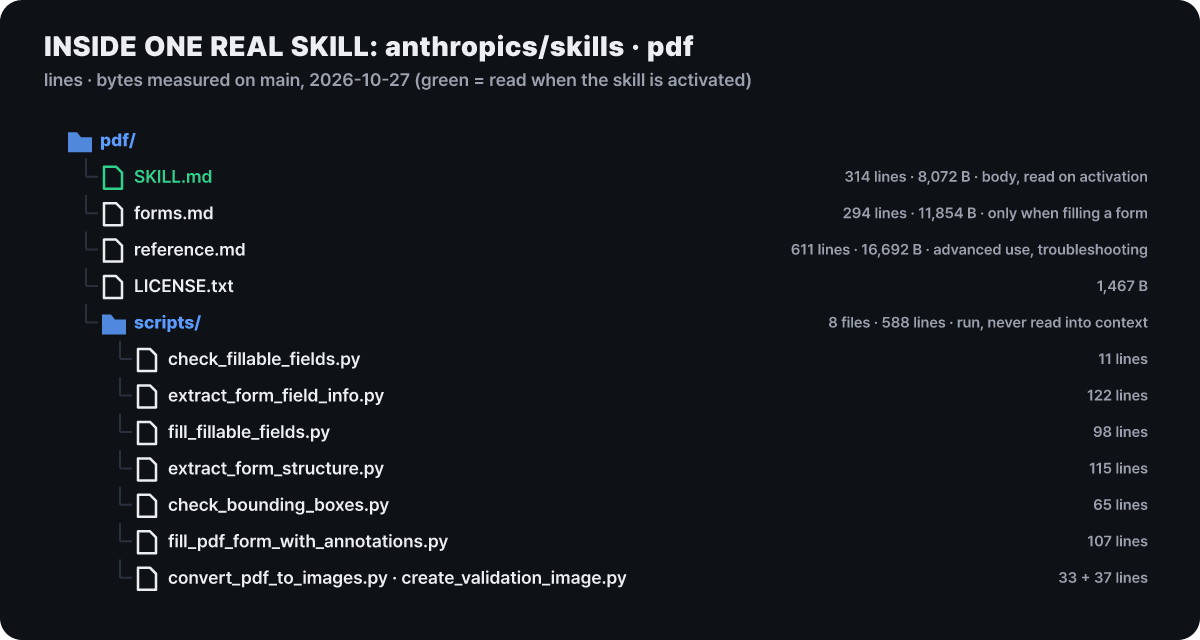 Figure 2. The pdf skill folder: one SKILL.md, two documents, a license and eight scripts
The role of each file roughly follows its size. SKILL.md is the main text, with usage per library and common tasks. forms.md is a procedure that covers only form filling, and reference.md is a dictionary of JavaScript libraries, advanced commands and troubleshooting. The eight Python files in scripts/ each handle one step of the form work. The shortest, check_fillable_fields.py, is 11 lines, and even the longest, extract_form_field_info.py, is only 122.
The reason LICENSE.txt is there shows up in the header shortly. Even when the format is an open standard, the terms of use of each individual skill are set by its folder. The license entry in this folder points to separate terms, and you have to open each folder to see the terms of the other skills in the same repository.
Three lines of promises in the header
SKILL.md puts a YAML header on top and writes a markdown body below it. All an agent reads at startup is the name and description in the header. Here is the pdf skill’s header, reduced to its skeleton.
---
name: pdf
description: (437 characters, English) Lists ten tasks done with PDFs and ends by saying to use this skill whenever a .pdf file is mentioned or a request asks to create a PDF
license: Proprietary. LICENSE.txt has complete terms
---
The first sentence of the description says, in effect, “use this skill for anything related to PDFs,” and then it names one task after another: extracting text and tables, merging, splitting, rotating, watermarking, creating, filling forms, encrypting and decrypting, extracting images, and OCR on scanned files. It follows the specification’s advice to state both what the skill does and when to use it. At 437 characters it is less than half of the 1,024-character limit. Since only this part of every skill is read at startup, one skill takes up roughly 50 to 100 tokens of the list, name included.
The specification defines six header fields, and this skill uses only three of them.
| Field | Limit in the specification | pdf skill |
|---|---|---|
name (required) |
1 to 64 characters, lowercase letters, digits and hyphens, no leading or trailing hyphen, no consecutive hyphens, must match the folder name | pdf, matches the folder name |
description (required) |
1 to 1,024 characters, both what it does and when to use it | 437 characters |
license |
A license name or a file name | Points to a separate terms file |
compatibility |
1 to 500 characters, the environment it needs (packages, network and so on) | Not used |
metadata |
A map of string key-value pairs, unique keys recommended | Not used |
allowed-tools |
A space-separated string of pre-approved tools, an experimental field | Not used |
In the real folder, the specification’s remark that most skills do not need compatibility rings true. The pdf skill uses Python packages but does not put environment requirements in the header; any install it needs sits next to the relevant example (for instance, the pip install note beside the OCR example). Loose validation is the convention. The implementation guide recommends loading a skill with only a warning when the folder name differs from name or when name is over 64 characters, and skipping only skills whose description is empty or whose YAML cannot be parsed.
What the 314-line body deliberately does not do
The body SKILL.md is 314 lines and 8,072 bytes. Estimating 4 English bytes per token gives about 2,000 tokens (our calculation), which sits comfortably within the specification’s recommended limits of 5,000 tokens and 500 lines. The section headings, in order, are Overview, Quick Start, Python Libraries, Command-Line Tools, Common Tasks, Quick Reference table and Next Steps. The Python Libraries section takes 161 lines, half of the body, and shows code examples for merging, splitting and rotating with pypdf, extracting text and tables with pdfplumber, and creating PDFs with reportlab.
What stands out is what is missing. There is no paragraph explaining what kind of file a PDF is, and code follows right after the overview. It puts into practice the best-practice advice to write only what the agent does not already know. More striking still, form filling appears in the body in just three lines (one pointer in the overview, one row in the quick reference table and one line in next steps). The procedure for the most complex job is handed off to forms.md instead of living in the body.
The way it hands off is worth learning, too. The sentence in the overview states the condition and the file together, as in “if you need to fill out a form, read FORMS.md and follow its instructions.” If you write a vague “see the reference document for details,” the agent cannot tell when to open it, but with a condition it opens the file only when that situation comes up. There is one mismatch as well. The body points to FORMS.md and REFERENCE.md, but the downloaded files are named in lowercase, forms.md and reference.md, and the raw address with the uppercase name comes back as a nonexistent file. On a case-sensitive file system the link name and the actual name can diverge, so in your own skill the name the body uses and the file name must match down to the letter.
Same folder, different amount read per request
Let us compute how much of this folder gets read for four kinds of requests. We assume the description is always in the list, the body is read when the skill is selected, and forms.md and reference.md are opened only in the situations the body’s pointers describe.
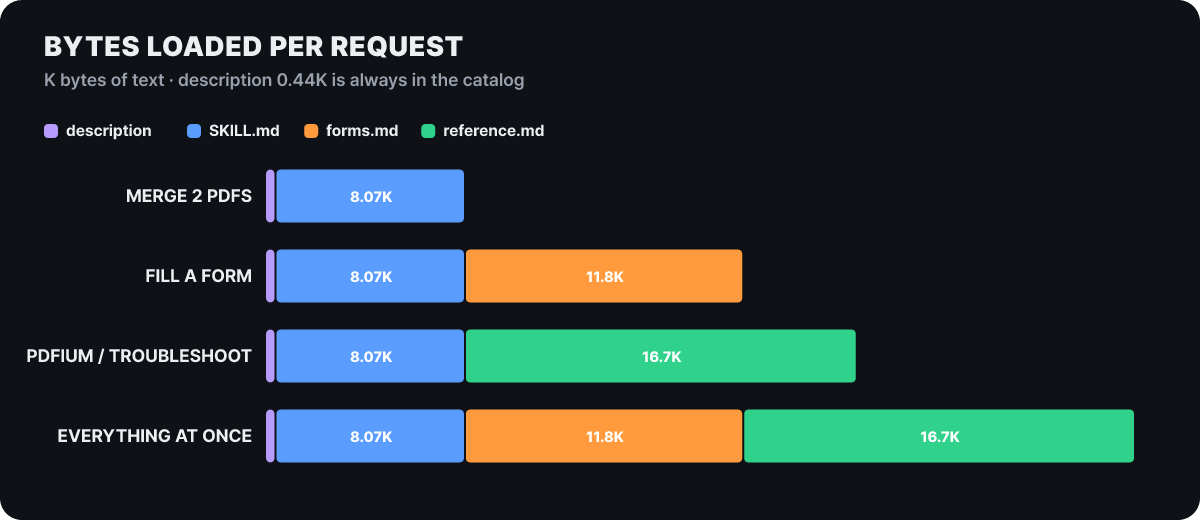 Figure 3. Amount of text read per request (K bytes). Per-file values are measured, totals are our calculation
A merge request ends at 8.51K. Form filling is 20.36K, which is 2.4 times that, advanced rendering or troubleshooting is 25.20K, or 3.0 times, and reading all three files at once is 37.06K, or 4.4 times. Had everything been in one file, every request would have paid the cost of the bottom bar, while the split into a folder lets most requests finish at the length of the upper bars. Scripts are not in these bars at all, because the agent runs a script and receives only its output.
The same principle carries on as skills multiply. With 50 skills installed, the list read at startup is about 5,000 tokens at 100 tokens per skill, but if the bodies of all 50 were read up to the cap (5,000 tokens each), it would be 250,000 tokens (our calculation). Activating one skill adds up to 5,000 tokens of body, for about 10,000 tokens. The advice to keep reference files only one level deep is a device to protect this arithmetic.
The path one form-filling job takes through the folder
Let us follow the longest path. This is the sequence for a case where the input PDF already has fillable fields, as laid down in forms.md. Time flows from top to bottom, and the red arrow marks the moment the flow passes from the body to the procedure document.
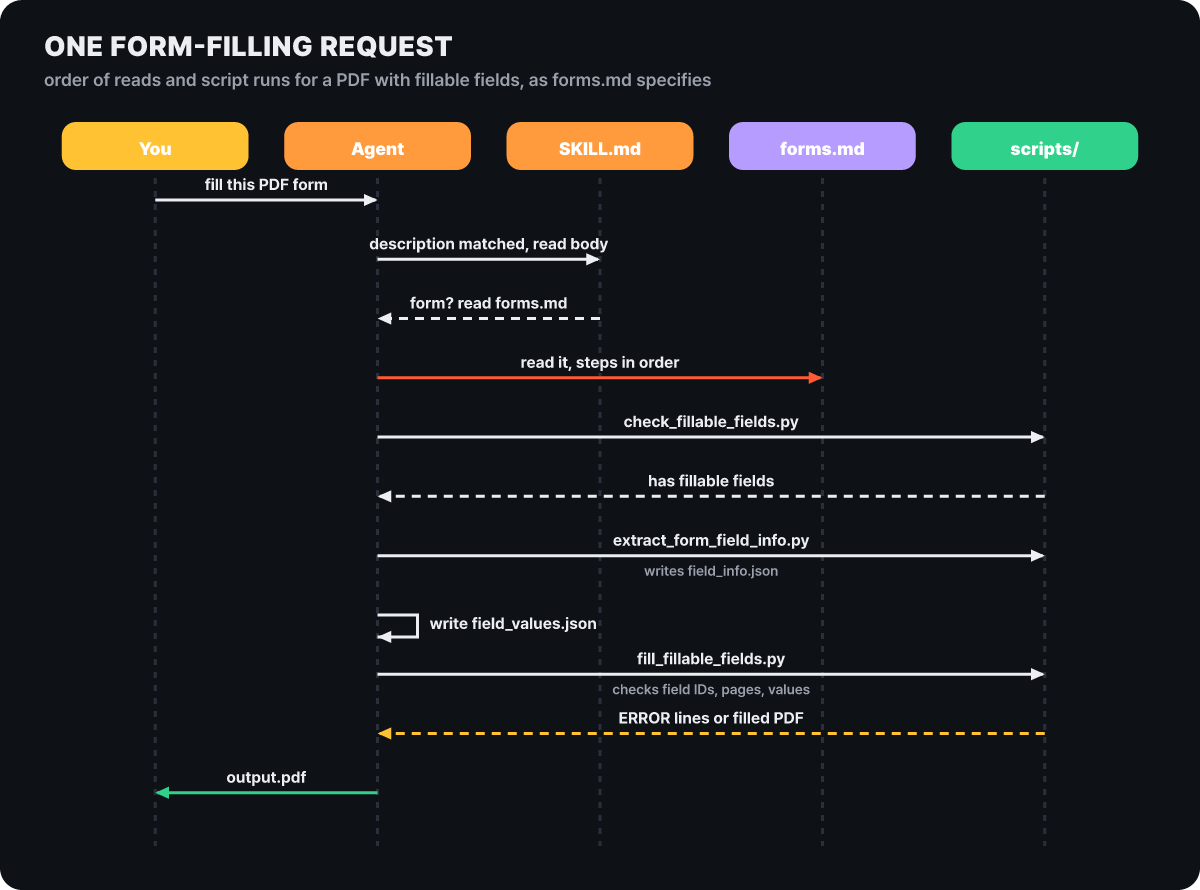 Figure 4. The order of reads and runs for one form-filling request
On its first line, forms.md insists that the agent follow the steps in order and not start by writing code. First, check_fillable_fields.py checks whether the PDF has fillable fields and picks a branch. If it does, extract_form_field_info.py pulls out, for each field, the field_id, page number, coordinates and type (text, checkbox, radio group, choice) as JSON. The agent works out the purpose of each field from the page-by-page images made by convert_pdf_to_images.py, and writes the value to enter for each field into field_values.json. Finally it runs fill_fillable_fields.py.
This last script is the key. Before filling, it checks the field_values.json that the agent wrote against the original’s field list, and if there is a field_id that does not exist, a page number mismatch or a value that does not fit the field type, it prints an error line and exits with code 1. The agent reads that error, fixes the values and runs it again. The pattern from the best-practices document, “make a plan, validate it against the source, then execute,” looks like this in an actual folder.
A PDF with no fillable fields takes a longer branch. It first tries extract_form_structure.py, which gets the field coordinates from the positions of text and lines inside the PDF (the approach the document recommends first). If that fails, it falls back to converting the pages to images, estimating coordinates by eye and correcting them by zooming in. For cases that mix the two approaches, it even writes out the formula for converting image coordinates to PDF coordinates. Once the coordinates are fixed, check_bounding_boxes.py checks whether the fields overlap each other and whether a field is too small for its text size, and only after that passes does fill_pdf_form_with_annotations.py lay the text on. The last step is turning the result into images again and checking by eye that the positions are right.
Scripts are run, not read
The eight scripts total 588 lines, about 20.6KB. If that code went into the agent’s context, one more block would have been added to the bars in Figure 3, but the agent only runs the scripts and receives their output. This is the structure that Anthropic’s engineering post explained using the PDF skill. The 11-line check_fillable_fields.py does not read the whole PDF; it returns one sentence, “there are fillable fields” or “there are none.” The code is given the job of shrinking a large input into a small answer.
The best-practices document lists a few conditions for scripts that agents use: do not ask interactive questions that wait for keyboard input, show usage when the arguments are wrong, send data to standard output and diagnostics to standard error, make it safe to run the same command again, use meaningful exit codes, and, because the harness truncates output at around 10 to 30K characters, default to a summary when the output is long. Reading the pdf skill’s eight scripts against this standard gives the following.
- There is not a single
input()call that waits for input. - Seven of the eight print usage and exit with code 1 when the number of arguments is wrong. The remaining one is the 11-line script that only takes arguments.
- It does not use a parser (argparse) that handles the
--helpoption. Instead, the body andforms.mdwrite out every command with an example run, so the agent never needs to ask separately how to use them.
It is a case showing that the standard is a recommendation, not a rule. If the usage is documented thoroughly enough, the script side can stay short.
Four checks when reading a folder you received
Scripts are code, so installing someone else’s skill means bringing code into your own environment, and the instructions in its body also drive the agent. Anthropic’s engineering post warns that a skill can make the agent introduce vulnerabilities or send data out, and tells you to install only from trustworthy sources. For less trusted skills, the advice is to read even the code dependencies, images and scripts in the bundled files, and to look for instructions that connect to untrusted external networks. Below is what came out when we ran only read-only commands on the pdf skill we just dissected, without executing any of its scripts.
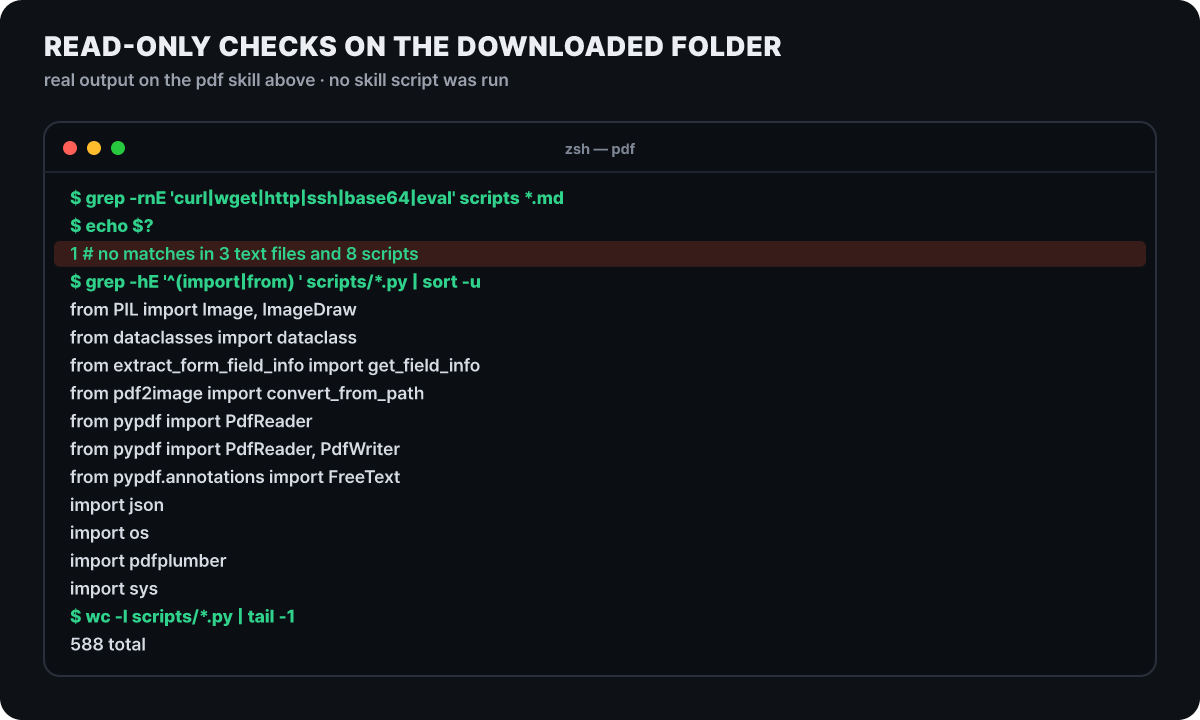 Figure 5. Not one network-related word, and the only external packages are PDF and image libraries
The grep that looks for any line containing one of curl, wget, http, ssh, base64 or eval found nothing in the scripts or the three markdown files, so it returned exit code 1. The only modules imported are pypdf, pdfplumber, pdf2image, PIL and standard modules, and every path for opening and writing files comes from command arguments. Still, a word search is a skim, not an audit, so what the body tells the agent to do has to be read with your own eyes.
- Open the folder and read
SKILL.md, checking that its instructions do not ask for anything different from the description. - Skim
scripts/with a word search for traces of network calls, encoded strings or arbitrary code execution. - Check that
allowed-toolsin the header is not broader than what the skill does. - If you are unsure, run it first in an isolated working folder, and do not use skills of unclear origin.
The riskiest case is a skill you did not install yourself. If you download an unfamiliar repository and start an agent, a project skill inside it can put instructions into the agent’s context. That is why the specification’s implementation guide recommends loading project skills only after confirming that you trust the folder. Claude Code’s documentation has a few more related items. A ! command in the body runs before the agent even sees the skill and has a default 2-minute limit, and setting disableSkillShellExecution to true in the settings replaces execution with a blocking notice. To block a particular skill, use a deny rule such as Skill(deploy *), and to turn off skills altogether, put the Skill tool itself in the deny list. allowed-tools also applies in folders you do not trust, so for a skill that comes with a repository, check that field first before running it.
Where each tool calls the same folder differently
The specification defines only the inside of the folder and leaves where to find it and how to call it to the tools. The implementation guide introduces <project>/.agents/skills/ and ~/.agents/skills/ as a shared convention among tools, and notes that some implementations also scan .claude/skills/. Claude Code uses its own folders, and when the same name exists in several places, the order is as follows.
- EnterpriseDeployed by the organization in the managed settings folder. Wins first when the name is the same
- Personal
~/.claude/skills/. Used in all my projects - Project
.claude/skills/. Committed to the repository and shared with the team. A.claude/skills/in a subfolder applies only to sessions opened inside that folder - PluginSeparated by the
/plugin:skillname, so no conflicts
The specification’s implementation guide describes project skills overriding user-level skills as a common convention among existing implementations, while in Claude Code’s documentation, personal comes before project. Which side is right matters less than the point that, with the same name, a different one may run depending on the tool. That is why giving a skill a common name like pdf is risky.
One more thing: Claude Code adds header fields that are not in the specification. It ignores unknown fields without an error, but if you upload a skill elsewhere with those fields still attached, it gets blocked.
| Field | What it does |
|---|---|
disable-model-invocation: true |
The agent cannot call it on its own, only via /name. The description is also dropped from context |
user-invocable: false |
Hidden from the / menu and called only by the agent |
context: fork |
Runs in a subagent with no conversation history |
paths |
Limits the auto-activation scope by file path patterns |
when_to_use |
Extra conditions appended to the description. Truncated at 1,536 characters together with the description |
model / effort |
The model and reasoning effort while it is invoked |
claude.ai uploads and the Skills API accept only the six fields name, description, license, compatibility, metadata and allowed-tools, and any other key causes an error on upload. If a skill will be uploaded to several tools, it is safer to keep only the six standard fields. A skill that has been loaded stays in the conversation and takes up context, and when the conversation is summarized, Claude Code re-attaches the first 5,000 tokens of the most recent invocation of each skill and fits the whole within 25,000 tokens. In a long session where many skills were called, that means older skills may drop out.
What to carry over when you copy this into your own folder
Combining the habits to take from the pdf skill with the patterns the best-practices document adds gives five. First, write in the body only what the agent does not know. Ask of every sentence, “would the agent get it wrong without this line?” and delete it if not. Second, do not make the agent choose a tool; decide one default. This is how the pdf skill’s quick reference table names a single tool per task, “pdfplumber for text extraction, pypdf for merging.” Third, collect the environment facts that agents often get wrong into a list of traps. Fourth, if steps depend on each other, add a checklist, and if they are easy to get wrong, add a validation script. Fifth, for batch or destructive work, create a plan file, check it against the source, and only then execute.
Below is an example from our editors that carries these principles over into a small skill.
---
name: release-notes
description: Draft release notes from a commit list. Use when asked for release notes or a changelog summary.
---

1. Read the commit titles since the last tag.
2. Group them into features, fixes and internal changes, one line each.
3. Output the draft only and do not write any files.

## Traps
- Leave merge commits and "wip" commits out of the list.
- Internal refactoring is not a user-visible change, so group it only under "internal".
Whether a skill really helps can only be known by running the same requests with the skill and without it (or against a previous version) and measuring the pass rate, time and tokens. The document’s example values are a pass rate of 83% against 33%, time of 45 seconds against 32 seconds, and tokens of 3,800 against 2,100. The judgment is that spending 13 more seconds and about 1,700 more tokens for a 50-percentage-point rise in pass rate is worth it. There is also advice to drop test items that always pass even without the skill, because they tell you nothing about its value.
Four places where people get stuck
I made a skill but the agent does not call it automatically
The check the specification recommends goes like this. Write about 20 queries, 8 to 10 that should trigger the skill and 8 to 10 that should not, run each 3 times (60 calls), and count from the tool log whether the skill was called. Passing means a call rate of 0.5 or higher for the queries that should trigger it and below 0.5 for the ones that should not, and the queries are split 6 to 4 between training queries used when editing the description and validation queries used to check generalization. The queries that should not trigger it are most valuable when they are near misses that share words but need a different job (for a CSV skill, “fix the formulas in my Excel budget sheet”). A simple one-step request may be handled with the default tools even when the description fits perfectly. If you are in a hurry, call it directly with /name in Claude Code, and the name has to be at the very start of the message to run immediately.
If the folder name and name differ, does the skill not work at all?
The specification says the two must be the same, and the validation tool skills-ref validate checks the naming rules. However, the implementation guide recommends loading the skill with only a warning for a name mismatch or a name over 64 characters. It may differ between tools, so passing the validation tool is the surest route.
Is it a problem if the description contains a colon?
Strictly speaking, putting a colon (:) in an unquoted value is invalid YAML. Some other tools happen to read it anyway, so the implementation guide recommends a fallback that wraps the value in quotes and parses it again. As an author, wrapping the whole description in quotes or a block string keeps it safe in every tool.
After the donation, do I have to join AAIF to make or publish skills?
No. You can keep using the format as it is, and you can give feedback on specification changes through GitHub repository discussions and the project Discord.
Three projects that joined the same foundation, and where to read next
On Oct 22, AAIF received three more projects besides skills. Open Responses, donated by OpenAI, is an open specification based on the Responses API, aiming to let you write requests and outputs once and run them across several model vendors through a common schema, consistent streaming events and an extensible tool specification. OpenEnv, donated by Hugging Face, is a framework and community hub for building and sharing reinforcement learning environments, and it runs an environment as a container service and exposes it through an agent interface, MCP and the Gym training convention. OpenSandbox, donated by Alibaba, is a general-purpose sandbox platform for AI applications that offers SDKs in several languages, a unified API and Docker and Kubernetes runtimes, with coding and GUI agents, evaluation, code execution and reinforcement learning training as its listed uses. The six projects that were already there are MCP, goose, AGENTS.md, Agent2Agent, Agent Router and agentgateway.
For the skills side, there are five places worth reading next.
- Full specification: agentskills.io/specification
- For authors: skill-creation/best-practices and the description optimization and evaluation documents on the same site
- For tool builders: client-implementation/adding-skills-support
- The donation announcements: Anthropic’s announcement and the Linux Foundation press release
- Real folders to dissect: the pdf, docx, pptx and xlsx folders of anthropics/skills



