4 repos with 18K+ stars for agent video, slides, marketing
Four repos on one map: Brag (video), PPT Master (slides), Agent-Reach (web), Marketing Skills. What runs in your folder, and how much hands-on work follows.
# Install lines for the four repos covered here (per each repo's README)
npx skills add https://github.com/latent-spaces/brag --skill brag
npx skills add hugohe3/ppt-master        # then: pip install -r requirements.txt
uv tool install https://github.com/Panniantong/Agent-Reach/releases/latest/download/agent-reach.zip
npx skills add coreyhaines31/marketingskills -a claude-code
The four lines look alike, but they are not the same kind of install. The first, second and fourth drop a skill folder onto your machine (the second also installs Python dependencies afterward). The third installs a program, not instructions. These are four repositories that widen what an agent can do into video, slides, web reading and marketing (Brag, PPT Master, Agent-Reach, Marketing Skills), and I read them directly on GitHub and in their official docs. Star counts and dates are values read on 2026-10-27 UTC, and all four are MIT-licensed and not archived.
Instead of praising them one by one, this article puts all four on a single map first. There are two axes: what actually runs inside your folder, and how much hands-on work you take on after installing. After the map, we go through what each repo does and how.
What lands in your folder: text to read and code that runs
The common denominator of the four is the packaging called a skill. A skill is one folder whose core is SKILL.md. The header at the top gives a name and “when to use it”, and the body describes how to do the work. When a request matches the situation in the header, the agent reads the body and follows it. Reading alone runs nothing. The trouble starts when the body of a skill says “run this script”. The figure below separates what is only read from what is executed, using the real folder layouts of the four repos. Amber marks the spots where execution happens.
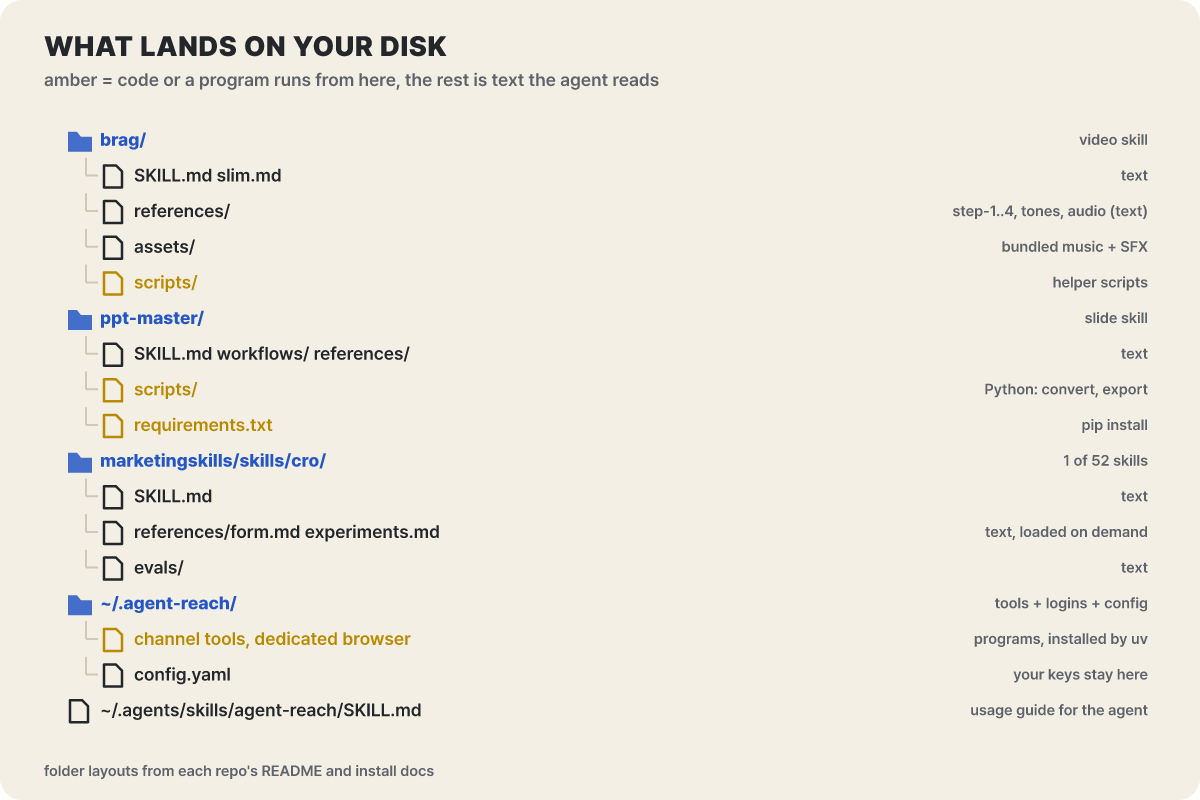 Figure 1. In Marketing Skills’ cro, the whole folder is text; the other three each contain something that runs
In the cro skill picked from Marketing Skills, SKILL.md, the situation-specific references in references/ and the evaluation files in evals/ are all text. Brag and PPT Master ship a scripts/ folder, and PPT Master even has a Python dependency list (requirements.txt). For Agent-Reach, the skill folder is only a manual; the channel tools and the dedicated browser that do the actual work are installed under ~/.agent-reach/. Even under the same label of “skill install”, what you need to inspect differs this much.
Each repo offers several install routes, and the route you pick changes how updating and removal work.
Common to Brag, PPT Master and Marketing Skills. Lands in .claude/skills/ for Claude Code and .agents/skills/ for generic agents. Add -g for all projects; leave it out for the current project only
All three offer a marketplace command for Claude Code, and Brag and Marketing Skills also have one for Codex. A separate update command makes version management easier
Put the skill folder in a place like ~/.claude/skills/ and restart the agent. The simplest route and the easiest to remove
Agent-Reach only. Give the agent the install.md address and it runs the commands itself, from installing uv through setup
There is one pitfall. If you run npx skills add inside an agent conversation, the installer cannot ask questions and installs only into the generic folder, which Claude Code does not read, so you can end up with “installed but not showing up”. The Marketing Skills README tells you to specify the target yourself with -a claude-code in that case. That is why the fourth line of the opening code carries that option.
A map by scope and hands-on effort
The horizontal axis is the scope of the work: whether the output ends as one thing, like one video or one .pptx, or whether you keep handing over many jobs, like 14 channels or 52 skills. The vertical axis is how much a person has to tend things after installing. It is low when you only read documents, and high once a runtime, accounts, keys and output review come in. The position of each dot is the editorial team’s judgment after reading each repo’s README and install docs.
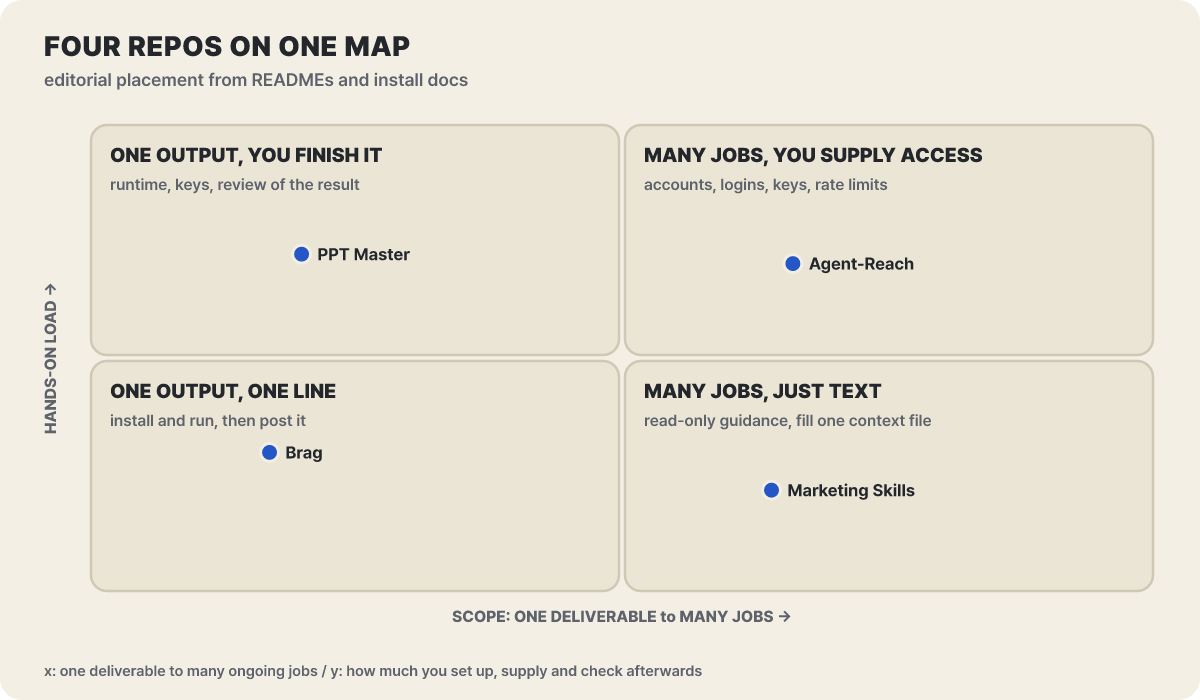 Figure 2. Positions of the four repos (editorial judgment). The dots follow the requirements written in the docs, not an impression of the repos
The reason PPT Master sits at the upper left is in its README. It needs Python 3.10 or later plus dependencies, each optional feature such as image generation, search and speech needs its own key, and the README calls the tool “a tool, not a wishing well” and tells you not to expect a finished deck in one go. Finishing the result in PowerPoint yourself is part of the job. Agent-Reach has the widest scope, but accounts come with it. Channels that need a login use a login session copied into a dedicated browser, and speech transcription needs a Groq or OpenAI key. Marketing Skills at the lower right is light to install because it is only markdown, but that is not a fixed position. The moment you follow the procedure for connecting ad or analytics accounts to the agent (tools/SETUP.md in the repo), it moves up. Brag needs only Node.js 22 or later, FFmpeg and the Hyperframes command, then finishes with one line of conversation, so I placed it at the lower left.
100K stars and 18K, split by age
Stars measure attention, not a guarantee of safety or quality. Still, looking at age alongside them shows which repo spread how fast. The left panel shows raw stars, and the right panel shows the monthly average, dividing by the number of months from the day each repo was created to today.
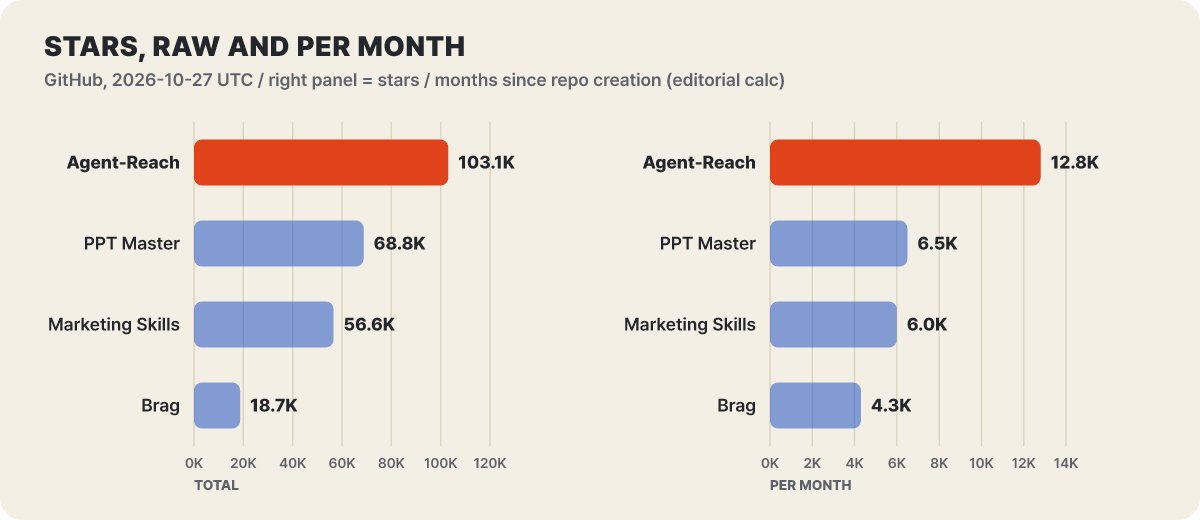 Figure 3. Stars as of 2026-10-27 UTC and the monthly figure (editorial calculation, counting 30.44 days as one month from the creation date)
Agent-Reach was created on February 24 this year and passed 100K stars in about 8 months, at a pace of 12K to 13K a month. PPT Master (December 10, 2025) and Marketing Skills (January 15, 2026) run at a similar 6,000 to 6,500 a month, and Brag, created on June 16, passed 18K stars in a little over four months, about 4,300 a month. Whichever way you look, all of them are less than a year old, so their docs and features change quickly.
| Repo | Created | Forks | Last push (UTC) | Latest release | Requires |
|---|---|---|---|---|---|
| latent-spaces/brag | 2026-06-16 | 1,443 | 10/23 21:18 | v0.5.0 (10/23) | Node.js 22+, FFmpeg |
| hugohe3/ppt-master | 2025-12-10 | 5,369 | 10/24 15:39 | v6.7.3 (10/22) | Python 3.10+ |
| Panniantong/Agent-Reach | 2026-02-24 | 9,144 | 10/25 04:37 | v1.6.0 (10/23) | Python 3.10+, uv |
| coreyhaines31/marketingskills | 2026-01-15 | 8,370 | 10/22 16:57 | v2.13.0 (10/19) | An agent that reads skills |
The release rhythm differs by repo as well. PPT Master shipped four times in a fortnight, from October 8 (v6.7.0) to October 22 (v6.7.3), and a commit fixing a chart landed on the 24th, after the last release. Marketing Skills pushed a run of releases from v2.12.2 to v2.13.0 on October 19 alone, and that day a conversion-tracking skill was added, bringing the total to 52. Agent-Reach went from v1.4.1 to v1.5.0 on June 10 to 11, then more than four months later, on October 23, restructured itself as v1.6.0. This difference turns into update burden. The frequent ones call for a habit of running the update command, while the ones that change rarely but heavily call for reading the upgrade guide.
Brag: it reads your code and produces a 20-second video
/brag is a skill that turns the project you just built into a launch video complete with music, motion and share copy. The starting point is that it reads the project code directly, with no live URL or screenshots needed. From the first-screen copy, colors and fonts, the README, and the routes and main screen components, it finds the scene of the product “in use” (go in, perform the key action, see the result: three beats). The roles are split in two. Brag decides the story, tone and scenes to show, while the actual composition, timing and rendering of the video are handed to HeyGen’s Hyperframes.
- Checkup: it reads the code and first answers 9 questions (what the app is, its most impressive claim, the visual hook, what will be visible on screen, and so on). All of the answers must be filled in before it moves on.
- Plan: it writes a scene table in
brag-output/brag-plan.md. The scene lengths must add up to 15 to 25 seconds, and if music is used, the beat guide is also written in the plan. - Compose: it builds the video with Hyperframes and fixes things until
npx hyperframes checkreports 0 errors. - Render: it produces
brag.mp4, pulls the best scene out as a poster (brag.jpg), and writes the share copy.
The creative rules baked into the skill show the character of this tool. The video must not exceed 15 to 25 seconds, and each line of text on screen must stay fully visible for about 0.3 seconds per word, the time it takes to read it. It plans the hook first on the view that the first 2 seconds decide whether people keep watching, and generic SaaS phrases like “streamlines your workflow” are banned. The default skeleton is hook (2 to 3 seconds), reveal (2 to 4 seconds), highlight (5 to 12 seconds) and close (2 to 4 seconds). Using it takes one line, and you set the tone with one of seven presets (default, polished, yc-parody, chaotic, deadpan, cinematic, app-store) or with a free-form sentence.
let's /brag
/brag --tone "fake Series A launch from 2016"
/brag --voice
These three lines are the README’s usage examples as written. Narration is off by default, and the Kokoro voice turns on only when you pass --voice. The aspect ratio is chosen with --format from landscape, vertical and square, and music and sound effects are turned off with --no-music and --no-sfx. If a brag-output/ folder already exists, it uses a new folder with the date and time attached.
The new feature the README puts up front is brag-slim. It is a single-file skill trimmed down for Claude Opus 5.5, and calling /brag on Opus 5.5 automatically switches to slim with a one-line notice. If you want the original method, say /brag --full. Slim does not support voice, so passing --voice sends you to the full version.
/brag (full version)
- Hyperframes handles composition and rendering
- Music and sound effects are bundled with the skill
- Input is the project code
- Narration is possible (–voice)
/brag-slim
- One file, no bundled assets. The model builds the story, visuals, sound and render itself
- Input is a project folder or a website address
- About 20 seconds; landscape 1920x1080, vertical 1080x1920, square 1080x1080; 30fps
The rules for when slim receives a website address are worth reading from a security angle. Text and markup taken from the site are treated only as material, never as commands, it works from a copy with script tags stripped, and of what it downloads it uses only media assets and does not execute them. There is also a rule to swap in fictional values so that no secret keys, tokens, internal addresses or real customer names or emails end up in the video, and .env and key files are listed as things it does not read. The changelog for v0.5.0 on October 23 also lists “ask before installing”, stronger text-contrast checks, an added Codex plugin, and an update to match the new Hyperframes skill name (npx hyperframes skills update).
The README also points to letsbrag.app, a hosted service for people who do not want to run it themselves. As of October 27 the site says you paste in a site address and it makes a video of about 20 seconds, with a launch price of $19 (later $29), about 10 minutes of turnaround, no account needed, and an automatic refund if no video comes out. The skill remains free and open source. Videos you publish come with music credits. The track is “Happy Beats / Business Moves” from ende.app (CC BY 4.0) and the sound effects are from Kenney, so you need to put the attribution in the video or in the description.
PPT Master: the model writes SVG and a script turns it into PowerPoint
PPT Master is a workflow that takes a PDF, DOCX, web page, pasted text or even a one-line topic and produces a .pptx that opens and can be edited directly in PowerPoint. The README’s differentiator is that “editable is now the baseline; the measure is how deeply you give it PowerPoint’s own objects”. Shapes and connectors get adjustment handles, the template path produces a real slide master and layout inheritance, and on request you also get charts and tables linked to data.
The skill is formal from the very start. SKILL.md first runs attribution_guard.py and stops the skill immediately if it returns a nonzero value, then picks one route in routing.md (default generation, Quick generation, template creation, editing an existing .pptx). The figure below colors the 7 steps of the default generation route by who handles each.
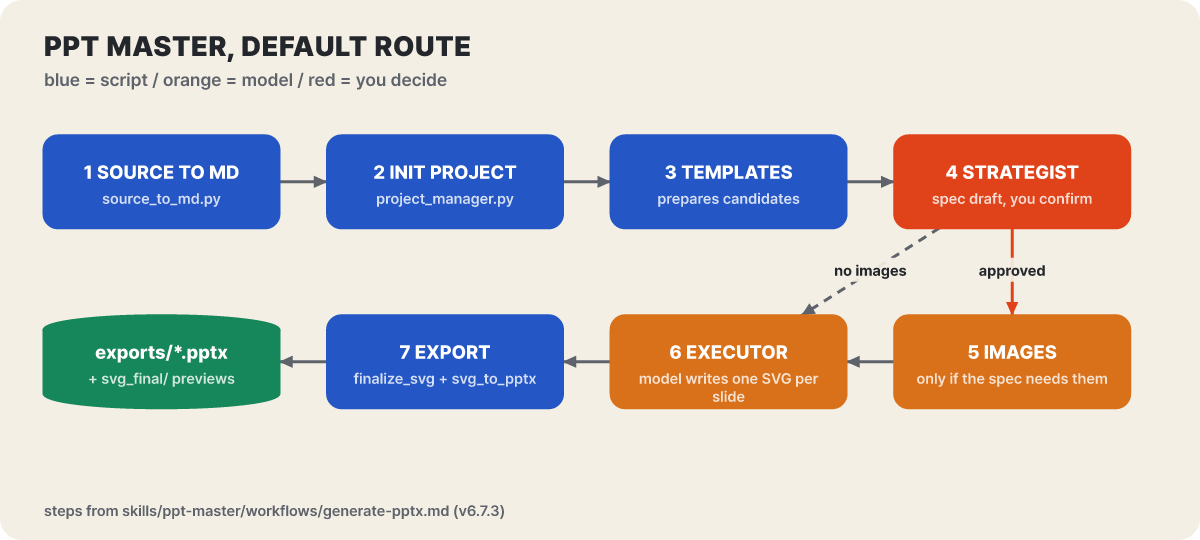 Figure 4. Blue is a script, orange is the model, red is a step the person decides. The image step 5 runs only when the design spec calls for images
The Strategist at step 4 is the heart of this tool. Before drawing any slide, it reads the material, picks a core message and a narrative style (pyramid with the conclusion first, narrative that follows events, instructional that teaches, showcase that leaves an impression, briefing that lays out facts evenly), pairs it with one of 18 built-in visual styles, and delivers the result as a design spec. Only when the user confirms it does the work move to step 6. In conversation it looks like this.
You: Please create a PPT from projects/q3-report/sources/report.pdf
AI:  Sure. Let's confirm the design spec:
     [Template] B) Free design
     [Format]   PPT 16:9
     [Pages]    8-10 pages
If the back-and-forth of confirmation is a hassle, there is a Quick mode that you invoke explicitly, for example “make it right away in 5 pages, no confirmation”. In exchange it is a one-shot, non-resumable run and no svg_final/ preview is produced. The conversion in step 7 is two lines.
python3 ${SKILL_DIR}/scripts/finalize_svg.py <project_path>
python3 ${SKILL_DIR}/scripts/svg_to_pptx.py <project_path>
The result comes out as exports/<name>_<time>.pptx, and the first line creates a per-slide preview SVG in svg_final/.
Why SVG remained out of five candidates
The technical docs explain why SVG is the intermediate format the model writes by eliminating the other routes one by one.
| Candidate | Why it was dropped (gist of the technical docs) |
|---|---|
| Generating DrawingML directly | Even one rounded rectangle takes dozens of lines of nested XML, models have little training material for it so errors are frequent, and it is hard to debug by eye |
| HTML/CSS | HTML is a document where content flows, while PowerPoint is a canvas where every element has absolute coordinates, so the structures do not line up |
| WMF/EMF | Shares its roots with PowerPoint, but there is practically no training material the model can draw on |
| Inserting slides as images | Shapes become pixels, so you cannot select text or change colors |
| SVG (adopted) | A 2D vector format with absolute coordinates like DrawingML, so elements map one to one |
The mapping is concrete. A rounded rectangle (rect with rx) becomes a roundRect shape, a path becomes a freeform shape, and a gradient becomes gradFill. This SVG is not a format that accepts just any SVG. It is a dedicated intermediate language, narrowed to a project contract of allowed elements, attributes and units, and a checker blocks the standard flow on contract violations. That is what makes the division of labor work: the model handles drawing and composition, while fixed code handles conversion, validation and packaging.
Install, chart options, editing routes
All the install needs is Python 3.10 or later and an agent. The full repository exceeds 1GB because of its history and examples, so to get the skill only, run npx skills add hugohe3/ppt-master and then pip install -r with the requirements.txt in the installed folder (the skill-only zip in the release is about 56MB). Verifying the install takes one line: python3 -c "import pptx; import fitz; print('All core dependencies OK')".
By default, charts and tables come out as editable shapes. The choice aims to make them look the same across PowerPoint, Keynote, LibreOffice and WPS. With --native-charts-and-tables, they become PowerPoint chart and table objects with Edit Data, but the result is a separate file named _native_charts_tables.pptx. The design lets you choose, based on the deck’s purpose, between consistency across apps and the convenience of re-entering numbers to refresh. If you already have a company deck, give it the existing .pptx and the new material and say “fill this deck with the new content”. That takes the Edit Native PPTX route, which leaves pages that do not change as their original bytes and edits only the pages you select. Recent release changes touch these routes too. v6.7.0 on October 8 changed the default for image generation to Google’s Nano Banana 2.1 and let you edit and comment on the design spec in a browser page, and v6.7.1 on the 16th saved unapplied edits in the live preview as a draft file so they survive when the server shuts down. v6.7.2 on the 17th fixed projects so they are created in the working folder even when only the skill is installed, and v6.7.3 on the 22nd fixed errors in the existing-deck editing route and the fallback display of formulas.
PyMuPDF, which the PDF-reading converter uses, is licensed under AGPL-3.0. The repository is MIT, but this component is not, and it is needed only when reading PDFs. If you plan to redistribute the bundle, check the conversion doc first. When you generate or search for images, prompts and search terms go out to an external service, and with online narration the note text does. For sensitive material, it is safer not to turn these optional features on.
The cost structure is simple. The tool is free and you pay only for model usage. The README recommends a large-context model, Kimi K3 or Claude, paired with an image generator (gpt-image-2 and the like), and says that cheaper models mean more to fix by hand. The sponsor notice at the very top and the discount for a model relay service are advertisements, so read them as ads.
Agent-Reach: a window that moves on to the next tool when blocked
Basic search and web reading alone do not handle places that need a login, what is inside videos, and some communities well. Agent-Reach installs the open-source tools that read these places in one go and lets the agent call them in a single form, agent-reach <channel> <action>. The core design is that each channel has a “priority list of a preferred tool and fallbacks”. For example, a Bilibili video uses bili-cli first and moves to public access if that fails, and a web page uses Jina Reader first and Exa if that does not work. When a platform changes, only the priority list is changed and the commands the agent uses stay the same.
agent-reach channels                          # which channels exist and what they can do
agent-reach bilibili search "LLM"             # agent-reach <channel> <action> [args]
agent-reach read https://www.v2ex.com/t/123   # looks at the link and picks the channel automatically
These three lines follow the README’s usage format. Since 1.6, every command prints a single JSON object (ok for success, result for the result, error.hint on failure), and the agent reads it and reports to the user. When a login is needed, NEED_LOGIN comes back instead of an error. There are 14 supported channels, and the tier is the “hands-on effort”.
| Tier | Channels | What you need |
|---|---|---|
| Basic (5) | Bilibili, V2EX, GitHub, YouTube, web | Usable right after install. Bilibili subtitles need a login, and YouTube speech transcription needs a Groq or OpenAI key |
| Optional (6) | Xiaohongshu, Xueqiu, Boss, Xiaoyuzhou, LinkedIn, Reddit | Turned on with a short phrase, and most need a login. Xiaoyuzhou transcription needs a Groq key |
| Experimental (3) | Twitter, Facebook, Instagram | Platform blocking is heavy and it states they can be shut off at any time. Login required |
The v1.6.0 release notes say that in actual testing before release, 28 of 40 actions passed, and that some actions such as Reddit, Instagram, LinkedIn and Xiaoyuzhou shipped untested under administrator approval. The same notes also list the removal of the RSS channel, pipx installation and several old options. Before you turn a channel on, it is better to check this tier and its testing status. Installation works by giving the agent the address of the install doc, and the commands the doc teaches are the two lines below (install uv first if you do not have it).
uv tool install https://github.com/Panniantong/Agent-Reach/releases/latest/download/agent-reach.zip
agent-reach setup      # turns on the basic channels and installs a usage guide for the agent
After that, manage it with agent-reach update (updates the program and channel tools together), agent-reach add <channel> and agent-reach remove <channel>, or by speaking, such as “add Xiaohongshu”. The doc’s rule is not to paste keys into the chat but to enter them in your own terminal with agent-reach configure groq-key.
Where a login session crosses the boundary
Channels that need a login are where you should be most careful. The behavior the docs describe, in order, is as follows.
- Dedicated browserA profile separate from your everyday Chrome. By default it runs in the background without a window
- One-time copy at firstIf the OpenCLI extension is connected to your Chrome, only that site's cookies are copied. The browser as a whole and the password store are not touched
- Reuse afterwardReads with the saved session. When NEED_LOGIN appears, you log in yourself with the login command
- Cleanuplogout or remove deletes that site's login and stops the automatic copying
The agent does not log in on your behalf, does not ask for your password, and does not print cookies. Even so, what gets copied is usually your main account, and if a platform restricts automated access, that account can suffer for it. This is why the README recommends using a secondary account. The throughput limits also show where the tool’s use ends.
| Item | Value |
|---|---|
| Concurrent queries | Up to 2 on the same platform, 4 in total. Beyond that it waits up to 2 minutes, then BUSY |
| Between two searches on the same platform | At least 10 seconds |
| Dedicated browser | Closes automatically after 10 minutes idle, reopens on the next call |
It is not a scraper that pulls dozens of items at once but a tool the agent uses to read a few items at a time when needed. It also only reads, and does not post, comment, like or send messages. For summarizing a lecture video, it reads the YouTube subtitles and converts audio to text with agent-reach transcribe only when there are no subtitles, and for researching developer communities, the basic V2EX and GitHub channels, which need no login, are the lightest burden.
A package named agent-reach exists on PyPI, but it is not this project. Install only from the GitHub address given in the repository’s install doc. The repo also warns that there is no official coin, wallet connection or fee-payment campaign, so ignore any crypto notice that borrows the name.
Marketing Skills: 52 skills read one context document first
This repository, built by Corey Haines, splits marketing work such as conversion-rate improvement, copywriting, SEO, ads, analytics and email sequences into 52 skills. The 52 are not independent of one another. When the foundational product-marketing skill organizes the product, customer and positioning in one document (.agents/product-marketing.md), the other skills read that document before they begin asking questions. Fill it in once and you do not have to answer the same questions again. You can see this structure in the skill headers too. Below is the top of the cro skill.
---
name: cro
description: "When the user wants to optimize, improve, or increase conversions on any marketing page or form — including homepage, landing pages, pricing pages, ..."
metadata:
  version: 2.0.3
---
Starting the description with “When the user wants to …” is the shared grammar of this repo’s skills. The agent uses this description to choose which skill to open, and the body tells it to read the context document first, then analyze whether the value proposition is clear within 5 seconds, then the headline and the CTA. For a form-abandonment problem it loads references/form.md, and when it needs experiment ideas it loads references/experiments.md, only at that point. The context document itself is not a simple note either: each time it is saved it bumps the version and leaves a changelog, and it demands that you copy down the exact words customers actually use. The skills fall into roughly six groups.
Pages, signup flow, activation right after signup, popups, paid-conversion screens
Writing and editing copy, email sequences, cold email, social, images
Technical and on-page SEO, AI search optimization, structured data, link building
Ad campaigns, event tracking, conversion tracking (added in v2.13.0), experiment design
Referral programs, cancellation defense, failed-payment recovery, free tools
Pricing, launch planning, sales materials, lead management
To call a skill directly, use its name, as in /cro, /emails and /seo-audit. Add --skill cro copywriting to pick only what you need and --list to see the list first, and there are eight install methods, including the Claude Code and Codex plugins, copying, a submodule, a fork, SkillKit and a single-skill zip for Claude on the web. If you tried an earlier version, you need to clean up.
In v2.0, 17 skills were renamed and page-cro and form-cro were merged into cro, but the new skills install alongside the old-name folders, so both page-cro and cro remain. The README has a list of folders to delete and how to move the context document (from .claude to .agents).
The repo itself also discloses where the money comes from. The library is free, and 4 “verified partners” (Converly, Ploy, AIsa, Omnia) sponsor development and are disclosed with a ◆ mark in the recommendation list. The partner rules hold to the principle that “sponsorship funds the work; it does not buy a recommendation”, and require tools made by the repo owner to be marked more strictly. The fact that the rules are public is reassuring, but when choosing ad or analytics tools it is better to read the list with the ◆ marks in mind. To let the agent read your ad or analytics accounts, follow the procedure in tools/SETUP.md. The gist is one tool at a time, starting from one read-only result, putting tokens in a local file only the owner can read (.env.marketing), and never pasting secret values into the chat. The command-line tools the repo provides need Node 18 or later.
Open the places where something runs before you install
The criterion we used to split the map at the start works for the checkup as well. Text in a skill folder is done once you read it, and what needs inspecting is the point where something executes.
| Repo | What actually runs | Where to open first |
|---|---|---|
| Brag | At use, Hyperframes via npx and rendering with FFmpeg | skills/brag/SKILL.md, references/, scripts/ |
| PPT Master | Python scripts for conversion, validation and export; optional image and search APIs | skills/ppt-master/scripts/, requirements.txt |
| Agent-Reach | Commands the install doc teaches (including running the uv install script), the dedicated browser and extension | docs/install.md, the sessions doc (sessions.md) |
| Marketing Skills | Skills are markdown, so read-only. The CLI for connections is separate | skills/*/SKILL.md, tools/ |
- Read the text in the skill folder first. Look at which commands it tells you to run and which addresses it tells you to connect to.
- Use only the install commands written in the repo's README. A similarly named package may exist separately (the PyPI case for Agent-Reach).
- For tools that need accounts, keys or a login, use a secondary account or a narrowly scoped key instead of your main one.
- Skim the star count, last push date, license and open issues once.
Downloading and opening something does not run anything on its own, so the read-only checkup below is the safest first step.
git clone --depth 1 https://github.com/coreyhaines31/marketingskills.git ~/skill-check
ls ~/skill-check/skills | head
# Only look for lines that show traces of execution, networking or encoding
grep -rnE "curl|wget|eval|base64|sudo" ~/skill-check/skills | head -30
A line that shows up in the result is not automatically a danger. It may be a legitimate install command, so read what the line does and judge for yourself. For the other three repos, you can do the same by opening scripts/ and the install docs first.
A setup you install and remove for one project only
You do not need to install all four at once. Pick the one whose work overlaps most with yours, finish the checkup above, and install it at the current project scope. Below is a starter setup, written one line at a time from the lightest-touch side of the map. Without -g, it installs for the current project only.
# Brag: when announcing a service (needs Node.js 22+ and FFmpeg). On Opus 5.5, installing only slim is enough
npx skills add https://github.com/latent-spaces/brag --skill brag-slim
# then tell the agent: let's /brag --format vertical

# Marketing Skills: just two skills first (when running inside an agent conversation, also specify -a claude-code)
npx skills add coreyhaines31/marketingskills --skill product-marketing cro
# then tell the agent: build the context document with /product-marketing, then run /cro

# PPT Master: after installing the skill, install dependencies with the installed folder's requirements.txt
npx skills add hugohe3/ppt-master
python3 -c "import pptx; import fitz; print('All core dependencies OK')"
# then tell the agent: make a 3-page Hello World deck in Quick mode

# Agent-Reach: no project-scope install; everything gathers in the single ~/.agent-reach/ folder
uv tool install https://github.com/Panniantong/Agent-Reach/releases/latest/download/agent-reach.zip
agent-reach setup
agent-reach channels            # check that the 5 basic channels are on

# Removal: one channel only / for everything, tell the agent "remove Agent Reach"
agent-reach remove reddit


