Alibaba's review CLI, engine keeps rules and AI judges
Which parts of one Alibaba Open Code Review (ocr) run belong to fixed code and which to the LLM: file gates, rule priority, and six same-model benchmark pairs.
Suppose you had an AI review a PR with thirty changed files and it came back with “no issues.” How would you confirm it actually read all thirty? With an interactive agent there is no good way, because the agent decides on its own, every time, which files to open and how far to read. Open Code Review (command ocr), which Alibaba released as open source, answers with this: “fixed code chooses the files to read, groups them, and attaches the rules; only reading and judging code is left to the LLM.” But the README’s phrase “deterministic engineering” can make it sound as if almost every step runs without an LLM. Open the official architecture document and you find that the LLM is called in more places than you would expect, though each time for a narrow question.
This article follows one ocr review run from the outside (picking files) to the inside (the sub-agent’s tool calls), reading who owns each step and how that boundary connects to the benchmark numbers. It is based on the official documentation and the latest version, v1.13.3, as of October 27, 2026.
Missed files, drifting lines, shaky quality: three weaknesses of model-discretion review
The README lists three complaints about attaching a review skill to a general-purpose agent such as Claude Code. When a change is large, the agent looks at only some files and moves on (omission). The line a finding points to drifts away from the actual code (line-number drift). And because it relies on natural-language instructions, quality wobbles with even a slightly different prompt (instability). All three share one root: the whole review process sits at the model’s discretion, so nothing enforces a promise like “look at every file.”
ocr’s answer is a hybrid design. For work that must not go wrong, such as choosing files, grouping them, matching rules, and fixing the position of a finding, fixed code sets the constraints. Inside that frame the agent handles only dynamic judgment and context gathering, such as which more files to read. The design came out of an internal Alibaba tool. According to the README it served as the company’s official internal AI code review assistant for about two years; the repository went public on May 18, and the npm package first appeared on May 21.
The pace since release is fast. From v1.12.8 on September 21 to v1.13.3 on October 22, ten releases shipped in 32 days, and v1.13.3 is still the latest as of October 27. The repository is Apache-2.0, written in Go, with about 48,000 stars and about 3,500 forks. npm downloads as of October 22 were 94,581 over the last 7 days and 487,366 over the last 30 days (later dates have not been tallied yet). This month’s changes are ChatGPT-plan review (via the Responses API) and ACP service support in v1.13.0 (October 13), shader language, Nushell, and PowerShell support in v1.13.2 (October 20), and, in v1.13.3 (October 22), a fix that reports an empty findings batch as an error instead of a success.
Where the LLM is called among the eight steps
The architecture document lists the processing order as bootstrap, diff creation, file filtering, grouping, sub-task execution, finding handling, and output. The figure below redraws it with colors separating “steps that run only fixed code” from “steps that call the LLM.” Green is code, orange is the LLM, and gold is a step that uses code first and the LLM as a helper.
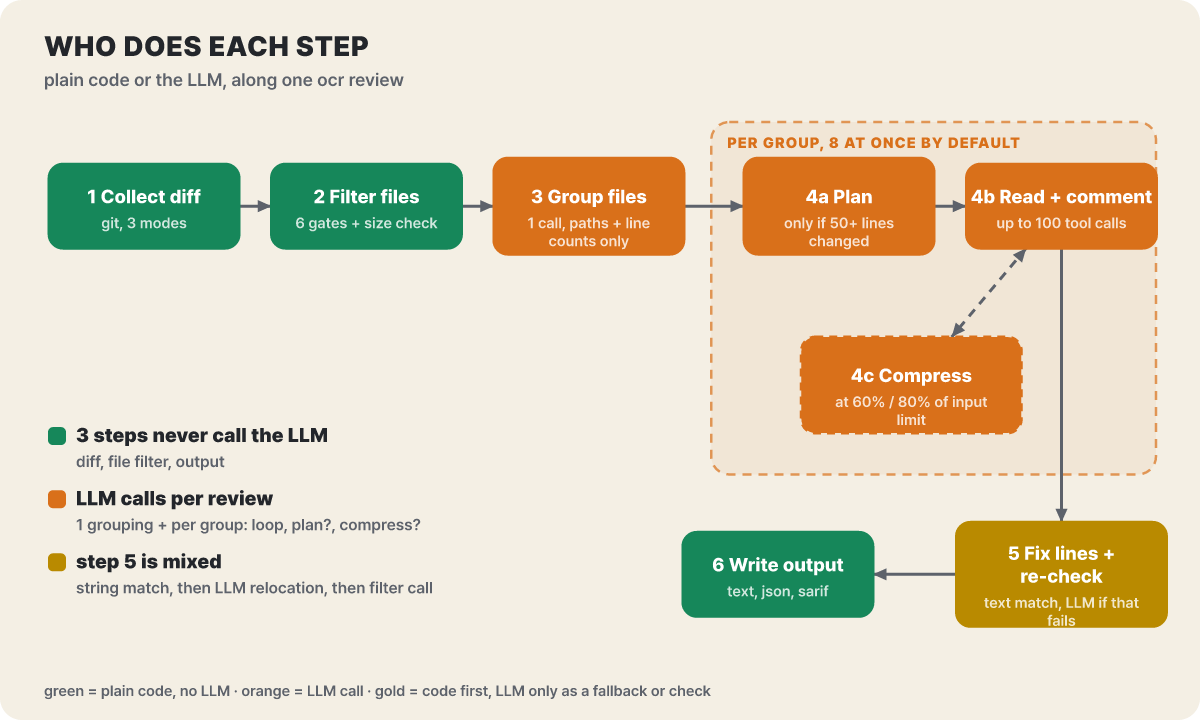 Figure 1. The LLM is called at grouping and inside each group; the gates before it and the output after it run on code alone
Two things to read from the figure. First, LLM calls do not happen “once per review” but once at grouping and then separately for each group. Second, even inside a group, planning (only for large changes) and compression (only when the conversation grows long) are called only when their conditions are met. So even for the same PR, the number of calls varies greatly with the number of files and lines, and the sections below open the steps in this figure one by one from the left. For bootstrap, all you need to know is that if the configuration is incomplete (any one of address, token, or model is empty), it ends with an error and no fallback path.
The gates a file passes before it reaches the model
Half of review quality is decided by “what not to look at.” A changed file must pass the gates below, in order, before it goes to the model. The documented order is binary (non-text files excluded), secret_exclude (secret paths such as .ssh, id_rsa variants, .npmrc, and .env variants; cannot be revived even by user rules), user_exclude (exclude patterns you wrote), user_include (a match skips the next two gates), unsupported_ext (extensions not on the allow list are excluded), and default_path (test files, generated code, fixtures, and dependency and build folders are excluded). Even after passing, deleted files drop out, and any file whose diff alone exceeds 80% of the input limit drops out as too_large.
Words alone do not show how far include reaches, so let us trace where seven files stop. This is an editorial example that assumes a configuration with **/generated/** in exclude and **/*_test.go in include.
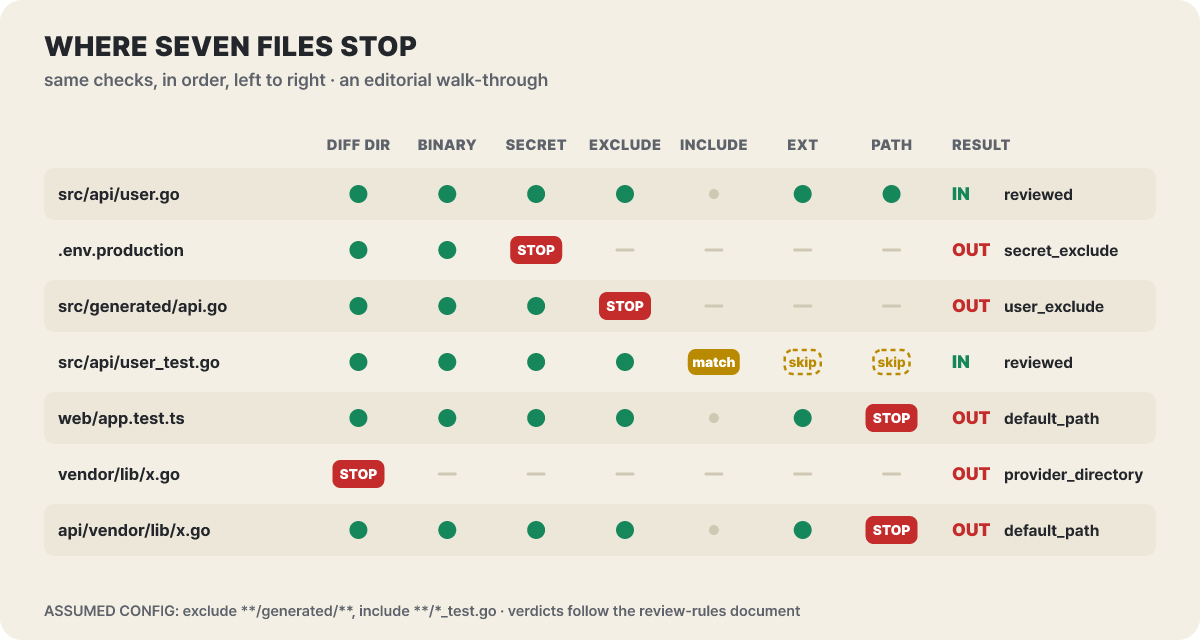 Figure 2. Red cells mark where a file stopped. A test file caught by
include skips the last two gates and survives
Three points to pick out of the figure. First, test files are dropped by default (web/app.test.ts). Patterns such as *_test.go, *.test.ts, __tests__/, and *Test.java are in the default exclusion list, so if you want to see test changes too, you must put them in include. Second, include is not an allow list. Only matching files bypass gates 5 and 6, while files that do not match (src/api/user.go) still go through the screening and pass. Third, a top-level vendor/ at the repository root cannot be revived even with include. A separate diff-stage check handles noisy folders directly under the root as provider_directory, while a subfolder (api/vendor/) is default_path and can be revived. Secret paths and exclude are decided before include, so no include can override them.
You can preview this verdict before spending any model cost. ocr review --preview prints only the filter result (target files and exclusion reasons) without calling the LLM, and ocr delegate preview in Delegation Mode, covered later, does not need a model connection at all.
Grouping and planning: where the model is first called
Files that pass the filter are grouped with others close in meaning. This is the first step where the LLM is called, and what it sends is only the path, the change status (added, modified, deleted, renamed), and the number of added and removed lines; the diff body is not sent. A group has at most 10 files, is split into single files if it exceeds the token budget, and a file that could not be grouped becomes a group of its own. If the call fails, processing falls back to per-file. The key point is that the document states outright that this step is an optimization, not a mechanism that guarantees correctness. Even if grouping is wrong or fails, every file ends up in some group and gets reviewed, so no “omission” occurs.
A separate sub-agent starts for each group, and the number running at the same time is set with --concurrency, 8 by default. Each group is checked before it starts. If a group’s message exceeds 80% of the input limit (200,000 tokens by default), the whole group is skipped and a warning is left.
The planning step is conditional. Only when one file changed by 50 or more lines, or the changes across two or more files add up to 100 or more lines, is the LLM called once, without tools, to make a checklist. Small changes go straight to the main review.
The sub-agent’s workbench
The main review is a loop in which the sub-agent goes back and forth using tools. There are six tools (read a file, read another file’s diff, find files, search code, leave a finding, finish), and up to 100 tool requests are allowed. The read tools exist to understand context, so the prompt states firmly that a problem found in another file is not a target for a finding. The loop stops when it calls finish, hits a limit, or has three consecutive rounds with no valid tool result.
--effort decides how many laps this loop runs. low is 1 round, the default medium is 2 rounds, and high is 3 rounds. From the second round on, the agent receives the findings confirmed in earlier rounds and the plan is left out. The document explains that a plan easily becomes a ceiling of “look only this far,” and if no new findings appear the run ends early.
Long conversations are compressed so they do not overflow the context window. At 60% of the input limit (120,000 tokens) compression runs in the background, and at 80% (160,000 tokens) it summarizes the earlier part immediately, with the summary output capped at 16,384 tokens. If one sub-agent fails, only a warning is left, without a retry, and the rest continue; if even one succeeds, the exit code is 0. The design leaves retrying to the CI that wraps it.
Three chances to get the line number right, then a final re-check
Once findings are collected, the line has to be settled. The first attempt, made by code, takes the original code snippet the model returned, finds it in the diff while ignoring whitespace, and computes the line number. If it cannot be found, the second attempt has the LLM place it again with a position-readjustment prompt. If that also fails, the finding is emitted with line number 0. As the document explains, this signals that the finding itself is valid; the cause is the model rewording the snippet or unusual formatting such as mixed CRLF and tabs. In agent integrations, the agent reads the existing_code field and finds the position itself. At the end the line number is corrected once more.
The LLM is called one more time here. At the end of each group, a re-check compares the list of findings against the diff and filters out the clearly wrong ones. Call errors are ignored, and --no-filter turns it off. The editorial reading is that the high precision ocr shows in the benchmark below can be seen as the result of this re-check working together with the narrow reading range.
Every review is recorded in append-only form (JSONL) in ~/.opencodereview/sessions/, and running ocr viewer opens past sessions at localhost:5483. Each group has separate panels for planning, main review, re-check, compression, and position readjustment, so if you wonder about a file with 0 findings, check whether that group’s main-review panel ended with finish after tool calls. If there is no main-review panel at all, the file was dropped by the filter before review, and --preview tells you the reason. ocr session compare sorts the findings of two sessions into four columns: new, continuing, resolved, and not reviewed. The last column matters. If something was flagged before and this time the file was not looked at at all, it is not resolved; that is the distinction.
Rule files: the first match wins
Which guidance the model receives when screening a file is decided by path pattern. This too is work done by code, and the model only reads the guidance that was selected. There are four layers of priority. First is the --rule flag, used for this run only. Second is the repository’s .opencodereview/rule.json (committed and shared by the team). Third is the global ~/.opencodereview/rule.json on your computer. Fourth is the language- and file-type-specific rules built into the binary. Within a layer, entries are checked in the order written, and the first match wins. An entry is a pair of a path pattern (path) and a natural-language instruction (rule), and exclude and include can also go at the top of the file.
{
  "exclude": ["**/generated/**"],
  "rules": [
    {
      "path": "src/api/**/*.go",
      "rule": "Public handlers must validate the request body before using it",
      "merge_system_rule": true
    }
  ]
}
The project’s own rule file is a real-world example. In the Go file that defines the list of supported providers, it writes “keep the field order inside each entry,” “update the four documents together,” and “add tests for any new provider,” and the rule is delivered only when this file changes. It is meant for attaching team conventions that a general model cannot know to just those paths.
There are three traps. The default is replacement, so a matching entry replaces that file’s built-in language rule (guidance on common defects such as NPE, XSS, and SQL injection) entirely. To keep the built-in rule you must add merge_system_rule: true, and because this value picks the matching language rule for each file separately and merges it, a single **/* line can layer the full security guidance on top. Your own rules do not merge with each other: if two of your entries match the same file, the one written first wins and the other is ignored. Patterns are case-insensitive (paths are lowercased before comparison) and sensitive to spaces inside braces, so with a space after the comma as in {ts, tsx}, tsx silently fails to match.
When you are confused about why a rule is not taking effect, ocr rules check <file> shows the layer and pattern that won, exactly as they are. Below are an example from the official CLI documentation and the summary line appended to the end of the text output.
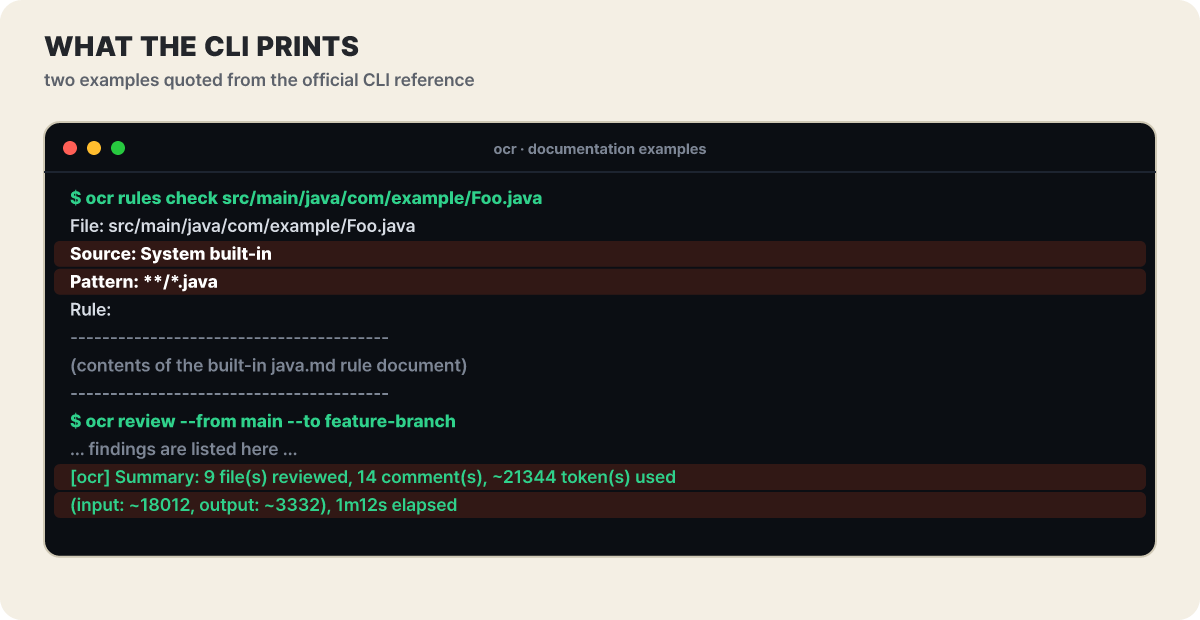 Figure 3. The
Source line tells you which layer’s rule won. The summary line shows file count, finding count, tokens, and time
Source: System built-in means none of your rules matched this file, and if a project or global rule won, that file’s path appears here. The token count in the summary line is effectively cost, so keeping an eye on this line on your first run gives you a feel for what one PR costs.
Six same-model pairs show the precision and recall trade
Now let us see how a design that splits the steps this way shows up in numbers. The ranking image in the README lists values per model and tool combination on an evaluation set (50 popular open-source repositories, 200 real PRs, 10 programming languages, and 1,505 ground-truth defects cross-verified by more than 80 senior engineers), and there are six pairs where the same model is put into ocr and into a general-purpose agent. First, precision, recall, and tokens side by side.
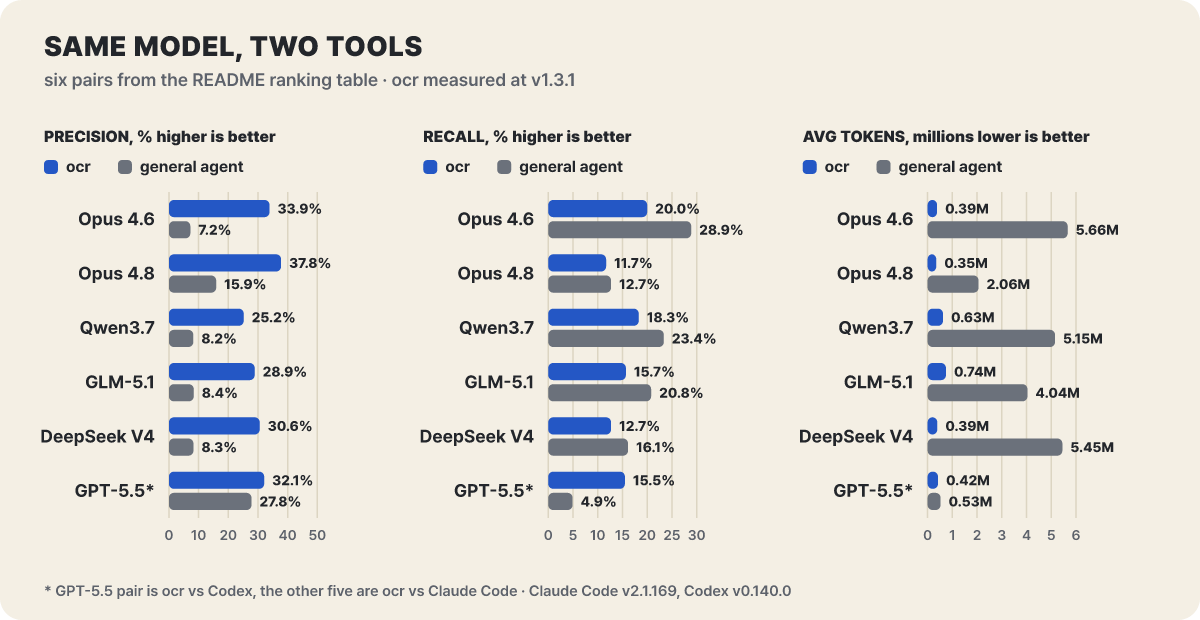 Figure 4. ocr leads on precision and tokens, while the general-purpose agent has higher recall in all five Claude Code pairs
ocr leads on precision and tokens. In the five Claude Code pairs, precision is 2.4 times (Claude-4.8-Opus) to 4.7 times (Claude-4.6-Opus) higher, and tokens used are 5.4 times (GLM-5.1) to 14.7 times (Claude-4.6-Opus) lower (editorial calculation). The README’s “about one ninth” sits around the middle of this range. Conversely, recall is higher for the general-purpose agent in all five Claude Code pairs, and only in the Codex pair (GPT-5.5) is ocr higher. The rest of the values are in the table. The parentheses show hits / reported.
| Model | Tool | F1 | Recall | Avg. time | Reported (hits) |
|---|---|---|---|---|---|
| Claude-4.6-Opus | ocr | 25.10% | 20.00% | 1 min 23 s | 889 (301) |
| Claude-4.6-Opus | Claude Code | 11.57% | 28.90% | 13 min 6 s | 5,980 (435) |
| Claude-4.8-Opus | ocr | 17.90% | 11.70% | 1 min 6 s | 465 (176) |
| Claude-4.8-Opus | Claude Code | 14.13% | 12.70% | 5 min 38 s | 1,200 (191) |
| Qwen3.7-Max | ocr | 21.20% | 18.30% | 4 min 41 s | 1,096 (276) |
| Qwen3.7-Max | Claude Code | 12.17% | 23.37% | 8 min 6 s | 4,260 (351) |
| GLM-5.1 | ocr | 20.40% | 15.70% | 4 min 11 s | 820 (237) |
| GLM-5.1 | Claude Code | 11.93% | 20.80% | 14 min 10 s | 3,742 (313) |
| DeepSeek-V4-Pro | ocr | 17.90% | 12.70% | 6 min 28 s | 624 (191) |
| DeepSeek-V4-Pro | Claude Code | 10.93% | 16.13% | 14 min 24 s | 2,945 (243) |
| GPT-5.5 | ocr | 21.00% | 15.50% | 2 min 51 s | 728 (234) |
| GPT-5.5 | Codex | 8.36% | 4.92% | 2 min 58 s | 266 (74) |
The “Reported” column changes how it feels. With 200 PRs, for Claude-4.6-Opus the findings per PR come to about 4.4 for ocr and about 29.9 for Claude Code (the editorial value of reported count divided by 200). Claude Code hits more defects (435 versus 301) but also puts out about 5,500 findings that are not hits. If a person has to check nearly thirty findings per PR one by one, “found more” does not mean more useful. Conversely, ocr hit only 301 (20%) of the 1,505 ground-truth defects, so it is no signal that it catches every defect. The editorial reading is that the structure of the earlier sections, where the re-check filters findings and grouping and planning narrow what is read, points in the same direction as this trade.
Three facts are needed to trust this table only as far as it deserves.
- The same maker built both. The evaluation dataset AACR-Bench was uploaded to Hugging Face by Alibaba’s Aone team under Apache-2.0, and ocr is also an Alibaba project. The dataset card describes 1,505 ground-truth findings and 640 incorrect ones, 2,145 in total, and the same team’s paper (arXiv 2601.19494) says that an AI-assisted, expert-verified method found defects the original PR comments missed, widening the defect coverage by 285%. The method is public, but that does not guarantee the same ratios on your code.
- The measured versions differ. In the table, ocr is v1.3.1 (only the Qwen3.8-Max row is v1.8.7), Claude Code is v2.1.169, and Codex is v0.140.0. The ocr you install now is v1.13.3, a different version from the table.
- The absolute level is not high. No combination in the table exceeds an F1 of 25.10%. Whatever the tool, the premise is that it finds only part of the ground truth, so it is better treated as a first pass that filters before a human review than as a replacement for it.
Install it and grab the cost knobs
Git 2.41 or later is required, and version control other than Git is not supported. There are five ways to install (npm recommended, Homebrew, an install script, a release binary, and a source build). One thing to know is that an ocr installed with npm updates itself by default. Every time it runs, it checks for a new version in the background (interval 18 minutes, adjustable with OCR_UPDATE_INTERVAL) and swaps it in if there is one. Static binaries do not have this behavior, and if you need reproducibility in a team environment, turn it off with OCR_NO_UPDATE=1. Because this is a project with ten releases a month, the same PR can be reviewed differently before and after an update.
- Install:
npm install -g @alibaba-group/open-code-review - Connect a model: pick a provider in
ocr config providerand enter the API key, and it runs a connection test automatically. After that, change the model withocr config model. - Check the connection: send a small request with
ocr llm test. - First review: run
ocr reviewin the project folder. For a branch range use--from main --to feature-branch, for a single commit--commit abc123, and to scan a whole folder without a diffocr scan --path internal/agent - Keep the results: save with
--format json --output result.jsonso other tools can read it. For GitHub Code Scanning, use--format sarif.
There are 25 built-in providers. Names such as Anthropic, OpenAI, Gemini, Amazon Bedrock, OpenRouter, DeepSeek, xAI, and Kimi are there, and you can also define a custom provider by writing the address and protocol yourself. If you already use Claude Code, it recognizes the ANTHROPIC_BASE_URL, ANTHROPIC_AUTH_TOKEN, and ANTHROPIC_MODEL environment variables as they are. Use a key from your own account, and do not post it in chat or in a repository. A local model must support tool calling (function calling) natively. The document says models that only imitate tool calls as text (it gives deepseek-r1 as an example) do not work, while models with native support such as qwen3 do.
The tool is free, but the connected model’s charges are separate. The controls the document offers are as follows.
| What you want | Option | Behavior |
|---|---|---|
| One quick pass and done | --effort low |
1 main-review round. The biggest saving |
| More thorough | --effort high |
3 rounds. Cost scales roughly with the number of rounds |
| Total token cap | --max-tokens-budget <n> |
When input plus output exceeds it, remaining groups are not sent and are reported as failed(budget). Partial results are posted and the exit code is 0 |
| Parallelism | --concurrency <n> |
Number of sub-agents running at once (default 8). Lower it if you hit rate limits |
| Passing requirements | --background "…" / -B file |
Puts the intent of the change and points to focus on into the prompt. Giving context first can reduce how often it fumbles through files |
| Skip the re-check | --no-filter |
Saves one LLM call for filtering findings |
| Time limit | --timeout <min> |
15 minutes per group by default, scaled by the number of rounds (15, 30, 45 minutes) |
A large refactoring PR that touches 30 files activates both grouping and planning, and rounds run in every group, so calls increase greatly. If auto-generated files are mixed in, the diff alone can exceed 80% of the input limit and the whole group can be skipped with a token_threshold_exceeded warning, so it is better to look at the targets with --preview first, then put generated files in exclude or split the commits and review them one at a time with --commit.
Let us also note where your code goes. The changed diff and the code snippets fetched by the read tools go to the model endpoint you configured. Session records and rule files stay on your computer only. There is not yet a feature that masks secret values automatically (the official FAQ says it is on the roadmap). The guidance is to not commit secrets, put files containing hashes in exclude, and use pre-commit masking to keep secrets out of the diff. If you connect an MCP server, the arguments of the tools the agent uses (search terms, request addresses, context) go to that server’s operator.
Delegation Mode, which borrows only the engine without a key, and CI
There is a mode in which ocr never calls a model. In Delegation Mode, ocr delegate preview outputs the target files and exclusion reasons, and ocr delegate rule <file…> outputs the bundled rules per file, and the coding agent you are already using does the actual review with its own model. The agent reads the diff and context with commands such as git diff, show, and blame, records for each file whether it reviewed or skipped it along with the reason, and is set to report the total file count, reviewed count, skipped count, and review ratio (coverage_rate). The targets are subscription-based agents such as Claude Code, Codex, Cursor, Open Code, and Qoder.
Default mode (ocr calls the model)
- The whole flow of Figure 1 above runs: grouping, planning, main review, position readjustment, and re-check
- A separate API key and model setup are required
- The benchmark values come from this mode
Delegation Mode (the agent calls the model)
- ocr handles only file selection and rule selection
- Uses the subscription agent’s limits, so you do not create one more key
- Grouping, re-check, and position readjustment do not run
Delegation Mode is a choice that saves a key and takes only the front half of the engine. Do not expect the precision advantage seen in the benchmark to come along as it is. The Claude Code plugin is attached with /plugin marketplace add alibaba/open-code-review and /plugin install open-code-review@open-code-review, and the /open-code-review:review and /open-code-review:delegate-review commands appear. One thing to watch is that the default behavior of /open-code-review:review is auto-fix. As the official documentation states, this command applies the High and Medium findings worth adopting directly to the code and quietly discards Low. The one that asks before fixing is the Agent Skill method, and if you want to confirm changes first, the documentation tells you to edit the prompt in the local command file. ocr itself does not fix anything, and the roadmap lists auto-fix without human approval as “no plans.”
For CI, the GitHub Actions example is the most detailed. When a PR changes, it leaves line-level comments and a summary, and when a repository member, owner, or collaborator posts /open-code-review in a comment, it runs again. Things to settle before connecting are the following.
- Did you add the repository secrets
OCR_LLM_URLandOCR_LLM_AUTH_TOKEN, and the model name and whether to use Anthropic as variables? - The example uses
pull_request_target, so secrets are passed to fork PRs too. The document explains that it “only reads the diff and does not execute the PR’s code,” so use it only after understanding this structure. - Set a per-PR cost cap with the
effortandmax_tokens_budgetinputs. - Do not insert values such as the PR title directly into
run; pass them throughenv(guidance from the example document). - Pin the version in the install step (the workflow default installs the latest).
When running in a pipeline without a screen, --audience agent turns off the progress display and returns only JSON. With the JSON’s session_id, an interrupted range or commit review can be continued with --resume, and it is allowed only when the target, the rules, and the model are the same. If the conditions do not match, it writes nothing and refuses.
Tools that solve the same problem with different designs
The rival ocr aims at is the approach of attaching a review skill to a general-purpose agent. Among open-source PR reviewers, the community-maintained PR-Agent is also widely known. We compare only the design differences. Scores are not placed side by side because the evaluation methods differ.
| General-purpose agent + review skill | PR-Agent | Open Code Review | |
|---|---|---|---|
| Who decides the review flow | The model’s discretion | A prompt per tool (/review, /improve, /ask) |
The engine decides file selection, rule selection, and group limits, and the model judges inside a group |
| How the LLM is called | Interactive tool use | One call per tool (README description) | Each group’s sub-agent uses tools over several rounds |
| Rules | Natural language in the skill document | Prompts and categories adjusted via a settings file | Per-path-pattern rules, 4-layer priority, checked with ocr rules check |
| Runtime environment | Inside the agent | GitHub Action, CLI, Docker, webhook | CLI, agent plugin, CI example, Delegation Mode |
If recall is your top priority, ocr as it is today may not fit. The roadmap lists an Ultra mode that spends more tokens and time to raise recall (planned for the second half of this year), a JetBrains plugin, and long-term memory in the first half of 2027, and the ACP server adapter is at an experimental stage usable only from a local source build. If you want to try it first, ocr delegate preview, which works without a model key, is the cheapest starting point: check which of your changes become review targets and which are dropped, and for what reason. If you are seeing for the first time that test files are dropped by default, you have understood this tool’s gates.



