Download open models or try them on ModelScope's free API
Budget ModelScope's free API from 250 cubes, 2,000 calls per account and 200 per model, then compare job bills, provider routing and weight download costs.
2,000 a day. That is how many free API calls ModelScope’s new-user guide opens up for a single account. The same post says any one model can be called only up to 200 times a day, and the Magicube that every call deducts arrives at 200 a day just for logging in. With three numbers in play, the limit stops at whichever is lowest. This article builds a daily budget from the three numbers, prices a model comparison and a coding-agent job like an invoice showing what percent of the budget each one uses, and then compares the cost of the two routes you take when the budget runs short: connecting an outside provider and downloading the weights.
ModelScope is an open-source model community and model hub. It collects models, datasets and demos, and lets you call some of the models straight away through a free API (API-Inference) that runs on Alibaba Cloud resources. It is the same kind of service as Hugging Face. The international site is modelscope.ai, and there is also a modelscope.cn site with the same account system. The appeal is that you can try new open models without registering a payment method, which is why “how much can I call for free” is the central question for this service.
The gate you pass before the math
The free API does not open just because you log in. Because free inference runs on Alibaba Cloud compute, the official documentation asks for real-name verification of a cloud account to prevent abuse. Each step must finish before the next one opens, in this order:
- Create an account on modelscope.ai. To use cubes, the profile needs a verified email.
- On the account screen in settings, bind an Alibaba Cloud account (Bind Now) and tick every item on the authorization screen. If you have no cloud account, create one through the two-step sign-up screen shown in the official guide.
- Complete real-name verification of the bound cloud account. The documentation says API-Inference works normally only after this verification is done.
- Issue a token on the access token screen in settings.
- Open the example code in the API-Inference panel on the right side of a model page and make your first call.
One access token covers both the SDK and Git. When you create it you choose a validity period, long-term or short-term (short-term is set in months), and you can keep up to 10 active tokens, each with its own name and period. Deleting a token expires it immediately, which also affects any model upload or training job running on that token. The old Git-only tokens are no longer issued, and the notice tells you to move to the unified token.
Step 3 is where you hand over personal information. Read the terms and the privacy policy to decide what permissions the binding screen asks for and what you type into the verification. If this gate feels like too much, downloading weights, covered later, is the way to use a model without going through the API route.
Cube income: from 200 for logging in up to 300 a day
API-Inference calls are paid for in Magicube. Cubes build up from logging in and from community activity, and the price per call depends on model size: about 0.5 for a lightweight model, about 1 for a standard one and about 2 for a flagship. Let’s break down the daily income first. The figure below shows how the cubes that arrive each day grow to 200, 250 and 300 depending on how far you go with activities.
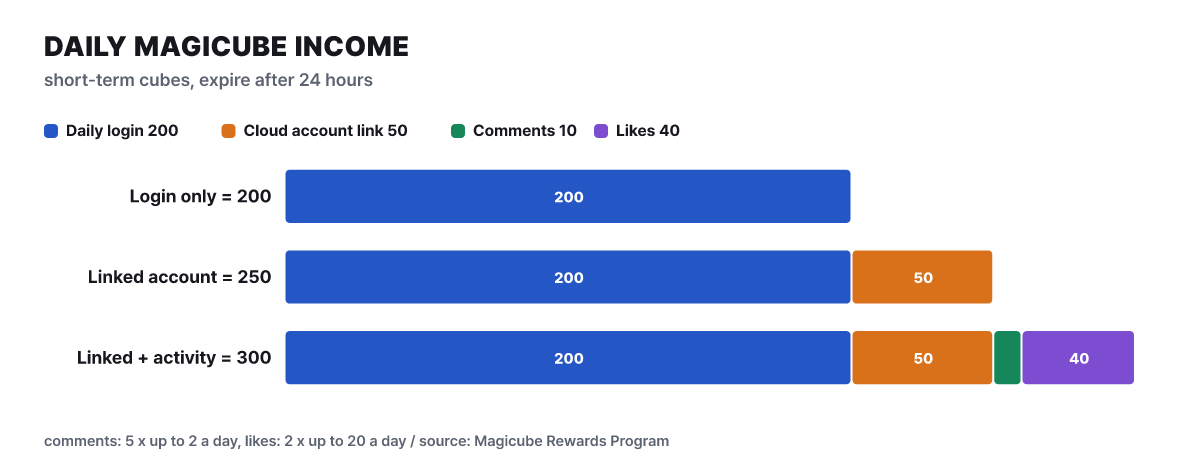 Figure 1. Composition of daily cube income. The 50 from activity rewards assumes you fill both 5 cubes × 2 comments and 2 cubes × 20 likes
The 50 added by binding the account is a big share. Logging in alone gives 200, but the cloud account is an entry requirement for the free API anyway, so the binding bonus comes along automatically. The comment and like rewards have to be earned on other people’s posts, and comment rewards are paid only after other users like or reply to the comment, so treat them as a bonus rather than putting them in your plan.
| Type | How to earn | Amount | Validity |
|---|---|---|---|
| Short-term | Daily login | 200 (once a day) | 24 hours after issue, same day only |
| Short-term | Alibaba Cloud account binding bonus | 50 (once a day) | 24 hours |
| Short-term | Comment on someone else’s post | 5 (up to 2 times a day) | 24 hours |
| Short-term | Favorite or like someone else’s post | 2 (up to 20 times a day) | 24 hours |
| Long-term | Verify email, write an intro, customize profile | 50 each (once) | 90 days after issue |
| Long-term | Refer a friend | 20 per person (up to 50 people a month) | 90 days |
| Long-term | Sign up with a referral code | 50 (once) | 90 days |
When you spend them the two types make no difference, and the cubes closest to expiring are deducted first. So the short-term cubes you received that day are used up first, and long-term cubes shrink only after the short-term ones run out. Short-term cubes you do not use in a day disappear, so hoarding does not work. Long-term cubes total just the 150 one-time grants (email, intro, profile), which you can treat as a one-off cushion worth 150 calls to a flagship model.
Three ceilings, and the lowest one stops you
The limit has three layers. The first is the cube balance. The second is the account limit stated in the official new-user guide: a registered user can make up to 2,000 calls a day across all models combined. The third is the per-model limit. Each model has its own daily quota, adjusted dynamically according to resource headroom, usage patterns and the model’s release date, with a cap of 200 calls and, in practice, often much lower. Limits also apply to concurrent calls: they are set per model depending on load, with the principle that a single developer’s single concurrent use is guaranteed.
Combine the three values in one formula and the maximum daily calls is min(250 ÷ price, 200 × number of models you use, 2,000). Put “number of different models called per day” on the horizontal axis and plot the three price tiers, and you can see where each curve bends.
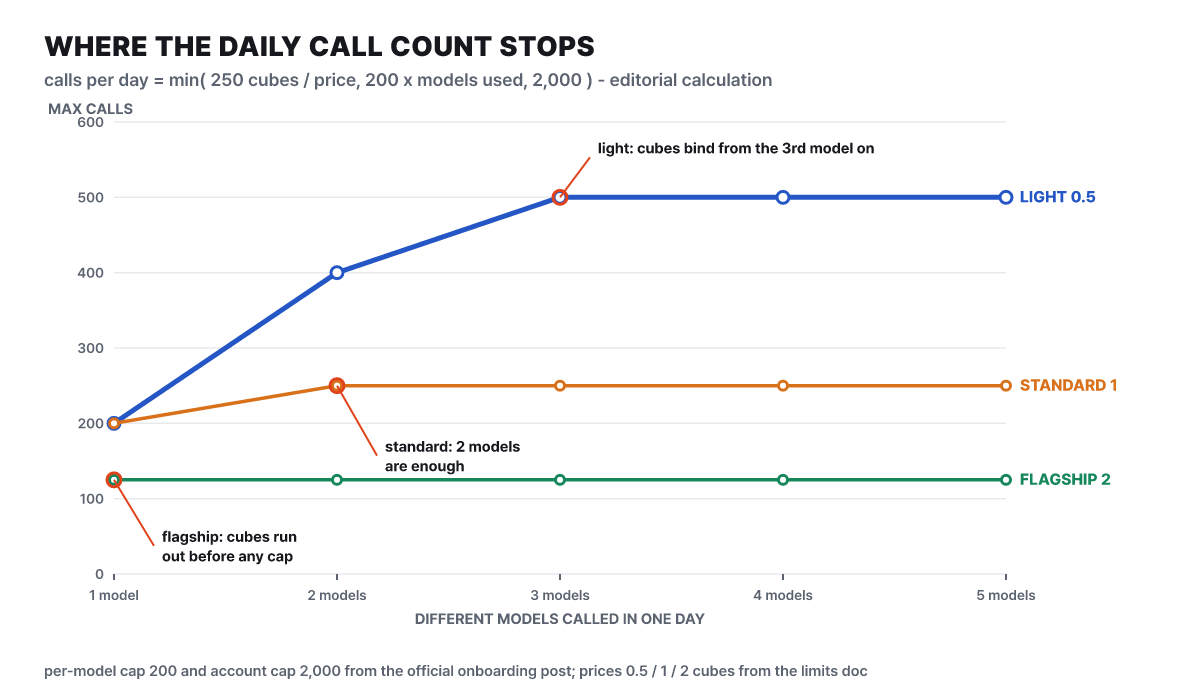 Figure 2. Where daily calls stop as the number of models grows. Based on 250 cubes, editorial calculation
A lightweight model allows 500 calls by cubes, but one model is capped at 200, so to reach 500 you have to split the calls across three different models. A standard model allows 250, so two models are enough. A flagship model runs out of cubes first at 125 calls, so even one model stays below every ceiling. The thing to notice is that the 2,000-call account limit is never reached anywhere on this graph. To call a lightweight model 2,000 times you would need 1,000 cubes, while the daily income is 300 at most. If you skip the cube math, the number 2,000 is easy to be fooled by.
Two additions. With the full 300 cubes from all activity rewards, 500, 250 and 125 rise to 600, 300 and 150, and the conclusion is the same. And since the documentation states that limits are adjusted in real time to platform load, the values above are ceilings, not promised counts. You can see today’s call count for your account in the Usage & Quota panel of the avatar menu, and to find which price tier a given model is in, pick “ModelScope Community” as the provider at the top right of the model page’s code example and read the estimated cube cost that appears.
Putting four jobs on the daily budget
Now that we know the ceilings, let’s load real work onto them. A job you call a few times and finish, such as a model comparison, and a job that chains dozens of calls, such as an agent, consume at very different scales. A coding agent calls the model again every time it reads a file or runs a command, so one task turns into dozens of calls. Here one task is assumed to be 40 calls. This assumption is a value the editorial team set, so it can be several times off depending on the nature of the task. The table below shows what percent of the daily 250 cubes each job uses.
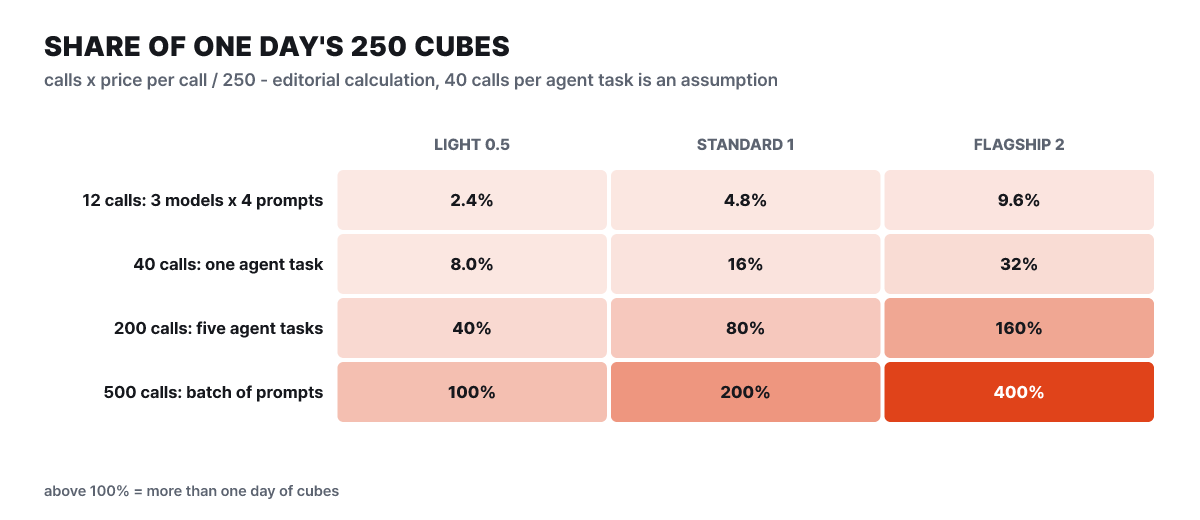 Figure 3. Job size × model price = % of the daily 250 cubes. Editorial calculation; 40 calls per task is an assumption
The top row is the most reassuring cell. Asking four questions across three models costs 9.6% of the day even with flagship models alone, so choosing candidates is no burden. One agent task uses 16% on a standard model and 32% on a flagship, which means about three runs a day on a flagship (125 ÷ 40). Five tasks (200 calls) fit in a day at 40% on lightweight and 80% on standard, but a flagship needs 160%, nearly two days, and funneling them into one model hits the 200-call cap either way. The last row, a batch of 500 prompts, takes the whole day even on a lightweight model, and takes two or four days on standard or flagship. The documentation also says not to use the free route for online work that needs high concurrency or service-level guarantees and to use a commercial platform instead, so this size of job is when you leave the free path. If your daily calls begin to exceed 500 on lightweight, 250 on standard or 125 on flagship, that point is the break-even.
Settings for connecting four coding tools
Many people feel this math through agent tools, so here are the connection methods introduced in the official course post (Aug 25, 2026). All use the same access token and differ only in the address. Claude Code connects the Anthropic way (no /v1 at the end of the address). The course also writes the token into the settings file, but keeping only the address and model in the file and passing the token through the shell environment variable ANTHROPIC_AUTH_TOKEN is less likely to leak into a repository.
{
  "env": {
    "ANTHROPIC_BASE_URL": "https://api-inference.modelscope.ai",
    "ANTHROPIC_MODEL": "zai-org/GLM-5.2",
    "API_TIMEOUT_MS": "3000000"
  }
}
OpenCode adds an OpenAI-compatible provider to its settings file (use the address with /v1) and takes the token through /connect at the prompt. In Qwen Code, you choose ModelScope API Key among the third-party providers in /auth and you are done. Codex CLI is held back by the response format. The latest versions support only the Responses API, so you put wire_api = “responses” in the settings file and pick a model that accepts that format, and to use a model with the Chat Completions format the course tells you to install an older version (it gives 0.80.0 as an example).
model_provider = "modelscope"
model = "Qwen/Qwen3.5-397B-A17B"

[model_providers.modelscope]
base_url = "https://api-inference.modelscope.ai/v1/"
env_key = "OPENAI_API_KEY"
name = "ModelScope"
wire_api = "responses"
The model IDs are examples from when the course was written. The list keeps changing, so copy a currently supported ID from the example on the right side of the model page.
First call: two addresses and one model ID
When you call from code without a tool, you only change the address, key and model name of the OpenAI SDK. The following is the official documentation example, changed to read the token from an environment variable.
import os
from openai import OpenAI

client = OpenAI(
    api_key=os.environ["MODELSCOPE_TOKEN"],  # read from an environment variable, not hard-coded
    base_url="https://api-inference.modelscope.ai/v1/",
)

response = client.chat.completions.create(
    model="Qwen/Qwen3.5-35B-A3B",  # ModelScope model ID
    messages=[
        {"role": "system", "content": "You are a helpful assistant."},
        {"role": "user", "content": "Write quicksort in Python"},
    ],
    stream=True,
)
for chunk in response:
    print(chunk.choices[0].delta.content, end="", flush=True)
The response streams in as chunks, so the text prints continuously. Reasoning models are called a little differently: the thinking process can arrive as reasoning_content and the final answer as content, and the documentation also says to treat the example on each model page as the standard. If you use the Anthropic SDK, you point it at the same service with the address without /v1 and call client.messages.create or client.messages.stream with max_tokens. This method is still in beta.
- OpenAI-style address
https://api-inference.modelscope.ai/v1/- Anthropic-style address
https://api-inference.modelscope.ai(no /v1 at the end, beta)- Key
- ModelScope access token
- Model
- ModelScope model ID, copied from the example on the right side of the model page
- Finding callable models
- Those with the lightning-bolt API-Inference logo in the model list
- Image input
- Vision-integrated models (such as Qwen3.5) and VL models take an image address or a Base64 data address (
data:image/png;base64,…) inimage_url
Models listed on API-Inference are picked in order of likes and downloads in the community, and when new models come in, older ones gradually drop out. A model ID hard-coded in your code can disappear one day, so move it out into a settings file or an environment variable.
Image generation takes a ticket and waits
Text-to-image models do not return results right away, so they work asynchronously. You place an order, receive a ticket, and then ask with the ticket whether it is done.
- POST to
v1/images/generationswith the headerX-ModelScope-Async-Mode: true - Get the task_id from the response
- GET
v1/tasks/{task_id}with the headerX-ModelScope-Task-Type: image_generation. The official example repeats this every 5 seconds - When task_status is SUCCEED, download the image from the address in output_images
The prompt is required, must be under 2,000 characters, and the guide says English generally works better. The seed is between 0 and 2^31 − 1, steps is 1 to 100, and guidance is 1.5 to 20. LoRA (a small add-on training file that layers a style on top of a base model) can mix up to 6 with weights, and the weights must sum to 1.0. Each model family allows different resolutions.
| Family | size range |
|---|---|
| SD family | 64x64 ~ 2048x2048 |
| FLUX | 64x64 ~ 1024x1024 |
| Qwen-Image | 64x64 ~ 1664x1664 |
| Z-Image-Turbo | 512x512 ~ 2048x2048 |
When 429 appears, recheck the cube math
When you hit a limit you get a 429 error. The official guide says to switch to another model or wait until the next day. If cubes remain and you are blocked, you hit the per-model ceiling; if the cubes ran out, you hit the income math from the earlier section.
Why do I get a 429 when I still have cubes?
That model’s daily quota (200 at most) filled first. Quotas are separate for each model and can drop lower depending on load, so you can keep going by continuing the same work on another model.
Do failed calls still deduct cubes?
Inference that fails because of a system error is refunded in full, automatically. Inference you cancel yourself is also refunded, but canceling model training uses up the cost.
One name after the model ID splits the bill
When the limit is not enough, the route that needs almost no code changes is API-Provider. On the API-Inference provider screen in personal settings you register an outside provider’s key (Host Key), and if you append a colon and the provider name after the model ID, the request goes there. Authentication is still done with the ModelScope token.
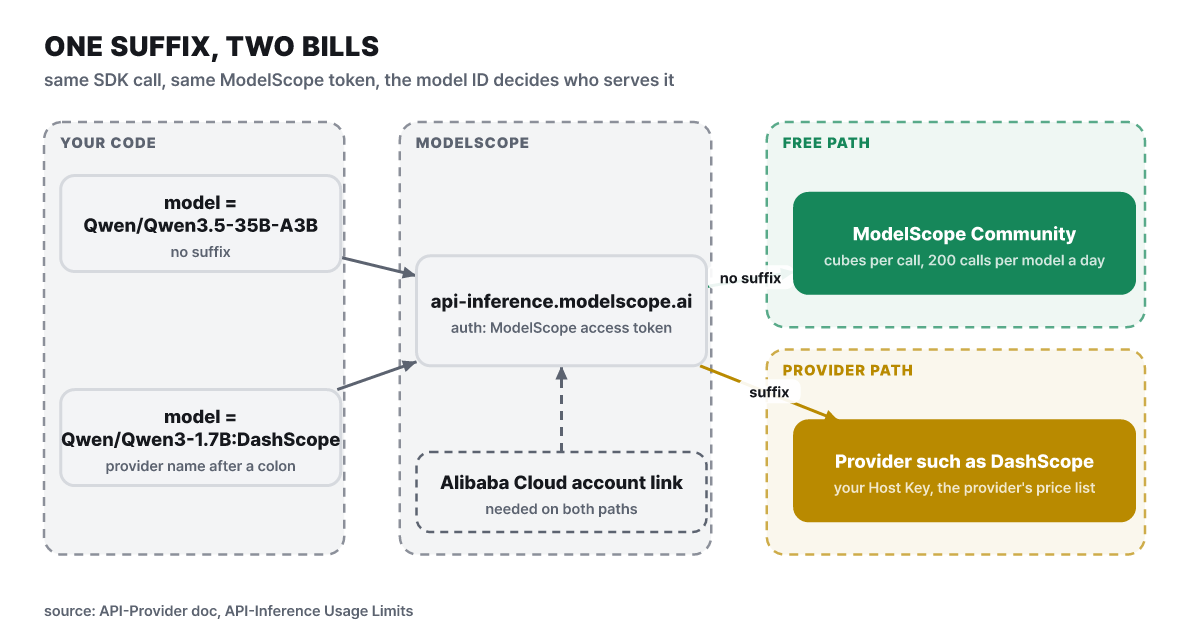 Figure 4. One suffix decides where the request goes and who bills it
response = client.chat.completions.create(
    model="Qwen/Qwen3-1.7B:DashScope",  # model ID + provider name
    messages=[{"role": "user", "content": "Which is larger, 9.9 or 9.11?"}],
    stream=True,
)
The provider names the documentation gives as examples are DashScope and DeepSeek. On this route the free API-Inference limit rules do not apply and the platform does not charge fees; the fees follow the provider’s product documentation. Neither cubes nor the 200-call cap reach this route, so it is where the jobs that went over 100% in the earlier table belong. Hosted keys are stored encrypted, cannot be viewed again in plain text on screen once registered, and can be changed or deleted at any time. Even on this route, though, you must bind the Alibaba Cloud account first.
Even when the route changes, your prompts still go to an outside server. On the free route ModelScope receives the prompt, and on the provider route the provider does. If the work involves internal code or personal information, neither route is suitable, and downloading, covered next, is the answer.
Weight size, the other bill
The download route pays in disk and memory instead of cubes. The documentation lists the uses of cubes as API inference and Civision inference and training, so downloading weights itself comes with no cube math. What matters instead is how large the files are. The values below are the file sizes in ModelScope repositories added up.
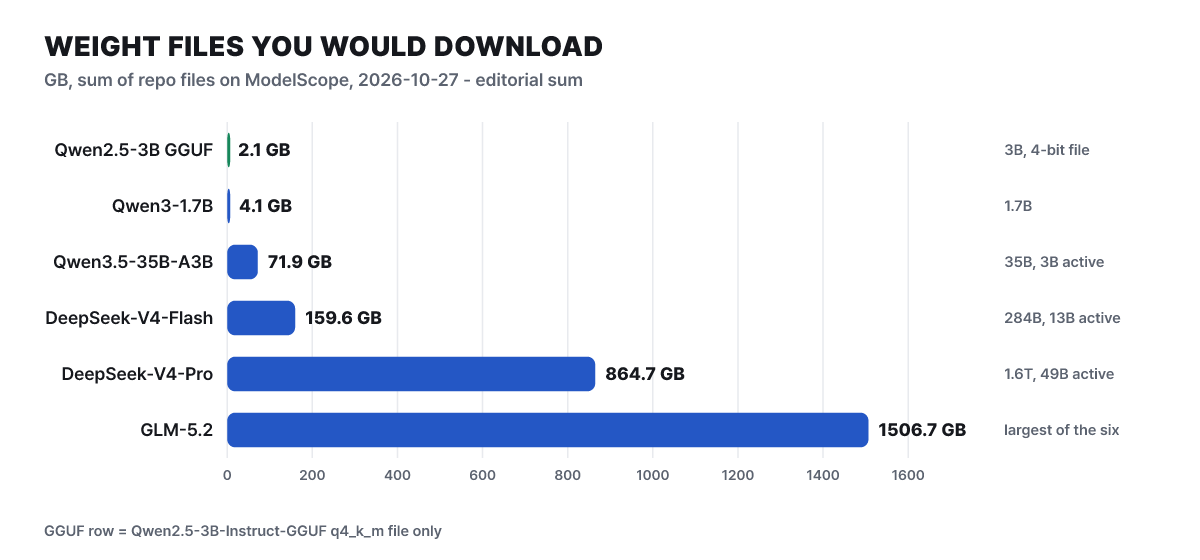 Figure 5. Size of the weights to download. File sizes in each repository summed by the editorial team on Oct 27, 2026
The files you download differ in size by more than 700 times. A GGUF file of a 3B-class model compressed to 4-bit is 2.1GB and fits on an ordinary laptop, while DeepSeek-V4-Pro is 864.7GB and needs server-class hardware. Look at active parameters, not just total size. Qwen3.5-35B-A3B, a mixture-of-experts (MoE) model, is 71.9GB in total and only 3B are switched on during inference, but you must download the whole file.
The size by compression level is also visible. File sizes in the Qwen2.5-3B-Instruct-GGUF repository are below. Lower precision makes files smaller but quality drops as well, and this balance is why Ollama picks Q4_K_M by default.
| File | Size | Note |
|---|---|---|
| q2_k | 1.38GB | Smallest |
| q3_k_m | 1.72GB | |
| q4_k_m | 2.1GB | The level Ollama picks by default |
| q5_k_m | 2.44GB | |
| q6_k | 2.79GB | |
| q8_0 | 3.62GB | |
| fp16 | 6.8GB | Sum of 2 split files (3.98 + 2.82) |
Q4_K_M is about a third of fp16 (editorial calculation, 2.1 ÷ 6.8). Before using a model, read the license on its model card. The hub’s model description is handled by the repository’s README.md, and the YAML at the top records the license, task type and base model, which appear in the search filters. DeepSeek-V4-Pro is marked with the MIT license, but not every model is. There are three visibility settings: public, which anyone can download; private, which only the owner and organization members can see; and request-based, where the owner must approve before you can download. Open weights means a model that publishes its weights, the bundle of numbers obtained by training, and it differs from open source, which also releases the training data and code, so check the wording for whether commercial use is allowed.
One line to download, one line to run
There are three ways to download: the command-line tool, the Python SDK and Git. The default storage location is ~/.cache/modelscope/hub (changed with the environment variable MODELSCOPE_CACHE), and because the tool talks to the modelscope.cn server by default, specify MODELSCOPE_DOMAIN=www.modelscope.ai to use the international site.
pip install modelscope
export MODELSCOPE_DOMAIN=www.modelscope.ai

# download only the config files first to check the structure
modelscope download --model 'Qwen/Qwen2-7b' --include '*.json' --local_dir './local_dir'

# then download only the safetensors weights if needed
modelscope download --model 'Qwen/Qwen2-7b' --include '*.safetensors'
Before downloading tens of GB, fetching the JSON config files first makes it easy to gauge the structure and size.
| Option | What it does |
|---|---|
–include · –exclude |
Specify files to download or exclude with glob patterns |
–local_dir |
Save straight into the given folder; if used together with –cache_dir, this one takes priority |
–revision |
Specify a version, branch or tag |
–dataset |
Download a dataset instead of a model |
–max-workers |
Number of threads downloading at the same time |
–token |
Access token for private models (or modelscope login –token) |
In Python, snapshot_download fetches a whole repository and model_file_download fetches a single file, and allow_patterns and ignore_patterns filter them. A common use is downloading just one q4_k_m file from a GGUF repository. To download with Git, install Git LFS and then use git clone https://www.modelscope.ai/<owner>/<model>.git, and to fetch only pointers instead of the large files, put GIT_LFS_SKIP_SMUDGE=1 in front. A dataset is a single line, MsDataset.load(‘squad’). One method in the documentation for downloading a private model is to put oauth2:token@ in the address, but then the token stays in the repository’s remote address. Logging in with modelscope login –token is safer.
GGUF is a file format that compresses (quantizes) a model so it can run on an ordinary PC, and the documentation says the hub has tens of thousands of them. It connects to local runtime tools in one line.
ollama run modelscope.ai/Qwen/Qwen2.5-3B-Instruct-GGUFOllama 0.3.12 or later is recommended, and if the repository has a Q4_K_M file it picks that by default. To choose the precision yourself, append it like :Q3_K_M, and vision models need 0.4.0 or later. With llama.cpp, set MODEL_ENDPOINT=https://www.modelscope.ai/ and run llama-cli -hf <model ID>, and it downloads straight from the hub.
Side repositories and the plaza around the hub
The hub is not just a model warehouse. The same GitHub organization (modelscope) has repositories for different purposes, and the latest release of modelscope/modelscope, the Python library that works with the hub, is v1.40.2 on Oct 9 (adds Intel XPU device support). The figures are based on the GitHub API on Oct 27, 2026 (UTC).
| Repository | Stars | License | Role |
|---|---|---|---|
| FunASR | 20,827 | MIT | Speech recognition toolkit (streaming recognition, voice activity detection, speaker diarization) |
| ms-swift | 15,942 | Apache-2.0 | Pretraining, fine-tuning and alignment for 600+ LLMs and 300+ multimodal models |
| DiffSynth-Studio | 13,304 | Apache-2.0 | Diffusion model tools |
| modelscope | 9,190 | Apache-2.0 | Hub integration library, 970 forks |
| ms-agent | 4,417 | Apache-2.0 | Agent execution framework |
The docs site also has MCP Plaza and Skills Center. MCP Plaza’s free deployment limits are 20 services per user, 1 instance per service, and up to 500 requests in a 5-second window across all freely deployed services. Skills Center lets you search agent feature bundles (SKILL.md folders) and install them with npx skills add or modelscope skills add, and the shell-script install passes a file fetched with curl straight to bash, so you end up running it without checking the contents. If you do not trust a skill, download the file and read it before running it.
Figures ledger: values and the date checked
Here is where and when each figure in the article was checked, gathered in one place. Limits and model lists change, so it is better to reopen the relevant document before relying on them.
| Item | Value | Basis |
|---|---|---|
| Official documentation version | 2026-09-01 edition (same version on Oct 27) | Documentation repository |
| Daily login cubes | 200 (short-term, 24 hours) | Magicube docs |
| Cloud account binding bonus | 50/day (short-term) | Magicube docs |
| API call price | About 0.5 lightweight, about 1 standard, about 2 cubes flagship | API-Inference limits docs |
| Account calls per day | 2,000 (all models combined) | Official new-user guide |
| Calls per model per day | Up to 200, may be lower in practice | Same post |
| Active access tokens | Up to 10 | Token docs |
| Coding tool connection course | Claude Code, OpenCode, Qwen Code, Codex CLI | Official course post, 2026-08-25 |
| Model repository size | 2.1GB (GGUF) to 1,506.7GB (GLM-5.2) | Summed repository files, Oct 27 |
| Hub integration library | v1.40.2 (Oct 9), 9,190 stars, last push Oct 23 | GitHub API, Oct 27 UTC |



