Terminal agent oh-my-pi adds IDE tools and a watcher model
We re-counted oh-my-pi's edit-format claim against its 16-model table, then checked LSP, subagents, the advisor model and the default yolo approval mode.
The oh-my-pi README introduces its edit tool by saying that edits land on the first try no matter which model you pick. The 16-model table in the blog post it cites as evidence shows the hashline format beating the patch format on 15 models and losing on 1. That is how big the gap between what is said and what was measured can be, and this article checks the claims one by one. oh-my-pi (the command is omp) is an MIT-licensed terminal coding agent that Can Bölük of Stencil Labs grew from a fork of Mario Zechner’s open-source agent Pi, with a language server (LSP), a debugger and subagents built in as tools. The reference date is 2026-10-27 UTC, and the numbers were re-checked that day against GitHub, npm and the project documentation.
The conditions of the experiment that blamed the tools
The claim starts from the maker’s blog post published on Feb 12. Talk about agent performance usually turns into which model is smarter, but the post argues that the harness, the software between the model and the files, causes a large share of the failures. A harness is the frame that hands the model tools such as read, edit and run, and returns their results to the model. The diagnosis is that the model often knows what to change, and the failure happens in the last step, where the change has to be written into the file exactly.
The experimental conditions are in the post. From a React codebase, a random file was picked and a mechanical mutation was planted in it, such as flipping an operator, inverting a boolean, an off-by-one, removing optional chaining or swapping an identifier. The bug was then described to the model in plain language, and the model was asked to fix it. The 180 tasks were run 3 times each on 16 models, in a fresh session every time, with only read, edit and write tools, and afterward the result was compared with the original file before and after formatting. The only thing that changed was the input format of the edit tool, and three formats were compared.
- patch: Codex’s
apply_patch, an OpenAI-style diff string. The blog explains that OpenAI models are probably tuned to this grammar and that it is a foreign language to other models. - replace: the
str_replaceused by tools like Claude Code, which finds the text to change by having the model rewrite it exactly, character for character. If more than one place matches, it is rejected. - hashline: points at a line by quoting the hash tag attached to it when the file was read.
This experiment is the maker’s own measurement, and the tasks are mechanical ones that revert planted bugs. The blog itself says it does not expect 100%, because a model can produce a valid fix that differs from the original. The blog also cites other measurements that asked the same question: Aider’s benchmark (GPT-4 Turbo moved from 26% to 59% depending on the edit format, while GPT-3.5 stayed at 19% with the same format), JetBrains’ Diff-XYZ (no single format wins for every model and situation), and Cursor’s own blog statement that for files under 400 lines, rewriting the whole file works better than a diff. The direction, that the edit format moves scores, shows up in several places, but what these citations share is that there is no agreement that any one format is always better.
Copying lines versus pointing at lines: where the failures split
The following figure shows where the two approaches diverge. On the upper path the model has to rewrite the old lines, and on the lower path it writes only the tag it received when reading and the line numbers.
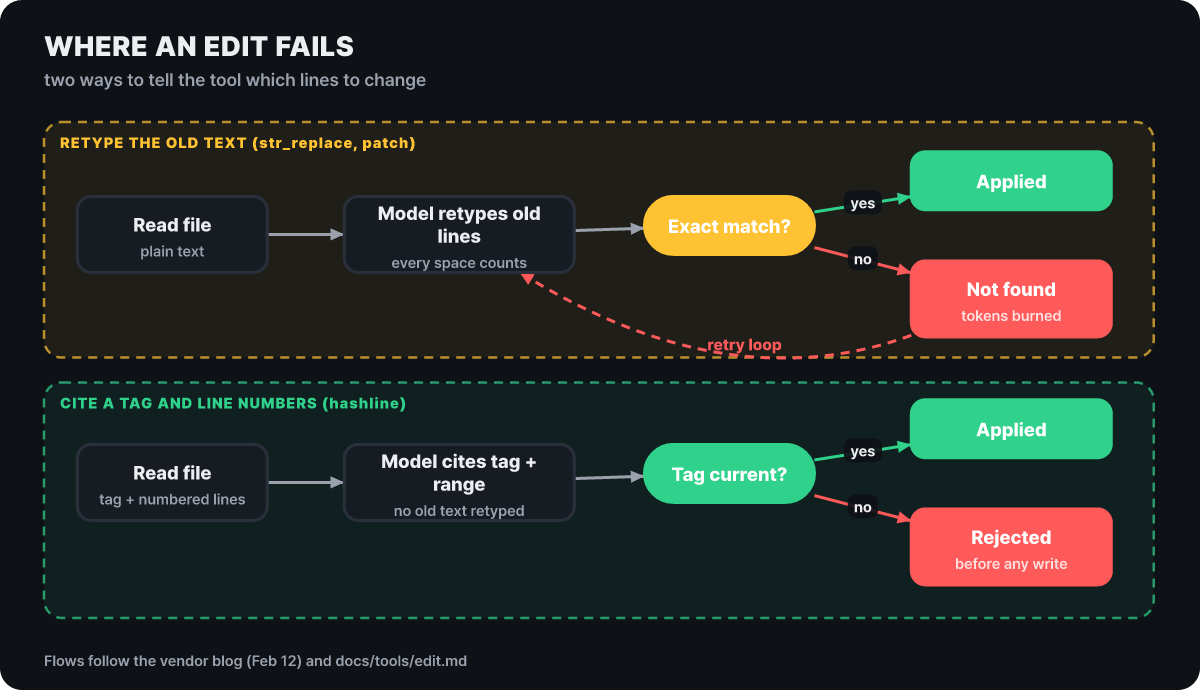 Figure 1. How the same edit fails in the two approaches. The upper path leads to retries, and the lower path stops before writing
On the upper path, one wrong space or one wrong indent turns into “not found”, and the model repeats the same attempt. On the lower path the old content of the lines to change is not written at all, so that kind of failure does not occur, and if the file changed after it was read, the tag no longer matches and the edit is rejected before anything is written. A rejection is still a failure in both cases, but the difference is that it stops before the file is damaged. According to the omp documentation, a stale tag is not thrown away at once: it is recovered automatically only when the recorded snapshot history proves it can be applied safely, and otherwise the edit is rejected with the current tag and the surrounding lines attached. A request to edit lines the model has never seen is also rejected under the default setting (edit.enforceSeenLines), and edits to auto-generated files are blocked by default (edit.blockAutoGenerated).
Counting the signs in the 16-model table
The blog has a per-model table. It lists, for 16 models, how many points the hashline format scored above patch and above replace, and the figure below reproduces those values as they are. The longer a bar extends to the right, the further hashline was ahead, and a red outline marks a negative value.
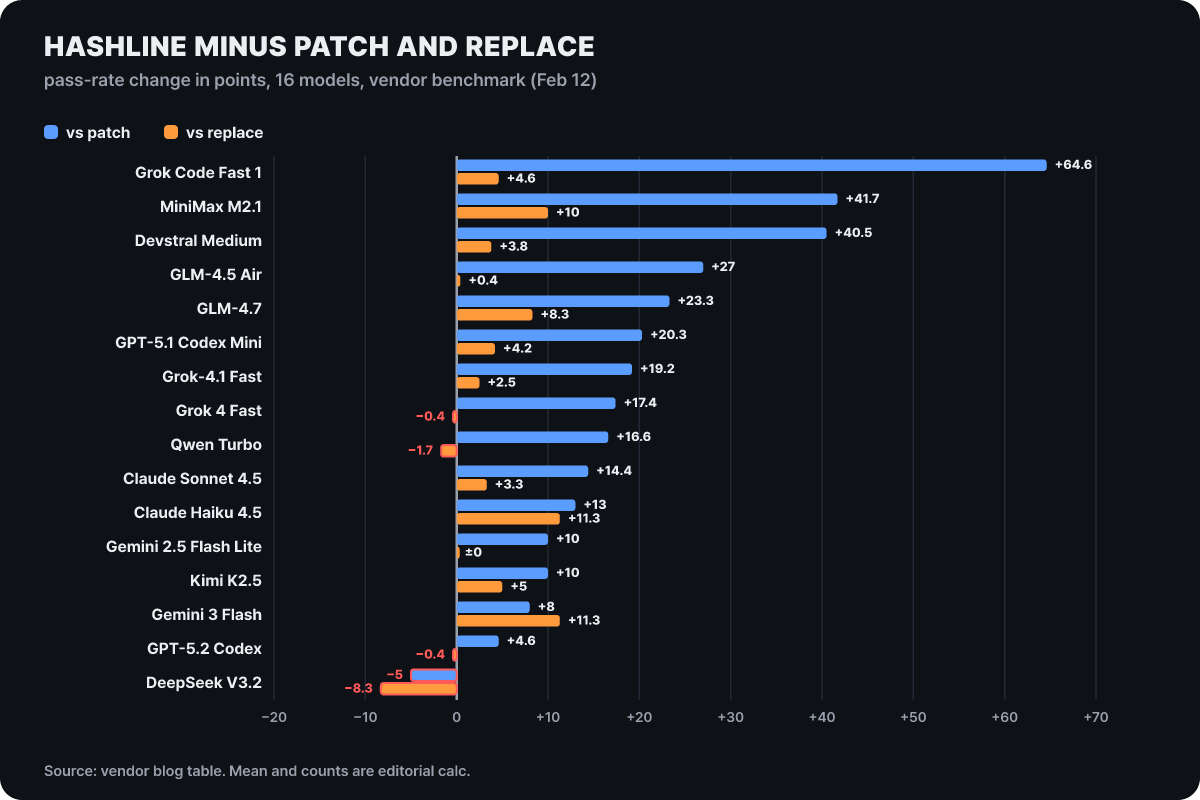 Figure 2. The two columns of the blog table. The average of 20.4 points against patch and 3.4 points against replace are our calculations
Against patch, 15 models went up and only DeepSeek V3.2 went down, by 5 points. The average is 20.4 points and the median is 17.0 points. Against replace, though, the picture changes. 11 models went up, 1 stayed the same and 4 went down, and the average is 3.4 points. Three of the 4 that went down are at 0.4 or 1.7 points, effectively the same level, and the biggest drop is DeepSeek V3.2’s 8.3 points. On the other hand, Claude Haiku 4.5 and Gemini 3 Flash were 11.3 points higher even than replace.
This is what the table lets you read. Most of the big gain comes from abandoning the patch format. If you already use a str_replace-style tool, the table fits the reading that the same effect shrinks to a single-digit score. The size of the gain varies a great deal by model. At the top are Grok Code Fast 1 (+64.6), MiniMax M2.1 (+41.7) and Devstral Medium (+40.5), and at the bottom are GPT-5.2 Codex (+4.6) and DeepSeek V3.2 (−5). That the OpenAI family, which the blog describes as familiar with the patch grammar, sits at the smallest end of the gains fits that explanation. The table lists only the changes, so the claim that “weaker models gain more” can only be read by ordering the models by the size of the change, which is also worth knowing.
When one model carries two or more numbers
The moment you want to quote one model’s improvement, several numbers appear. Putting the blog text, the table and the README side by side gives the following.
| Subject | One side | The other side |
|---|---|---|
| Grok Code Fast 1’s gain over patch | Text: 6.7% to 68.3%, a 61.6-point difference | Table: Δ patch +64.6 |
| Average gain over patch | Blog headline: +15 points | Table column: average +20.4 points, median +17.0 points (our calculation) |
| Number of models where hashline beat patch | Text and README: 14/16 | Counting the signs in the table: 15/16 (our calculation) |
| Gemini 3 Flash’s gain | Table: +8 (vs. patch), +11.3 (vs. replace) | Text: “78.3%, 5.0 points above Google’s own best attempt”; README: “+5 pp, vs. str_replace” |
The Gemini 3 Flash row is the most complicated. The same model carries numbers with three different baselines: +8 over patch, +11.3 over replace, and 5.0 points over the best attempt Google presented for that model. The README copied the last one with the shorter label “vs. str_replace”. This is not saying that any one number is wrong. It is saying that if you take “Gemini gained 5 points” as it is, what it gained 5 points over is lost. The results of the revised version (v2) have to be read the same way. The blog says v2 improved further on 12 of the 16 models, with the largest rise being GPT-5.1 Codex Mini going from 60.0% to 77.5%, but that rise is relative to the first hashline version.
The −61% in tokens was the best case
The token figure in the README table is Grok 4 Fast’s −61%, with the explanation that output tokens fell because the retry loops disappeared. The blog table has this value for 12 models, and putting the accuracy gain on the horizontal axis shows the distribution at a glance. The lower a point sits, the more output tokens fell.
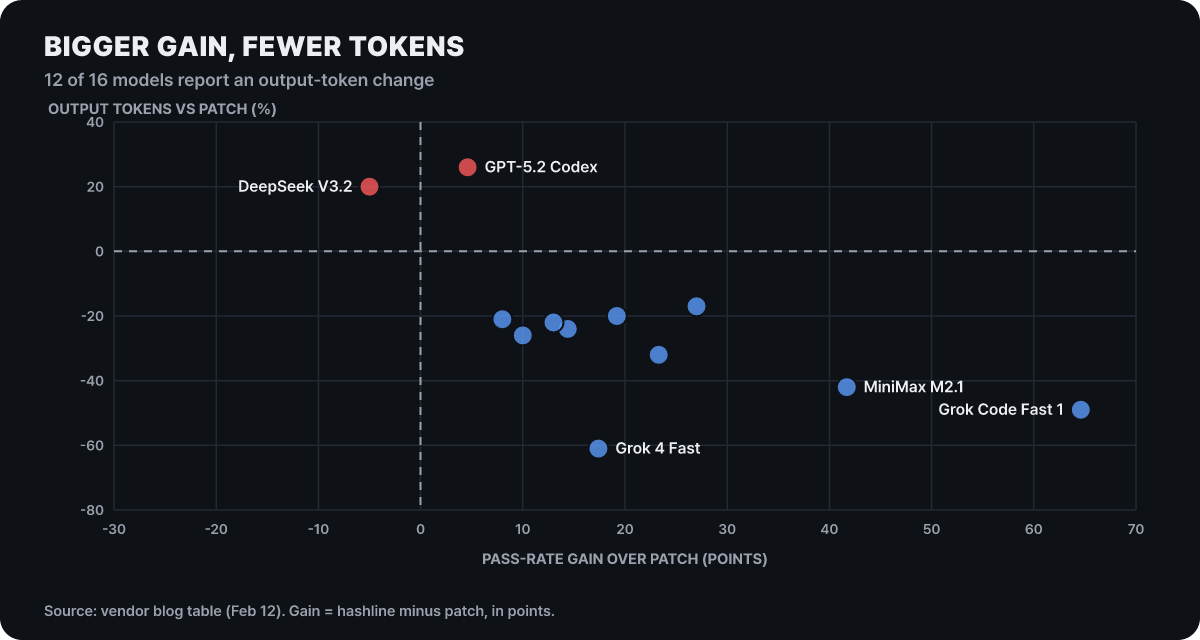 Figure 3. Models with big gains used fewer tokens, and the two models with almost no gain used more. The table values are from the blog
10 of the 12 used fewer tokens, with a median of −23% and an average of about −22% (our calculation). The −61% is the best single case, and the typical scale the blog text describes is also around 20%. Two points are on the other side. GPT-5.2 Codex used 26% more tokens and DeepSeek V3.2 used 20% more, and those two also have the smallest gains in the table. For the other four models (Devstral Medium, GPT-5.1 Codex Mini, Qwen Turbo and Gemini 2.5 Flash Lite), the token value is blank in the table. What this figure shows is that the headline number is the tail of the distribution, and that a model that does not fit the new format well can end up spending more tokens.
The default edit mode today is not the hashline that was measured
The hashline the blog described attaches a 2- to 3-character content hash to every line when it is read. The default edit mode in the current omp documentation shares only the name, and the implementation is different. Reading a file attaches one four-digit uppercase hex snapshot tag to the file and numbers the lines, and an edit is a small patch language that writes line numbers under that tag. The figure below reproduces the example from the documentation and is not a record of a real session.
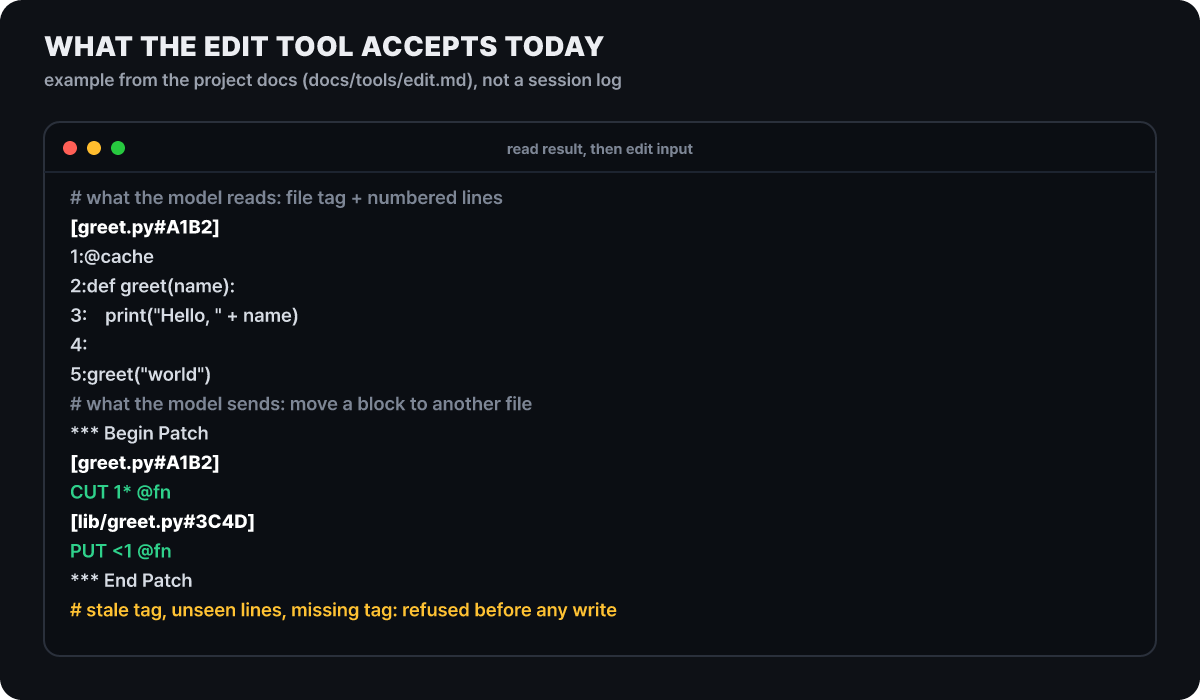 Figure 4. An example of edit input from the current omp documentation. Every line number refers to the original as it was when read
Spelled out, the grammar works like this. PUT N.=M: replaces lines N through M with the + lines that follow, PUT <N and PUT >N insert before or after line N, and CUT deletes while keeping the text in a named register so it can be pasted elsewhere. With an asterisk, as in PUT N*:, the target is a whole block found with the syntax tree (tree-sitter), and file deletion (REM) and moves (MV) use the same grammar. When a tag does not match, the rejection is named by reason (stale_tag, unseen_lines, missing_tag, unknown_tag, other_file_tag and so on) and is left in the tool result. In the main branch changelog there is an entry listed under 18.13.0 in which /session counts failed edits by these reasons, but the latest npm release is still 18.12.6.
There are five edit modes (hashline, apply_patch, patch, replace, sloppy), and the order of selection is the per-model setting, the environment variable PI_EDIT_VARIANT, the setting edit.mode, and then the default hashline. On top of that there is an automatic fallback by model family. When hashline was chosen through settings, the Kimi, MiMo, MiniMax, DeepSeek, StepFun, Codex Spark and GLM 5.3 Flash families are switched to replace, and the environment variable PI_STRICT_EDIT_MODE turns that fallback off. The DeepSeek family, where hashline lost in the table, being on this list matches the table, but the families of MiniMax M2.1 (+10) and Kimi K2.5 (+5), which were higher than replace in the table, are on the list too. That means the list is not based on this one February table alone, so it is more accurate to read the table as evidence for “changing the format moves the score” and not as a score sheet for today’s default.
Counting 14 LSP operations and 28 debugger operations
The numbers at the top of the README (31 built-in tools, 14 LSP operations, 28 debugger operations, 60 or more model providers) are marketing copy, and counting the operations in the tool documentation confirms that the 14 LSP and 28 debugger operations are correct. LSP is the standard protocol an editor uses to ask language-specific servers “where is this function defined” and “where is this name used”. omp bundles those servers behind a single lsp tool that provides diagnostics, definition, references, hover, symbols, rename, rename_file, code_actions, type_definition, implementation, status, reload, capabilities and request. The scene the README gives is a request to move a file. rename_file goes through workspace/willRenameFiles and updates imports, re-exports and aliased paths as the server reports them before the file moves, so it differs from a string replacement that also renames a different variable with the same name. Diagnostics right after a write (lsp.diagnosticsOnWrite) are on by default, and automatic formatting after a write (lsp.formatOnWrite) is off by default.
There are conditions the README does not mention. A server starts only when the current working folder has that language’s root marker file (such as package.json or go.mod) and the server executable is found in a place like the project’s node_modules/.bin or on the PATH. The marker search does not climb to parent folders, and omp does not install servers for you. When LSP does not come up, check these two conditions and the --no-lsp run option, in that order. To turn a server off or change it, write it in ~/.omp/agent/lsp.json or in the project’s .omp/lsp.json, in a shape like this.
{
  "servers": {
    "eslint": { "disabled": true }
  },
  "idleTimeoutMs": 300000
}
The example above turns off the eslint server and shuts down servers that have been idle for 5 minutes. Diagnostics for the whole working folder (file: "*") look at the marker files and run the matching ones among cargo check, npx tsc --noEmit, pyright and go build, up to two at a time.
The debugger attaches through DAP (Debug Adapter Protocol), and a single tool (debug) offers 28 operations, including breakpoints, line-by-line execution, reading the call stack and variables, evaluating expressions, reading and writing memory, and disassembly. The README gives examples of attaching lldb to a C binary, dlv to a Go service and debugpy to a Python process. Approval levels differ by operation. Operations that read variables, the stack or output are at the read level, and operations that start execution, set breakpoints or write memory are at the execute level. The README capture shows the agent halting a function called xorshift32, reading that the variable x changed from 7 to 57351, and then calculating by itself whether 7 ^ (7<<13) equals 57351. 7<<13 is 57344, and XOR with 7 gives 57351, so the calculation is correct too.
Subagents do the work, the watcher model only speaks
The feature the title calls “a second model watches” (the advisor) does a different job from subagents (task).
Subagent (task)
- Splits the work and does it directly
- Returns the result to the parent as a schema-validated object
- Each worker reads, edits and runs with its own tool set
advisor (watcher model)
- Reads and advises only, inserting advice as the main agent progresses
- Advice comes in three strengths: a light note, a concern, and a blocking-level note
- It has no authority to approve or block actions, and its default tools are read, grep and glob
A subagent call carries a context shared by all workers (required) and a list of per-task instructions (tasks), and each task gets a solutionSpace. This field states in one line whether the solution is already decided (“one fix, name specified”) or the cause is still open (“cause of the deadlock unknown, no reproduction”), and it is used as the input that classifies how deeply the subagent should think. What comes back is not prose but a schema-validated object, and the parent can specify an output schema (outputSchema). The default mode (permissive) accepts a malformed result with a warning after retries are exhausted, so you have to switch to strict to treat that as a failure. The isolated workspace (isolated), which prevents conflicts from editing the same file at the same time, appears in the tool input only when task.isolation.enabled is turned on, and backends such as APFS clones, btrfs and zfs reflinks, overlayfs, projfs and plain copies are supported. While running, Alt+A opens the agent hub, where you can see each subagent’s activity and usage, open one to read its conversation history or send a message that changes its direction, or stop just that worker. The built-in agents are scout, reviewer, security-reviewer, task and sonic, and /review launches reviewers in parallel, assigns each problem a priority from P0 to P3 and a confidence level, and gives a verdict on whether the change can ship.
The advisor is off by default. You turn it on with the --advisor option, /advisor on inside a session, or the setting advisor.enabled: true, and the documentation’s settings table says it works when this value resolves to a model that modelRoles.advisor can use. If no model is set it follows the slow role for deep reasoning, and when an explicitly named model is unavailable it does not quietly switch to another one. That is why you line up a fallback model in case of an outage or a call limit.
modelRoles:
  advisor: openai/gpt-5.5:medium

advisor:
  enabled: true

retry:
  fallbackChains:
    advisor:
      - anthropic/claude-sonnet-4-5:medium
The format above follows the advisor configuration example in the omp documentation. The main agent reads the advice and either corrects its course or explains to the user why it is not following it, and since the second model is called separately, the cost rises by that much. The “watching” in the title applies when this feature is turned on.
Rules that step in only when broken, and the magic words
Writing project rules at length in AGENTS.md takes up context on every turn. omp’s TTSR (Time Traveling Stream Rules) keeps rules locked in normal times and brings them out only at the moment the model’s output hits a condition. The order is this: while the model is streaming text or tool arguments, a regex condition matches, the response is cut off, the rule body is inserted as a system notice, and the model is made to write again from the same point. Rules are markdown files in the project’s .omp/rules/ or the user folder ~/.omp/agent/rules/, and the condition in the front matter is the trigger.
---
description: No Box::leak in production code
condition:
  - "Box::leak"
---
In production code paths, use an owned type such as Arc<str> instead of Box::leak.
In the README’s scene, the moment the agent tries to use Box::leak the request is interrupted, the rule is injected, and the agent suggests Arc<str> and asks for confirmation. Besides regexes, the conditions include astCondition, which matches by structure (an ast-grep pattern), and question, where a judging model answers yes or no about the finished output. A question rule does not cut the text mid-stream and is delivered only as a warning after the output ends. By default the watched targets are the response body and the tool arguments, and reasoning is excluded.
Magic words in the prompt are a lighter mechanism. If a standalone lowercase word is present, a hidden instruction is attached for that turn only. It does not react inside code blocks, paths or identifiers, it is on by default, and you turn it off with omp config set magicKeywords.enabled false. ultrathink asks for careful multi-step reasoning, and when automatic thinking level is on it picks the highest level that model supports. orchestrate needs task to be enabled and hands independent work to subagents in parallel. workflowz sets up a workflow of several subagents when both eval and task are enabled, and jevify batch-judges a long list when eval is enabled.
The defaults are open: the approval mode and the features that are off
This is the setting to change first in this article. The default of tools.approvalMode is yolo, which auto-approves read, write and execute tools without asking. The others are always-ask (only reads are automatic), always-ask-cached (even file reads are asked, and approved files or folders are remembered) and write (reads and writes are automatic, execution is asked). When the model issues a shell command, it runs without a confirmation window.
There is a safety rule that asks for confirmation on fatal patterns such as rm -rf /, a fork bomb, or a command that downloads and runs something immediately, but the documentation states that in yolo this standalone safety rule is ignored. What is kept in yolo is the per-tool prompt and deny policies that the user wrote explicitly. When you first use it, add the run option –approval-mode always-ask or change the setting.
always-ask-cached stops in front of a file it reads for the first time, and when you approve, it can remember that file or folder. A folder allowance applies only to files directly under that folder and does not reach subfolders. The permanent setting is omp config set tools.approvalMode always-ask, and to bind a single tool separately, write this in the config file.
tools:
  approvalMode: write
  approval:
    bash: prompt
    eval: prompt
There is a reason eval is listed too. eval is a tool that runs Python and JavaScript cells and can call a shell, so if you put a deny rule only on bash, the same command gets through via eval. The documentation warns about this gap directly. bash.patterns rules are an approval policy and not an isolation mechanism, so an approved command keeps the shell’s full access to files, network and child processes. The main branch documentation includes tools.restrictedFolders, which makes every action in a specified folder ask each time even in yolo, but in the changelog it is still a pre-release entry, so it is not in 18.12.6.
The actual defaults of features that are easy to read as built in from the introductory write-ups are below (per the Oct 27 documentation).
| Feature | Default | How to turn on or change |
|---|---|---|
| advisor (watcher model) | Off | advisor.enabled, --advisor, /advisor on |
| Memory | off (choices: off, local, hindsight, mnemopi) |
memory.backend |
| Automatic skill learning (autolearn) | Off, experimental | autolearn.enabled |
| Desktop control (computer) | Off | computer.enabled, session only via /computer |
| LSP, diagnostics right after writes | On | --no-lsp, lsp.diagnosticsOnWrite |
| Rejecting edits to unseen lines, blocking generated-file edits | On | edit.enforceSeenLines, edit.blockAutoGenerated |
| Magic words | On | magicKeywords.enabled |
What comes in when you open an unfamiliar repository
The README’s “Project input and trust” section is the second most important caveat. When you open a repository, the settings, extensions, hooks, tools, commands, skills, rules and project MCP config inside it are loaded automatically by design. Hooks are TypeScript code such as .omp/hooks/pre/*.ts, loaded and run as extension modules, and .omp/lsp.json can set the command that starts a language server, with server executables searched for in places like the project’s node_modules/.bin before PATH. The claim that it reads other tools’ settings as they are is another side of the same thing. It reads rules, skills and MCP servers that already exist in .claude, .cursor, .windsurf, .gemini, .codex, .cline, .github/copilot and .vscode without conversion, and when names collide it uses only the higher-priority one (omp itself 100, extension packages 90, agents 70, cursor and windsurf 50, cline 40, github 30). As convenient as that is, if you open a repository you did not write with omp, that repository can change how the agent behaves, and with the default approval mode (yolo) on top, commands the agent issues run without confirmation.
There are separate ways to reduce each kind of input.
| What comes in | Option to reduce it |
|---|---|
| Extensions and hooks | --no-extensions, or an allowlist with --trusted-extension <absolute path> |
| Rules and skills | --no-rules, --no-skills |
| Language server definitions | --no-lsp |
Project .mcp.json |
Put mcp.enableProjectConfig: false in --config <file> as a nested key (a one-line flat key is ignored) |
| Built-in tools | --no-tools (project tool modules are a separate discovery path) |
| The last gate | Approval mode at always-ask or stricter |
The README itself says these options only narrow the inputs and do not change the repository trust model. Another tool solves the same problem from the opposite side. The terminal agent Codewhale states in its documentation that project settings apply only values that tighten model and approval policy, and ignores the API keys, base URLs and provider definitions a repository carries. omp chose to accept repository inputs broadly for convenience, and it states that limit explicitly. Only the latest release receives vulnerability fixes, and reports are directed to GitHub’s private security advisories.
Before opening, look at what the repository brings in using a read-only command.
git ls-files | grep -E '^(\.omp/|\.mcp\.json|AGENTS\.md|\.claude/|\.cursor/|\.windsurf/|\.gemini/|\.codex/|\.cline|\.vscode/|\.agents?/)'No output means there is almost no project input to be loaded automatically. If hook, extension or MCP files appear, open them and read them before running omp.
Installation, model roles and release cadence
If you have bun, a global install is the recommended path. It is bun install -g @oh-my-pi/pi-coding-agent or brew install can1357/tap/omp, and there are also Nix, mise and a PowerShell script for Windows. The script of the form curl -fsSL https://omp.sh/install | sh downloads a prebuilt binary from build.stencil.so when bun is missing, verifies the SHA-256 and installs it, and can pin a release with --ref v<version>, but it works by running a downloaded script, so it is safer to read the content first or use the package manager route. Installing with bun requires bun 1.3.14 or later, and on musl environments such as Alpine you must first install the libstdc++ and libgcc packages. For the first run, start omp not in a project you use but in a small practice folder, connect a provider with /login inside a session (omp login from the terminal), pick a model with /model, and start with questions that only read. There are five ways to use it: interactive omp, one-shot omp -p "prompt", the SDK for Node, omp --mode rpc controlled over standard I/O, and omp acp for editors.
Model providers number more than 60, including direct APIs, coding subscription plans, local servers such as Ollama, LM Studio, llama.cpp and vLLM, and any OpenAI-compatible server, and you switch with a single /model. omp itself is MIT, so there is no tool fee, and the cost is paid to the model provider. Models are divided by type of work into nine roles (default, smol, slow, plan, commit, vision, task, advisor, tiny), and when you launch many subagents you can assign the cheap smol. The cost and limit management tools are fallback chains, where the next model takes over when a limit error (429) occurs, path: in enabledModels, which pins a different set of models per repository path, and rotation across several keys for one provider. Register your own server in ~/.omp/agent/models.yml and confirm it with omp models <name>. Web search (web_search) chains 23 search providers in order, and security lookups reference databases such as NVD, OSV and CISA KEV directly.
The release pace can be read from the repository numbers. The repository, created on Dec 31, 2025, has 36,695 stars, 4,097 forks and 4,245 open issues (including pull requests) as of Oct 27, and the npm package has about 162,000 weekly downloads (Oct 16 to 22). The latest npm release, v18.12.6, came out around 21:00 UTC on Oct 21, and before it one release came out each day starting with v18.12.1 on Oct 17, with two on the 21st. Since then there have been six days with no new version, while a changelog with an 18.13.0 entry keeps building up on main. A fast release pace means problems get fixed quickly, and also that setup methods change often, so in a work environment it is safer to pin the version in the install script with something like --binary --ref v18.12.6 and check the changelog for the features you use before upgrading.
Since the Feb 12 table, 485 more versions have gone up on npm, and in that time hashline has changed from a hash attached to each line into a patch language with file tags, block anchors and registers. The table measured the code of that day, so the most accurate way to learn how different today’s edit mode is on your model and your repository is to run the same task twice, changing only edit.mode or PI_EDIT_VARIANT. Just as the numbers examined in this article were mostly right in direction and varied in size by condition, the introductory write-ups of this tool are safest read for direction first, with the size measured again in your own environment.



