25 skills keep agents in spec-to-ship order, 110K stars
Addy Osmani's agent-skills says an installed skill fires on one line of description, and the repo measures it: one sentence took calls from 7 to 21 of 27.
Installing 25 skills and having an agent actually call those skills are two different things, and addyosmani/agent-skills is a rare skill collection that measures that gap with numbers inside its own repository. The README introduces the repo as “production-grade engineering skills for AI coding agents.” The goal is to stop AI coding agents from taking the shortest path and dropping the spec, tests, and security review, by enforcing a senior engineer’s workflow and quality gates. It was made by Addy Osmani, and the figures checked on Oct 27 are 110,737 stars, 11,571 forks, 61 open issues and 116 PRs, under the MIT license. It was created on Feb 15 and has shipped 15 releases. When it released 0.6.8 on Aug 28 it said it had passed 90,000 stars, and two months later it stands at 110,000. The latest release is 0.6.13 from Oct 13, with no newer releases or commits since. The contents are 25 skills (24 lifecycle skills plus 1 meta skill that guides which skill to use), 9 slash commands, 4 expert personas, and 7 reference checklists.
This article follows one question. If you install the skills, does the agent really keep the order from spec to ship? It first looks at whether a skill fires, using the repository’s own measurements. Then it checks, command by command, whether the procedure is followed once the skill is on. It ends with how to adopt the collection.
The two lines an installed skill shows the agent
A skill is a single SKILL.md file, and only two lines of it, name and description, are loaded into context when the agent starts. The agent reads the body only after it decides to turn the skill on. The repository’s docs/skill-anatomy.md sets rules around this structure. Keep the body under 500 lines, move detailed material into separate files, and keep the description within 1,024 characters, stating only “what it does” and “when to use it.” There is also a rule against putting a procedure summary in the description, because the agent may follow the summary without ever reading the body.
The host side points the same way. According to the Claude Code documentation, the descriptions in the skill list take up context on every turn whether or not the skill is used, and the combined text of description and when_to_use is cut off at 1,536 characters. When a conversation is compacted, the first 5,000 tokens of each invoked skill are re-attached, with a total budget of 25,000 tokens. /skill-doctor (Claude Code v2.1.252 or later) shows each skill’s context cost and how often it was used. In other words, whether a skill gets called is decided by looking at these two lines.
In plain terms
Picture a cabinet with 25 drawers, where the staff read only the label on the front of each drawer to decide whether to open it. If the label says “code review manual,” the staffer thinks “I already know how to review,” doesn’t open it, and handles the job alone. Once the label says “open this when reviewing a diff someone pasted in, too,” the drawer starts to open. However good the manual inside is, a label that can’t beat the staffer’s “I can handle this myself” keeps the drawer shut every time.
For the same reason, on Sep 18 the repository changed one default in 0.6.10. It removed from the plugin the hook that forcibly injected the meta skill using-agent-skills when a session started. Claude Code and Codex already choose skills by reading descriptions, so the hook put one more router on top of that, and the stated reason was a cost of about 3.5k tokens per session. The hook script remains only for hosts that have no skill routing.
The order in which the call-counting tools appeared
A skill is markdown, so “it was written” and “the agent called it” are separate problems. How the repository has narrowed that gap shows up when you line up the release dates (UTC). The dots above and below the center line are releases, and the last red dot is the central event of this article.
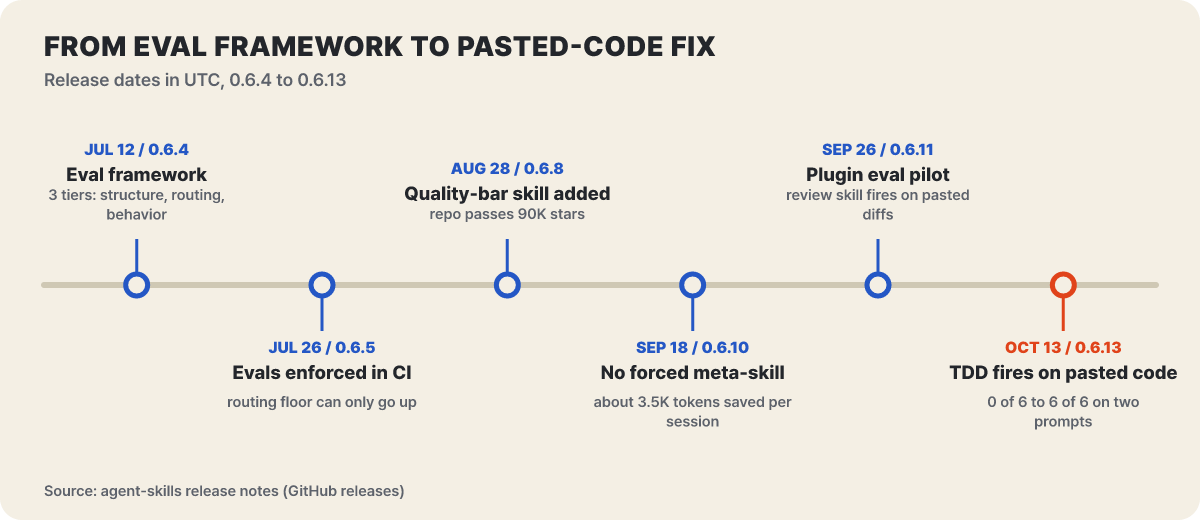 Figure 1. How the evaluation framework arrived, was enforced in CI, and how a measured call count led to a fix in a skill description
The evaluation framework that arrived in 0.6.4 (Jul 12) has three tiers. Tier 1 is a structural check of the front matter, names, required sections, and links, and it runs for free in CI. Tier 2 approximates, using vocabulary (word frequency), whether a description contains the words users actually type and whether two skills’ descriptions overlap, and it also runs in CI. It cannot judge meaning, so Tier 3 is needed. Tier 3 runs a real agent and grades whether it followed the skill, which costs tokens. From 0.6.5 (Jul 26), Tier 2 is enforced in CI in a way that only allows raising its threshold, and the current threshold is a top-1 hit rate of 95.
On top of that, 0.6.11 (Sep 26) added a trial of claude plugin eval. On Claude Code 2.1.269 or later it loads the whole plugin at once, runs each case both with and without the plugin, and reports the score difference (Δ). It measures not a single skill’s description but whether Claude Code’s router picks that skill from a natural request.
claude plugin eval . --no-publish                                          # all cases, both conditions, 3 runs each
claude plugin eval . --case code-review-fires --runs 1 --ablation none     # run a single case cheaply
Every run is a real model call, so it is not run in CI and is used only when needed. The first result this tool produced is the review skill in the next section.
The review skill that went from 7 calls to 21 with one sentence
The first trial ran on Claude Code 2.1.278 with claude-opus-5, and the review skill fired in 5 of 7 runs on the phrasing its case used. The trouble came with ordinary requests such as “review this diff before I merge,” “do a proper code review of this change,” and “take a look at this pull request before it goes into main.” With the original description, the skill almost never fired on phrasing like that. The model reviewed on its own without the skill, and did it skillfully, but the verdict, the severity levels, and the five-axis check were missing. When the diff was pasted into the chat window, the agent judged “I can do this right away” and skipped the skill.
Two fixes did not work. Adding what the skill contributes to the description had no effect, and neither did adding the words diff and pull request on their own. What worked was a single clause pointing at the very case the model treated as “I can do this alone.”
description: Conducts multi-axis code review. Use before merging any change. Use when reviewing code written by yourself, another agent, or a human. Use when you need to assess code quality across multiple dimensions before it enters the main branch. Use when asked to review a diff or a pull request, even when the diff is pasted inline.The last sentence is the addition. With the model pinned to claude-opus-5-5, this one clause raised calls on the review-request phrasings from 7 to 21 of 27. Nine adjacent requests that should not fire it stayed at 0 of 27, the same as before. The plainest phrasing went from 0 of 9 to 3, so, in the README’s own words, it improved but was not solved. A case that asks only for a commit message for a pasted diff must not trigger the review skill, so a separate case (code-review-stays-quiet-on-commit-message) guards that sentence.
The measurements also produced two practical rules. When reporting numbers, pin --model and write down the Claude Code version, because the CLI updates itself and the default model changed twice between morning and evening on the same day. And give cases a turn limit of 10 or more, because a route where the model goes through a slash command (agent-skills:review) to reach code-review-and-quality takes two turns.
The same fix took three TDD requests from 0 to 6
This is the result of applying the same method to test-driven-development. The chart below shows the share of runs in which the skill fired before and after adding one sentence to the description, with the same model pinned. The wider a bar pair splits, the bigger the effect of that one sentence.
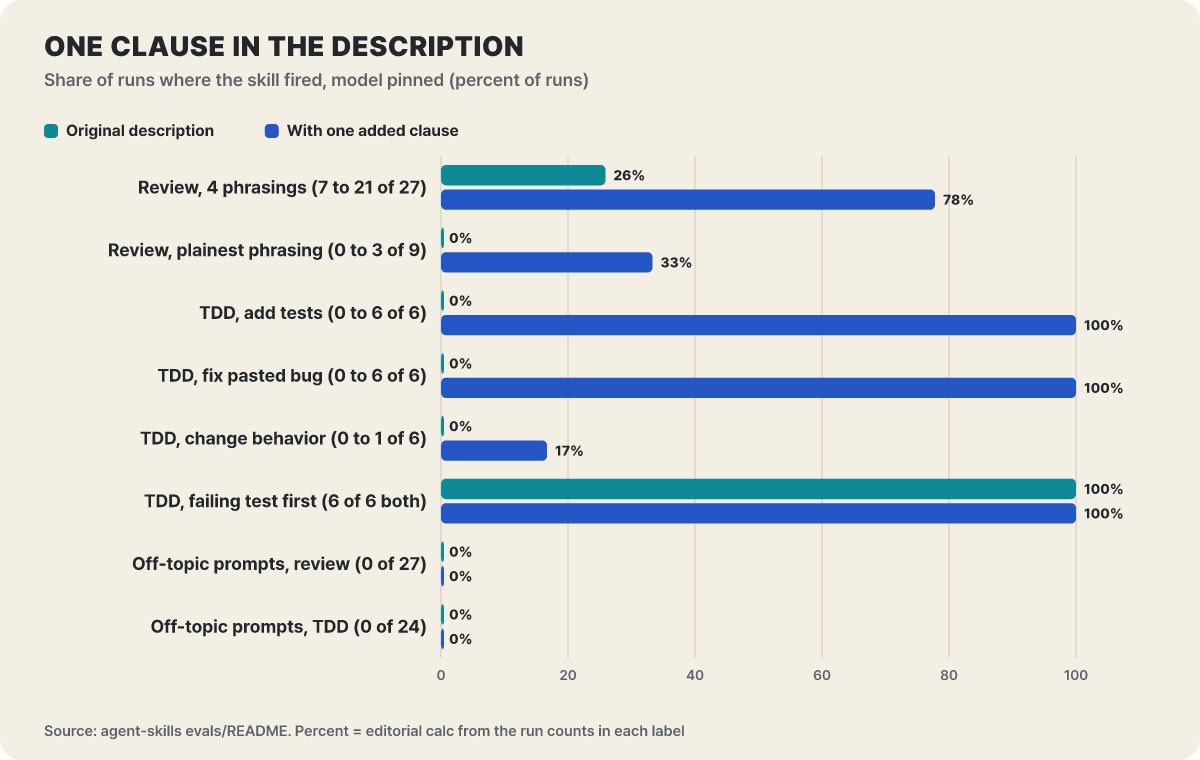 Figure 2. The call rates that one sentence changed. The percentages were computed by the editors from the run counts in the labels
On the TDD side, four prompts were run six times each. With the original description, “add unit tests to this function,” “fix the bug in this function,” and “change this function so its size doesn’t exceed 100” each fired in 0 of 6 runs. Only the request that describes the process, such as “write the failing test first, before you fix it,” fired in all 6. The tail clause from the previous section was not enough on its own. After the three requests were named explicitly and the description added that it applies “even when the code is pasted in the chat window and the request does not mention tests,” the total across the four prompts went from 6 of 24 to 19 of 24. Adding tests and fixing bugs reached 6 of 6, and eight adjacent requests stayed at 0 under every variant.
The 17% bar in the chart also stands out. The one-line behavior change fired in only 1 of 6 runs. The trace shows the model finished with a single edit and no tool calls, and for a job that small it never thought of a procedure. Not pushing a procedure on a small job is consistent with the repository’s intent. interview-me says not to use it for requests whose meaning is clear, such as renaming a variable or fixing a typo, and doubt-driven-development also excludes one-line changes whose result is self-evident. This description fix went into 0.6.13 on Oct 13, and the release notes attribute the change from 0 to 6 on two prompts to “adding one clause.”
Firing does not mean being followed. In the case that handles a pasted bug (tdd-fires-on-pasted-bug), the skill fired in every run, but the share of runs that reproduced the bug with a failing test before fixing it was 2 of 4 with the plugin loaded and 0 of 3 without it. The README says the grading is deliberately strict. Fixing first and then adding “this test would have failed on the old code” is a fail. The document distinguishes this gap as a compliance problem arising in sessions that have no shell and can run nothing, not a calling problem. The point is that the problem of firing and the problem of being followed have to be solved separately, and the next sections turn to the second.
A fired skill writes down the agent’s excuses in advance
Every skill follows the same anatomy. Below the front matter (name, description) come an overview and when to use it (the conditions to fire and the conditions not to), a numbered procedure, a table of common rationalizations (Common Rationalizations), red flags (Red Flags), and verification (Verification). The procedure goes as far as the command to run rather than “check that the tests work,” and verification requires evidence for each item to check before saying the work is done. The most distinctive part is the table of excuses and rebuttals. It writes down in advance the things an agent says when it skips a step, and puts next to each one why it is wrong. Taken from the TDD skill’s table, it looks like this.
| Excuse the agent makes | Rebuttal the skill wrote down |
|---|---|
| I’ll write the tests after the code works | You won’t. Tests written afterward check the implementation, not the behavior |
| I tried it by hand | Manual checks don’t persist. If tomorrow’s change breaks it, there is no way to know |
| It’s just a prototype | Prototypes become production code |
| I’ll run the tests once more to be safe | If the code hasn’t changed, running the same command again gains nothing |
The red flags are written as signs you can observe. A test that passes on its very first run, a report that everything passed when it was never actually run, and skipping a test to get the suite through are examples. There is also a rule to find out how this repository tests before writing the first test. Don’t assume npm test; check the real command in package.json, pom.xml, pyproject.toml, or the CI config. A rule for people using the skills was also written down in 0.6.10. Use the procedure itself, not workarounds for places where a particular model gets it wrong.
Commands are the entrance, and reviewers appear only in /ship
There are two more layers above the skills. docs/agents.md splits them into commands for “when,” personas for “who,” and skills for “how.” A command is the entrance a user types, a persona is a role with one viewpoint and an output format, and a skill is a procedure with steps and exit conditions. The chart below places eight of the nine commands in six stages and draws lines for which commands reach a subagent in a separate context. Some commands end in the upper region, and others descend into the lower one.
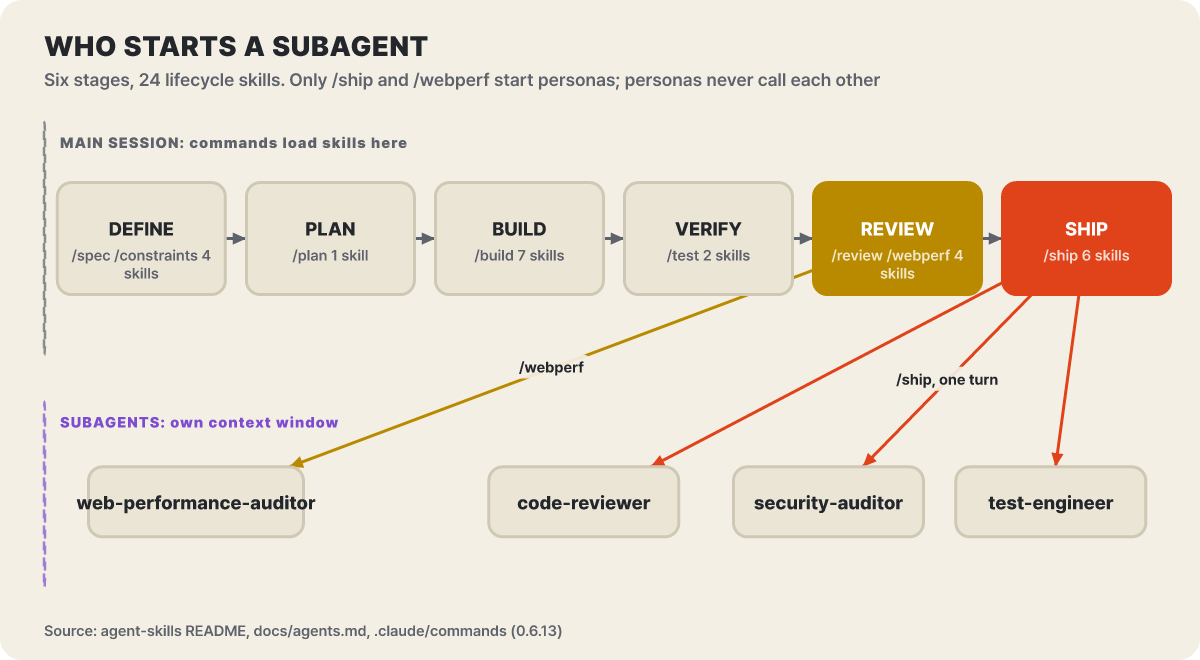 Figure 3. The 24 lifecycle skills across six stages and the two commands that reach subagents. The auxiliary command
/code-simplify is omitted
Two lines stand out. One is that /review and /test are not commands that wrap a persona. Both run code-review-and-quality and test-driven-development in the main session. Documentation before 0.6.13 described this differently and was corrected on Oct 13. It now says that if you need code-reviewer or test-engineer in a fresh context, you should call the persona directly or use /ship. The other is /webperf. This command is for web apps only. It runs in deep mode when it has a Lighthouse or PageSpeed Insights JSON, a CrUX response, a DevTools performance trace, or a live URL connected through Chrome DevTools MCP, and in quick mode, which finds only structural problems from the source, when it has none of these. Every finding in quick mode is marked “potential impact.”
The rule that a persona cannot call another persona is captured in the chart’s subtitle. Coordination is up to the command or the user, and in Claude Code the platform constraint that a subagent cannot spawn a subagent enforces the same rule. In Claude Code the commands are plugin commands, so /review, which has the same name as a built-in command, must be called as /agent-skills:review.
A vague request stops twice, at the interview and at the spec
interview-me, the first skill of the define stage, does not start building right away when it gets a request like “build me a dashboard.” It writes its current guess as one sentence with a confidence figure, asks questions one at a time and attaches its own guess to each, watches whether the user is giving the answer they think they should give, restates the intent in the user’s own words, and stops once it gets a clear “yes.” Condensed, the example in the skill goes like this.
User: Build me a dashboard for our metrics.
Agent: My hypothesis is that you need a way to answer “how are we doing?” at standup. My confidence is about 30%. Who uses it, which metrics, and what counts as success are missing. Who is the person asking “how are we doing?” I’d guess the team at standup.
User: Actually it’s just for me. I keep losing track of which experiments are running. There’s no list, it’s scattered across several docs.
(In two questions it becomes clear that what’s needed is not a dashboard but an experiment list.)
Attaching a guess to each question is the key. The skill explains that users react faster to correcting a wrong guess than to filling in a blank. The test for finishing is also not a feeling. If you can predict the user’s reaction to the next three questions you would ask, the interview stops. When restating the intent, an “out of scope” line is required, an answer like “just handle it” does not count as a yes, and the skill itself says not to use it in CI or scheduled runs where no one is there to respond.
Once the intent is settled, spec-driven-development turns it into a document. The spec covers six areas: goals, commands to run, project structure, code style (one real code snippet rather than three paragraphs of description), test strategy, and boundaries. The boundaries are divided into three columns. “Always do” holds things like running tests before a commit, “ask first” holds database schema changes and adding dependencies, and “never do” holds committing secrets and deleting tests without approval. A vague instruction is turned into success criteria. “Make the dashboard fast” becomes LCP under 2.5 seconds on 4G, initial data load under 500ms, and layout shift CLS under 0.1, and the agent can iterate with tries and fixes toward those conditions.
The point of this section is that both skills must stop at the end. In 0.6.12 on Oct 3, spec-driven-development was fixed to end its turn after saving the spec and wait for approval. On hosts that load only skills, some models did the spec, plan, task breakdown, and implementation in a single turn, because the “confirm before proceeding” step was written only in the /spec command. The same fix went into interview-me in 0.6.11. The repository has paid twice for the lesson that a rule written only in a command disappears on hosts that have no commands.
Where /build auto removes the human, and where it keeps one
/build implements the next task from the plan and stops. The order is to read the acceptance criteria, write a failing test (RED), write the minimum code that passes (GREEN), run the full tests and the build, and then commit. /build auto creates the plan, gets it approved once, and then implements every task without stopping. The starting conditions are demanding.
- A spec must exist at
SPEC.mdin the root,docs/SPEC.md, or underspec/, and a README or an arbitrary document does not count as a spec. If there is none, it stops and tells you to do/specfirst - If
git statusshows uncommitted changes outside the plan’s artifacts, it first asks you to commit or stash them. Commits pile up per task, so mixing in someone else’s changes would break a clean revert - It shows the plan and waits for a clear affirmative such as “approve,” “go,” or “yes.” “Looks fine” is not approval
- After that, it repeats RED, GREEN, regression check, build, and a separate commit for each task, staging only the files that task touched and never using
git add -A
The documentation states plainly that auto mode is not faster per task. It runs the same test-driven loop and only removes the person between tasks. There are three conditions for stopping to ask. When a test won’t pass or the build breaks, when the spec is ambiguous or a decision not in the spec is needed, and when the step is one that git revert cannot undo, such as authentication and permissions, irreversible data migration, payments, deletion, deployment, or secrets. Once the user clears the blockage and types /build auto again, it resumes from the next unfinished task.
The mechanism for that last condition is doubt-driven-development. Assuming a confident answer is not necessarily a correct one, it sets up a fresh reviewer who tries to refute each major decision.
- Write the claimIn two or three lines, such as "this cache layer is thread-safe under read-heavy load"
- Strip it downKeep only the artifact and the contract, and delete my reasoning
- Doubt itA reviewer in a new context reviews it with a prompt that says "find what is wrong." My claim is not passed along
- Sort it outClassify the findings as contract misreading, valid, accepted trade-off, or noise
- StopWhen only trivial findings remain, after 3 rounds, or when the user says "ship it"
The point is to hand over only the artifact and the contract, because passing along my conclusion makes it easy for the reviewer to agree with it. Cross-model review can be used on the grounds that a different model family does not share the same blind spots, and the guidance is to ask the user every time before using an external command-line tool and to run it in a read-only sandbox. That is because instructions hidden in the text under review can drive the tool. If substantive findings remain after three rounds, it does not extend the loop and instead reports that the artifact is not ready yet.
The order in which three reviewers read at once in /ship
/ship is the only parallel coordination the repository allows. It launches three subagents at once to read the same change from different viewpoints, and when the reports come back, the main agent merges them. In the chart below, look at the order: three calls go out in the same turn, and the verdict comes only after the reports return together.
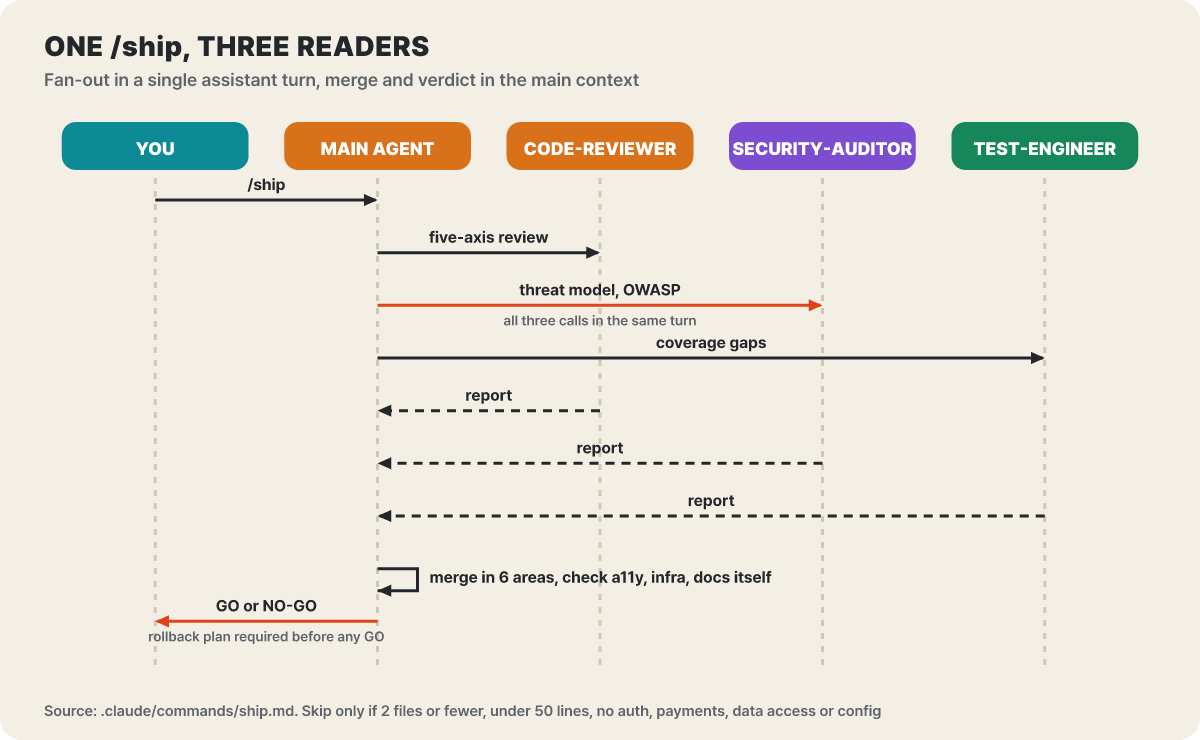 Figure 4. The three reviewers do not call one another, and each works in a fresh context. Merging and the verdict belong to the main agent
The command document insists that all three calls be sent in a single assistant turn, because making the calls one after another defeats the purpose of splitting them in parallel. The reasons to go parallel are that the reviews do not depend on each other and each runs in its own fresh context window, so the main session does not get cluttered. The merge is organized into six areas: code quality, security, performance, accessibility, infrastructure, and documentation. Accessibility, infrastructure, and documentation are not covered by the three personas, so the main agent checks them directly. If the user has defined a persona of the same name under .claude/agents/, that one takes priority over the plugin’s, so a reviewer tuned to the team’s standards drops straight into /ship.
The verdict rule is simple. If even one Critical finding appears, the default verdict is NO-GO unless the user explicitly accepts the risk, and without a rollback plan it cannot issue GO. The parallel check can be skipped only when the change is 2 files or fewer, under 50 lines, and does not touch authentication, payments, data access, or configuration. The rollout after the verdict is set by the shipping-and-launch skill. Deploy with the feature flag off, turn it on for the team internally and watch for 24 hours, turn it on for 5% of users and compare against the baseline for 24 to 48 hours, widen to 25%, 50%, and 100%, and within two weeks of full release clean up the flag and the dead code paths. Whether to advance a stage is decided by thresholds, not by feel.
| Metric | Proceed | Hold and investigate | Roll back |
|---|---|---|---|
| Error rate | Within 10% of baseline | 10 to 100% higher | More than 2x baseline |
| P95 latency | Within 20% | 20 to 50% higher | More than 50% |
| Client-side JS errors | No new kinds | New errors in under 0.1% of sessions | New errors in over 0.1% of sessions |
| Business metrics | Neutral or improving | Drop under 5% (could be noise) | Drop over 5% |
Five shortcuts that produce a green light
If the earlier skills set the order of work, constraint-driven-development leaves this project’s standards on file as numbers. Introduced in 0.6.8 on Aug 28, this skill creates a single CONSTRAINTS.md at the repository root and has you write, next to every number, the check command that measures it. It finds what can be read from code and config (language, test runner, linter, CI) without asking, then limits itself to four questions, each with a default, so “I don’t know” is a complete answer. When you don’t know the target figures, the defaults are changed-line coverage of at least 80% (high enough to force tests to be written, low enough to allow a one-line config change), project-wide coverage that does not fall below today’s value, a mutation score of 60% at first and 80% when mature, zero high-or-above dependency vulnerabilities, LCP of 2,500ms and CLS of 0.1 or less, and an exception lifetime of 90 days. The device for a codebase that is already below the bar is the “ratchet.” If coverage is 62% and you enforce 80%, a red build stays forever and the team learns to ignore red builds, so it records today’s value and blocks only a drop below it.
The most practical part is the five moves by which an agent quietly lowers the bar. The skill’s view is that an agent does not use clever tricks but, when it meets a red light, makes it green by the cheapest route, and in review you find these five from git diff alone.
| Shortcut | What it looks like in git diff |
|---|---|
| The threshold moved | A budget number was lowered, a severity was downgraded, or a check was removed from the fast stage |
| The test got easier | A skip was added, a test file was deleted, or an assertion was dropped from the remaining tests |
| The checker was silenced | A new @ts-ignore or eslint-disable, or an exclusion comment for coverage, mutation, or security checks |
| The work is unfinished | An empty shell that only throws, an empty catch that swallows failures, a TODO in place of the implementation |
| An exception appeared | A new exception row that nobody discussed |
The principle is to tighten standards quietly and loosen them loudly. floor-guard, the reference implementation that ships with this skill, is a starting point for this check, and a major flaw was fixed in 0.6.11. The guard had been silently passing 7 of the 14 cases it said it would catch, such as untracked suppression comments, deleted test files, and loosened maximum budgets. It now catches all 14 and has its own tests in CI. The release notes advise anyone who copied this reference into their own project to pick up the new version.
It also weighs how trustworthy a check is. Sorted by whether an agent can pass by writing code that doesn’t work, axe, vulnerability databases, and Lighthouse, which measures a real browser, are external checks the agent cannot argue with, human-owned lint rules are in the middle, and a test suite the agent wrote is the only true circularity. So at least one of the standards must be an external check. There is also a caution to always add --redact to gitleaks, the secret scanner. Without it, the secrets it finds flow into the agent’s log.
The review skill has a trick in the same vein. It came in with 0.6.12, and it says not to judge “would this test catch a regression” by reading, but to run an experiment. Flip one condition the change added (remove a negation, change && to ||), run the suite, and if it is still green after you restore the original file, that is a finding that the change has a missing test. There is also a change-size guideline: about 100 lines is good, about 300 is acceptable only for a single logical change, and about 1,000 lines should be split.
The first month’s order and the distance to other collections
After installing, the question is where to turn things on first. docs/adoption-guide.md separates two paths by the age of the codebase.
| Item | New project | Older codebase |
|---|---|---|
| Start | From the first feature, /spec, /plan, /build, /review, /ship |
Start with the rules file, review of incoming changes, and debugging of bugs you were already fixing |
| Testing | Test-driven development, git discipline, security, and decision records all the time | Characterization tests (pinning current behavior as it is) only where you will change things, then simplify |
| New features | The same flow | Full flow only for new features, contract first between new and old code. In the final stage 4, deprecation and migration, observability, and performance work that measures first |
| Most expensive shortcut | Skipping the spec because “it’s a prototype” | Having an agent refactor code that has no tests |
| Time to reach the same state | A day | About a quarter |
The anti-patterns the guide names also differ by path. For a new project, “loading all 25 into every session” wastes context and dilutes the important skills, and for an older codebase, a wholesale adoption that lays the full flow on day one produces specs for code that already exists and refactoring with no safety net. The Chesterton’s fence principle, which says not to remove a strange retry loop until you understand it, because it may actually be holding something up, comes from the same place.
docs/comparison.md compares it side by side with collections of the same kind, Superpowers (obra) and Matt Pocock’s skills. It is a comparison written by the repository’s own side, so read it only as a reference. agent-skills centers on a product lifecycle from definition to deployment, is characterized by 25 skills with excuse-rebuttal tables, /ship’s parallel personas, and an in-repository evaluation framework, and by default puts a checkpoint at every stage. Superpowers is a single line of development methodology from brainstorming to review, with about 14 skills that go deep into the inner implementation loop and aim at autonomous execution with deliberately fewer intermediate checks. Pocock’s collection has about 30 skills and publishes as a toolbox the “grilling” that presses for requirements, plus lightweight everyday loops such as PRDs and TDD. The comparison document deliberately leaves out star counts, and while citing one third-party experiment it draws a line that it is not a benchmark. In Om Mishra’s single-task experiment, agent-skills took about 8 minutes to reach the code (about 12 for the comparison target), went through verification 7 times (5 for the comparison target), and caught even a compatibility problem outside the feature, but Superpowers invested more in upfront design reasoning. It is one person’s measurement on one task, so it is an example of selection criteria, not grounds for ranking. The comparison document concludes that if you drive one feature from start to finish with a person watching, agent-skills fits, if you hand off a large, vague chunk and walk away, Superpowers fits, and if you want a lightweight everyday loop for refining requirements, Pocock’s collection fits.
Where each install path snags
The fastest route the README introduces is the open skills CLI, which it says can install into more than 70 agents, including Claude Code, Cursor, Codex, Copilot, and Cline. A known gap tracked as issue #361 is that installing a single skill does not bring along the references/ folder shared by the whole repository, so the paths to the supporting checklists inside the skill do not open. The alternatives are to install or clone the whole repository, or to copy the checklists you need into the skill folder.
npx skills add addyosmani/agent-skills            # all 25 skills
npx skills add addyosmani/agent-skills --list     # just list them before installing
npx skills add addyosmani/agent-skills --skill test-driven-development
Installing from the Claude Code marketplace is /plugin marketplace add addyosmani/agent-skills followed by /plugin install agent-skills@addy-agent-skills. The marketplace clones over SSH, so it can fail without a GitHub SSH key, and in that case the guidance is to add it with the full HTTPS address. For Codex, it is codex plugin marketplace add addyosmani/agent-skills and then codex plugin add agent-skills@agent-skills, and for Gemini CLI, gemini skills install https://github.com/addyosmani/agent-skills.git --path skills. This host list now has a standard too. From 0.6.13, the README’s install section lists only hosts the maintainer has run personally, and the rest get a single line in docs/other-hosts.md. The Oh My Pi and Dojo Workspace instructions that had gone into 0.6.12 were withdrawn under this standard.
Hooks are shell commands. A skill is markdown that you can read and judge, but the scripts in hooks/, once connected, run in your computer’s shell before and after the agent’s tool calls. Read the scripts once before connecting them. simplify-ignore, which marks blocks that must not be touched when simplifying code, had bugs fixed in 0.6.10, 0.6.11, and 0.6.13 where work was lost, characters were corrupted on restore, or reverted changes came back, so get the latest release if you use it.
Is it OK to install all 25 at once?
It is not recommended. The adoption guide names loading all 25 into every session as an anti-pattern, because it wastes context and dilutes the important skills. It says to leave skill selection to only one of the host’s own routing or the meta skill. Using both makes the router double up.
Do /spec and /ship work in Copilot or Cursor?
The slash commands are wrappers for Claude Code. In Copilot the commands do not appear, so the README says to call them by skill name, such as /spec-driven-development. Cursor works by placing .cursor/skills/ and .cursor/rules/ in your own project, and this repository does not ship those folders. Gemini CLI has its own folder of command wrappers.
A setup to leave on for one week, and a description sentence to write yourself
The adoption guide’s direction is not to turn on all 25 from the start but to turn on only what each stage needs. Which three is the editors’ suggestion, following the order seen in the earlier sections: interview-me for receiving vague requests, test-driven-development on the implementation side, and code-review-and-quality before merging. Watch for a week whether the three fit how you work, and if they do, run one feature all the way from /spec to /ship, then add the rest one at a time.
npx skills add addyosmani/agent-skills --skill interview-me
npx skills add addyosmani/agent-skills --skill test-driven-development
npx skills add addyosmani/agent-skills --skill code-review-and-quality
You can reduce the cost of the skills you leave on with skillOverrides in the Claude Code settings. "name-only" lists only the name to save context, and "off" hides the skill from the list entirely. Note that a name-only skill has its description hidden, so, as seen earlier, it gives up the effect of the description sentence in helping automatic calls. It does not apply to skills installed as a plugin, which are managed in /plugin.
{
  "skillOverrides": {
    "performance-optimization": "name-only",
    "deprecation-and-migration": "off"
  }
}
For your team’s skill descriptions, you can use the frame seen in this article as is. It is what the skill does, when to use it, and one clause saying it applies even in cases where the model might judge “I can do this alone.” Below is an example the editors made in imitation of two descriptions in the repository.
---
name: release-notes-check
description: Checks release notes against the merged pull requests. Use before publishing a release. Use when asked to review draft release notes, even when the text is pasted inline and the request does not mention pull requests.
---


