26.1% of 31,132 skills were vulnerable, so scan first
Where the 26.1% figure came from, and what NVIDIA's skill scanner SkillSpector sends off your machine and what it cannot see when scoring.
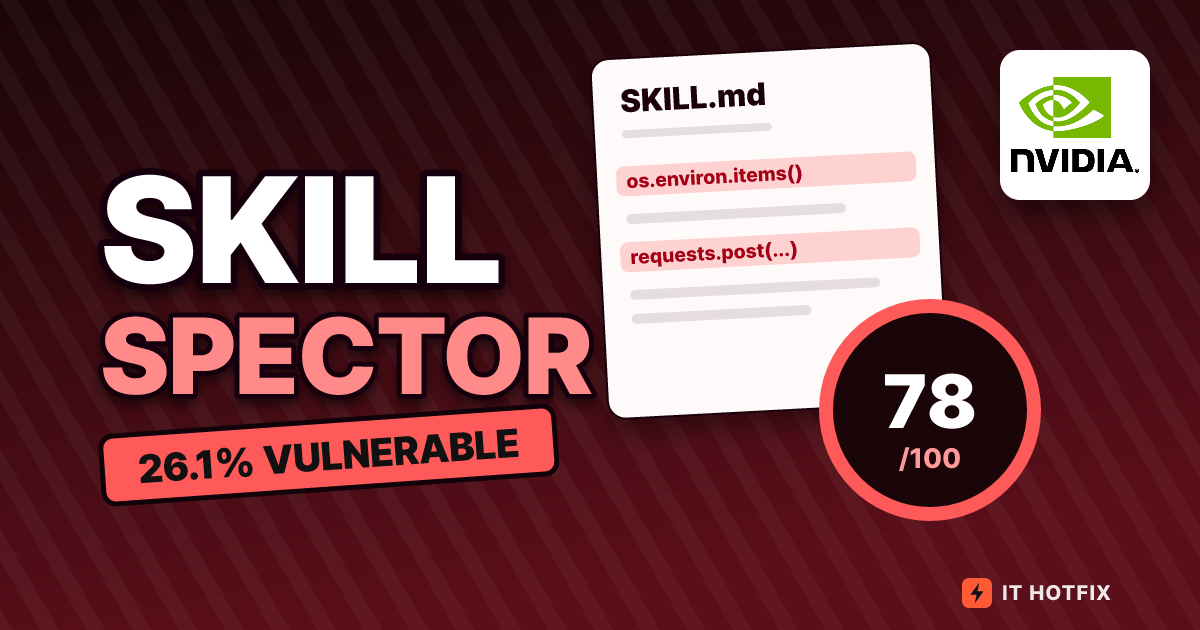
One in four skills is vulnerable, and only 0.52% of suspicious skills remain. Both numbers appeared in the same year. The first is the 26.1% from the January 2026 paper “Agent Skills in the Wild,” which analyzed 31,132 skills. The second comes from “Context Matters,” published in March, which filtered again after adding repository context. The two do not contradict each other, because the denominators, samples, and scanning methods differ. SkillSpector, which NVIDIA published on GitHub (NVIDIA/SkillSpector), is a skill scanner that names the first paper as its research background. As of 2026-10-27 UTC it has 21,973 stars and 1,924 forks, is licensed under Apache-2.0, and its latest release is v2.13.1 from October 23. This article reads how the 26.1% was built, starting from the denominator, then looks at how the same number moves when the scanner changes, and finally follows what SkillSpector trusts and what it sends off your computer when it turns that number into a score.
How 42,447 became 31,132
In December 2025 the paper’s team crawled two skill marketplaces. They collected 27,365 skills from skills.rest and 15,082 from skillsmp.com, for a total of 42,447, with 54,980 scripts attached. The final analysis set, however, is 31,132. The gap of 11,315 (editorial calculation) was removed by four conditions. Files with identical content were reduced to one by SHA-256 hash, and skills with instructions under 10 lines, skills not in English, and skills whose repository had already been deleted (404) were dropped. The deleted repositories account for 7,353, or 17.3% of the initial collection. The remaining 31,132 split across the two marketplaces as 20,048 from skills.rest (64.4%) and 11,084 from skillsmp.com (35.6%).
The change on the script side is larger. Of 54,980 scripts, 51,406 were removed and only 3,574 remained (a 93.5% reduction). Of those removed, 68% were the same file copied by several skills, 24% was boilerplate, and 8% was code that was not part of a skill. So the paper’s unit of counting is the skill, not the script, and each skill is counted once.
Two points matter in the denominator. One is that the figure covers only skills written in English. The other is that skills whose repositories were deleted were excluded from the start. If malicious skills were reported early and disappeared, more of them would sit among the deleted ones, and that side is entirely outside the sample. The paper itself lists this as survivorship bias, and its limitations note that a December snapshot may not represent enterprise environments or the later ecosystem. So 26.1% should be read not as “26.1% of all skills” but as “26.1% of the 31,132 English skills that were still alive on two marketplaces in December 2025.”
Cutting 26.1% into 100 cells
Now the numerator. 8,126 skills have at least one vulnerability. The paper fixes a severity for each pattern in advance and counts each skill once, at its highest severity. The figure below shrinks 31,132 skills into 100 cells so that you can read each severity’s share by counting cells.
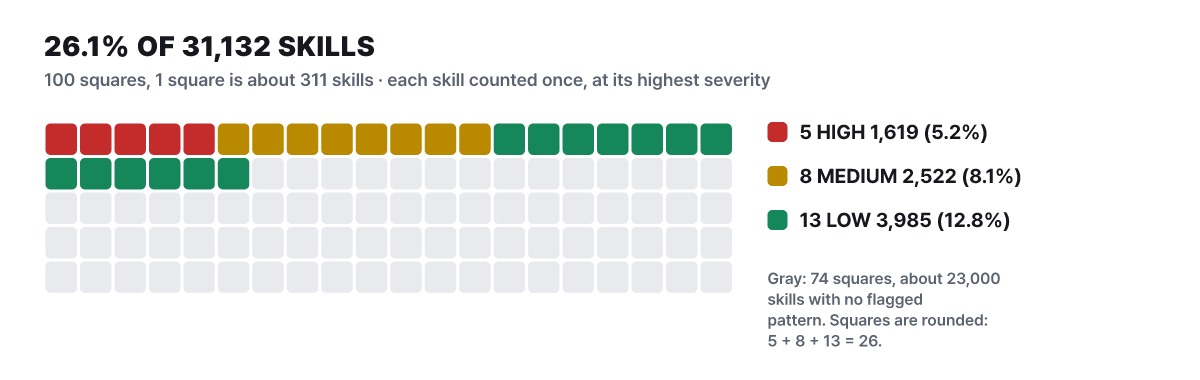 Figure 1. Severity breakdown of the 8,126 vulnerable skills. Cell counts are rounded; counts and ratios are from the paper
Half of the 26 colored cells are low (12.8%). This group holds many hygiene problems, such as not pinning versions or requesting broad permissions. High severity, which suggests malice, is the smallest at 5.2%. By category, data exfiltration accounts for 4,133 (13.3%), privilege escalation for 3,671 (11.8%), supply chain for 2,296 (7.4%), and prompt injection for 209 (0.7%). The four numbers add up to 10,309, which exceeds 8,126, because 44.2% (3,594) of vulnerable skills fall into two or more categories.
Is 5.2% then the share of malicious skills? The paper does not say so. Of the 1,619 skills classified as high, people reviewed the 87 with the highest risk by hand, and clear indicators of malice appeared in 23. In a small validation that actually ran 25 of them, 18 (72%) showed exploitable behavior, 4 were a split call, and 3 were false positives.
The 23 comes from the 87 highest-risk skills, so it cannot be scaled up to all 1,619. The paper itself states that 26.1% bundles deliberate malice, careless practice, and ambiguous patterns together. The paper’s abstract calls 5.2% “high-severity patterns suggestive of malicious intent,” while the SkillSpector README shortens this to the share that is “likely malicious.” The loss of the word “pattern” in that shortening is a typical way a number travels.
The 86.7% precision came from a 200-skill sample
The accuracy of the scanner that produced the number was measured on a human-labeled sample. The validation set has 200 skills, of which 63 (31.5%) are vulnerable. With static patterns alone, precision was 71.4% and recall 91.2%. The final configuration, which adds LLM classification, reaches precision 86.7% (±4.7), recall 82.5% (±5.3), and F1 84.6%. The figure below attaches the comparison from the paper’s Appendix F beneath these two rows. The four rows underneath were measured on a 100-skill subset of 50 vulnerable and 50 benign skills, covering three general-purpose scanners and the paper’s tool, so the sample differs.
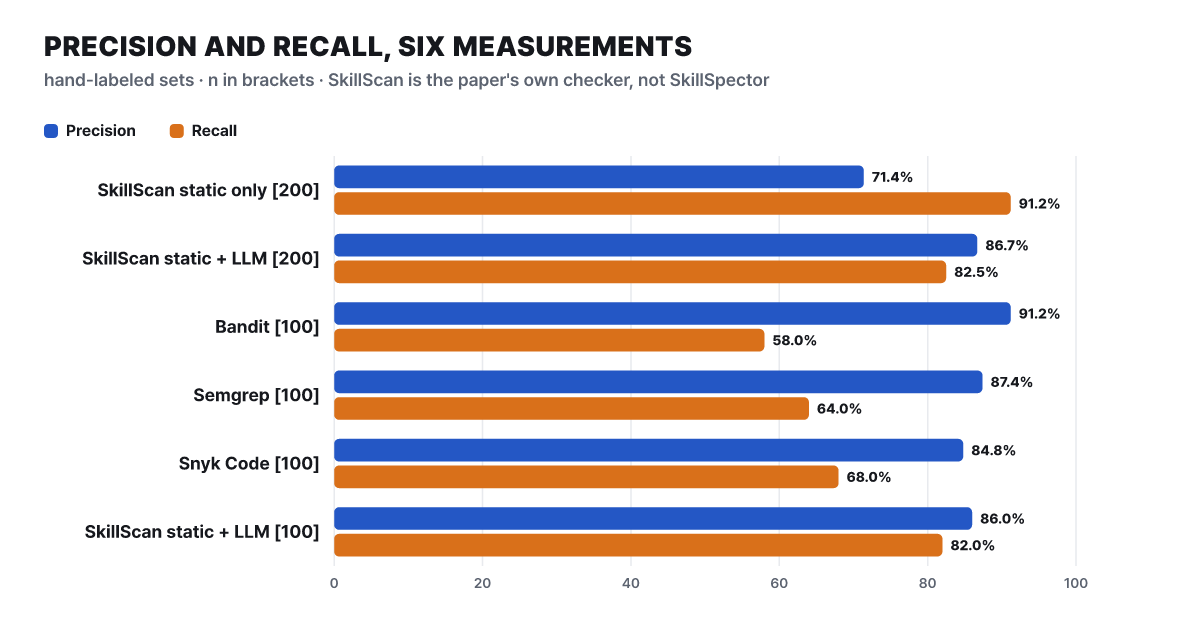 Figure 2. Precision and recall on the paper’s validation set. Values are from the paper’s appendix; numbers in parentheses are sample sizes
The top two rows show that static patterns cast a wide net, so they miss little but raise many false positives. Merely reading os.environ triggers them. The price of the LLM stage removing those false positives is recall falling by 8.7 points (editorial calculation). Unpacked into counts, the final configuration found 52 of the 63 vulnerable skills and judged 129 of the 137 benign skills as benign, which means 8 false positives (editorial calculation). With 52 found and 8 wrongly flagged, precision is 52 ÷ 60 = 86.7%, which checks out. In the bottom four rows, the general-purpose scanners reach only 58 to 68% recall; on prompt injection all three tools scored 0% while the paper’s tool scored 78.6%. Conversely, Bandit has the highest precision at 91.2%. A code-pattern scanner flags only what is certain, so it is rarely wrong, but it cannot see cases where a sentence in the instructions is the threat. The SkillScan in this chart is the scanner the paper built, and it is a different tool from SkillSpector.
The paper also measures how much the numbers wobble. When the LLM classification was run three times, 94.5% of verdicts were identical, and when the prompt was changed three ways, 91.0% were identical. So it places the real rate between 23 and 30% and takes 26.1% as the central value. The 95% confidence interval from sampling is 23.1 to 30.2%, and the value corrected for scanner misclassification is 26.5%.
It is normal for security-tool skills to score high. Skills in the security and red-team field had a detection rate of 67.4%, far above the other fields. When people reviewed 60 of them, 68.3% turned out to be normal behavior of legitimate tools (credential access, file exploration), and the corrected rate for this field fell to 21.4%. Excluding this category, overall precision becomes 90.6% and the corrected prevalence 24.8%.
Measure the same marketplace nine ways and get 3.8% to 41.9%
A paper that re-measured 26.1% by another method followed. “Context Matters” by Holzbauer et al. was released on March 17, revised on June 1, and won the Best Paper Award at the AgentSkills ’26 workshop (CAIS). It collected 238,180 deduplicated skills from ClawHub (16,755), SkillsDirectory (17,611), Skills.sh (112,231), and GitHub (91,583), and first gathered the verdicts of several scanners per marketplace. The introduction gives the share that each marketplace’s scanner reports classified as malicious: ClawHub 46.8%, Skills.sh 23.0%, and SkillsDirectory 6.0%.
Even within the same marketplace, each tool gives a different value. Plotting the fail-verdict rates from the paper’s Table 2 as dots gives the picture below. The dotted line is 26.1% and the band is the 95% confidence interval.
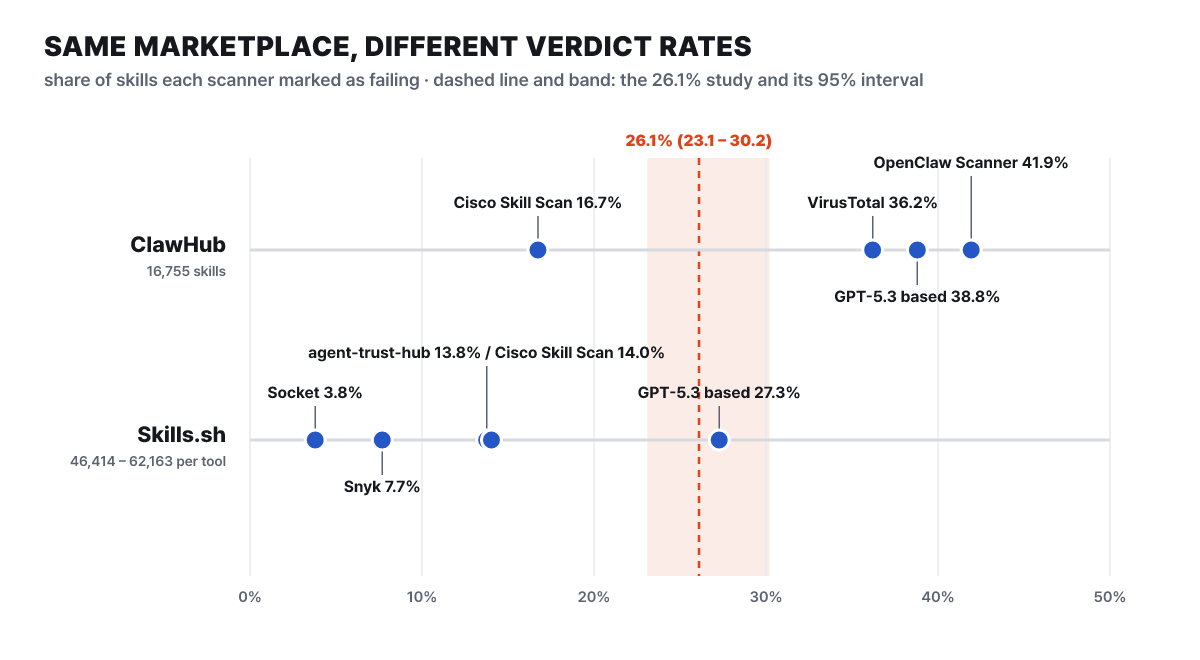 Figure 3. Verdict rates measured per tool on the same marketplaces. Values are from Table 2 of Context Matters; 26.1% and its interval are from the Liu et al. paper
On ClawHub, Cisco Skill Scan judged 16.7%, VirusTotal 36.2%, GPT-5.3-based analysis 38.8%, and OpenClaw Scanner 41.9%. On Skills.sh the figures are Socket 3.8%, Snyk 7.7%, agent-trust-hub 13.8%, Cisco Skill Scan 14.0%, and GPT-5.3-based analysis 27.3%. The number of skills each tool scanned also differs, so the denominators range from 46,414 to 62,163. What stands out is that the dots scatter evenly on both sides of 26.1%. Some tools are far more lenient than the paper, and some far stricter. Of the 27,111 Skills.sh skills that all five tools scanned, 33 were judged fail by all five.
The core of this paper is the next step. There were 8,153 skill-repository pairs that both Cisco Skill Scan (high or above) and the GPT-5.3 analysis (score above 3) flagged. From these, ClawHub skills without a repository and skills placed at a repository root were removed, and 3,000 were drawn at random. After 113 that failed to clone were removed, the remaining 2,887 were given a repository context score (30% metadata, 70% codebase): 1,393 (48.3%) scored 60 or above, 1,373 (47.6%) scored 40 to 60, and 121 (4.2%) scored below 40. Even after looking at those scores, 15 pairs remained suspicious, which is 0.52% of 2,887. Two people reviewed a sample of 20 and judged all 18 they could examine to be normal.
The denominator of the 0.52% deserves a careful look. It is not 0.52% of 238,180, but 0.52% of the 2,887 pairs that already passed two scanners and have a repository. What this number says is not “99.5% of skills are clean” but “even when two scanners flag a skill at the same time, repository context makes most of them look like parts of normal projects.” The same paper also points out that 121 skills whose repository owners have disappeared lead to seven repositories. Because a third party could take over those names, it recommends a direct distribution method. In short, the verdict of one scanner should not be read straight as a count of malicious skills, and a lower number that adds context should not be read as proof of safety either.
Four surveys in one table show the difference in units
Let us put the surveys from the same period on one line. The samples and definitions differ, so this table is not meant to rank them but to show what each number counted.
| Survey | Date | Sample | Method | Reported figure |
|---|---|---|---|---|
| Liu et al. paper | 2026-01-15 | 31,132 skills alive in English from two marketplaces | Static patterns + LLM classification (SkillScan) | At least one vulnerability 26.1%, high severity 5.2% |
| Snyk | 2026-02-05 | 3,984 (all of ClawHub + top 100 of skills.sh) | 8 scanners (LLM verdicts + rules), human confirmation | 76 confirmed malicious, 13.4% (534) with at least one critical issue, 36.82% (1,467) with issues at other levels |
| Holzbauer et al. | 2026-03-17 (revised June 1) | 238,180 | Marketplace scanners + repository context | Marketplace verdicts up to 46.8%, 15 of 2,887 (0.52%) after context |
| ESET H1 2026 report | 2026-07-08 | About 900,000 seen from December 2025 to May 2026 | ESET’s own analysis | Thousands clearly malicious |
26.1% is “skills with at least one pattern,” Snyk’s 13.4% is “skills with a critical-level issue,” 76 is “skills that people confirmed as malicious,” and ESET’s number is “clearly malicious.” All of them get shortened to “vulnerable” or “dangerous,” but they count different things. One more point: the numbers that people confirmed or checked in context stay in the single-digit percentages. Snyk’s 76 is about 1.9% of 3,984 (editorial calculation), and ESET’s thousands are around 1% of about 900,000.
How 71 patterns become one line of score
SkillSpector is the side that turns this research into a usable tool. The README introduces 71 patterns in 17 categories, while NVIDIA’s hosted guide says 68. The categories are prompt injection, refusal suppression, data exfiltration, privilege escalation, supply chain, excessive permissions, output handling, system prompt leakage, memory manipulation, tool misuse, resident agent, trigger abuse, behavior syntax tree, taint tracking, YARA signatures, MCP least privilege, and MCP tool poisoning. Reports print numbered rule IDs as they are. The ones you will meet often are instruction override (P1), instructions hidden in comments or invisible characters (P2), environment variable harvesting (E2) and sending to an external URL (E1), conversation context leakage (E4), reading SSH keys and tokens (PE3), download-and-run (SC2), obfuscation (SC3), look-alike package names (SC6), known CVEs (SC4), and unpinned versions (SC1).
The flow is simple. It unpacks the input (folder, zip, Git URL, or single file) into a local folder, builds context from the file list and contents, runs the analysis nodes all at once, and gathers the results into a score. The development docs count 22 analysis nodes. When the LLM is on, a meta-analysis rereads the findings file by file, and findings that static analysis discovered do not disappear even if the model disagrees. Findings that the model did not confirm get an llm-unconfirmed tag, and the per-finding review outcome is left in the JSON evidence.llm_review_outcome as one of confirmed, disagreed, low-confidence, missing, or failed. Thanks to this structure, a decisive risk signal is not erased just because the LLM says “looks fine.”
The score is computed by adding up the severity of the findings. CRITICAL is +50, HIGH is +25, MEDIUM is +10, and LOW is +5, and a skill with executable scripts has its total multiplied by 1.3. The range is 0 to 100.
| Score | Severity | Recommendation |
|---|---|---|
| 0 ~ 20 | LOW | SAFE |
| 21 ~ 50 | MEDIUM | CAUTION |
| 51 ~ 80 | HIGH | DO NOT INSTALL |
| 81 ~ 100 | CRITICAL | DO NOT INSTALL |
Let us calculate how the formula lands on each band with five hypothetical skills. For real scores, read the value the tool produces; the following is only a calculation exercise for understanding the formula.
| Hypothetical skill | Findings | Scripts | Calculation | Recommendation |
|---|---|---|---|---|
| Translation skill with instructions only | MEDIUM 1 | None | 10 | SAFE |
| Report generation skill | LOW 4 | None | 20 | SAFE |
| The same skill with one more LOW | LOW 5 | None | 25 | CAUTION |
| Auto-install skill | HIGH 1 + MEDIUM 1 | Yes | (25+10)×1.3 = 45.5 | CAUTION |
| Skill with hidden transmission code | CRITICAL 1 + MEDIUM 1 | Yes | (50+10)×1.3 = 78 | DO NOT INSTALL |
When five small problems pile up, the result moves to CAUTION, and one critical finding with a script attached lands straight in the do-not-install band. Because the score is a sum of severities, it is better read as a sorting key than as a probability. The README’s sample output shows 78 points for two HIGH findings, but by the formula that is (25+25)×1.3 = 65, so read the sample only as a demonstration of the report’s shape. The findings matter more than the score. Each finding comes with a file and line number, the flagged code snippet, a confidence level (for example 94%), and an explanation, which tells a person where to read first. NVIDIA’s guide also suggests actions: block high or critical findings until they are fixed or formally accepted, delete the content for hidden instructions and tool poisoning, fix the permission list or remove the behavior for undeclared capabilities, and upgrade, pin the version of, or document the reason for vulnerable dependencies.
What leaves your computer in a single run
This is the first part of the tool to check. The README’s trust model states flatly that it is a defense measure, not a sandbox. It does not execute skill code and only reads the content with regular expressions, the Python syntax tree, YARA, and an optional LLM. Data leaves by three routes.
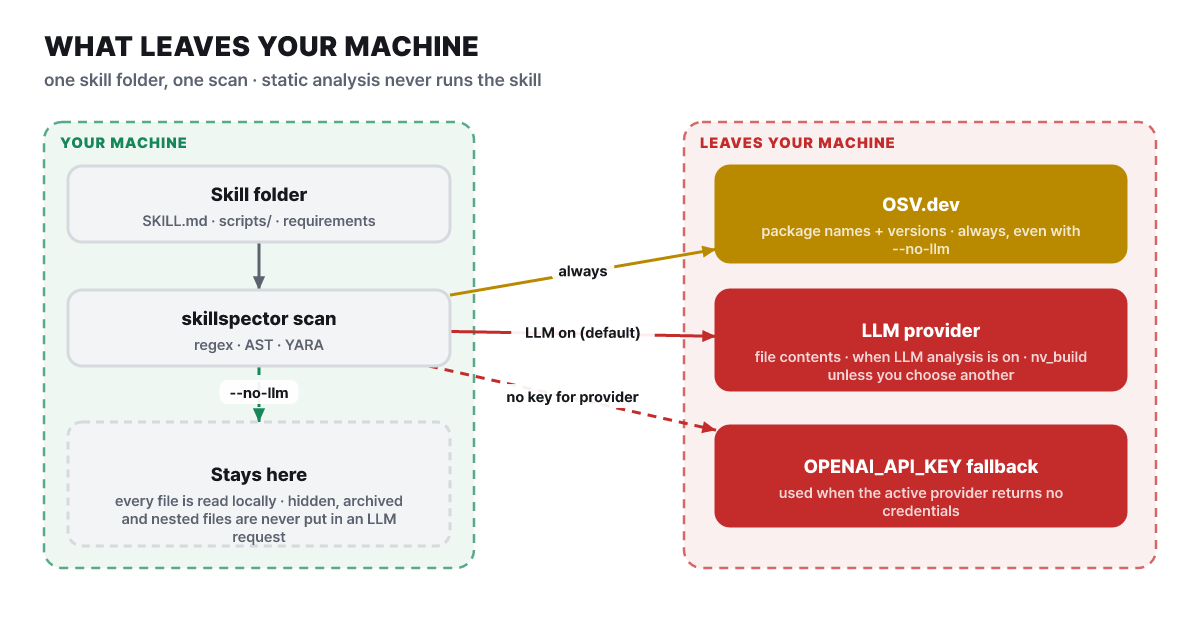 Figure 4. Data movement by scan mode. Hidden, compressed, and nested files are analyzed but are not included in external LLM requests
First, the dependency lookup (SC4) stays on even with --no-llm. It sends the package names and versions that the skill declares to OSV.dev in a batch; no key is needed, results are cached for one hour, and a built-in list substitutes when the connection fails. File contents are not sent. Second, the README lists LLM analysis as on by default, and when it is on, the file contents used for analysis go to the active provider. The default provider is NVIDIA Build (nv_build) and the default model is z-ai/glm-5.3. The release notes of v2.13.0 on October 16 include replacing the NVIDIA Build default model. The hosted guide describes the same stage as “optional,” so the two documents appear to disagree. Either way, if you do not want content to leave your machine, the simplest answer is to specify --no-llm explicitly. Third, where the content goes depends on the provider you choose. You can use OpenAI, Anthropic, AWS Bedrock, Gemini, Azure OpenAI, NVIDIA Build, Ollama, or an OpenAI-compatible endpoint. The local claude, gemini, and opencode commands use a login session without an API key and receive the skill content only through standard input in a subprocess with the keys removed. codex_cli is blocked from LLM analysis because its read-only sandbox can read host files.
Even without a provider key, an environment variable can send content out. The README says that when the active provider cannot supply credentials, OPENAI_API_KEY is used as the second fallback. If this variable already exists in your shell, file contents may go to OpenAI unintentionally. There is also a report in the opposite direction. Issue #908, filed on October 25, says that with the LLM on by default and no provider key, the whole scan in 2.13.1 ends with exit code 2 and produces no output at all (a Windows report, still open as of October 27). In that case --no-llm is the workaround.
The HTTP-mode MCP server has no authentication, so it binds only to loopback such as 127.0.0.1, and it rejects local paths and file:// addresses so that it cannot read other files on the host. The comparison target, Snyk Agent Scan, works differently. It automatically discovers the agents, MCP servers, and skills installed on a computer, requires a Snyk API token, and sends analysis information including skill content to the Agent Scan API while masking secret values. When it scans MCP configurations it actually runs the commands written in the configuration, so the README recommends a sandbox, and it notes that the CLI output format is experimental and may change. This contrasts with SkillSpector, which only reads files and promises stable exit codes and JSON.
From installation to the first report
As the official guide says, install it with uv on Python 3.12 or later. The README notes that installation also downloads third-party open source, so check the license notices. Everything below is a command that only reads files.
- Look at what the folder contains. A skill with
scripts/is on the higher-vulnerability side, as the paper showed (40.6% vs 24.2%, odds ratio 2.12) - Run the static scan first, which sends no content outside
- Read the list of findings rather than the score, then go to the flagged file lines and check them yourself
- Save the result to a file and share it with your team (JSON, Markdown, SARIF)
uv tool install git+https://github.com/NVIDIA/skillspector.git

# View the folder structure (read-only)
ls -R ./my-skill | head -40

# Static scan that sends no file contents outside
skillspector scan ./my-skill/ --no-llm

# Save a report (the file is created with 0600 so only the owner can read it)
skillspector scan ./my-skill/ --no-llm --format markdown --output report.md
echo "exit code: $?"
You can also pass a single file (skillspector scan ./SKILL.md), an archive (./my-skill.zip), or a Git repository URL the same way. The README’s sample output looks like this (an example of the format, separate from the earlier calculation exercise).
 SkillSpector Security Report  v2.0.0
 Score           78/100
 Severity        HIGH
 Recommendation  DO NOT INSTALL

Issues (2)
  HIGH: Env Variable Harvesting (E2)
    Location: scripts/sync.py:23
    Confidence: 94%
  HIGH: External Transmission (E1)
    Location: scripts/sync.py:45
    Confidence: 89%
When environment variable harvesting (E2) and external transmission (E1) appear together in one script, read the two findings as one story. The report’s explanatory sentences also point out that link.
To attach it to CI you need to know the exit codes. 0 means “score 50 or below (SAFE or CAUTION) and no strict option triggered,” 1 means “score above 50 or a strict option triggered,” and 2 means “input error or internal failure.” In the default configuration both SAFE and CAUTION return 0, so to stop the build on CAUTION too, add --fail-on-findings (fail if any active finding exists), --fail-on-incomplete (fail if the scan is partial), or --min-coverage percent (lower bound on scan coverage), or read the recommendation value in the JSON directly. If you put already reviewed results in a baseline file, only new findings count toward the score from the next scan.
skillspector baseline ./my-skill/ -o .skillspector-baseline.yaml

skillspector scan ./skills/new-skill --no-llm \
  --baseline .skillspector-baseline.yaml \
  --format sarif --output skill.sarif --fail-on-incomplete
If you want an agent to run scans by itself, install skillspector[mcp] and register it with claude mcp add skillspector -- skillspector mcp. The scan_skill tool returns llm_used and scan_mode along with risk_score, severity, recommendation, and safe_to_install, so a low score from a static-only run is not mistaken for a complete scan. The README says the initialization hang on this stdio path (issue #199) still applies, but the issue itself was closed on July 12 after the reporter confirmed the cause was a command sandbox restriction. Call it once right after setup, and keep the CLI open as a fallback. For a case of using skills on the security side, see the security audit skill built by Cloudflare, and for where the skill specification is heading, see the news of Agent Skills moving to a foundation.
At the limits, partial analysis comes before the score
The README’s list of limitations is short. It can miss patterns in non-English content, and it cannot see text inside images, encrypted or compiled code, or runtime behavior. On top of that come the resource limits read from the documentation.
| Item | Limit |
|---|---|
| Number of items one skill can hold | 10,000 |
| Original cached for analysis | 64 MiB |
| Total scan time | 600 seconds |
| Inside an archive | Depth 3 levels, 1,000 entries, 25 MiB expanded size, 5 seconds, compression ratio 100:1 per entry |
| Remote input | 100 MiB, 10,000 zip entries |
| One file | Analyzed up to 1 MB; files over 16 MiB are not sent to an external model |
When a limit is reached, the scanner records a “partial analysis” instead of failing, and if any range was excluded, a SAFE recommendation is not issued. The documentation explains these limits as “a safety boundary, not proof of being clean.” False positives are real too. v2.13.1 fixed the problem of mistaking visible text between HTML comments for a hidden instruction (P2), but open false-positive reports continue after October 20, such as a report that a backtick inside a shell comment raises HIGH (#901) and a report that treats correct DB parameter binding as output injection (OH1) (#888). A baseline also has to be used with care. With the fingerprint method, a finding returns to active when the source changes or the SkillSpector version goes up, but a hand-written glob rule keeps applying even when files change, and if its scope is wide it hides malicious content that arrives later.
There are also numbers about deliberately fooling scanners. The Cloud Security Alliance research note dated July 6 ran 1,613 malicious skills confirmed on ClawHub through eight commercial and open-source scanners. Wrapping a skill in a self-unpacking package bypassed them more than 99% of the time in most configurations, and even just blurring the structure gave an evasion rate of 80 to 96%. SkillSpector is not on the list of scanners the note tested. Still, what SkillSpector catches is also content visible in the files, which is in line with the README listing encrypted or compiled code and runtime behavior as limitations.
Just as the 26.1% has to be read with its sample and method, SkillSpector’s score carries conditions too. Even for the same folder, it is a different measurement depending on whether it ran with --no-llm, which provider and model it used, whether it hit a limit and became a partial analysis, and which version it was. Rules change quickly enough that six releases came out in two months, from v2.11.0 on August 28 to v2.13.1 on October 23. So when you keep a report, store scan_mode and the version together with the score, so that a month later you can explain what that score measured.