
Claude Duet speaks first, but how much can you hand it?
Claude Duet messages you first with a morning briefing and periodic checks. Four scenes cover approvals, secrets, limits and signup (as of Oct 27).
On its own, Claude Duet only reads and drafts. Sending messages, payments, signatures and deletions happen only after it shows you the details and you approve, and securities trades and transfers between accounts are not done even if you approve. Where that line sits is easier to see by following one real task than by reading a feature list. So this article walks through four scenes in order: the morning briefing, the checks during the day, sending payment reminders, and paying for an order. After that it sorts tasks into grades, covers what is left when you disconnect an app, and describes what you meet from signup through the first week. The basis is the introduction Anthropic posted on Oct 21 (UTC), the safety, privacy and security documents of Oct 23, and the support documents, all reopened and checked on Oct 27, 2026 (UTC).
7 a.m.: a schedule conflict surfaces among unread emails
Duet is an app that moves first, before the user says anything. Every morning it skims your email and calendar and sends the most important items as a short briefing, and it can already start first steps such as drafting replies. You talk with it by text or voice in one continuous thread, and you can open separate channels by topic, which share memory. The underlying model is Claude Opus 5.5, and there is no setting for choosing a model. The model decides its own effort level for each task.
The quickest way to see what a briefing looks like is the example below. It is an imaginary conversation our editors made to show the flow, not a real screen.
07:00 Morning briefing (editors' example)
Three things to look at first today. Your 2 p.m. client visit overlaps with another appointment. A quote request that arrived late yesterday needs a reply. One overdue invoice has passed its due date.
Write a draft telling the client we're moving the overlapping meeting to 4 p.m.
I've prepared a draft. Before sending, I'll show you the recipient and the wording and ask for your approval.
It is a short exchange, but it holds two things. The briefing and the draft are things Duet does on its own without approval, and from the moment a draft turns into a real email, a human approval steps in. The support documents say that when Duet gives numbers or summaries, it also lists the emails, files and spreadsheets they came from. You can open that source once before trusting a line in the briefing.
The beta-tester cases Anthropic presented point to the same spot. One real estate agent said the morning briefing caught a property showing that had been put on the wrong day, and called it the kind of alert they wanted without having to ask. A business owner with about 110 employees handed over accounting, customer support and marketing for several stores and said they no longer needed to keep 100 tabs open. Anthropic picked all of these cases, so read them as the use the design is aiming at, not as average results.
When does an email that arrives just before lunch get noticed?
The most common misunderstanding about “speaks first” is the expectation that it tells you the moment an email arrives. Duet checks your connected accounts every few hours, and Anthropic gives the reason: checking nonstop would drain plan limits much faster. The support documents also state as a limitation that an urgent item may wait until the next check.
The figure below puts a day on a scale, assuming a 3-hour check interval. Blue dots are check times, and orange squares are the times emails arrived.
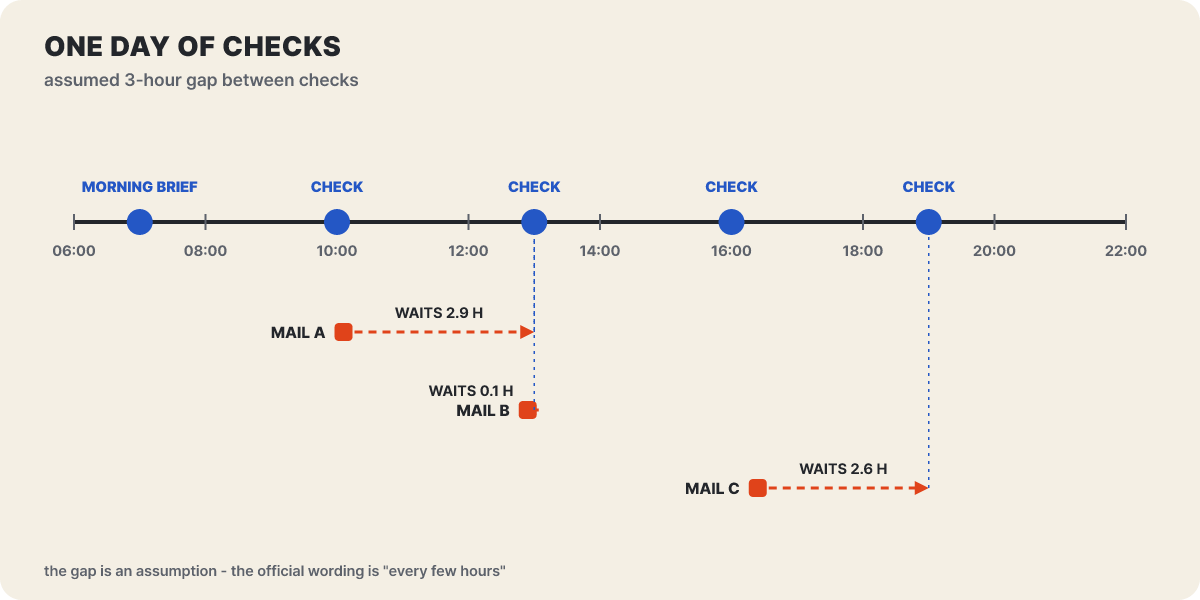 Figure 1. The 3-hour interval is an assumption; the official wording is “every few hours”
An email that arrives at 10:06 waits almost 3 hours until the 1 p.m. check, while one that arrives at 12:54 is caught right away. With the same interval, the wait ranges from zero to one full interval depending on arrival time, so outage alerts or security alarms that need a response within minutes are not something to leave to this structure.
The reason for the long check interval is the limit. Duet has no separate price, and it uses up Pro and Max limits at the same rate as chat. The support documents say this applies to both the 5-hour session limit and the weekly limit, and the morning briefing and daytime checks count toward the limit too. That means the limit moves a little even in hours when you have not spoken to it. Bigger jobs such as financial models and presentations need more model calls and background work, so they use more. You can choose the topics and frequency you receive, so opening them narrowly at first is the way to save your limit.
Before three payment reminders go out
The third scene is about the order in which approval actually runs. One of the tasks Anthropic gave as an example is finding invoices that have not yet come in from QuickBooks and Stripe and drafting payment reminder emails. Below is our editors’ flowchart of that task, and the user’s words and the number of clients are assumptions. What to look for in this figure is the color of the arrows. Black arrows go ahead without approval, and orange arrows go out only after a person allows them.
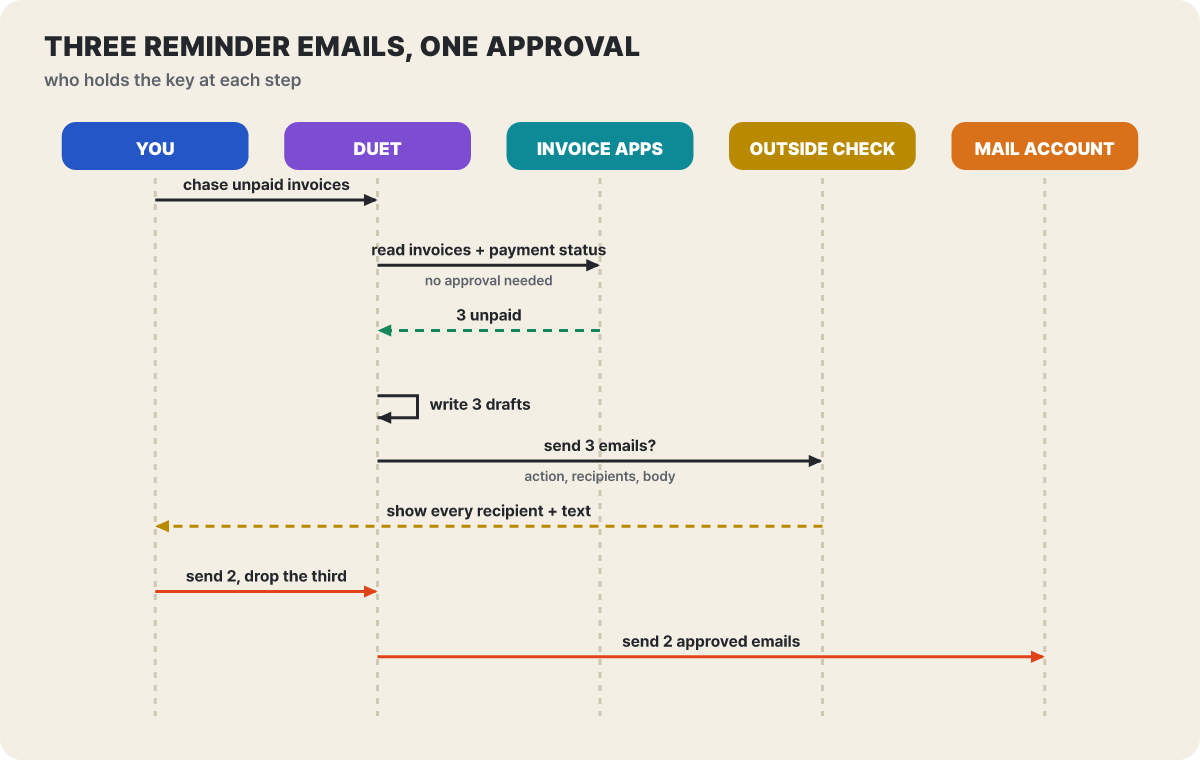 Figure 2. Reading and drafting on its own, sending after approval. The assumption is that one of three emails is dropped and two go out
The “OUTSIDE CHECK” in the figure is a mechanism described in the Oct 23 safety document. For each action, a separate automatic check runs outside the model and evaluates whether the action matches the user’s intent, and in the introduction Anthropic said that the auto-mode classifiers of Claude and Claude Code are used for action approval. The approval screen shows the action, the destination and the content, and for a message it shows every recipient. You do not approve all three emails at once; you can see with your own eyes which one to remove.
Work does not stop when a person cannot respond right away. According to the support documents, Duet finishes everything except the part that needs approval and brings the approval request back later. Routines that run while you are away reportedly use the same safeguards. There is also a “don’t ask again” rule that reduces repeated approvals, but payments or transfers, deleting orders and creating accounts are excluded from it and are asked every time. The introduction alone reads as if the rules were fixed, but with the Oct 23 document it became clear that users can lower the approval frequency for some tasks.
An order where neither the card number nor the password passes through
The fourth scene involves money. Purchases go through Stripe’s Link wallet, and Link issues a one-time virtual card limited to one merchant and one amount. The real card number is handed to neither Duet nor the merchant. This payment is also subject to approval, and on Shopify stores there is a route to pay with Shop Pay. Responsibility for problems after an order is split, and the support documents say to contact the shop for delivery or refunds, Link support for Link problems, and Anthropic if Duet picked the wrong product or option.
On sites that require a login, you start to wonder where the password goes. The figure below divides the Oct 23 document’s explanation by area. What to look at are the places connected to the agent box by dotted and solid lines.
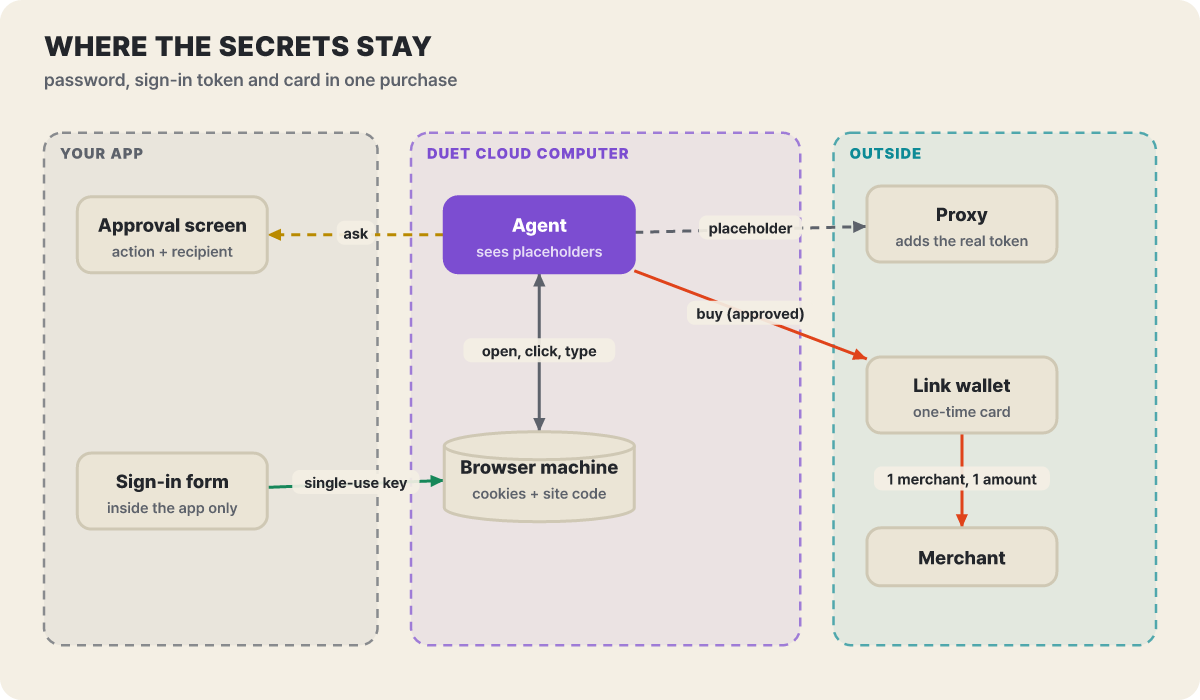 Figure 3. The agent sees only placeholders. The password goes from the form in the app to the browser machine, and the outside proxy attaches the real token
You enter the password directly in a form inside the Claude app, it is encrypted with a one-time key and goes to the browser machine, and the model never sees the value. The login form appears in the app only during a login the user requested, and the document warns that requests arriving by link, text message, email or another website are not legitimate. The agent handles login tokens only as placeholders, and at the moment a request goes out, a proxy outside the agent’s computer inserts the real value. The browser is controlled on a dedicated cloud virtual machine only through set commands such as open, click and type, and a site’s code and cookies stay on the browser machine. The text of pages and downloaded files come back to the agent.
This structure follows the same line as the Claude Managed Agents documentation, which Anthropic says Duet’s credential handling follows. The developer documentation explains that you register a secret once in a vault, leave only a placeholder on the agent side, and swap it only in requests going out to hosts you have allowed. The same document also states a limit. The swap happens only in the outgoing direction, so a session token obtained with a secret enters the sandbox as it is, and the agent can do everything the key allows, so give the key only the permissions it needs. Turned toward the user, the statement that it cannot see the password is reassuring, but the permission scope of an app you connect is the scope the agent can reach.
The text going back and forth gets one more check. A separate classifier looks at every outgoing message, and even files uploaded to the browser are inspected. Login credentials, full card or account numbers, and government-issued ID numbers are not shared even if the user asks. Other personal information such as health or finance needs consent, and the user’s own request counts as consent. A blocked message is sometimes rewritten without the sensitive content and sent back for approval again. The document also says this classifier can occasionally miss something or block a harmless message. Meanwhile, browser requests carry a distinctive User-Agent and Anthropic publishes its browsing IP addresses, and some large sites reportedly decided to block them. On such sites, an order may not go through.
Nine tasks, placed in three grades
Putting the tasks from the four scenes on one sheet shows at a glance where the line is. The table below picks only actions named in the official documents, and the darker the cell, the more a person’s involvement comes first.
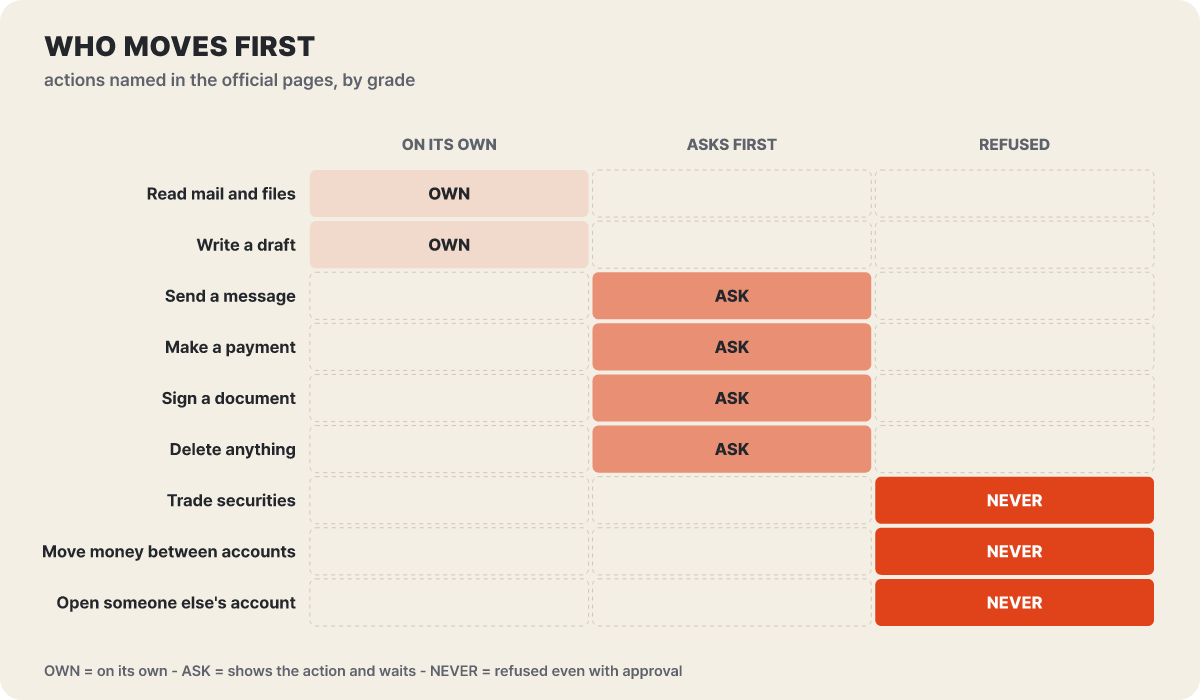 Figure 4. Two things it does on its own, four it asks approval for, and three it will not do even if approved
What they have in common is whether the action can be undone. A draft can simply be thrown away, but an email already sent, a payment already made, a signed contract and a deleted record are hard to take back. The bottom three rows are an area it refuses even when you press approve, which removes any room for a person to allow them by mistake. Conversely, the reading at the top is done on its own within its permissions, so the more apps you connect, the more immediately the range it can read widens. As one guide pointed out, a filter that narrows the topics you receive only defines the job, and it does not reduce the account permissions the connector holds.
Memory that stays after you disconnect
If you disconnected an app out of worry, you need to know what changes. You start a connection yourself, can remove it at any time, and manage it in Claude settings. If you turn off a connection in Claude, it is also off in Duet, and the reverse is true as well.
What changes when you disconnect or delete
- New access to the disconnected app stops
- Deleting your account erases everything Duet stored
- Deleted conversations drop out of past-conversation search
What stays if you only disconnect
- What it already read and learned stays in its memory
- Conversation history and memory carry across tasks until you delete or reset them
- Duet shares the memory of your Claude account
So to erase the information gained from an app after you disconnect it, resetting memory is a separate step. On the other hand, there is a window for checking what the agent does. You can see the task list and a page for each task, and you can also change the direction of a task in progress. However, viewing or taking over the agent’s browser screen is not yet possible. Only results and approval screens are visible, so the information on the approval screen is most of what you have to judge by.
Joining the waitlist, and the first constraints
For now it is a research preview, by invitation. The target is Pro and Max accounts in some regions, and you apply in the following order.
- On the Claude Duet product page, click to join the waitlist.
- Enter your name and email. If you use Claude, it must be your Claude account email.
- Choose your plan and phone type (iPhone or Android), and optionally write what you do and the first task you want to hand over.
- After you submit, an email arrives when your turn comes. Invitations go out in sequence, so applying does not guarantee a date.
- Open the invitation email on your phone and follow the instructions to connect with an Apple or Google account. The email of this account must be the same as the one you entered on the waitlist.
Admitted users get one perk. On admission, the 5-hour session limit and the weekly limit are both reset once, and the support documents say this entitlement can be used until Nov 30, 2026. That means even if the limit drains fast while you test new tasks, you can start over from the beginning once.
Knowing the first constraints also cuts down on trial and error. Team and Enterprise plans are not yet eligible, and the support documents say there are plans to bring them later. The Microsoft 365 connector cannot be used yet, and some connectors have limits. It cannot send phone calls or text messages, and email goes out through the connected account with your approval. Large outputs come back in the Make tab as editable files (research briefs, financial models, presentations, dashboards). For sites without a connector, it works through its own cloud browser. It uses only connections you started yourself, it does not see every project and file on your computer, and its work on the Claude side is read-only.
Connections to open and keep closed in week one
Starting with two read-focused connections for the first few days is the safer way. Email and calendar make a good starting point because the morning briefing shows its usefulness right away while the write risk is the lowest. One guide recommends practicing at first with a test mailbox that holds only made-up content instead of your real inbox. If you read every approval request to the end, including the recipient, subject, body, attachments and sending account, you also see in the meantime how well the briefing’s urgency judgments match your own standards.
Apps where money and signatures are at stake, such as payments, payroll and contracts, are better connected last. However well the approval screen is made, once it repeats dozens of times a day, the pressing finger turns into a habit before anything else. You also need to tell whether an empty briefing means “nothing to do” or “failed to read.” They are different states, and neither automatically means safe. It is best to keep checking on deadline-bound work the way you did before.
At a time when competing products keep appearing, it is tempting to choose by model performance or the number of connected apps, but the standard Duet offers is a bit different. What this tool does on its own versus through approval comes down in the end to whether it can be undone. If so, the question to ask is the same whichever agent arrives: is a person standing in front of an action that cannot be undone, and if so, what can that person see on the screen? Add that disconnecting stops access but what it has already learned stays, and most of the setup is deciding how much each first app you attach opens up to the agent.