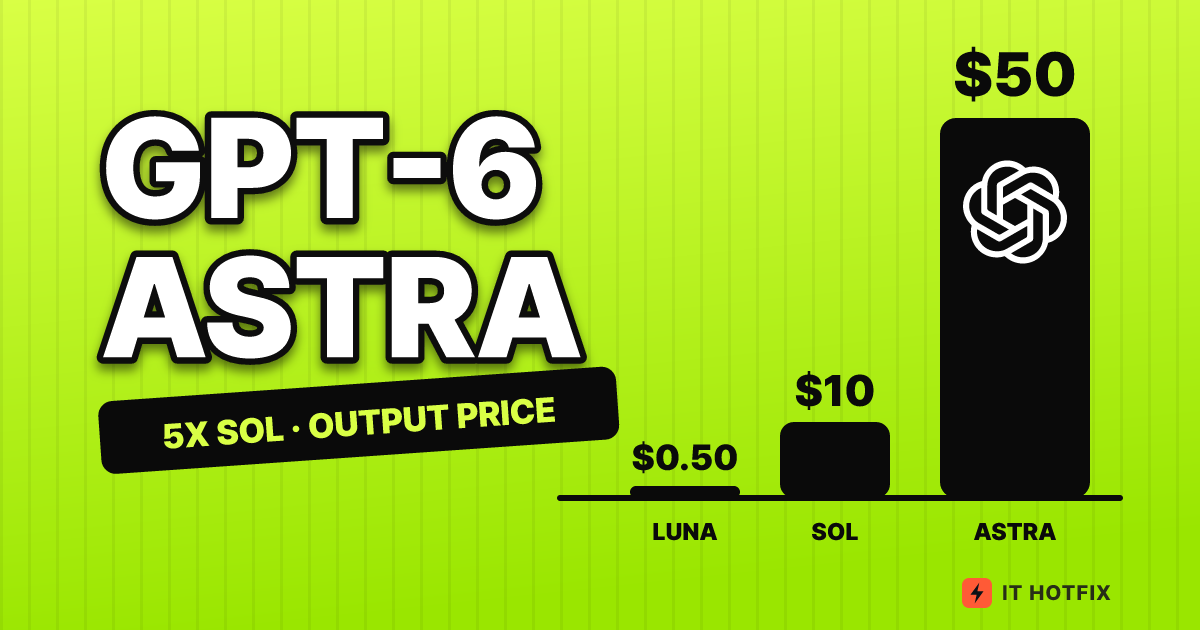
When is GPT-6 Astra worth $50 per 1M output, 5x Sol?
GPT-6 Astra reprices the whole request past 272K input tokens, and caching splits 20 calls into $22 versus $6. Modes, migration breaks and monitoring, priced.
Suppose a service runs its contract-analysis feature on GPT-6 Astra (this scenario is made up by the editorial team). Until yesterday, one question against a 270K-token bundle of contracts cost $3.20 per request. Today an addendum was attached, the bundle reached 280K tokens, and the same question cost $6.35. Input grew by 3.7% and the price grew by 98%. This is not a bug in the code. It is a step built into the price list. If you set a budget from the rate card’s “input $10, output $50” alone, the bill will not match your expectation the moment you cross such a step.
This article rereads the pricing page, the model page, the prompt caching, Fast mode and async tool call guides, and the changelog in OpenAI’s developer docs as of 2026-10-27, and works through Astra’s bill by calculation. Comparing unit prices takes one line: both input and output cost 5x as much as GPT-6.1 Sol from the same family, and that is all. The real bill is the product of input length, processing mode, cache and number of calls, so we compute these multiplications one at a time. The single-request figures are editorial calculations of token counts multiplied by the input and output unit prices, and output includes reasoning tokens.
The step between 270K and 280K tokens
Astra’s context window is 1,050,000 tokens, with a maximum input of 922,000 tokens and a maximum output of 128,000 tokens. The pricing page classes a request with input of 272K tokens or less as short context, and anything above that as long context. A long-context request is billed in full, not just the excess: the input and cache prices double and the output price is multiplied by 1.5. In standard processing, Astra’s input of $10 becomes $20 and its output of $50 becomes $75.
The chart below shows how the price of a single request changes when output is fixed at 10K tokens and only the input length varies. The blue line is Astra, and the dotted line is the line that would have continued without the step.
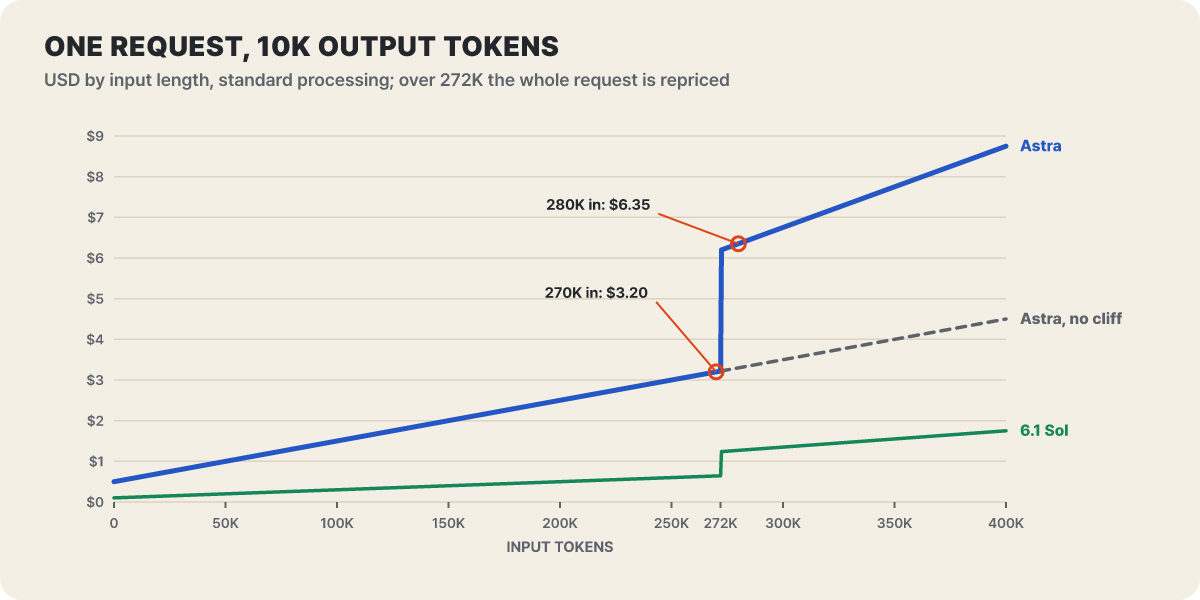 Figure 1. Price of one standard-processing request with output fixed at 10K tokens. Editorial calculation from the pricing page’s unit prices
The vertical gap between the dotted line and the blue line is the height of the step. The $3.22 just below 272K becomes $6.19 just above it, and the slope above that point is also twice as steep. The green 6.1 Sol has the same kind of step, but at one-fifth of the height. It is also worth noting that because the maximum input is 922K, the zone above the step stays open over a span of 650K tokens.
The step is not unique to Astra. The model pages and pricing page for 6.1 Sol, 6.1 Terra and Luna list the same multipliers, and the batch, Fast and Ultrafast rows carry their own long-context prices. Moving down to a smaller model therefore leaves the boundary where it is. For a call that feeds in a long document whole, the first question before switching models is whether the input can be cut to fit within 272K.
One request, multiplied by mode and model
There are four processing modes: standard, batch/Flex, Fast and Ultrafast. Batch and Flex cost 50% of standard, Fast costs 2x, and Ultrafast costs 6x on Astra and 6.1 Sol. The pricing page has no Ultrafast row for 6.1 Terra and Luna. Put the same request (100K input, 10K output) across four models and four modes, and the cheapest cell and the most expensive cell differ by a factor of 1,200. The colors are on a log scale, so darker cells cost more.
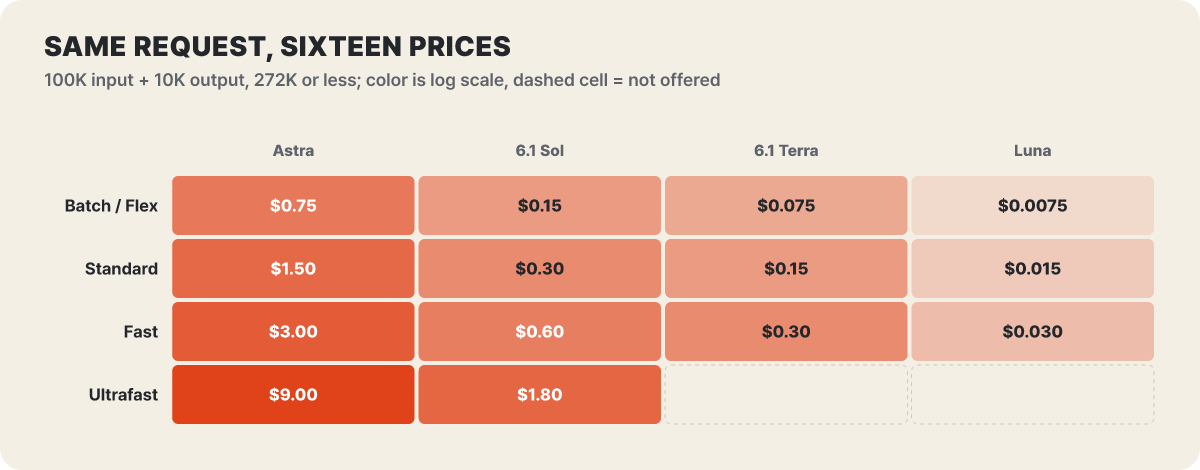 Figure 2. Cost by mode for 100K input + 10K output tokens (272K or below). Dotted cells are combinations missing from the pricing page. Editorial calculation
Read down a column to see how the mode changes the price, and read along a row to see how the model changes it. Astra’s standard price ($1.50) is higher than 6.1 Sol’s Fast price ($0.60). In this range, moving one model down costs less than turning on Fast to get a quicker answer. Layer the 272K step on top and the price of one Astra request spreads out like this.
| Astra, per 1M tokens | Input · output at 272K or below | Input · output above 272K | 270K input + 10K output | 280K input + 10K output |
|---|---|---|---|---|
| Batch/Flex | $5 · $25 | $10 · $37.5 | $1.60 | $3.18 |
| Standard | $10 · $50 | $20 · $75 | $3.20 | $6.35 |
| Fast | $20 · $100 | $40 · $150 | $6.40 | $12.70 |
| Ultrafast | $60 · $300 | $120 · $450 | $19.20 | $38.10 |
The last two columns are editorial calculations. In every mode the price doubles when the boundary is crossed, and on Ultrafast one extra addendum makes a difference of nearly $19 on a single request. Choosing a mode and keeping the input length in check are not separate matters. They multiply.
Each mode also comes with conditions beyond its price.
- Fast is used by adding
service_tier: "fast"to the request, and the changelog introduced it for GPT-5.6 Sol as up to 2.5x faster at 2x the price. The docs state that Fast on Astra has no latency guarantee (SLA). It shares limits with standard processing on the same model, and once input tokens reach 1M per minute you can only increase them by 50% or less every 15 minutes. Requests held back by the increase limit come back asservice_tier: "default"and are billed at the standard price. Regional data residency is not supported for Astra’s Fast, but it is supported for 6.1 Sol’s Fast. - Ultrafast is a tier that shortens the gap between output tokens, set with
service_tier: "ultrafast". The docs strongly recommend a persistent WebSocket connection, because an agent that calls tools many times in quick succession loses its gain to network overhead if it reconnects every time. The Sept 29 changelog says Astra’s Ultrafast does not support regional residency, while 6.1 Sol’s Ultrafast (Oct 8) supports global processing and regional residency. Since Oct 16,agent.service_tiercan also be set toultrafastin the Agents API. - Regional processing (an option to process data only in a specific region) carries a 10% surcharge on models released after March 5, 2026.
Ultrafast throughput limits are set separately from standard, and they are much narrower. Astra’s tokens-per-minute limits, as laid out on the model page and in the Ultrafast guide, are as follows.
| Tier | Standard | Ultrafast | Ultrafast ÷ standard |
|---|---|---|---|
| Build | 1M | 500K | 1/2 |
| Launch | 4M | 1M | 1/4 |
| Grow | 40M | 5M | 1/8 |
The price is 6x while the limit is at most one-eighth, so you cannot push high-volume traffic through Ultrafast. On the other hand, Ultrafast does not use the standard limit, so a split design is possible: send only the short paths where a person is waiting to Ultrafast, and route the rest to standard or batch.
Line by line: the bill for a coding agent that makes 20 calls
An agent sends dozens of requests while it works, and each time it resends the earlier conversation and the tool definitions in full. The input is largely a repeat of the same opening, so input becomes the biggest line on the bill. Prompt caching is a mechanism that recognizes that repeated opening (the prefix) and processes it cheaply at a read price, and it is on by default for supported models. For GPT-5.6 and later models, cache prices are multiples of the input price. A read is 0.1x (0.05x for 6.1 Sol and 6.1 Terra), a 30-minute write is 1.25x, and a 12-hour write is 2.5x, and each token is charged at only one of regular input, cache read or cache write.
The calculation uses the following assumptions (editorial assumptions).
- One repository, and the same agent makes 20 calls
- Each call has 100K input tokens, and the first 95K of them are identical every time
- New input per call is 5K tokens, and output is 2K tokens
- With caching, the first call does one 30-minute write, and the other 19 reads happen within 30 minutes
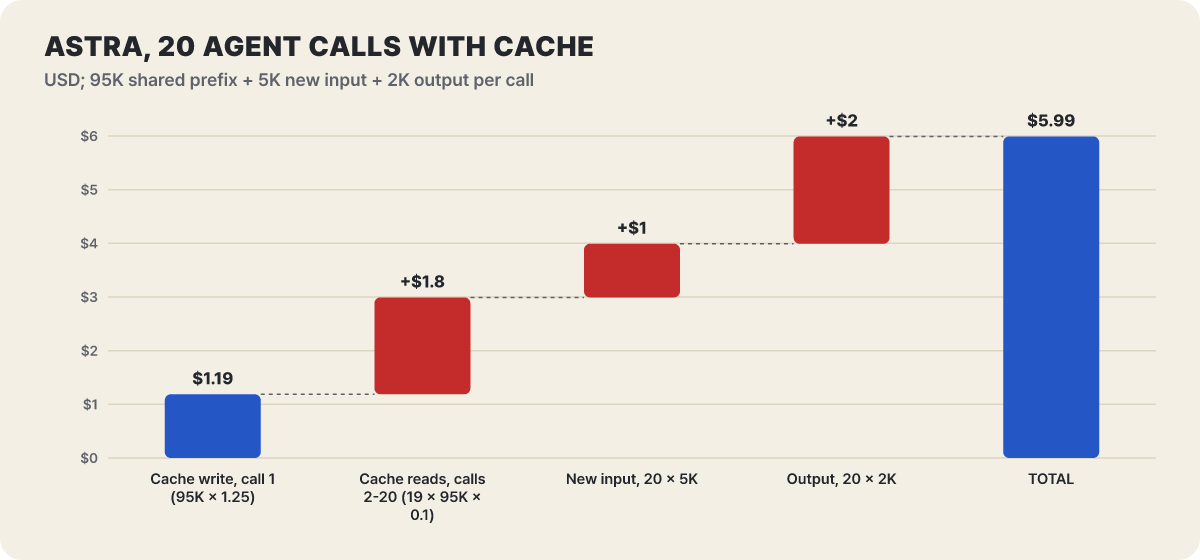 Figure 3. How the total for 20 cached Astra calls builds up from four items. Editorial calculation
The largest item is the $2 for output. Caching cut the repeated opening input across 20 calls ($19 without caching) to just under $3 (write plus read), yet the input-side items (write, read, new input) still add up to nearly $4, so input still makes up two-thirds of the bill. Note also that the read item is $1.8. Even at one-tenth of the input price, reads pile up over 19 calls to more than the new input for 20 calls ($1). Caching does not erase input. It converts input into a price that is an order of magnitude cheaper.
What happens if the same calls run without caching? The chart below applies it to all four models.
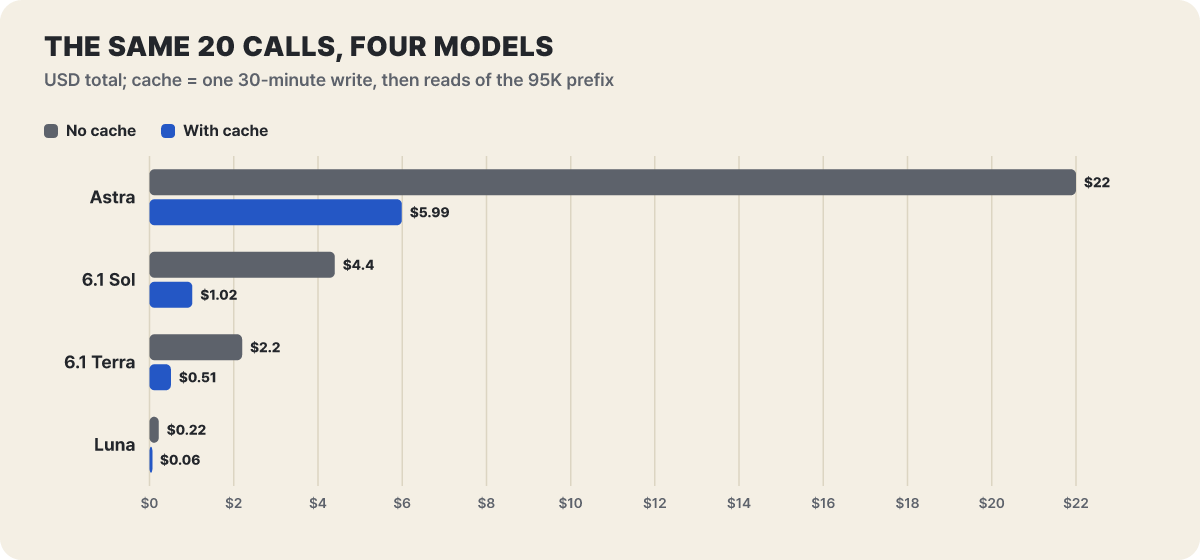 Figure 4. Total for the same 20 calls, without caching versus with caching. Editorial calculation
Caching alone cuts Astra from $22 to $5.99, a 73% reduction. Even so, Astra with caching ($5.99) is still more expensive than 6.1 Sol without caching ($4.40). Model choice and cache design are not an either-or decision. They multiply. The conclusion of this chart is that using Astra requires using the cache well, and that even with good caching, dropping to a smaller model may be cheaper.
When the same loop grows to 300K tokens
An agent’s context grows as it works. If the 100K input in the calculation above grows to 300K tokens, it crosses the 272K step and all 20 calls are billed at long-context prices. Three cases are laid side by side on the assumption that the opening 285K tokens are the same, new input is 15K tokens, and output is 2K tokens per call.
| Astra, 20 calls (output 2K per call) | No cache | With cache |
|---|---|---|
| Input 100K (opening 95K) | $22.00 | $5.99 |
| Input 300K (opening 285K), over 272K | $123.00 | $26.96 |
| Input 270K (opening 255K), 272K or below | $56.00 | $13.03 |
The context tripled, yet the cached bill grew 4.5x ($5.99 → $26.96), because the unit price doubled. Trim 30K tokens from the context to bring it to 270K and the bill falls by half, from $26.96 to $13.03. Time spent compressing or cutting out old tool output and file contents that were already handled comes straight back as model call cost. Compression does change the prefix, so the cache has to be rewritten, but that cost is already included in the write item in the table above.
How many calls it takes for the cache to win, and when it breaks
How many times must the same opening be read for the cache to pay off? The examples in the docs are one 30-minute write plus one read at 1.35x the input price (2x for two calls without caching), and one write plus nine reads at 2.15x (10x for ten calls without caching). Taking input price as 1x and working this structure out by number of requests gives the following.
| Requests with the same opening | No cache | 30-minute write + reads (Astra) | 30-minute write + reads (6.1 Sol) | 12-hour write + reads (Astra) |
|---|---|---|---|---|
| 1 | 1 | 1.25 | 1.25 | 2.5 |
| 2 | 2 | 1.35 | 1.30 | 2.6 |
| 5 | 5 | 1.65 | 1.45 | 2.9 |
| 10 | 10 | 2.15 | 1.70 | 3.4 |
| 20 | 20 | 3.15 | 2.20 | 4.4 |
For a request whose opening will be used only once, caching is a 25% loss (1.25 versus 1), and the gain starts from the second request. A 12-hour write starts at 2.5x, so it suits only cases where the same opening is read many times over a day. The changelog stated this 2.5x explicitly when it added 12-hour retention on Oct 20.
12-hour retention is most valuable for a service whose requests come more than 30 minutes apart. Each read keeps the entry alive for at least another 30 minutes from that point, but if requests arrive 40 minutes apart, a 30-minute cache expires every time and you repeat writes without any reads. Say 10 requests with the same opening arrive at 40-minute intervals. Then 30-minute retention costs 1.25x ten times, which is 12.5x (more than the 10x without a cache), and 12-hour retention costs 2.5 + 0.1 × 9 = 3.4x (editorial calculation). Whether your service’s request interval is below or above 30 minutes is the criterion for choosing a retention time.
Whether the cache is actually hitting can be checked in the usage fields of the response. The fields and formulas set out by the docs are as follows.
usage.input_tokens
usage.input_tokens_details.cached_tokens                          # reads (excluding write tokens)
usage.input_tokens_details.cache_write_tokens                     # total writes
usage.input_tokens_details.cache_write_tokens_details.ttl_30m_tokens
usage.input_tokens_details.cache_write_tokens_details.ttl_12h_tokens

regular input = input_tokens - cached_tokens - cache_write_tokens
input cost (multiple of the input price) = regular input + cached_tokens × 0.1 + ttl_30m_tokens × 1.25 + ttl_12h_tokens × 2.5
The two retention-time fields do not overlap, and their sum is cache_write_tokens. The minimum cacheable length is 1,024 tokens of visible input, and OpenAI’s hidden system instructions are not counted. Set the retention time by passing "30m" (the default) or "12h" in prompt_cache_options.ttl, and 12 hours is a minimum lifetime, not a deletion deadline. The default is implicit mode, which records at the end of the most recent message. In explicit mode, where you set the points yourself, a single request can have up to four write points. prompt_cache_options.prewarm: true fills the cache without producing output, and that write is also charged at the write price for the chosen retention time.
The cache writes anew if even one character of the prefix changes. The changes the docs list as breaking the prefix are as follows.
model,tools(names, descriptions, schemas, order),parallel_tool_calls,text.format,text.verbosity,reasoning.effort, compaction, andcontext_management- Editing earlier messages or splicing something into them
- Changing content such as a timestamp or per-user wording placed before the breakpoint
The cache is not shared across organizations or across regional processing boundaries, and traffic above about 15 requests per minute can overflow to other machines, which can lower the reuse rate. Keep in mind too that cached tokens still count in full toward the tokens-per-minute limit. They are cheap on the bill, but in the limit calculation they count the same as regular input.
Async tools that overlap the waiting, and mid-task steering
A bill is made not only of tokens but also of waiting. For a service where a person waits at the screen, the time the model’s turn stalls on each call to a slow tool is itself a cost. Three features released with Astra on Sept 3 are meant to overlap that waiting. The first is async tool calling. If you put async: true in the tool definition, the turn does not stop after the model emits the call, and the model keeps working through the parts that do not depend on it.
{ "type": "function", "name": "get_weather", "async": true, "strict": true,
  "parameters": { "type": "object", "properties": { "city": { "type": "string" } },
                  "required": ["city"], "additionalProperties": false } }
The sequence is shown below. The important point is that the party that actually runs the tool is still your own application.
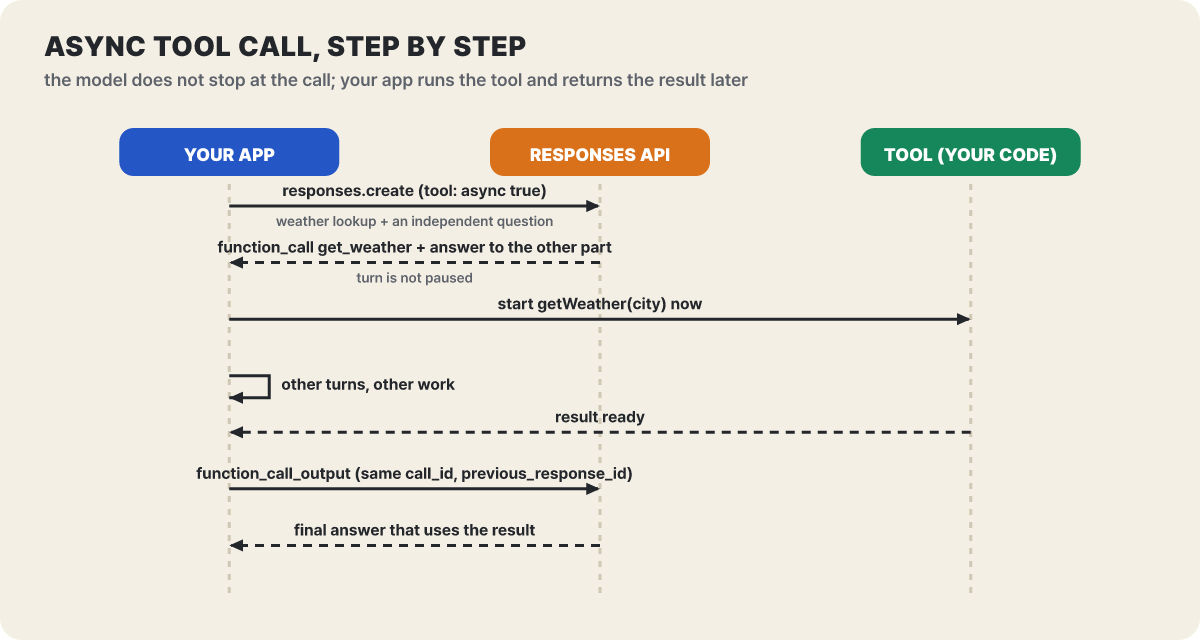 Figure 5. Request and result of an async tool call. OpenAI does not run or manage the task on your behalf
The work from the third arrow on is on the app’s side. Your own code runs the tool, and the finished result is returned in the next Responses request as function_call_output (custom_tool_call_output for custom tools), with the call_id of the original call attached. If other conversation turns pass in between, chain them with the most recent response’s ID as previous_response_id. For moments when the model must wait for a result, the docs introduce a pattern that uses a wait function the app builds itself, and this function is not built in. There are three constraints. Async applies only to functions and custom tools that your own app runs, not to hosted built-in tools such as web search. It is not used together with programmatic tool calling, and in multi-agent mode it is not combined with parallel tool calls.
The second is changing direction mid-task. It sends a correction such as “leave that file out” while a response is still being generated, and it works only on GPT-6 family models over a Responses API WebSocket connection. After sending response.create and receiving response.created, send response.steer (only type, previous_response_id and input are allowed) on the same connection. The events the server sends come in this order.
response.steer.accepted    the correction was queued (not yet applied)
response.incomplete        the original response was cut off, incomplete_details.reason: "steered"
response.completed         the follow-up response created by the server has finished
Do not send another response.create after the correction. The server creates the follow-up response by itself after finishing the current output item and any hosted-tool work that was already running. A correction landing does not cancel output already sent, actions already taken, or tools already started. If the response needs a tool result or approval, the correction stays in the queue, and once the original response ends, response.steer.pending reports required_input. On failure, response.steer.failed returns the original input with a reason code such as steering_not_supported or too_many_pending_steers. If the connection drops, pending corrections disappear, so keep a record of the corrections you sent, reconcile it against the events after reconnecting, and only then resend. The docs say this WebSocket approach on its own makes tasks with 20 or more tool calls up to about 40% faster, that a connection stays open for up to 60 minutes, and that up to 16 responses can run at once on one connection.
The third is changing reasoning effort mid-conversation. Changing the top-level reasoning.effort alters the hidden instructions and breaks the cache prefix, so during a conversation you append an item to the input array instead.
{ "type": "configuration_update", "reasoning": { "effort": "low" } }The most recent item sets the effort for later responses. The docs advise not putting two such items next to each other, not using it together with automatic compaction or truncation, and inserting a new item again after an explicit compaction. From the cache bill’s point of view, this single line protects the gain that would otherwise be traded away for a prefix rewrite (one 1.25x write).
Calls that return a 400 after you move
Some requests that worked on earlier models are blocked when sent unchanged. These are collected from the changelog and the migration notes in the latest model guide.
reasoning.effort: "none"is not available. Astra and GPT-6.1 Sol do not support it, while GPT-6 Sol, GPT-6.1 Terra and Luna do. Sendingnoneto Astra returns HTTP 400, so calls that turned reasoning off for fast responses should move tolow. The supported levels arelow,medium(default),high,xhighandmax.- Sampling values cannot be used. When the reasoning effort is not
none, you must removetemperature,top_pandtop_logprobs. In Chat Completions also droplogprobs, and in Responses dropmessage.output_text.logprobsfrominclude. First look fortemperaturehidden in shared client code. - Tool calls work only through the Responses API. For Astra, Sol and Terra alike, code that used tools through Chat Completions must move to Responses. The supported endpoints are Chat Completions, Responses and Batch, and the Realtime API, fine-tuning, embeddings, image-generation model calls, speech and transcription, moderation and the legacy Completions API are not supported. Image generation can still be used as a tool in Responses.
- The output limit needs headroom.
max_output_tokensis a limit on reasoning tokens and visible output combined, so if the response hits the limit it ends asincompleteand you pay for input and reasoning even though there is no visible output. The docs recommend leaving at least 25,000 tokens when you start. - The cache settings change. When moving up from GPT-5.5 or earlier, replace
prompt_cache_retentionwithprompt_cache_options.ttl("30m"), and check your cache boundaries and how writes are billed.
The guide says these conversions can be applied automatically in Codex with the OpenAI Docs skill. Do not stop at changing the model ID. Rerun your evaluations with the same inputs and check how the responses’ tendencies change. Reasoning tokens are not visible on screen, yet they are billed at the output price ($50) and also take up the context window, so during evaluation record output_tokens_details.reasoning_tokens along with the score, or the bill cannot be explained. The docs say to treat reasoning effort as an adjustment knob rather than the main way to raise quality, to use medium as the baseline, and to use xhigh and max only when an evaluation confirms the gain.
When the misalignment monitor stops a conversation
Astra comes with a misalignment monitor. It is a system that asynchronously reviews the model’s reasoning and actions, checking whether the agent interprets the user’s instructions correctly and whether it moves sensitive data or makes destructive changes, and it can stop the conversation when it sees a problem. How far the monitoring reaches depends on how the request is made.
| Request | Monitoring | Automatic stop |
|---|---|---|
| Responses API + one of persistent reasoning, WebSocket or OpenAI compaction | Covered | Possible (recognizes and blocks the conversation’s following requests) |
| Responses API without those | Covered | None (webhook notification only) |
| Chat Completions API | Not covered | Not applicable (other safety checks apply) |
If a request is blocked before it starts, HTTP 403 comes back, and the error body looks like this. The same error can also arrive during streaming, so the code that reads the stream must handle it too.
HTTP 403
error.type = "invalid_request_error"
error.code = "misalignment_policy_violation"
Branch on the code, not on the message text. The docs set out three responses. Stop sending further actions to the same conversation and do not retry automatically. Preserve the request and response IDs and the tool call records according to your policy. Show the error information to the person responsible so they can compare what the agent did with what was intended. The API has no general way to resume a stopped conversation, so the design needs to start a new one.
To watch at team level, attach a webhook to the project and receive the safety.alert.created event. The webhook carries only the alert ID, and you read the details by calling GET /v1/safety/alerts/{alert_id} with a key from the same project that has the api.safety.alerts.read permission. The alert’s reason is a category description, may be empty on Zero Data Retention requests, and is not a conversation record or an investigation report. request_paused being true only means a safety block was registered. It is not a guarantee that execution stopped or that earlier actions were reversed.
A pause is not a rollback. Because the monitor is asynchronous, some actions may already be finished before it notices a problem, and a block does not cancel them. The docs themselves say a flag is not evidence that the user broke a policy, and that the monitor may miss a problem or wrongly flag normal work. Keep a human approval step in front of irreversible work such as deleting files, deploying or sending sensitive data.
Astra proceeds instead of asking, and follows skills to the letter
The developer guide sums up Astra’s behavior in five traits. Carrying over a prompt written for an earlier model unchanged will go wrong here.
- Asking back. When the answer would change the outcome a lot, it stops more often than earlier models. It may halt on a task you expected to run to the end. The guide’s recommended direction is to add instructions to the system prompt telling it to infer intent and carry on to the end, to produce a concrete, reviewable result before asking for approval, and not to append warnings or approval requests about hypothetical risks.
- Following instructions. It is sensitive to the skills and instruction files (
AGENTS.md) it can reach. The docs recommend checking every skill and instruction file the model reads, stating in the prompt that user instructions take priority over skill instructions, and having the model say which instruction in which skill file it followed when it stops or goes astray. If a skill obtained from outside is mixed into the instruction files, Astra may follow its contents more faithfully than earlier models, so it is a subject for a security review. - Style. It prefers lists, tables and markdown, and may produce heavily formatted answers and phrases that repeat across sessions. You need to specify tone and structure.
- Delegation. It runs subagents in parallel less than you would expect. Specify when and how much to parallelize.
- Verification. It may run broad tests even for a small change. For easily reversible changes, limit the scope.
The difference you feel most is the first. Of the five, the ones that touch the bill directly are the last two. Running tests broadly adds tool calls, so 20 becomes 40, and less parallel delegation stretches the same job out sequentially. As calls grow, the calculations above multiply right along with them.
Putting a model on three jobs and pricing them
The GPT-6 family currently listed on the pricing page has five models. 6.1 Terra is a new model released on Oct 26, aimed at visual reasoning, precise computer use and natural-sounding writing.
| Model (per 1M tokens) | Input | Cache read | Output | none |
Knowledge cutoff | Description in the docs |
|---|---|---|---|---|---|---|
| GPT-6 Astra | $10 | $1 | $50 | Not available | Apr 30 | Top performance for the hardest work |
| GPT-6.1 Sol | $2 | $0.10 | $10 | Not available | Apr 30 | Near-Astra performance at a lower cost |
| GPT-6.1 Terra | $1 | $0.05 | $5 | Available | Jun 1 | Fast and efficient; visual reasoning, computer use, writing |
| GPT-6 Sol | $2 | $0.20 | $10 | Available | Apr 20 | Previous generation |
| GPT-6 Luna | $0.10 | $0.01 | $0.50 | Available | May 18 | Fastest and cheapest; high-volume work with a narrow scope |
The model selection guidance says to default to Astra when cost and latency are not a concern, and to lower the model and reasoning effort when you want to cut costs. The pairings it gives as examples are below. Terra is not in this guidance’s pairing list.
| Combination | Jobs OpenAI cites |
|---|---|
| Luna · low | Fine-grained edits, narrowly scoped problem solving, simple data extraction |
| Luna · very high | Finding up-to-date context across multiple apps, problems with clear constraints |
| GPT-6.1 Sol · medium | Complex technical work, deliverables to be refined |
| GPT-6.1 Sol · very high | Polished output, decisions made from conflicting evidence |
| Astra · low | Concise writing that preserves facts and nuance |
| Astra · medium | Large projects that need broad context |
| Astra · very high | Demanding analysis and complex deliverables |
Apply this calculation to three jobs.
Job 1: a nightly batch that summarizes 1,000 documents by morning. Each document has 50K input tokens and 2K output tokens, fits within 272K, and is not urgent. The standard price and the batch price (50% of standard) are as follows (editorial calculation).
| Summarizing 1,000 documents | Standard | Batch |
|---|---|---|
| GPT-6 Astra | $600 | $300 |
| GPT-6.1 Sol | $120 | $60 |
| GPT-6.1 Terra | $60 | $30 |
| GPT-6 Luna | $6 | $3 |
If summarization does not need Astra-level quality, moving down to 6.1 Sol alone makes it 5x cheaper, Terra 10x and Luna 100x. If the same instructions sit at the front of every document, cache reads can be added on top.
Job 2: a query that feeds in a whole contract. The step we saw earlier applies as is. At 280K tokens, Astra costs $6.35, 6.1 Sol $1.27, Terra $0.64 and Luna $0.06 (10K output tokens, editorial calculation). Moving down a model leaves the doubling at the moment of crossing from 270K to 280K, so for this job, excerpting only the needed parts to bring the input within 272K comes before swapping models.
Job 3: a chat where the user waits in front of the screen. Latency is quality. Astra’s Fast has no latency guarantee, shares the standard limit, and is billed at the standard price when it hits the increase limit. Its price is 5x that of 6.1 Sol Fast ($3.00 versus $0.60, Figure 2), so if you need Fast for latency, the right order is to first see whether Fast on 6.1 Sol or Terra meets the requirement. Using Astra only for requests where the difference in results on the same input is meaningful is what keeps the price down.
The order that came up in common across the three jobs is “bring input within 272K → stabilize the cache prefix → lower the model and mode.” The jobs that should use Astra are what remain after those three are done. Gather 20 representative tasks you give your current model, run them on 6.1 Sol and Astra with the same input and the same reasoning effort, and total the input, output, reasoning and cache-read tokens of the responses. With the quality difference and the price difference side by side, you can decide from your own data whether the task is worth Astra’s 5x price.
GPT-6 family changes as of Oct 27, 2026
This collects, in date order, only the changes from the changelog and pricing page that touch the bill (from the Astra release to Oct 26).
| Date | What changed | Where it touches the bill |
|---|---|---|
| Sept 3 | GPT-6 Astra released. Async tool calls, mid-task steering, mid-conversation reasoning effort change, misalignment monitor | Keeping the cache prefix (configuration_update), handling monitor stops |
| Sept 8 | Prompt cache diagnostics generally available | Finding out why the cache missed |
| Sept 22 | GPT-6 Sol and Luna released (Luna input $0.10, output $0.50) | Unit price for high-volume work |
| Sept 25 | Image encoding error fixed for Sol and Luna | Rerun image input evaluations |
| Sept 29 | GPT-6.1 Sol released (input $2, output $10, standard at 272K or below), Astra Ultrafast | 6x unit price, limits of 1/2 to 1/8 |
| Oct 6 | Usage tiers go from five to three (Build, Launch, Grow), Decisions API beta | Per-minute limits |
| Oct 8 | Ultrafast also on GPT-6.1 Sol | Scope of regional residency support |
| Oct 9 | Agents API sandbox compute billed only during active turns | No charge for idle time between turns |
| Oct 16 | Ultrafast in the Agents API (agent.service_tier) |
Processing tier on the agent path |
| Oct 20 | 12-hour prompt cache (writes at 2.5x) | Cache profit and loss for services with long request intervals |
| Oct 21 | Per-project service tier restrictions | Admins choose which processing tiers can be used |
| Oct 22 | Decisions API generally available, questions per request raised from 200 to 400 | Luna-based batch judgments |
| Oct 26 | GPT-6.1 Terra released (input $1, cache read $0.05, output $5) | A new price point between Sol and Luna |