Why Ollama is slow on Macs and how to calculate bandwidth
Why Ollama runs large language models slowly on Apple Silicon unified memory, what changed with the Metal engine, and how to tune bandwidth in a Modelfile.
3 a.m. in the workshop, and on the desk sat a MacBook Pro giving off a cool chill without a single whisper from its fans.
An M3 Pro chip with 36GB of unified memory. Its Geekbench multicore score easily beats a desktop workstation, and it renders several tracks of 4K video in real time without a hiccup. It was a high-performance machine.
The developer opened a terminal window and launched Ollama, the open-source launcher Mac users rely on most for running local LLMs. Then they typed the following command.
ollama run llama3:70bA weight file for a 70-billion-parameter large language model, quantized to 4 bits, began loading into memory. The file was around 39GB, and the load only just succeeded after scraping together the macOS system cache and every bit of free space. At the Ollama prompt in the terminal, the developer typed a one-line refactoring request and pressed Enter.
The CPU graph in Activity Monitor, parked in a corner of the screen, hovered around 40%, and the 18-core GPU never climbed past 30% utilization. Yet something was off. The cursor blinked and stuttered as if wading through mud.
Several seconds passed before the first word appeared, and the token rate after that was dismal. The live meter Ollama printed at the bottom of the terminal read just 7.8 tokens per second. That is slower than a human reads and less than a tenth of the speed of a cloud API response, a frustrating number.
What on earth is going on inside a latest-generation Apple Silicon laptop that costs thousands of dollars? Developer communities tend to trade shallow guesses such as “Macs don’t have enough GPU cores for Ollama” or “the Neural Engine isn’t pulling its weight.”
But a closer look with a hardware profiler and the Metal performance analyzer reveals a very different engineering truth. The real reason large language models crawl like turtles on a Mac is not a shortage of compute. It is the mathematical result of a single deterministic bottleneck: the physical path the data travels, which is to say memory bandwidth.
The Apple Silicon dilemma of a huge shelf and a narrow pipe
Opinions on Apple Silicon for local AI always split into extremes. One side praises it as a miracle machine that can host models tens of gigabytes in size on a single laptop, while the other dismisses it as a toy that is too slow at Ollama token output to use for real work. To understand this wide gap in verdicts, we need to dissect the hardware using the metaphor of a shelf and a pipe.
Picture Nvidia’s flagship graphics card, the GeForce RTX 4090. This card boasts a remarkable memory bandwidth of 1,008GB per second. Its pipe is enormously wide, able to pour roughly a terabyte of data per second into the GPU cores.
But it has a fatal limit. Its VRAM capacity, the size of the shelf on which data can sit, is a mere 24GB. A 24GB shelf cannot hold a current 70B model, or anything much above 30B, in full. The moment model weights exceed the shelf by even 1MB, Ollama either refuses to run or gets pushed into CPU offload, and computation is effectively paralyzed.
Apple Silicon takes the opposite physical approach. Apple built a unified memory architecture (UMA) in which the CPU, GPU, and Neural Engine share one giant memory pool. Choose a Mac Studio or a high-end MacBook Pro and you get a vast VRAM shelf of 64GB, 128GB, even 192GB or 512GB. That is a size that rivals many data center accelerators.
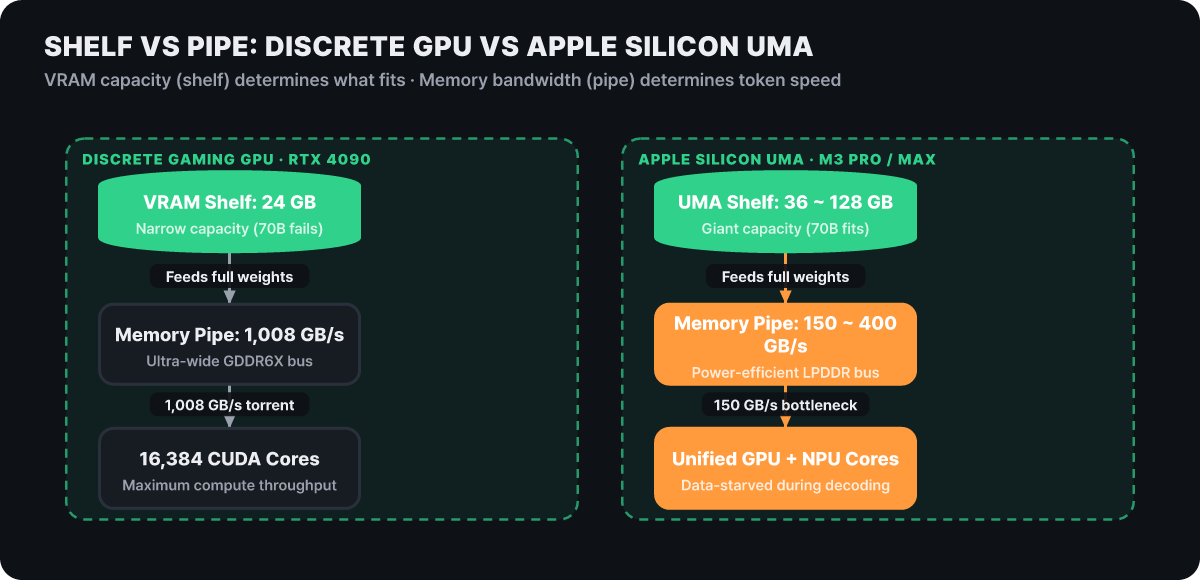 Figure 1. VRAM shelf capacity and memory pipe bandwidth of a discrete gaming GPU (RTX 4090) versus Apple Silicon unified memory (UMA)
The problem is the thickness of the pipe attached beneath that shelf. The base M2 and M3 chips have a memory bandwidth of around 100GB per second, the M3 Pro has 150GB per second, and the M3 Max has roughly 300 to 400GB per second.
The shelf is as big as a gymnasium and can comfortably hold thousands of books’ worth of parameters, but the elevator that picks those books up and delivers them to the compute cores runs at only one-tenth to one-seventh the speed of the RTX 4090. This imbalance is the core paradox that determines every strength and weakness of local AI and Ollama on the Mac.
This hardware design gap exists because the manufacturers have different goals. A gaming graphics card carries ultra-fast GDDR memory to render graphics at 120 frames per second or more at 4K resolution, draws hundreds of watts, and needs a large, roaring cooler.
Apple Silicon, by contrast, chose to package low-power LPDDR memory on the main board so that a laptop can run all day on battery. In exchange for taming heat and power consumption, Apple narrowed the bus width and compromised on bandwidth. That compromise shows up as a decisive speed difference in Ollama workloads.
The autoregressive curse of reading every weight for each single token
Why does memory bandwidth govern token generation speed so absolutely? If the GPU has plenty of compute, couldn’t the cores simply work harder and make up for somewhat slower memory? Unfortunately, the modern transformer decoder architecture and the way Ollama runs mercilessly betray that hope.
Text generation in large language models is autoregressive. The model predicts the next word one at a time, in sequence. It does not stamp out a whole sentence at once. It produces the first word, feeds that word back into the input to produce the second, and repeats this process without end.
This is where the engineering bottleneck appears. To predict just one next token, the model has to load the entire weight matrix of its tens of billions of parameters from memory into the GPU registers, with nothing left behind.
Take an 8-billion-parameter model run in Ollama with ollama run llama3:8b. With 4-bit quantization (Q4), the model file compresses to about 5.5GB.
Suppose this model generates the sentence “Data processing is complete.” If that takes roughly 5 tokens, the computer must read the 5.5GB block of weights from memory into the compute units five full times, from start to finish, to produce those 5 tokens. In other words, generating just 5 tokens means shuttling a total of 27.5GB of data back and forth over the memory bus.
- Generate token 1Load all 5.5GB of weights ➔ compute cores ➔ output 1 token
- Generate token 2Reload all 5.5GB of weights ➔ compute cores ➔ output 1 token
- Generate token 3Reload all 5.5GB of weights ➔ compute cores ➔ output 1 token
- 100 tokens accumulated550GB of sequential memory bus traffic
In this process, arithmetic intensity, the number of floating-point operations performed per byte of data, plunges below 1. Even with thousands of modern shader cores, if the matrix data needed for the next operation has not crossed the memory bus and arrived, the cores must stop working and wait.
This is the classic memory-bound state as defined in computer architecture. No matter how powerful the GPU cores are, a narrow pipe cuts off the data supply and leaves them starved. So Ollama’s token generation speed is determined mechanically not by the number of GPU cores or their clock speed, but solely by how many weights the pipe can carry in one second.
The deterministic speed formula set by memory bandwidth and model size
Once you understand this principle, predicting the generation speed of a local language model comes down to a surprisingly simple calculation. You can set aside complicated variables like GPU core clocks and driver versions. During the autoregressive decoding stage, the maximum theoretical token generation speed Ollama can achieve is calculated by this one formula.
Token generation speed (tokens/s) = system memory bandwidth (GB/s) / active model weight size (GB)
In a real system, background operating system processes consume some bandwidth and the memory controller adds overhead, so measured speeds land at roughly 70% to 85% of the theoretical limit.
Plug the actual specs of the Apple Silicon lineup into this formula and it becomes clear at a glance why Ollama slows down so much on certain models.
| Apple Silicon chip | Memory bus width | Nominal memory bandwidth | Theoretical speed, 8B Q4 model (5GB) | Theoretical speed, 70B Q4 model (40GB) |
|---|---|---|---|---|
| M2 / M3 / M4 base | 128-bit | 100 ~ 120 GB/s | 20 ~ 24 tokens/s | (Not enough memory to run) |
| M2 Pro / M3 Pro | 192-bit | 150 ~ 200 GB/s | 30 ~ 40 tokens/s | 3.7 ~ 5.0 tokens/s |
| M2 Max / M3 Max | 512-bit | 300 ~ 400 GB/s | 60 ~ 80 tokens/s | 7.5 ~ 10.0 tokens/s |
| M2 Ultra | 1024-bit | 800 GB/s | 160 tokens/s | 20.0 tokens/s |
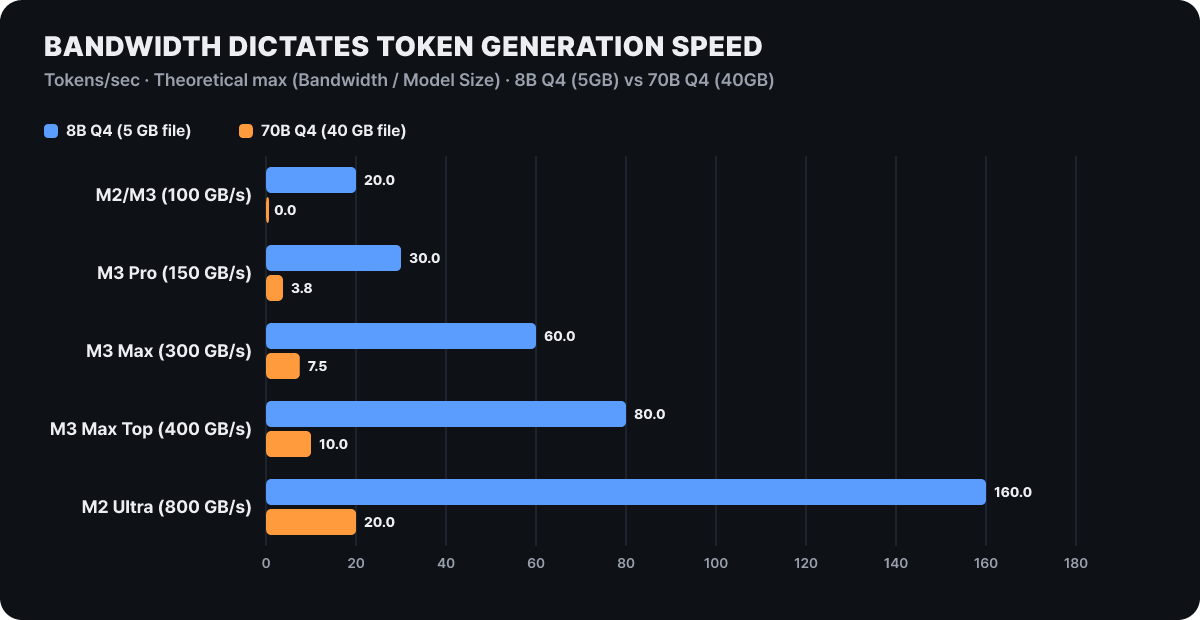 Figure 2. Theoretical maximum token generation speed (tokens/s) by Apple Silicon memory bus bandwidth and model size for 8B and 70B models
The takeaway from this table is clear. Run a 70B-class model on an M3 Pro (150GB per second of bandwidth), and even if there is plenty of memory and the whole model fits, the physical speed limit is only 3.75 tokens per second. A measured speed of around 3 tokens is not a software bug or a settings mistake. It is the pure result of the laws of physics when a 40GB block of weights has to pass through a 150GB pipe.
An 8B model on an M3 Max, which delivers 400GB per second, by contrast, runs at a pleasant 70 tokens per second or more.
There is an important lesson here. When choosing a Mac chip, do not be dazzled by core counts like “M3 Pro with 18-core GPU” versus “M3 Max with 30-core GPU.” In a local LLM setup, what splits speed by a factor of two to three is not the number of GPU cores but the memory bus width the chip supports (192-bit or 512-bit). So the first strategy for an Ollama user who wants to maximize perceived performance is clear: keep the physical file size of the model strictly below what your chip’s bandwidth can handle.
Prompt ingestion and token generation demand entirely different silicon resources
Working with local AI, you run into another interesting phenomenon: what happens when you paste a huge codebase of thousands of lines or a long document into the Ollama window.
Some computers sit silent for more than a minute after you ask a question before the first character appears, then write out the answer briskly once it starts. Others react within a second of pressing Enter, yet crawl when printing the answer itself.
To understand this, you need to observe the language model’s execution as two completely separate stages: the prompt evaluation stage (prefill, or Time to First Token) and the token generation stage (generation, or decoding) we examined earlier.
Stage 1: Prompt evaluation (Prefill / TTFT)
- Operation: Parallel matrix computation over thousands of input tokens at once
- Nature of the work: Compute-bound
- What decides it: GPU core count, NPU compute power, parallel FLOPS throughput
- What you feel: A shorter initial wait until the first word appears
Stage 2: Token generation (Generation / Decoding)
- Operation: Sequentially loads all model weights for every single token
- Nature of the work: Memory-bandwidth-bound
- What decides it: Unified memory bus bandwidth (GB/s), quantization bit width
- What you feel: The real-time text output speed (tokens per second)
The first stage, prompt evaluation, is the process in which the model digests all the text the user entered at once. If 1,000 tokens were entered, the model computes those 1,000 tokens in parallel at the same time.
Here the weights are read from memory just once, and then many compute cores fiercely perform parallel matrix multiplications. So this stage is limited not by memory bandwidth but by the raw computing power of the cores.
This is where chips with the latest Neural Engine cores, or high-end chips packing 40 GPU cores, come into their own. When you throw a long document at the model, it is the pure compute cores that dramatically cut the time to first response.
In fact, given the same long document, a newer-generation chip with improved compute cores took 18 seconds to display the first character, while a previous-generation base chip sat frozen for 81 seconds.
But once the first word pops out, the rules flip 180 degrees. From the second word on, the autoregressive regime we just described takes over. Dozens of GPU cores fall into the position of stopping work and waiting for weight data to drip one drop at a time from the memory pipe.
So when you build a code review tool that pushes in a large amount of source code at once and analyzes it, a high-end chip with many compute cores is essential, but when you use Ollama for everyday chat or as a real-time coding assistant, you should watch only the memory bandwidth figure.
The MoE architecture suited to a huge shelf and how it pairs with the Mac
There is an architecture that can turn Apple Silicon’s inherent limit of “a vast shelf but a narrow pipe” completely to its advantage: MoE (Mixture of Experts), which has recently become mainstream in the open-source ecosystem.
In an ordinary dense model, all parameters are bundled into one giant block. In a 70B model, all 70 billion parameters are activated for every token.
An MoE model, by contrast, splits its interior into many small specialist networks. Take mixtral:8x7b, a representative MoE architecture that is easy to run in Ollama. It has about 47 billion parameters in total, but when computing a particular token, a router dynamically selects and activates only the 2 expert networks (about 13 billion parameters) it judges most suitable.
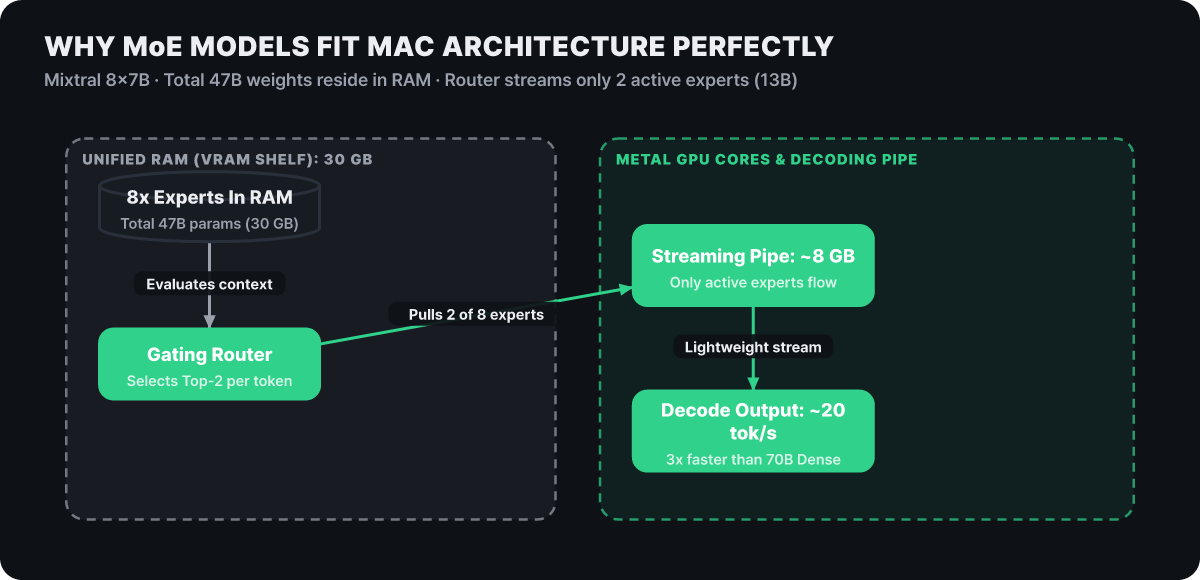 Figure 3. MoE sparse routing, in which a total of 47B weights stay resident in RAM but only the 2 experts activated for each token (8GB) pass through the pipe
Model selection guide for a huge-shelf, narrow-pipe environment
A single dense 70B model struggles to exceed 4 tokens per second at 150 GB/s of bandwidth. To keep the same level of intelligence while lifting perceived speed by more than 3x, the smartest engineering choice is to deploy MoE-family models whose active parameters are limited to around 13B (Mixtral 8x7B, Qwen 2.5 MoE) in Ollama first.
This structure pairs fantastically with the Mac’s characteristics. On the shelf side, loading an 8x7B model at 4 bits takes about 30GB of VRAM. A single 24GB GeForce card cannot even load it for lack of memory, but a MacBook with 36GB or 64GB can put the full weights on the shelf without any trouble.
On the pipe side, the real innovation happens. When generating a token, the data that actually has to cross the memory bus is not the full 30GB but only the active 2 experts, about 8GB.
As a result, the load on the pipe drops sharply to less than one-third. You enjoy intelligence and reasoning ability comparable to the 70B class while the size of the weights that bottleneck the memory bus falls to the 13B level.
That is the secret behind pulling a comfortable 18 to 20 tokens per second by running ollama run mixtral:8x7b in Ollama on the same M3 Pro where a dense 70B model gasps along at 4 tokens per second. Remember that the best local model for a Mac is not a single huge dense model but an MoE model designed with a small number of active parameters.
The KV cache bomb and SSD swap disaster that arrive as context grows
Even a system that held steady speeds according to the memory bandwidth formula can suddenly collapse once a conversation gets long or you dump dozens of technical documents into the Ollama prompt. Output that held at 25 tokens per second plunges at some point to 1 token per second, or even 0.5.
The culprits behind this disaster are the growth of the KV cache (Key-Value Cache) and the operating system’s virtual memory swap.
For a language model to remember earlier conversation and keep its context, it must store in memory the Key and Value vectors computed for every token that has gone by. This is the KV cache. The problem is that the cache grows in proportion to context length and batch size, and quickly balloons.
In current language models, holding a context of 32,000 tokens or more means the KV cache alone easily takes more than 8GB to 12GB of memory.
What if you have loaded 30GB of model weights on a MacBook with 36GB of unified memory? The free system memory available is only 6GB. After subtracting the baseline memory used by the operating system and the web browser, there is almost no room left.
If the conversation gets long enough that the KV cache starts demanding 8GB, the macOS virtual memory manager begins forcibly evicting some of the data in physical memory to the swap area on the SSD to prevent a system crash.
Normal operation (Unified RAM)
- Data path: Unified memory (UMA) ➔ GPU compute cores
- Physical bandwidth: 150GB ~ 400GB per second
- Measured speed: Normal output of 25 to 40 tokens per second
- System state: Stable, with memory use under 80%
Swapping (NVMe SSD paging)
- Data path: SSD virtual memory swap area ➔ GPU compute cores
- Physical bandwidth: 3GB ~ 6GB per second (a 50x collapse)
- Measured speed: Drops to 0.5 to 0.8 tokens per second
- System state: SSD controller overheating and a frozen cursor
Unified memory bandwidth reaches 150GB to 400GB per second, but even the ultra-fast NVMe SSD in a MacBook manages a sequential read bandwidth of only 3GB to 6GB per second at best. The width of the pipe shrinks to one-fiftieth in an instant.
The 20% free-memory rule to prevent SSD swap
The moment the sum of model weights, KV cache, and baseline system usage exceeds 80% of unified memory, the macOS virtual memory manager starts paging to the SSD. Bandwidth gets chopped to one-fiftieth, from 150 GB/s down to the SSD sequential read speed of 3 to 5 GB/s, so on a 36GB machine you should keep the Ollama model file within 20GB to stay safe.
Once you fall into this swap hell, you can only sit at the monitor watching the cursor freeze and the SSD controller overheat.
This is why you should not blindly raise the context length in Ollama, and why the sum of model weights, KV cache, and baseline system usage must stay under 80% of physical memory. With 36GB of memory, the golden rule is to keep model weights within 20GB and leave at least 16GB of buffer for the operating system and the KV cache.
Swapping the Ollama engine and squeezing out real-world gains with a Modelfile
If the physical hardware bandwidth limit is fixed, what realistic tuning cards does a developer have to raise Ollama’s speed at the software level?
In fact, something interesting happened in the global local LLM ecosystem in the spring of 2026. Without a single change in hardware specs, Ollama’s token generation speed on the same Apple Silicon Mac nearly doubled, shooting up from 58 tokens per second to 112. The secret was not a hardware swap but a swap of the inference engine inside Ollama.
- Check the runtime backend engine optimization Apply a backend wired directly to Apple Silicon Metal shader kernels (MPS) and MLX in place of the generic CPU/GPU porting layer of llama.cpp, which underpinned Ollama for years, to remove the memory-copy loop bottleneck in dequantization.
- Put precision quantization bits (Q4_K_M) on a diet Apply Q4_K_M quantization, with a perplexity loss under 1%, instead of FP16 or Q8 to shrink the weight size and ease the bandwidth bottleneck by more than 3x.
- Cap the up-front context reservation in the Modelfile (num_ctx) Instead of the default 32k automatic reservation, set an explicit cap of 4,096 to 8,192 tokens, which is what real work needs, to shut out wasted KV cache memory and SSD swap at the source.
The first is Metal kernel optimization of the execution runtime engine. In the past, Ollama used the llama.cpp backend, designed as a general-purpose engine for x86 CPUs and Nvidia CUDA environments, as its internal engine.
Apple Silicon, however, has a special structure in which the CPU and GPU share all of physical memory. In a general-purpose runtime, the process of unpacking 4-bit quantized integers into 16-bit floating-point values just before the compute units (dequantization) created an unnecessary memory-copy loop.
When Ollama introduced a dedicated runtime engine built around Apple Silicon Metal shader kernels and the MLX architecture, output on the same hardware nearly doubled from 58 tokens per second to 112. If you use a Mac, you should keep Ollama on the latest version and check that Metal kernel acceleration is bound correctly.
The second is a careful diet of the quantization profile. Many users insist on 8-bit (Q8) or 16-bit (FP16) weights simply because they want the highest accuracy.
But a 14B-class model at 16 bits takes up 28GB and chokes the bandwidth, whereas applying a carefully tuned 4-bit quantization (Q4_K_M) shrinks the model to 8.5GB. Plug that into the formula and the speed is exactly 3.3x faster.
Benchmark studies show that modern quantization techniques lose less than 1% in perplexity compared with the original 16-bit model. Sacrificing two-thirds of your speed for a marginal difference in intelligence is the least efficient choice in a local environment.
In Ollama, you can write a Modelfile yourself to precisely control these parameters and the context memory.
# Example Modelfile for custom Ollama settings
# Applies Mac-optimized parameters on top of the llama3.1 8B model
FROM llama3.1:8b-instruct-q4_K_M

# Fix the context window cap to prevent a KV cache bomb (default 32k -> 4k)
PARAMETER num_ctx 4096

# Fully offload every layer to the Metal unified-memory GPU
PARAMETER num_gpu 999

# Match the inference thread count to the Apple Silicon performance core count
PARAMETER num_thread 8

# Temperature and generation control
PARAMETER temperature 0.7
PARAMETER top_p 0.9

SYSTEM """You are a senior software engineer assistant optimized for the Apple Silicon architecture."""
After writing the Modelfile above, enter the following commands in the terminal and the optimized custom model is created immediately.
ollama create my-mac-llama -f Modelfile
ollama run my-mac-llama
The third is strict control of the context window size. If you leave Ollama on its defaults or send a long prompt, it often reserves a huge amount of KV cache memory in advance to match the model’s maximum supported length.
For simple code completion or everyday Q&A, you should set an explicit limit on context size of around 4,096 or 8,192 tokens, like PARAMETER num_ctx 4096 in the Modelfile above. That one step immediately reclaims several gigabytes of unified memory and shuts out the risk of SSD swap at the source.
When you integrate Ollama through the REST API, you can pass the same options directly as a JSON payload to protect bandwidth and memory.
# Example call with practical memory control through the Ollama REST API
curl http://localhost:11434/api/generate -d '{
  "model": "qwen2.5-coder:14b",
  "prompt": "Implement a simple trie as a Python class",
  "options": {
    "num_ctx": 4096,
    "num_gpu": 999,
    "temperature": 0.2
  }
}'
Core architecture principles for maximizing local AI performance on a Mac
What decides large language model inference speed in an Apple Silicon unified memory environment is neither flashy marketing copy nor the number of GPU compute cores. Under the autoregressive decoding mechanism, all performance is governed by a physical law of computer architecture: “system memory bandwidth (GB/s) ÷ active model weight size (GB).”
The core principles an engineer must follow to build a stable, fast inference pipeline locally boil down to these four.
-
Pick the model size by memory bus bandwidth
First check the bandwidth of your Mac’s chip (M3 Pro 150 GB/s, M3 Max 300~400 GB/s), then work backward from the minimum speed you need for comfortable real-world use (25 to 35 tokens per second) to set a strict upper limit on model weights. Loading a dense 70B model on a device with 150 GB/s of bandwidth physically invites a bottleneck of under 4 tokens. -
Favor MoE models that use the vast shelf
The most effective way to fully use the Mac’s greatest strength, its large unified memory, while overcoming the limits of a narrow bandwidth pipe is the MoE (mixture of experts) architecture. If you keep more than 47GB of weights resident in VRAM while holding the parameters activated per token to around 13B (about 8GB), you get 70B-class reasoning quality and speeds above 20 tokens per second at the same time. -
Keep 20% of memory free to block SSD swap at the source
The moment the sum of model weights, KV cache, and baseline system usage exceeds 80% of physical memory, macOS starts virtual memory paging. Once swapping to the NVMe SSD begins, bandwidth is chopped to one-fiftieth, from 150GB to around 3GB per second, and the inference pipeline collapses. On a 36GB machine, keep the model within 20GB and leave at least 16GB of buffer space. -
Optimize the Ollama engine and control context in the Modelfile
Stay on the latest runtime with Apple Silicon Metal/MLX kernels to remove the dequantization copy-loop bottleneck, and explicitly cap the context window with thePARAMETER num_ctx 4096setting in yourModelfile. Simply blocking the waste of several gigabytes of KV cache being reserved up front by the defaults can raise system stability dramatically.
When you understand and control the physical limits of the hardware bus and the traits of the software runtime as an engineer, rather than relying on gut feeling or vague hopes, Apple Silicon can become the quietest yet most powerful personal AI workstation a developer can have.