5 of 10 staple MCP servers are archived, here is the swap
We checked 10 MCP servers against official repos. SQLite, PostgreSQL, GitHub, Brave and Puppeteer are archived and need successors.
An average of 19,600 downloads a day. Averaged over the 21 days npm counted between Sep 28 and Oct 25, 2026 (UTC), that is how often @modelcontextprotocol/server-postgres, a package that has been archived and is no longer fixed, was downloaded. It sits in the same range as the active reference server Sequential Thinking (25,699 a day) and Firecrawl (24,719 a day), which is actively maintained outside the official repository. Five of the ten names that keep turning up in “10 MCP servers to plug into your local AI” lists are in this position, so this post puts all ten on one map and goes through what to do in each cell. Every figure and version was re-opened and checked on 2026-10-27 (UTC).
The ten servers, cell by cell
The names that recur in recommendation posts are Filesystem, Git, Fetch (web retrieval), Sequential Thinking, SQLite, PostgreSQL, GitHub, Brave Search, Puppeteer, and the web scraping service Firecrawl. The grid below checks these ten against the official repository READMEs and npm and PyPI data. Green marks servers the official repository maintains today, blue marks projects maintained separately outside it, and red marks archived servers.
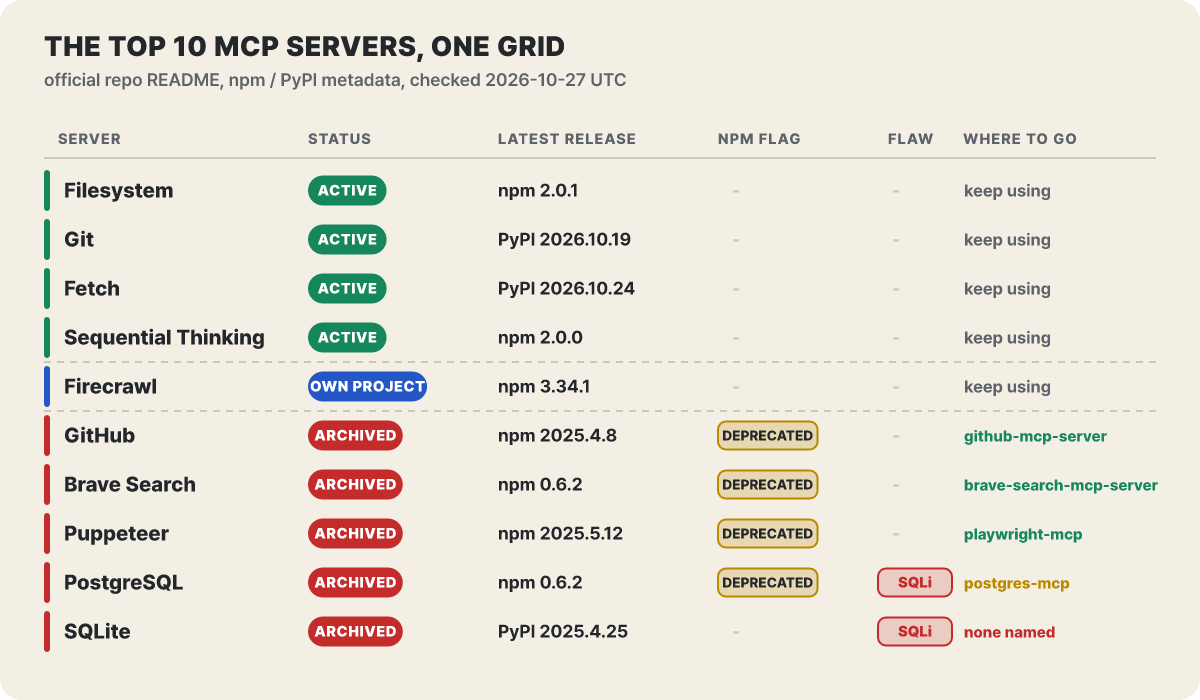 Figure 1. The top five can stay as they are, the bottom five need a switch. Four of the five archived cells carry an npm deprecation flag
The top five have had recent releases, so there is nothing to do. The bottom five are the problem. The npm packages for GitHub, Brave, Puppeteer and PostgreSQL carry a “no longer supported” deprecated flag, SQL injection flaws have been reported in PostgreSQL and SQLite, and SQLite does not even have a note pointing to a successor. Even where a successor exists, swapping the name is not the whole job. The last section covers what changes when you switch, one server at a time.
First, what archived means. modelcontextprotocol/servers-archived, where the archived servers sit, was archived by its owner on May 29, 2025 and became read-only. The last push was the day before, May 28 (306 stars). The top of its README says the repository is no longer maintained, that no security updates or bug fixes will come, and that there is no security guarantee. The active repository modelcontextprotocol/servers (91,591 stars) keeps seven reference servers: Everything, Fetch, Filesystem, Git, Memory, Sequential Thinking and Time. Its README lists 13 archived servers. Besides the five in this post, they are AWS KB Retrieval, EverArt, GitLab, Google Drive, Google Maps, Redis, Sentry and Slack. Two lines in that list are worth a look. Brave Search is noted as replaced by an official server, and Slack as continued by Zencoder. The archived repository’s own list also mentions Git, but the active repository’s README still treats Git as a maintained reference server, and mcp-server-git on PyPI keeps shipping, with release 2026.10.19.
Here is how the flag looks on npm. The latest version of four packages carries the deprecation message “Package no longer supported”. The flag does not block installation, so running with npx -y still downloads and starts them as usual.
How a demo bundle became the backbone of recommendation lists
These servers were never “products built to be used”. MCP began on Nov 25, 2024, when Anthropic released the specification and SDKs, and the bundle of servers that shipped with it is the servers repository. It put integrations everyone wants, such as files, Git, Postgres, GitHub, Slack, Google Drive and Puppeteer, in one place, so recommendation posts and videos took their names straight from it. The config example is a single npx -y package-name line that is easy to copy, and few people go back and reopen a line they copied.
The README still draws the line at the very top. These servers are educational reference implementations that show MCP features and SDK usage, not production-ready solutions, and whoever uses them must add safeguards that fit their own threat model. A separate note tells anyone looking for a server list to use the MCP registry instead of this repository.
Putting the archive date next to the last release shows one more thing. The archive label reads more like a late record of development that had already stopped.
| Package | Last release | Until archiving (2025-05-29) |
|---|---|---|
PostgreSQL server-postgres 0.6.2 |
2024-12-04 | 176 days |
Brave Search server-brave-search 0.6.2 |
2024-12-04 | 176 days |
GitHub server-github 2025.4.8 |
2025-04-08 | 51 days |
SQLite mcp-server-sqlite 2025.4.25 |
2025-04-25 | 34 days |
Puppeteer server-puppeteer 2025.5.12 |
2025-05-12 | 17 days |
The day counts are the editorial team’s calculation. Some servers had gone almost half a year without a fix by the time they were archived, and the code today is not the code that existed when a given recommendation post was first written.
Archived, yet downloaded 20,000 times a day
How much archived packages are really used can be read from npm download counts. One caution is needed. npm’s weekly total call adds up days whose daily count is empty (0), so its values jump around. So we took only the 21 days that have data (2026-09-28 to 10-25) and averaged per day. Download counts include automated builds and mirroring, so they do not equal the number of people. Still, they are enough to show that setups copied from these lists are still widely in circulation.
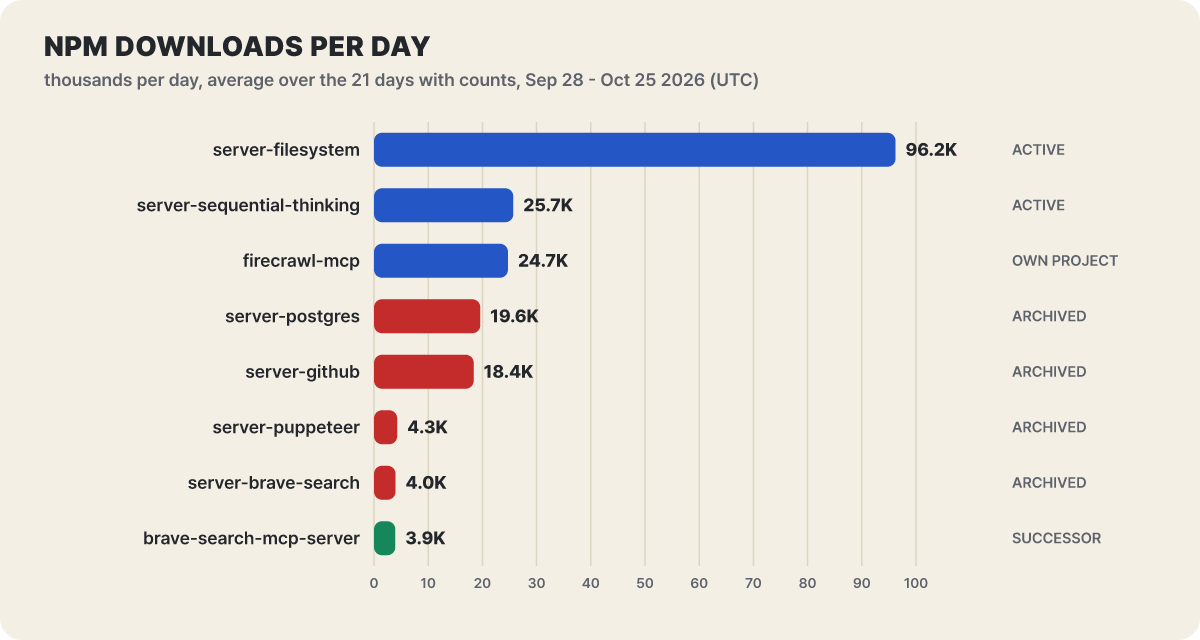 Figure 2. Average daily downloads (editorial calculation). Red marks archived packages
What stands out first in the bars is the length of the Filesystem server (96,225). Below it, archived PostgreSQL (19,611) and GitHub (18,404) sit in the 70% range of the active Sequential Thinking (25,699) and Firecrawl (24,719). For Brave Search, the old archived package (3,974) and its successor (3,929) are almost the same height. The old name is used as much as the successor.
We also checked how this changes over time. More than a year after archiving, usage has not dropped.
| Package | Daily average, 2026-06-01 to 06-28 | Daily average, 2026-09-28 to 10-25 |
|---|---|---|
server-postgres |
14,466 | 19,611 |
server-github |
21,069 | 18,404 |
server-brave-search |
3,965 | 3,974 |
server-puppeteer |
4,452 | 4,280 |
Both periods are averaged over days that have data (editorial calculation). PostgreSQL actually grew. The weekly downloads of this package that Datadog Security Labs gave in an August 2025 post were about 20,000, and dividing that by seven gives roughly 2,900 a day, so today’s daily average is close to seven times that (editorial calculation). The lists keep being copied, and the copied configs keep running.
Holes left in archived code: SQLite and PostgreSQL
Two cases put a brake on the thought “it’s only a local experiment anyway”. Both came from archived servers, and both got public analyses from security firms.
The SQLite reference server had a classic SQL injection flaw: it concatenated user input directly into SQL statements and ran them through Python’s sqlite3 driver. Trend Micro reported it to Anthropic on June 11, 2025, and the reply was that the repository is an archived demo, so it is out of scope and no patch is planned (GitHub issue #1348). What worried the security firm more is what comes next. If an attacker closes the query and plants a fake “open” support ticket in the database, an AI agent that later triages tickets reads the instructions inside it as ordinary work and follows them. In the firm’s demonstration, the agent used a mail tool to send customer data to the attacker’s address. This is stored prompt injection, where text written into the DB later becomes the agent’s command. The firm also pointed out that before the archiving this code had been forked or copied more than 5,000 times, which means that much unfixed code has spread.
The PostgreSQL server’s case is covered in detail in Datadog Security Labs’ analysis. The server claimed to block writes by wrapping the user’s SQL in a read-only transaction. But the database driver accepts several statements joined by semicolons in one go. If a statement that ends the transaction early is put in front, the statements after it could run as ordinary writes with no protection. The analysis also pointed out that the connection pool was shared between calls, so session settings from one call leaked into the next. The timeline goes like this. A security researcher reported it first through HackerOne on Nov 27, 2024, and on Apr 1, 2025 a Datadog engineer filed a report with a patch. Zed Industries fixed its own fork (@zeddotdev/postgres-context-server) in v0.1.4 on Apr 9. Anthropic put a fix into the repository on May 29, but at the time of the Datadog post, npm 0.6.2 and the Docker image were unchanged, and the fix existed only in an unreleased version. The latest npm version is still 0.6.2.
“Read-only” said by the server vs. said by the database
What to learn from the PostgreSQL case is less the single flaw than the difference between two sentences. “The server says it is read-only” and “the database allows only reads” do not mean the same thing. The first is a promise that server code intends to keep, and the second is a fact enforced by the permissions of the DB account. A promise breaks when the code has a gap, and enforcement remains even if the server is breached.
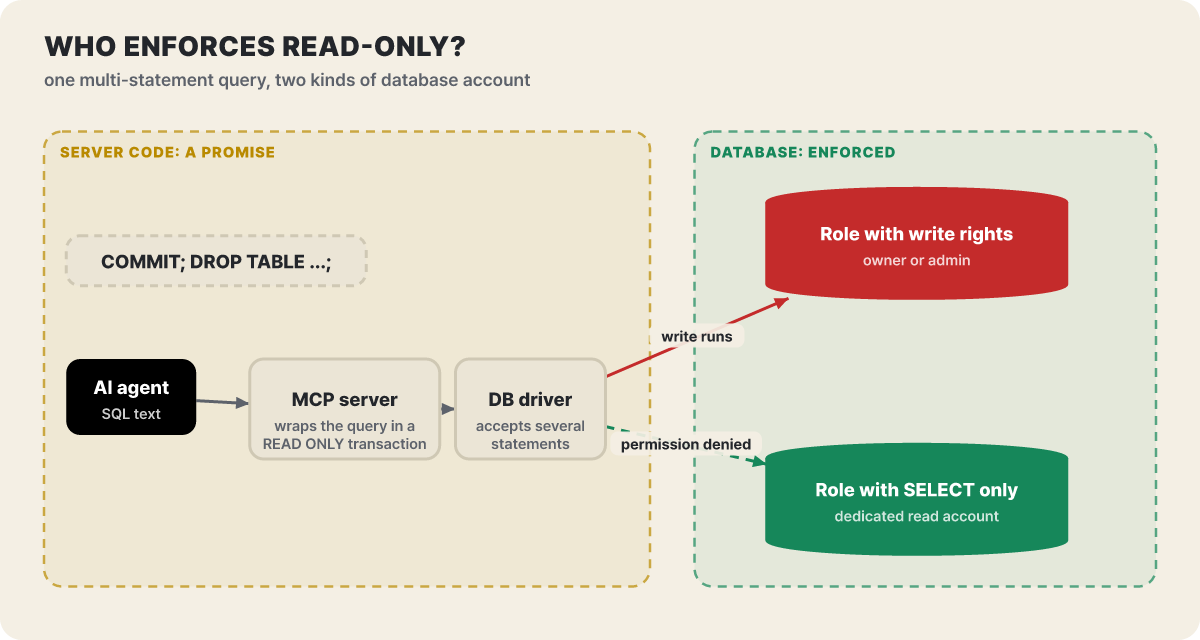 Figure 3. The same query meets a different ending depending on the account’s permissions. The yellow zone is promise, the green zone is enforcement
In the figure, the query travels from the agent through the server and the driver to the DB. Inside the yellow zone, a bypass can appear whether or not the server wraps the query in a read-only transaction. The outcome is decided in the green zone, that is, by what permissions the DB granted this connection. With an owner-level account the write runs, and with an account granted only SELECT the same statement ends in a permission error. So when you connect a DB to an MCP server, create the account before you choose the server. For PostgreSQL it looks like this.
-- Read-only account: change the name and schema to fit your environment
CREATE ROLE mcp_reader LOGIN PASSWORD '<issue from your password manager>';
GRANT CONNECT ON DATABASE appdb TO mcp_reader;
GRANT USAGE ON SCHEMA public TO mcp_reader;
GRANT SELECT ON ALL TABLES IN SCHEMA public TO mcp_reader;
ALTER DEFAULT PRIVILEGES IN SCHEMA public GRANT SELECT ON TABLES TO mcp_reader;
The same principle applies to other servers. If you run the filesystem server in Docker, add ro to the end of the bind mount so the operating system blocks writes. For GitHub, separately from the server’s read-only option, narrow the permissions of the token itself so the service enforces the limit. A server option is one layer among several defenses you can stack, and the most trustworthy layer is the one that the operating system, the DB or the service enforces regardless of server code.
What the four active servers can touch
The four reference servers that are still maintained have similar names but very different characters. Opening the tool list shows what switching a server on allows the AI to do.
9 read tools (read file, list, tree, search, info) and 4 write tools (create directory, write file, edit, move)
7 tools for status, diff, history and branches, and 5 for staging, commit, reset, branch creation and checkout
Takes one URL and returns it as Markdown. Long pages are read in parts with max_length and start_index
Stacks thinking steps by number, revises earlier steps or splits off branches. The record lasts only while the connection stays open
Filesystem takes the folders the AI may open as command-line arguments at startup. The README explains that this is the only method that works with every protocol version. The Roots method, where the client changes folders at run time, was marked for deprecation in protocol version 2026-07-28 and cannot be used at all in connections on that version. Each tool carries hints: the nine read tools are marked as pure reads, while write_file, edit_file and move_file are marked destructive. In actual behavior, write_file overwrites an existing file as is, move_file fails if a file exists at the destination, and edit_file previews the change with dryRun. Running it requires Node.js 24 or later.
Git suits questions about history, such as “what changed between the last two commits”. It is a Python package, so you run it with uvx mcp-server-git --repository <path>. One easy-to-miss point is that --repository accepts any path inside the working tree and resolves it to the repository root. Even if you specify it meaning to open just one subfolder, the whole repository becomes the target. If you leave the option out entirely, it falls back to taking repo_path on each call. Commit, reset and checkout tools are also switched on, so if you only need history lookups, block an agent’s attempt to change branches at the approval step.
Fetch has safe defaults. It rejects hosts that resolve to non-public addresses such as loopback, private, link-local and cloud metadata (169.254.169.254) addresses, repeats the same check at every redirect it follows, and obeys robots.txt for fetches the model requested. The README also states the limits. It cannot stop DNS rebinding, where the DNS answer is changed between the address check and the connection, and it cannot check host names that only a proxy can resolve. To let it read a dev server or an internal page, you have to turn on --allow-private-ips yourself. The README itself warns of a security risk with that option, so turn it on only when needed.
Sequential Thinking does not reach any external system, so it has the least to worry about in permissions. The model calls it with thought (this step’s thinking), thoughtNumber, totalThoughts and nextThoughtNeeded, and uses isRevision and revisesThought to rewrite an earlier step and branchFromThought to split off a branch. It is meant to keep the model from clinging to the first hypothesis when debugging a problem with several possible causes. If you do not want the thinking record in your logs, set the environment variable DISABLE_THOUGHT_LOGGING to true.
The READMEs of these four servers now carry a “two protocol generations” note. A 2026-07-28 client starts with server/discover and attaches its information to every request with no handshake, while a 2025-11-25 client starts with initialize in the older way. The server adapts to the first request it sees, so there is nothing to change in your settings. Updates for this kind of spec support go only to maintained servers and not to archived ones.
A config that hooks up three of the servers together looks like this. Only change the paths to your own project.
{
  "mcpServers": {
    "filesystem": {
      "command": "npx",
      "args": ["-y", "@modelcontextprotocol/server-filesystem", "/Users/me/project"]
    },
    "git": {
      "command": "uvx",
      "args": ["mcp-server-git", "--repository", "/Users/me/project"]
    },
    "fetch": {
      "command": "uvx",
      "args": ["mcp-server-fetch"]
    }
  }
}
With Claude Code, you register the same server with one command. Everything after -- is passed through as the server launch command, and after registering you check the connection with /mcp.
claude mcp add --transport stdio git -- uvx mcp-server-git --repository /Users/me/project
claude mcp list
Firecrawl: a service stands in front of the server
Of the ten, only Firecrawl is different in character. It is not a reference server of the official repository but a server maintained separately by the company of the same name as firecrawl/firecrawl-mcp-server (MIT, about 7,700 stars), and it is updated actively (repository push Oct 26, npm firecrawl-mcp 3.34.1). Where the four servers above handle files and history inside your own computer, this one is a door to an external service.
The full profile reaches 27 tools. They include scraping a single page (scrape), building a map of a site’s URLs (map), search, walking through many pages (crawl), interpreting documents such as PDFs (parse), operating pages that need clicks and typing (interact), change watching (monitor) and checking credit usage (credit_usage). There is also a trimmed-down edition for clients short on slots. The hosted endpoint that works without a key opens only three tools, scrape, search and parse, with rate limits, while crawl, map and agent require an API key (FIRECRAWL_API_KEY). For self-hosting, point FIRECRAWL_API_URL at your own instance.
The rule for choosing is simple. To read a single page whose address you know, Fetch is enough, with no key and no cost. If you need to walk through many pages, handle pages that need clicks and typing, or read PDFs, consider Firecrawl. On the cloud side, every call spends credits, and the addresses of the pages you read go out to an external service, so factor that in. The documentation asks for one thing: do not write the key into the server address or the chat window, and keep it in the client settings or a secret manager.
Find archived names in your own setup
If you already followed a list, first look for archived packages in your environment with read-only commands. The commands below do not change any files.
# Claude Code: names and status of registered servers
claude mcp list

# Find archived package names in config files (adjust paths to the app you use)
grep -rnE "server-(github|postgres|puppeteer|brave-search)|mcp-server-sqlite" \
  .mcp.json ~/.claude.json "$HOME/Library/Application Support/Claude/claude_desktop_config.json" 2>/dev/null

# Ask npm whether a package has a deprecated flag
npm view @modelcontextprotocol/server-github deprecated
The npm view command returns the message if the flag is present, and prints nothing for an active package such as server-filesystem. Sweep your team repository’s .mcp.json the same way. Servers added in Claude Code with --scope project are stored in this file and committed to be shared with the team, so once an archived package goes in, it spreads to every teammate’s environment. Also check that no token sits in that file in plain text.
If you find one, move one server at a time in the order below. Changing everything at once makes it hard to tell what changed.
- Back up the settings. Copy the config file and write down which tokens and keys that server used.
- Attach the successor in read-only mode first. Start GitHub with the
/readonlyaddress, the DB with a SELECT-only account, and the browser with--isolated. - Ask it the same questions as the old server. Compare whether read tasks such as listing issues or viewing a table structure give the same results.
- Remove the old server. In Claude Code, delete it with
claude mcp remove <name>. - Revoke the token it used and issue a new one. Make the token for the new server with a narrower scope.
Five successors to move to
We go through the five archived servers starting with the one whose successor has the clearest shape. The reason you should not assume equal features and just swap the name differs from server to server.
GitHub: an official server, toolsets switched on and off
Issues, pull requests, commits and Actions run history are now handled by github/github-mcp-server, which GitHub builds itself (MIT, about 34,000 stars, pushed Oct 23). Unlike the old server, which exposed 26 tools at once and asked for the repo scope on a personal access token (PAT), the new server switches tools on and off by toolset. The default is five bundles: context, repositories, issues, pull requests and users.
The easiest starting point is the remote server hosted by GitHub, https://api.githubcopilot.com/mcp/. Add /readonly to the end of the address and you get a read-only server without the write tools (the X-MCP-Readonly header does the same), and you can also open just certain toolsets, as in /x/issues. The local server does the same with the --read-only and --toolsets options, and in read-only mode the write tools stay off even if you name them directly. The local server supports OAuth, where you sign in through a browser on first run, and keeps the token only in memory. To use a PAT, set the environment variable GITHUB_PERSONAL_ACCESS_TOKEN, which takes priority. The minimum scopes the README gives as an example are repo, read:packages and read:org, and you should narrow them further if your work does not need them.
If hidden instructions in public repositories’ issues and comments worry you, there is lockdown mode (--lockdown-mode). It is a filter that shows only content from users with push access, and the documentation states plainly that it is a best-effort filter and not a permission boundary. Another tool or API with the same credentials could still reach the hidden content.
claude mcp add --transport http github https://api.githubcopilot.com/mcp/readonly \
  --header "Authorization: Bearer <token narrowed to mostly read access>"
Brave Search: an official server with a new name and a different default transport
The README of the active repository names the successor directly. It is brave/brave-search-mcp-server, built by Brave (MIT, npm 2.1.4). From 2.x the default transport is STDIO, and it offers 8 tools covering web, local, image, video and news search and summaries, place search, and body-text extraction for AI grounding. It needs a Brave Search API key (BRAVE_API_KEY), and the full local search feature works only on the Pro plan. Unlike 1.x, image search does not return base64 image data, so responses are lighter. The mode that serves over HTTP has no authentication, so it defaults to the loopback address (127.0.0.1), and to open it to the whole network you have to change BRAVE_MCP_HOST yourself. Even then, open it only on a network you trust.
Puppeteer: two successors, split by use
The old server drove the browser with 7 tools (navigate, screenshot, click, hover, type, select, run script) and came with a warning that it could reach local files and internal addresses. Among successors that make the screen do things, Microsoft’s microsoft/playwright-mcp (Apache-2.0, about 38,700 stars) is the most widely used. It reads the accessibility tree (structured page information) rather than screen images, so it needs no vision model, and it has options such as --headless, --isolated (keeps the profile only in memory) and --allowed-origins. The same README says Playwright MCP is not a security boundary and that the origin list has no effect on redirects, so do not rely on it as a line of defense. The same README also recommends, for coding agents, attaching a skill to the CLI rather than using MCP because that saves tokens. For exploratory work that keeps state and tries many times, it says MCP is the better fit.
If the goal is performance and console inspection, Chrome DevTools MCP (Apache-2.0, about 54,200 stars) is the fit. We covered it separately in this blog’s Chrome DevTools MCP intro.
PostgreSQL: no designated successor, community servers fill in
The README names no replacement server. Among community servers, crystaldba/postgres-mcp (Postgres MCP Pro, MIT, about 3,400 stars) is far broader than the old server (one query tool and a table schema resource). It gives 9 tools covering schema exploration, execution plans, a slow query list, index recommendations and health checks. Its access modes are Unrestricted for development and Restricted for production, and Restricted mode applies a read-only transaction and an execution time limit. As we saw in the earlier section, that is only one layer on the server side, so use a SELECT-only account alongside it. Index recommendations work only if the DB has the pg_stat_statements and hypopg extensions. Its last push was Aug 17, so it is not a repository that moves every week like the two successors above, which is also worth weighing when you choose.
SQLite: no note points to a successor
The last release of mcp-server-sqlite on PyPI is Apr 25, 2025, and it is archived. It has 6 tools (read query, write query, create table, list, describe, insight memo), but the README names no replacement server. If you are starting new, pick another actively maintained SQLite server rather than the archived one, and begin with a copy of the DB, not the original. The stored prompt injection scenario above holds the moment an agent reads text inside the DB, so unless the task needs write access, opening it read-only is the default.
The starting point for finding a new server is the MCP registry. According to the official documentation, the registry is still in preview and focuses on verifying that a server name really comes from the owner of the matching GitHub account or domain. Security checks of the code are left to npm, PyPI, Docker Hub and the marketplaces that use the registry, so a name coming from a trustworthy place does not mean the code is safe. If you want to survey the structure of MCP itself from the beginning, continue with the MCP introduction post.



