What Is MCP and Why Is Everyone Adding It? A Primer
MCP split into host, client, server and its layers: call messages, the 2026-07-28 revision, local vs remote setup, tool definition costs, permission checks.
You connect a folder to Claude Desktop and ask, “What’s in my Downloads folder?” A list comes back. But whose program actually read that folder, where does it run, and whose permissions did it use? To answer that, you have to stop treating MCP (Model Context Protocol) as a one-line “standard that links AI apps to tools” and take it apart layer by layer. This article works from the outside in: how the parts are arranged, the paths messages travel, the pieces a server exposes, what happens inside a single call, what the 2026-07-28 revision removed, the permissions that come with attaching a server, and the costs that appear as you scale up. It is based on the latest revision of the official documentation (2026-07-28) and was checked on 2026-10-27 (UTC).
Where does the program that reads your folder run?
The official architecture documentation splits MCP into three roles: host, client and server. The host is an AI app such as Claude Code, Claude Desktop or Visual Studio Code. For every server it connects to, the host creates one client, and each client keeps a dedicated connection to its own server. In the documentation’s example, when Visual Studio Code connects to the Sentry server it creates one client object, and when it connects to a local file system server it creates another.
The figure below is drawn from the point of view of an AI app running on your own computer. Pay attention to the boundary lines. The clients live inside the host, while a server can sit either inside or outside your computer.
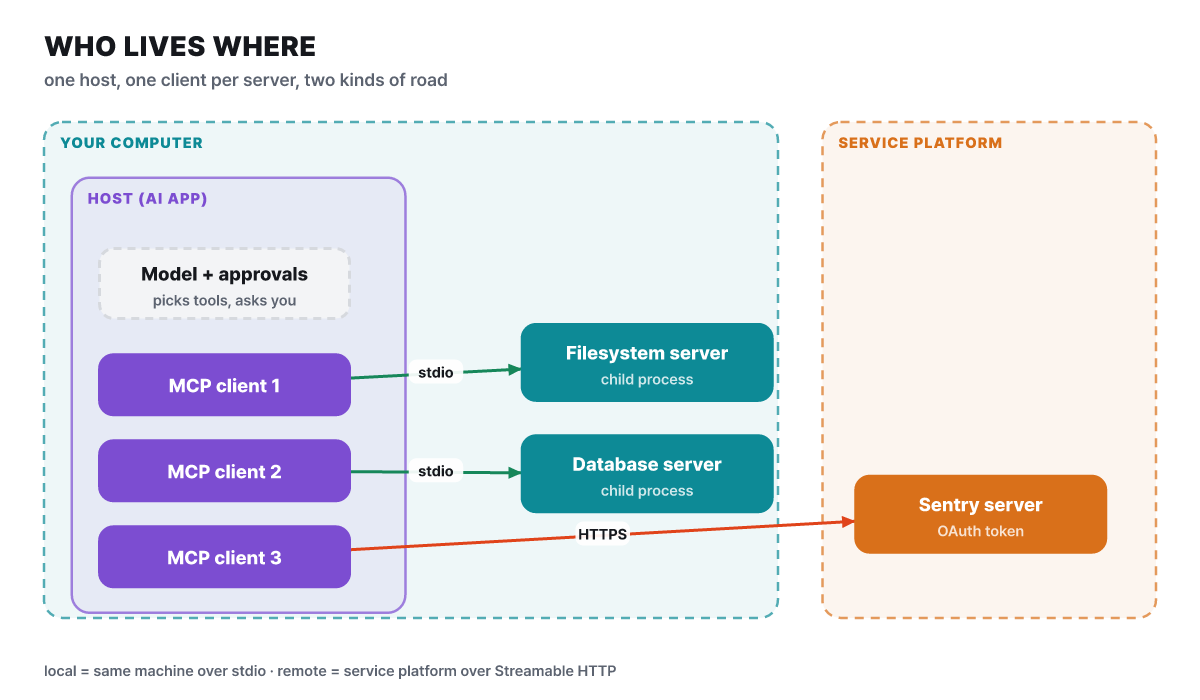 Figure 1. One host, as many clients as servers, and two kinds of path
What separates “local” from “remote” in the figure is not where the server sits but which path it uses. The documentation explains that a server connected over standard input/output (stdio) on the same computer is commonly called a local server, while a server that Sentry runs on its own platform and that connects over Streamable HTTP is called a remote server. A stdio server usually serves a single client, whereas an HTTP server accepts many clients.
That also answers the opening question. The program that read your folder is a file system server that Claude Desktop launched as a child process. It runs on your computer under your user account’s permissions, and it can open only the folders you listed in the configuration.
In plain terms
Picture a restaurant floor server (the host) who keeps a dedicated order window (a client) for each kitchen station. The floor server listens to the guest, decides which window to send the order through, and each station cooks in its own way. Because every window uses the same order slip format, the floor server never has to learn a new format when a station is added. MCP defines only that slip format. Whether the cooking itself is safe has to be checked station by station.
The reason a standard was needed looks like the difference between multiplication and addition. If 3 apps each integrate separately with 4 services, that is 12 integrations (editorial calculation), but if each service builds a server once, it ends at 7: 3 on the app side and 4 on the service side. Anthropic released MCP as open source on 2024-11-25, and on 2025-12-09 the Linux Foundation created the Agentic AI Foundation (AAIF) and took MCP in as a founding contributed project. The same press release stated that there were more than 10,000 public MCP servers and that Claude, Cursor, Microsoft Copilot, Gemini, Visual Studio Code and ChatGPT had adopted it. And MCP only defines how context is exchanged. How an AI app uses a model and handles the context it receives lies outside the specification.
The outer shell is the road, the inner shell is the language
The official documentation describes MCP in two layers. The inner one is the data layer, which defines what is said. The outer one is the transport layer, which defines which road that speech travels on.
- Data layer: JSON-RPC 2.0 messagesServer discovery (server/discover), tools, resources and prompts, asking the user for input, change notifications. Most of the specification's volume is here
- Transport layer: stdio or Streamable HTTPstdio talks to a child process on the same computer through standard input/output and needs no network. With Streamable HTTP the client sends over HTTP POST and the server streams back over SSE when needed
- Authentication: a job for the HTTP transportRemote servers are recommended to obtain tokens with OAuth. For stdio servers the specification advises reading credentials from environment variables
Both transports carry the same JSON-RPC messages, so you can move a server from local to remote without changing its code much. Put the other way around, the road can differ but the language must stay the same, and this is where the well-known stdio pitfall comes from. In stdio, standard output is the road the conversation travels on. If a server prints a single debugging print() line, plain text gets mixed in among the JSON-RPC responses and the connection breaks. Diagnostic output has to go to standard error (stderr), and this rule does not apply to HTTP servers.
Three pieces a server offers, and who holds each one
A server can give a client three kinds of capability. More important than the kind is who picks it, and when.
| Piece | Chosen by | What it does | Example |
|---|---|---|---|
| Tools | The model | Functions that execute. They do something to the outside world | Writing a file, calling an API, querying a database |
| Resources | The app | Read-only context data, with a URI and a MIME type | File contents, a database schema, API documentation |
| Prompts | The user | Reusable question templates | A “trip planning” template invoked with a slash command |
The database server example in the documentation separates the roles of the three pieces well. A tool that runs queries, a resource that holds the schema, and a prompt that holds examples of how to use the tool can all live on one server. Because read-only resources and world-changing tools are kept apart, it is also clear where confirmation is needed.
Resource addresses come in two forms: fixed addresses (calendar://events/2024) and templates that fill in values (travel://activities/{city}/{category}). Templates support autocompletion that suggests candidates even when you type only part of a value. Tools are designed so that the model picks and calls them on its own from the conversation context, but the specification recommends (SHOULD) that a human be able to refuse. That means showing in the interface which tools are exposed to the model, indicating when one is executed, and asking for confirmation before the operation.
Not everything is on the server side. The client side offers a piece too: elicitation, which lets a server ask the user for input such as a date or a confirmation while it works. It has a form mode that opens an input box and a URL mode that sends the user to an external address. Passwords, API keys, tokens and payment details must not be requested in form mode, and URL mode must be used. Sampling (a server asking the app’s model for an answer) and logging became deprecated in 2026-07-28, which the revision section below covers.
Opening a single tools/call step by step
Once a server is attached, this sequence runs inside.
- (Optional) The client asks with
server/discoverwhich specification versions, capabilities and identity the server supports. The server must implement this request, but whether the client calls it first is optional. The response can be cached, so the documentation example setsttlMsto 3,600,000 (1 hour). - When the client requests the tool list (
tools/list), each tool arrives with a name, a description and an input format (JSON Schema). The list also carriesttlMs(example: 300,000, or 5 minutes) andcacheScope. - The model looks at the list and picks a tool and its arguments. After user approval the client sends
tools/call, and the result comes back as acontentarray.
Here is what the actual messages look like. This is a shortened version of the calculator tool example in the official documentation; every request carries the specification version and the client capabilities in _meta.
// One tool in the list response: name, description, input format
{
  "name": "calculator_arithmetic",
  "title": "Calculator",
  "description": "Perform mathematical calculations including basic arithmetic, trigonometric functions, and algebraic operations",
  "inputSchema": {
    "type": "object",
    "properties": { "expression": { "type": "string" } },
    "required": ["expression"]
  }
}

// Call request
{
  "jsonrpc": "2.0", "id": 3, "method": "tools/call",
  "params": {
    "name": "calculator_arithmetic",
    "arguments": { "expression": "2 + 3 * 4" },
    "_meta": {
      "io.modelcontextprotocol/protocolVersion": "2026-07-28",
      "io.modelcontextprotocol/clientCapabilities": { "elicitation": {} }
    }
  }
}

// Response: the result is a content array, a failure is flagged with isError
{
  "jsonrpc": "2.0", "id": 3,
  "result": { "resultType": "complete", "content": [{ "type": "text", "text": "14" }], "isError": false }
}
The description and inputSchema are almost the only clues the model has for deciding whether to use a tool. The specification recommends that a tool name be 1 to 128 characters of letters, digits, underscores, hyphens and dots, and be unique within the server. The list should not change from connection to connection, and returning it in a deterministic order helps both the client cache and the prompt cache hit rate at the model provider.
Errors split into two kinds, and this distinction is what separates good servers from bad ones.
| Kind | When | What comes back | Who fixes it |
|---|---|---|---|
| Protocol error | Unknown tool, a request that violates the specification, an internal server error | A JSON-RPC error (for example -32602) | A person or the app |
| Tool execution error | An API failure, input validation failure such as a date format, a business rule violation | isError: true inside a normal response, plus an explanatory sentence |
The model reads it, fixes the arguments and retries |
So whoever builds a tool does better to return failures as sentences the model can read and act on, such as “The date must be in the future.” The specification requires servers (MUST) to validate input, control access, rate-limit calls and sanitize output, and recommends that clients ask the user to confirm sensitive operations, show tool input before sending it to the server, apply timeouts and keep usage logs.
The 2026-07-28 revision that removed the session
The core of the latest revision is that it removed state. Previously, opening a connection meant exchanging greetings with initialize, and later requests were handled on the strength of that session (the Mcp-Session-Id header). Now every request carries the specification version and the client capabilities itself, so a server can handle a request by looking at that request alone. The left side is up to 2025-11-25 and the right side is 2026-07-28. Notice that the same tool call goes through preliminary steps in the earlier version and starts in one go in the later one.
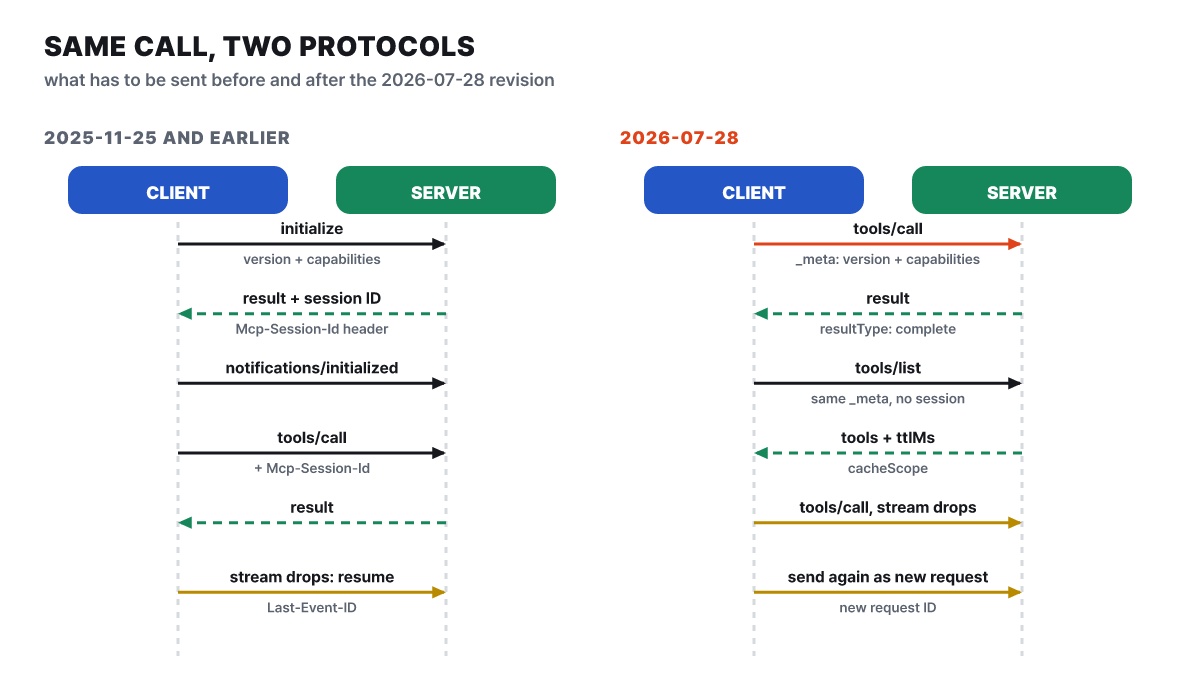 Figure 2. Opening a session and then calling, versus carrying the information in every request
The two lower lines of the figure changed as well. When a stream was cut, the old way resumed it with Last-Event-ID, but that resume feature is gone: requests that were in progress are lost, so you send them again with a new request ID. Lists (tools/list and others) no longer vary from connection to connection. For servers that need state, such as a shopping cart or an open browser, the specification recommends building a tool like create_basket that returns a handle, and having the model pass that handle as an argument to later calls.
Change notifications became opt-in too. The client opens subscriptions/listen with the notification types it wants (tool list changed, resource changed and so on), the server sends a confirmation, and from then on sends only those notifications. Notifications are best effort, however, and can be missed during a reconnect, so the specification says to poll alongside them for freshness. Requests that the server used to initiate (roots/list, sampling/createMessage, elicitation/create) became multi round-trip requests (MRTR). The server returns a result with resultType: "input_required" containing the input it needs, and the client re-sends the original request with inputResponses attached.
This revision also introduced a list of deprecations. The specification adopted a lifecycle policy alongside it: a deprecated feature gets at least 12 months of grace before removal, and new implementations are told not to adopt the features below.
| Deprecated | Use instead |
|---|---|
| Roots | Pass folders and files as tool arguments, resource URIs or server settings |
| Sampling | The server calls the model provider’s API directly |
| Logging | stderr for stdio servers, OpenTelemetry otherwise |
| HTTP+SSE transport | Streamable HTTP |
| Dynamic client registration (RFC 7591) | Client ID metadata documents |
Tasks, which handle long-running work, also left the core specification and moved to an official extension (io.modelcontextprotocol/tasks). The server returns a task handle, and the client polls with tasks/get to receive the result. A one-line view of how this flow built up over dates looks like this.
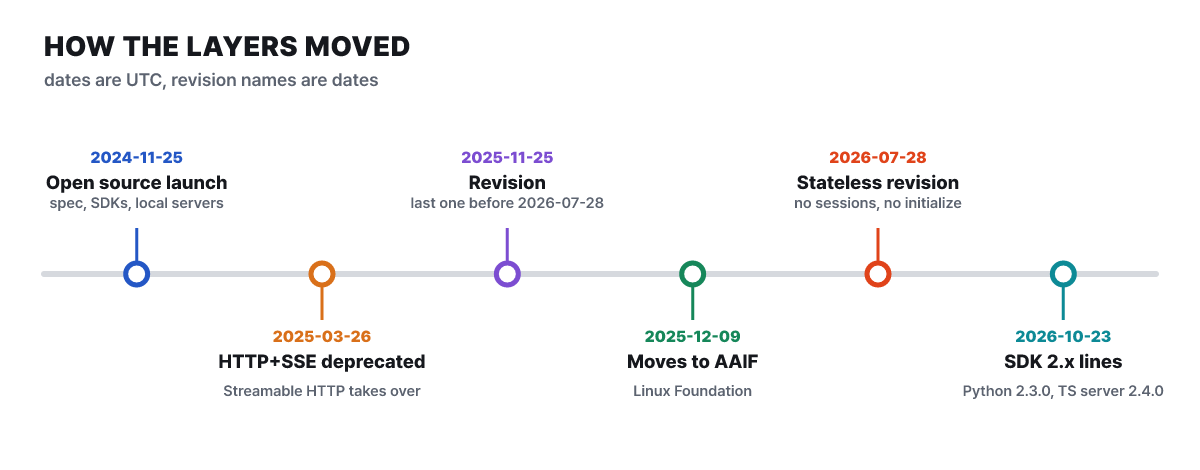 Figure 3. A revision’s name is its date, and the SDKs are now on the 2.x line too
By GitHub releases, the latest Python SDK is v2.3.0 (2026-10-02) and the latest TypeScript SDK server package is 2.4.0 (2026-10-23), while the 1.x line on the TypeScript side is updated alongside it as 1.32.2. When you build a server yourself, the safe first step is to check which revision the SDK follows.
Setup and scopes for attaching to your own computer
The official guide to local connections walks through attaching a file system server to Claude Desktop. You need Claude Desktop and Node.js (the LTS version is recommended).
- In the Claude menu (not the account settings inside the window), open Settings, then open Edit Config on the Developer tab.
- Put the content below into the configuration file (on macOS
~/Library/Application Support/Claude/claude_desktop_config.json, on Windows%APPDATA%\Claude\claude_desktop_config.json). - Do not just close the window: quit the app completely and start it again.
- Under the input box, open “Add files, connectors, and more” and check the filesystem server’s tool list in Connectors.
{
  "mcpServers": {
    "filesystem": {
      "command": "npx",
      "args": ["-y", "@modelcontextprotocol/server-filesystem", "/Users/username/Desktop", "/Users/username/Downloads"]
    }
  }
}
npx downloads the package and launches the server, and the paths at the end of args are the folders the server may open. Listing only the folders you need is the point of this configuration, and on Windows you write backslashes twice, as in C:\\Users\\username\\Desktop. If the server does not appear in the list, follow the order in the official documentation: fully restart the app, check the JSON syntax, check that paths are absolute rather than relative, and then run the command from the configuration directly in a terminal. Logs are in ~/Library/Logs/Claude on macOS and %APPDATA%\Claude\logs on Windows; mcp.log collects connection information and mcp-server-SERVERNAME.log collects the server’s stderr.
Claude Code, the terminal coding tool, attaches servers with a command rather than a configuration file.
# Remote server (HTTP). Specify a name and an address
claude mcp add --transport http notion https://mcp.notion.com/mcp

# Local server (stdio). What follows -- is the command that launches the server
claude mcp add --env AIRTABLE_API_KEY=YOUR_KEY --transport stdio airtable -- npx -y airtable-mcp-server

claude mcp list      # Configured servers and their connection status
The Claude Code documentation lists the SSE transport as deprecated and says that from v2.1.265 onward it tries HTTP first and falls back to SSE only if the server does not accept it. There are three storage scopes.
| Scope | Where it applies | Shared with team | Where it is stored |
|---|---|---|---|
| local (default) | Current project only | No | The project entry in ~/.claude.json |
| project | Current project only | Yes, via the repository | .mcp.json in the project root |
| user | All of my projects | No | ~/.claude.json |
When servers with the same name exist in several places, the order of precedence is local, project, user, plugin, then claude.ai connector, and fields are not merged. For a server from a .mcp.json you pulled from a repository, an interactive session shows an approval prompt and the server stays at “Pending approval” until you approve it. In claude -p, the Agent SDK and cloud sessions, however, project servers are loaded without asking. To block that in such environments, add them to disabledMcpjsonServers or use --strict-mcp-config so that only the servers you specify are used.
The sign-in road for remote servers
A remote server’s program runs on the service operator’s side and holds a token for your account. In Claude, you open Connectors in Settings, choose Add custom connector, enter the server address, finish authentication, and then decide allow or block per tool on the same screen. The authentication the specification defines is based on OAuth 2.1, and the client obtains a token like this.
- The client sends a request to the server without a token.
- The server answers 401 along with an address saying “my authentication information is here” (
resource_metadata). - The client finds the authorization server in the protected resource metadata at that address and reads the authorization server metadata.
- The client registers itself. A client ID metadata document is the recommended method, and dynamic client registration is deprecated.
- The user signs in and consents in the browser. PKCE and the
resourceparameter are used, and if the response containsiss, the client verifies that it matches the issuer it recorded. - The client exchanges the code it received for a token and attaches it to every later request in an
Authorization: Bearerheader.
Putting the token in the address query is forbidden, and a server must accept only tokens issued to itself. If the permissions are insufficient, the server answers 403 with insufficient_scope and states the required scope, so the client can ask for consent to only that additional scope. The recommended approach is to request only low permissions such as read at first and raise them when needed.
Building your own server and opening it in the inspector
The official tutorial for building a server is offered for Python (3.10 or later, SDK 2.0.0 or later), TypeScript and others. In Python, the tool definition is generated from type hints and the docstring.
from mcp.server import MCPServer

mcp = MCPServer("notes")

@mcp.tool()
async def count_words(text: str) -> str:
    """Count the words in the given text.

    Args:
        text: The text to count words in
    """
    return f"{len(text.split())} words"

if __name__ == "__main__":
    mcp.run(transport="stdio")
One function becomes one tool, and the docstring becomes the description the model reads. The single entry in the tools/list response we saw earlier came out of a function like this. If the description is sloppy, the model picks the tool at the wrong time or never finds it.
Opening a server in the official inspector before attaching it to an app separates server problems from app configuration problems. You run it without installing anything using npx @modelcontextprotocol/inspector node path/to/server/index.js. The default is a web interface, and there are also --cli (for scripts and CI) and --tui (a terminal interface) modes. It requires Node 22.19.0 or later and prints an address containing a token on every run. For a remote server, check it with --server-url ADDRESS --transport http. OAuth tokens and environment variable values are stored in the keychain, and where no keychain exists they are stored in ~/.mcp-inspector/secrets.json, in plaintext unless you supply an encryption key.
The scale at which tool definitions eat up context
The more servers you attach, the more tool descriptions you have to show the model. The official client best-practices document warns that if all tool definitions are placed in full at the start of a conversation, then in an environment with dozens of servers and hundreds of tools, most of the context window can be filled with definitions before the model reads the user’s message. I put the documentation’s example values on the same axis. Red is the default approach and green is the reduced approach.
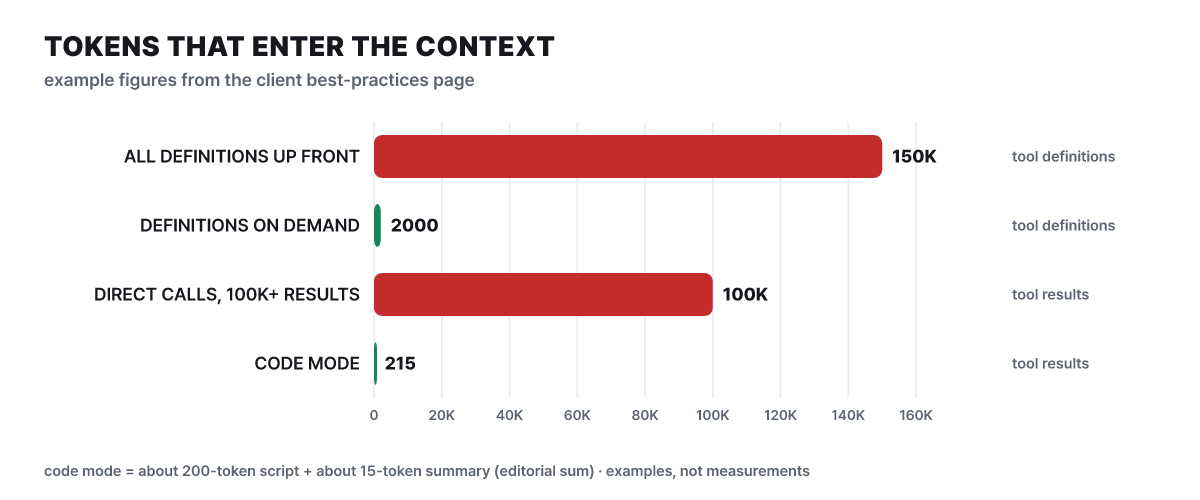 Figure 4. Example values from the documentation (not measurements). The code mode figure of 215 is about 200 for the script plus about 15 for the summary, an editorial sum
The top two lines show how much the tool definitions take up, and the bottom two show how much intermediate result passes through when tools are called back to back. The remedies split in two as well. On the definitions side it is progressive tool discovery: the app receives the definitions and keeps them, but initially gives the model only a small tool for searching tools, and loads the definitions of only what the model picks. The documentation gives an example of switching to this approach once a threshold such as 1 to 5% of the context window is exceeded. Search methods include keyword (BM25, regex), embeddings, a subagent in which a small model chooses, and hybrids, and Claude and OpenAI offer tool search as a built-in feature. The Claude Code documentation says tool search is on by default and can be turned off with ENABLE_TOOL_SEARCH=false.
On the results side it is code mode. The model writes code and runs tool calls bundled together inside a sandbox, so intermediate results never pass through the model and only a summary comes back. But the app has to implement the sandbox, and approving a script does not mean every call inside it is approved, so the same confirmation policy must be applied to each call. The documentation adds that adding and removing tools midway breaks the prompt cache, and that loss can be larger than the reduction in definitions.
For an ordinary user the problem shows up like this. If answers get slower or the model picks the wrong tool after you attach many servers, try turning off the servers you do not use first. The output side has separate limits: Claude Code warns when tool output exceeds 10,000 tokens (this threshold is fixed), the default limit is 25,000 tokens, and you can adjust it with MAX_MCP_OUTPUT_TOKENS. A text result over 50,000 characters is saved to a file unless the server has raised the limit.
What an attached server can do with your permissions
A server is a program that moves as the AI app tells it to. A local server is a separate program running under your account’s permissions, and a remote server holds a token for your account. So what you check first is provenance and permission scope, not star counts or ease of installation. Here are the risks named in the official security best-practices document, together with who has to stop them.
| Risk | What happens | Who must stop it |
|---|---|---|
| Local server start command | One line in the configuration runs with your permissions. A malicious command can slip in unnoticed | Users read the entire command; apps show the command to be run in full and get consent |
| Token passthrough | A server accepts a token that was not issued to it and forwards it to another API | Server operators: accept only tokens issued to the server |
| Confused deputy | Because of a relay server’s fixed ID and an earlier consent record, an attacker’s app gets an authorization code without consent | Server operators: show a consent screen for each client |
| SSRF | The app follows an address supplied by the server and touches the internal network or cloud metadata | App developers: block private ranges (including 169.254.0.0/16) and enforce HTTPS |
| State handle hijacking | A guessed handle value gives access to someone else’s cart or task | Server operators: bind handles to the authenticated user and use random values |
| Excessive scope | Taking every permission from the start means a leaked token does great damage | Everyone: start with a minimal scope such as read |
There are five things users can do right away.
- Connect only the folders you need to a file server, and a read-only account to a database server.
- Do not click through tool approval prompts out of habit. For write, delete and send tools, read the input values before approving.
- Do not attach a server of unclear origin, or one whose configured command you do not understand.
- Pass API keys through environment variables, and remove servers you do not use from the configuration.
- Remember that a server that reads web pages or documents can have the model pulled along by wording inside them.
The last item is also warned about in the Claude Code documentation: a server that fetches external content can be exposed to prompt injection (the model following instructions inside the text it fetched), so connect only servers you trust. That content read from one server can flow into the tool input of another is a problem that grows with each additional server, and it is the same reason the specification recommends showing tool call input to the user before sending it to the server.
Questions to ask first when you’re stuck
What if the configuration is right but the stdio server drops immediately?
Start by suspecting that the server is printing plain text to standard output. Standard output is the road messages travel on, so a single print line breaks the connection. The server’s stderr is recorded in Claude Desktop’s mcp-server-NAME.log, where you can read the error message. Launching the same command in the inspector and checking whether the tool list appears will tell you whether the problem is on the server side or in the app configuration.
What if I updated the server but the new tool does not appear?
The app is most likely caching the list. The client reuses the list for as long as the ttlMs in the list response, and change notifications only arrive if you subscribe through subscriptions/listen and the server declares the listChanged capability. Even then they are best effort and can be missed during a reconnect. The fastest check is to reconnect the server in the app (/mcp in Claude Code) or restart the app.
Paths outside MCP, and servers to read next
MCP is not the right answer for every connection. The same tool can be delivered in three ways, and the shape of the job decides the choice.
| Approach | Where tools are defined | Where it runs | Fits when |
|---|---|---|---|
| API tool use (function calling) | Defined directly in the tools value of each request |
Your app code (server tools run on Anthropic infrastructure) | A dedicated tool used within one app |
| MCP server | Published by the server as a list | The server process (local or remote) | Several apps reuse the same tool |
| CLI + skill | A command-line tool and an instruction file | The shell the agent uses | You want to save context otherwise spent on tool definitions |
The Playwright MCP README says that for coding agents a CLI-plus-skill combination is more efficient in tokens, and that MCP fits exploratory automation, where browser state persists or the page structure must be inspected continuously. The Claude API also has an MCP connector that attaches a remote MCP server without a separate client, so the two approaches are not mutually exclusive either.
There are two ways to find servers to attach. The servers repository of the modelcontextprotocol organization, which maintains the specification, has the most stars, but its README states that it is a collection of educational reference implementations. The servers that remain are seven: Everything, Fetch, Filesystem, Git, Memory, Sequential Thinking and Time, while 13 including GitHub, PostgreSQL, Slack, SQLite and Puppeteer have moved to an archive repository. The README tells you to see the official registry (registry.modelcontextprotocol.io) for a server list. The registry is still in preview, hosts no code and stores only server.json metadata. Names use a reverse-domain form like io.github.user/server, so only someone who has proven ownership of a GitHub account or domain can publish under that name, and code scanning is the job of package registries such as npm and PyPI and of marketplaces. Being listed means a server can be found, not that it has been verified.
| Repository | Role | GitHub stars (2026-10-27 UTC) |
|---|---|---|
| servers | Collection of educational reference servers | 91,582 |
| python-sdk | Python SDK (MIT) | 24,675 |
| typescript-sdk | TypeScript SDK | 13,655 |
| inspector | Server inspection tool | 11,154 |
| modelcontextprotocol | Specification and docs | 9,535 |
| registry | Official registry | 7,408 |
Star counts are only a measure of attention, not evidence of quality or safety. The extensions side is growing separately too. MCP Apps is an extension that lets a server draw sandboxed iframe views (charts, forms, viewers) inside a conversation, and the documentation says it is supported by Claude, Claude Desktop, GitHub Copilot in Visual Studio Code, Microsoft 365 Copilot, Goose, Postman and others; both the client and the server must support it for it to work.
This site also has articles that take real servers apart one by one. Which servers have been archived and what to switch to is covered in Half of the 10 MCP servers in the recommended lists are already archived, a server that opens the browser directly in Chrome DevTools MCP, and a server that pulls in current documentation in Context7. For permissions and safeguards when connecting to a database, see Supabase MCP and Neon MCP; for how read-only remote servers actually look, see Microsoft Learn MCP and Fabric IQ MCP; and a local server that remembers code structure is covered in the codebase-memory-mcp article.



