DeepSeek V4.1 Flash 1017, same price, terminal score 31 to 42
V4.1 Flash 1017 keeps its prices ($0.30 in, $1.20 out) while Terminal-Bench rises from 31.2 to 42.3. We check test conditions, rivals, and per-task cost.
The price sits on the same line as in September, while all eleven lines of the score table moved to different lines. On Oct 17, DeepSeek swapped V4.1 Flash for V4.1-Flash-1017. Prices per 1 million tokens stay at $0.30 for input (cache miss) and $1.20 for output, yet in the model card’s comparison table Terminal-Bench 4.0 rose from 31.2 to 42.3 and ProgramBench from 20.3 to 29.1. The API model name deepseek-flash now points to 1017 on its own, so there is no code to change, and the weights are published under the MIT license. (All times in this article are UTC, and the reference date is Oct 27.)
This article follows the numbers, not the order of events. In turn, we read how far the scores rose, who measured them and under what conditions, where the model loses to rivals, what one task costs at the same score level, and how much the bill swings with time of day and cache. The Flash line has changed shape three times in two and a half months: V4-Flash-0731 on Jul 31 (284 billion parameters in total), V4.1 Flash on Sep 10 (552 billion parameters, a 1 million-token context, image input), and now 1017 on Oct 17. Below, “the previous version” means the V4.1 Flash of Sep 10.
Measuring how far all eleven rows rose
The figure below puts the eleven tests in which the model card lists both the previous version and 1017, sorted from the largest gain down. The gray dot is the previous version, the orange dot is 1017, and the number beside each name is the gain.
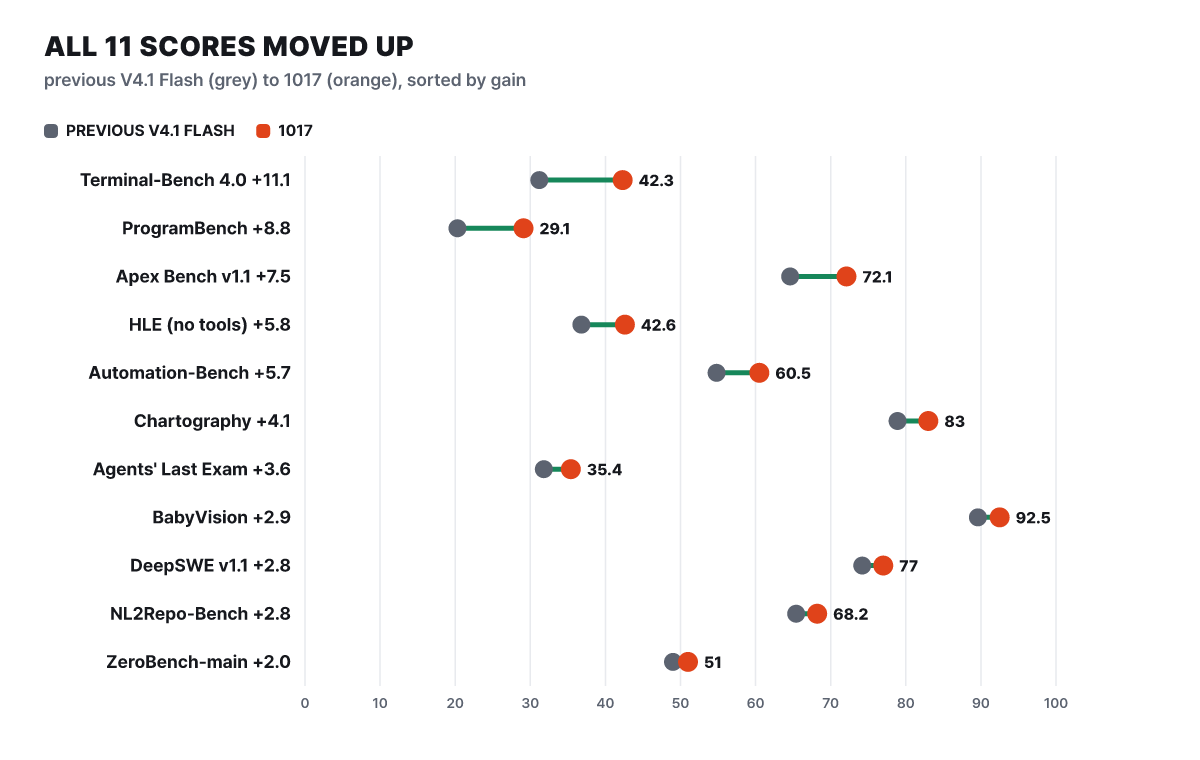 Figure 1. Change from the previous version in the model card’s comparison table. These are values DeepSeek ran itself
The top two rows stand out. Terminal-Bench 4.0, where the model works the terminal directly to finish a job, gained 11.1 points, and ProgramBench, where it builds a whole program, gained 8.8. These are low-scoring tests, so in relative terms the jump looks even bigger: ProgramBench rose 43% (20.3 to 29.1) and Terminal-Bench 36% (editorial calculation). At the bottom, BabyVision (89.6 to 92.5) and ZeroBench (49.0 to 51.0) gained little, and BabyVision is also a test where 1017 sits just 7.5 points short of a perfect score (100). The average gain across the eleven rows is 5.2 points (editorial calculation: the gains sum to 57.1, divided by 11).
This distribution points the same way as DeepSeek’s own explanation. The release notes call the core of this training round reinforcement learning with self-feedback, and say it strengthened the ability to see a result through to the end, such as games or 3D modeling, even when the prompt and reference material are short. The same announcement calls this “better performance at equal or lower cost”, a Pareto improvement. The figure above shows the score half of that claim, and the cost half is checked later against independent measurements and the bill.
Four conditions the table does not state
Whether the values in Figure 1 can be trusted depends less on the values than on the conditions. There are four places to watch when reading the model card table.
First, every cell is a value compiled by DeepSeek. DeepSeek also chose which tests go in the table, so the table is best suited to reading “did 1017 improve over the previous version?” and does not tell you “who is first overall across the tests?”
Second, the toolbox differs by test. According to the table footnotes, Terminal-Bench 4.0 was run with the Claude Code harness (the frame that wraps a model and hands it command execution and file editing), and DeepSWE v1.1 with the Mini-SWE-V2 harness. The same model scores differently under different harnesses, so there is no guarantee that your own agent tool will produce the same numbers.
Third, the HLE row has two numbers. For 1017 it is 42.6, with a separate text-only subset score of 44.0 (36.8 and 39.1 for the previous version), while the GLM-5.3 cell has only a text-only value of 42.0. Either way you line them up, 1017 is higher than GLM-5.3, but remember that the basis is not the same in every cell.
Fourth, the last three rows (Chartography, BabyVision, ZeroBench-main) are scores with tools, and the GLM-5.3 cell is empty. So against GLM-5.3 the model competes in eight rows, not eleven. The table also does not state the rival models’ thinking levels or sampling settings. That K3 scores 12.6 on Terminal-Bench 4.0, far from the other models’ 37.9 to 51.8, is itself a signal to look at the run settings before the score.
Wins and losses against four rivals
Besides the previous version, the table has columns for K3, GLM-5.3, GPT-5.6 Sol, and Opus 5. We counted, cell by cell, where 1017 is ahead and grouped the counts by model.
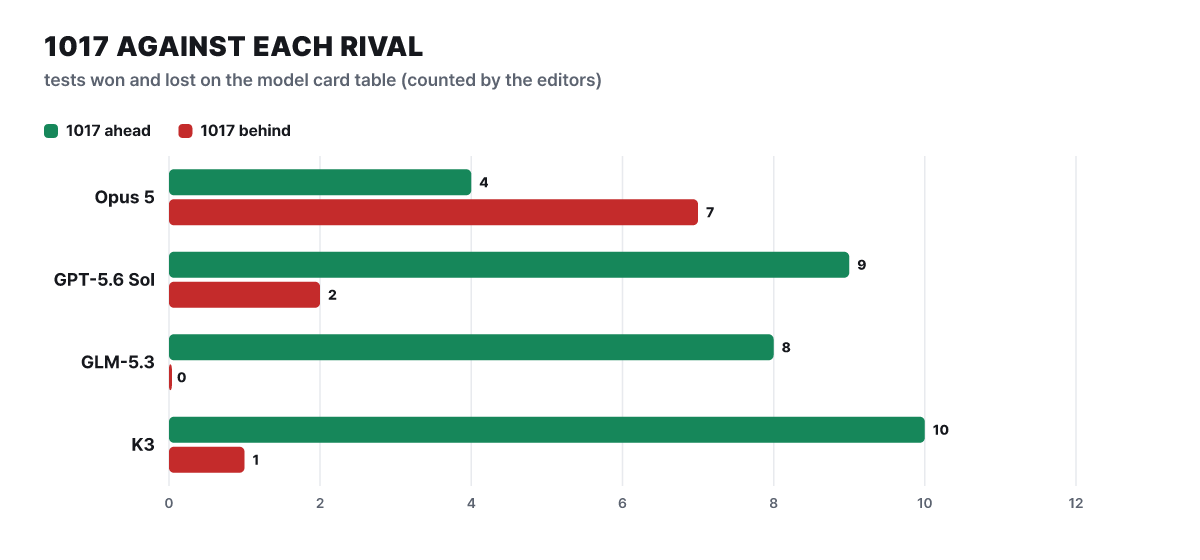 Figure 2. Number of cells in the model card comparison table where 1017 is ahead (green) and behind (red). Counted by the editorial team from the table values
Against GLM-5.3 it wins all eight rows they share, and against K3 it loses only HLE (42.6 vs 43.5). Against GPT-5.6 Sol it wins nine rows and loses two: HLE (42.6 vs 44.5) and ZeroBench-main (51.0 vs 53.0). Opus 5 is behind 1017 in only four rows, DeepSWE (77.0 vs 74.0), Automation-Bench (60.5 vs 50.3), Agents’ Last Exam (35.4 vs 28.6), and Apex Bench (72.1 vs 65.8), and 1017 trails in seven. (The numbers in parentheses are 1017 first, then the rival. The Opus 5 in this table and the Opus 5.5 on the Artificial Analysis leaderboard that appears later are separate entries with different names.)
Counting alone, though, hides the size of the gaps. Of the seven rows lost to Opus 5, three, Chartography (83.0 vs 84.0), ZeroBench-main (51.0 vs 52.0), and BabyVision (92.5 vs 94.1), are within 1.6 points. The real gaps are HLE at 13.7 points (42.6 vs 56.3), Terminal-Bench 4.0 at 9.5 points (42.3 vs 51.8), ProgramBench at 7.9 points, and NL2Repo-Bench at 7.1 points, all of them hard, long tasks or deep reasoning (gaps are an editorial calculation). The same 4 wins and 7 losses is best read as “still some distance from the top model on the hardest reasoning, and nearly level elsewhere”.
Four numbers from independent measurement
A vendor table alone is unsettling, so we overlay measurements from the independent evaluator Artificial Analysis (AA below). AA’s composite index (v4.3.2) bundles several evaluations, including Terminal-Bench 4.0, SciCode, and HLE, and the posted result for 1017 was measured at the maximum effort (Max) setting. Speed and cost are based on DeepSeek’s own API.
The composite index and the speed are praiseworthy values, and only the output tokens point the other way. At a glance, DeepSeek’s “output got shorter” and AA’s “very verbose” seem to collide, but they compare against different things. The former is measured against the previous V4.1 Flash, and the latter against the median of the comparison group. It means the model got shorter than before but is still a talkative one within the group.
The unit price is also below the group median. In AA’s notation, input is $0.30 per 1 million tokens (median $0.43) and output is $1.20 (median $1.45), and the blended price, mixing in cache-hit input at a 7 : 2 : 1 ratio, is $0.18. Because the cache discount is 98%, the heavier the share of input in an agent job, the closer the cost gets to this blended price.
Is $0.26 per task cheap for an index of 45?
AA also records what it cost to run one index-evaluation task for each model. For 1017 it is $0.26 per task. Whether that is cheap or expensive only shows up when you set it next to others. The figure below shows cost per task for models selected from the Oct 27 AA leaderboard, with each model’s composite index in gray text on the right.
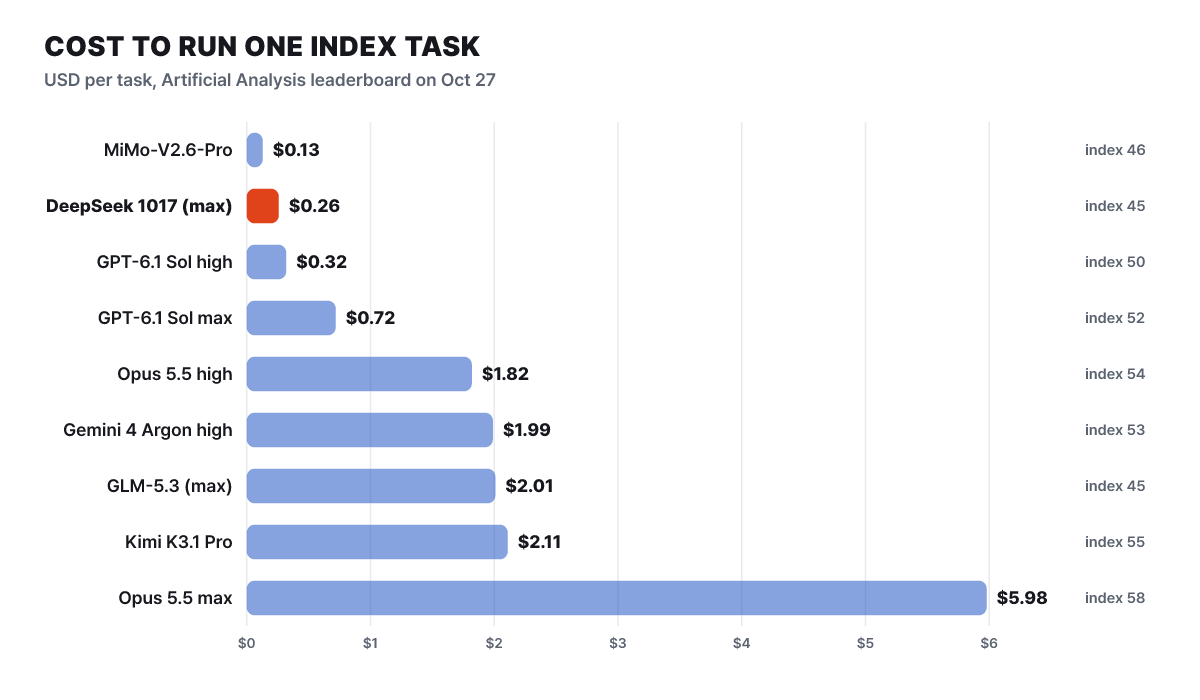 Figure 3. Cost per task (USD) and composite index on the Artificial Analysis leaderboard. Entries for the same model at a different thinking level are listed separately
At the same 45-point level, GLM-5.3 (Max) costs $2.01, about 7.7 times 1017 (editorial calculation). Looking for more points, Kimi K3.1 Pro scores 55 for $2.11, and Opus 5.5 max scores 58 for $5.98, paying about 23 times as much for 13 points more. On the other hand, 1017 is not the cheapest. GPT-6.1 Sol high scores 50 for $0.32, and MiMo-V2.6-Pro scores 46 for $0.13. The point of this figure is that choosing a model is not choosing one model but choosing a pair that includes the thinking level.
Two things must be added. This cost is computed from the input and output lengths of AA’s index evaluation, so it differs from the cost of your own task. And the $0.30 input and $1.20 output that AA applied are peak-time prices, so if you run off-peak, the unit price drops by half.
Full price for only 35 of the 168 hours in a week
DeepSeek splits the unit price in two by time of day. The prices per 1 million tokens on the pricing page are as follows.
| Per 1M tokens | Flash peak | Flash off-peak | Pro peak | Pro off-peak |
|---|---|---|---|---|
| Input, cache hit | $0.006 | $0.003 | $0.044 | $0.022 |
| Input, cache miss | $0.30 | $0.15 | $1.32 | $0.66 |
| Output | $1.20 | $0.60 | $3.96 | $1.98 |
Peak is weekdays 01:00 to 04:00 and 06:00 to 10:00 UTC, and everything else is half price. In the figure, orange cells are full price and light cells are half price.
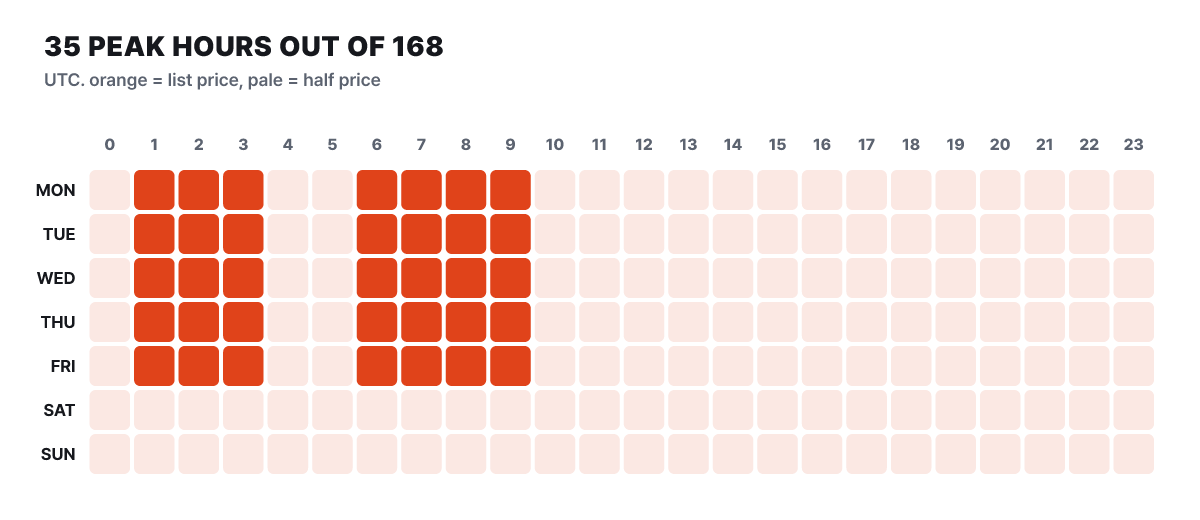 Figure 4. The 168 cells of a week in UTC. The 35 orange cells are full price and the 133 light cells are half price
On a weekday only seven hours are peak, and weekends and holidays count as off-peak for the whole day. Of the 168 hours in a week, 35 (20.8%) are peak and 133 (79.2%) are half price. As the figure shows, the half-price window is effectively the default, and scheduling jobs between 04:00 and 06:00 UTC on weekdays or after 10:00 lets you avoid full price. Pro (deepseek-v4-pro) is a separate model called DeepSeek-V4-Pro-0813, with cache-miss input at 4.4 times Flash and output at 3.3 times, and it does not support image input. Flash does support image input.
Splitting up the receipt for a single task
Let us calculate, for one task, how the table’s unit prices turn into an actual bill. The assumptions are these. A coding agent makes 40 calls, and on each call it resends the first 150,000 tokens, so input is 6 million tokens, and output is 3,000 tokens per call, or 120,000 tokens. The real number of calls and tokens differs by task, so these values are assumptions.
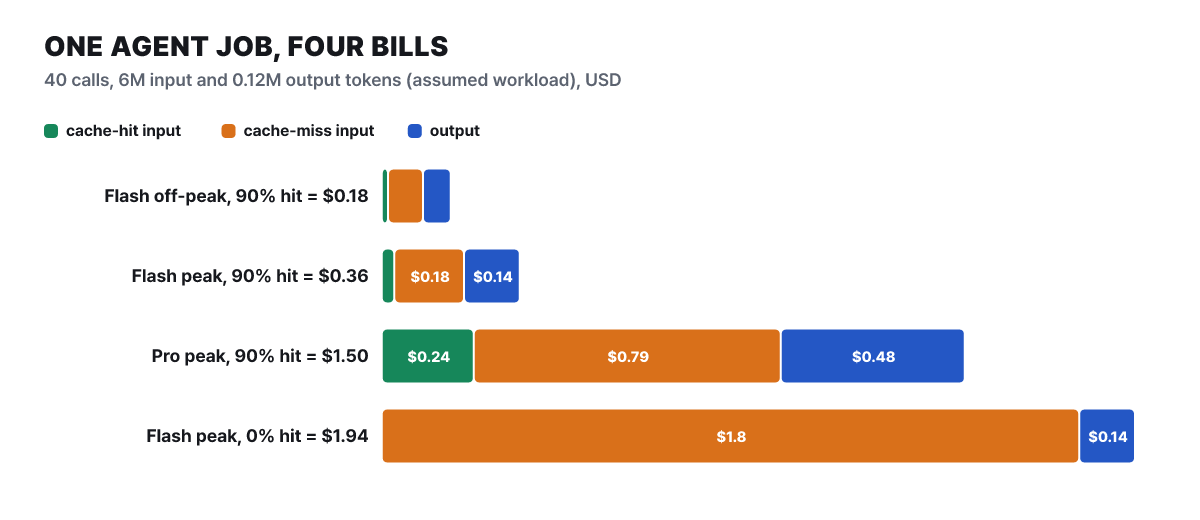 Figure 5. Bill composition for the same task (assumed workload, editorial calculation from the price list)
With a 90% cache hit rate, the Flash peak bill is about $0.36, and off-peak it is exactly half, about $0.18. Running the same 90% on Pro peak gives about $1.50 (4.2 times), and if no cache hits at all, even Flash peak costs about $1.94, 5.5 times as much. What to notice is the color of the bars. Even at a 90% hit rate, the 10% of input, 600,000 tokens, is billed as cache miss and becomes the largest segment (about $0.18), while the 5.4 million hit tokens come to only $0.03. When the cache misses, the input-miss segment takes almost the entire bill. That is why the order of savings is cache, time of day, then model choice.
There is nothing to switch on for the cache. It is on by default for all users, any part of a request that matches the beginning of an earlier request counts as a hit, and prompt_cache_hit_tokens and prompt_cache_miss_tokens appear separately in the response’s usage. However, it is best-effort, so a 100% hit rate is not guaranteed, building the cache takes a few seconds, and unused entries are usually cleared within hours to days. To get hits, the beginning must match character for character, so pin the system prompt and long reference material at the very front and append the changing question after them. For jobs that need no immediate result, such as a document-classification batch, moving them to after 10:00 UTC on weekdays or to the weekend halves the cost of the same work.
Where the call rules reach the bill
The caller-side specification is gathered on one sheet.
- Call name
deepseek-flash(recommended). Old names such asdeepseek-v4-flashare still accepted, but that model is retired and 1017 handles the request at the Flash rate- Model version
- DeepSeek-V4.1-Flash-1017
- Context and output
- 1 million-token context, up to 384,000 output tokens
- Mode
- Thinking mode is the default and can be turned off
- Supported features
- JSON output, tool calls, Responses API, Anthropic API format, image input, prefix completion (beta). FIM completion (beta) only with thinking mode off
- Compatible endpoints
https://api.deepseek.com(OpenAI format),https://api.deepseek.com/anthropic(Anthropic format)- Concurrent request limit
- 2,500 per account (500 for Pro)
Thinking mode is on by default, and the default effort level is high. To turn it off, set thinking to disabled, and to change the level, use one of low, high, or max in reasoning_effort. Other names are folded into the nearest value: minimal is treated as low, medium and xhigh as high, and ultra as max. The official documentation example is as follows.
curl https://api.deepseek.com/chat/completions \
  -H "Content-Type: application/json" \
  -H "Authorization: Bearer ${DEEPSEEK_API_KEY}" \
  -d '{
    "model": "deepseek-flash",
    "messages": [{"role": "user", "content": "Tell me why the tests in this repository are failing"}],
    "thinking": {"type": "enabled"},
    "reasoning_effort": "high",
    "stream": false
  }'
There are three easy places to trip in call code. First, in conversations that use tools, you must resend all of the previous turns’ reasoning_content, and if you leave it out, the API returns a 400 error. Second, temperature, presence_penalty, and frequency_penalty are ignored without an error. The temperature 1.0 and top_p 1.0 that the model card recommends are values for when you serve the weights yourself. Third, top_p is applied only in the thinking mode of deepseek-flash, in the range 0.95 to 1.0, and lower values are treated as 0.95.
The limits are numbers too. If concurrent requests exceed 2,500 per account, HTTP 429 comes back, and if you need more, you can request an increase at no extra cost. A service that handles many end users can put a user_id in the request (letters, digits, -, _, up to 512 characters) to separate cache and scheduling per user, and the documentation states firmly that personal information must not go in that value. If inference does not start within 10 minutes, the server closes the connection.
Search and fetch pricing starts Oct 31 at 16:00 UTC
On Oct 17, DeepSeek opened two APIs, Search and Fetch, on top of its own search engine. Search takes a query and returns a list of results (with the page text if requested), and Fetch takes a URL and returns the title and the body in Markdown. The endpoints are /v1/tools/search and /v1/tools/fetch, and authentication uses the same API key. Each costs $0.75 per 1,000 calls, and search bills only successful responses (200) that have results, while fetch bills only successful responses that return a body. Empty results, failures, and timeouts are free. The per-second request limits are 100 for search and 25 for fetch (with separate per-domain limits), a 429 comes back if exceeded, and these are separate from the model’s concurrency limit.
curl https://api.deepseek.com/v1/tools/search \
  -H "Authorization: Bearer ${DEEPSEEK_API_KEY}" \
  -H "Content-Type: application/json" \
  -d '{"query": "site:docs.python.org lang:en after:2026 asyncio taskgroup", "count": 5}'
A query is 1 to 128 characters and can use operators such as site:, -site:, exact match in quotes, lang:, and after: or before:. count is 1 to 50 (default 10), and each result carries a rerank_score from 0 to 3 (1.5 or above is high quality) and an authority level from 0 to 4 (3 or above is highly trustworthy), so code can filter on them. To receive the body text, you must set need_content to true, and with the default false, content is always an empty string.
The date matters. Calls in which DeepSeek Harness, Claude Code, or Codex use this API as a server-side tool are free until 16:00 UTC on Oct 31, after which every request is billed, and as of today four days remain. The totals are combined per account, so however many agents you run, they pile up in one ledger. Suppose a web research agent makes 10,000 searches a day and, for each search, opens two fetches after it: that is 30,000 calls, $22.5 a day and $675 over 30 days (assumption and editorial calculation). If you use only search results and no fetch, it is $7.5 a day and $225 over 30 days. Counting your combined search and fetch calls before the free period ends lets you estimate the November bill. Retry only on 408, 429, and 5xx; for 402 (insufficient balance) top up first, and for other 4xx errors fix the request before sending it again, as the official documentation advises. In the harness, 1017 and search and fetch support went into v0.2.1-rc.2 on Oct 17, and the latest candidate is rc.3 from Oct 23.
Numbers for those who download: 552 billion, 16 billion, 22 providers
The weights are on Hugging Face (deepseek-ai/DeepSeek-V4.1-Flash-1017) and ModelScope under the MIT license, so commercial use is allowed. As of Oct 27, the model card shows 95,889 downloads in the past month and 3.12k likes. The model is a Mixture-of-Experts (MoE) design with 40 layers, and each layer has 384 routed experts and one shared expert that every token passes through, with 6 chosen per token. Of the 552 billion total parameters, only about 16 billion actually work in the stage that produces the answer, and about 8 billion in the stage that reads the prompt. The weights are stored in FP8 and the experts in FP4, so this is not for a personal PC. The GPU scale you need must be measured yourself before deployment. How the KV cache shrank to 890 bytes per token is explained in the KV cache diet article.
For serving, vLLM (one vllm serve line opens an OpenAI-compatible endpoint on port 8000), SGLang (pip or the lmsysorg/sglang Docker image), Docker Model Runner (docker model run hf.co/deepseek-ai/DeepSeek-V4.1-Flash-1017), and Transformers are documented. The unfamiliar part is that there is no chat template (Jinja). The Python reference implementation (encoding.py) in the repository’s encoding folder handles multi-turn conversations, tool calls, thinking mode, and inputs mixed with images, and for production it recommends deepseek-recipe, which ships the same format as a Rust library with Python bindings. This library only handles request conversion and output parsing, while inference, tool execution, and HTTP transport are the caller’s responsibility. If you choose not to serve it yourself and instead take the route of a vendor that hosts and sells it, AA lists 22 providers that offer 1017, so you can compare unit price and speed. Quantized and derived models you see on the hub are made by third parties, not official DeepSeek releases, so check the source before using them.
Most of the gains and costs in this article use the September V4.1 Flash as the baseline. The Flash line has changed three times in two and a half months, so when the next replacement arrives, the same call name may produce different scores. When you note down a score or a price, writing the version name DeepSeek-V4.1-Flash-1017 together with the date measured, rather than the alias deepseek-flash, is the cheapest safeguard with this model.