
Hermes Agent builds its own skills the more you use it
Hermes Agent's 'skills pile up' claim, unpacked: three file locations, how skills are born, prompt limits, the 14/30-day curator and write approval, plus setup.
Instruction files are written and edited by people, but in Hermes Agent the agent writes the skills, edits them, and even clears them out when they go unused. Hermes Agent (repository NousResearch/hermes-agent) is an MIT-licensed agent from Nous Research, known for its open-model research. As of the check date (2026-10-27 UTC) it has about 257,000 GitHub stars and about 56,000 forks, and the latest release is v0.22.5 (Oct 23). The official README leads with its built-in learning loop, but the phrase “skills pile up the more you use it” does not tell you what piles up, where, how much, when the pile gets used, or what happens when it goes stale. This article reads that one sentence piece by piece, through file names, setting values and commands from the official documentation.
Three places a single request leaves files on disk
Start with the physical reality of “piling up”. Hermes keeps everything under ~/.hermes/ in the user’s home, and there are three kinds of storage related to learning: a skills/ folder that holds methods, two small markdown files that hold facts (memories/), and state.db, which holds past conversations in full.
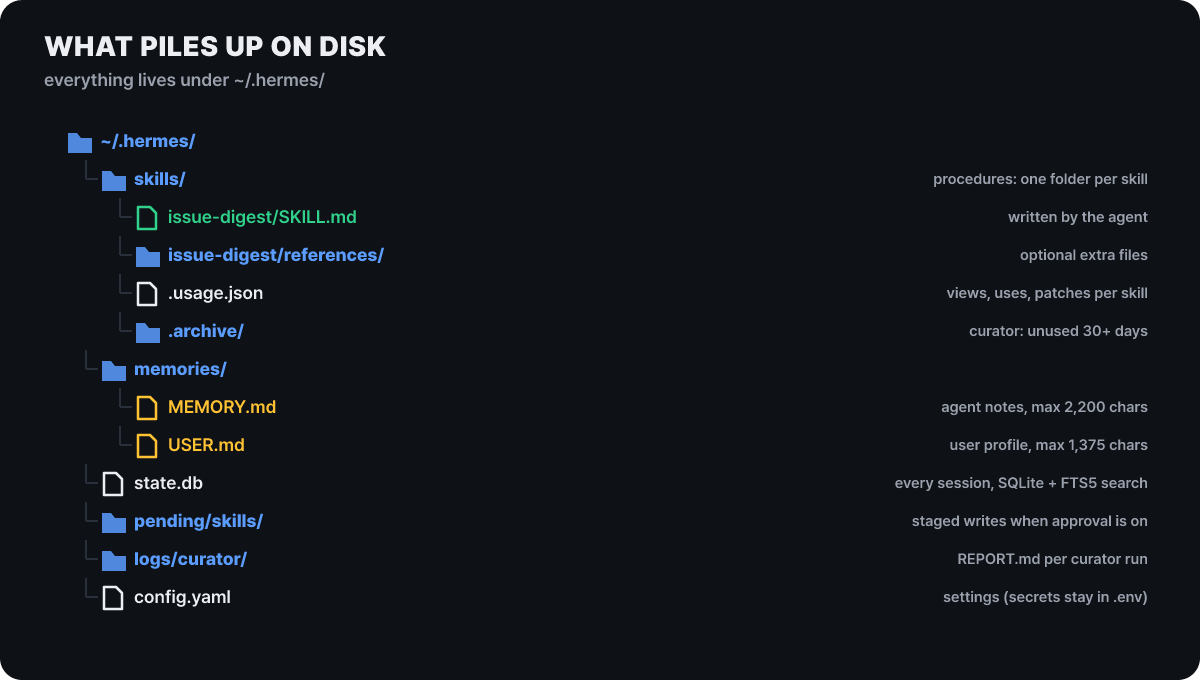 Figure 1. Everything related to learning lives inside
~/.hermes/
The green files are skills the agent newly wrote, and the two yellow files are the memory that goes into the prompt every session. Each skill in skills/ is a folder containing a SKILL.md, and it can optionally have the supporting folders references/, templates/, scripts/ and assets/. .usage.json is a ledger that records how many times each skill was opened, used and edited, and the curator we will meet later makes its decisions from these numbers. The conversation history state.db is SQLite; every CLI and messenger session goes into it, and it is searched with FTS5 full-text search. External memory services run alongside the built-in memory. Since v0.22.0 (Oct 14), providers such as Honcho, Hindsight, Supermemory and Mem0 have moved into their vendors’ plugins and are installed with hermes plugins install <name>. The release notes say existing users were migrated automatically, and the ones bundled in the box are RetainDB and ByteRover.
This split matters because each store piles up differently and has a different limit. The skills folder has practically no limit, the memory files are capped by character count, and conversation history is retrieved only by search.
Four moments a skill is born
Skills appear even if no person creates them. The official skills documentation lists three cases in which the system prompt urges the agent to save one: when it has worked out a multi-step workflow, when it has recovered from an error or a dead end, and when the user has corrected the agent. The fourth is when the user points /learn at a directory, an address, a workflow just performed, pasted notes, or a set of books or documents. A large source becomes a knowledge skill: a light SKILL.md with a description of 60 characters or fewer, plus one reference file per topic.
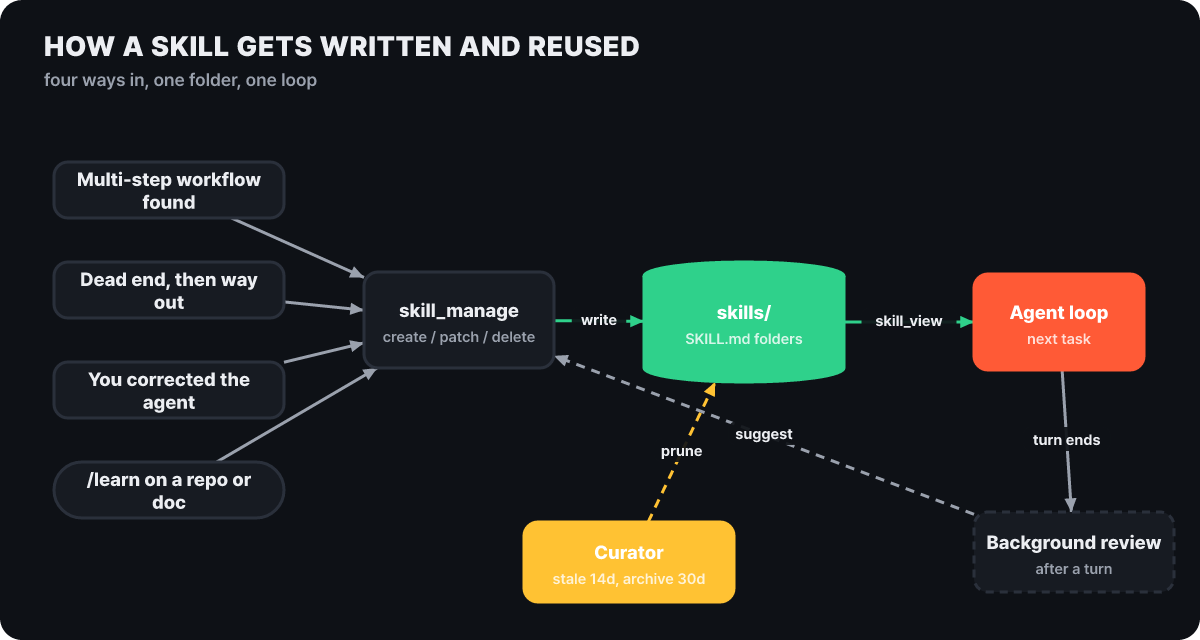 Figure 2. Four entrances converge on the single tool
skill_manage, and the reading side and the tidying side look at the same folder
The dotted lines in the figure are paths with no human involvement. When a turn ends, a background review runs and either proposes skill changes or leaves them pending, and the curator tidies the folder. The documentation says you tune how often reviews run with the memory.nudge_interval and skills.creation_nudge_interval settings, and tells you to use auxiliary.background_review.enabled: false to turn automatic review off entirely.
The only tool for writing and editing is skill_manage. create makes a new skill, patch is a partial edit that replaces old_string with new_string (the approach the documentation recommends because it sends less text), write_file and remove_file handle supporting files, and delete removes a skill. The quickest way to see what a skill actually looks like is an example. The one below follows the header fields and section names the documentation describes; it is a format example, and its content is invented for illustration.
---
name: issue-digest
description: Summarize yesterday's new issues in three lines
version: 1.0.0
platforms: [macos, linux]
metadata:
  hermes:
    tags: [report, github]
---

# Issue digest

## When to Use
When asked "summarize yesterday's issues"

## Procedure
1. Collect the issues opened between 00:00 and 24:00 yesterday
2. Pick three, in order of user impact
3. Write one per line, with the issue number attached

## Pitfalls
- Do not count issues created by bots

## Verification
- Check that there are three lines and every number is a real issue
If you omit platforms in the header, the skill loads on any operating system. metadata.hermes can hold tags, a category, and conditions such as requires_toolsets that show a skill only when a given tool bundle is on, and if a skill needs a secret value, you declare it under required_environment_variables and it is asked for only in the local CLI. Skills follow the open Agent Skills standard (agentskills.io), so a SKILL.md bundle you used in another tool can be brought over. The standard itself is covered in Agent Skills moved to a foundation.
Why the prompt does not bloat as skills grow
When dozens of skills pile up, you might worry that all of them must be read every time. The documentation’s answer is progressive disclosure. At level 0 (skills_list) only the name, description and category are read, and that is about 3,000 tokens. Only the skills the agent decides it needs get their full body opened at level 1 (skill_view(name)), and at level 2 (skill_view(name, path)) one reference file inside it is opened. Sizes for levels 1 and 2 are said only to vary by skill.
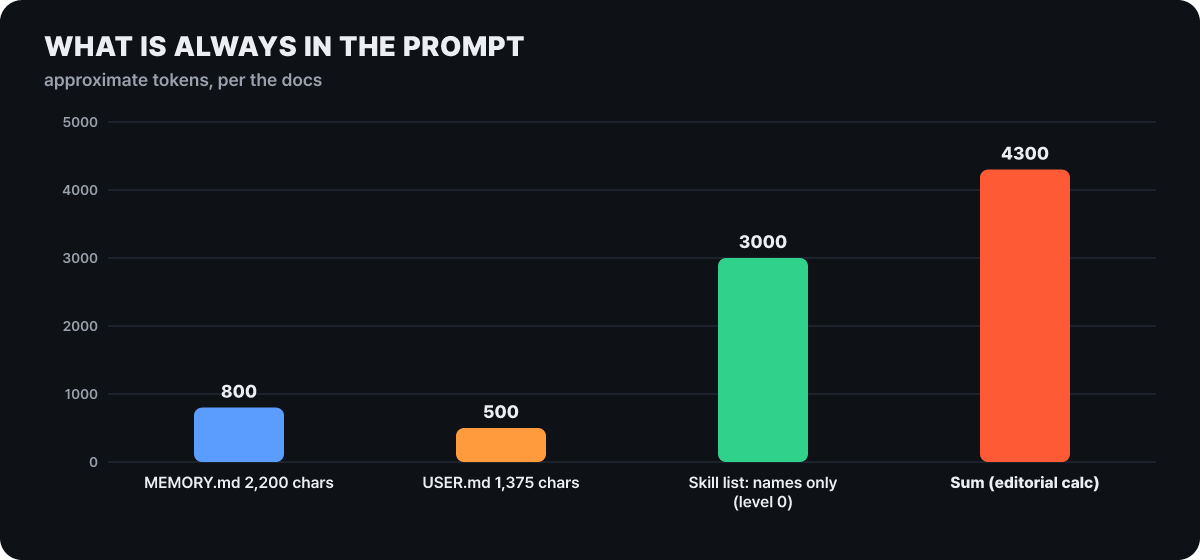 Figure 3. What is always included every session. The total is the editorial team’s calculation, and the three values are approximations from the documentation
In the three bars, the largest share is the skill list, and the point is that it is only names and descriptions. Skill bodies come up when called, so what grows as skills increase is the list. That makes one rule stand out: a skill description should be short and specific so the agent can choose from the list alone. The documentation says it warns when a skill has more than 60 reference files or when the SKILL.md body exceeds about 24,000 characters, which shows the intended direction: do not let a single skill grow bloated.
There is also a path for people to call skills. Every installed skill becomes a slash command, invoked as /skill-name instruction, and you can stack up to 5 skill commands at the start of a single message. When skills with the same name exist in several locations, the higher one hides the lower ones in this order: the project folder (.hermes/skills/ or .agents/skills/, not loaded until you trust it with hermes skills trust), local ~/.hermes/skills/, skills.create_dir, then skills.external_dirs. If names collide within a single folder, Hermes does not guess and raises an “ambiguous name” error. One more thing to know: external folders have no write protection, so if the process has write permission, the agent can edit the skills inside them.
Memory deliberately stops at 3,575 characters
If skills are “methods”, memory is “facts”. MEMORY.md is the agent’s own notes (environment facts, conventions, lessons learned) with a limit of 2,200 characters (about 800 tokens), and USER.md is the user profile (preferences, tone, expectations) with a limit of 1,375 characters (about 500 tokens). They live in ~/.hermes/memories/ and are separate per profile, so running hermes -p work reads ~/.hermes/profiles/work/memories/. The two files together come to 3,575 characters.
In plain terms
Skills are the procedure manuals in a drawer, and memory is two sticky notes on the edge of your monitor. The manuals can grow as far as the drawer allows, and you only pull out and read what you need. The sticky notes have a fixed amount of space, so to post a new one you have to peel off or merge an old one. The log of past calls (the conversation-history DB) sits in a cabinet away from the desk, and you rummage through it only when you need to.
What happens at the limit shows the character of this design. The memory documentation states plainly that there is no automatic compression. A write that would exceed the limit returns an error, and in the same turn the agent merges or deletes entries to make room, then retries as a single batch that also adds the new entry. The documentation recommends tidying up once usage passes 80%. The memory tool has only three actions, add, patch and remove, and no read action, because memory goes into the prompt automatically at session start. When you edit, old_text must match exactly one entry, and content you try to save is blocked if it contains prompt injection, credential exfiltration, an SSH backdoor or invisible Unicode.
Memory has one time lag. The files are read once when a session starts and enter the system prompt as a frozen snapshot. Anything saved mid-conversation is written to disk immediately but does not show up in the prompt until the next session. This follows from the design principle in the developer documentation, that the system prompt does not change during a conversation (explicit user actions such as /model are the exception), and it is a courtesy to protect the model provider’s prompt cache. If you run one very long conversation in a messenger, you need to draw a boundary with /new before new memory takes effect.
session_search, which finds past conversations, has two descriptions. The memory documentation says it returns stored messages as they are, uncut, with no LLM call. The README presents the same feature as having an LLM summary attached. Either way, past conversations stay in SQLite and are searched, and that DB is the reason the rest of the past can still be pulled out by search even though the memory files are capped at 3,575 characters.
Pile things up and never tidy, and they go stale: 14 and 30 days
If an agent keeps making skills, similar skills multiply, and one-use skills fill the folder. The curator is the mechanism that cleans this up, and the curator documentation describes it as a way to keep the skills made by the agent’s self-improvement loop from multiplying into near-identical copies.
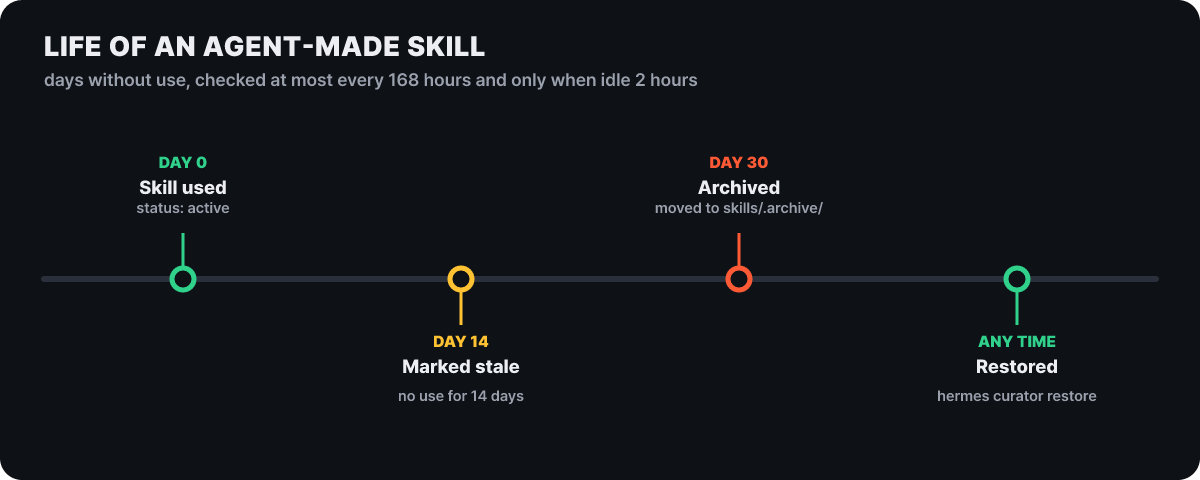 Figure 4. States by days unused. The spacing is even to show the order, not drawn to scale
The curator is not a cron job but an idle-time check. It runs only when interval_hours (default 168 hours, 7 days) has passed since the last run and the agent has been idle for min_idle_hours (default 2 hours), and the check happens when a CLI session starts, during the gateway’s cleanup work, and on the check timer of hermes serve. On a fresh install, the first observation only records a reference time and the first real check comes one interval later, which leaves time to look over the skills and pin them. The first step of a check is a mechanical transition that uses no LLM. A skill unused for 14 days (stale_after_days) becomes stale, and one unused for 30 days (archive_after_days) is moved to ~/.hermes/skills/.archive/. A skill that has never been used is not archived until stale_after_days has passed since it was created. Pinned skills (pin) and skills referenced by cron jobs (including paused ones) are skipped, and the documentation says there is no automatic deletion, so the worst case is archiving, which can be recovered.
The second step, LLM consolidation, is off by default. It costs tokens and changes the structure heavily; when turned on (curator.consolidate: true, or once only with hermes curator run --consolidate), a review model reads the skills and chooses to keep, edit, merge overlapping skills or archive. A skill with a reference-file folder attached is handled as a bundle, so it cannot simply flatten and merge only the SKILL.md.
curator:
  enabled: true          # default
  interval_hours: 168    # minimum gap between checks
  min_idle_hours: 2      # must have been idle this long to run
  stale_after_days: 14
  archive_after_days: 30
  consolidate: false     # LLM consolidation only when you turn it on
  backup:
    enabled: true
    keep: 2              # keep 2 snapshots before a check that rewrites
Its scope is narrow too. The curator manages only skills the agent made on its own (those marked created_by: agent in .usage.json). It does not touch skills a person wrote, skills the agent made at the user’s request through the learn command (created_by: learn), or skills installed from the hub, and bundled default skills are also left alone unless you turn on curator.prune_builtins. A pinned skill cannot be deleted or archived through skill_manage, but it can still be edited. The commands for people are hermes curator status, run --dry-run, pin, list-archived and restore <name>. Each check leaves a REPORT.md and a run.json under ~/.hermes/logs/curator/. To undo a consolidation, hermes curator rollback restores the most recent snapshot, and to undo a single change you find the entry with ledger and use rollback <entry ID>. The documentation says deleted skills can be brought back this way too.
How what you teach on Monday gets read by Tuesday’s cron
Having a single store matters more when there are many entrances. According to the developer documentation, there is one agent core (the AIAgent class), and the CLI, the messenger gateway, the ACP adapter for editors, the batch runner and the API server all call that same core. Only the input and output differ by entrance, so they all read and write the same ~/.hermes/. ACP is how an editor (VS Code, Zed, JetBrains) connects through hermes acp, and scheduled jobs are checked and run by the gateway process every 60 seconds.
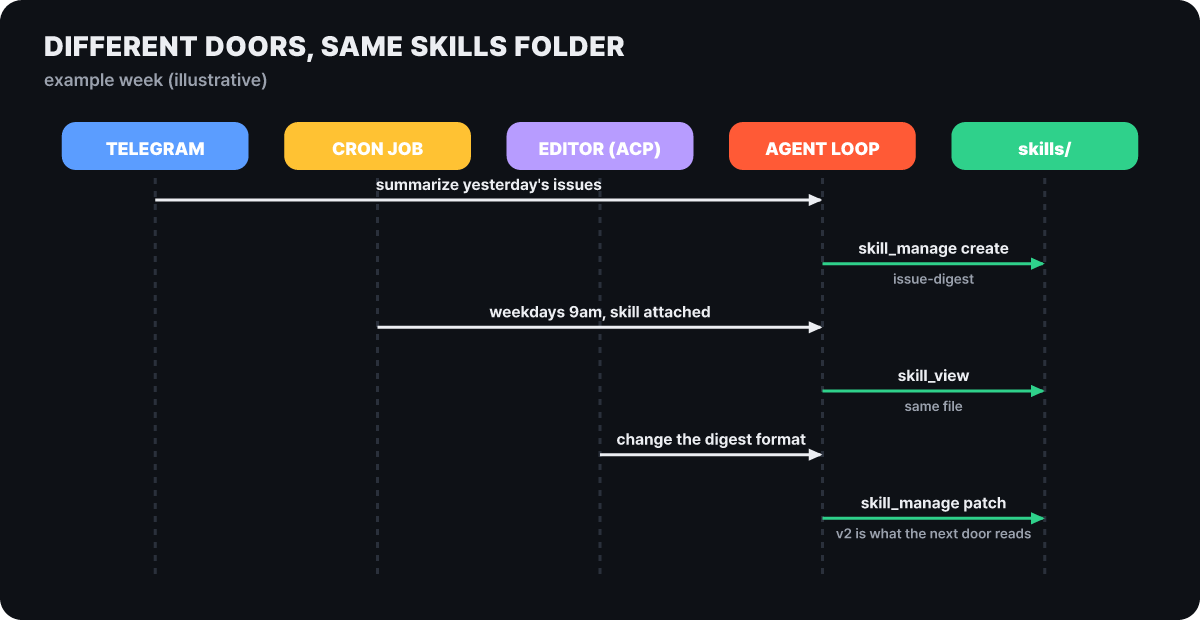 Figure 5. An example week made up by the editorial team. Three entrances read and write the same
skills/ folder
In words, the flow in the figure goes like this. On Monday you tell the agent over Telegram, “summarize yesterday’s issues,” and after a few rounds of refining it creates the issue-digest skill. On Tuesday at 9 a.m., cron takes over the same job. You can create the schedule with a command such as hermes cron create "weekdays at 9am" "summarize yesterday's issues" or with /cron add inside a chat, and each time it runs, cron creates a fresh agent with no history and puts the linked skill in as context. In other words, the skill serves as the instructions, so nobody has to explain each time. On Wednesday, if you say “change the summary format” in the editor, the same agent core edits the skill with patch, and the next day’s cron reads the edited version. Where results go is decided by the deliver value (the original conversation, a local file, the home channel, or a specific target such as telegram:<chat_id>), and you set the home channel in chat with /sethome.
Cron comes with safeguards around learning. An agent inside cron is blocked by default from creating new cron jobs (cron.allow_agent_scheduling: false), and before a run it checks API keys, skills, delivery credentials and MCP server settings, and if there is a problem it stops without calling the model. Recurring jobs that cannot reach the model server are retried automatically at 5, 15 and 30 minutes. The documentation says the gateway has more than 25 adapters, including Telegram, Discord, Slack, WhatsApp, Signal and email, and the hermes gateway setup wizard guides the configuration.
One exception is the sub-agent. A sub-agent launched with delegate_task (10 at once by default, default depth 1) cannot use the memory, send_message, cronjob and clarify tools, starts with an empty context, and returns only a final summary to its parent. So a sub-agent cannot write what it finds out directly into memory, and the parent has to sort it out. In v0.22.5 the delegation backend also became a plugin, so sub-agents can be dispatched by model map or by profile. If you want to raise agents separately by purpose, create profiles. A profile is a separate home in which settings, secrets, persona (SOUL.md), memory, sessions, skills, cron and the gateway are all isolated, so there is one drawer per profile. But a profile is not a sandbox: on the local backend it has the file permissions of the same account.
Where a wrongly learned skill gets caught
A skill is an instruction the agent follows from the next session on, so a wrong or contaminated skill makes the same mistake repeat. The official documentation filters at four points. First, skills installed from the hub are scanned for data exfiltration, prompt injection, destructive commands and supply-chain signals, and the trust tiers run builtin, official, trusted (repositories such as openai/skills and anthropics/skills), then community. For community skills only non-dangerous findings can be passed with --force, and a dangerous verdict stays blocked. Second, skills made by the agent have a separate content check called skills.guard_agent_created. Third, in context files such as the project’s AGENTS.md, .cursorrules and SOUL.md, it looks for phrases telling the agent to ignore earlier instructions, hidden HTML comments, attempts to read .env and invisible Unicode, and anything caught is replaced with a [BLOCKED: …] notice. The documentation states that this is a heuristic and not a check that reads intent by meaning. The fourth is human approval.
With skills.write_approval: true, every skill write piles up in ~/.hermes/pending/skills/, and you list them with /skills pending, check what changed with /skills diff <number>, then use /skills approve <number> or /skills reject <number>. You can switch it with /skills approval on|off, and memory works the same way with memory.write_approval, /memory pending and /memory approve. Both default to false, meaning free writing. In an interactive CLI it asks at the moment of writing, and in a messenger, a script or a background review the writes pile up as pending. It is a switch that slows learning in exchange for letting you see with your own eyes what the agent is learning.
There is another layer at the stage where what a skill asks for is executed. The approval method for dangerous commands is set by a single value, approvals.mode.
| Mode | Behavior |
|---|---|
manual |
Asks the user every time a dangerous command comes up |
smart (default) |
An auxiliary LLM rates the risk: light ones pass for that one command only, clearly dangerous ones are denied, ambiguous ones are handed to a person |
off |
Turns off all approval checks (same as --yolo). Only in a trusted environment |
If you do not answer a prompt within 300 seconds (approvals.timeout), it is denied, and sessions with no person present, such as cron, one-shot runs (hermes chat -q) and webhooks, deny dangerous commands by default. A hard-block list, including rm -rf / and its variants, fork bombs, mkfs against a mounted root and dd writing to a disk device, is not lifted even in off or YOLO mode. Deny patterns you write yourself (approvals.deny) are also applied before YOLO. If you choose “always” in an approval dialog, it is saved to command_allowlist, and hermes approvals suggest proposes only allow candidates from the last 90 days of history.
The problem is that on some backends this check disappears altogether.
| Terminal backend | Isolation | Dangerous-command check |
|---|---|---|
local |
None | Yes |
ssh |
Remote host | Yes |
docker |
Container | Skipped |
modal · daytona · vercel_sandbox |
Cloud sandbox | Skipped |
singularity (plugin) |
Container | Skipped |
The container side relies on the boundary instead of the check. The Docker backend drops all Linux capabilities and adds back only the three it needs (DAC_OVERRIDE, CHOWN, FOWNER), blocks privilege escalation and caps the process count at 256. The resource defaults are 5,120 MB of memory, 51,200 MB of disk and 1 CPU. Approval and isolation guard from opposite sides, so an agent that runs while nobody is around, like cron or a gateway, suits a container backend better. Here are the limits the documentation admits itself. The write-block list for secret files (~/.ssh/, ~/.aws/, .env and so on) is defense in depth and not a sandbox against a malicious agent; the terminal tool runs as the same OS user, so shell commands can still reach blocked paths; and deny rules cannot unravel variables, aliases or renamed executables. The secret-name filter (KEY, TOKEN, SECRET, PASSWORD and so on) applies to execute_code, which runs Python scripts, and the Docker, SSH and Modal backends do not pass host environment variables by default. If you are curious about a tool that focuses on undo and receipts for file changes, reading Codewhale alongside this shows how the approaches diverge.
When you attach a messenger, who can talk to the agent is the security. The gateway rejects unknown users by default and opens only through an allowlist (variables such as TELEGRAM_ALLOWED_USERS) or a pairing code. A pairing code is 8 characters from a cryptographic random source (a 32-character alphabet that leaves out 0, O, 1 and I), it expires after 1 hour, a user can make 1 request per 10 minutes, a platform can have 3 pending codes, 5 failed approvals lock it for 1 hour, and you approve with hermes pairing approve <platform> <code>.
Questions that come up before you hand over skills
Does it cost money to use the program itself?
Hermes Agent is MIT-licensed open source, so the program is free. The cost comes from the per-call fees you pay the model provider you connect, or from a Nous Portal subscription. The official documentation does not state the subscription price and points you to the subscription management page. The curator’s LLM consolidation and the background review also call an auxiliary model, so turning them on increases calls accordingly.
Can I use it with a local model that runs on my own computer?
Yes, and the condition is a context window of at least 64K (65,536) tokens. Anything smaller is rejected at startup. When you bring up a local server, raise it first with --ctx-size 65536 for llama.cpp or -c 65536 for Ollama. A custom endpoint must be OpenAI-compatible. The roughly 4,000 always-included tokens we saw earlier being a small share of 64K also ties in with this condition.
Can I move skills and memory to another computer?
hermes backup is the documented command for moving the whole configuration. At the profile level, hermes profile export makes an archive (API keys are left out) and hermes profile import brings it in. For an agent you will keep updating, there is also distribution through a git repository (hermes profile install, hermes profile update). hermes profile create work --clone copies settings, skills and memory but does not copy conversation history or cron jobs.
From installing to confirming that learning continues
The official documentation recommends three install routes. On macOS and Windows it is the desktop installer (the CLI and desktop app together), on the Linux, macOS and WSL2 command line it is a shell script, and on native Windows it is a PowerShell script. For the one-line install, it recommends opening the script before running it and checking the install location (~/.hermes in your home folder) and the components it downloads (Python, Node.js, ripgrep, FFmpeg and others). After installing, hermes setup offers three modes. Quick setup starts without keys by logging in to Nous Portal, full setup lets you choose all providers and tools with your own keys, and the blank slate starts with only a provider, a model, file operations and the terminal toolset on, and you turn on what you need one at a time. For someone evaluating the learning feature, the blank slate with the fewest tools on is the best fit.
hermes                                       # start chatting (--tui for the improved screen)
hermes config set terminal.backend docker    # run the terminal in a container
hermes config set approvals.mode manual      # ask about dangerous commands every time
hermes config set skills.write_approval true # send skill writes to the queue
hermes -c                                    # resume the last session
hermes curator status                        # skill status as the curator sees it
hermes doctor                                # diagnose the environment
You confirm that learning actually continues after about three days, in three places. First check with hermes -c that the previous session comes back, then run /skills pending in chat to see whether the skills the agent tried to write are in the queue, and if you turned write approval off, open ~/.hermes/skills/ to see whether a new folder appeared. Reading that SKILL.md yourself is the quickest evaluation, and you can open the two memory files the same way. If responses are abnormal or empty after setup, the recovery order the documentation recommends is hermes doctor, hermes model, hermes setup, hermes sessions list, hermes --continue, hermes gateway status, and it says to attach a messenger once ordinary chat works normally. If gathering several API keys is a hassle, a Nous Portal subscription (hermes setup --portal) gives you more than 300 models and the tool gateway (web search and extraction, FAL image generation, OpenAI speech synthesis, a Browser Use cloud browser) in one go, and the Modal cloud terminal is optional.
If you have already used another agent, you can bring over the memory and skills you have built up, so learning does not have to restart from scratch. import-agent, which is also in the v0.22.5 release notes, targets OpenClaw, Claude Code, Codex CLI and Cursor, and you look at a preview first.
hermes plugins install agent-importers
hermes import-agent openclaw --dry-run   # only shows the plan, changes nothing
hermes import-agent openclaw             # runs after a preview and confirmation
SOUL.md is copied as is, while MEMORY.md and USER.md are split into entries, merged with existing content and de-duplicated. Skills go into ~/.hermes/skills/openclaw-imports/. Models, MCP servers, messenger tokens and allowlists are moved to the matching settings, and files with no corresponding feature are kept in ~/.hermes/migration/openclaw/<timestamp>/archive/. API keys are moved only if you pass --migrate-secrets, and only names on the allowlist are copied. A restore archive is left in ~/.hermes/backups/ before it runs, and after it finishes you need to open a new session for the imported skills and memory to take effect.



