Bonsai 2 squeezes a 54GB 27B model into 6GB for laptops
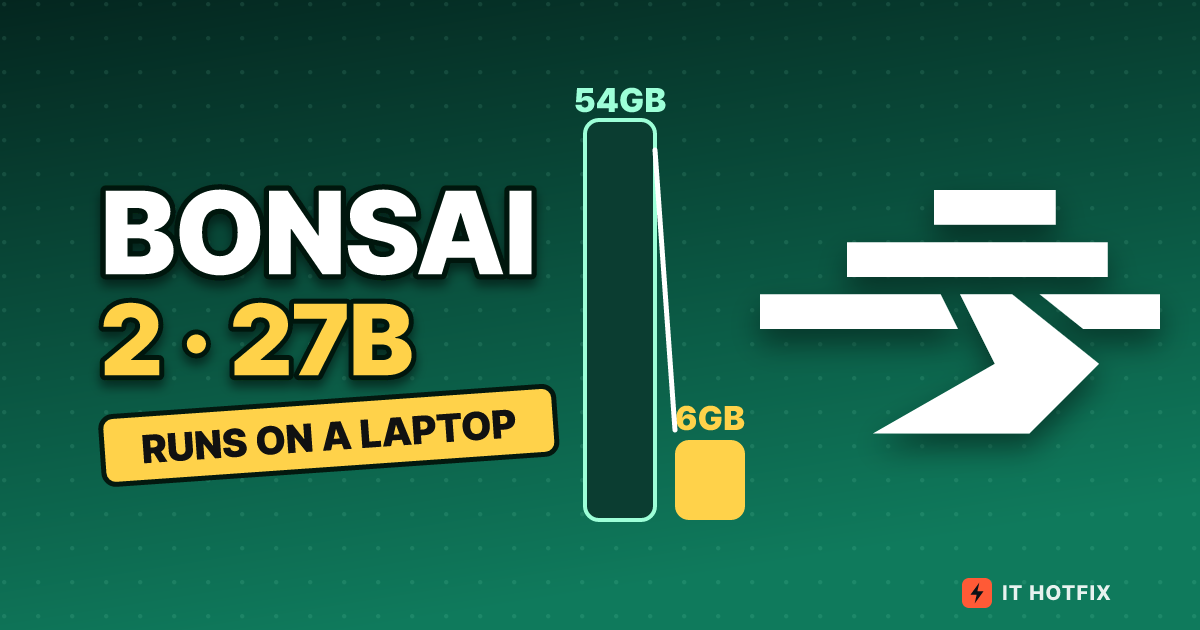
Bonsai 2 27B shrinks 54GB to 5.95GB. We trace the files, matrices, 128-slot groups, rotation, speed and memory, then 14 benchmarks to see where scores dropped.
Bonsai 2 27B shrinks 54GB to 5.95GB by turning 27.3 billion weights into one of three values (-1, 0 or +1) and attaching one 16-bit scale to every 128 weights. By the maker’s measurements, this compression keeps 98.2% of the original’s (FP16) average across 14 benchmarks. It comes at a cost in two ways. The rotation is folded into the file, so you need a dedicated runtime such as the llama.cpp fork PrismML published, and scores drop noticeably on knowledge reasoning (MuSR) and on vision and OCR. All scores and speeds are numbers the maker posted on the model card, and the figures in this article are based on the card and the demo repository as we reopened them on Oct 27, 2026 UTC.
We take the file apart from the outside in: the file list, the layout of the 27.36 billion slots, one 128-slot group, the rule for reading that group, and then the speed and memory arithmetic that sits on top.
How many files you download, and how big each is
The 27B repository on Hugging Face splits the weight files by packing format, and keeps a separate vision file that you need only when working with images. The structure shows up when you also look at the ratio against the FP16 original (about 54GB). The ratios in the MLX row are our own calculation.
| File | Bits/weight | Size | vs. FP16 |
|---|---|---|---|
| FP16 original (Qwen3.8-27B) | 16.0 | About 54GB | 1x |
| Ternary theoretical value (128-slot groups) | 1.72 | 5.8GB | About 9.3x |
| GGUF PTQ1_0 | 1.75 | 5.95GB | About 9.0x |
| GGUF PQ2_0 | 2.13 | 7.21GB | About 7.5x |
| MLX 2-bit (Apple only) | 2.25 | Language body 7.67GB | About 7x |
| Vision file (mmproj) | 8-bit (Q8_0) | 0.63GB | Only when using images |
PTQ1_0 packs the ternary values tightly and comes closest to the theoretical 5.8GB, while PQ2_0 gives each value a 2-bit slot and is a little over 1.2GB larger. Both files hold the same weights, so whichever you download, the content of the model is identical and only reading speed and memory differ. Later we look at how that difference flips from device to device.
Where the 27.36 billion sit: body, input/output, eyes
According to the model card, the 27.36B parameters in total are spread over three places. The premise behind “6GB” is how far the ternary conversion reaches.
| Part | Count | How it is stored |
|---|---|---|
| Language body (64 blocks) | 24.35B | Attention projections and MLP projections are all ternary |
| Embeddings and output layer (LM head) | 2.54B | Ternary |
| Vision tower (27 blocks) | 0.46B | Split into a separate file (mmproj), loaded only when an image comes in |
| Tensors that could not become ternary | 26.2M | The recurrent-state path of linear attention and the normalization weights. 0.0976% of the language model |
What stands out is that even the embeddings and the output layer are ternary. These are the places where compression usually leaves some precision, but in Bonsai 2 the only things left out are the normalization weights and the recurrent-state path. That is why the overall bit count rises only slightly, from 1.71 bits for the weight values themselves to 1.72 bits.
The architecture is the original Qwen3.8-27B unchanged. It is a hybrid in which about 75% of the attention is linear attention and about 25% is full attention, with a context of 262K tokens. A linear-attention layer updates a single recurrent state, so the cache does not grow as tokens increase, and it is the full-attention layers whose cache grows with length. This is not a newly trained model; what was released is the converted weights and the runtime.
Opening one 128-slot group
When the weights of a matrix are bundled 128 at a time, one group becomes the unit of compression. Each weight in the group becomes one of -1, 0 or +1, and one 16-bit scale s is attached to the group. The value actually used in computation is s times -1, 0 or +1. Because 0 exists, it can also express “cut this connection”.
Think of a class roster
Instead of writing down the height of 128 students one by one in centimeters, you write only one of three words, “taller than average, about average, shorter”, and write once at the top how many centimeters one step of the word is worth. Each individual’s precise number is gone, but the height distribution of the whole class survives. The 128-slot group in this article is that one class, and the line at the top is the scale s.
The bit count comes from the sum of two terms. Telling one of three values apart takes log2(3), about 1.585 bits. When 128 weights share a 16-bit scale, that is 16÷128 = 0.125 bits each. Together that is 1.71 bits, about one ninth of 16 bits. Converted per group, FP16 at 128×16 = 2,048 bits (256 bytes) becomes about 219 bits (27.4 bytes) (editorial calculation).
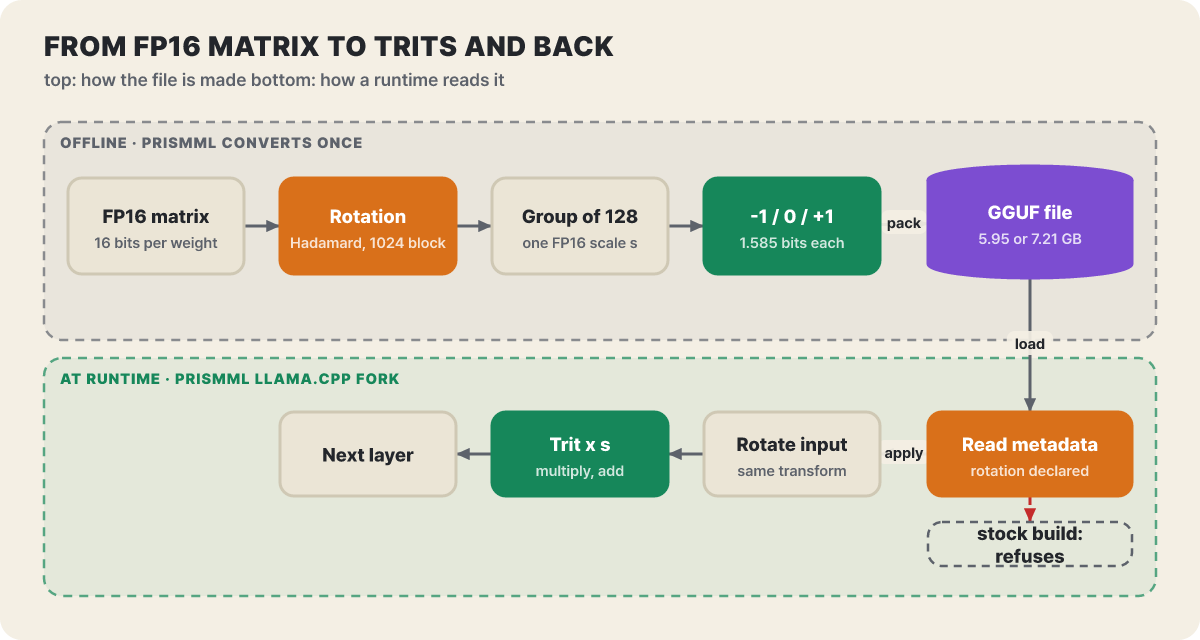 Figure 1. The upper part is the conversion PrismML does once; the lower part is the reading your runtime does every time. “stock build” in the figure means a regular, non-fork build
In the figure above, the two paths meet at the file’s metadata. The rotation folded into the weights on the conversion side has to be undone by its counterpart on the reading side for the computation to come out right. The next section is about that rotation.
The rotation folded into the file, and the paired transform the runtime handles
The model card describes the rotation as follows. For each matrix, an orthogonal Hadamard transform (fixed ±1 signs) is applied in blocks of size 1024, and only then are the ternary values assigned. This rotation is folded into the stored weights in advance, so it adds no bits and no extra data read from memory. In exchange, the runtime has to apply the paired transform on the input (activation) side. The file declares the rotation in its metadata, and the runtime either applies the transform or refuses to load the file.
This structure is why it “does not run on just any llama.cpp”. Here is what happens on each way of running it.
| Way of running | PTQ1_0 and PQ2_0 | Basis |
|---|---|---|
| PrismML llama.cpp fork | Loads | The demo pins and downloads a fork build (prism-b10826 as of Oct 25) |
| Regular llama.cpp | Refuses; does not know the format | The demo README says that with the latest upstream, only the official Q2_0 file works |
| GGUF path of Ollama and LM Studio | Cannot read | Model card KNOWN_ISSUES |
| FP16 file on regular llama.cpp | Opens, but the output is nonsense | KNOWN_ISSUES |
| Standard MLX loader | Skips the rotation and writes nonsense without any error | Use the bundled dedicated loader. The demo pins mlx-vlm 0.7.8 and mlx-lm 0.32.0 |
| Quantizing to PQ2_0 or PTQ1_0 yourself | Output is nonsense | Needs Prism’s rotated checkpoint (KNOWN_ISSUES #242) |
The dangerous part of the rows that say “opens but nonsense output” is that they produce wrong text with neither an error nor a warning. A runtime that can read the file but lacks the transform ends up mixing pre-rotation and post-rotation values in its computation, and the result shows up only as wrong characters. That is the reason, before blaming the model for odd answers, to first check whether the runtime build knows about the rotation.
Packed tight versus packed easy to unpack
The same ternary weights are stored by PTQ1_0 tightly (1.75 bits) and by PQ2_0 in a 2-bit slot per value (2.13 bits). The tight one reads about 17% less data but needs computation to unpack the values, while the 2-bit-slot one is simple to unpack but reads more. Which is faster depends on the device. From the card’s throughput table (llama-bench, one request at a time, without the vision file, tokens/second), only the generation speed is carried over here.
| Device | PQ2_0 | PTQ1_0 | Faster one |
|---|---|---|---|
| RTX 5090 | 129.9 | 120.5 | PQ2_0 |
| RTX PRO 6000 Blackwell | 124.8 | 117.9 | PQ2_0 |
| H100 SXM | 113.9 | 86.9 | PQ2_0 |
| RTX 6000 Ada | 82.8 | 90.4 | PTQ1_0 |
| RTX 4090 | 81.2 | 91.1 | PTQ1_0 |
| L40S | 74.4 | 81.8 | PTQ1_0 |
| A100 SXM | 73.9 | 54.7 | PQ2_0 |
| L4 (72W) | 29.8 | 32.1 | PTQ1_0 |
| Apple M5 Pro (Metal) | 28.1 | Not measured | Apple measured with PQ2_0 |
On the Ada generation and the L4, the tight format wins; on Blackwell, H100 and A100, the 2-bit-slot format wins. In prompt processing (pp512), PQ2_0 is faster on every device the card tested, and the card describes PTQ1_0 as “the one to pick when memory is tightest”. One more thing to add is the SYCL (Intel GPU) entry in the backend documentation. On the XMX path, PTQ1_0 is unpacked into a batch of the same size as PQ2_0, so even though the file is small, the weight memory that goes onto the GPU is not necessarily smaller.
The speed ceiling is memory read speed divided by file size
Every time a token is produced, all the weights must be read once from memory, so the upper limit on generation speed is roughly “memory bandwidth ÷ file size”. From the measurement that the M5 Pro reads the PQ2_0 file (7.21GB) 28.1 times per second, the bandwidth works out to 7.21 times 28.1, about 203GB/s, which matches the roughly 204GB/s measured value the card lists separately. Using this one bandwidth, let us draw a curve and look at the ceiling by file size.
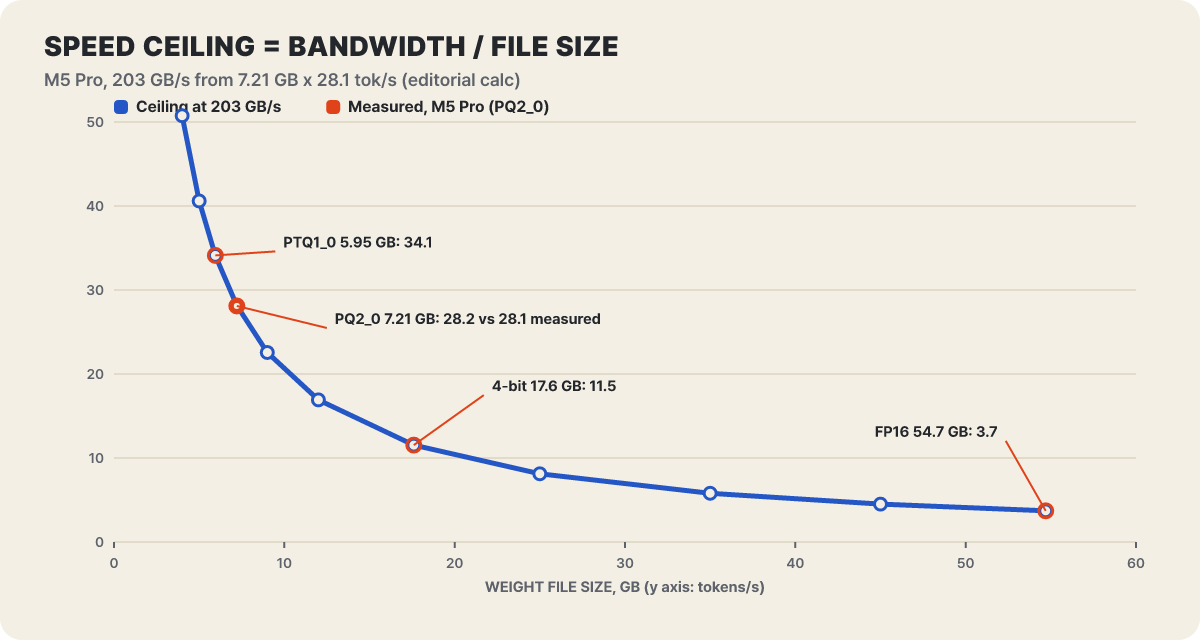 Figure 2. Speed upper limit assuming 203GB/s. The points on the curve are our own calculation, and only the one red filled point is the M5 Pro measurement (PQ2_0)
The key is that the curve stands steep near 6GB. On the same laptop, the ceiling for 4-bit (17.6GB) is 11.5 and for FP16 (54.7GB) it is 3.7, and the 54GB original does not even load, let alone run fast. The values for 4-bit and FP16 are not measurements but calculations assuming the same bandwidth, and actual speed varies below this ceiling depending on the kernel implementation. This law applies to your own machine too. If you know your machine’s memory bandwidth, dividing it by 7.21 (or 5.95) gives an optimistic estimate.
The three laptop models are different in nature. Only the M5 Pro was measured on the current build, while the M5 Max (47.0) and M4 Pro (18.0) were measured on a build from before the rotation was added, so the card marks them as awaiting re-measurement. On the same earlier build the M5 Pro scored 28.7, and the card states that the current build’s 28.1 was measured in a quiet state and can move by around 4% if background work is running. The community measurements folder of the demo repository holds results for the same 27B from a wider range of devices. Carrying over only the values we checked: PQ2_0 143.0 on an RTX 5090 (Linux, CUDA 12.8), 43.7 on an 8GB RTX 3070, PTQ1_0 47.9 on an Intel Arc B580 (12GB, SYCL), PQ2_0 24.3 on an Apple M3 Max (36GB, Metal), and 7.82 on a base M5 Air (16GB). These values come from different submitters and builds, so they cannot be compared directly against the card’s table; use them to see roughly which row a machine in your class falls in.
The speed table alone falls short for long inputs. The card’s prompt-processing values (pp512) are 765 tokens/s for the M5 Max, 387 for the M5 Pro and 125 for the M4 Pro. Suppose you ask for a summary of a 20,000-token document, cap the thinking budget at 2,048 tokens, and write a 500-token answer. Dividing by these values as they stand gives about 80 seconds for the M5 Max (26 plus 54 seconds), about 142 seconds for the M5 Pro (52 plus 91), and about 302 seconds for the M4 Pro (160 plus 142) (an editorial estimate that uses values measured over a 512-token span as they are; the M5 Max and M4 Pro values are from the earlier build). On the M4 Pro, prompt processing alone is more than half of the total. If you often feed in long documents, look at this value before the generation speed.
Putting size and score on one plane
The maker packed the same Qwen3.8-27B four ways and measured 14 benchmarks on an H100 with EvalScope and vLLM, with thinking mode on. Sampling followed the recommended settings except that min_p was 0.0. Below is a plot with file size on the horizontal axis (log scale) and the 14-benchmark average on the vertical axis.
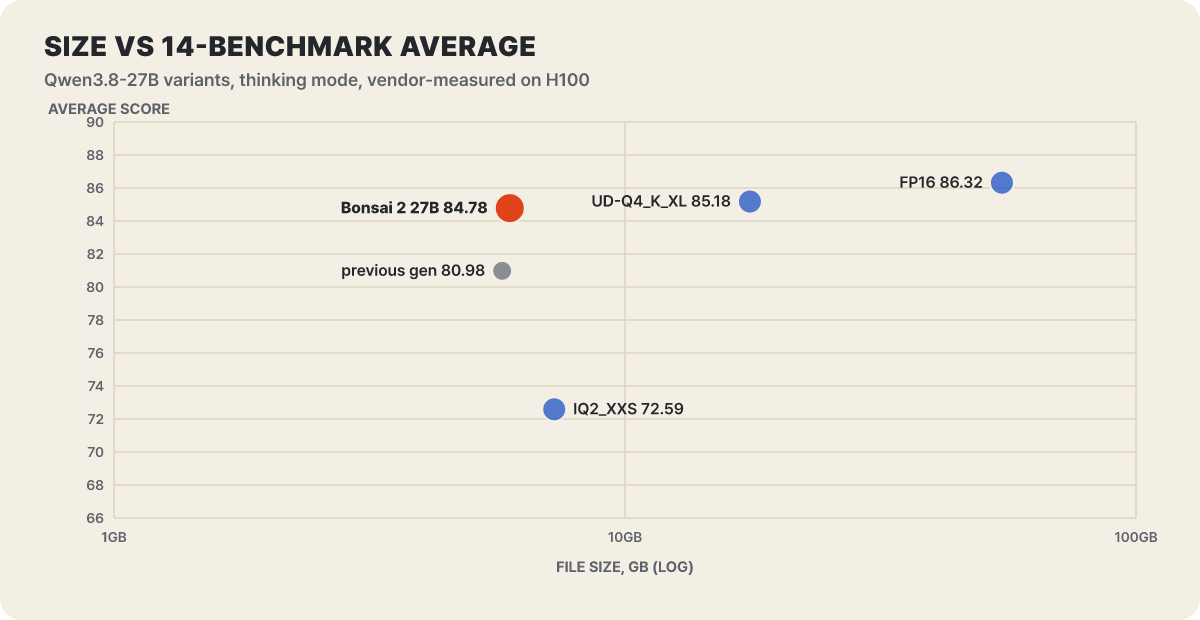 Figure 3. Size and average score by packing method for the same base model. The previous generation is a value listed in the card’s intelligence-density table, and since its base model differs, it is for reference only
Read it vertically. Bonsai 2 (84.78) is 0.4 points from the 4-bit build (85.18), which is three times larger, and more than 12 points above the ordinary 2-bit build of similar size (72.59). Read it horizontally. Within the same 6 to 7GB, the packing method made a 12-point difference in score. The gap shows up better when you flip the average score into a “miss rate”.
These are 100 minus the average score, and they are our own calculation. Bonsai 2 gets about 11% more wrong than the original and about 3% more wrong than 4-bit, but misses only about half as much (1/1.8) as the ordinary 2-bit build. The intelligence density D that the maker uses is the log of this miss rate divided by size, that is, −log2(1 − score/100) ÷ GB. It is 0.457 for Bonsai 2, 0.257 for ordinary 2-bit, 0.157 for 4-bit and 0.053 for FP16, and the card says it rose 9.9% from the 0.416 of the previous-generation ternary Bonsai 27B (5.75GB, average 80.98). All of these are values the maker measured itself and the comparison targets are other compressions of the same 27B, so for your own use, it is better to decide only after running it side by side with a smaller model’s 4-bit build at the same memory budget.
Which of the fourteen cells got cut
An average flattens the gains and losses per item. The figure below places the points lost against FP16 for each item, across three variants side by side. The darker the cell, the more was lost, and a cell with + in front means the score was higher than FP16.
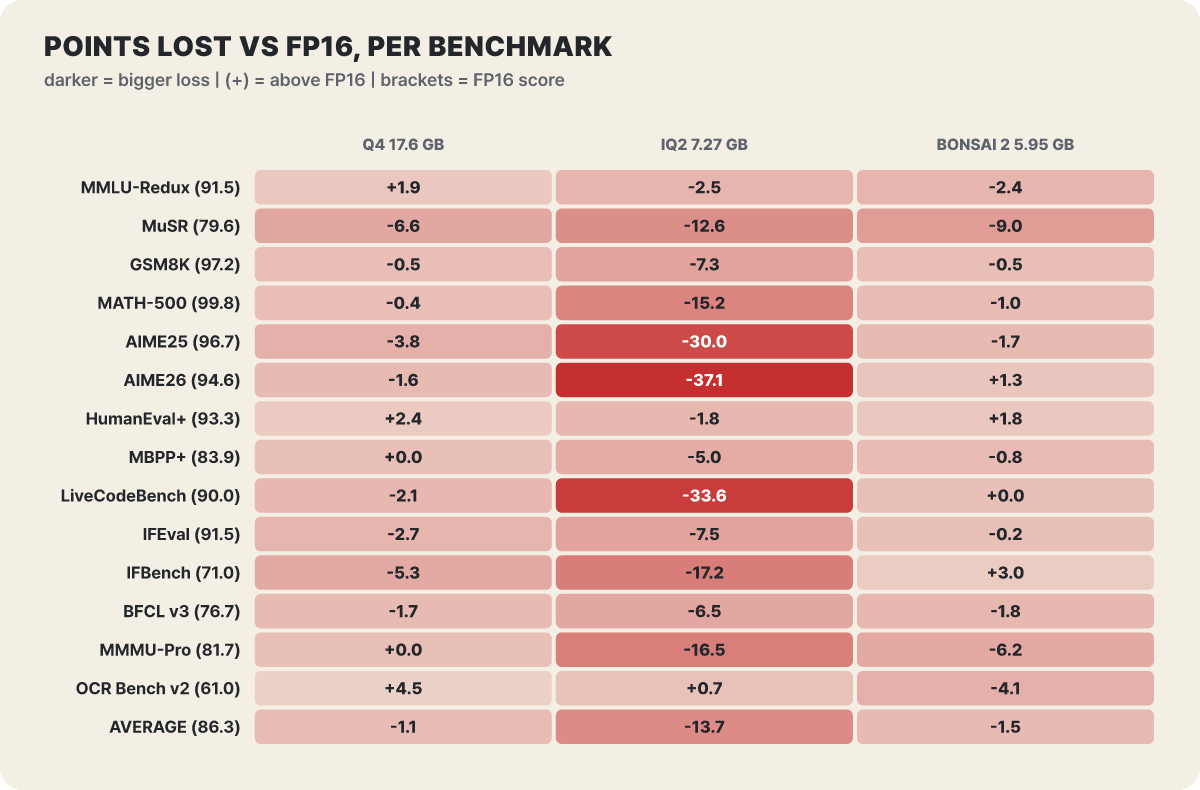 Figure 4. Score loss against FP16. The FP16 score is in parentheses, the raw values come from the per-item table on the model card, and the differences are our own calculation
The ordinary 2-bit build collapses on cells that need long reasoning. AIME26 −37.1, LiveCodeBench −33.6 and AIME25 −30.0, while knowledge questions (MMLU-Redux) hold at −2.5. The card also explains that this build keeps knowledge and weakens selectively on long reasoning chains. Bonsai 2 has the opposite shape. Math and coding are nearly unchanged (AIME26 +1.3, LiveCodeBench 0.0, HumanEval+ +1.8, IFBench +3.0), and the cuts cluster in knowledge and commonsense reasoning and in vision, such as MuSR −9.0, MMMU-Pro −6.2, OCR Bench v2 −4.1 and MMLU-Redux −2.4. In per-category averages (FP16 vs. Bonsai 2), math 97.06 vs. 96.57, coding 89.07 vs. 89.42 and instruction following 81.25 vs. 82.66 are practically the same, while knowledge and reasoning is 85.55 vs. 79.86, vision 71.36 vs. 66.19 and tool calling 76.74 vs. 74.92.
4-bit is not free either. Even while using 17.6GB, it loses 6.6 on MuSR, 5.3 on IFBench and 3.8 on AIME25. On IFBench and AIME25 it is cut more than Bonsai 2 (+3.0, −1.7), while on MuSR, conversely, Bonsai 2 (−9.0) is cut more. 4-bit is higher than FP16 on OCR (+4.5) and MMLU-Redux (+1.9). So “4-bit is always safe and ternary is always risky” does not follow from this table. If reading document images is central, check once more at the OCR value of 56.88; if knowledge reasoning is central, at the MuSR value of 70.63.
The memory a 6GB file actually takes
Starting from “the file is 6GB, so 8GB of RAM should do” gets you stuck. The thing that grows the most on top of the weights is the KV cache, which holds the conversation memory. Per the demo documents, the FP16 KV cache is about 64KiB per token, and with the environment variable BONSAI_KV4=1 for a 4-bit cache it is about 18KiB. The vision projector is a 0.63GB Q8_0 file, uses about 0.9GiB more as memory, and is loaded only when an image comes in. We plugged these into four scenes.
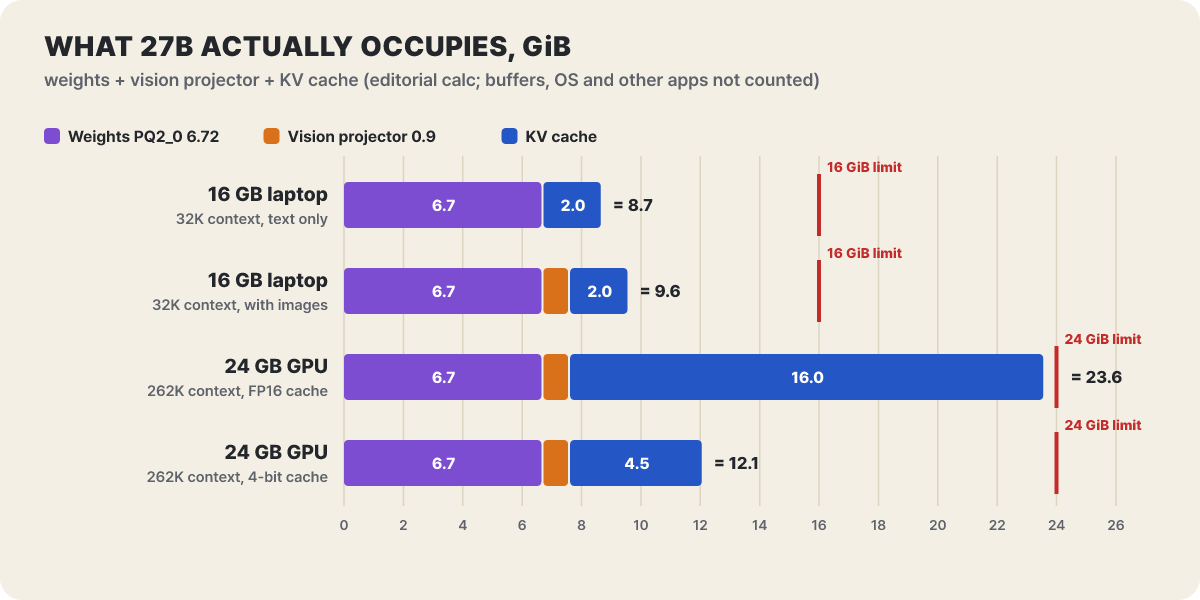 Figure 5. Memory breakdown by scene (GiB). Weights are the PQ2_0 7.21GB converted to GiB (6.72). Our own calculation, leaving out runtime buffers, the operating system and other apps
The last bar matters. On a 24GB GPU, filling the full 262K with an FP16 cache puts the cache alone at 16GiB, so the total reaches the limit at 23.6GiB, and switching the same setup to a 4-bit cache shrinks it to 4.5GiB and the total to 12.1GiB. The share of runtime buffers and other apps that is not in the figure is not small. The model card’s KNOWN_ISSUES says the default 32K context does not fit on a 12GB GPU and advises lowering BONSAI_CTX or using BONSAI_KV4=1. The first two bars of Figure 5 (8.7 to 9.6GiB) likewise mean that the operating system and browser have to fit inside the 6GiB left on a 16GB laptop.
The default context length is set automatically by RAM-size bracket. Low-RAM devices get 8K, devices above 71GB go up to 131K, and 262,144 tokens is the maximum. Older versions grabbed the full 262K at startup, which sometimes made memory blow up. Now BONSAI_CTX=0 resolves to the per-bracket default, and if memory is still short at startup, the FAQ tells you to lower it yourself, for example BONSAI_CTX=8192.
Snags on the first launch
The easiest route is the official demo repository, which downloads the fork binary for you. The 27B default is PQ2_0 at about 7.8GB plus the vision projector, and with Open WebUI and the code interpreter added, a few more GB are needed. KNOWN_ISSUES notes that setup.sh sometimes quietly downloads about 19GB, and advises skipping that with BONSAI_SKIP_GGUF=1. If the download size is a burden, also use BONSAI_OPENWEBUI=0 and BONSAI_CODE_INTERPRETER=0.
git clone https://github.com/PrismML-Eng/Bonsai-demo.git
cd Bonsai-demo
./setup.sh                          # downloads the model and the fork binary (pinned to prism-b10826)
./scripts/start_llama_server.sh     # chat, images and tool calls at http://localhost:8080
./scripts/run_llama.sh -p "Introduce yourself briefly"   # one-shot run without the server

# October certificate renewal: pulling the repository does not change the packages of an environment you already built, so upgrade separately
uv pip install --python .venv/bin/python "certifi>=2026.10.23"
By default the server opens only on 127.0.0.1, and changing BONSAI_HOST to another address exposes it to other devices on the same network. The problems you are likely to meet during installation are summarized in the documentation as follows.
- M5 Macs and macOS 26.2 to 26.4: A Metal library compile error ends in running out of memory. Putting GGML_METAL_TENSOR_DISABLE=1 before the command loses only the prefill gain from the neural accelerator and keeps the Metal speed. That is much faster than BONSAI_NGL=0, which runs on the CPU
- CUDA 13.3 build: A crash report is open, and CUDA 12.8 is recommended on Linux and 12.4 on Windows. A report says the prebuilt Linux binary for the RTX 5090 decodes unevenly, so the docs advise building it yourself with
120a-real - PQ2_0 on Vulkan: In the binary distribution it can silently fall back to the CPU and give under 2 tokens per second. The source has been fixed but the binary does not yet include it, so build the
prismbranch yourself or use PTQ1_0 - Windows install script: The problem of picking Vulkan on NVIDIA was fixed (Bonsai-demo #176), and it now downloads only PQ2_0, so you have to download PTQ1_0 yourself
- Stalls when building yourself: One parallel CUDA compile job uses several GB, so if VRAM is under 16GB the script caps parallelism at 2
The place you bump into most often after launch is reasoning length. This model thinks for a long time before answering, and because the default reasoning effort is the highest, xhigh, a small output limit such as 256 cuts it off in the middle of thinking. The card recommends -n 16384 or more. If you need short answers, lower it to medium, and set the server-wide default as below. low is not supported and behaves almost the same as xhigh, and reasoning_effort: "high" has an open issue that returns HTTP 500, so use xhigh or medium.
./scripts/start_llama_server.sh --chat-template-kwargs '{"reasoning_effort":"medium"}'
./scripts/start_llama_server.sh --reasoning-budget 2048     # the cap on thinking length is set with this server flag
A thinking budget sent through chat_template_kwargs is ignored, so it must go in a top-level field of the request or through the server flag above. A budget of 0 does not turn reasoning off either; to turn it off, send reasoning_effort: "none" and leave the server on --reasoning auto. The light-bulb menu on the chat screen picks the thinking budget from off, 512, 2,048, 8,192 and unlimited. The recommended sampling values are temperature 1.0, top_p 0.95, top_k 20 and min_p 0.05 in thinking mode, and temperature 0.7, top_p 0.8, top_k 20 and presence_penalty 1.5 in instruct mode. The GGUF file does not contain min_p and presence_penalty values, so you have to specify them yourself, and the demo scripts already apply them. The server opens an OpenAI-style /v1/chat/completions, so existing tools connect by changing only the address.
curl http://localhost:8080/v1/chat/completions \
  -H "Content-Type: application/json" \
  -d '{"messages":[{"role":"user","content":"Summarize the cause of this error log in three lines: ..."}],"max_tokens":16384}'
What images and tool calls cost extra
The 27B accepts images as well. You upload a photo or screenshot on the chat screen, or send it in the API as an image_url item. One vision token covers about 32×32 pixels, and up to about 4,096 tokens (about 4.2 megapixels) are accepted. An image is prompt-processing cost, so a large photo adds a wait of thousands of tokens before the first character appears. On Mac, Vulkan and CPU runs, images are downscaled to use at most 1,024 tokens by default, so small text and serial numbers can get smeared, while CUDA and ROCm have no cap. If you need detail, raise BONSAI_IMAGE_MAX_TOKENS to 0 or to 2048 or more, or upload only the part you need, cropped. KNOWN_ISSUES advises passing --image-min-tokens 1024 when position recognition on small images is weak, but the demo server does not pass this value yet. For the vision file, Q8_0 is recommended over BF16. With BF16 the server can hang when image requests arrive concurrently. If VRAM is tight, BONSAI_MMPROJ_CPU=1 keeps the projector in system RAM, and only image processing gets slower. llama.cpp encodes an image only once, so follow-up questions about the same image come back immediately, but MLX keeps no cache between requests.
For tool calls, the server accepts OpenAI-style tools and tool_calls as they are. The chat screen comes preconfigured with Hugging Face search, DeepWiki and Brave search tool servers that you can switch on and off per chat, and the loop that calls tools runs at most 10 times by default. The more tools you switch on, the more their definitions are attached to the prompt and use up context: about 2,600 tokens for Hugging Face, about 400 for DeepWiki and about 2,900 for the three Brave search tools. In an environment where context is tight, switching off tools you don’t use directly saves memory and speed. In Open WebUI, weather, web fetch, the demo SQL database, the code interpreter and time are on by default.
It also saves time to know the tool-call problems listed in KNOWN_ISSUES. If arguments is empty the server raises an error (HTTP 500 or 400), so you must send "{}", and 500 also appears when the system message is not first or there are two or more, so merge them into one and put it at the very front. The problem of the prompt cache keeps missing in a tool loop shrinks if you do not send the thinking content back in the conversation. Calls that come out malformed or repeated are classified as a model limitation arising from structured output, and the tool-call score (BFCL v3) also drops from 76.74 for FP16 to 74.92. The demo documents advise keeping API keys out of code, in environment variables or an uncommitted file. The executables the demo downloads are built by PrismML, so in a company environment, check the origin and version, and there is also the path of building the source (MIT license) yourself.
Three younger siblings shrunk the same way, and side paths
About four weeks after the 27B announcement, on Oct 15, three small models (2B, 4B and 9B) using the same ternary method were introduced. The Hugging Face repositories had been created on Sep 23, and the 4B and 9B were updated on Oct 15. The base is the Qwen3.5 family, and the context is 262K, the same as the 27B. The model card has no benchmark averages for the small models, so when choosing, comparing them yourself on the same question set is the surer way.
| Size | Base model | PTQ1_0 | PQ2_0 | FP16 | Vision (Q8_0) | HF downloads |
|---|---|---|---|---|---|---|
| 27B | Qwen3.8-27B | 5.95GB | 7.21GB | About 54GB | 0.63GB | About 2.16M |
| 9B | Qwen3.5-9B | 2.00GB | 2.42GB | About 17.9GB | 0.62GB | About 183K |
| 4B | Qwen3.5-4B | 0.95GB | 1.15GB | About 8.4GB | 0.37GB | About 57K |
| 2B | Qwen3.5-2B | 0.43GB | 0.52GB | About 3.8GB | 0.36GB | About 86K |
Download counts are from the Hugging Face GGUF repositories as of Oct 27, 2026 UTC, and the 27B has 2,834 likes while the demo repository has 3,447 stars and its last push was Oct 25. With the small models, watch out for three settings. Thinking mode sometimes uses more than 3,000 tokens even for a simple question, so the output limit should be set to 8,192 or more, and greedy decoding at temperature 0 makes some prompts hang in thinking mode, so avoid it. The sampling defaults are also different from the 27B. With thinking on they are temperature 1.0, top_p 0.95, top_k 20, min_p 0 and presence_penalty 1.0, and with it off, temperature 0.7, top_p 0.8, top_k 20 and presence_penalty 1.5. The 9B has an MTP-head variant (2.68GB) that predicts draft tokens ahead and a separate drafter (DFlash2, 1.57GB); they help with tasks that copy repeated content but can be slower in ordinary conversation, so plain decoding is recommended for the 2B. When using the small models’ vision files, Q8_0 is recommended over BF16, and the agent demo runner in Open WebUI has not yet had its small-model profile and loader wiring updated.
A way to try the 27B without installing it yourself is prism-ml/ternary-bonsai-2-27b on OpenRouter. It accepts parameters such as reasoning, reasoning_effort, tools and response_format, and on this route the benefit of local running, “your data does not leave your device”, does not apply. If you want to use it as an app, whether an app that bundles its own engine, such as LM Studio, can read PTQ1_0 and PQ2_0 depends on the engine version the app includes, and the demo repository does not update that engine for you, so check format support first. The model is Apache 2.0, the demo repository is Apache-2.0 and the fork is MIT licensed, and it is safer to read the terms of the underlying Qwen model as well. If you are looking for something smaller, the 1-bit line of the first-generation Bonsai (27B, 8B, 4B, 1.7B) remains in the demo repository as a separate document, and there is also the path of running a smaller model (for example the 9B) as an ordinary non-ternary 4-bit build. The ternary approach started from the first-generation 27B on Jul 15 (base Qwen3.6-27B) and continued to Bonsai 2 27B on Sep 17. The announced retention rose from 95% to 98.2%, but the base models and benchmark mix differ, so the two values cannot be compared directly. The three small models are branches that bring the same method down to 2B through 9B.