Perplexity keeps files on your Mac, sends only search out
Follows the line between what stays on the Mac and what goes to the cloud: Privacy Gate's four verdicts, PII-Tracer by the numbers, first setup.
Until now, handing a customer-list CSV to an AI meant picking from awkward options. Upload it whole to a cloud AI and names, phone numbers and accounts land on a server. Mask it yourself first and a find-and-replace pass still tends to miss a spot or two. Stick to a local model on one Mac and you give up web search and big-model reasoning. Either way, “hiding what needs hiding” was a human’s job.
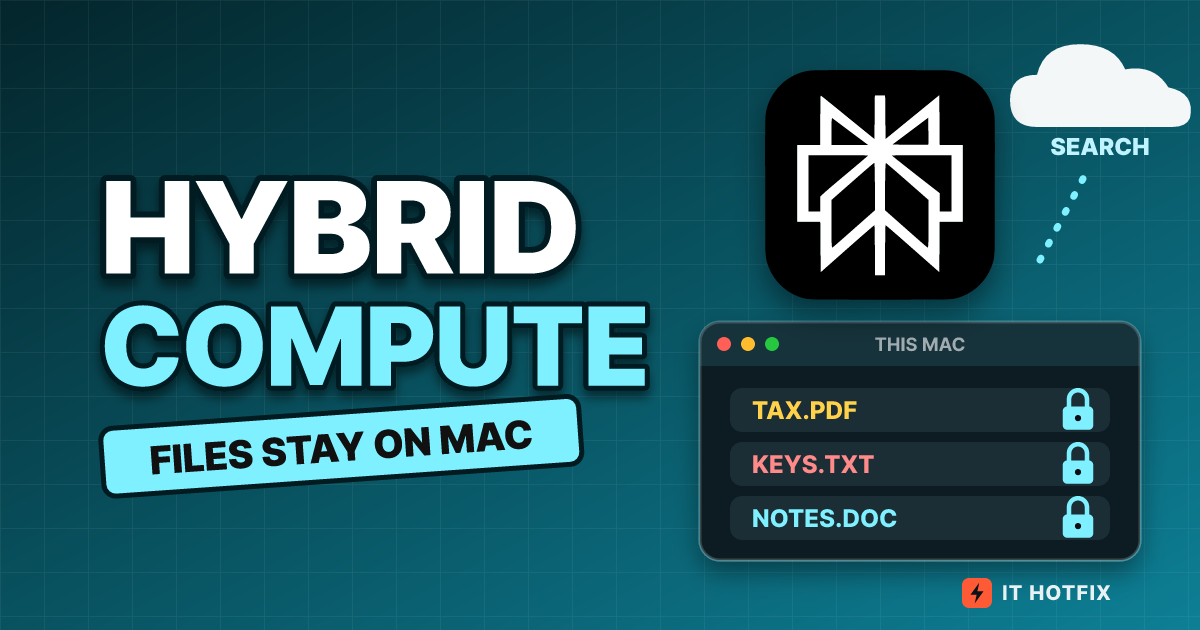
Hybrid compute, which Perplexity added to its Mac app on Sept 1 (UTC), hands that job to a screening step on the Mac. This article spends less time on a feature tour and more on drawing the line: what stays in the Mac zone, what crosses into the cloud zone, how the 0.6B model guarding the gate pinpoints characters, and where the line leaks when the same name appears many times or the text gets long. It all follows official announcements, help pages, the model page and figures from the paper. Status and numbers were checked against the official sources again as of 2026-10-27.
Files stay in the Mac zone, only masked sentences cross
In the diagram below, the two dashed boxes are the boundary. Only two arrows cross the wall: the masked draft going out, and the answer with stand-ins mixed in coming back.
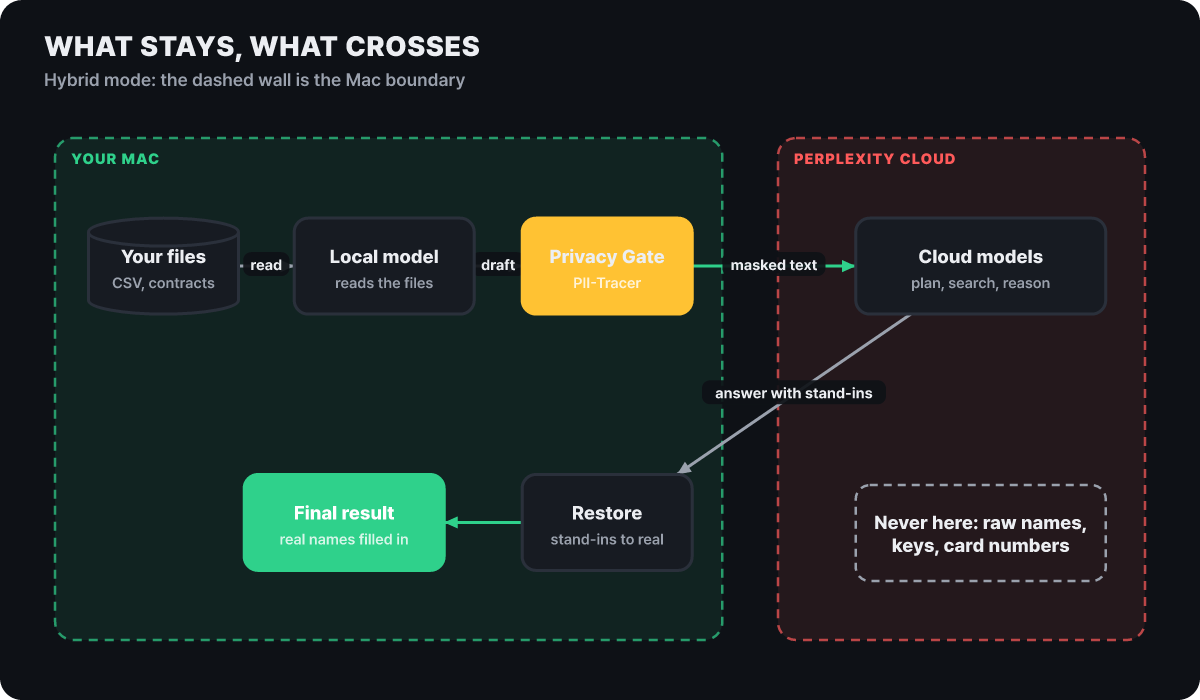 Figure 1. Files never leave the Mac zone. The cloud handles planning, search and reasoning, and the real values are filled back in on the Mac
Perplexity’s description goes like this. One Computer task is split between a cloud model and a local model on the Mac. The cloud handles planning, web search and hard reasoning, the Mac handles personal files and sensitive steps, and the two branches are merged into a single deliverable. A task starts in the cloud, so once work begins the cloud side lays out the path first, and the Mac’s model works on the steps that need to open a file. Starting in the cloud also means the question text and the plan are on the side that crosses the boundary, which a later section comes back to.
Take a job that reads a customer-list CSV and researches which Mac suits each customer (an example the editors made up). The step that reads the list finishes inside the Mac, and only the step that looks up current prices and specs goes to the cloud model. The cloud model researches “a model that fits Customer A” without ever seeing A’s real name, and once the result table is back on the Mac, the names return to their places. The part standing on the boundary is the screening step on the Mac (Privacy Gate). It is the yellow box in the diagram, and the sections below take apart its four verdicts and the model inside it.
What lives on the Mac: three models and the requirements
First, what sits in the Mac zone. According to the official help page and announcement, hybrid works on an Apple silicon Mac with macOS 15 Sequoia or later and 24GB or more of unified memory, and Perplexity says results are best on a 32GB Mac. The product page’s recommended memory is 32GB for hybrid and 36GB for fully local. You need one of the Perplexity Pro, Max or Enterprise subscriptions.
There have been three local models since launch.
- Gemma 4 E4B: a small model
- Qwen3.6 35B-A3B: a large mixture-of-experts model
- Perplexity model: Perplexity’s own model, post-trained for Computer
Download one of the three once, following the in-app prompt. The cost structure follows the boundary too. Work handled by a local model does not use Computer credits, while the steps that run in the cloud use credits like any other Computer task.
So who decides “what runs where”? The Aug 25 Perplexity research blog post on local-first agents describes the orchestrator as deterministic code, not an LLM. Its job is to run the loop, assemble context, enforce policy, and execute only the model-proposed tool calls that are approved. The same post explains that before calling a cloud advisor model, the harness picks only the relevant context, flags sensitive information with a PII classifier, and shows the user what will leave the device. That post covers Portable Computer for Windows and Linux, but the design, leaving the line-drawing to code and policy rather than a model’s mood, carries straight over to this article’s topic. The hybrid orchestrator was first introduced in June.
The four verdicts at the checkpoint
On the way to the cloud, the classification model on the Mac picks one of the four verdicts below before the contents of a protected file go out. This is the behavior confirmed in the official help page and announcement.
| Verdict | What it does | Fits when |
|---|---|---|
| Mask | Sends a stand-in for the value and restores the original in the final result | Names and emails, where the job works without knowing the value |
| Keep local | The Mac’s model handles that step itself | The value has to be read and computed on |
| Refuse | The action is not carried out | The value that must not leave is the crux of the job |
| Confirm | Asks the user first whether it may be sent | A call too ambiguous to settle by policy |
The classifier looks for names, addresses, account numbers and secrets. Of these, credentials, card numbers and government ID numbers form the strictest group. These values are kept local or refused, or the request is rewritten without the value so the cloud model can carry on without it. Names, emails and phone numbers are presented as the main cases for masking.
For individual users the verdict comes from a confirmation dialog, but on organization accounts the admin decides. An Enterprise admin sets org-wide rules for what must stay on the Mac, what may be masked, and what needs user approval before going to the cloud, and can audit the moment data left the device. When a personal file is involved, choosing “process on my Mac” in the confirmation dialog fits the purpose of the feature, and approving the dialog out of habit makes the checkpoint nearly pointless.
The road of a name: stand-in and back
The product page’s example sums up how masking looks in one line. Names, emails and phone numbers are swapped for stand-ins and sent to the cloud, the cloud model researches with the stand-ins, and when the final result returns the real values are restored. What the stand-ins look like on the app’s screen is not public, but PII-Tracer, the model that does the screening, is published on Hugging Face under the MIT license, so you can watch the same kind of masking on a made-up sentence yourself. A shortened version of the model card’s usage example is below.
pip install torch "transformers>=5.2"from transformers import AutoModel
model = AutoModel.from_pretrained("perplexity-ai/PII-Tracer", trust_remote_code=True)
text = ("Hi, I'm Daniel Whitfield, you can reach me at "
"daniels@meridiancap.com or 415-555-0123.")
spans, sensitivity = model.predict(text) # list of spans and a conversation sensitivity score
for s in spans:
print(s.label, (s.start, s.end), text[s.start:s.end])
print(model.mask(text)) # the sentence with spans replaced by category-name stand-instrust_remote_code=True means running code from the downloaded repository, so use it only in a trusted development environment. The model card’s example output is three spans, private_person, private_email and private_phone, and the masked sentence is below. The name, email and phone number are all made-up values from the model card.
Hi, I'm [PRIVATE_PERSON], you can reach me at [PRIVATE_EMAIL] or [PRIVATE_PHONE].From this one sentence alone, the cloud model can get as far as “a draft proposal to send to this person,” and when the answer comes back the Mac fills the real values into the stand-in slots. This works under one condition. If the same name appears ten times in a document, all ten must become the same stand-in. Miss even one line and the cloud model reads the real name on that line, and a value that has gone out cannot be taken back. That is why the next two sections focus on “values that appear many times” and “long text.”
Inside the 0.6B encoder that pinpoints characters
Let’s open up PII-Tracer, the eye of the screening step. It is a small model with 0.6B parameters (about 600 million), built on a Qwen3-family encoder (pplx-embed-v1-0.6b) arranged to read a sentence from both directions. It is not a model that generates text but a classification model that labels each token, so small is enough.
It looks for nine categories: person name, account number, URL, date, address, email, phone number, other personal info, and secret. The labels attached to each token number 37: one “not personal info” label plus 36 from multiplying the categories by four tags (begin, inside, end, single-token). This scheme is called BIOES. If the labels the model outputs per token were used as-is, inconsistent combinations such as “an end with no begin” could appear, so the output passes through a constrained decoder (Viterbi) that blocks rule-breaking combinations before being turned into character spans. The model also carries a separate head that scores how sensitive the whole conversation is, but the paper’s performance figures cover only span detection, so the numbers in this article are for that side too.
Training used about 714,000 examples, a mix of multilingual conversations and single-turn examples, repeated 3 times. It reads 4,096 tokens at a time, and the model page warns that longer input is cut off, so split it first. It also ships in several forms. Besides the default (PyTorch), vLLM (token-classification serving), GGUF (for llama-server) and MLX (8-bit weights, needs a separate MLX implementation) are released separately. As of the Oct 27 model page, monthly downloads are 5,434 and likes are 91. The model is MIT-licensed, while the paper (arXiv 2609.22200, submitted Aug 31) carries a separate license, CC BY-NC-ND 4.0.
The app takes the list of spans this model produces and decides a verdict. The detection model only goes as far as the signal “this is an email”; whether to mask it or keep it local is up to the policy in the earlier section.
Where it leaks when a name appears six times
Alongside the model, Perplexity released an evaluation set, PII-TRACE. It has 13,148 synthetic conversations across 13 languages and 10 scripts, with 37,431 identifier mentions that have character-level ground truth. Among the 5,645 conversations that carry personal-info labels, in 63.8% the same identifier appears two or more times, and in 28.7% it recurs across multiple turns. In the test set, 899 identifiers appear once, 959 appear two or more times, and 790 of those span multiple turns. That repetition is the norm rather than the exception is the core design point of this evaluation.
“Consistent detection” here is a metric that counts success only if every mention of one identifier is found. The chart below shows the score by how many times the same identifier appeared. Look at how steeply the curve falls, and at the gap to the other systems in the 6-10 bucket.
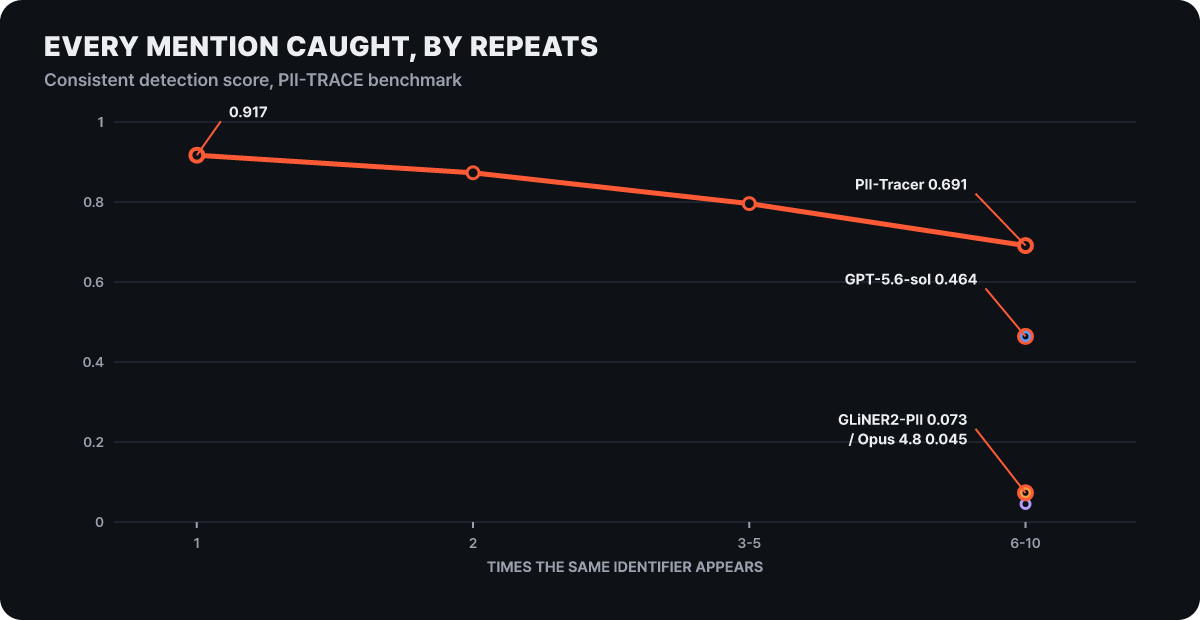 Figure 2. The score of 0.917 for one appearance falls to 0.691 for 6-10 appearances
It is 0.917 at one appearance, 0.873 at two, 0.796 at 3-5 and 0.691 at 6-10. The more a value repeats, the more chances there are to miss a line, so the downward curve is natural. In the same bucket the comparison targets were GPT-5.6-sol at 0.464, the open model GLiNER2-PII at 0.073 and Claude Opus 4.8 at 0.045. The share of repeating identifiers found all the way through is 79.4% overall for PII-Tracer against 57.0% for GPT-5.6-sol, and narrowed to identifiers spanning multiple turns it is 77.6% against 55.1%. Still, read as an absolute number, it means that about three in ten frequently repeated values (editors’ calculation, 1 − 0.691) have a line missed somewhere.
The overall score tells the same story. Character-level F1 (a single value combining how much of what should be found was found and how much of what was found is right; closer to 1 is better) is 0.629 for PII-Tracer, first among the 12 systems compared. On span-level F1, GPT-5.6-sol is higher and PII-Tracer is second. Reading “first place” and “0.629” together, the accurate takeaway is that repeated personal info in long multilingual conversations is that hard a problem.
Past 10,000 characters, text falls out of view
The second leak is length. The model’s window is 4,096 tokens, so feeding long text whole leaves the tail out of view. The evaluation had three length groups: 167 cases under 1,000 characters, 1,292 cases of 1,000 to 10,000 characters, and 463 cases of 10,000 or more. Look at the gap between the red and green bars below.
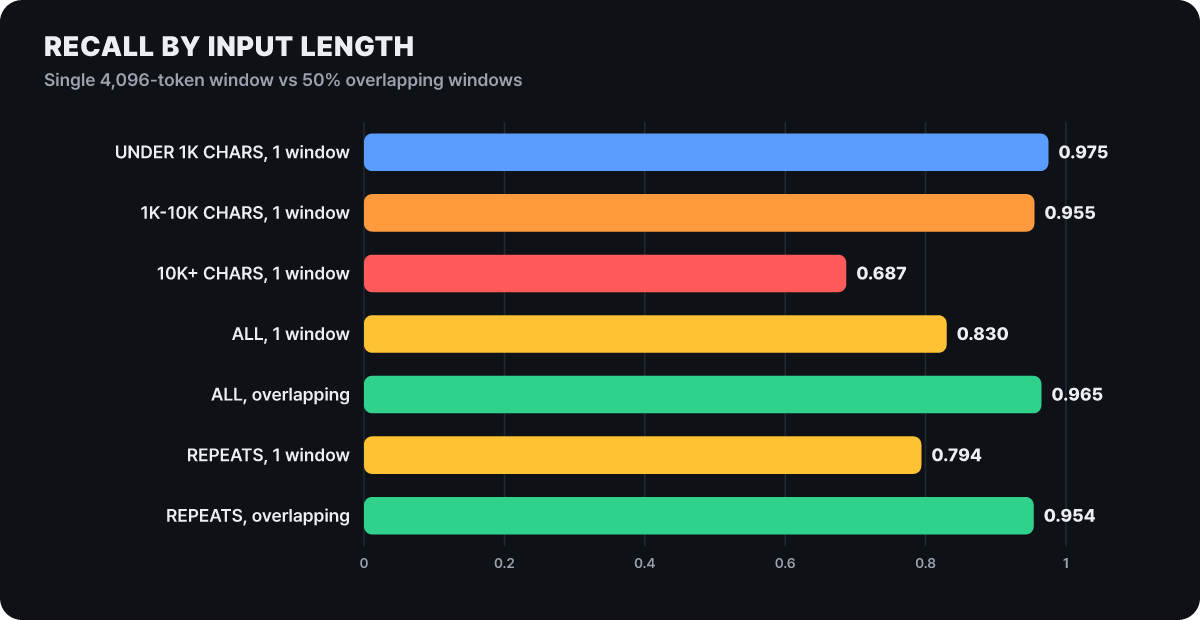 Figure 3. Recall drops to 0.687 at 10,000 characters and over, and overlapping the windows by half recovers it
Under 10,000 characters, recall is high at 0.955 or more. At 10,000 characters and over, it falls to 0.687 and precision stays around 0.51. But when the same checkpoint was made to read in windows overlapping by 50%, with no retraining, overall recall rose from 0.830 to 0.965, and consistent detection of identifiers that appear several times rose from 0.794 to 0.954. The story is that the problem was not the model’s understanding but how much of the input it covered.
That said, this improvement is a result of using the model that way in the evaluation, not a value that guarantees what happens inside the app. If you use it directly, you can turn the same method into code. The one below is an example the editors wrote; since character count and token count differ, it sets the window to 2,000 characters with non-English documents in mind. It is a different window setting from the one used in the evaluation.
def find_spans(text, win=2000, stride=1000):   # read with windows overlapping by half
    found, i = [], 0
    while True:
        spans, _ = model.predict(text[i:i + win])
        found += [(s.start + i, s.end + i, s.label) for s in spans]
        if i + win >= len(text):
            break
        i += stride
    found.sort()
    merged = []
    for a, b, lab in found:                    # merge overlapping spans into one
        if merged and a <= merged[-1][1]:
            merged[-1][1] = max(merged[-1][1], b)
        else:
            merged.append([a, b, lab])
    return merged
0.95 on synthetic data, 0.594 on human-annotated TAB
The model’s general ability can be seen in evaluations made by other people. Perplexity compared character-level F1 against OpenAI Privacy Filter on five external evaluations. In the chart below, the gray dot is Privacy Filter and the orange dot is PII-Tracer; the longer the line, the bigger the gap.
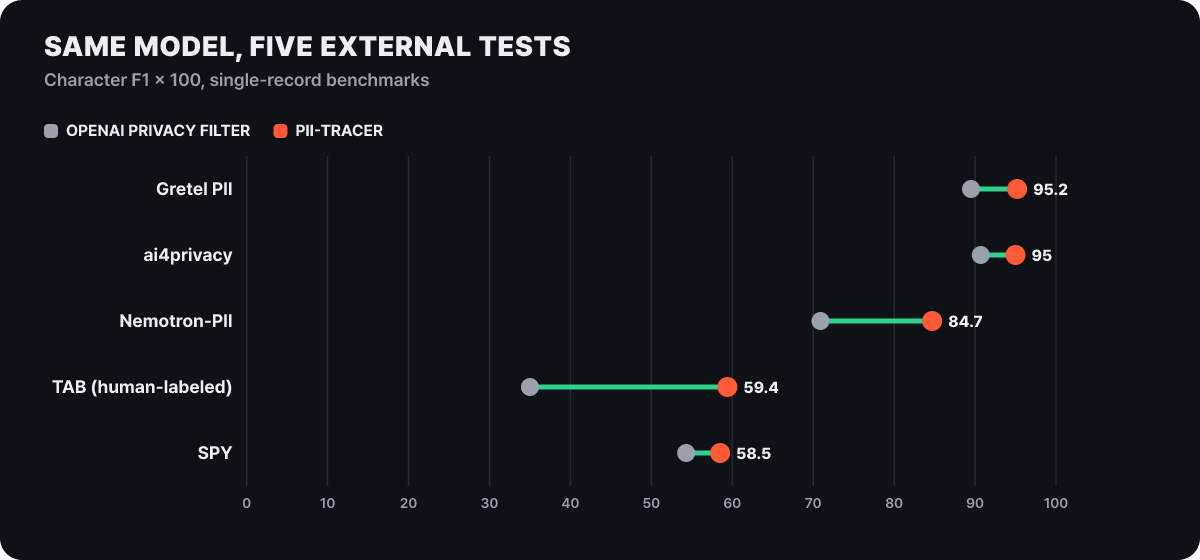 Figure 4. Values are F1 multiplied by 100. PII-Tracer leads on every evaluation, but the absolute values for TAB and SPY are low
On synthetic data, as in Gretel PII at 0.952 vs 0.895 and ai4privacy at 0.950 vs 0.907, both models are above 0.9. The score drops sharply on TAB, the only human-annotated dataset (127 documents). PII-Tracer scores 0.594 and Privacy Filter 0.350. TAB precision is similar at 0.986 vs 0.982, but recall is 0.425 vs 0.213, so both models are almost always right about what they find yet miss more than half of what people marked. That TAB is the evaluation with the biggest lead is good news, and that its absolute values are low is a warning that the 0.95 on synthetic evaluations should not be carried over to real documents as is.
The scope of the evaluation is worth remembering too. The main evaluation is synthetic conversations, tool calls, agent-to-agent messages and image input were outside the evaluation, and each compared system was tested with only one inference setting. So these numbers are a yardstick for gauging “how far to trust it under which conditions,” not proof that “the screening is perfect.”
What still goes outside the boundary
However good the model guarding the boundary is, some things sit outside it from the start. Hybrid starts in the cloud, so the question text, search queries and plan go to the cloud. What the screening hides is detected personal info, and values it fails to detect go out as they are. If you do not want to send anything to the cloud, the fully local mode added on Oct 20 is the right one.
Hybrid compute
- Start: begins in the cloud and hands only the personal-file steps down to the Mac
- What goes to the cloud: requests that passed screening (masked or confirmed)
- Recommended memory: 32GB (minimum 24GB)
- Local models: Gemma 4 E4B, Qwen3.6 35B-A3B, Perplexity model
Fully local
- Start: begins on the Mac and does planning, reasoning and file handling all on the Mac
- What goes to the cloud: only when the user allows it (latest information, browser, connected apps)
- Recommended memory: 36GB
- Local models: Qwen 3.6, PPLX Pro
Even in fully local mode, with permission you can call one of 15-plus frontier models to take on hard reasoning. The mode is chosen per task. Steps that send a message or a meeting invite go through that app’s service regardless of where the AI runs, code and tools run in an isolated sandbox, and access to Mac files and apps is limited to the range you allow.
Two examples on the product page show where the line gets drawn. In the hybrid example, working an investment-committee deck (IC deck), rebuilding the model under base, management and downside scenarios and checking returns happens on the Mac, while finding comparable deals happens in the cloud. In the fully local example, on a Mac mini it looks at a portfolio file and market data, flags two positions over the concentration limit and three buckets off target, then updates an Excel file and meeting materials. Work that needs web research fits hybrid, and work that finishes inside the files fits fully local.
It can also be used remotely. Start a task from an iPhone and a connected Mac handles the local steps; an always-on Mac mini is recommended, not required.
The order for a first run
Perplexity’s help page lays out the setup in four steps.
- Download and open the latest Perplexity Mac app and sign in with a Pro, Max or Enterprise account.
- Download one local model by following the prompt. Choose from Gemma 4 E4B, Qwen3.6 35B-A3B and the Perplexity model.
- Open the model selector and choose Hybrid.
- Pick the local model and the cloud model to use for this task.
For the first task, it is better not to use real files. Make a CSV of a few dozen rows of invented names, phone numbers and emails, ask for something like “write a notice draft for each customer,” and watch which columns get masked and which items bring up the confirmation dialog. Put the same name on several rows, and mix in one fake value that would fall into the strictest group, such as a card number, and it becomes easier to gauge how the numbers from the earlier sections show up in your own files. A value that has gone to the cloud once cannot be undone, so this check comes before any real work file. If the file runs to tens of thousands of characters, don’t upload it all at once; split it up.
Two questions on credits and using the model alone
Does work handled by a local model really cost no credits?
The part handled by the local model does not use Computer credits. But you first need a subscription (Pro, Max or Enterprise), and the cloud steps within the same task use credits like any other Computer task.
Can I use PII-Tracer on its own?
The model is released under the MIT license, so you can download and use it directly. It reads only up to 4,096 tokens at a time, so long text has to be split by hand as in the earlier example, and the paper file’s license (CC BY-NC-ND 4.0) is separate from the model’s, so check it separately if you reproduce the paper.
Other ways of drawing the same line off the Mac
Hybrid on the Mac is one of the ways Perplexity tackles this problem. In date order: Personal Computer in April, the hybrid orchestrator introduced in June, Portable Computer on Aug 25, Mac hybrid on Sept 1, SPACE, the sandbox platform behind Computer, open-sourced on Oct 15, and the Mac fully local mode and the deployment for institutions on Oct 20.
If you are not on a Mac, there is Portable Computer. The help page’s local-model table lists Windows PCs (AMD Ryzen AI Max, NVIDIA RTX), Linux PCs (NVIDIA RTX) and NVIDIA DGX Spark, and the model is PPLX 27B, post-trained from Qwen 3.8 27B (Qwen 27B too in some environments). The requirement is 24GB or more of GPU-accessible memory, and Windows needs about 20GB of free disk. Unlike Mac hybrid, the model and agent run on the device, and the cloud is used only after asking the user first, when the latest information or advanced reasoning is needed. On organization accounts, the admin decides whether local inference is allowed on Windows and Linux.
An institution can also put the boundary entirely inside its own zone. On Oct 20, Perplexity teamed up with Valarian to start deployments that run Computer on an institution’s own servers and in air-gapped networks. It uses open-weight models such as Nemotron, GLM, Kimi, DeepSeek-R1 and Qwen on infrastructure the institution controls, and work is divided into enclaves with defined access to data, tools, users and credentials. Air-gapped deployments have no connection to external model APIs or the public web.
The cost side, splitting models per question between cloud and local, continues in the LLM routing article.