4 GitHub repos for agent desktops, finance and testing
Cua for computer use, financial-services for finance documents, Anatomy for diagrams and e2e for plain-sentence tests, read by who confirms the agent is done.
18 days. That is how long it took Anatomy to collect 20,989 stars after its first commit (Oct 8). Cua, which gathers stars the same week, needed 633 days to reach 31,020, anthropics/financial-services needed 245 days to reach 40,802, and e2e needed 96 days to reach 11,938. The figures were read on 2026-10-26 18:30 (UTC) from the repository pages, releases and official documentation.
These four cannot be put on one ruler by feature list. One hands an agent a desktop, one entrusts it with investment-banking documents, one has it draw explanatory diagrams, and one lets you write app tests as sentences. So this post asks all of them one question: when the agent says it has finished, what checks that the claim is true? The answers differ from repository to repository, and the differences show where to be careful.
Driver reads the result back through accessibility data and puts a confirmation level in the response. If it cannot read, it says so
Separates the sub-agent that opens outside documents from the one that writes files, and a human signs last
An audit script checks that no parts pass through each other, and headless Chrome zooms in on the joints
Records only the steps that a following check passed, and the next run replays that record without a model
18 days for 20,000 stars, 633 days for 30,000
Star counts speak of popularity, not of speed or maturity. The chart below puts days since the first commit on the horizontal axis (log scale) and stars on the vertical axis. The day counts are the editors’ own, from the first commit to Oct 26.
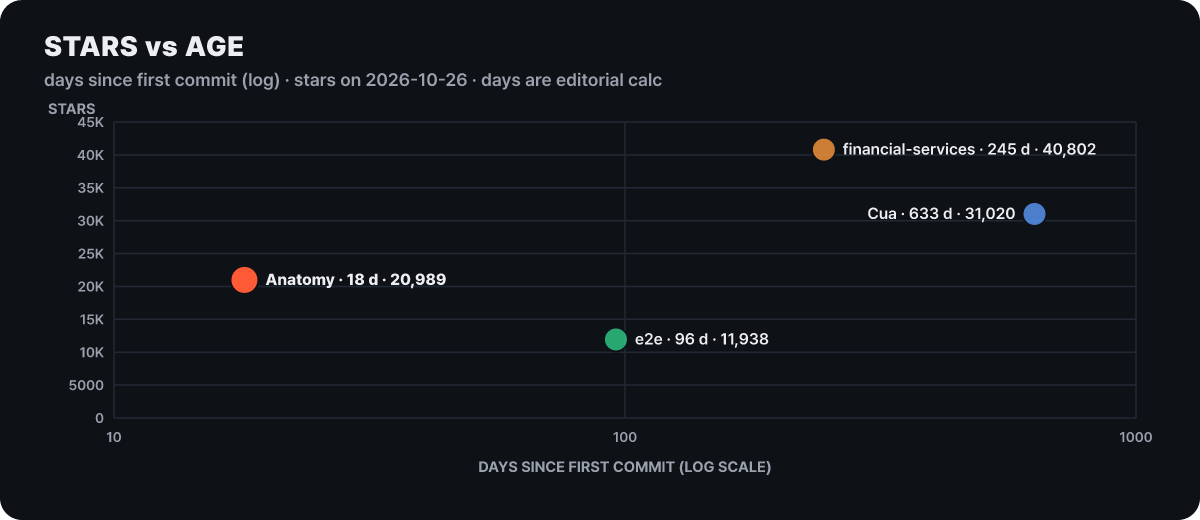 Figure 1. Age versus stars. Anatomy, the youngest, sits above e2e
Anatomy is less than a fifth of e2e’s age and has about 1.8 times the stars. At the other end, financial-services sits highest, but its main branch has 73 commits and the last one was on Sep 21. As the repository itself says, it is a reference template, closer to a set of designs to read once than to a product that keeps changing. Movement is more accurate to read from a table.
| Repository | First commit | Commits | Latest activity | License |
|---|---|---|---|---|
| Cua | 2025-01-31 | 5,989 | Spaces v0.16.0 (stable Oct 25), v0.17.0-beta.1 (pre-release Oct 26) | MIT; Spaces is FSL-1.1-MIT; optional extensions are AGPL-family |
| financial-services | 2026-02-23 | 73 | Last commit Sep 21 | Apache-2.0 |
| Anatomy | 2026-10-08 | 153 | Print sheets added Oct 18, release v1.1.0 (Oct 12) | MIT |
| e2e | 2026-07-22 | 943 | Commits as recently as Oct 26, npm 0.21.3 (Oct 23) | Apache-2.0 |
The forks number 2,271, 5,697, 1,692 and 627 in that order, and none of the four is archived. The e2e npm package had 288,757 downloads in the week of Oct 19 to 25.
Cua: six products in one repository
The first sentence of the Cua repository is “give AI agents a computer.” But when you look for what to install, there are six components, and it is hard to tell which line to type first. Here is the README’s “choose your path” restated by purpose alone.
An app that creates desktops (Spaces) for agents and manages them from the menu bar. Includes teleport and multiplayer
Drives apps and browsers on your own computer through CLI, MCP or SDK. macOS, Windows and Linux
Creates and manages macOS and Linux virtual machines on Apple silicon
Python, TypeScript and Rust SDKs. Creates and handles sandboxes, as in cua sb create ubuntu
A research release of a small model that makes short decisions such as filling a form. The weights are separate on Hugging Face
A tool for building and evaluating tasks for computer-use agents. Starts with simulation, no virtual machine
To have an agent press apps for you on the computer where you do your own work, use Driver. To lend an agent a separate desktop of its own, use Spaces. The one-line install script (cua.ai/install.sh) always installs the cua command, and the Spaces app is selected by default while Driver is not. To add Driver, use sh -s – –select cua-driver, and to skip the selection step, use –only cua-driver. The other three (Lume, CUA-S1, Bench) are a virtual machine tool, a research model and an evaluation tool, so ordinary users have little reason to touch them first. From here on we look at Driver and Spaces, which see the most use.
The four rungs Driver climbs before it trusts a click
The widespread default is to look at a screen image and pick coordinates. Anthropic’s computer use tool documentation shows that frame. Every call is executed by the developer’s own application, the tools are screen-level actions such as screenshot, left_click, type and zoom, and the documentation recommends a dedicated virtual machine or container, an allowlist of reachable domains, and human confirmation for high-consequence actions such as payments. In this frame, whether a click worked has to be guessed from the next screenshot.
Driver is on the side that reduces that guessing. The model and the repeating loop are run by the agent (Claude Code, Codex, Cursor and so on), and Driver turns one step the agent proposes into an observation or an action on the real desktop and reports the result. There are four ways to connect: MCP (cua-driver mcp), a shell command (cua-driver call <tool>), an SDK, and a shared daemon that lets several clients use one desktop together. Observation is tree plus pixels. Calling get_window_state returns the window’s accessibility tree and a screenshot at once, and every actionable element carries an element_token. The input tools are click, type_text, press_key, hotkey, scroll, drag and move_cursor, and each call decides whether to target a window (background is the default) or the whole screen (foreground only).
One action descends the stairs from the top. The name beside each rung is the means used at that rung, and the box on the right is the confirmation level carried in the response.
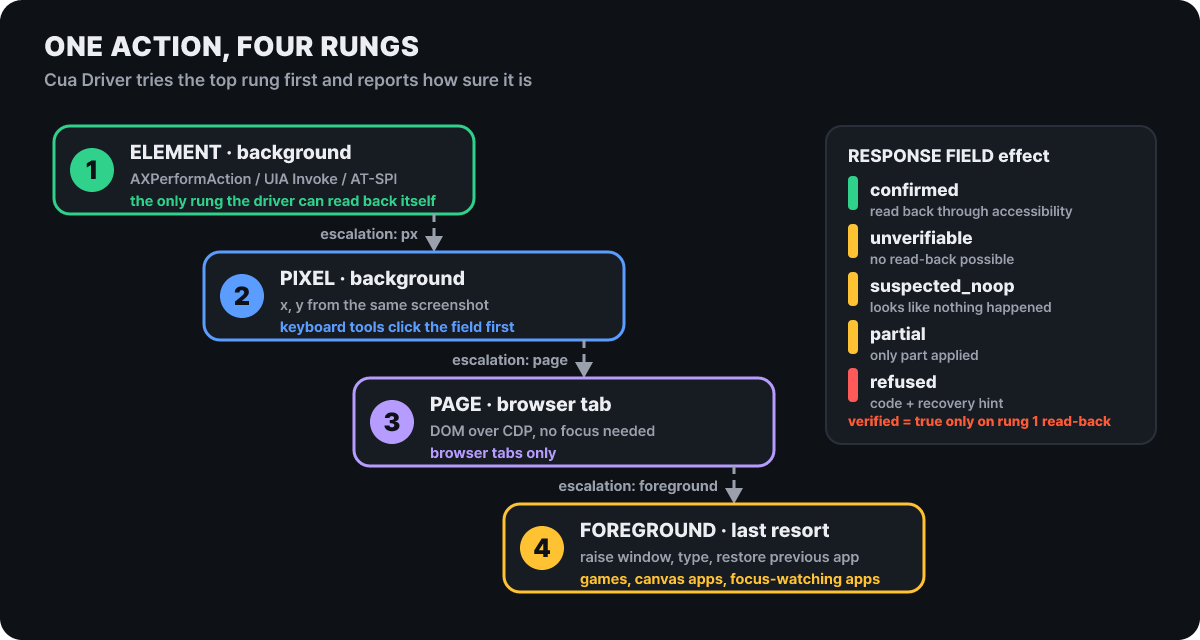 Figure 2. Driver’s action ladder. If the upper rung cannot confirm, escalation in the response recommends the next rung
Only the top rung of the stairs carries real meaning. Rung 1, which calls an accessibility action directly with an element token, is the only rung where Driver can verify the result by reading it back itself. Rung 2 is input by screenshot coordinates, rung 3 reaches the DOM through the Chrome DevTools Protocol (CDP), and rung 4 is the last resort of raising the window, typing, and restoring the previous app. The response’s effect is one of confirmed (read back and confirmed through accessibility), unverifiable, suspected_noop, partial and refused, and verified becomes true only when it was confirmed by reading.
This distinction is useful because Electron, Catalyst and web content sometimes echo a write back without actually applying it. In that case Driver does not insist on success; it answers unverifiable, and the agent has to observe again. The stale-token error (stale_element_token) does not mean the path was wrong but that you should snapshot the window again. Support per rung differs by operating system.
| OS | Input and observation | Where it gets blocked |
|---|---|---|
| macOS | Accessibility API, window-scoped events, per-window screen capture | Needs accessibility and screen recording permissions. A SwiftUI window on another Space loses its tree |
| Windows | UI Automation, messages to the target window | A low-privilege process cannot send input to an app running as administrator (refused, not bypassed). The daemon runs in the user session |
| Linux X11 | AT-SPI, window-targeted input | Refused depending on the toolkit |
| Linux Wayland | No generic raw input | Returning background_unavailable for an unfocused window is the intended behavior |
Among browsers, Brave, Vivaldi, Opera and Arc are only detected and are awaiting release approval, while Safari and Firefox are handled with a clean refusal.
For screens with no tree at all (canvas apps, games, remote desktops) there is an optional extension, cua-perception. It interprets one screenshot into text, icon and control regions on the local CPU and hands the agent region boundaries and text instead of image bytes. The official documentation says one interpretation takes 2 to 2.5 seconds on macOS, 3.5 to 4 seconds on Linux and 8 to 9 seconds on Windows, and each interpretation is tied to a capture_id that expires after 60 seconds. This extension is not MIT. The icon detector is AGPL-3.0-only, so redistributing it or offering it as a network service may create a source-disclosure obligation, and the README directs you to read the notice before installing.
First result with a 6×7 calculator test
Driver’s first test is the calculator. Below are the quickstart’s commands in order; on Windows and Linux the install line and the daemon start line differ.
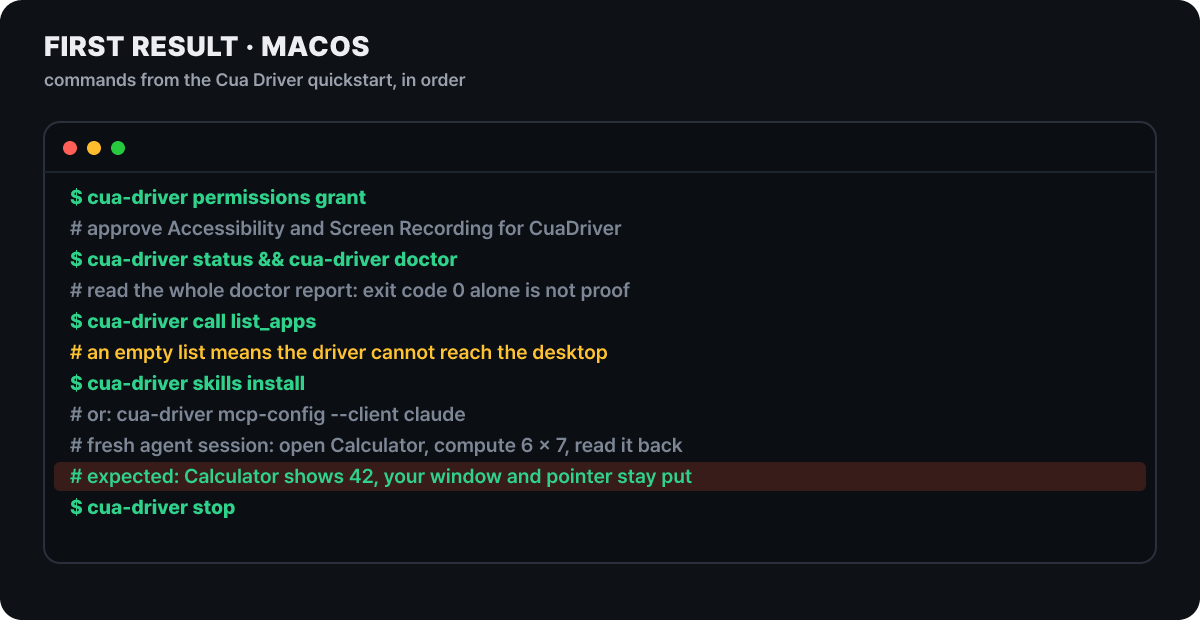 Figure 3. First test on macOS. The comments are the explanations the quickstart attaches to each line
The install line takes the form /bin/bash -c “$(curl -fsSL https://cua.ai/driver/install.sh)”. If downloading and running at once bothers you, open and read the script first, then run it. The permission prompt offers Open System Settings instead of Allow, and there you turn on CuaDriver. If you refuse, Driver can neither see nor operate the desktop. Even when doctor exits with code 0, read the report to the end, and if list_apps is empty, open the calculator and try again. Connect it to your agent through the skill (cua-driver skills install) or an MCP setting, and in a new session instruct it like this.
Using the Cua Driver skill, open the installed calculator app, compute 6 × 7, and read the displayed result back from a fresh snapshot.
Expected result: the calculator shows 42, and the agent reports the last value it read. Your window, keyboard focus and pointer stay as they were, and the cursor moving on screen is the agent's overlay
The phrase “read it back from a fresh snapshot” matters, because it makes the agent re-read the app instead of answering 42 from memory. What this test shows is not the arithmetic but that your own work is not interrupted, and the first real use is asking a coding agent to check the app’s screen while you keep writing a document.
The limits are in the same documentation. Even with several sessions, the screen, keyboard and focus are one, and native input is processed one at a time, so this is not for running several agents on the same desktop at once. Each connection gets an implicit session that is cleaned up after 5 idle minutes, and the element tokens become invalid with it. The MCP listener opened over HTTP is off by default, and turning it on needs a port environment variable and a bearer token.
The latest stable release is Driver 0.38.0 from Oct 21, 05:26 (UTC). According to the notes, it published the cua-sdk and the protocol contract so developers can build their own harness, included 25 fixes split across Windows, macOS and Linux, and now refuses to start the Linux GNOME 50 and later helper in an unsafe way. One line stands out: every Cua client no longer trusts the compromised eMudhra intermediate certificates. Why those certificates were blocked is covered in why browsers blocked 8 certificate authorities. A nightly build (0.38.1-nightly) also came out on Oct 25 and 26.
How a login crosses into a Space
Spaces is the app that gives an agent a separate desktop. A Space is a macOS virtual machine or a Linux image made locally on your Mac, and it can also run on your other devices or in your own cloud account (AWS, Google Cloud, Modal). The quickstart requirements are one of a Mac with macOS 26 or later, a Windows PC (preview) or Ubuntu 24.04, plus an agent such as Claude Code, Codex or Cursor. A macOS Space needs an Apple silicon Mac with about 50GB of free disk, and a Linux Space needs a container engine such as Docker. On the app’s start screen you press Connect for each agent so that Cua adds its tools to that agent’s configuration file, and an agent that was already open must be restarted. A free account is needed only to reach a Space on this computer from your other computers.
The most distinctive feature is teleport. If you move a Chrome or Slack you have logged in to into a Space, it opens there still logged in.
- Pick the app and scopeEach app is split into full (install and login state), install only, or unsupported, and files can be moved along with it
- Consent screenLists the pinned versions and checksums of install items, the files and folders to move, and the state items. Nothing runs before approval
- Secrets confirmed separatelyCookies, tokens and logins need a separate consent plus Touch ID or a password on macOS
- Opens in the SpaceFiles go to the Space's Teleported folder, and the app opens already logged in
For browsers, three items, “stay signed in,” “saved passwords” and “browsing history,” are off by default, and you choose what to send after seeing the count per site. Sites of sign-in services (identity providers) are not selected automatically. A saved Chrome password file cannot be decrypted by the Chrome in the Space if moved as is, so use the cua keyvault import-passwords path, on which the agent logs in without ever seeing the password itself.
A teleported login is a live login. Whoever controls the Space can act as that account. The documentation recommends moving only to a Space you own and, where possible, using the tab scope (tabs) instead of the full session. Teleport is not in the open-source SDK package; it exists only in the Cua Spaces app.
Pricing follows the pricing page. The limits do not apply to a Space you connect to directly from your own network; they apply to the number and duration of sessions when you connect remotely through the cua.ai relay, and going over does not cut you off but shows an upgrade notice.
| Plan | Annual billing (monthly equivalent) | Monthly billing | Relay sessions | Remote hours per month |
|---|---|---|---|---|
| Free | $0 | $0 | 2 | 20 hours |
| Pro (1 person) | $15 | $18 | 5 | 200 hours |
| Teams (1 to 100 seats) | $25 per seat | $30 per seat | 5 per seat, pooled for the team | 200 hours per seat, pooled (2 seats means 10 sessions and 400 hours) |
The license has three layers. The SDK, the cua command, Driver and Lume are MIT, and the README states that the MIT parts do not depend on the FSL parts. The Spaces app, cua-spacesd, Keyvault and teleport are FSL-1.1-MIT: you may use them, self-host them and build on them, but a competing hosted service is prohibited, and each release becomes MIT two years after its launch. Cua Driver Bench is also FSL from versions after Oct 11. The two optional extensions seen earlier (cua-som, cua-perception) are AGPL-family.
Recent activity looks like this. Spaces v0.16.0 went stable on Oct 25 at 21:36 (UTC) with 3 features and 14 fixes. The change that matters most to users is that the uninstall script (uninstall-local.sh) now clears local settings and caches, removes this Mac from the relay, and even deletes the entries on the coding-agent side. The next day at 08:35 (UTC), v0.17.0-beta.1 appeared as a pre-release.
If you installed cuabot after reading an older post, remove it now. It is a deprecated package that the README marks as “has known security issues, do not run,” and the cleanup steps are below. The replacements are Driver connected through MCP or the sandboxes of the cua command.
cuabot --stop                          # for each named session, if you have any
npm uninstall -g cuabot
docker rm -f cuabot-xpra
docker images -q trycua/cuabot | xargs docker rmi
rm -rf ~/.cuabot
Ten finance agents and the one seat that opens outside documents
anthropics/financial-services is a collection of reference agents, skills and data connections that Anthropic released for investment banking, equity research, private equity and wealth management. Every file is Markdown or JSON, so there is no build step, and the same source is used as a Claude Cowork plugin or deployed through the Claude Managed Agents API. The warning at the top of the README is the frame for reading this repository. These agents only produce draft analyses for review (models, memos, research notes, reconciliation results); they do not recommend investments, execute trades, post to the books or approve onboarding, and every result waits for a human signature. This post likewise introduces a tool and does not advise on investment decisions.
| Area | Agent | What it does |
|---|---|---|
| Sales and advisory | Pitch Agent | Writes a pitch deck through to the end using comparable companies, precedent transactions and LBO analysis |
| Meeting Prep Agent | A briefing pack before a client meeting | |
| Research and modeling | Market Researcher | Takes an industry or topic and produces an industry overview, competitive landscape, comparable companies and idea candidates |
| Earnings Reviewer | Reads earnings releases and filings, updates the model and drafts a note | |
| Model Builder | Builds DCF, LBO and three-statement models directly in Excel | |
| Fund operations and finance | Valuation Reviewer | Takes manager materials, runs the valuation template and waits for investor reporting |
| GL Reconciler | Finds differences between the ledger and subledger and traces their causes | |
| Month-End Closer | Accruals, balance carry-forward and variance explanations | |
| Statement Auditor | Checks investor statements before allocation | |
| Onboarding | KYC Screener | Document interpretation, a rules engine and matching against sanctions and politically exposed person lists |
The one of the ten that shows the safety structure in the most detail is the GL Reconciler’s Managed Agents cookbook. The custodian and counterparty statements this agent reads are documents written by outsiders, so they may contain instructions meant to trick the agent. The cookbook divides the zones so that sentences in those documents cannot reach the shell, the write tools or the company’s systems.
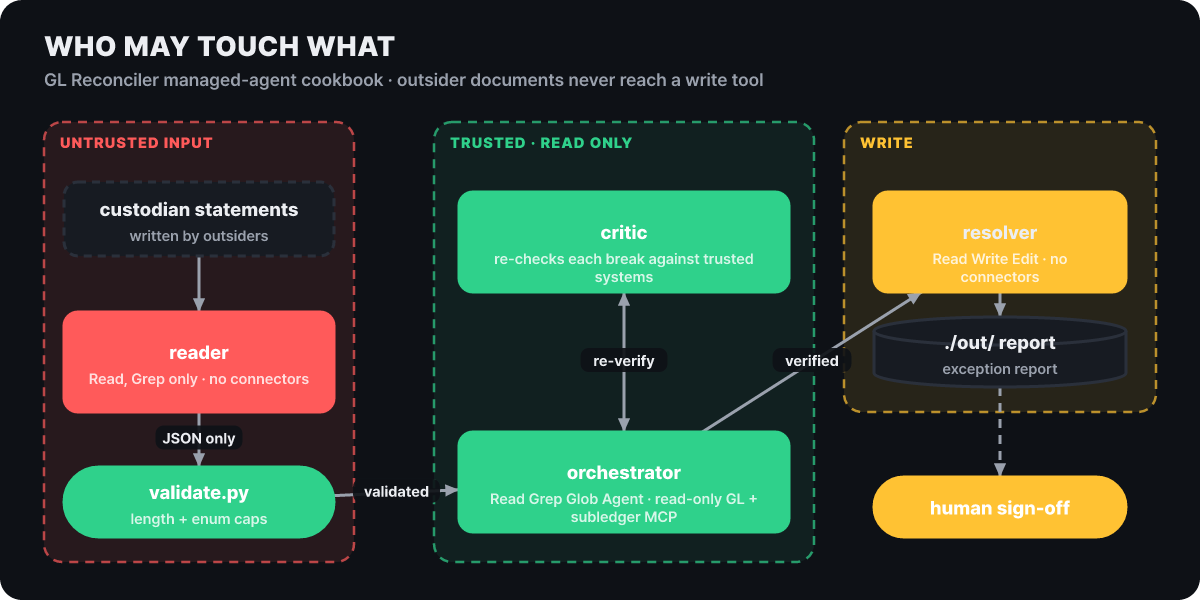 Figure 4. Permission zones of the GL Reconciler. The place that opens outside documents and the place that writes files do not overlap
In the figure, the one place outside documents reach is the reader in the left zone. The reader can use only Read and Grep, has no connected systems, and sends out only JSON that passed a schema. The schema is specific. Asset class names are at most 32 characters, account values at most 64 characters of alphanumerics and . _ : - only, the list of differences at most 500 entries, the suspected cause one of four values (temporal_cutoff, system_drift, reclass, unknown), the evidence links at most 10 with each at most 256 characters, and undefined fields are not allowed. scripts/validate.py does the validation, and the cookbook explains that the device is meant to keep an instruction planted in a document from surviving this threshold intact.
The orchestrator in the middle zone splits and gathers the work and holds only read-only ledger and subledger connections. The critic independently re-verifies the differences the reader reported against trusted internal systems, and the orchestrator that receives the result hands the verified bundle to the resolver. The resolver is the only one with Write permission, but it cannot open outside documents and writes an exception report to ./out/. The cookbook README states that this agent writes nothing to the system of record and that ledger adjustments are approved by a human outside the agent.
The path of one month-end reconciliation line
A single sentence moves the agent. The cookbook’s steering example file (steering-examples.json) contains three.
Reconcile GL vs subledger, trade date 2026-04-30, classes: equities, fixed-income, derivatives
A daily run. Specifies three asset classes
Reconcile GL vs subledger, trade date 2026-03-31, classes: all, threshold: 10000
A month-end run. All asset classes, with a variance threshold of 10,000 stated explicitly
Re-trace break: account 41200-EQ-US, trade date 2026-04-30
A follow-up steering event. Re-traces only the one difference that just came out, in depth
A single run flows in this order: balance lookup, comparison and splitting out differences (one reader per asset class), cause tracing, the critic’s re-verification, and the resolver’s report. Give it a trade date and asset classes, and out come the list of differences over the threshold, trade-level evidence and cause classification for each item, and an exception report for the controller to sign.
Other agents can be read in the same frame. The Earnings Reviewer takes a ticker and a quarter, pulls the results through the FactSet and Daloopa connections, loads the full call transcript rather than a summary, reads guidance, tone and the questions management avoided, fixes the model, checks balance, broken links and hardcoded values in calculated cells with an Excel check skill, and then stops in draft status. The rules are that every number carries a source, a number without a source gets [UNSOURCED], and nothing is published externally. The KYC Screener extracts the legal entity name, beneficial owners and addresses from onboarding documents, records the rules engine’s pass or fail with evidence, gathers the sanctions, politically exposed person and adverse media matches with confidence levels, and builds an escalation bundle. The same isolation applies to the sub-agent that reads the documents, and the risk-rating decision belongs to the compliance officer.
There are two ways to install.
# Claude Code: add the marketplace -> core plugin first -> then the agent
claude plugin marketplace add anthropics/financial-services
claude plugin install financial-analysis@claude-for-financial-services
claude plugin install gl-reconciler@claude-for-financial-services

# Managed Agents API: keep the key in an environment variable and run the deploy script
export ANTHROPIC_API_KEY=...        # your own key
scripts/deploy-managed-agent.sh gl-reconciler
In Cowork, paste the repository URL into the plugin add option in settings, or upload a folder under plugins/ as a zip. Slash commands such as /comps, /dcf, /earnings and /ic-memo are installed separately from the vertical plugins (investment-banking, equity-research, private-equity and so on). Data is connected through the MCP addresses of providers such as FactSet, S&P Global, Moody’s, PitchBook, LSEG, Morningstar and Daloopa, and the README notes that a provider subscription or key may be required. The feature that hands work to sub-agents (callable_agents) is a research preview.
Try it with one agent and fake data. The connections the cookbook uses are values you must adapt to your own company’s systems, such as the internal ledger and subledger servers (GL_MCP_URL, SUBLEDGER_MCP_URL), so the safe order is to adjust the isolation structure and the JSON threshold to your own rules before attaching real connections.
The checks Anatomy runs on a single drawing
wheresryan22/anatomy is a skill that, when you ask an agent such as Claude Code for an explanatory diagram, builds an object whose concept is its working principle. Instead of the sentence “the work is skipped only when every cache key matches,” it builds a pin tumbler lock that turns only when every pin fits, and the structure in which one GPU context serves several canvases is drawn as a gantry plotter whose single print head moves across 16 cells. The result is an isometric illustration made of dozens of small parts, placed on a card with a title, hints and live figures, and it moves slowly in response to the pointer and keyboard. The figures on screen come from the same small model that moves the parts, so the picture and the numbers do not drift apart.
What sets this repository apart from the other three is that it spends more tools on verifying than on making. The order SKILL.md sets is gathering real numbers, inventing the object, a parts list, planning the world, constructing the geometry once with the kit, painting back to front, the frame, motion, and then verification through a critic’s eyes. The verification-side tools are as follows.
| Tool | What it filters out |
|---|---|
kit/audit.mjs |
Whether any part passes through another, whether every end sits on a mount, whether overlaps resolve by depth order |
capture.mjs, drive.mjs |
Takes screenshots and zooms with headless Chrome and a slow contact sheet to check the joints by eye |
lines.mjs |
Treats a line that ends in mid-air as a failure |
turn-check.mjs |
Orbit check when a 3D (beta) part rotates |
There are three kinds of output. The core format is SVG (a standalone HTML page, a single .svg file, or a React/Next.js component), and for drawings that need fire, water or light, a WebGL shader is added to the SVG and drawn inside the same isometric camera (without WebGL, only the SVG remains). The 3D beta builds parts that actually rotate, such as a turning dial or a bending finger, and re-projects only the moving parts on every frame. On Oct 18, a print sheet (scripts/print.mjs) was added that outputs the finished drawing as an A4 or Letter PDF. It has three formats, a one-page poster, a one-page blueprint and a two-page detail, and it is listed among the unreleased items in the repository’s change history.
Installation and first use take two lines.
npx skills add wheresryan22/anatomy -g/anatomy explain how a token bucket rate limiter works, interactiveNo API key is needed and there are no dependencies to install (it uses only Node built-in modules, Node 20.10 or later). It works in Claude Code, Antigravity, OpenCode, Codex and MiniMax Code, and in Codex you call it with $anatomy. The whole repository (about 10MB with examples) is copied. Verification launches headless Chrome, so Chrome or Chromium must be present, and if the Codex sandbox blocks Chrome, the drawing is still made but only verification fails. In that case, approve running that command outside the sandbox. The README recommends giving the concept to explain and real numbers (sizes, counts, ratios, thresholds) rather than a picture, and saying where it will be placed (standalone HTML, .svg, React component) and whether you want a light or dark theme. The evaluation prompts include numbers, such as “a pool of 10 connections where requests borrow and return, and queue up when all are busy.”
The limits are written honestly. It is not a chart library, so it does not make data graphs with axes and series; it draws objects such as machines, tools and furniture, and does not draw people or exact maps. It is deliberately slow. Full orbit verification in 3D mode takes 15 to 20 minutes for 30 parts, and the 380-part test hand ran at about 20fps at 1,440px width. The change history records that the skill was changed to stop telling users how long it will take, because the estimate of 30 to 90 minutes was longer than the actual build.
Why e2e doesn’t call the model on the second run
tester-army/e2e is an end-to-end test framework for web and mobile apps. You write the goal in natural language, the agent operates the app to achieve it, and within the same test you check the result with locators and assertions. It requires Node 24.8 or later (for Node 22, 22.22.3 or later), and on Windows you run it in WSL.
import { test, expect } from 'e2e';

test('a member upgrades to Pro', async ({ app, agent, screen }) => {
  await app.open('/settings/billing');

  await agent.act('upgrade the workspace to the Pro plan');
  await agent.assert('the invoice preview shows a prorated amount');

  await expect(screen.getByRole('status')).toContainText('Pro');
});
Three kinds of lines are mixed in one test, and their costs and failure modes differ.
| Kind | Example | Who judges | Model call |
|---|---|---|---|
| Goal | agent.act |
The agent picks the actions and returns when the goal is met, or throws if it fails | Only on the first run. If the following check passes, later runs replay the record |
| Semantic assertion | agent.assert, waitFor, extract |
The model judges the meaning of the screen | Every time |
| Locator | screen.getByRole and expect |
Directly checks an element you specified | None |
The replay principle connects with this post’s question. An agent.act step is recorded only after a following check passes. What counts as a check is things like locator matchers, toHaveURL, waitFor and agent.assert; the mere fact that a step finished, agent.extract and another act do not count. In effect, only the steps whose correctness was checked separately carry over to the next run.
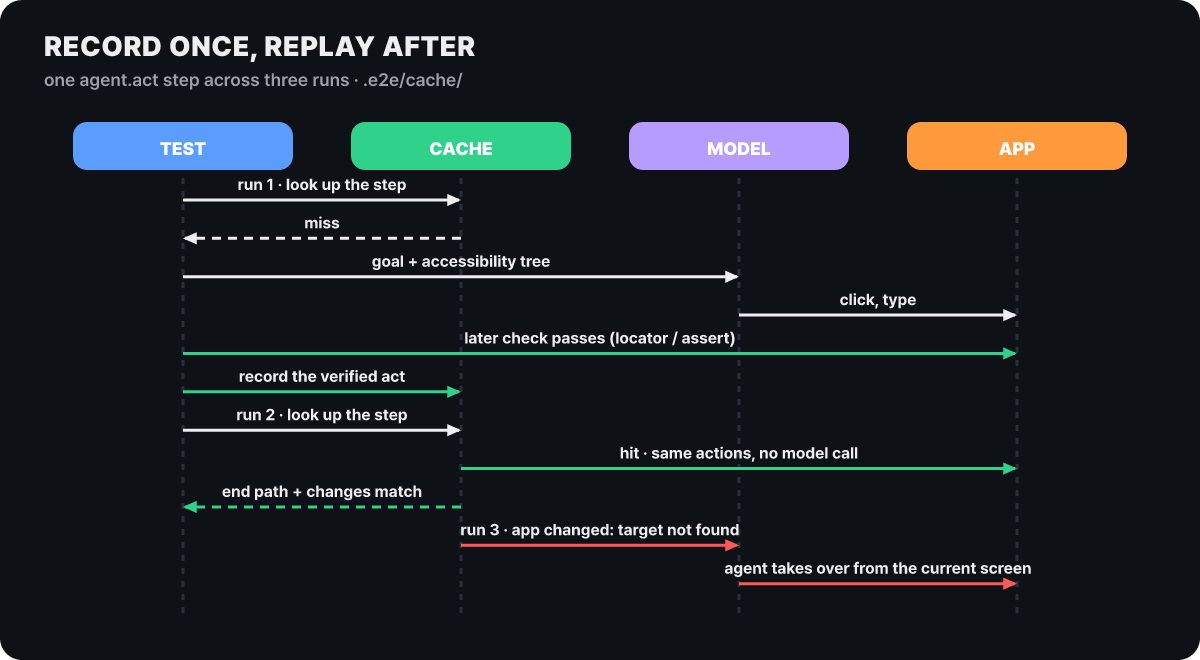 Figure 5. The path one step takes through three runs. Green is the path that does not call the model, red is the path where the agent takes over
On the second run, it checks that the starting path is right, finds the recorded control by role, name, test ID and surrounding context, repeats the same action, and verifies the end path and the changes. If the app has changed and the record no longer fits, the agent takes over from the screen at that spot. A record holds the action, the target description, the typed text, a step summary and the end check (the path and up to 8 controls that appeared or disappeared each), and it does not hold prompts, screenshots or secret values. That means non-secret input is stored exactly as typed. A record is replayed only when the test, target, instruction, parameters and agent are all the same, so renaming a test, moving a file or editing the wording of an instruction causes a fresh recording, while changing the model does not invalidate a record. Wrap values that change on every run (a timestamp, a new email) in unique(). A step is not recorded if it exceeds 50 actions, types more than 4,096 characters, or has a secret mixed in.
There are three execution modes. The local default is read-write, which both replays and records; with the CI environment variable set and no cache configured separately, it is read-only, which only replays; and –no-cache runs everything through the model once. There is one trap in CI here. Because e2e init puts .e2e/cache/ in .gitignore, if you do not commit the records to the repository, CI starts with no records at all. Retries are enabled in CI but retries do not replay, so running in CI without records calls the model on every agent line. To share them, remove that line, commit the records and review them in a pull request. To make a broken replay fail instead of silently falling back to the model, use –strict-cache, which ends with REPLAY_STALE (exit code 2) and does not retry.
Getting started goes like this.
npx e2e init    # web (Playwright) / mobile, choose a model provider -> generates e2e.config.ts and a sample test
npx e2e run     # runs the sample test. --headed lets you watch a web test
The generated sample test makes no model call, so no login or API key is needed (on the web it opens / and checks that the body is visible; on iOS it checks the General button in the Settings app). For the model, you choose among a ChatGPT or GitHub Copilot subscription login, an API key (Vercel AI Gateway, OpenRouter, OpenAI-compatible) and a local model. The web uses Playwright for Chromium, Firefox and WebKit, and mobile uses simulators and emulators. examples/ has passing projects for Vite, Next.js, Astro, Angular, Expo, SwiftUI, Jetpack Compose, Kotlin Multiplatform, Flutter and .NET MAUI. On Oct 26, a change was merged into the main branch that makes e2e init choose web and mobile together, and the npm stable release is 0.21.3 with nightly in the 0.21.4 line. The repository describes itself as “in active development toward 1.0,” so the API and configuration may change between minor releases.
You should know the holes the security documentation admits before starting. Secrets are shown to the model only by name and purpose, the runner types them in directly, and after that the model screenshots are turned off for that attempt, but the video hides nothing, command.log contains the app output as is, and parts of a secret (the last four characters, a base64 conversion) pass through the masking. There is no origin allowlist, so the agent can follow the app to another site and use that step’s secret there, and tests, configuration and app commands run with your own OS permissions, without a sandbox. The documentation’s guidance is to run code from untrusted pull requests in an external sandbox with no secrets and to give the model key only to trusted CI builds. The CLI sends anonymous usage data (excluding test and app content and credentials), and you turn it off with npx e2e telemetry disable or E2E_TELEMETRY_DISABLED=1.
Other routes to the same work
The baseline for computer use is Anthropic’s computer use tool documentation seen earlier, and you can compare which gaps Driver fills against it. If you only need what is inside a browser, a browser-specific tool such as Chrome DevTools MCP is a narrower and simpler route. Driver and the financial-services cookbook both connect tools and data through MCP, so if that concept is unfamiliar, it is quicker to read the MCP primer first.
Other candidates in the style of Anatomy, where you install a single folder into an agent, are collected in 4 agent skill repositories. An e2e test with no agent lines runs without a model, so you can adopt it by starting with tests that have only locator lines and adding agent lines one at a time. On the finance side, just reading one agent’s definition file (GL Reconciler) and the cookbook’s subagents/reader.yaml is enough to copy the isolation design.



